IBM Cloud CLI for People Who Already Run IBM Power Systems
Written from the seat of someone embedded in a live IBM Power10 estate in critical national infrastructure. A field report on IBM Cloud CLI…
IBM Cloud CLI for People Who Already Run IBM Power Systems
Written from the seat of someone embedded in a live IBM Power10 estate in critical national infrastructure. A field report on IBM Cloud CLI and PowerVS for infrastructure engineers managing legacy IBM estates — not a beginner tutorial.
Cloud CLI Baseline Series — Part 3 of 4
Every IBM Cloud CLI tutorial you’ll find online assumes you’re starting fresh — a developer spinning up a free-tier account to deploy a Node app or kick the tyres on Watson. This article isn’t that one. This is written from the seat of someone embedded in a live IBM Power10 estate in critical national infrastructure, responsible for its lifecycle governance and resilience. For someone in that seat, the question isn’t “how do I learn IBM Cloud” — it’s “how does IBM Cloud connect to the estate I’m already responsible for?”
And the answer to that question lives in one place most introductory tutorials never reach: a service called PowerVS. We’ll get there. But first, a quick word on what this article is and isn’t.
Who this is for
- If you’re trying to learn IBM Cloud from scratch, this isn’t the article for you — read the IBM Cloud Docs first.
- If you’re a developer building cloud-native apps and IBM Cloud happens to be your provider, this also isn’t the article for you — go look at IBM Code Engine instead.
- If you manage an on-premise Power Systems estate and your board is asking when AIX moves to the cloud — this is the article.
Section 1. Why IBM Cloud CLI matters differently
Part 1 of this series covered Oracle Cloud Infrastructure (OCI) CLI. Part 2 covered Google Cloud SDK and gcloud. Both are excellent for cloud-first workloads. Both are, in their own ways, friendly to a developer arriving with no enterprise baggage. IBM Cloud CLI is different - and the difference is the point.
AWS and GCP tutorials assume you’re going to build something new in the cloud. IBM Cloud tutorials often assume the opposite: that you already operate inside the IBM ecosystem and want to extend it. Neither assumption holds for most enterprises I’ve worked with. The reality is hybrid — legacy Power Systems running mission-critical AIX workloads on-prem, alongside a regulated compliance posture, alongside the growing pressure to consume cloud services where it actually makes sense.
Inside that reality, IBM Cloud CLI is most useful not as a replacement for your HMC or NIM server, but as a bridge tool — a way to extend the estate you already manage into cloud-resident services without rewriting any of it.
IBM Cloud CLI is not trying to be friendly. It is trying to be correct. That distinction matters more than people admit.
If you’ve used gcloud, the IBM Cloud CLI feels heavier from the first command. There's more to install, more to authenticate, more context to set. Some of that is legitimate complexity that reflects the seriousness of the workloads IBM Cloud is designed to host. Some of it is, frankly, ergonomic debt. We'll be honest about both.
Section 2. Installation and setup
2.1 Installing the IBM Cloud CLI
On Linux (Ubuntu/Debian — the same environment used in the previous articles in this series), installation is a single command:
1. curl -fsSL https://clis.cloud.ibm.com/install/linux | sh
2. ibmcloud version
On macOS, Homebrew handles it cleanly. On Windows, an MSI installer is available from the IBM Cloud documentation. The CLI works identically across all three. I tested this on Kubuntu 24.04 and the install took 38 seconds end-to-end.
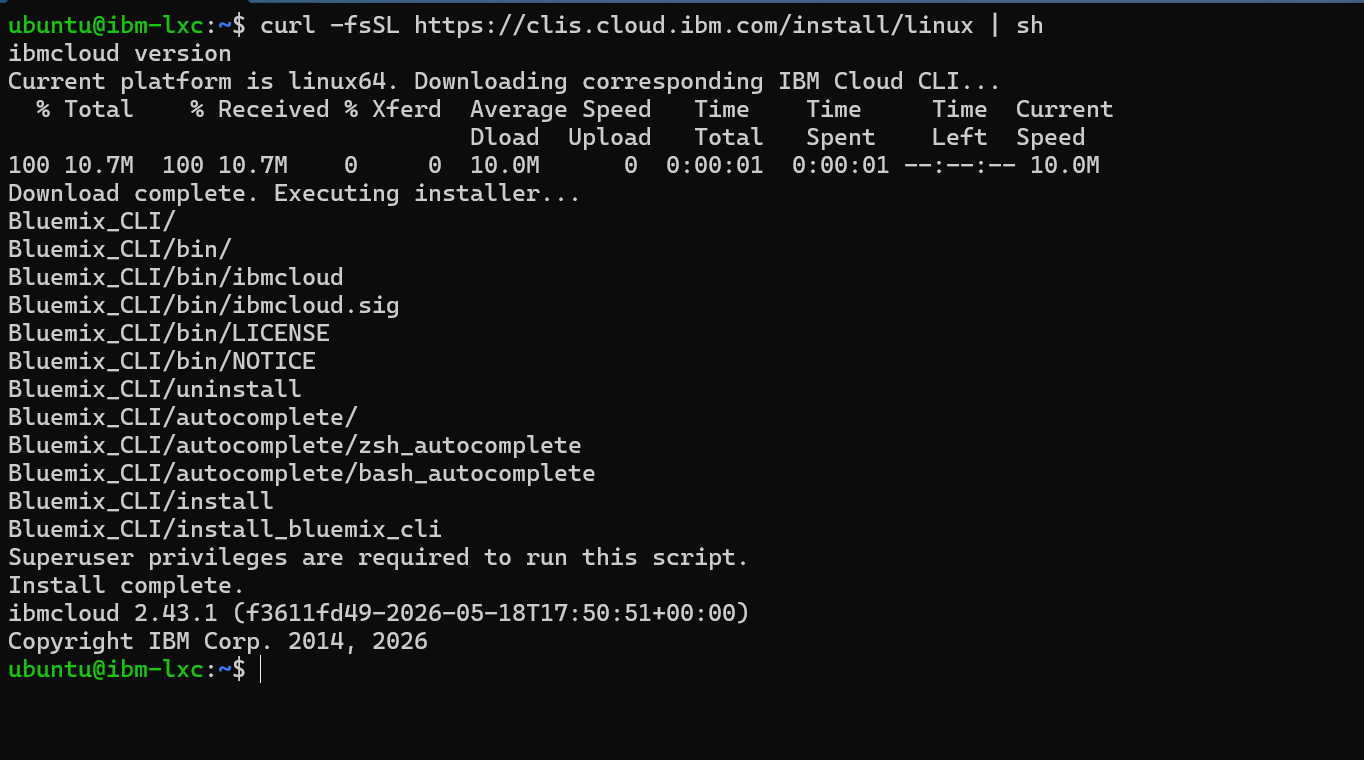
IBM Cloud CLI installation via curl on Linux — 38 seconds end-to-end

ibmcloud version confirming CLI v2.43.1 is installed and ready
A security note on the install command. That one-liner pipes a remote script straight into your shell. It’s IBM’s official endpoint over HTTPS, so the trust chain is reasonable — but if your security policy requires it (and in a regulated estate it should), download the script and read it before you run it: pull it down with
curl -fsSL https://clis.cloud.ibm.com/install/linux -o install.sh, review it, then runsh install.sh. Pipe-to-shell is convenient; it is not automatically safe. The fact that you paused to check is the point.
2.2 Login and authentication — the enterprise reality
This is the first place IBM Cloud CLI diverges meaningfully from GCP. There are three ways to authenticate, and which one you’ll actually use depends entirely on the environment you operate in:
1. ibmcloud login                      # interactive, personal use
2. ibmcloud login --sso                # federated / enterprise SSO
3. ibmcloud login --apikey @apikey.txt # automation, CI/CD, scripts
The @ prefix reads the key from a file - and it expects the raw key string, not the JSON that ibmcloud iam api-key-create --file writes out. Point it at a file containing the plain key, or pass the key inline.
In any regulated environment, you will be using SSO or API key authentication. Personal interactive logins should never appear in production scripts or shared automation — they sidestep the audit trail that compliance frameworks like ISO 27001 and DORA require. This is not a recommendation. It is a precondition.
If your IBM Cloud CLI authentication can’t survive an auditor’s question of “who issued this command and when,” you’re using it wrong.

ibmcloud login auto-authenticating via IBMCLOUD_API_KEY environment variable — the enterprise pattern
2.3 Plugin architecture — the key design choice
Where gcloud is a monolith and AWS CLI is a single binary, IBM Cloud CLI is deliberately modular. The core CLI does very little on its own. Almost everything useful - Power Systems, VPC, container services, observability - lives in plugins you install on demand.
1.ibmcloud plugin list                            # what's installed today
2.ibmcloud plugin install power-iaas              # PowerVS — the one we care about
3.ibmcloud plugin install vpc-infrastructure      # VPC networking
4.ibmcloud plugin install infrastructure-service  # classic infrastructure
There’s a real benefit to this modular design that isn’t immediately obvious. Your automation only depends on the plugins it actually uses, which means your CI/CD pipelines don’t inherit the entire IBM Cloud surface area. From a governance angle, that’s cleaner than monolithic CLIs — you can declare exactly which plugins your automation needs and reject everything else.
Of these, the power-iaas plugin is the one that changes the conversation for anyone running a Power estate on-premise. Everything in Section 4 depends on it.

Attempting pi commands before the plugin is installed — FAILED with ‘pi is not a registered command

Installing power-iaas plugin v1.9.0 and confirming available pi subcommands
Section 3. Core commands and navigation
3.1 Targeting — the mental model that trips everyone up
IBM Cloud CLI requires you to set context before you can do most things. Region, resource group, sometimes account, all need to be “targeted” first. In gcloud, you can override region per-command and it's fine. In IBM Cloud CLI, you set the target once and it persists for the session:
1. ibmcloud target -r eu-gb -g Default
2. ibmcloud target
Once you’ve internalised this, it becomes second nature. Before then, it feels unnecessarily strict. I lost the better part of an hour the first time I worked with IBM Cloud because I kept forgetting to target a region before running queries, then wondering why my resource groups appeared empty.
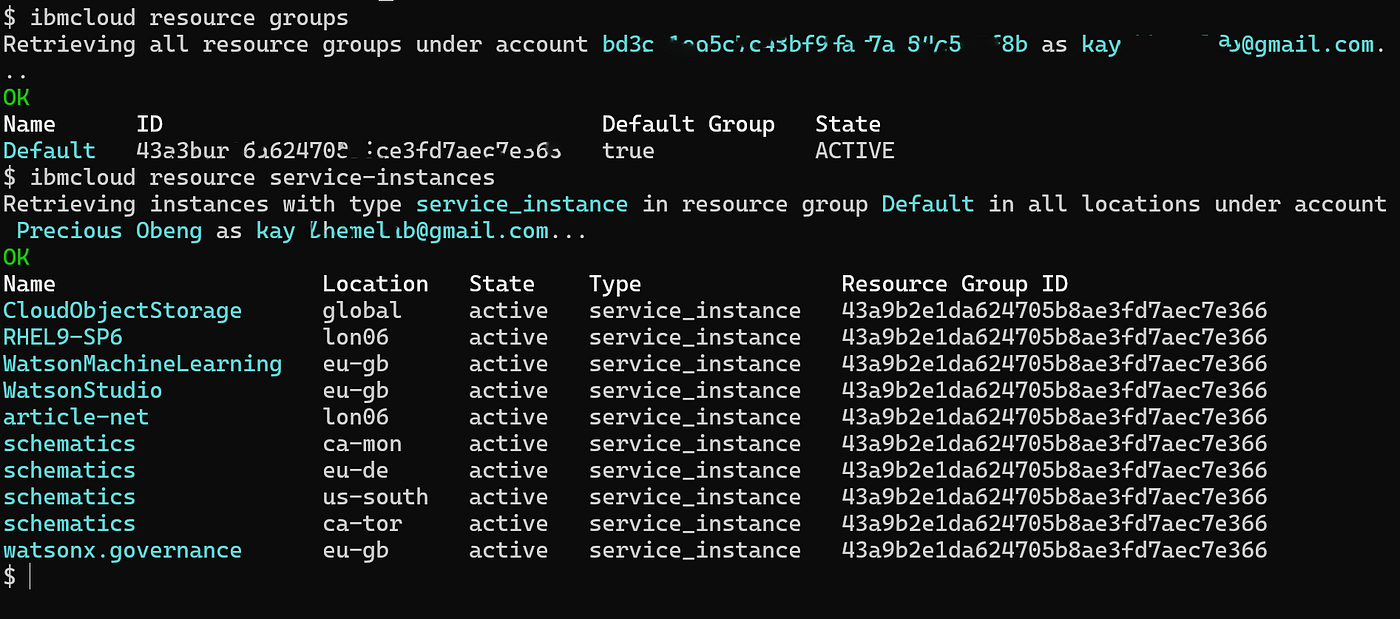
ibmcloud resource groups and resource service-instances output — the shape of a tenancy in under three minutes
3.2 Diagnostics — the first five commands on any new environment
When I hand someone a new IBM Cloud tenancy, these are the first five commands I have them run, in this order:
ibmcloud resource groups            # what resource groups exist
ibmcloud resource service-instances # what services are running
ibmcloud iam access-groups          # who can access what
ibmcloud account users              # full user list
ibmcloud billing account-usage      # what's costing what
One caveat on that last command: ibmcloud billing account-usage requires account-owner or billing-level IAM permissions. In a large enterprise tenancy you won't have those by default, so don't be thrown by a permissions error - it's a boundary, not a broken command. A second caveat: billing data lags. Usage from a just-deleted instance won't appear immediately - IBM Cloud billing cycles monthly, so run ibmcloud billing account-usage --month YYYY-MM to query a specific period rather than relying on the current-cycle view mid-month.
Those five outputs tell you everything you need to know about the shape of a tenancy in under three minutes. Save them, compare them on the next visit, and you have a drift detector with no extra tooling.
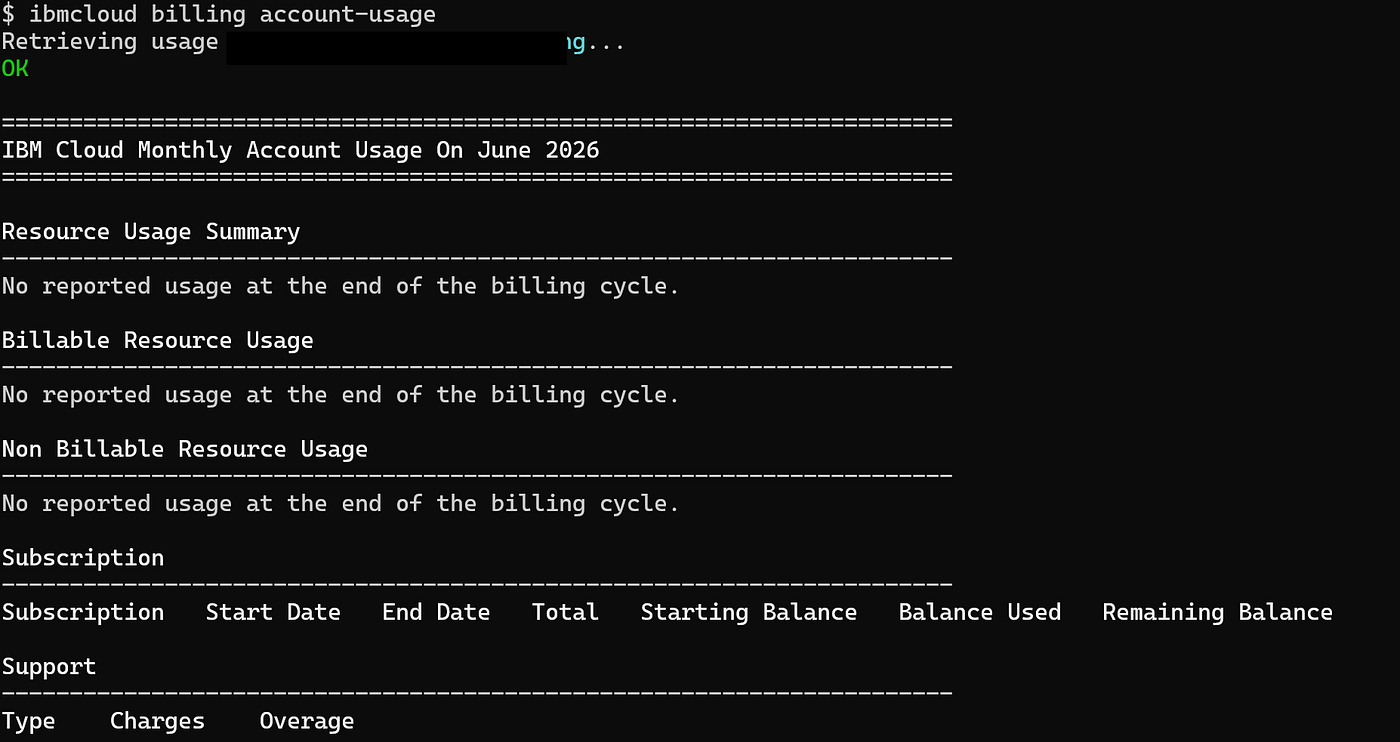
ibmcloud billing account-usage — monthly usage summary with subscription and support breakdown
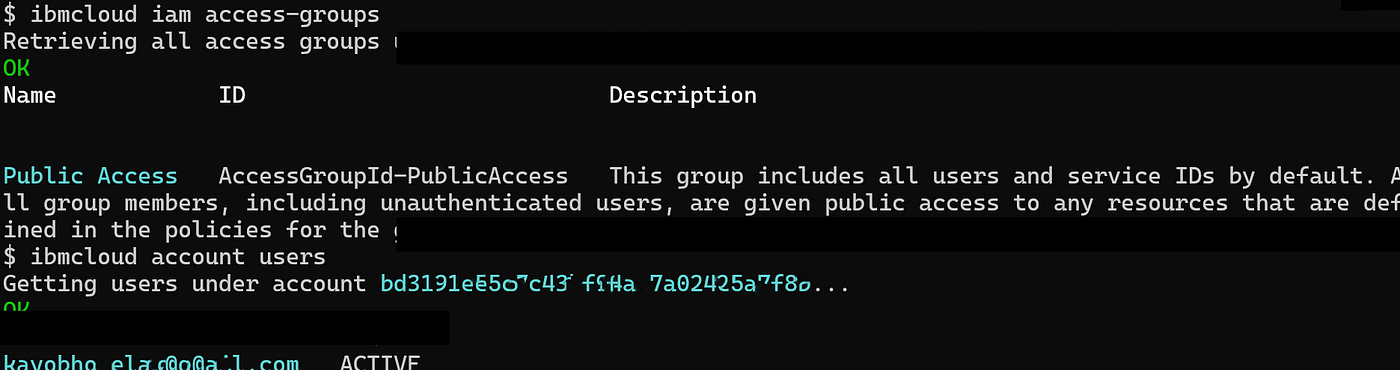
ibmcloud iam access-groups and account users — the default Public Access group and user state
Section 4. PowerVS — the reason any of this matters for enterprise
This is the section the rest of the article exists to set up. Every other cloud provider has its own variation on “run a Linux VM, run a managed Kubernetes cluster.” IBM Cloud has those too, and they’re fine, but they’re not the differentiator. The differentiator is PowerVS.
4.1 What PowerVS actually is
IBM Power Virtual Server is IBM Cloud’s infrastructure-as-a-service offering built on actual Power hardware in IBM’s data centres. Not x86 with a Power emulation layer. Not a containerised translation of AIX workloads onto Linux. Real IBM Power servers — S922 (Power9) and S1022 (Power10) — in IBM Cloud data centres, accessible over the network and managed through the same CLI you use for the rest of IBM Cloud. When you provision an instance, the CLI tells you exactly which system type you landed on: s922, s1022, or similar. That's not a VM label. That's the physical server model.
PowerVS instances are virtual machines running on Power hardware under IBM’s Power Hypervisor (phyp) — not bare-metal LPARs in the HMC sense. You won’t get an HMC console, and you’re not carving partitions off a physical system you own. But the operational model is close enough that the mental model transfers: shared/dedicated processor allocation, memory profiles, ppc64 architecture, the same OS images you’re already running on-prem.
For anyone running a Power estate on-premise, the implications are significant:
- Native AIX 7.1, 7.2, and 7.3 support — the same OS you’re already running
- IBM i (System i / AS/400) workloads supported with no emulation overhead
- LPAR mental model maps directly — partitions, profiles, dedicated cores all behave as expected
- Direct Link connectivity to bridge on-prem and cloud workloads on the same Power architecture
- PowerVC-style provisioning available through the IBM Cloud console and CLI

BM Cloud PowerVS Workspaces console — London 06 workspace active and ready
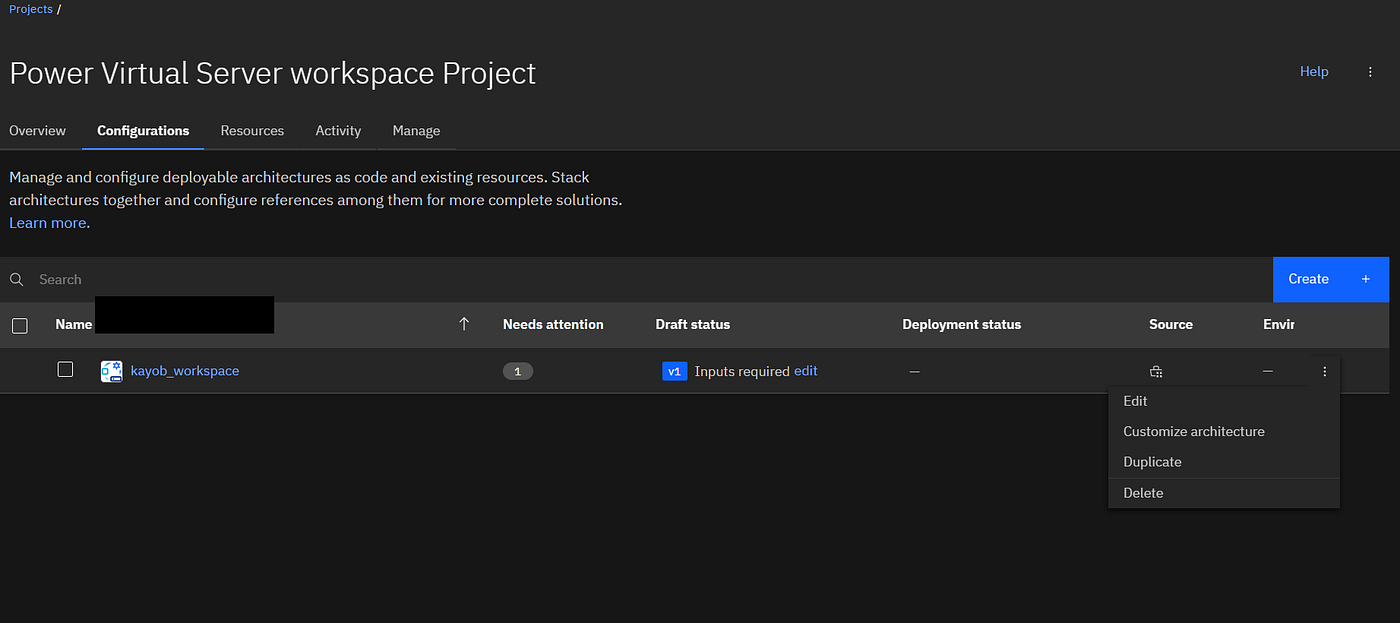
PowerVS workspace project view in IBM Cloud console showing configuration status
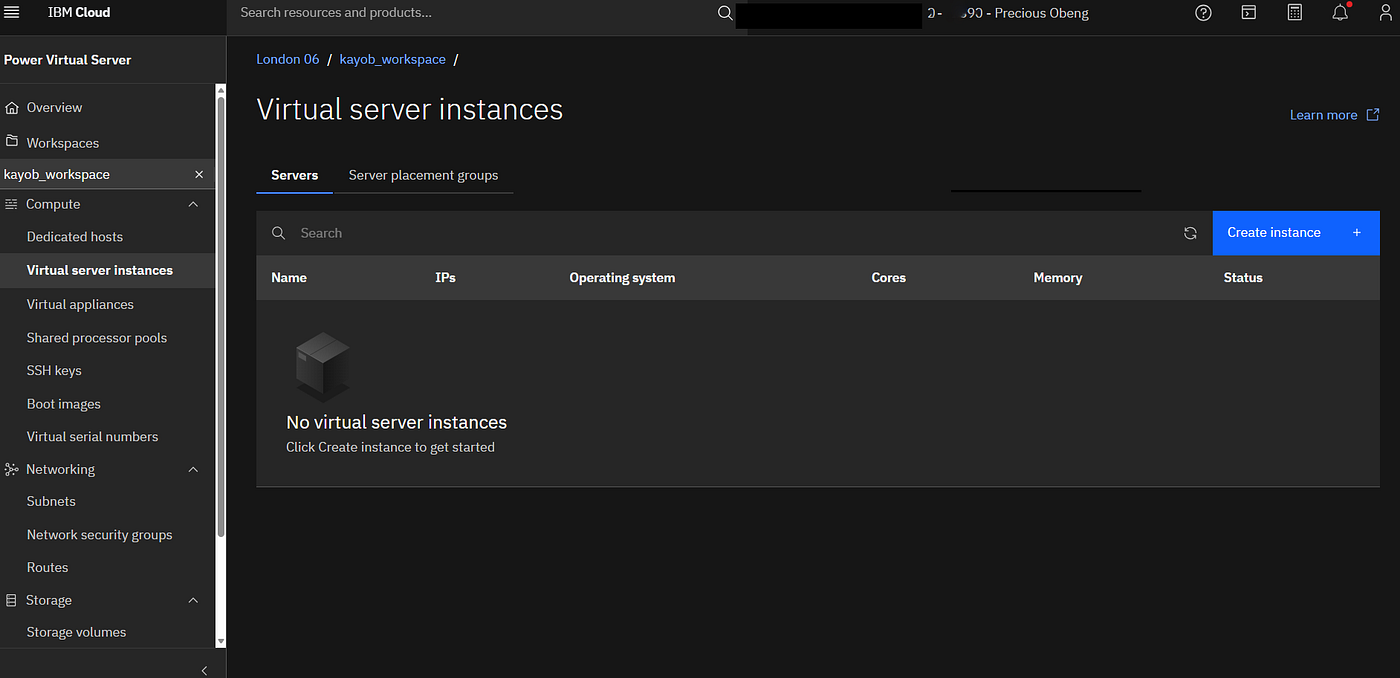
Virtual server instances overview inside a PowerVS workspace
PowerVS is the only realistic cloud destination for AIX workloads that doesn’t require a full application rewrite. Everything else is theoretical.
4.2 First commands with the power-iaas plugin
With the plugin installed and your target set, the first useful exploration of PowerVS happens here:
1.ibmcloud pi workspace list                    # see your PowerVS workspaces
2.ibmcloud pi workspace target CRN              # set workspace context — requires the full CRN, not just the ID
3.ibmcloud pi subnet list                       # workspace networks (pi network list removed in v1.9.0)
4.ibmcloud pi image list-catalog                # images available in the regional catalog
5.ibmcloud pi image create IMAGE_ID             # import a stock image into your workspace
6.ibmcloud pi image list                        # images imported into your workspace
7.ibmcloud pi instance list                     # running Power instances
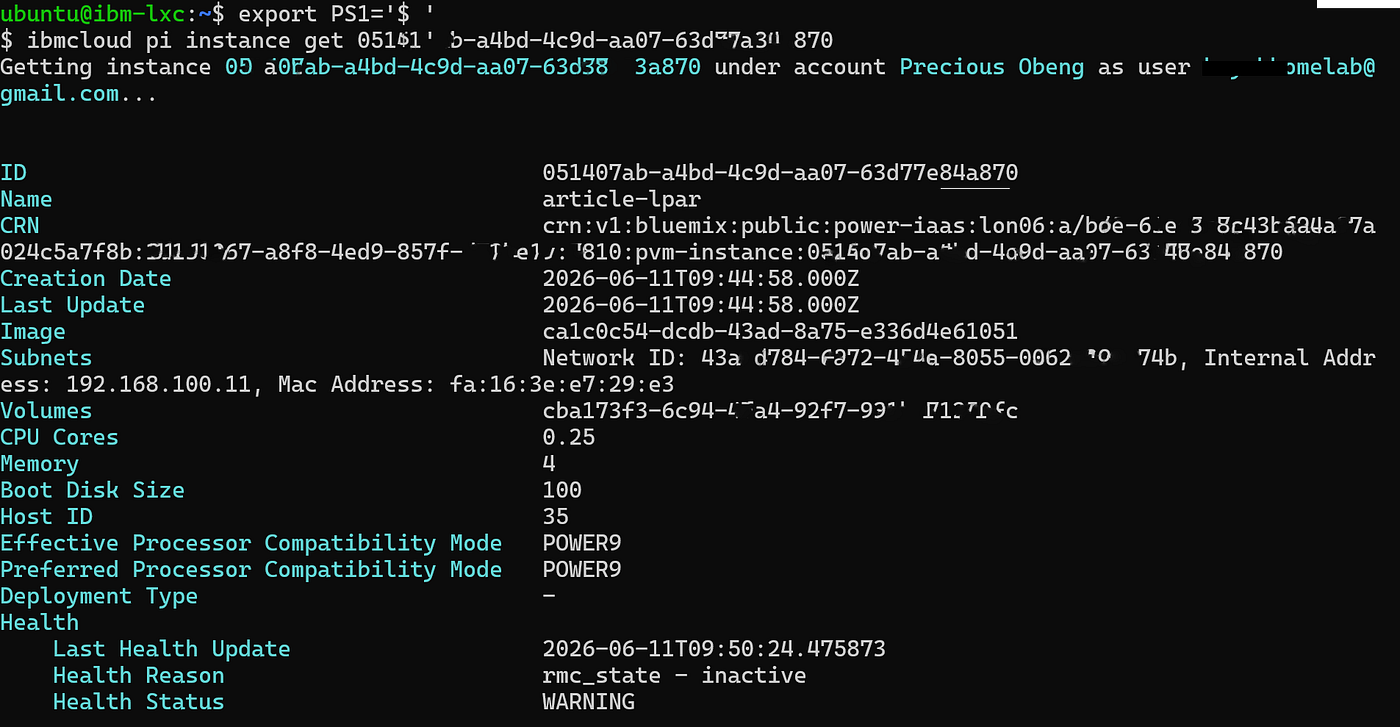
8.ibmcloud pi instance get INSTANCE_ID          # inspect a single instance
One thing that trips people up: pi workspace target requires the full CRN - the long crn:v1:bluemix:public:power-iaas:... string from pi workspace list output - not just the workspace ID. Passing only the ID returns is not a valid CRN. Copy the whole CRN.
A second gotcha if you’re on plugin v1.9.0 or later: pi network list and pi catalog-images no longer exist. Networks are now pi subnet list; catalog images are pi image list-catalog. The plugin changelog doesn't advertise these renames loudly - if your commands fail with unknown command, run ibmcloud pi image --help or ibmcloud pi --help to find the current name.
These are the equivalents of running lparstat and lssyscfg on an HMC, except they're returning data about VMs hosted in IBM's facility rather than your own. The mental model holds. The data shape is familiar. That continuity is the whole point.
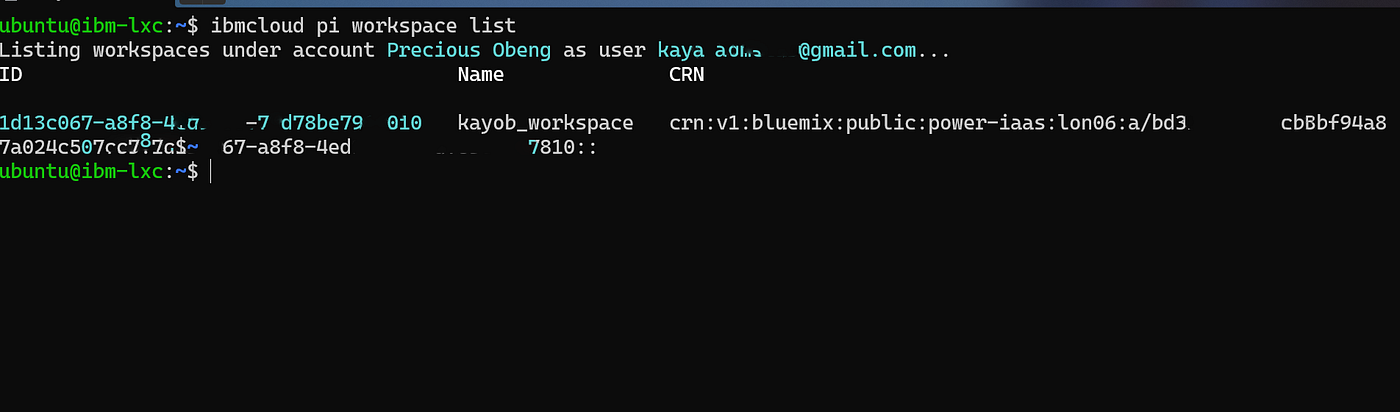
pi workspace list — kayob_workspace active in London 06 (lon06)

pi image create importing RHEL9-SP6 stock image into the workspace
pi instance create — BUILDING on an IBM S922 Power9 server, tier3 flash storage
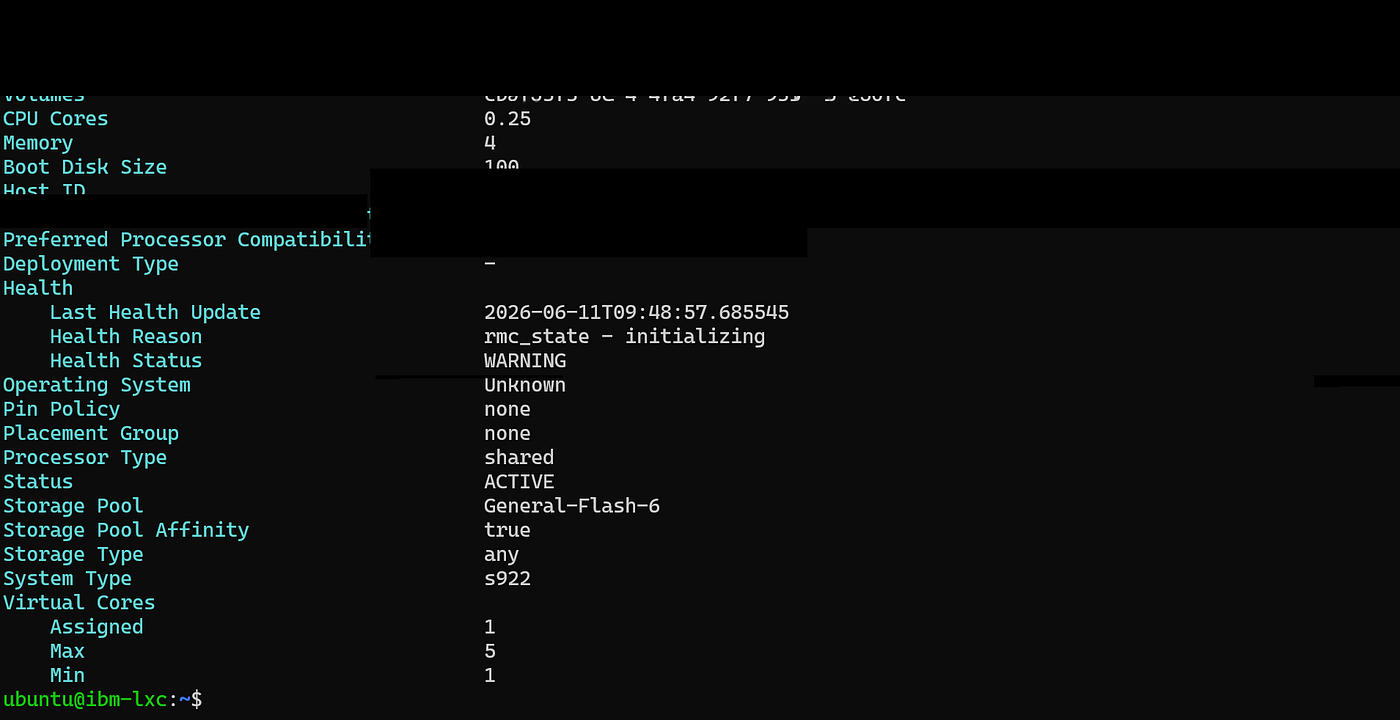
pi instance get — Status: ACTIVE, System Type: s922, POWER9 compatibility mode, shared processor

pi instance get continued — storage pool, virtual cores, full instance detail

pi instance list — article-lpar visible with path reference

pi instance delete — clean deletion confirmation, instance lifecycle complete
4.3 The migration conversation nobody has properly
In a recent 48-hour resilience exercise on a live Power estate, I was the engineer responsible for Linux/Unix infrastructure across six disaster recovery scenarios. The experience clarified for me why most discussions of “cloud migration for legacy workloads” miss the point. Migration isn’t about lifting a workload to a new platform. It’s about preserving the operational characteristics — the latency profile, the dependency graph, the recovery procedures — that the workload was originally engineered around.
Most cloud platforms force you to re-engineer those characteristics. PowerVS doesn’t, and that’s the entire commercial case for it. The architectural questions that actually matter when you’re planning a PowerVS migration:
- Network design: Direct Link for production AIX traffic, IPsec VPN for control-plane access only
- Storage: tier 0/1/3 volumes, snapshot strategy, NIM replication considerations
- Identity: how your on-prem AIX user model maps onto IBM Cloud IAM (it doesn’t, cleanly — you’ll need a federation strategy)
- Compliance: IBM Cloud’s ISO 27001 and FedRAMP certifications, and which workloads can actually live there from a regulatory standpoint
The organisations that struggle with PowerVS are the ones who try to map it onto their on-prem HMC mental model line-for-line. The organisations that succeed treat it as a parallel operating model — same workloads, different control plane, different habits.
If you take one thing from this section: PowerVS is not a like-for-like replacement for your on-prem Power estate. It is a credible destination for a subset of your workloads, with operational implications you need to plan for explicitly. Anyone telling you it’s a turn-key lift is selling you something.
Section 5. IAM and the governance layer
For regulated industries — energy, finance, defence, healthcare — IAM is not an afterthought. It’s the first thing an auditor looks at, and the last thing you can afford to get wrong. IBM Cloud IAM is built around four primitives that don’t always map cleanly onto what you’d expect from a Unix background:
- Users — humans with IBMid credentials
- Service IDs — non-human identities for automation, equivalent to GCP service accounts
- Access groups — collections of users and service IDs with shared policies
- Trusted profiles — workload identities that don’t require API keys, scoped to specific compute resources
The trusted-profile concept is the one most people miss when they’re new to IBM Cloud. If your automation runs on a virtual server inside IBM Cloud, you can attach a trusted profile to that server and skip API key management entirely. That’s a meaningful security improvement over the traditional “store an API key in a file” pattern.
1.ibmcloud iam access-groups
2.ibmcloud iam access-group-create dev-team
3.ibmcloud iam user-policy-create user@example.com --service-name power-iaas --roles Viewer
4.ibmcloud iam service-ids
5.ibmcloud iam trusted-profiles
One default that catches people out: every IBM Cloud account ships with a Public Access group ( AccessGroupId-PublicAccess) that includes all users and unauthenticated identities and cannot be deleted. It is harmless as long as no resource policies are attached to it - but in a regulated environment, your auditor will ask. Have the evidence ready: ibmcloud iam access-group-policies AccessGroupId-PublicAccess should return nothing. If it doesn't, that's a finding.
Every command above writes to the Activity Tracker audit log. In a regulated context, you should configure Activity Tracker to forward to your central SIEM and treat IAM changes as a high-severity event class. This is non-negotiable in any audit framework I’ve worked under.
ibmcloud iam access-groups showing the default Public Access group — verify no policies are attached
Section 6. How IBM Cloud CLI compares — honestly
This is the third article in this series and the one that finally lets me draw a comparison across all three platforms. Here’s the honest assessment, with no pretence that one tool is universally better than the others:
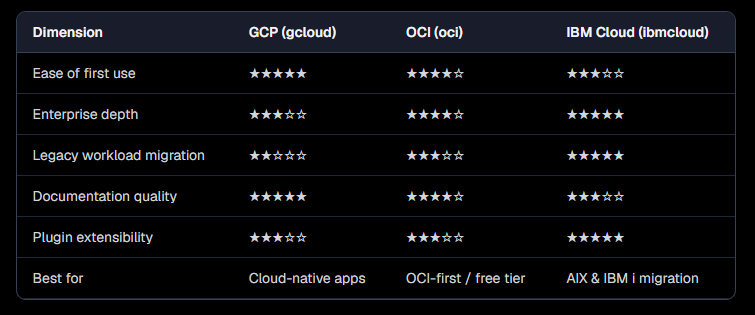
If you’re building cloud-native applications from scratch, GCP is the friendliest tool in this list and there’s no shame in saying so. If you’re running an Oracle-heavy estate and want to stay aligned with that, OCI is well-built. But if your problem is an estate of AIX and IBM workloads that need a credible cloud destination — not tomorrow, not in theory, but as part of an actual board-approved migration programme — IBM Cloud, and specifically PowerVS, is the only serious answer.
Catching up on the series? Part 1 walked through the OCI CLI, and Part 2 covered the Google Cloud SDK and gcloud.
Closing thoughts and what’s next
IBM Cloud CLI is not the easiest tool I’ve used in this series. It is the most appropriate one for the workloads I actually manage. That distinction is worth holding onto whenever someone tries to sell you a cloud platform by demoing a five-minute Node.js deployment. Five minutes is not the test. The test is whether the platform still makes sense at the 24-48 hour DR exercise, the regulator’s site visit; the post-incident review.
Part 4 of this series will be a direct cross-provider comparison — same workload, same set of governance constraints, run across GCP, OCI, and IBM Cloud — with a focus on where each provider’s CLI helps or hinders in practice. If you’ve read this far, that one is for you.
──────────────────────────────
Kweku Obeng, MSc is an Infrastructure Obsolescence & Cybersecurity Lead at a major UK energy utility, responsible for legacy estate governance, lifecycle planning, and infrastructure resilience. He writes about cloud CLIs, security architecture, and the realities of running mission-critical infrastructure at @kayobgh and kayob.co.uk.
IBMCloud #PowerSystems #AIX #CloudCLI #EnterpriseInfrastructure #DevOps #CloudMigration
Originally published at https://kayob.co.uk.
메타데이터
- post_id
- 738c527f043b
- slug
- ibm-cloud-cli-for-people-who-already-run-ibm-power-systems-738c527f043b
- url
- https://medium.com/@kayobgh/ibm-cloud-cli-for-people-who-already-run-ibm-power-systems-738c527f043b
- canonical_url
- https://medium.com/@kayobgh/ibm-cloud-cli-for-people-who-already-run-ibm-power-systems-738c527f043b
- author_url
- https://medium.com/@kayobgh
- status
- ok
- fetched_at
- 2026-06-21 20:33:08