Async CAPTCHA Solving Is a Concurrency Problem Before It Is an API Problem
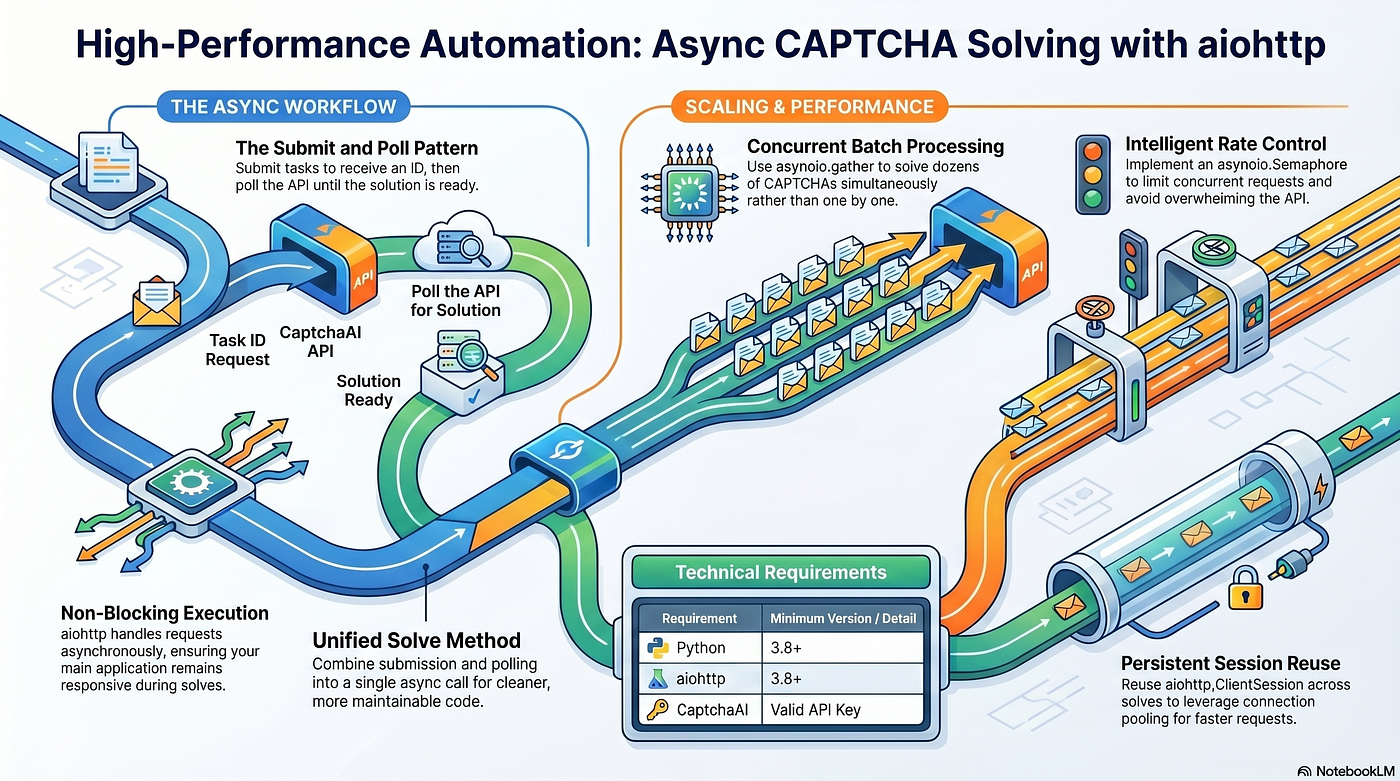
Async CAPTCHA solving usually starts with a simple goal: avoid blocking the application while waiting for a CAPTCHA-solving result.
Async CAPTCHA Solving Is a Concurrency Problem Before It Is an API Problem
Async CAPTCHA solving usually starts with a simple goal: avoid blocking the application while waiting for a CAPTCHA-solving result.
In Python, aiohttp makes that possible by allowing non-blocking HTTP requests. Instead of submitting one CAPTCHA task, waiting synchronously, polling until completion, and only then moving to the next task, an async workflow can submit and poll multiple tasks while the event loop continues to handle other work.
That is useful. But it is also where many engineering teams make the wrong design decision.
They treat async CAPTCHA solving as a performance trick rather than a production concurrency problem.
The difference matters.
A simple async script can call asyncio.gather, submit multiple CAPTCHA tasks, poll every few seconds, and return tokens. A production system needs more than that. It needs bounded concurrency, timeout budgets, session reuse, queue control, error taxonomy, cancellation handling, balance monitoring, backpressure, structured logs, and safe authorization boundaries.
The technical question is not only “Can we solve multiple CAPTCHAs concurrently?”
The better question is: “Can we operate this async CAPTCHA workflow reliably when latency changes, tasks fail, queues grow, providers slow down, or the target workflow becomes invalid?”
That is the architecture problem.
Why this problem matters
CAPTCHA solving is usually not the final goal of an automation system. It is a dependency inside a larger workflow.
That workflow might be QA automation, authorized testing, data collection, ad verification, research tooling, internal validation, or another approved automation process. If the CAPTCHA step blocks, times out, retries too aggressively, or returns late, the broader workflow suffers.
Async code makes this both easier and riskier.
It is easier because non-blocking execution lets a service continue processing other tasks while CAPTCHA results are pending. It is riskier because async workflows can create high concurrency very quickly. A loop that submits hundreds of tasks may look efficient in development but cause API pressure, cost spikes, queue overload, rate-limit issues, or noisy failures in production.
The source article shows the core async mechanics: submitting CAPTCHA tasks, polling for results, solving multiple tasks concurrently, reusing an aiohttp session, and limiting solves with a semaphore. Those are the right building blocks. In production, they need to be wrapped in a stronger reliability model.
A CAPTCHA-solving subsystem should behave like any external dependency: observable, rate-limited, timeout-aware, and failure-classified.
Technical workflow breakdown
A reliable async CAPTCHA workflow has six main layers.
The first layer is the workflow request. This is the business task that needs a CAPTCHA token. It should include the target URL, challenge type, site key, workflow ID, authorization context, priority, and timeout budget. Avoid passing only raw CAPTCHA parameters; production systems need traceability.
The second layer is the async client. This is where aiohttp fits. The client should handle task submission, polling, balance checks, response parsing, and connection reuse. A shared aiohttp.ClientSession is important because sessions maintain connection pools and reduce overhead across multiple solves.
The third layer is the concurrency controller. This prevents the system from submitting unlimited tasks. A semaphore is a practical starting point because it limits how many solve operations can run at once. For larger systems, this may become a queue-based worker pool with per-provider or per-workflow concurrency limits.
The fourth layer is polling control. CAPTCHA solving is not instant. A solver task usually has a pending state, and the client polls until the result is ready or the timeout expires. Polling should have a defined interval, total timeout, cancellation behavior, and error handling strategy. Polling too frequently creates unnecessary API traffic. Polling too slowly increases end-to-end latency.
The fifth layer is validation. A returned token is not the same as a successful workflow. The system still needs to submit the token to the original page or process and confirm that the intended authorized action completed. This distinction is important because token expiration, browser context mismatch, or page-state changes can cause downstream failure.
The sixth layer is observability. Every solve attempt should produce structured telemetry: task ID, workflow ID, provider, challenge type, submit latency, solve latency, total workflow latency, retry count, timeout status, error category, and final validation result.
With these layers, async CAPTCHA solving becomes an operational subsystem rather than a helper function.
Production considerations
The first production consideration is bounded concurrency.
Async code can make it easy to start too many tasks at once. In a local test, running many concurrent solves may look successful. In production, that same pattern may increase cost, create provider pressure, overwhelm downstream pages, or make failures harder to debug. Start with a conservative semaphore and tune based on observed latency, success rate, and cost per completed workflow.
The second consideration is timeout budgeting.
A CAPTCHA solve timeout should not be chosen randomly. It should fit inside the timeout of the larger workflow. For example, if the full automation job has a 120-second budget, a 300-second CAPTCHA timeout is not useful. The CAPTCHA subsystem should know when the parent job is no longer worth completing.
The third consideration is cancellation safety.
Async systems often cancel tasks when clients disconnect, jobs expire, or workers shut down. A production design should handle cancellation cleanly. It should log the cancellation, release semaphores, close sessions properly, and avoid leaving orphaned workflow states.
The fourth consideration is session lifecycle.
Creating a new HTTP session for every solve wastes connection pooling benefits. Reusing a session across multiple solve operations is more efficient, but long-lived services also need clean startup and shutdown behavior. Sessions should be opened intentionally and closed gracefully.
The fifth consideration is error classification.
A zero-balance error, timeout, network failure, malformed request, provider rejection, pending timeout, and downstream token failure should not all become the same exception. Each one requires a different response. Some should alert operations. Some should retry. Some should stop the workflow. Some should be counted as validation failures rather than solve failures.
The sixth consideration is backpressure.
If CAPTCHA latency increases, the queue can grow. If the queue grows, workers can become saturated. If workers saturate, unrelated jobs may slow down. Backpressure protects the system by slowing intake, lowering concurrency, rejecting low-priority jobs, or routing tasks for later processing.
Common mistakes
One common mistake is using asyncio.gather without limits. It works for small batches, but unbounded concurrency can become expensive and unstable.
Another mistake is treating the CAPTCHA token as the final success condition. The real success condition is whether the authorized workflow completed after token submission.
A third mistake is ignoring polling behavior. A fixed polling interval may be fine at small scale, but production systems should monitor pending time, timeouts, and provider response patterns.
A fourth mistake is creating a new ClientSession for every solve. This reduces the benefit of aiohttp and can increase connection overhead.
A fifth mistake is using one global concurrency limit for all workflows. Different challenge types, providers, priorities, and target systems may need separate limits.
A sixth mistake is hiding provider errors in generic logs. If the system cannot distinguish balance problems from network issues or timeouts, debugging becomes slow.
A seventh mistake is skipping authorization checks. Async speed should never become an excuse to scale a workflow beyond approved boundaries.
Metrics to monitor
A production async CAPTCHA workflow should monitor both the solving layer and the parent workflow.
At the solving layer, track submission count, solve success rate, solve failure rate, average solve latency, p95 and p99 solve latency, timeout rate, provider error rate, balance errors, pending duration, and cancellation count.
At the concurrency layer, track active tasks, queued tasks, semaphore wait time, worker utilization, queue depth, and tasks dropped due to timeout or policy.
At the workflow layer, track final completion rate, token validation failure rate, downstream page rejection, retry count, cost per completed workflow, and workflow duration.
The most useful metric is often not raw solve success rate. It is completed authorized workflow rate. A system can solve many CAPTCHAs successfully but still fail the actual job because tokens expire, sessions change, or downstream validation fails.
A sudden increase in solve latency should trigger investigation. It may indicate provider slowdown, challenge difficulty changes, network issues, excessive concurrency, or target workflow behavior changes.
Safe/authorized-use note
CAPTCHA solving, automation, bots, scraping, and third-party workflows require clear boundaries. This type of workflow should only be used in owned, client-authorized, or contractually permitted environments.
For engineering teams, that means the async pipeline should include policy checks, rate limits, audit logs, and stop conditions. The system should make authorized workflow context explicit rather than treating CAPTCHA solving as a generic utility that any process can call.
A responsible architecture does not simply make automation faster. It makes automation controlled, observable, and accountable.
For the original implementation walkthrough, review the source article on aiohttp + CaptchaAI: Async CAPTCHA Solving.
Use the source as a starting point for the mechanics: async submission, polling, concurrent solving, semaphores, and session reuse. Then extend the design with production controls: bounded concurrency, timeout budgets, error taxonomy, workflow validation, backpressure, and monitoring.
Before scaling async CAPTCHA solving, define the concurrency model, timeout budget, telemetry schema, validation step, and authorization rules. Async code gives you speed; production architecture gives you control.
메타데이터
- post_id
- 739ae35e5b68
- slug
- async-captcha-solving-is-a-concurrency-problem-before-it-is-an-api-problem-739ae35e5b68
- url
- https://medium.com/@oliverjack1999xx/async-captcha-solving-is-a-concurrency-problem-before-it-is-an-api-problem-739ae35e5b68
- canonical_url
- https://medium.com/@oliverjack1999xx/async-captcha-solving-is-a-concurrency-problem-before-it-is-an-api-problem-739ae35e5b68
- author_url
- https://medium.com/@oliverjack1999xx
- status
- ok
- fetched_at
- 2026-06-09 15:37:30