Terraform Pull Request Automation: Safe Infrastructure Delivery with Atlantis, OPA, and Conftest
How to move Terraform changes from individual laptops to controlled, auditable pull request workflows
Terraform Pull Request Automation: Safe Infrastructure Delivery with Atlantis, OPA, and Conftest
How to move Terraform changes from individual laptops to controlled, auditable pull request workflows
In the past few months, as AI agents have become more common in engineering workflows, we have heard more stories about service disruptions caused by accidental resource deletion or incorrect infrastructure updates. When autonomous AI agents are used in application development, there is still some hope of recovery through version control systems such as Git. If generated code reaches production and causes an issue, the change can often be rolled back. In some cases, data may still be corrupted during the impact window, but the blast radius is usually smaller than a bad infrastructure change.
Infrastructure is different. A bad infrastructure change is not just a code change. It can delete a cloud resource, expose a private service, weaken an IAM policy, modify a security group, or update production infrastructure in a way that is difficult to recover from.
When infrastructure is automated, mistakes are automated too. That is why Infrastructure as Code needs more than code review. It needs a controlled workflow with plan visibility, policy enforcement, approvals, and a clear audit trail.
In this article, we will look at how teams can automate Terraform safely using pull request automation, Atlantis, Conftest, and Open Policy Agent.
Most Common Ways Teams Run Terraform Today
Most teams move through three Terraform execution approaches as they mature.
Approach 1: Running Terraform Locally
This is usually where teams start. A developer runs:
terraform init
terraform plan
terraform apply
from their own machine.
This works well for learning, experiments, and small internal projects. But it becomes risky for real teams because:
- Developers may need broad cloud permissions.
- Terraform versions may differ across machines.
- Credentials may be handled inconsistently.
- The plan may be reviewed by one person or nobody.
- It becomes hard to prove who requested, reviewed, planned, and applied a change.
Local Terraform is simple, but it does not scale well as a governance model.
Approach 2: Running Terraform Remotely Through CI
The next step is usually running Terraform through a remote CI system such as GitHub Actions, GitLab CI, Jenkins, CircleCI, or Buildkite.
A pipeline may run:
terraform init
terraform validate
terraform plan
Then, after merge, another workflow may run:
terraform applyThis is better than local execution because credentials, logs, and execution are centralized. But generic CI often turns into a custom workflow that every team implements differently.
One repository may post the plan as a PR comment. Another may hide the plan inside build logs. Another may apply automatically after merge without strong policy checks.
You can standardize this with shared CI workflows, but then the platform team must write, version, test, and maintain those workflows.
Approval logic also becomes hard to manage in code. It is easy to require one generic approval for every infrastructure PR. It is much harder to say:
- A public security group change needs Security review.
- A database deletion needs senior approval.
- A Redis parameter change needs the platform or application owner.
- A module version drift should warn, but not block.
Approach 3: Pull Request Automation
The safer approach is Terraform pull request automation using Atlantis.
In this model:
- Terraform plans are generated from pull requests.
- Plan output is posted back to the PR.
- Policy checks run before apply.
- Apply happens only after the required approvals are present.
Atlantis gives teams a workflow where the pull request becomes the shared control point for Terraform.
Humans, AI agents, and automation can all inspect what will change before infrastructure is updated.
Infrastructure as Code becomes truly collaborative only when infrastructure changes go through the same review path as application code: version control, pull requests, automated checks, human review, and controlled apply.
The Pull Request Model for Terraform
A practical Terraform pull request workflow starts when a human engineer or AI agent creates a branch with Terraform changes.
Once the pull request is opened:
- Automated checks run.
- Terraform generates a plan.
- The plan is posted back to the PR.
- Reviewers inspect the code, plan, and policy results.
- Apply happens only after the required approvals are present.
The important shift is ownership.
A human engineer or AI agent may write Terraform, but automation owns the plan and apply workflow.
That gives the team a shared control plane where every infrastructure change can be discussed, approved, applied, and traced later.
Atlantis
What Atlantis Does
The problem with Terraform in many teams is not that Terraform is hard to run.
The problem is that Terraform is too easy to run without the right review boundary.
Atlantis solves that workflow problem by moving Terraform plan and apply into the pull request lifecycle.
Atlantis is an open-source Terraform pull request automation tool. It listens for pull request events from systems such as GitHub, GitLab, Bitbucket, and Azure DevOps.
When a pull request changes Terraform code, Atlantis runs:
terraform planand comments the result back on the pull request.
When the change is ready, an authorized user can comment:
atlantis applyAtlantis can then run:
terraform applyand post the output back to the pull request.
For production environments, a safer pattern is to apply only after the PR is merged. This ensures that the infrastructure is aligned with the code present in the main branch.
Atlantis does not replace Terraform.
Terraform still manages state, talks to the cloud provider, and performs plan and apply operations. Atlantis orchestrates when those operations happen and how their results are surfaced to reviewers.
How Atlantis Connects to GitHub
In a real implementation, Atlantis is not just a binary running somewhere in the cluster.
It needs to be wired into GitHub, exposed through a reachable webhook endpoint, and pointed at the repositories it is allowed to manage.
A practical integration usually has three layers:
- A GitHub App installed on the repository.
- A public webhook route that forwards GitHub events to Atlantis.
- Atlantis running inside Kubernetes or another controlled execution environment.
The goal is simple:
When a pull request changes Terraform code, GitHub sends an event to Atlantis. Atlantis finds the matching Terraform project, runs a plan, and comments the result back on the pull request.
The communication is two-way.
GitHub talks to Atlantis through webhooks. Atlantis talks back to GitHub through GitHub App credentials, using the GitHub API to clone repositories, read pull request metadata, post comments, and update commit statuses or checks.
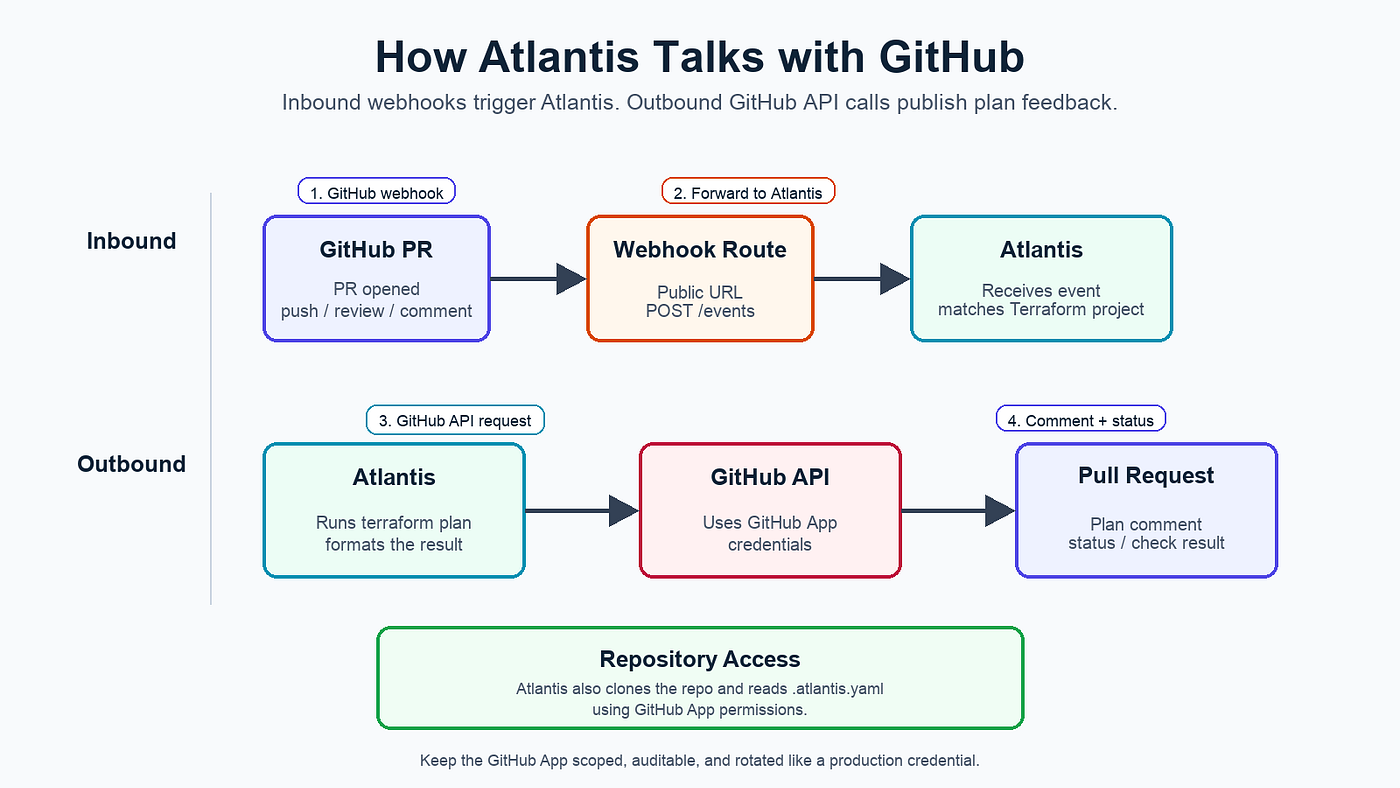
GitHub sends webhook events to Atlantis, and Atlantis uses GitHub App permissions to post plan output, comments, and status checks back to the pull request.
Step 1: GitHub App Setup
The GitHub App gives Atlantis permission to interact with pull requests.
At minimum, the app usually needs:
- Contents: Read access, so Atlantis can clone and inspect the repository.
- Pull requests: Read and write access, so Atlantis can read PR metadata and comment on plans.
- Commit statuses: Read and write access, so Atlantis can publish plan and apply status.
- Checks: Read and write access, if your workflow uses GitHub Checks.
- Issues: Read and write access, because GitHub pull request comments use the issues comments API.
- Metadata: Read access, granted by default.
For webhook events, enable:
- Pull request
- Pull request review
- Issue comment
- Push
This detail matters.
If Atlantis receives the webhook but cannot write a commit status, the plan may run, but the pull request may still look broken.
A common error is:
403 Resource not accessible by integrationThat usually means the GitHub App is missing a required permission.
Step 2: Public Webhook Routing
GitHub must be able to reach Atlantis from the public internet.
In a Kubernetes-based setup, the public API gateway or ingress usually forwards:
POST /events  -> Atlantis
GET  /healthz -> Atlantis
The GitHub App webhook URL then points to the public /events endpoint.
For a public article, never include real webhook secrets, app IDs, installation IDs, or private URLs. These values should live in Kubernetes Secrets or another secret manager.
Atlantis in Kubernetes
Atlantis can run inside Kubernetes as a standalone deployment or as a sidecar beside a GitHub runner.
A standalone deployment is simpler to reason about.
A sidecar can be useful when the runner pod already has the network access and tooling needed for infrastructure automation.
Image placement: Add the image here:
assets/05-atlantis-runner-sidecar.pngCaption: Atlantis can run as a Kubernetes deployment or as a sidecar beside a GitHub runner, depending on how the CI environment is designed.
In either model, keep the boundary clear.
Atlantis needs:
- GitHub App credentials
- Webhook secret
- Public URL
- Repository allowlist
- Repo-level configuration
- Server-side configuration
If Atlantis runs as a sidecar, the runner and Atlantis share the pod boundary, but Atlantis should still have its own port, configuration, and responsibility.
Image placement: Add the image here:
assets/06-atlantis-event-flow.pngCaption:
GitHub sends the pull request event to Atlantis, Atlantis reads .atlantis.yaml, runs the matching Terraform plan, and posts the result back to the PR.
Atlantis Configuration
Atlantis configuration usually has two layers:
- Repository-level
atlantis.yaml - Server-side
repos.yaml
The repository-level file describes the Terraform projects in the repository.
The server-side file is controlled by the platform team. It defines which repositories are allowed, which workflows can be used, what approval requirements apply, and whether policy checks are enabled.
This separation is important.
Repository owners should be able to describe their project layout. They should not automatically be able to define arbitrary commands that run on the Atlantis server.
Repository-Level atlantis.yaml
Here is an example atlantis.yaml for a repository with separate development and production network projects:
version: 3projects:
- name: network-dev
dir: environments/dev/network
workspace: default
workflow: terraform-with-policy
autoplan:
enabled: true
when_modified:
- "*.tf" - name: network-prod
dir: environments/prod/network
workspace: default
workflow: terraform-with-policy
autoplan:
enabled: true
when_modified:
- "*.tf"This file tells Atlantis where Terraform code lives and which local file changes should trigger a plan.
Keep this repository-level file focused on project layout. Put governance controls in server-side configuration.
Server-Side repos.yaml
The server-side repo config is passed to Atlantis when the server starts:
atlantis server --repo-config=/etc/atlantis/repos.yamlHere is a safer starting point:
repos:
  - id: github.com/example/platform-infra
    branch: /main/
    workflow: terraform-with-policy
plan_requirements:
- mergeable apply_requirements:
- approved
- mergeable
- undiverged import_requirements:
- approved
- mergeable allowed_overrides:
- workflow allowed_workflows:
- terraform-with-policy allow_custom_workflows: false policy_check: true repo_locks:
mode: on_planworkflows:
terraform-with-policy:
plan:
steps:
- init
- plan
apply:
steps:
- applyThis configuration makes a few deliberate choices:
- The repository can select only the approved workflow.
- Custom workflows are disabled.
atlantis applyrequires approval, mergeability, and a fresh branch.- Policy checks are enabled.
- Repository locks are enabled on plan to avoid two PRs racing against the same Terraform state.
Atlantis Improves the Workflow, But It Does Not Review Everything
Atlantis solves the workflow problem around Terraform execution.
It decides:
- Where
terraform planruns - How the plan gets back into the pull request
- Who is allowed to trigger apply
- Whether the pull request has the required approval before infrastructure is changed
That alone is a major improvement over running Terraform from individual laptops or ad hoc CI jobs.
But Atlantis alone does not understand your organization’s infrastructure rules.
It can show reviewers the plan, but it does not automatically know:
- Whether port
22should be blocked from0.0.0.0/0 - Whether production databases must use deletion protection
- Whether only approved modules should be used
- Whether resource deletions need senior approval
- Whether a cost increase should go to FinOps
Without policy automation, those checks fall back to humans or AI-assisted reviewers.
At small scale, that may feel reasonable.
At larger scale, it becomes a bottleneck.
If a reviewer leaves the same comment every time a security group exposes SSH to the internet, that rule should not live only in someone’s memory.
It should become automation.
Policy Enforcement
Policy enforcement is where Terraform pull request automation becomes more than visibility.
Atlantis can show the plan in the pull request, but the next question is:
What should pass automatically, and what should be blocked or escalated.
Many infrastructure review comments are repeatable policy checks:
- Is a security group open to the public internet?
- Is the module approved?
- Is this change deleting an important resource?
- Are required tags missing?
- Is encryption disabled?
- Is an IAM policy too broad?
If these rules are known in advance, they should be checked before a human reviewer is pulled in.
That does not remove code review.
It makes code review sharper.
Automation handles predictable guardrails. Humans and AI-assisted reviewers can then focus on architecture, trade-offs, exceptions, and intent.
A good policy enforcement workflow usually has two outcomes:
- If the change follows policy, the pull request moves faster.
- If the change violates policy, the pull request clearly shows what failed and who can approve the exception.
This is how teams get both speed and control.
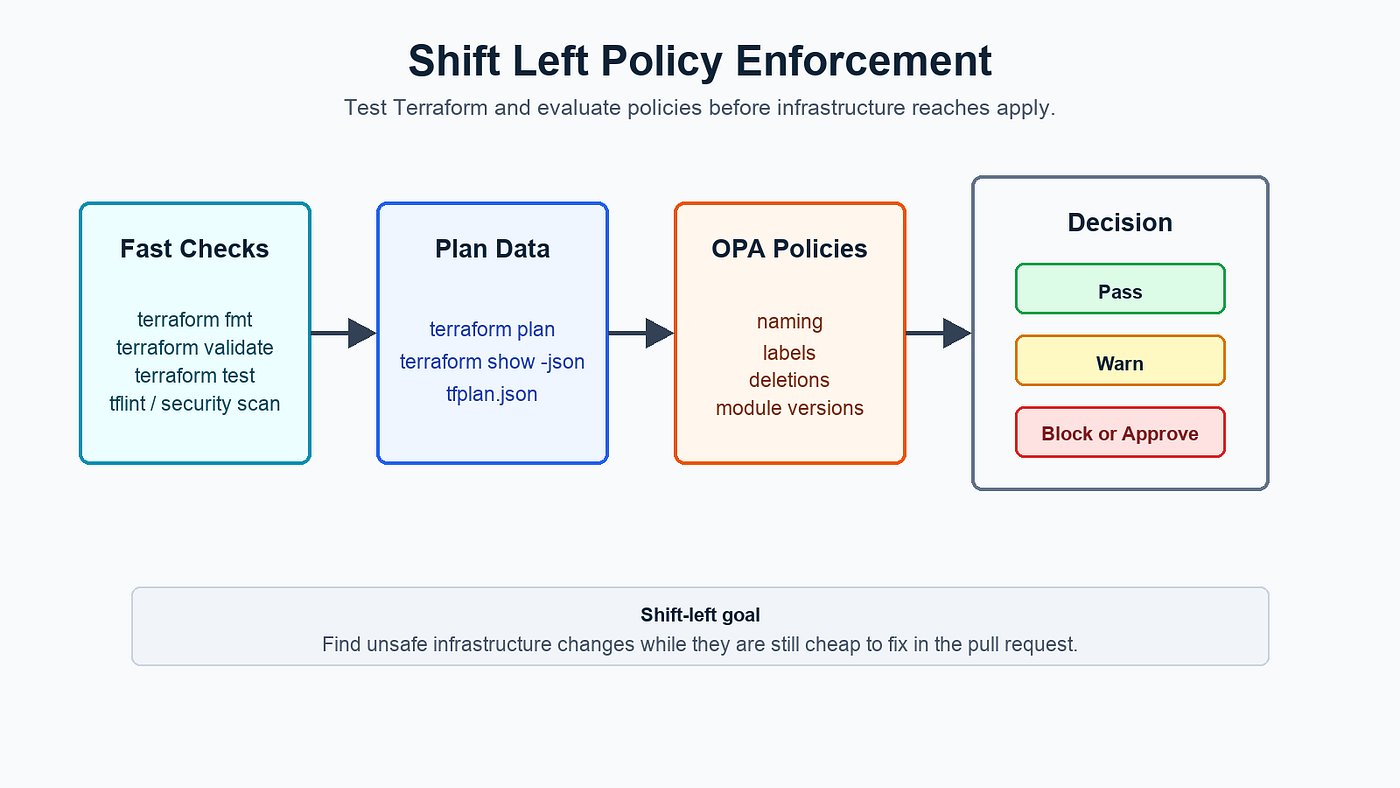
Shift-left policy enforcement catches unsafe infrastructure changes before Terraform reaches the apply stage.
Conftest: Turning Policies into PR Checks
Conftest is a lightweight policy testing tool for structured configuration files.
In a Terraform workflow, it usually checks the Terraform plan JSON before anyone runs apply:
terraform plan -out=tfplan
terraform show -json tfplan > tfplan.json
conftest test tfplan.json
Conftest uses Open Policy Agent under the hood.
OPA is the general-purpose policy engine. Conftest is the practical CLI wrapper that makes it easy to run OPA policies against files such as Terraform plans, Kubernetes YAML, Helm values, or JSON configuration.
Terraform converts the saved plan into JSON using:
terraform show -jsonConftest then evaluates that JSON against Rego policies and reports whether the pull request should pass, warn, or require approval.
With policy checks in place, the pull request no longer asks:
Can a human reviewer notice every dangerous change in a long Terraform plan?
Instead, it asks:
Which changes are routine, which changes violate policy, and which changes need a specific approval?
That is a much stronger review model.
Best Flow Policies to Consider
A good Terraform pull request flow should not treat every change the same.
The Terraform plan already tells you which resources are being created, updated, replaced, or deleted.
Conftest, OPA, Atlantis policy checks, or GitHub Actions can use that plan to decide whether the PR should pass, warn, fail, or request a specific approval.
The principle is simple:
Block unsafe changes, warn on modernization work, and route risky changes to the team that owns the risk.
Resource or Policy AreaRecommended BehaviorReviewer or OwnerSecurity groups, NACLs, public ingress, IAM, encryptionBlock or require approval when unsafeSecurity or network teamDatabase instances and data-sensitive changesRequire approval for deletion, backup, encryption, or availability riskDatabase, platform, or data teamRedis or cache infrastructureReview sizing, eviction, availability, and connection behaviorPlatform, SRE, or application ownerEKS cluster from an approved moduleUsually allow with platform standards; flag cost if largePlatform, SRE, or FinOpsEKS with custom IAM, public endpoint, or network changesRequire additional security reviewSecurity plus platform teamNaming conventions and required labels or tagsFail the pipeline when missing or invalidPlatform, FinOps, or governance teamResource deletionBlock apply until senior approval is presentPrincipal Engineer, EM, platform lead, or service ownerModule version driftWarn and track, but do not block merge by defaultPlatform team
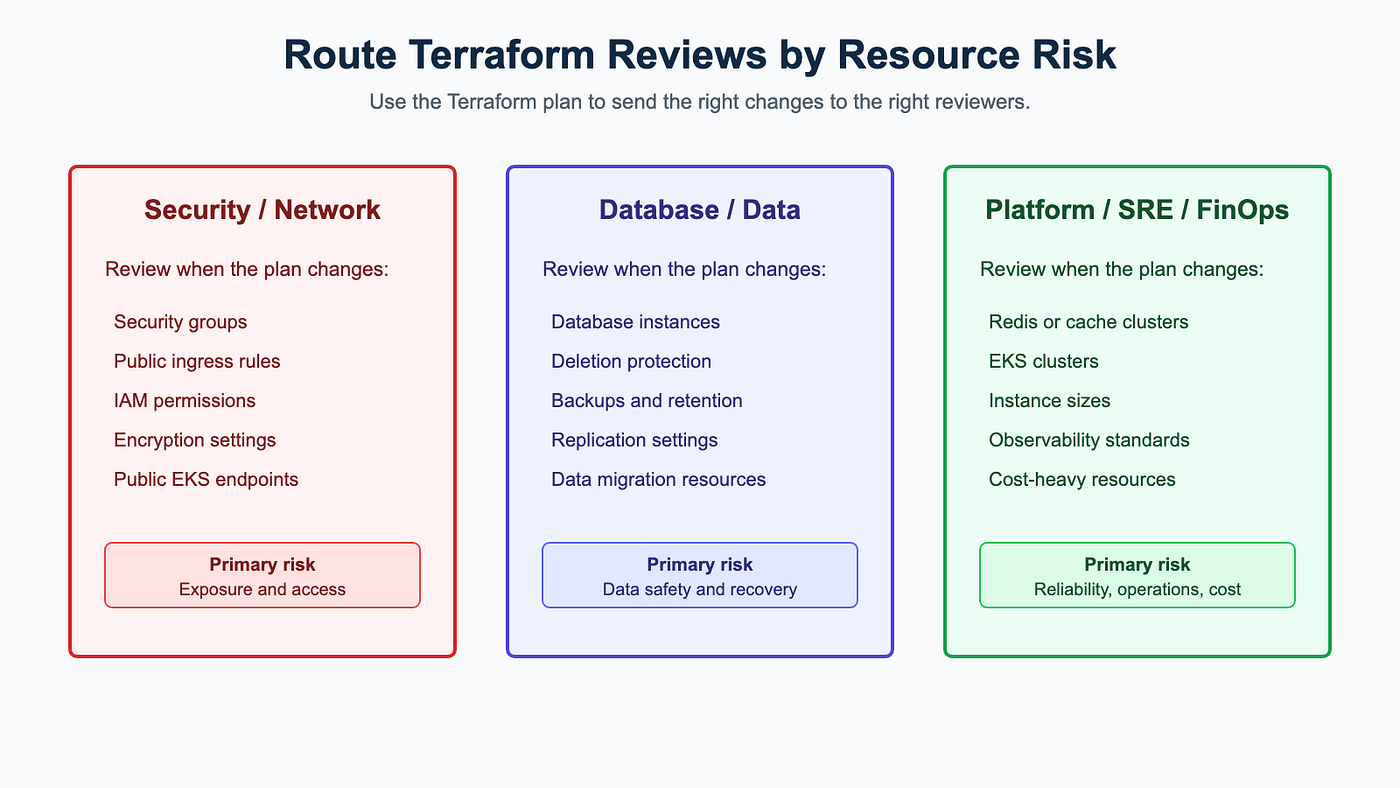
The Terraform plan can help route review to the team that owns the actual risk.
Avoid using one generic approval for every infrastructure PR.
That is easy to implement, but it creates noisy reviews and slows down safe changes.
A better flow uses condition-based approvals:
- A normal Terraform change may need one platform review.
- A public ingress change should request Security or network review.
- A database deletion should require senior approval.
- An outdated module version may only need a warning and a tracking issue.
OPA Policy Examples
Start by converting the Terraform plan to JSON:
terraform plan -out=tfplan
terraform show -json tfplan > tfplan.json
Conftest evaluates tfplan.json against OPA policies written in Rego.
Keep real policies split by domain and keep configurable values in data files.
Naming Convention Enforcement
Use a data file for naming patterns so the policy stays reusable.
Data file: policy/data/naming_patterns.json
{
  "naming_patterns": {
    "aws_s3_bucket": "^svc-[a-z0-9-]+-(dev|stage|prod)-[a-z0-9-]+$",
    "aws_security_group": "^svc-[a-z0-9-]+-(dev|stage|prod)-sg$",
    "aws_db_instance": "^svc-[a-z0-9-]+-(dev|stage|prod)-db$",
    "aws_elasticache_replication_group": "^svc-[a-z0-9-]+-(dev|stage|prod)-redis$"
  }
}
Policy file: policy/terraform/naming.rego
package terraform.namingimport rego.v1deny contains issue if {
some rc in input.resource_changes
"create" in rc.change.actions pattern := object.get(data.naming_patterns, rc.type, "")
pattern != "" name := resource_name(rc)
not regex.match(pattern, name) issue := {
"policy": "TF-NAMING-001",
"severity": "BLOCKER",
"resource": rc.address,
"msg": sprintf("%s does not follow the required naming convention.", [rc.address])
}
}resource_name(rc) := name if {
some field in ["name", "bucket", "identifier", "cluster_identifier", "replication_group_id"]
name := object.get(rc.change.after, field, "")
name != ""
}resource_name(rc) := name if {
tags := object.get(rc.change.after, "tags", {})
name := object.get(tags, "Name", "")
name != ""
}This should be a blocking policy.
Required Labels Verification
Require metadata needed for ownership, cost, incident response, and reporting.
In AWS, this usually means tags. In Kubernetes or GCP, this usually means labels.
Data file: policy/data/required_labels.json
{
  "required_labels": [
    "Owner",
    "Environment",
    "CostCenter",
    "Service"
  ]
}
Policy file: policy/terraform/required_labels.rego
package terraform.labelsimport rego.v1deny contains issue if {
some rc in input.resource_changes
"create" in rc.change.actions tags := object.get(rc.change.after, "tags", {})
some label in data.required_labels value := object.get(tags, label, "")
value == "" issue := {
"policy": "TF-LABELS-001",
"severity": "BLOCKER",
"resource": rc.address,
"msg": sprintf("%s is missing required label or tag %s.", [rc.address, label])
}
}This should also be a blocking policy.
Approval for Resource Deletion
Deletion should require senior approval.
Keep approvers configurable outside the policy.
Data file: policy/data/approvers.json
{
  "senior_approvers": [
    "platform-lead",
    "principal-engineer",
    "engineering-manager"
  ]
}
The CI workflow can fetch GitHub PR reviews into:
policy/data/github_reviews.jsonPolicy file: policy/terraform/deletion_approval.rego
package terraform.deletionimport rego.v1senior_approval_exists if {
some review in data.github_reviews
review.state == "APPROVED" some approver in data.senior_approvers
lower(review.user.login) == lower(approver)
}deny contains issue if {
some rc in input.resource_changes
"delete" in rc.change.actions
not senior_approval_exists issue := {
"policy": "TF-DELETE-001",
"severity": "BLOCKER",
"resource": rc.address,
"msg": sprintf("%s includes a delete action and requires senior approval.", [rc.address])
}
}This blocks only when the plan includes a delete action and the required approval is missing.
Module Version Check
Flag repositories that are not using the latest approved higher-order module version.
This should usually warn, not block, because teams may need time to upgrade safely.
Data file: policy/data/module_versions.json
{
  "latest_module_versions": {
    "github.com/example/platform-modules/rds-postgres": "v3.4.0",
    "github.com/example/platform-modules/redis": "v2.1.0",
    "github.com/example/platform-modules/eks": "v5.0.0"
  }
}
Policy file: policy/terraform/module_versions.rego
package terraform.modulesimport rego.v1warn contains issue if {
some name, call in input.configuration.root_module.module_calls source := call.source
base := split(source, "?ref=")[0]
current := split(source, "?ref=")[1]
latest := data.latest_module_versions[base] current != latest issue := {
"policy": "TF-MODULE-001",
"severity": "MAJOR",
"module": name,
"msg": sprintf("Module %s uses %s, but latest approved version is %s.", [name, current, latest])
}
}Generate latest-version data before Conftest runs. Then let OPA evaluate the plan and supplied data deterministically.
GitHub Actions Integration
The pipeline should separate blocking policy checks from warning-only policy checks.
Blocking checks should fail the workflow.
Warning checks should publish comments or annotations, but return success.
Here is a simplified GitHub Actions workflow:
name: Terraform Policy Checkson:
pull_request:
types: [opened, synchronize, reopened, ready_for_review]permissions:
contents: read
pull-requests: readjobs:
terraform-policy:
runs-on: ubuntu-latest steps:
- name: Checkout
uses: actions/checkout@v4
with:
fetch-depth: 0 - name: Setup Terraform
uses: hashicorp/setup-terraform@v3 - name: Terraform init
run: terraform init -input=false - name: Terraform validate
run: terraform validate - name: Terraform test
run: terraform test - name: Terraform plan
run: terraform plan -out=tfplan -input=false - name: Convert plan to JSON
run: terraform show -json tfplan > tfplan.json - name: Fetch PR reviews for deletion approval policy
env:
GH_TOKEN: ${{ github.token }}
run: |
mkdir -p policy/data
gh api repos/${{ github.repository }}/pulls/${{ github.event.pull_request.number }}/reviews \
| jq '{github_reviews: .}' \
> policy/data/github_reviews.json - name: Blocking OPA policy checks
run: |
docker run --rm \
-v "$PWD:/workspace" \
-w /workspace \
openpolicyagent/conftest:latest \
test tfplan.json \
--policy policy/terraform \
--data policy/data \
--all-namespaces \
--output github - name: Warning-only OPA module version check
run: |
docker run --rm \
-v "$PWD:/workspace" \
-w /workspace \
openpolicyagent/conftest:latest \
test tfplan.json \
--policy policy/terraform/module_versions.rego \
--data policy/data \
--all-namespaces \
--output json \
> conftest-module-version-results.json || trueSome teams prefer a GitHub Action wrapper around Conftest.
That is fine, but the direct openpolicyagent/conftest container keeps the example explicit and close to the tool itself.
If your organization standardizes on an action wrapper, pin it to a reviewed version or SHA and keep it updated through Dependabot.
How Atlantis and Conftest Work Together
Atlantis and Conftest usually connect through Terraform plan JSON.
The flow looks like this:
- Atlantis runs
terraform planfor the pull request. - Terraform converts the plan into JSON using
terraform show -json. - Conftest evaluates that JSON against OPA/Rego policies.
- Policy results are returned back into the pull request workflow.
- Apply is allowed only when the required checks and approvals pass.
In short:
Atlantis creates the plan. Terraform converts the plan to JSON. Conftest checks that JSON before the change is applied.
Image placement: Add the image here:
assets/08-atlantis-output-conftest-input.pngCaption: Terraform plan JSON is the handoff between Atlantis and Conftest.
What to Automate First
Do not start by trying to encode every infrastructure rule your organization has ever discussed.
Start with a small set of rules that are obvious, repeated, and high-value.
Good first policies include:
- Block public SSH or RDP.
- Require approved Terraform modules.
- Detect resource deletions.
- Require tags such as
Owner,Environment, andCostCenter. - Block unencrypted storage.
- Require deletion protection for production databases.
- Prevent overly broad IAM policies.
These are good first policies because they are not philosophical.
They are guardrails.
The goal is not to replace engineering judgment. The goal is to stop spending engineering judgment on repetitive checks that a machine can perform consistently.
Common Mistakes
Mistake 1: Treating Atlantis as a Security Boundary by Itself
Atlantis centralizes Terraform execution, but you still need careful cloud permissions, repository permissions, webhook security, network exposure controls, and workflow restrictions.
Mistake 2: Allowing Arbitrary Custom Workflows Everywhere
Custom workflows are powerful.
They are also a way to run commands on the Atlantis server.
Use server-side configuration for sensitive controls and allow repository-level overrides only where the trust model is clear.
Mistake 3: Reviewing Only the Terraform Code
Terraform code shows intent.
The plan shows consequences.
Both matter.
Mistake 4: Reviewing Only the Plan and Ignoring Policies
Humans and AI-assisted reviewers are not the right place to repeatedly scan long plan output for the same class of issue.
Machines are good at that.
Let them help.
Mistake 5: Assuming PR Automation Solves Drift
Atlantis automates the pull request workflow.
It does not automatically detect or fix every change made outside Terraform.
Drift detection is a separate workflow that teams should design intentionally.
Mistake 6: Putting Sensitive Plan Artifacts in the Wrong Place
Terraform plan files and plan JSON can contain sensitive values.
Treat them as sensitive build artifacts.
Do not commit them to version control.
Final Thoughts
Terraform pull request automation is not just about making Terraform run in CI.It is about changing the ownership model of infrastructure delivery. Local Terraform puts too much responsibility on individual machines and individual judgment.
Pull request automation moves the workflow into a shared, reviewable, auditable system. Atlantis gives teams a strong open-source foundation for that model. Conftest and Open Policy Agent make the model scale by turning repeated review comments into automated policy checks.
The best Terraform workflows are not the ones where every change gets blocked by a platform team. They are the ones where safe changes move quickly, risky changes get the right attention, and every applied change leaves a clear trail.
That is the real promise of Terraform pull request automation:
Speed without losing control.
Related Articles
References
- HashiCorp resource page: Terraform Code Reviews: Supercharged with Conftest
- Atlantis guide: What Is Atlantis?
- Atlantis docs: Access Credentials
- Atlantis docs: Repo-Level atlantis.yaml Config
- Atlantis docs: Server-Side Repo Config
- Atlantis docs: Conftest Policy Checking
- Atlantis docs: Custom Workflows
- Terraform docs: JSON Output Format
- Conftest: Open Policy Agent / Conftest
- Conftest docs: GitHub output and policy testing
- PullApprove v3 docs: PullApprove Conditions
- PullApprove v3 docs: Group Conditions
메타데이터
- post_id
- 73ac8a52bb9f
- slug
- terraform-pull-request-automation-safe-infrastructure-delivery-with-atlantis-opa-and-conftest-73ac8a52bb9f
- url
- https://medium.com/@iftekharkhan245/terraform-pull-request-automation-safe-infrastructure-delivery-with-atlantis-opa-and-conftest-73ac8a52bb9f
- canonical_url
- https://medium.com/@iftekharkhan245/terraform-pull-request-automation-safe-infrastructure-delivery-with-atlantis-opa-and-conftest-73ac8a52bb9f
- author_url
- https://medium.com/@iftekharkhan245
- status
- ok
- fetched_at
- 2026-06-12 10:20:10


