Java 17 Features and Interview Questions and Answers
Java 17 is a Long-Term Support (LTS) release with many modern language, JVM, and API improvements. Here are the most important features…
Java 17 Features and Interview Questions and Answers
Java 17 is a Long-Term Support (LTS) release with many modern language, JVM, and API improvements. Here are the most important features developers commonly use.
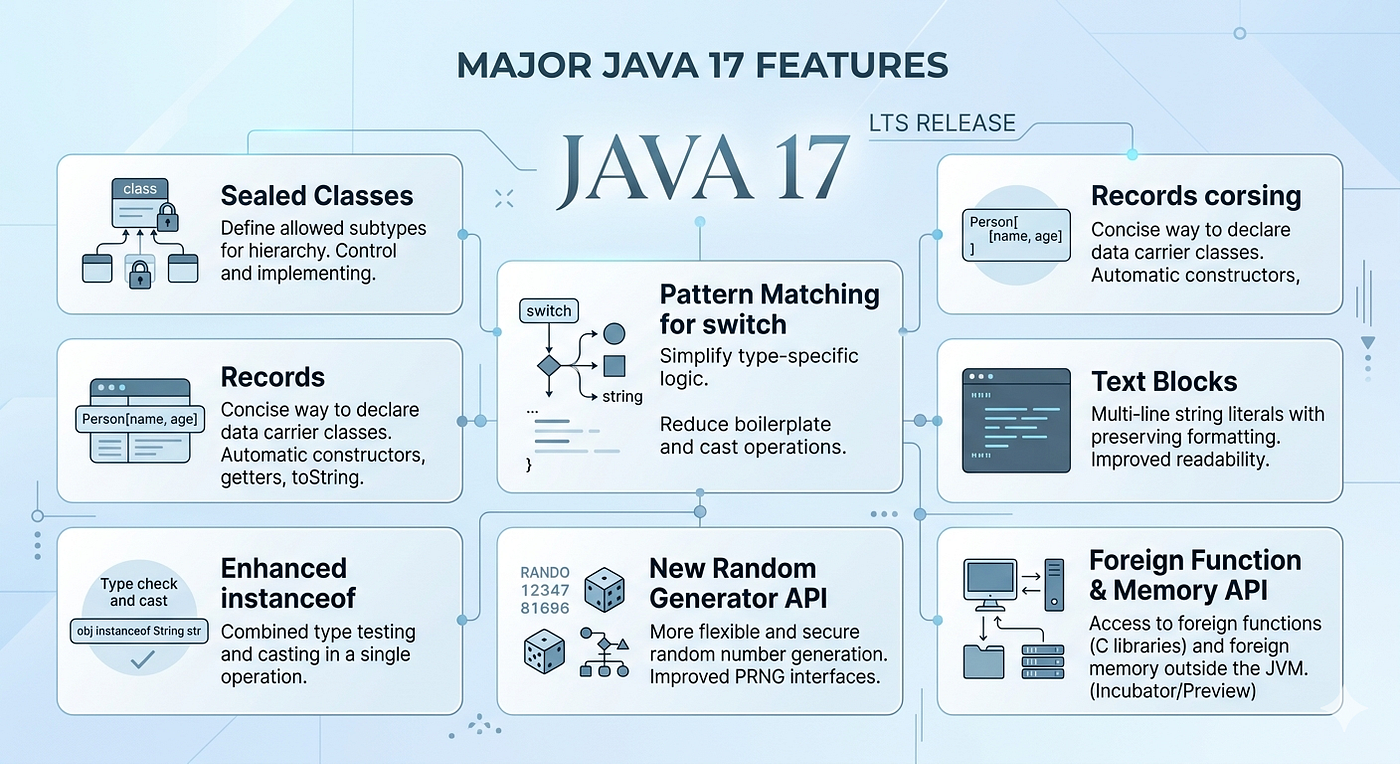
Major Java 17 Features
- Sealed Classes
- Pattern Matching for
switch - Records
- Text Blocks
- Enhanced
instanceof - New Random Generator API
- Foreign Function & Memory API
- What is Sealed Classes?
Sealed classes were introduced in Java to provide controlled inheritance. Before sealed classes, if a class was public, any class could extend it. But sometimes we want to restrict which classes are allowed to inherit from a parent class.
Using the sealed keyword, we can explicitly define which subclasses are permitted to extend or implement a class or interface.
This improves:
- better control over inheritance,
- security,
- maintainability,
- and makes the code more predictable.
For example, in a payment system, if I have a Payment class, I may want only CreditCard, UPI, and NetBanking classes to extend it. No other class should be allowed.
sealed class Payment permits CreditCard, UPI, NetBanking {
}

final class CreditCard extends Payment {
}

final class UPI extends Payment {
}

final class NetBanking extends Payment {
}
Any class extending a sealed class must declare one of these modifiers:
final→ cannot be extended furthersealed→ restricts inheritance againnon-sealed→ removes the restriction and allows normal inheritance
So sealed classes give us controlled extensibility.
Sealed classes restrict which classes can extend or implement a class or interface.

2. What is non-sealed?
“It removes the sealing restriction and allows normal inheritance again.”
sealed class Vehicle permits Car {
}

non-sealed class Car extends Vehicle {
}

class SportsCar extends Car {
}
3. Can interfaces be sealed?
“Yes. Both classes and interfaces can be sealed.”
sealed interface Shape permits Circle, Square {
}
4. Which Java version introduced sealed classes?
“Preview in Java 15, finalized in Java 17.”
2. What is Pattern Matching for switch?
Pattern Matching for switch is a Java feature that makes switch statements more powerful and cleaner by allowing type checking, casting, and variable extraction directly inside the switch case.
Before this feature, when working with different object types, we usually used multiple instanceof checks and manual casting. Pattern matching simplifies this.
Old Style
Object obj = "Hello";

if (obj instanceof String) {
    String s = (String) obj;
    System.out.println(s.toUpperCase());
}
With Pattern Matching
Object obj = "Hello";

if (obj instanceof String s) {
    System.out.println(s.toUpperCase());
}
Java extended this idea to switch, so now switch can directly match object types.
Example — Pattern Matching for switch
static void printValue(Object obj) {

    switch (obj) {

        case Integer i ->
            System.out.println("Integer: " + i);

        case String s ->
            System.out.println("String: " + s.toUpperCase());

        case Double d ->
            System.out.println("Double: " + d);

        default ->
            System.out.println("Unknown Type");
    }
}
Output
Integer: 10
String: HELLO
Double: 12.5
What Problem Does It Solve?
“It removes boilerplate code like:
- repeated
instanceof, - manual casting,
- and long if-else chains.
The code becomes:
- cleaner,
- more readable,
- and less error-prone.”
3. What is Records? Records in Java are a special type of class introduced to reduce boilerplate code for data-carrying objects.
Before records, when creating a simple POJO class, we usually wrote:
- fields,
- constructor,
- getters,
toString(),equals(),- and
hashCode()manually.
Records automatically generate all of these for us.
Normal Class Example
class Employee {

    private final int id;
    private final String name;

    public Employee(int id, String name) {
        this.id = id;
        this.name = name;
    }

    public int getId() {
        return id;
    }

    public String getName() {
        return name;
    }
}
Same Using Record
record Employee(int id, String name) {
}
That single line automatically creates:
- private final fields,
- constructor,
- getter methods,
equals(),hashCode(),- and
toString()
Usage Example
Employee emp = new Employee(101, "Vinoth");

System.out.println(emp.id());
System.out.println(emp.name());
System.out.println(emp);
Output
101
Vinoth
Employee[id=101, name=Vinoth]
In records:
- fields are automatically
final, - records are immutable,
- and they cannot extend other classes because records already extend
java.lang.Record.
Real-Time Use Cases
“Records are mainly used for:
- DTOs (Data Transfer Objects),
- API request/response models,
- immutable data objects,
- configuration objects,
- and microservice communication models.”

4. What is Text Blocks? Text Blocks in Java are used to write multi-line strings more easily and cleanly.
Before text blocks, if we wanted to write JSON, SQL queries, XML, or HTML inside Java code, we had to use:
- multiple string concatenations,
\n,- and many escape characters.
Text blocks solve this problem by allowing multi-line strings using triple double quotes.
Before Text Blocks
String json = "{\n" +
              "  \"name\": \"Vinoth\",\n" +
              "  \"age\": 25\n" +
              "}";
This becomes difficult to read and maintain.
Using Text Blocks
String json = """
        {
          "name": "Vinoth",
          "age": 25
        }
        """;

System.out.println(json);
Output
{
  "name": "Vinoth",
  "age": 25
}
Advantages
- Cleaner multi-line strings
- Better readability
- No need for
\n - Less string concatenation
- Easier maintenance
Real-Time Use Cases
“Text blocks are commonly used for:
- SQL queries,
- JSON payloads,
- XML,
- HTML templates,
- API requests,
- and email content.”
SQL Example
String query = """
        SELECT id, name, salary
        FROM employee
        WHERE salary > 50000
        ORDER BY salary DESC
        """;

System.out.println(query);
HTML Example
String html = """
        <html>
            <body>
                <h1>Welcome</h1>
            </body>
        </html>
        """;
Text blocks preserve formatting and indentation automatically, making the code look almost the same as the actual output.
Text Blocks were introduced as a preview feature in Java 13 and became stable in Java 15.
5. What is Enhanced instanceof?
Enhanced instanceof is a Java feature that simplifies type checking and casting.
Before this feature, when we checked an object type using instanceof, we had to manually cast the object after checking the type.
Enhanced instanceof combines:
- type checking,
- variable declaration,
- and casting in a single step.
Before Enhanced instanceof
Object obj = "Hello Java";

if (obj instanceof String) {

    String s = (String) obj;

    System.out.println(s.toUpperCase());
}
“Here we first check the type, then manually cast it.
Using Enhanced instanceof
Object obj = "Hello Java";

if (obj instanceof String s) {

    System.out.println(s.toUpperCase());
}
In this example:
- Java checks whether
objis aString - and automatically casts it to variable
s.
Output
HELLO JAVAAdvantages
- Less boilerplate code
- No manual casting
- Cleaner syntax
- Better readability
- Reduced casting errors
Another Example with Custom Object
class Employee {

    String name = "Vinoth";
}

Object obj = new Employee();

if (obj instanceof Employee emp) {

    System.out.println(emp.name);
}
6. What is New Random Generator API? Java 17 introduced an enhanced Random Generator API to provide better random number generation with improved performance, flexibility, and modern algorithms.
Before Java 17, we mainly used:
RandomThreadLocalRandom- and
SplittableRandom
But Java 17 introduced a new RandomGenerator interface and multiple advanced random generator implementations.”
Why Was It Introduced?
“The older Random class had some limitations:
- weaker algorithms,
- less flexibility,
- and lower performance in some cases.
The new API provides:
- better random algorithms,
- improved scalability,
- consistent interfaces,
- and support for modern random generators.
Main Interface
RandomGeneratorAll random generator classes now follow this common interface.
Basic Example
import java.util.random.RandomGenerator;

public class Test {

    public static void main(String[] args) {

        RandomGenerator random =
                RandomGenerator.getDefault();

        System.out.println(random.nextInt(100));
        System.out.println(random.nextDouble());
    }
}
Output Example
45
0.73452
Important Implementations
Java 17 introduced several algorithms like:
L32X64MixRandomL64X128MixRandomXoroshiro128PlusPlusSplittableRandom
“These provide faster and higher-quality random values
Example Using Specific Algorithm
import java.util.random.RandomGeneratorFactory;

public class Test {

    public static void main(String[] args) {

        RandomGenerator generator =
            RandomGeneratorFactory
                .of("L128X256MixRandom")
                .create();

        System.out.println(generator.nextInt(100));
    }
}
Real-Time Use Cases
Used in:
- gaming applications,
- simulations,
- security-related randomization,
- load testing,
- data generation,
- AI/ML sampling,
- and distributed systems.
7. What is Foreign Function & Memory API? Foreign Function & Memory API is a feature introduced in Java 17 that allows Java programs to interact directly with native code and native memory without using JNI.
Earlier, if Java wanted to call C or C++ libraries, we used JNI — Java Native Interface. JNI was powerful but complicated, unsafe, and difficult to maintain.
The Foreign Function & Memory API provides a modern, safer, and more efficient alternative.
What Does It Do?
“It mainly provides two capabilities:
- Foreign Function Access → Java can call native functions written in C/C++.
- Foreign Memory Access → Java can allocate and manage off-heap/native memory safely.”
Why Was It Introduced?
“JNI had several problems:
- lots of boilerplate code,
- manual memory handling,
- difficult debugging,
- platform dependency,
- and risk of JVM crashes.
The new API improves:
- safety,
- performance,
- readability,
- and developer productivity.
Traditional Approach
Java → JNI → Native C/C++ LibraryNew Approach
Java → Foreign Function & Memory API → Native LibraryBasic Native Function Example
Linker linker = Linker.nativeLinker();The Linker helps Java connect with native functions
Native Memory Example
MemorySegment segment =
        Arena.ofAuto().allocate(100);
This allocates 100 bytes of native memory safely outside JVM heap
메타데이터
- post_id
- 73e98518ebf2
- slug
- java-17-features-and-interview-questions-and-answers-73e98518ebf2
- url
- https://medium.com/@vino7tech/java-17-features-and-interview-questions-and-answers-73e98518ebf2
- canonical_url
- https://medium.com/@vino7tech/java-17-features-and-interview-questions-and-answers-73e98518ebf2
- author_url
- https://medium.com/@vino7tech
- status
- ok
- fetched_at
- 2026-07-10 13:01:02