I Built a Chrome Extension Because Google Calendar Colors Felt Too Limited
I use Google Calendar almost every day.
I Built a Chrome Extension Because Google Calendar Colors Felt Too Limited
I use Google Calendar almost every day.
Work meetings, personal plans, reminders, focus blocks, random tasks I don’t want to forget — everything eventually ends up there. And the more I used it, the more I realized something simple:
Google Calendar is useful, but its color customization feels limited.
If you rely on your calendar not only as a schedule but as a visual planning tool, colors become more than decoration. They help you understand your week faster. They help separate work from personal life. They make meetings, deep work, errands, workouts, and reminders easier to scan at a glance.
And that is where I started to feel that the default Google Calendar color system was not enough.
What Google Calendar Already Lets You Do
To be fair, Google Calendar does provide color options.
You can change the color of an entire calendar. For example, you can have one color for your work calendar, another for personal events, another for holidays, and so on.
You can also change the color of individual events. This is useful when you want a specific meeting or task to stand out from the rest of the calendar.
On a desktop, the usual flow is simple:
- Open Google Calendar.
- Find the calendar or event you want to customize.
- Open the color menu.
- Pick one of the available colors.
For many people, this is enough.
If you only need basic visual separation, Google Calendar’s built-in colors do the job. But once you start using your calendar heavily, the limitations become more noticeable.
I mean, I don’t really like to create a new calendar for every new event type.
Where the Built-in Color System Starts to Feel Limited
The biggest limitation is not that Google Calendar has no colors.
It does.
The limitation is that you cannot easily build your own flexible color system directly inside Google Calendar. You need to create a lot of calendars then :)
For example, you may want:
- more event colors,
- custom colors,
- better contrast,
- separate text colors,
- softer colors for visual comfort,
- stronger colors for important events,
- a more aesthetic calendar layout.
This is especially noticeable if you use Google Calendar for more than just meetings. A color can mean different.
Text Color Matters Too
Most calendar color discussions focus on event background colors.
But text color is just as important.
Sometimes a background color looks good, but the event title becomes hard to read. This is especially true with darker colors, pastel colors, or certain high-contrast combinations.
A good calendar color system is not only about making things look nice. It should also be readable.
Why I Built Tint Calendar
I decided to build a small Chrome extension called Tint Calendar.
The idea was simple:
Make Google Calendar color customization more flexible without making the experience complicated.
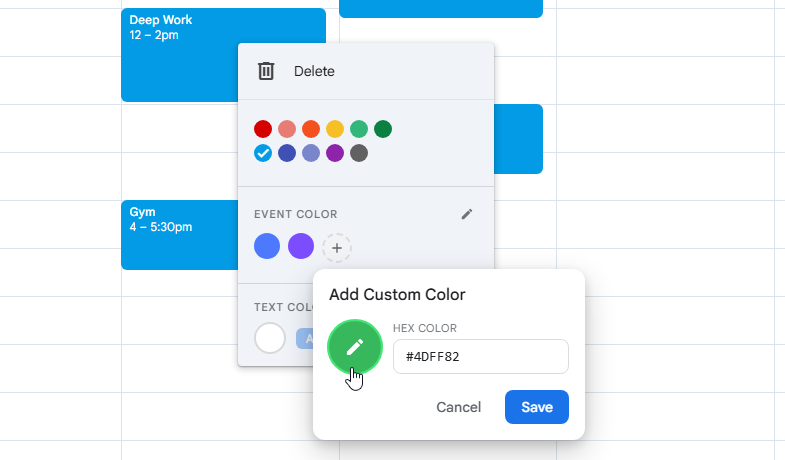
Tint Calendar adds more color options to Google Calendar and allows you to customize event colors and text colors more easily.
The main things I wanted were:
- custom event colors,
- separate text color control,
- a simple right-click workflow,
- no extra account,
- no complex setup,
- a lightweight extension that does one thing well.
I did not want to build a huge productivity platform.
I wanted a small tool that fixes one specific annoyance.
How Tint Calendar Works
After installing the extension, you can open Google Calendar and use the additional color options directly from the calendar interface.
The basic workflow is:
- Open Google Calendar.
- Right-click an event.
- Choose additional colors from the extended color menu.
- Add a new custom color if needed.
- Apply a background color or text color.
- Use your calendar with better visual clarity.
Try it!
What I Learned from Building a Tiny Chrome Extension
Building a browser extension sounds small, but it teaches you a lot.
You have to think about browser APIs, permissions, the Chrome Web Store review process, privacy declarations, screenshots, product copy, SEO, and user trust.
You also quickly learn that building the product is only part of the work.
Final Thoughts
Google Calendar is already a powerful tool.
But if you use it every day, small limitations become more visible.
For me, color customization was one of those small limitations. Not dramatic. Not life-changing. But annoying enough to fix.
That is how Tint Calendar started.
Not every productivity problem needs a giant system.
Sometimes you just need better colors.
Extension: chrome web store
YouTube: Colors for Google Calendar — Tint Calendar
Detailed guide: WebSite
메타데이터
- post_id
- 741b72e506d6
- slug
- i-built-a-chrome-extension-because-google-calendar-colors-felt-too-limited-741b72e506d6
- url
- https://medium.com/@antoha54785485/i-built-a-chrome-extension-because-google-calendar-colors-felt-too-limited-741b72e506d6
- canonical_url
- https://medium.com/@antoha54785485/i-built-a-chrome-extension-because-google-calendar-colors-felt-too-limited-741b72e506d6
- author_url
- https://medium.com/@antoha54785485
- status
- ok
- fetched_at
- 2026-06-09 15:37:30



