Designing Authentication Patterns for Workforce Applications
Designing workforce authentication with PingOne and DaVinci using three patterns that balance simplicity, orchestration, and control.
Designing Authentication Design Patterns for Workforce Applications
If you spend enough time working on workforce identity, you start to notice a pattern. Most authentication designs are not driven by requirements. They are driven by whatever tool the team learned last. That usually works right up until it doesn’t. Then things get complicated fast.
PingOne gives you a few different ways to design authentication. On paper they look like options. In practice, they represent very different architectural decisions. The trick is knowing which one you are actually making.
There are three patterns that cover almost everything you will run into:
- PingOne Authentication Policies
- DaVinci flows assigned directly to applications
- A combined model using DaVinci as an external identity provider inside a policy
Authentication Patterns in PingOne
Every workforce environment looks similar from a distance. Users log in. MFA shows up. Tokens get issued. Done. Underneath that, the differences matter.
Some applications carry real financial or regulatory risk. Some are internal and low impact. Some user populations are employees. Others are contractors coming from who knows where. Some environments need audit trails that can stand up to scrutiny. Others just need to keep honest people honest.
If you do not anchor your design in those realities, you are just picking tools and hoping it works out later. That is where most of the pain comes from.
PingOne Authentication Policies
Authentication Policies are the cleanest place to start. They give you a visual way to define login flows without turning authentication into a development project. For a lot of teams, this is enough.
You get support for password and passkey login, identity first experiences, routing users to the right identity provider, LDAP integration, and PingID MFA. You can layer in things like terms of use or basic profile collection without much effort.
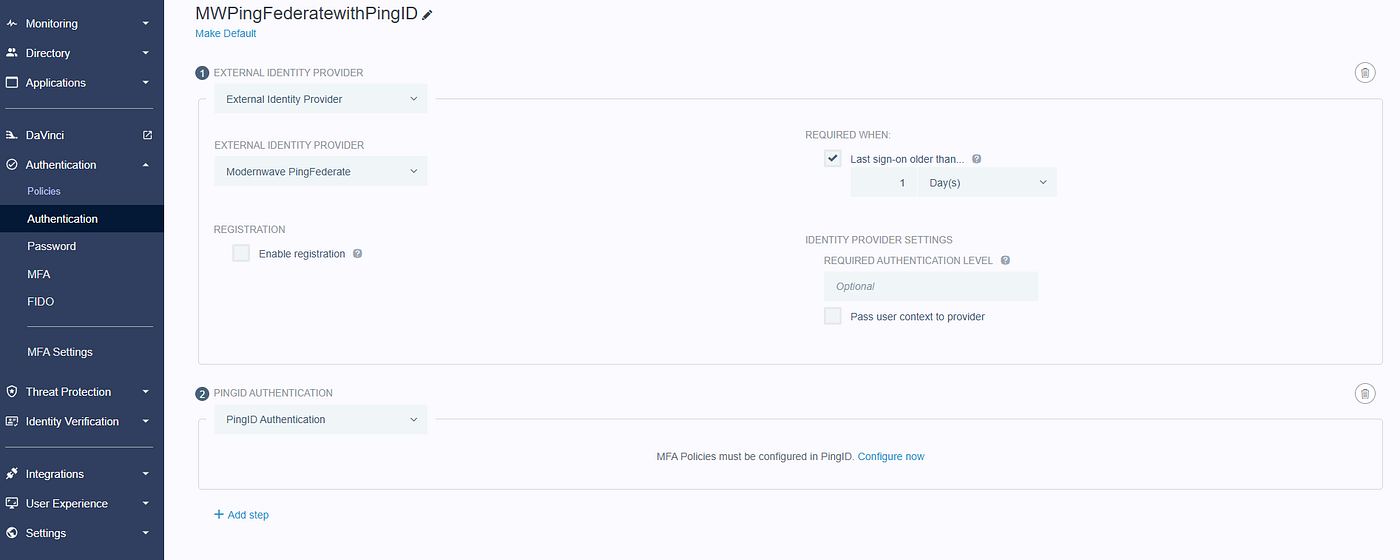
PingOne Authentication Policy Example
From an operations standpoint, this model is easy to live with. It is predictable. It is straightforward to explain. Auditors tend to like it because there is not much ambiguity in how decisions are made. That simplicity is the whole point.

A PingOne Authentication Policy assigned to a PingOne application
Where things start to break down is when requirements move beyond static decisions. The moment you need to evaluate risk signals, call out to external systems, or change behavior dynamically, policies start to feel tight. That is not a flaw. It is a boundary. If your requirements stay inside that boundary, this is usually the right answer.
DaVinci flows driving authentication
PingOne DaVinci changes the game a bit. Instead of configuring authentication, you are orchestrating it. That gives you a lot more control.

PingOne DaVinci Flow Example
You can make decisions based on context. You can integrate with external APIs mid flow. You can build branching logic that reflects real world scenarios instead of forcing everything into a fixed path. You can reuse components across applications, so you are not solving the same problem ten different ways.

Assigning a DaVinci Flow Directly to a PingOne application
This is where you go when authentication needs to be dynamic. The tradeoff is pretty obvious. More flexibility means more responsibility. You are designing flows that need to be understood, tested, and maintained. If you are not careful, it is easy to overbuild and create something that only makes sense to the person who originally put it together.
I have seen teams turn simple login experiences into full blown orchestration engines for no real reason. When DaVinci is used well, it solves problems that policies cannot touch. When it is used poorly, it creates new ones.
Combining both without overdoing it
The pattern that tends to land well in larger environments is a mix of both. You keep PingOne Authentication Policies as your foundation, and you bring in DaVinci where it actually adds value. The usual way to do that is by treating DaVinci as an external identity provider inside the policy.

PingOne Authentication Policy with External Identity Provider step pointing to DaVinci Flow Policy
That lets you keep a consistent entry point while still having the option to branch into more advanced logic when needed. You are not rebuilding every login flow from scratch. You are extending the ones that need it.

DaVinci Flow Policy (shown) and OIDC settings for DaVinci App (OIDC tab)
This approach also makes it easier to evolve over time. You can start simple and introduce more advanced behavior without ripping everything apart later. For most organizations, this ends up being the sweet spot.
What this really comes down to

Comparing PingOne Authentication Design Patterns
This is less about features and more about discipline. Authentication Policies give you consistency. DaVinci gives you control. The combined model lets you choose where to apply each.
The mistake is trying to force everything into one model because it feels cleaner on paper. Real environments are messy. Your design should reflect that without becoming messy itself.
If you take the time to understand your requirements up front, the right pattern usually becomes obvious. If you skip that step, you end up redesigning it later under pressure. That never goes well.
If you want to go deeper
If you’re looking to expand your PingOne skills beyond this post, I cover the platform in more detail in my **Ping Identity Workforce SSO Essentials Udemy course and on the [IdentityPro Academy](https://youtube.com/@identityproacademy)** YouTube channel. These resources focus on practical setup and real-world scenarios.
I’m also working on a new course that will go even further into advanced orchestration and hybrid flows so stay tuned for that.
메타데이터
- post_id
- 742219aa4e8b
- slug
- designing-authentication-patterns-for-workforce-applications-742219aa4e8b
- url
- https://identitypro.blog/designing-authentication-patterns-for-workforce-applications-742219aa4e8b
- canonical_url
- https://identitypro.blog/designing-authentication-patterns-for-workforce-applications-742219aa4e8b
- author_url
- https://medium.com/@edkorth
- status
- ok
- fetched_at
- 2026-08-10 01:00:38