Hyperswitch on AWS: Deploy, Monitor, and Operate Payments Like a Fintech Team
A technical deep-dive into Hyperswitch, open-source payment orchestration on AWS, and the toolkit that makes it actually production-ready.
Hyperswitch on AWS: Deploy, Monitor, and Operate Payments Like a Fintech Team

A technical deep-dive into Hyperswitch, open-source payment orchestration on AWS, and the toolkit that makes it actually production-ready.
The Friday Night Problem
It’s 11:47 PM on a Friday. Your on-call phone goes off.
Stripe is having an incident. Your checkout is returning 500s. Your error rate just hit 34%. Someone in the Slack channel is typing in all caps.
You have three options:
- Wait for Stripe to fix it (ETA: “we’re investigating”)
- Manually switch to Razorpay at the DB level and pray nothing breaks
- Have already set up fallback routing so this never becomes your problem at 11:47 PM
If you’re currently in option 1 or 2 territory, this article is for you.
What Is Hyperswitch?
Hyperswitch is an open-source payment orchestration layer built by Juspay, the same folks who process billions of transactions for some of the largest e-commerce platforms in India and Southeast Asia.
In plain terms: it sits between your application and every payment processor you use. You make one API call. Hyperswitch figures out which connector to use, handles routing, retries, fallbacks, 3DS, vaulting, refunds, all of it.
Think of it as a reverse proxy for payments.
Your App
   │
   ▼
Hyperswitch  ──→  Stripe
                ──→  Adyen
                ──→  Razorpay
                ──→  PayPal
                ──→  (50+ more)
Instead of maintaining five different SDKs, five different webhook handlers, five different reconciliation pipelines, you maintain one. Hyperswitch is that one.
And critically: you own it. It runs in your AWS account. Your customer card data never touches a third-party SaaS platform you don’t control.
Which Gap Does It Fill?
Let’s be honest about what the current landscape looks like.
Option A, Direct integration with one PSP Works fine until that PSP has an outage, raises prices, or doesn’t support a payment method your new market needs. Then you’re back to square one, re-integrating from scratch.
Option B, Build your own orchestration layer Congratulations, you are now a payments infrastructure company. Enjoy debugging webhook signature validation at 2am. Your product roadmap will thank you.
Option C, Buy a SaaS orchestration platform (Spreedly, Conductor One, Primer) These are good products. They’re also $$$, and your transaction data lives on their servers. For a lot of companies, especially fintech, healthcare, or anyone with serious compliance requirements, that’s a hard no.
Option D, Hyperswitch Open source. Self-hosted. Production-battle-tested by a company that processes at genuine scale. Free to use. You pay only your AWS bill.
That’s the gap. It fills the space between “we only use Stripe” and “we built our own thing and now nobody else understands it.”
Is This the Best Payment Orchestration Available?
Honest answer: it depends on what you’re optimizing for.
Press enter or click to view image in full size
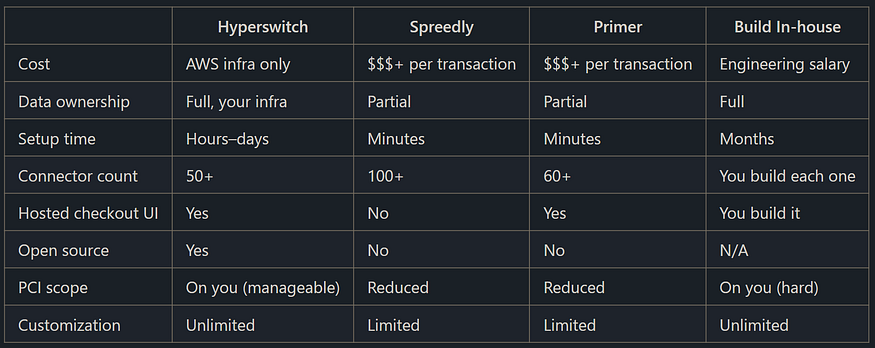
If you want zero ops overhead and don’t mind the price, Spreedly or Primer are fine choices. No shame in that.
But if you’re an engineer at a company where:
- Transaction volume is high enough that per-transaction fees hurt
- Data residency or compliance requirements are strict
- You want the ability to read, modify, and understand every line of code processing your payments
- You’re already on AWS and comfortable with EKS/RDS
…then Hyperswitch is genuinely hard to beat.
Is This For You?
Let’s save everyone some time.
You should use Hyperswitch if:
- You process (or expect to process) meaningful transaction volume and per-transaction SaaS fees are a real line item
- You need multi-connector routing, different PSPs for different countries, currencies, or payment methods
- You have a compliance or data residency requirement that rules out third-party data processors
- You have at least one engineer who is comfortable owning AWS infrastructure
- You want fallback routing to be automatic, not a manual intervention at midnight
You probably shouldn’t use Hyperswitch if:
- You’re a 2-person startup processing $10k/month, just use Stripe, seriously
- You have zero AWS experience and no appetite to learn it
- You need it running in 30 minutes with no infrastructure knowledge
- You’re looking for someone to call when things break (there’s a community, but no 24/7 support SLA unless you go enterprise)
The honest version: this is infrastructure for engineers who take payments seriously. If that’s you, read on.
Before vs After
Without Hyperswitch:
- You have Stripe for US, Razorpay for India, Adyen for Europe
- Three separate integrations, three codebases, three webhook handlers
- Indian customers can’t pay with UPI through your main checkout flow
- Reconciliation is a spreadsheet that someone owns and everyone fears
- Adding a new PSP is a 2-week engineering project
With Hyperswitch:
- One API, one SDK, one webhook endpoint
- Stripe goes down → automatic fallback to Adyen in 200ms, no pages, no calls
- UPI, cards, wallets, BNPL, all routed through the same checkout experience
- Reconciliation is built in
- Adding a new PSP is an afternoon’s work in the control center
A Real Failure Scenario
Friday, 11:47 PM. X-Financial-Service reports a partial outage in us-east-1.
Without Hyperswitch:
- Alert fires. On-call wakes up.
- Someone manually updates config to route to backup PSP.
- Half the team is on a call debugging why some transactions went through and some didn’t.
- Post-mortem reveals 23-minute revenue gap.
- Someone builds a manual runbook. It lives in Confluence and nobody ever finds it again.
With Hyperswitch + the toolkit:
- Hyperswitch detects elevated error rates from Stripe connector.
- Smart routing automatically shifts traffic to Adyen (or Razorpay, or whichever you’ve configured as fallback).
proactive_detector.pypicks up the anomaly within 30 seconds and posts to Slack.incident_classifier.pygrades it P2, degraded, not outage, fallback is active.- On-call gets notified, confirms fallback is working, goes back to sleep.
- Morning post-mortem: “Stripe was down for 18 minutes. We processed normally throughout.”
That’s the difference. Not magic, engineering.
Technical Setup: Deploying on AWS
Full step-by-step documentation lives at docs.hyperswitch.io. This section covers what you need to know before you read the docs, so you don’t walk into it blind.
IAM User Creation & Permissions
This is where most people cut corners and regret it later. Don’t create an admin user for your Hyperswitch deployment. Create a scoped IAM user with exactly the permissions needed for the CDK deployment, EKS, RDS, EC2, Secrets Manager, and CloudFormation.
The CDK script needs to create resources, not become root. Treat this like you’d treat any production service account.
Key things the deployment needs:
ec2:*for networking and instanceseks:*for cluster creationrds:*for the databasesecretsmanager:*for storing connector credentialscloudformation:*for the stack itself
Store your access keys somewhere other than a sticky note on your monitor.
CDK / CloudFormation Full Stack Deployment
The fastest path to a running Hyperswitch instance. One script, full stack.
curl https://raw.githubusercontent.com/juspay/hyperswitch/main/aws/hyperswitch_aws_setup.sh | bashWhat it spins up:
- EKS cluster with Hyperswitch app server
- RDS PostgreSQL (your payment data store)
- Redis/ElastiCache (session and caching layer)
- ALB (your public-facing load balancer)
- Hyperswitch Control Center (management UI)
- Card vault (for storing tokenized card data)
Expect this to take 15–25 minutes.
Once complete, you’ll get output URLs for the app server, control center, and demo store. Test a payment with 4242 4242 4242 4242 and verify you're seeing transactions in the control center before moving on.
Estimated monthly cost at 1,000 transactions/day: ~$120–180. At 50,000 transactions/day, budget closer to $380–500. The cost calculator covers this in detail.
The Toolkit: hyperswitch-aws-toolkit
This is where deployment ends and operations begin.
Deploying Hyperswitch is a few hours of work. Running it in production for the next three years, that’s the actual challenge. Most open-source deployment guides drop you at “it’s running, good luck.” This toolkit picks up exactly where they leave off.
Repository: https://github.com/bhoobalan-bhoo/hyperswitch-aws-toolkit
The entire toolkit is Python, built for Linux, reads your AWS profiles natively, and everything connects through a single session, you pick your profile and environment once, and every script just works.
Getting Started
Run bash start.sh and navigate from there
Or Start Manually
Runprerequisites_check.py first, then aws_connect.py to select your AWS profile and environment (dev / staging / prod). The connect script lists every profile you have and double-confirms before touching production.
What the Toolkit Does
Security Hardening
**security/iam_hardening.py** , Scans for IAM users with AdministratorAccess, missing MFA, wildcard policies, and access keys older than 90 days. Reports what's wrong and exactly how to fix it.
**security/vpc_audit.py**,Verifies your database isn't accidentally public, VPC Flow Logs are enabled, and no security group allows 0.0.0.0/0 on sensitive ports.
**security/secrets_audit.py** , Scans ECS, Lambda, and SSM for plaintext secrets in environment variables. Because someone always does DB_PASSWORD=supersecret123 and forgets about it for two years.
PCI-DSS Compliance
**compliance/pci_dss_checklist.py** , Maps real AWS resource checks to PCI-DSS v4.0 requirements. Outputs PASS / FAIL / WARN / MANUAL per control. Run this before your QSA shows up, not after.
**compliance/audit_logger.py**, Pulls CloudTrail events for sensitive operations: IAM changes, security group edits, Secrets Manager access, RDS config changes.
CloudWatch Alarms
**observability/cloudwatch_alarms.py** , Creates the full production alarm set in one run: payment error rate, P99 latency, RDS CPU/connections/storage, ALB 5xx rate, and payment success rate. All alarms route to a single SNS topic. Supports a --dry-run flag to preview before creating.
Grafana Dashboards
**observability/grafana_setup.py** , Generates four ready-to-import dashboard JSON files backed by CloudWatch:
- Transaction Volume: TPS, success/fail counts, error rate, P99 latency over time.
- Revenue Tracking: GMV, net revenue, refunds, revenue by connector.
- Conversion Funnel : Initiated → Authenticated → Authorized → Captured → Refunded. Shows exactly where payments drop off.
- Payment Operations Center : Eight health indicators, live transaction rate, real-time error gauge, per-connector health, RDS and ALB metrics. 10-second refresh. This is the one you open during an incident.
Alert Routing
**observability/alert_routing.py:**Wires your SNS topic to email or Slack. Slack alerts are color-coded (red for ALARM, green for OK) with a direct link to the affected resource. Interactive menu to add subscriptions and send test alerts.
Live Log Streaming
**operations/live_log_streamer.py: **tail -f for production Hyperswitch logs, but smarter. Polls CloudWatch every 2 seconds, colorizes by log level, and pattern-matches against known failure signatures with badges: CONNECTOR_ERROR, DB_CONNECTION, TIMEOUT, CARD_DECLINED. Supports filtering by level and saving sessions for post-incident review.
Proactive Issue Detection
**operations/proactive_detector.py** : Runs continuously, checking metrics every 30 seconds, and surfaces problems before CloudWatch alarms fire. Detects rising error rates, latency spikes, connector degradation, connection pool pressure, and volume drops. Prints severity and a specific remediation step. HIGH/CRITICAL issues also publish to SNS.
The difference from alarms: alarms fire when you’re already in trouble. This tells you you’re heading toward trouble.
Incident Classifier
**operations/incident_classifier.py**: Grades the current system state P0–P3 based on live metrics, with a list of affected systems, immediate actions, escalation path, and SLA.
Grade Meaning SLA P0 Complete outage, success rate < 50% 5 minutes P1 Partial outage, success rate 50–90% 15 minutes P2 Degraded, error rate 2–10% 1 hour P3 Minor, single connector issue Next business day
Supports a --watch flag to re-assess every 60 seconds during an active incident.
Escalation Playbook
**operations/escalation_playbook.py**: Full incident lifecycle: create, acknowledge, resolve, and list incidents. Creating a P1 notifies Tier 1 immediately and escalates to Tier 2 after 15 minutes if unacknowledged. Incident state is persisted locally with timestamps for SLA reporting.
Runbooks
Four runbooks for the most common production failure modes , actual commands you run in order, not theory:
**connector_failure.md**: Identify the failing connector, enable fallback routing via API, recover after the incident.**high_latency.md**: Layered diagnosis from app layer to database to connector, with specific kubectl and AWS CLI commands.**db_connection_exhaustion.md**: Kill idle connections via SQL, set up RDS Proxy permanently, restart pods.**pod_crash_loop.md** : OOMKilled diagnosis, missing secret detection, rollback procedure, node health checks.
Chaos Testing
**resilience/chaos_testing.py**: Publishes fake metrics to verify your alerting and response procedures work before a real incident. Five scenarios: connector failure, high error rate, latency spike, RDS connection pressure, volume drop. Metrics auto-restore to normal after the test.
Load Testing
**resilience/load_testing.py**: Tests your deployment's actual capacity with no external dependencies. Four modes: ramp-up (find your ceiling), steady-state (verify sustained load), spike (test burst recovery), and soak (surface memory leaks over time). Run the ramp test before go-live — know your ceiling before your users find it for you.
Cost Calculator & Reporting
**cost/cost_calculator.py** : Input your target TPS, get a detailed monthly AWS cost breakdown with recommended instance sizing across all tiers.
**cost/cost_report.py**: Pulls actual spend from Cost Explorer, shows month-over-month trend, flags anomalies, and forecasts month-end spend vs your configured budget.
Connector Onboarding
**connectors/onboarding_guide.py**: Interactive seven-step guide for adding a new connector: credential collection, Secrets Manager setup, API configuration, test transaction, and CloudWatch verification. Supports Stripe, Adyen, Razorpay, PayPal, Checkout.com, Braintree, Klarna, and Worldpay.
**capability_matrix/connector_matrix.py**: Terminal table comparing every connector across card, UPI, wallet, BNPL, refunds, 3DS, payouts, recurring, settlement speed, and fees. Exports to Markdown and JSON.
**capability_matrix/region_coverage.py**: Which payment methods are available per region (IN, US, EU, SG, AU, AE) and which connectors support them. Useful when expanding to a new market.
The start.sh: A CLI That Ties It All Together
The toolkit ships with start.sh, a bash menu that wraps everything into a navigable interface. No script paths to remember, no flags to look up, just bash start.sh and navigate with number keys.
This is particularly useful when handing off operations to someone else , the CLI surface is the documentation.
Final Thought
Payment infrastructure is one of those things that feels fine until it isn’t. And when it isn’t fine, and there’s a lot of money moving in the wrong direction.
Hyperswitch is a serious piece of engineering from a team that processes payments at scale. The toolkit exists because deploying it is the easy part, operating it well, auditing it, detecting problems before users do, responding when something breaks, that’s the hard part.
Between the two, you have a complete payments platform that you own, understand, and can actually reason about when it matters most.
That’s the whole point.
About the Author
**Bhoobalan B R **is a Software Development Engineer II, specialized in AWS native solutions and high-performance distributed systems. He has hands-on experience building scalable applications serving thousands of daily users, with a focus on system reliability, performance optimization, and cost efficiency. Passionate about open-source, he actively creates and contributes to OSS projects, including tools that bridge the gap between deployment and real-world production operations in cloud-native environments.
About CodeStax. Ai
At CodeStax.Ai, we stand at the nexus of innovation and enterprise solutions, offering technology partnerships that empower businesses to drive efficiency, innovation, and growth, harnessing the transformative power of no-code platforms and advanced AI integrations.
But the real magic? It’s our tech tribe behind the scenes. If you’ve got a knack for innovation and a passion for redefining the norm, we’ve got the perfect tech playground for you. CodeStax.Ai offers more than a job — it’s a journey into the very heart of what’s next. Join us, and be part of the revolution that’s redefining the enterprise tech landscape.
메타데이터
- post_id
- 74602d02db28
- slug
- hyperswitch-on-aws-deploy-monitor-and-operate-payments-like-a-fintech-team-74602d02db28
- url
- https://medium.com/@codestax/hyperswitch-on-aws-deploy-monitor-and-operate-payments-like-a-fintech-team-74602d02db28
- canonical_url
- https://medium.com/@codestax/hyperswitch-on-aws-deploy-monitor-and-operate-payments-like-a-fintech-team-74602d02db28
- author_url
- https://medium.com/@codestax
- status
- ok
- fetched_at
- 2026-06-18 00:10:23