The Hidden Cost of Messy Figma Files
There’s no doubt that most teams understand technical debt. Developers know that a codebase filled with shortcuts, inconsistent patterns…
The Hidden Cost of Messy Figma Files
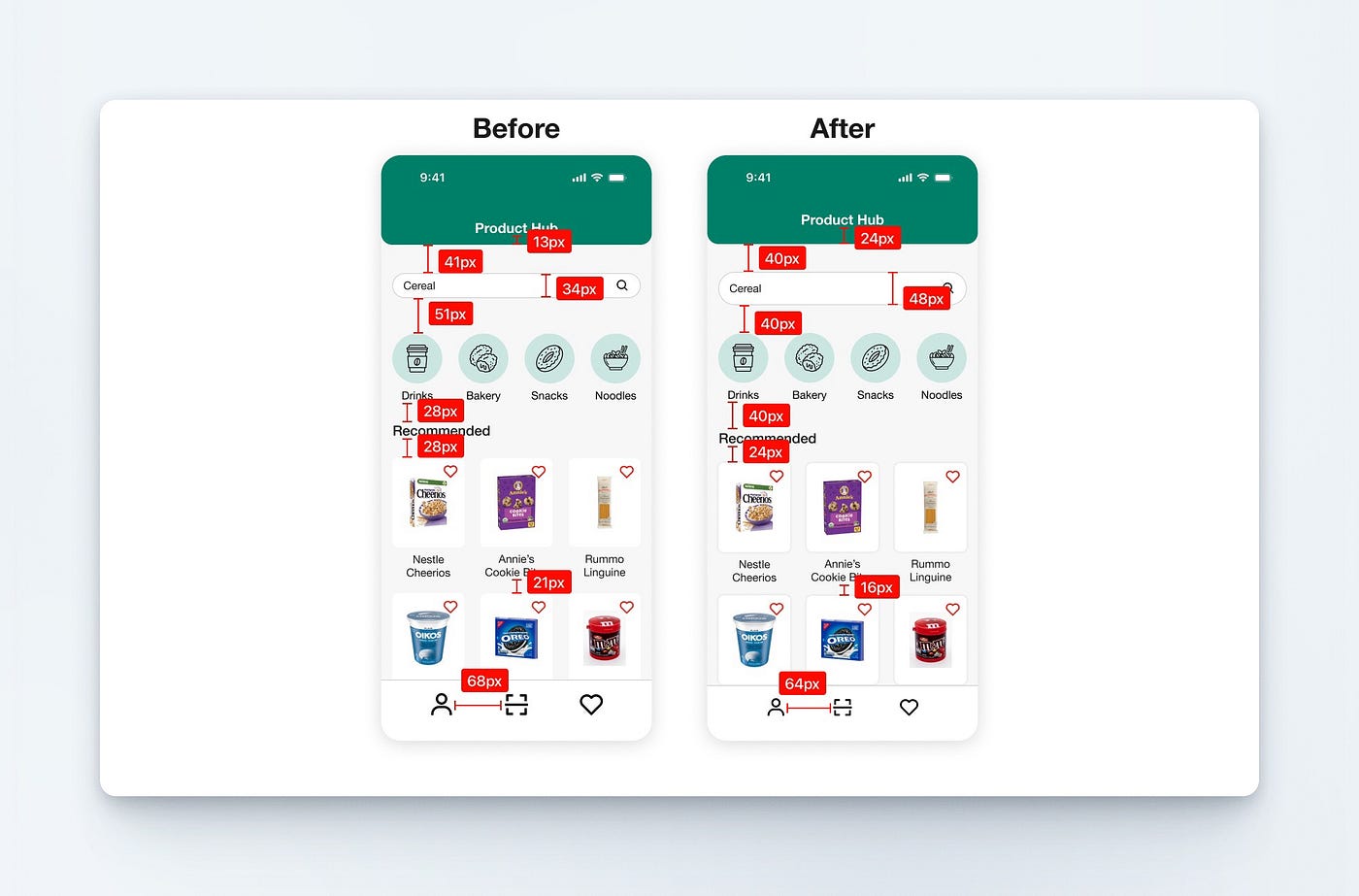
Consistent spacing can make the whole UI look more polished
There’s no doubt that most teams understand technical debt. Developers know that a codebase filled with shortcuts, inconsistent patterns, and poor documentation becomes harder to maintain over time. Every new feature takes longer to build because the foundation is becoming increasingly difficult to work with.
The same thing happens in design. Unfortunately, many teams don’t recognize it until it starts slowing them down. Many teams think that a messy Figma file is harmless as long as the product is shipping and the designs look fine. The problem is that small inconsistencies begin to accumulate over time. These inconsistencies turn into design debt that affects designers, developers, and ultimately the product itself.
Design Debt Starts Small
Design debt is not something that appears overnight. It usually begins with seemingly harmless decisions. A designer creates a new button rather than reusing an existing one because there is no standardized button design. Another designer adds a slightly different text style for a new screen. Someone introduces a new shade of blue because they can’t find the original color. A component is so messy that it is easier to detach it from the instance and modify it directly than to update it at the source.
None of these decisions is a major problem on its own. The problem is that they compound over time. It starts as a simple file with a handful of screens, and before the team realizes it, it becomes a collection of duplicated components, inconsistent styles, random spacing values, and naming conventions that nobody fully understands.
Inconsistency Slows Down Design
Nobody wants to admit it, but if a design file lacks structure, designers will have to spend more time searching than designing. Instead of focusing on solving user problems, they have to spend time asking questions such as:
- Which button should I use?
- Is this the correct text style?
- Which color token is the approved one?
- Does this component already exist somewhere?
It sounds like minor interruptions, but they happen repeatedly throughout the design process. Five minutes here and ten minutes there eventually become hours of wasted effort every week. The larger the team becomes, the more expensive these inefficiencies become.
Development Becomes More Difficult
Messy design files don’t only affect designers; developers feel the impact as well. I have worked with many designers who hand off the design with inconsistent spacing, font size, colors, and so on. Imagine a product where three buttons that look nearly identical have slightly different paddings, border radii, or colors. Was that intentional? Or was it a mistake?
A lot of designers don’t even bother creating a standardized component for the most basic UI element. The developer now has to spend time seeking clarification for every part of the design. Multiply this across dozens of screens and hundreds of components, and communication overhead begins to increase significantly.
If design lacks consistency, implementation becomes lower, quality becomes harder to maintain, and the gap between design and development grows wider. It is an inevitable issue many teams don’t realize until it’s too late.
New Team Members Take Longer to Onboard
A well-organized design system acts as documentation without even needing to write dedicated documentation. A messy file does the exact opposite.
When the designer who designed the original UI leaves the team, and new designers join the project, they should be able to understand how the product works by exploring the system. Unfortunately, many teams force new designers to learn through trial and error.
If the design file contains multiple versions of the same component, inconsistent naming conventions, and no clear style hierarchy, nobody will know which components are current and which are outdated. As a result, onboarding becomes slower, and mistakes become more common.
Growth Magnifies Existing Problems
The most dangerous thing about design debt is that it often remains invisible during the early stages of a product. A startup with ten screens can survive a messy Figma file, but a product with hundreds of screens cannot.
As products grow, so do features, designers, developers, stakeholders, and user expectations. Without a structured foundation, every new addition introduces more complexity. What once was a minor inconvenience becomes a bottleneck, and the team has to spend more time maintaining the design than improving it.
The Solution Isn’t Always a Massive Design System
When people hear the term “design system,” they often imagine a large enterprise-level project that requires months of work. The truth is that many teams don’t need an extensive design system, at least at the beginning. What they need is a structure such as consistent color tokens, clear typography scales, standardized spacing values, organized components, meaningful naming conventions, and reusable patterns.
These fundamentals create a foundation that allows products to scale more efficiently.
My Final Thoughts
A messy Figma file affects how quickly designers work, how effectively developers implement designs, and how easily teams can scale their products. A technical debt slows development, and design debt slows product growth. The cost may not be obvious at the beginning, but as products become larger and more complex, the consequences become increasingly difficult to ignore. Investing in a structure early is often far less expensive than cleaning up years of accumulated design debt later.
Messy Figma files create friction for designers, developers, and product teams. I help teams clean up existing files and transform them into organized, scalable systems with consistent colors, typography, spacing, components, and naming conventions.
Whether you’re preparing for growth, onboarding new designers, or simply tired of maintaining a chaotic design file, I can help turn your Figma workspace into a more efficient and maintainable foundation for your product.
If you want help with this, here’s where you can reach me → Fiverr
Thank you so much for reading until the end, and I’d love to hear about your experience with messy Figma files! Feel free to share your experiences in the comment below.
Let’s connect with me: LinkedIn | Behance | My Website
메타데이터
- post_id
- 759f0a41d792
- slug
- the-hidden-cost-of-messy-figma-files-759f0a41d792
- url
- https://medium.com/@evanch98/the-hidden-cost-of-messy-figma-files-759f0a41d792
- canonical_url
- https://medium.com/@evanch98/the-hidden-cost-of-messy-figma-files-759f0a41d792
- author_url
- https://medium.com/@evanch98
- status
- ok
- fetched_at
- 2026-06-20 20:29:01






