PoE switches for IP cameras
Photo by User_Pascal on Unsplash
PoE switches for IP cameras
Photo by User_Pascal on Unsplash
I remember the first time I tried to wire a security system for a small warehouse about a decade ago. I was young, ambitious, and trying to save a few bucks. I bought a standard network switch and ran power cables separately to every single camera. By the time I was done, the server closet looked like a spaghetti factory exploded. It was a fire hazard, a troubleshooting nightmare, and frankly, it was embarrassing.
That is when I learned the value of a good Power over Ethernet (PoE) switch.
If you are setting up IP cameras for your home or business, you are likely searching for the best way to power them without running electrical wiring to every corner of the building. You want a clean setup. You want reliability.
I have installed hundreds of these systems, from simple doorbell cams to complex 32-camera commercial grids. I am going to walk you through exactly what you need, how to avoid the mistakes I made, and which hardware actually holds up after years of 24/7 usage.
Why You Actually Need a PoE Switch
Most people think they can just grab any old hub from the electronics store. You can’t.
Standard switches only send data. PoE switches send both data and electrical power through a single Ethernet cable (Cat5e or Cat6). This is the “one cable rule” that makes modern security setups possible.
When you use a PoE switch, you do not need an electrician to install an outlet near the ceiling where your camera sits. You just run your network cable from the switch to the camera, and it boots up. It is that simple.
But here is where it gets tricky, and where most people get burned. Not all PoE switches are the same. You have to look at the Power Budget.
Understanding the Power Budget
Think of the power budget like a bank account. The switch has a total amount of power it can give out (measured in Watts). Each camera you plug in makes a withdrawal.
If you buy a cheap switch with a 60W budget, and you plug in four cameras that need 15W each, you are at the limit. If you try to add a fifth one, or if one of those cameras has a motorized lens (PTZ) or powerful night vision IR lights that kick on at night, the switch will cut power to a device. Usually, it’s the last one you plugged in, or worse, they all start rebooting in a loop.
I always recommend overestimating your power needs. If you think you need 50W, get a switch with 100W. It keeps the switch cooler and gives you room to expand later.
Managed vs Unmanaged: What Do You Need?
You will see these terms thrown around a lot.
Unmanaged Switches: These are plug-and-play. You plug the camera in, it works. There is no software to configure, no IP address for the switch itself. For 95% of homeowners and small businesses, this is what you want. It just works.
Managed Switches: These allow you to log into the switch and control things. You can remotely power cycle a specific port if a camera freezes (which is a lifesaver if the camera is 20 feet up a ladder). You can also separate your camera traffic from your Netflix traffic using VLANs. I use these for larger installs, but they have a steeper learning curve.
My Top Recommended PoE Switches
Over the years, I have narrowed down my toolkit to a few reliable workhorses. These are units I currently use or have installed for clients with zero callbacks.
In a rush and just need the quick answer? Here are my top-rated picks you can confidently choose from right now.
1. TP-Link TL-SG1005P Desktop Switch
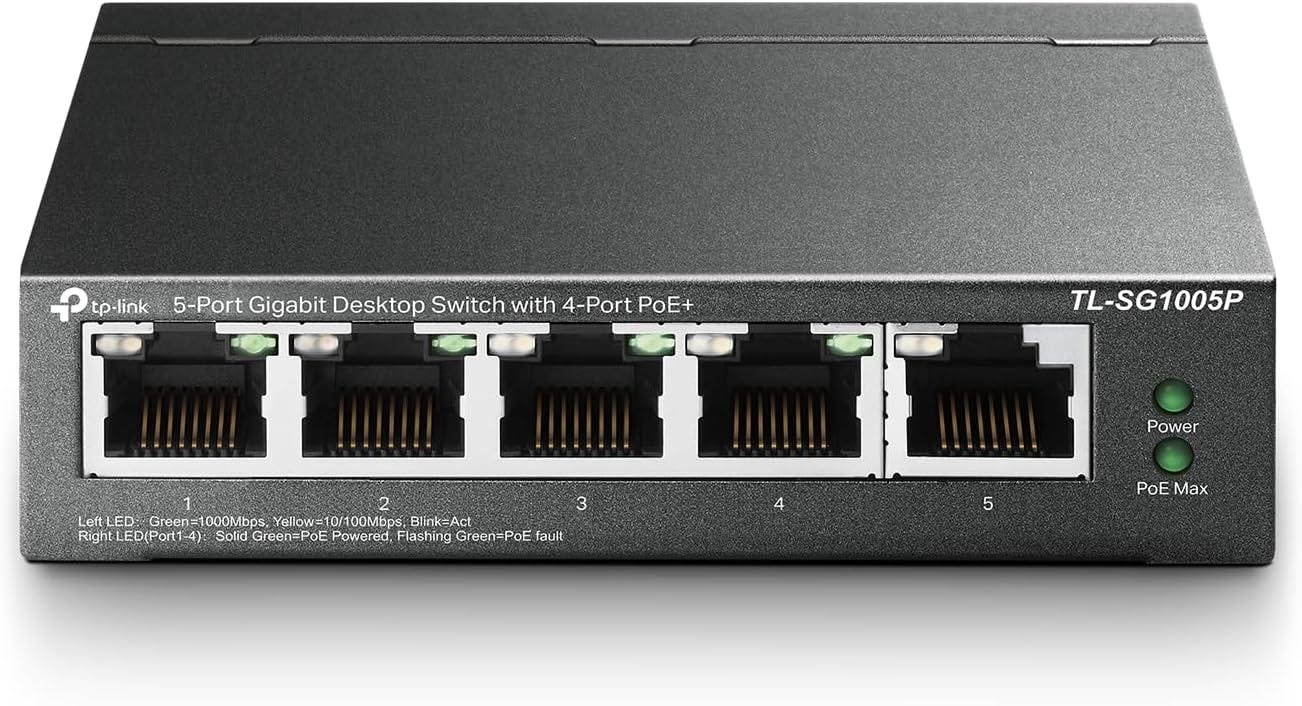
This is my go-to recommendation for residential setups where you only have a few cameras.TP-Link TL-SG1005P is unmanaged, meaning you don’t need an IT degree to set it up.
Why I use it: The reliability for the form factor is incredible. It is fanless, so it runs completely silent. This matters if you are keeping your equipment in a living room or a home office. It usually comes with four PoE ports and one standard uplink port that goes to your router or NVR.
The Specs and Experience: The metal casing feels premium compared to the plastic junk you often find in big box stores. It supports the 802.3af standard, which covers most static bullet or dome cameras. I have had one of these running in my own garage for three years, powering three 4MP cameras, and I have never had to reboot it once. It handles traffic priority well, meaning if your network gets busy, it prioritizes the video feed so your recording doesn’t skip.
What Users Are Saying: I was talking to a client, Mark, who installed this himself. He mentioned that the “Priority Mode” was a game changer for him because his son’s gaming used to lag his security feed. After switching to this unit, the video streams remained smooth even when the network was under load.
2. NETGEAR 8-Port Gigabit PoE+ Switch (GS308PP)

If you are running more power-hungry cameras, specifically ones with Pan-Tilt-Zoom (PTZ) features or long-range night vision, you need **NETGEAR 8-Port Gigabit PoE**. This Netgear unit is a beast.
Why I use it: It offers a flexible mounting system and a high power budget. What I love about this specific Netgear line is the ruggedness. I have installed these in non-climate-controlled warehouses where it gets hot in the summer, and they just keep chugging along.
The Specs and Experience: This gives you eight Gigabit ports, all capable of PoE. The total power budget is generous, usually enough to power 8 standard cameras or 4 very high-powered ones. It has LED indicators on each port that actually tell you if you are drawing PoE power or just data, which helps with troubleshooting. If a light isn’t amber, I know immediately I have a power draw issue or a bad cable.
What Users Are Saying: A small business owner named Sarah told me she chose this for her bakery because of the mounting options. She was able to mount it under the counter easily. Her review was that it felt “industrial” and she liked that the power brick wasn’t bigger than the switch itself, which is a common annoyance with other brands.
3. Ubiquiti UniFi Switch Lite 8 PoE

This is for the prosumers and the tech enthusiasts. If you already have Ubiquiti Wi-Fi access points, this is a no-brainer. Even if you don’t, it is a fantastic managed switch.
Why I use it: The interface. Ubiquiti has the best software in the game. I can pull up an app on my phone and see exactly how many watts Port 3 is using. I can restart a frozen camera from the beach.
The Specs and Experience: It looks like a piece of modern art, clean and white. It offers four PoE+ ports and four standard ports. It is fully managed, so you can set up VLANs to keep your cameras completely isolated from the rest of your network for security [Link to Guide on Network Security]. The main selling point here is visibility. You aren’t guessing what is happening with your network; you can see it.
What Users Are Saying: My colleague James, who runs a tech blog, swears by this unit. He notes that the integration with the UniFi ecosystem makes it addictive. Once you buy the switch, you end up buying their router and cameras just to fill up the dashboard. It is a very sticky ecosystem, but the performance backs it up.
Critical Advice on Cabling
You can buy the best switch in the world, but if you use bad cabling, you will have issues.
Copper Clad Aluminum (CCA): Avoid this at all costs. This is cheap cable where the wire is aluminum dipped in copper. It is terrible for PoE. It heats up, has higher resistance, and can cause voltage drops.
Pure Copper: Always buy solid copper Cat5e or Cat6 cables. It is slightly more expensive but ensures your cameras get the power they need.
Also, remember the 100-meter rule. Ethernet can only send data and power reliable up to 100 meters (328 feet). If you need to go further, you will need a PoE extender.
Frequently Asked Questions
Does a PoE switch replace my NVR? No. The switch connects the cameras to the network. You still need something to record the footage, whether that is a Network Video Recorder (NVR), a PC running Blue Iris, or a cloud subscription. The switch just acts as the intersection and the power plant.
Can I plug a non-PoE device into a PoE switch? Yes, absolutely. Modern PoE switches are smart. They perform a “handshake” when you plug a device in. If the device (like a laptop or printer) does not ask for power, the switch will not send it. It will just send data like a normal switch. You won’t fry your laptop.
Do I need Gigabit speed for cameras? For most cameras, 10/100 Mbps is actually enough speed. Video streams are compressed. However, I always recommend buying Gigabit switches (1000 Mbps) anyway. It prevents bottlenecks if you are moving large files across the network, and it future-proofs your setup for higher resolution 4K or 8K cameras down the road.
Why are my cameras turning off at night? This is the classic power budget issue I mentioned earlier. Infrared (IR) lights on cameras turn on when it gets dark to see at night. These lights consume significantly more power than the camera does during the day. If your switch is maxed out, the extra demand from the IR lights will crash the system. Check your switch’s total wattage rating.
Bottom Line
Don’t overcomplicate it. If you are setting up a home system with 3 or 4 cameras, grab the TP-Link unmanaged switch. It is inexpensive and reliable
Affiliate Disclaimer: This guide is reader-supported. If you buy through the links on this page, I may earn a small commission at no extra cost to you. I only recommend gear I’ve actually used and trust. Thanks for your support!
메타데이터
- post_id
- 76dc00ce533f
- slug
- poe-switches-for-ip-cameras-76dc00ce533f
- url
- https://medium.com/@LewisHenry/poe-switches-for-ip-cameras-76dc00ce533f
- canonical_url
- https://medium.com/@LewisHenry/poe-switches-for-ip-cameras-76dc00ce533f
- author_url
- https://medium.com/@LewisHenry
- status
- ok
- fetched_at
- 2026-07-22 15:10:16