Architecting Autonomous Deep Research Agents with LangGraph
TLDR::Build an AI research agent using LangGraph, OpenAI and Tavily. Learn to automate web research and generate reports.
Architecting Autonomous Deep Research Agents with LangGraph
TLDR::Build an AI research agent using LangGraph, OpenAI and Tavily. Learn to automate web research and generate reports.
You know how when you have a question, you just type it into Google and read the answer? That works for simple stuff. What’s the capital of Montana? Who directed The Matrix? But there is another kind of question. Questions that don’t have a single answer sitting on some webpage.
What are the latest developments in AI agents? When might nuclear fusion become commercially viable? These questions require research. Real research, like what academics do. But academics are slow. They take months. And they are expensive.
There is a gap here. A gap between a Google search and a PhD dissertation. Most people who need real research just hire someone. Or they do it themselves and waste a day.
I think we can fill this gap with AI. Not by making the AI smarter. By making it work like a human researcher.
How a Human Researches
A human researcher does not just ask one question. They break the big question into smaller ones. They search for each piece separately. They read what they find. They think about contradictions. They write up what they learned.
The steps look like this:
- Plan sub-queries that cover different angles of the topic
- Search for each sub-query using multiple sources
- Read and extract key information from each result
- Identify patterns, contradictions, and gaps
- Synthesize findings into a coherent analysis
- Write a structured report with sources
The AI can do each of these steps. The trick is wiring them together.
LangGraph as the Wiring
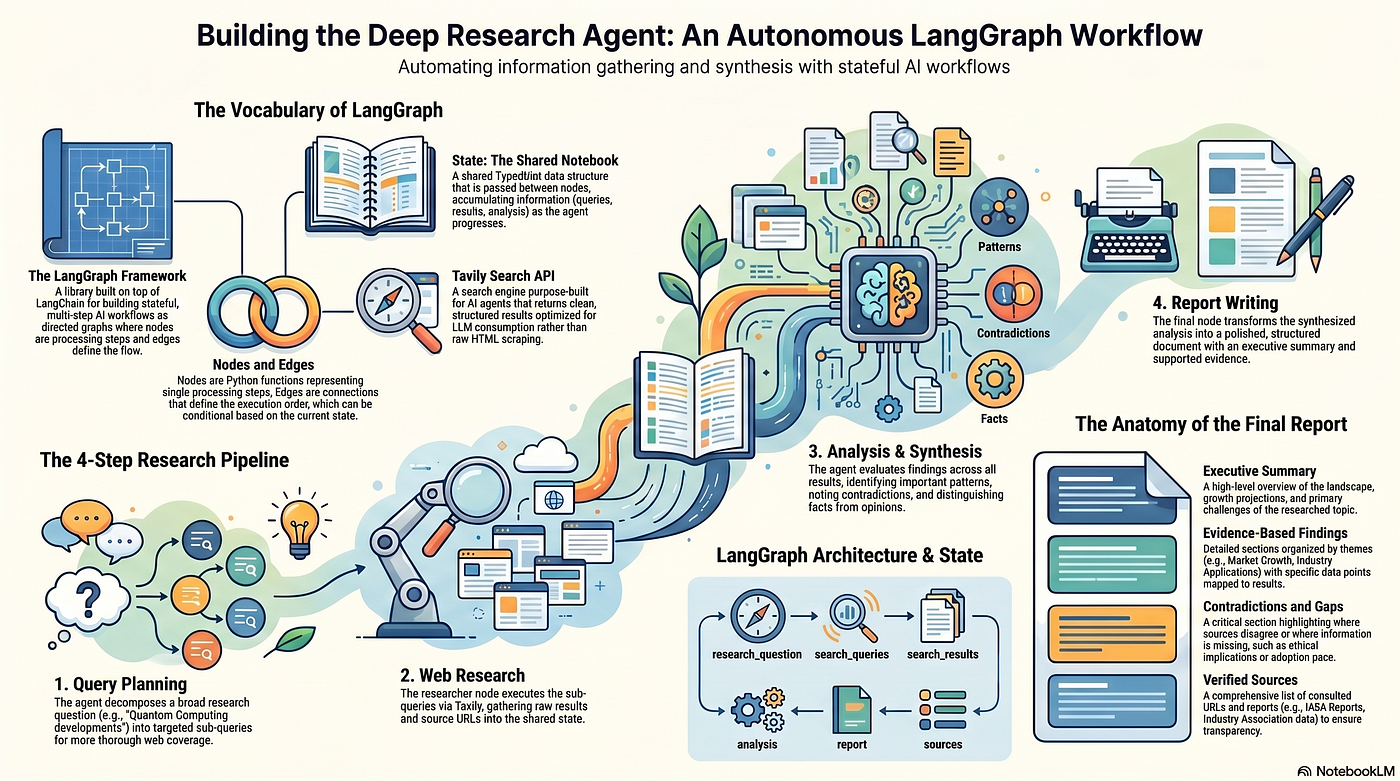
LangGraph is a tool for this wiring. It lets you build a graph where each node is a step.
The state flows through the graph like water through pipes. Each node reads from the state, does one thing, and writes back to the state.
The State Schema
The state tracks everything the agent knows:
The State Object
The state for a research agent has six fields:
- The original question
- The generated sub-queries
- The raw search results
- The analysis
- The final report
- The list of sources
Each node populates the field that comes next. It’s like an assembly line for research.
The Four Nodes
1. Plan Queries
This node takes the broad research question and breaks it into 3–5 specific sub-queries. For a question about nuclear fusion, it might generate:
- “current advancements in nuclear fusion energy research 2023”
- “timeline for commercial viability of nuclear fusion energy”
- “major challenges facing nuclear fusion energy development”
- “recent breakthroughs in nuclear fusion technology”
2. Research
This node executes each sub-query using the Tavily search API. It collects up to 3 results per query, extracts the title, URL, and content, and stores everything in the state.
3. Analyze
This node takes all the raw search results and asks the LLM to synthesize them. The prompt instructs the model to:
- Identify key findings and themes across sources
- Group related information together
- Note contradictions or gaps
- Distinguish facts from opinions
- Highlight the most important insights
4. Write Report
This node transforms the analysis into a polished report with a specific structure:
- Title and executive summary
- Key findings organized by theme
- Conclusion with implications
- Sources list
Why a Graph Instead of a Loop
This is different from a chatbot. A chatbot has memory, but it is just feeding the conversation back into itself. It does not have a pipeline. It does not have specialized steps.
A graph gives you structure. And structure matters when you are doing real work.
The execution flow is simple:
START → Plan Queries → Research → Analyze → Write Report → ENDEach node does one thing well. The planner does not search. The researcher does not analyze. The analyzer does not write. This separation makes debugging easier. When something goes wrong, you know which node failed.
What the Agent Produced
I tested this agent on two questions.
Question 1: AI Agents
Research question: “What are the latest developments in AI agents, and how are they being used in real-world applications?”
The agent generated 5 sub-queries and collected 15 results from 15 unique sources. The final report was 6500 characters and included:
- Market growth projections (expected to reach $50.31 billion by 2030)
- Applications across healthcare, customer service, and logistics
- Challenges including implementation gaps and governance needs
- A complete list of sources
Question 2: Nuclear Fusion
Research question: “What is the current state of nuclear fusion energy research and when might it become commercially viable?”
The agent generated 5 sub-queries and collected 15 results. The report highlighted:
- Advancements in plasma confinement (EAST reactor, KSTAR maintaining plasma for over 100 seconds)
- Technical barriers including material durability under neutron bombardment
- Conflicting timelines (optimistic projections of mid-2030s vs. historical skepticism)
- The need for both technical and socioeconomic considerations
The Pattern Beyond Research
The report was not perfect. Some sources were just blog posts. The analysis sometimes stated the obvious. But it took about 30 seconds and cost a few cents. A human would take hours and cost dollars.
This is the pattern. Find something that humans do slowly and mechanically. Break it into steps. Automate each step. Wire them together. The result will not be as good as the best human. But it will be good enough for most purposes. And it will be fast and cheap.
The same approach works for other tasks:
- Customer support triage
- Document processing
- Code review
- Legal document analysis
- Competitive intelligence gathering
The Key Insight
Before LLMs, a step in a pipeline had to be deterministic. You wrote code that did exactly one thing. Now a step can be an LLM call that reads a prompt and makes a judgment.
The research agent’s planner node does not have a hardcoded algorithm for generating sub-queries. It just asks an LLM to do it. The analyzer node does not have rules for finding contradictions. It just asks an LLM to look for them.
This is the power of LLMs. They handle ambiguity.
The graph provides the structure. The LLMs provide the intelligence. Together they produce something neither could do alone.
What You Should Do
If you are building with LLMs, stop chaining calls inside a single loop. That is the naive approach. Build a graph instead.
- Define your state as a TypedDict
- Write small functions that transform the state
- Add each function as a node
- Add edges to define the flow
- Compile and run
And if you need to answer a question that does not have a single answer, build a research agent. It takes an afternoon. It costs nothing to run. And it works.
Further Reading:
9 Tips for Building Claude Agent Skills
4 Tips to Never Hit Claude Code’s Session Limit Again
AI Agent Skills Explained Simply
**🛠️ Learn How to Write Effective Agent Skills**
What is LLM Wiki Pattern? Persistent Knowledge with LLM Wikis
🐍 LiteLLM PyPI Supply Chain Attack Detection and Remediation
🐍The LiteLLM PyPI Supply Chain Attack What You Need to Know
What is Moltbook? The Social Network for Ai Agents
🦞(Clawdbot) MoltBot OpenClaw Local System Architecture
Agent Skills Vs MCP Vs Prompts Vs Projects Vs Subagents :A Comparative Analysis
⌨️ What is LLM Prompt Engineering?
📈 Prompt Engineering Made Simple with the RISEN Framework
💡 What is Prompt Engineering ?:: RAG, CoT, ReAct & DSP Explained
🔗What is Model Context Protocol? (MCP) Architecture Overview
How DRIFT Stops Prompt Injection Attacks in LLM Agents
Implementing Secure by Design Principles in AI System Development
How to Build an Enterprise AI Compliance Program
🕵️How to Monitor AI Models in Production
⚙️AWS Well-Architected Best Practices
Building Cloud Agnostic Resilience After AWS Outage
Building Secure AI Agents with Data Governance
Part 1: Building AI Data Governance
**Part 2: Building The HR Agent**
Part 3: Evaluating and Deploying the HR Analytics Agent
How to Build a Secure Enterprise Sovereign AI Factory with Open-Source.
Build AI Customer Support Agents with PydanticAI
⚙️LangChain vs. LangGraph: A Comparative Analysis
🔗What is Model Context Protocol? (MCP) Architecture Overview
🚀DeepSeek R1 Explained: Chain of Thought, Reinforcement Learning, and Model Distillation
💻What is Ollama: Running Large Language Models Locally
Model Context Protocol (MCP) vs. APIs: The New Standard for AI Integration
🧠Understanding LLM Context Windows: Tokens, Attention, and Challenges
How DRIFT Stops Prompt Injection Attacks in LLM Agents
Frequently Asked Questions (FAQ)
1. What is LangGraph and why should I use it for research agents? LangGraph is a framework for building stateful, multi-step AI workflows as directed graphs. It’s ideal for research agents because it maintains shared state across processing steps, allows flexible conditional flows, and enables modular design where each node (planning, searching, analyzing, writing) operates independently.
2. How does the agent handle API rate limits? The basic implementation processes searches sequentially. For production, you can implement retry logic with exponential backoff, use queuing systems, or add delays between requests. The free Tavily tier allows 1000 searches per month.
3. Can I use a different search API instead of Tavily?
Yes. Replace the research() node's Tavily calls with any search API (Google Custom Search, Bing, SerpAPI). You'll need to adapt the response parsing to match your API's result structure while maintaining the same state fields.
4. What’s the cost to run this research agent? GPT-4o-mini costs approximately 0.15permillioninputtokensand0.15permillioninputtokensand0.60 per million output tokens. A typical research report (5 queries, 3 results each) uses about 15,000–20,000 tokens total, costing roughly $0.01–0.03 per report. Tavily’s free tier provides 1000 searches monthly.
5. How accurate are the generated research reports? Reports are based on actual web search results, so accuracy depends on search result quality. The analysis node identifies contradictions and distinguishes facts from opinions. For critical applications, implement human review or add source credibility scoring.
6. How long does a complete research cycle take? With sequential searching (5 queries × 3 results), execution takes 30–60 seconds depending on API response times. Most time is spent on Tavily searches (3–5 seconds each) and LLM calls (5–10 seconds for analysis and report writing).
7. Can the agent research any topic? Yes, the agent can research any topic accessible via web search. Performance varies by topic availability. Niche or highly technical topics may yield fewer quality results. The planner node adapts queries to maximize relevant findings.
8. How do I add more nodes to the pipeline?
Use workflow.add_node("node_name", function_name) then add edges to position it. For example, add a "fact_check" node after "analyze" using workflow.add_edge("analyze", "fact_check") and workflow.add_edge("fact_check", "write_report").
9. What happens if Tavily returns no results?
The current implementation returns empty results. Enhance by adding conditional edges that check len(search_results) and route to a "refine_queries" node that generates alternative search terms when results are insufficient.
10. Can I run searches in parallel for faster execution?
Yes. Modify the research() node to use asyncio or concurrent.futures.ThreadPoolExecutor to execute Tavily searches simultaneously. This can reduce total search time from 15-25 seconds to 5-8 seconds.
메타데이터
- post_id
- 76f487ded907
- slug
- architecting-autonomous-deep-research-agents-with-langgraph-76f487ded907
- url
- https://medium.com/@tahirbalarabe2/architecting-autonomous-deep-research-agents-with-langgraph-76f487ded907
- canonical_url
- https://medium.com/@tahirbalarabe2/architecting-autonomous-deep-research-agents-with-langgraph-76f487ded907
- author_url
- https://medium.com/@tahirbalarabe2
- status
- ok
- fetched_at
- 2026-07-07 03:40:08