How I Built a Claude AI Agent Without Writing Any Code
No code, no babysitting — just an interview, a build sheet, and a live agent grading its own work.
How I Built a Claude AI Agent Without Writing Any Code
No code, no babysitting — just an interview, a build sheet, and a live agent grading its own work.
How I built an AI Agent without writing any code
Non-members, please read here.
I cloned a repo, typed one slash command, and twenty minutes later I had a live agent running on my own Anthropic account — emailing me a daily to-do digest, on a schedule, without me writing a single line of its logic.
I didn’t build it. Claude did. I just answered questions.
That’s the part that actually surprised me. Not that AI can write code — I’ve been doing that for years. It’s that I never once opened the agent’s source to check what it was doing. I described what I wanted, it scoped it, wrote it, deployed it to my own account, graded its own output, and scheduled it to keep running. My job was to clone a repo, create an API key, and answer an interview.
What this actually is
It’s called [launch-your-agent](https://github.com/anthropics/launch-your-agent) — a pair of Claude Code skills from Anthropic's own GitHub. Not a product, not a wrapped SaaS tool. A skill folder you run inside Claude Code.
git clone <repo>
cd <repo>
claude
Then inside Claude Code:
/launch-your-agentThe target isn’t “any AI agent anywhere.” It’s specifically Claude Managed Agents — Anthropic’s own hosted runtime for agents. So this skill is really a guided pipeline from idea to a live thing on that specific surface.
I tested it with something deliberately small
I didn’t have a real client problem ready, so I gave it something low-stakes: a simple to-do app that emails me a daily digest. Not impressive. That was the point — I wanted to see the mechanics, not prove a use case.
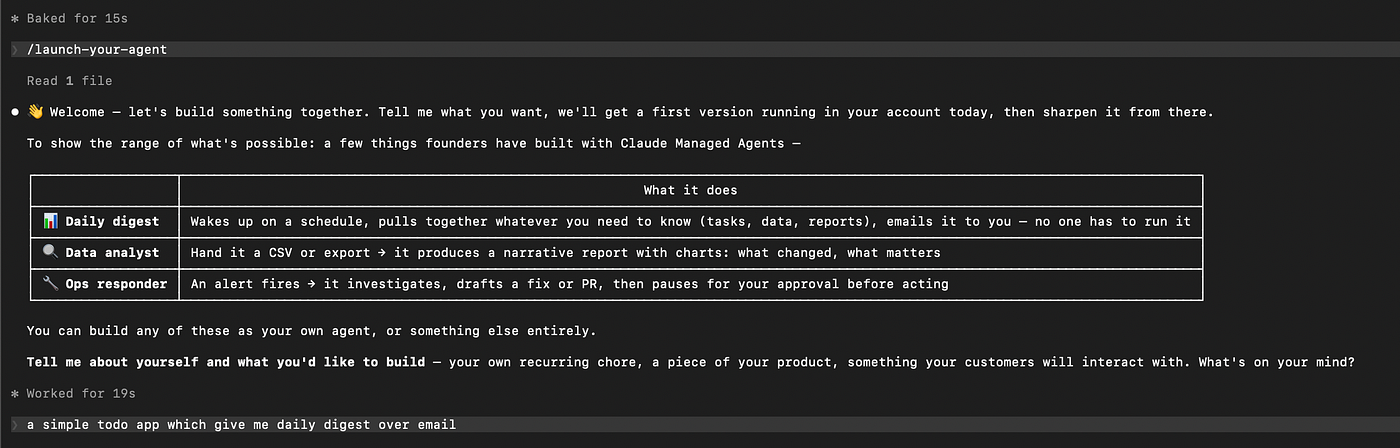
/launch-your-agent
The skill interviews you first. It’s not a form. It’s closer to a discovery call — it asks what you want, narrows scope, and pushes back when your answer’s too vague to build from. By the end of that conversation it had a clear v0: a to-do list, a daily check, an email out.
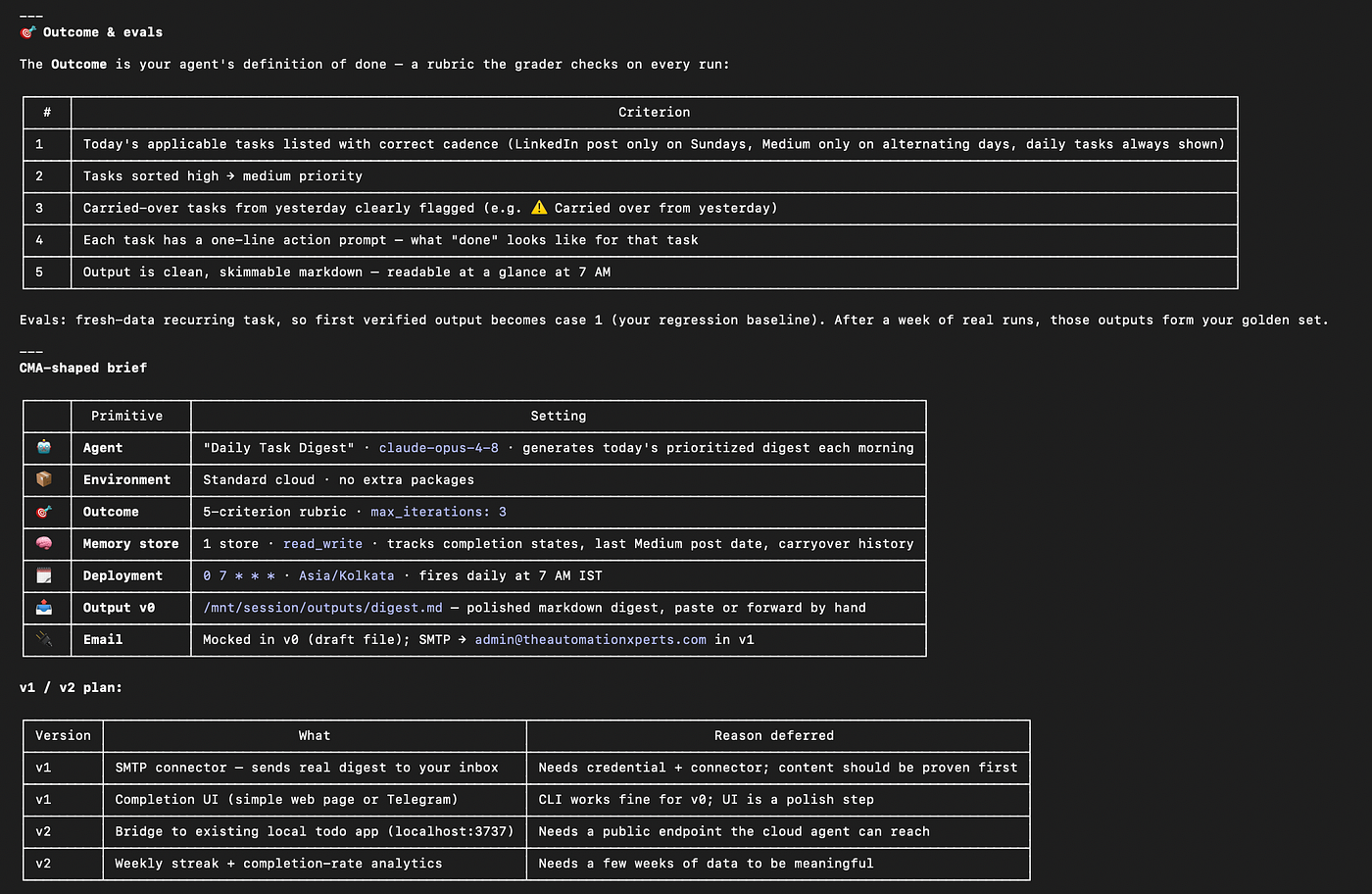
the complete plan for the AI agent
Then it writes what it calls a build sheet — a real spec, not a paragraph of intent — and from there it stages and launches the agent, building a UI for the user.
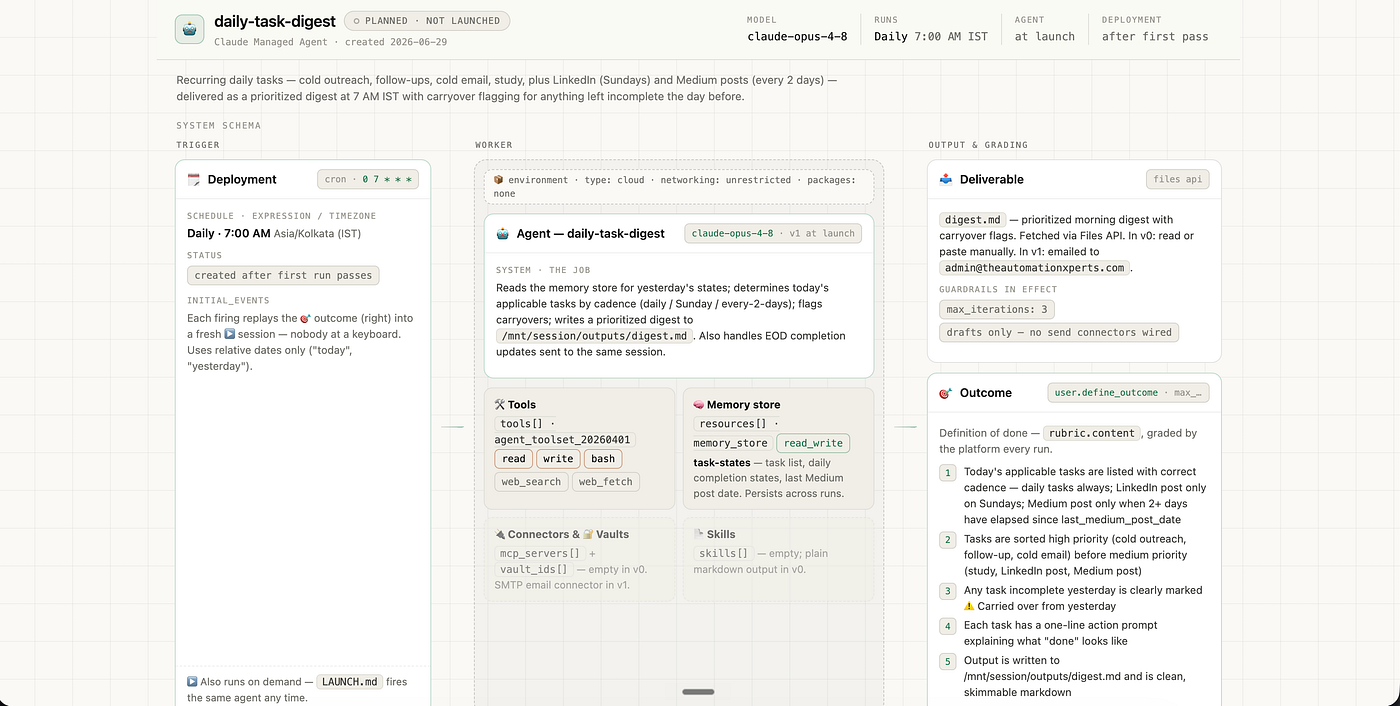
the complete UI plan for the AI agent
The part that made me stop and actually pay attention
After it launched the agent, it graded its own output.
Not “looks good!” — an actual evaluation pass against criteria tied to what I’d described as done. It ran the agent and checked whether the digest email matched what I’d asked for.
I’ve used a lot of automation tools that stop at “it’s deployed.” This one stopped at “it’s deployed, and here’s whether the digest actually matches what you asked for” — and it flagged a spot where it didn’t, before I had to find that out myself the next morning.
After grading, it scheduled the agent to run on its own — no cron job I had to configure, no separate scheduling tool.
What I walked away with
A my-agent folder sitting locally with the build sheet, the exact API calls it made, a launch script I could re-run, an eval scaffold for future grading, and a file called NEXT-DIRECTIONS.md — basically Claude's own notes on what v1 and v2 could look like if I wanted to take this further.
There’s also a companion skill, /wrap-up, that you can run any time after — it regenerates an overview of what you've built and tells you what to upgrade next. I haven't needed it yet since my agent's still doing its one small job, but it's there for when this stops being a toy.
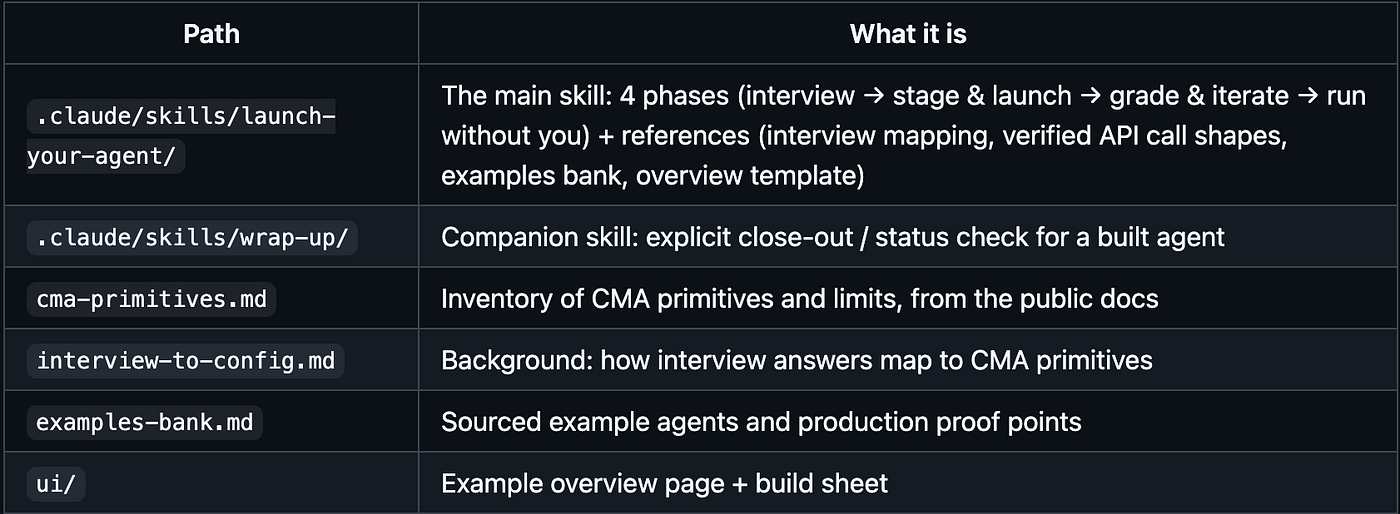
Repo layout for launch-your-agent
Where this actually sits
It’s not a no-code tool. You still clone a repo and touch a terminal. But you never write the agent’s logic, and you never manually wire up grading or scheduling — both of which are usually the parts that quietly eat a weekend.
For a real client build I wouldn’t trust the first pass blind — I’d still want to read the build sheet line by line before calling it done. But going from “I have an idea” to a graded, scheduled agent without writing its logic myself is closer to working as advertised than I expected.

This story is published on Generative AI. Connect with us on LinkedIn and follow Zeniteq to stay in the loop with the latest AI stories.
Subscribe to our newsletter and YouTube channel to stay updated with the latest news and updates on generative AI. Let’s shape the future of AI together!

메타데이터
- post_id
- 7741fefc0c12
- slug
- how-i-built-a-claude-ai-agent-without-writing-any-code-7741fefc0c12
- url
- https://generativeai.pub/how-i-built-a-claude-ai-agent-without-writing-any-code-7741fefc0c12
- canonical_url
- https://generativeai.pub/how-i-built-a-claude-ai-agent-without-writing-any-code-7741fefc0c12
- author_url
- https://medium.com/@ruqaiya.beguwala
- status
- ok
- fetched_at
- 2026-07-11 07:22:59