OpenAI Realtime Voice Agent Cost Workflow: How Developers Keep Low-Latency AI Calls Affordable
A voice agent can feel magical in a demo and painfully expensive in production. The hard part is not only making it answer quickly. The…
OpenAI Realtime Voice Agent Cost Workflow: How Developers Keep Low-Latency AI Calls Affordable

OpenAI Realtime Voice Agent Cost Workflow
A voice agent can feel magical in a demo and painfully expensive in production. The hard part is not only making it answer quickly. The hard part is making every second of audio, every tool call, every retry, and every silence period worth paying for.
OpenAI’s Realtime API gives developers a cleaner path to low-latency speech-to-speech systems than the old chain of speech recognition, LLM reasoning, and text-to-speech services. Recent Realtime model updates, including stronger and smaller realtime variants, make voice agents more practical for support, onboarding, sales assistance, tutoring, internal operations, and hands-free workflows. But practical does not mean cheap by default.
This guide is for builders who want voice agents that are fast, useful, and financially sane. We will walk through a cost-aware workflow for OpenAI Realtime voice agents: how to choose the right model, shape sessions, reduce waste, control tool use, handle latency tradeoffs, and measure whether calls are creating real value.
Why Realtime Voice Agents Create a New Cost Problem
Text chat cost is already easy to underestimate. Voice makes the problem sharper because cost is tied to time, audio tokens, output length, interruptions, silence handling, and tool execution. A user who types one sentence may spend a few hundred tokens. A user who talks for five minutes can create a much larger stream of input, output, and context.
The common mistake is treating a voice agent like a chatbot with a microphone. That mental model breaks down quickly. A production voice agent needs to listen continuously, detect turns, respond with natural timing, recover from interruptions, call tools, and often keep enough context to sound coherent. Each layer can add cost if it is not designed intentionally.
For developers and AI automation builders, the practical question is not “Can this model talk?” The better question is: “Which parts of this conversation deserve expensive reasoning, which parts need fast lightweight handling, and which parts should never happen at all?”
What the OpenAI Realtime API Changes
Traditional voice stacks usually look like this:
- Capture audio from the user.
- Send audio to a speech-to-text service.
- Send the transcript to an LLM.
- Send the answer to a text-to-speech service.
- Stream audio back to the user.
That stack works, but it can add delay, glue code, error points, and duplicated context. A realtime speech-to-speech model can simplify the flow by handling conversational audio more directly and supporting tool use inside the interaction. The newer Realtime models also aim to improve things developers care about in production: interruption behavior, noisy audio handling, alphanumeric recognition, latency, and cost-efficient mini-model choices.
That does not remove architecture decisions. It moves them closer to the conversation loop. You still need to decide when to start a session, what instructions to include, how much context to keep, when tools are allowed, what to log, and when to escalate to a human or a slower workflow.
The Cost-Aware Voice Agent Architecture
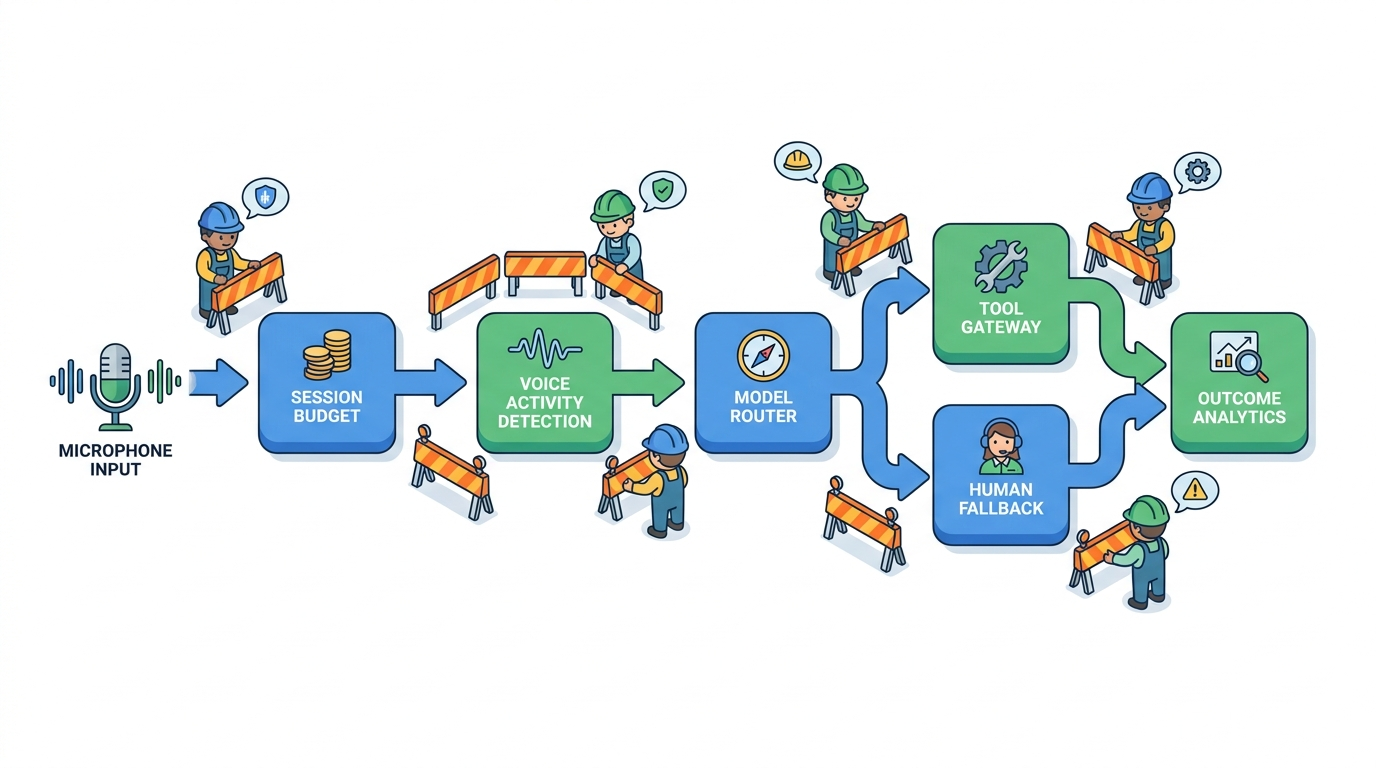
A useful OpenAI Realtime voice agent should be designed as a controlled workflow, not an always-on talking box. The architecture can be simple, but it needs clear boundaries.
A practical pattern looks like this:
- Client audio layer: Captures microphone input, streams audio, handles playback, and supports interruption.
- Session broker: Creates short-lived Realtime sessions and applies per-user policy.
- Conversation budget layer: Tracks duration, model choice, tool calls, context growth, and retry count.
- Tool gateway: Exposes only the actions the voice agent needs for the current task.
- Human fallback path: Routes high-risk, high-cost, or low-confidence calls away from the agent.
- Observability layer: Records latency, user interruption rate, completion outcome, cost, and quality signals.
The important idea is separation. The voice model should not own your business logic, credentials, customer data policy, or cost policy. It should participate in a workflow controlled by your application.
Choose the Model by Job, Not by Excitement
Realtime model choice should start with the job being done. A voice agent that collects appointment preferences does not need the same reasoning depth as an agent that explains a complex billing dispute. A product onboarding agent does not need the same tool power as an internal operations agent that can update records.
Use the stronger realtime model when the task needs deeper reasoning, more careful instruction following, more complex tool use, or higher tolerance for messy conversation. Use the smaller realtime model when the task is short, repetitive, routing-focused, or cost sensitive.
Good candidates for a smaller realtime model include:
- Lead qualification with fixed questions.
- Appointment scheduling intake.
- Basic product onboarding.
- Status checks.
- Simple internal helpdesk routing.
- Voice forms where answers are structured.
Good candidates for a stronger realtime model include:
- Multi-step troubleshooting.
- Complex account questions.
- Workflows with several tool calls.
- Conversational tutoring.
- Calls that require careful policy interpretation.
- Scenarios where the agent must reason across long context.
The expensive mistake is making the strongest model the default for every call. Start with a task map. Then route by task complexity, user value, and failure risk.
Design the Session Budget Before You Write Prompts
A voice agent budget is not only a monthly spend cap. It is a per-session operating rule. Before writing the perfect system prompt, define what a normal session is allowed to consume.
Set limits for:
- Maximum call duration before the agent summarizes and offers escalation.
- Maximum number of tool calls per session.
- Maximum number of retries for the same failed action.
- Maximum response length for common answers.
- Maximum silence time before the agent pauses or ends the session.
- Maximum context retained before compaction.
These constraints are not only financial. They improve user experience. Long, wandering calls are expensive and often frustrating. Short, goal-oriented calls are easier to measure and improve.
A Simple Session Budget Object
Your application can keep a budget object outside the model. It can be stored in memory for a live call and written to logs after the session.
{
  "session_id": "voice_abc123",
  "user_tier": "trial",
  "task_type": "appointment_intake",
  "model_route": "realtime_mini",
  "max_duration_seconds": 240,
  "max_tool_calls": 3,
  "max_retries_per_tool": 1,
  "max_silence_seconds": 20,
  "requires_human_approval": false,
  "spent_audio_seconds": 0,
  "tool_calls_used": 0,
  "outcome": null
}
The model can be instructed to stay concise, but your application should enforce the real limits. Prompts are helpful. Runtime policy is safer.
Use Voice Activity Detection as a Cost Control
Voice activity detection decides when the system treats audio as speech, silence, or a turn boundary. Poor VAD settings create two common problems. If the agent responds too early, users interrupt it and the call becomes chaotic. If the agent waits too long, the experience feels slow and sessions stretch longer than needed.
For cost control, VAD tuning matters because silence and false starts can waste processing time. The goal is not aggressive cutoff. The goal is confident turn-taking.
Test VAD with real audio, not only clean developer microphones. Use:
- Noisy rooms.
- Mobile earbuds.
- Accents and fast speech.
- Users who pause mid-sentence.
- Users who say “um” while thinking.
- Interruptions while the agent is speaking.
If your target use case is customer support, you also need to test emotional speech. People who are confused or annoyed do not speak like demo videos.
Keep Instructions Short and Operational
Realtime voice agents do not need giant brand manifestos in the system prompt. Long instructions increase context size and can make behavior harder to debug. A good voice prompt is short, operational, and tied to the current task.
Instead of giving the model every policy document, use a layered approach:
- Put stable behavior rules in the session instructions.
- Retrieve only the relevant policy snippet when needed.
- Expose narrow tools for specific actions.
- Use human fallback for edge cases.
A practical instruction block might say:
You are a concise scheduling assistant.
Goal: collect date preference, time preference, timezone, and contact confirmation.
Keep replies under two sentences unless the user asks for detail.
If the user asks about pricing, legal terms, refunds, or account changes, explain that you will route them to a human.
Use the availability_check tool only after you have date, time window, and timezone.
Do not call any booking tool until the user confirms the proposed time.
This style gives the agent a job, a tone, tool rules, and escalation boundaries. It avoids vague instructions like “be helpful” without operational meaning.
Reduce Tool-Call Waste
Tool calls are where voice agents become useful. They are also where they can become expensive, slow, and risky. A voice agent that checks a database after every sentence will feel clumsy and burn unnecessary tokens. A voice agent that waits until it has all required fields will be faster and cheaper.
Use these rules:
- Collect before calling: Do not call a tool until required inputs are present.
- Batch when possible: Prefer one availability lookup with complete constraints over many partial lookups.
- Cache session facts: If the user already confirmed their email, do not ask or look it up again.
- Use read-only tools first: Let the agent inspect options before making changes.
- Require confirmation for writes: Booking, cancellation, payment, and account changes should need explicit user confirmation.
One useful pattern is a tool readiness check. Before a tool is exposed or called, the application verifies that the required fields exist.
function canCheckAvailability(state) {
  return Boolean(
    state.datePreference &&
    state.timeWindow &&
    state.timezone
  );
}
function canBookAppointment(state) {
return Boolean(
state.selectedSlot &&
state.userConfirmedSlot &&
state.contactConfirmed
);
}This keeps the model from improvising with incomplete information. It also makes cost easier to predict because each workflow has a known maximum number of useful tool calls.
Compact Context During Longer Calls
Voice sessions can grow quickly. Every user turn, assistant response, tool result, and correction adds context. If the call lasts long enough, old details may become expensive noise.
Use compaction when the session crosses a threshold. The goal is to keep the facts that matter and remove the transcript bulk that does not.
A compacted voice session summary should include:
- The user’s goal.
- Confirmed facts.
- Open questions.
- Tool calls already made.
- Decisions that require confirmation.
- Escalation triggers already encountered.
Do not compact away uncertainty. If the user sounded unsure, changed their mind, or gave conflicting details, preserve that as a state flag. A wrong summary can be worse than a long transcript.
Route Expensive Reasoning Out of the Live Call
Not every problem should be solved while the user waits on the phone. Live voice is best for interactive clarification, short decisions, and guided workflows. It is not always the best place for deep analysis.
When a request needs heavy reasoning, use a two-step workflow:
- The voice agent gathers the question, constraints, and permission to follow up.
- A background workflow handles the deeper analysis and returns a summary later.
This is especially useful for complex support cases, legal or financial interpretation, data-heavy account reviews, long document analysis, and workflows that need approval. It keeps the live call short while still helping the user.
The voice response can be simple: “I can collect the details now and send this to the review workflow. That will be more accurate than trying to solve it live. Is that okay?”
Use Fallbacks Without Hiding Failure
Fallbacks are not only for outages. They are part of cost and reliability design. A voice agent should know when to downgrade, pause, ask a simpler question, or hand off to a human.
Common fallback triggers include:
- The user repeats the same question three times.
- The agent fails the same tool call twice.
- The call exceeds the normal duration for that task.
- The user asks for a high-risk action.
- The user gives conflicting identity or account information.
- The agent confidence is low after a noisy audio segment.
Do not pretend the agent is omnipotent. Users trust systems that fail clearly. A good fallback says what happened and what will happen next.
Measure Cost Per Completed Workflow
Cost per minute is useful, but it is not enough. A short failed call is still waste. A longer call that resolves a high-value issue may be worth it. The metric that matters is cost per accepted outcome.
Track these events for every session:
- Session started.
- First response latency.
- User interruption count.
- Tool calls attempted.
- Tool calls succeeded.
- Fallback triggered.
- Human handoff requested.
- Task completed.
- User accepted outcome.
- Estimated session cost.
Then calculate:
cost_per_completed_workflow = total_voice_agent_cost / completed_workflows
cost_per_accepted_workflow = total_voice_agent_cost / accepted_outcomes
handoff_rate = human_handoffs / total_sessions
retry_waste_rate = repeated_failed_tool_calls / total_tool_calls
The last two metrics are often more useful than raw model spend. High handoff rate may mean the agent is handling the wrong tasks. High retry waste may mean the tool schema, prompt, or data layer is broken.
Build a Quality Gate for Voice Agents
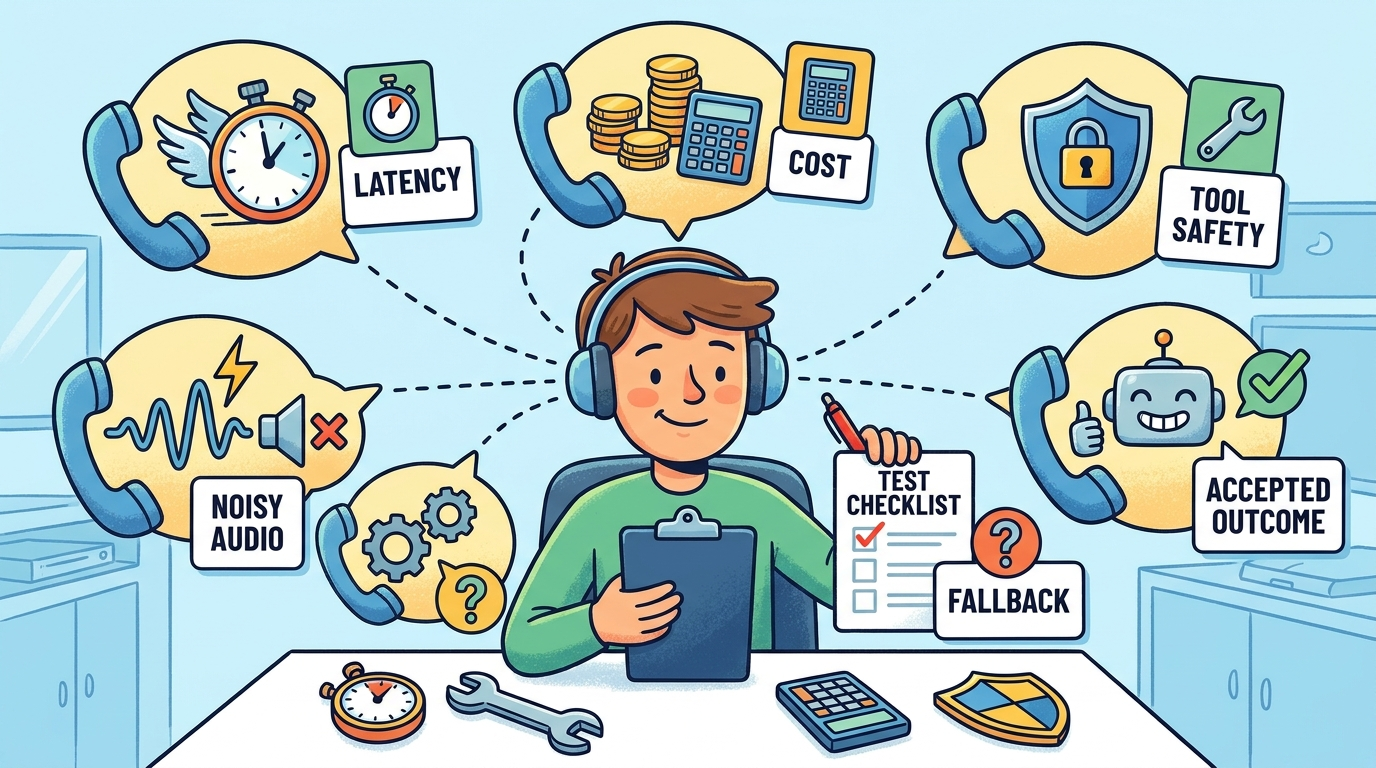
Before a voice agent goes live, test more than “Can it answer?” A cost-aware quality gate should test speed, correctness, task completion, and spend.
Create a small eval set with realistic calls:
- Happy path calls where the user gives clean answers.
- Messy calls where the user changes their mind.
- Noisy calls where the transcript is imperfect.
- Boundary calls where the user asks for a restricted action.
- Long calls where context compaction must happen.
- Tool failure calls where fallback should trigger.
For each test, score:
- Did the agent complete the right task?
- Did it avoid unauthorized tool calls?
- Did it ask for confirmation before write actions?
- Was the first response fast enough?
- Did it stay concise?
- Was the estimated cost within budget?
- Would a user understand what happened?
A voice agent that passes quality but fails budget is not production-ready. A voice agent that passes budget but frustrates users is also not production-ready. You need both.
Common Mistakes That Make Voice Agents Expensive
Letting Calls Drift
Open-ended conversation feels impressive in demos. In production, drift raises cost and reduces completion rate. Give the agent a task, a stop condition, and a summary path.
Exposing Too Many Tools
A voice agent with ten tools needs more reasoning than an agent with two focused tools. Tool overload increases latency, mistakes, and cost. Expose tools by workflow state, not by global availability.
Ignoring Silence
Silence handling affects both user trust and spend. The agent should not panic during normal pauses, but it should not keep a session alive forever. Use polite check-ins and clear timeout behavior.
Measuring Usage Instead of Outcomes
High minutes do not prove success. High token use does not prove value. Track whether the agent solved the problem, avoided handoff, and created an accepted outcome.
A Practical Implementation Checklist
Use this checklist before moving an OpenAI Realtime voice agent from prototype to production:
- Define one primary workflow for the first launch.
- Choose the default model based on task complexity, not hype.
- Create a per-session budget for duration, tools, retries, and context.
- Write concise task-specific instructions.
- Expose only the tools needed for the current workflow state.
- Require user confirmation before write actions.
- Test voice activity detection with real audio conditions.
- Compact context during long calls.
- Route deep reasoning to background workflows when possible.
- Track cost per accepted outcome.
- Create eval calls for happy paths, messy paths, noisy paths, and restricted paths.
- Add human fallback for high-risk or repeated-failure cases.
The Balanced Take
OpenAI’s Realtime API makes voice agents easier to build, but the builders who win will not be the ones who connect a microphone and hope. They will be the ones who treat voice as a production workflow with budgets, state, tools, fallbacks, and measurements.
The strongest voice agents are not the ones that talk the most. They are the ones that know when to listen, when to answer briefly, when to call a tool, when to stop, and when to hand the problem to a safer path.
If you remember one rule, make it this: optimize for cost per useful outcome, not cost per minute alone. That single shift changes how you design prompts, sessions, tools, evals, and product analytics.
FAQ
What is an OpenAI Realtime voice agent?
An OpenAI Realtime voice agent is an application that uses OpenAI’s realtime audio capabilities to hold low-latency spoken conversations. It can listen, respond with speech, handle interruptions, and in some workflows call tools or APIs while the user is still in a live conversation.
How do developers reduce Realtime voice agent cost?
Developers can reduce cost by using the right model for the task, limiting session duration, tuning voice activity detection, keeping prompts short, compacting context, reducing unnecessary tool calls, routing complex reasoning to background workflows, and tracking cost per accepted outcome.
When should I use a smaller realtime model?
Use a smaller realtime model for short, repetitive, structured, or routing-focused tasks. Examples include appointment intake, basic onboarding, status checks, and simple voice forms. Use stronger models for complex reasoning, multi-step troubleshooting, or tool-heavy workflows.
Are voice agents more expensive than text chatbots?
They can be, because voice agents process audio over time and often need low-latency output, turn detection, and longer live sessions. The exact cost depends on model choice, call length, context size, audio handling, and tool use. Measuring cost per completed workflow gives a clearer view than comparing raw minutes or tokens.
Should a voice agent call tools during a live conversation?
Yes, when tool calls are necessary for the user’s goal. But tools should be narrow, state-aware, and controlled by your application. Read-only tools are safer early in the workflow. Write actions such as booking, canceling, paying, or changing account data should require explicit confirmation.
What metrics matter most for production voice agents?
Important metrics include first response latency, interruption rate, average session duration, tool-call success rate, fallback rate, human handoff rate, task completion rate, accepted outcome rate, estimated session cost, and cost per accepted workflow.
What is the biggest mistake when building Realtime voice agents?
The biggest mistake is treating the voice agent as an open-ended chatbot instead of a controlled workflow. Without budgets, tool rules, fallback paths, and outcome metrics, a voice agent can become expensive, slow, and hard to trust.
메타데이터
- post_id
- 77d4f6a76fe1
- slug
- openai-realtime-voice-agent-cost-workflow-how-developers-keep-low-latency-ai-calls-affordable-77d4f6a76fe1
- url
- https://medium.com/toward-next-ai/openai-realtime-voice-agent-cost-workflow-how-developers-keep-low-latency-ai-calls-affordable-77d4f6a76fe1
- canonical_url
- https://medium.com/toward-next-ai/openai-realtime-voice-agent-cost-workflow-how-developers-keep-low-latency-ai-calls-affordable-77d4f6a76fe1
- author_url
- https://medium.com/@towardnextai
- status
- ok
- fetched_at
- 2026-07-09 05:26:43