OpenLineage: The Open Standard for Data Lineage
In the modern data landscape, understanding where your data comes from, how it’s transformed, and where it goes is critical. But with…
OpenLineage: The Open Standard for Data Lineage
In the modern data landscape, understanding where your data comes from, how it’s transformed, and where it goes is critical. But with dozens of different tools and platforms, tracking lineage across your entire data ecosystem has been a nightmare — until now. Enter OpenLineage: an open standard that’s revolutionizing how we track data lineage.
What is OpenLineage?
OpenLineage is an open framework for data lineage collection and analysis. It provides a vendor-neutral, standardized way to capture metadata about data pipelines as they run, making lineage tracking consistent across different tools, platforms, and environments.
Think of OpenLineage as the “common language” for data lineage — just like HTTP is the standard for web communication, OpenLineage is becoming the standard for lineage metadata.
Key Features
- Open Standard: Vendor-neutral specification that works with any tool
- Event-Based: Captures lineage in real-time as jobs execute
- Rich Metadata: Tracks datasets, schemas, transformations, and more
- Extensible: Custom facets allow you to add domain-specific metadata
- Active Community: Backed by major companies and open-source projects
Why OpenLineage Matters
The Problem It Solves
Before OpenLineage, every tool had its own way of tracking lineage:
- Airflow had its own metadata format
- Spark had different tracking mechanisms
- dbt used yet another approach
- Custom scripts? Good luck tracking those!
This fragmentation meant:
- ❌ No unified view of data flows across tools
- ❌ Difficult to debug cross-platform issues
- ❌ Vendor lock-in with proprietary solutions
- ❌ Manual effort to maintain lineage documentation
The OpenLineage Solution
With OpenLineage:
- ✅ One standard works across all your tools
- ✅ Automatic collection as pipelines run
- ✅ Unified lineage graph across your entire data ecosystem
- ✅ Tool flexibility — switch tools without losing lineage
- ✅ Open source — no vendor lock-in
OpenLineage Architecture
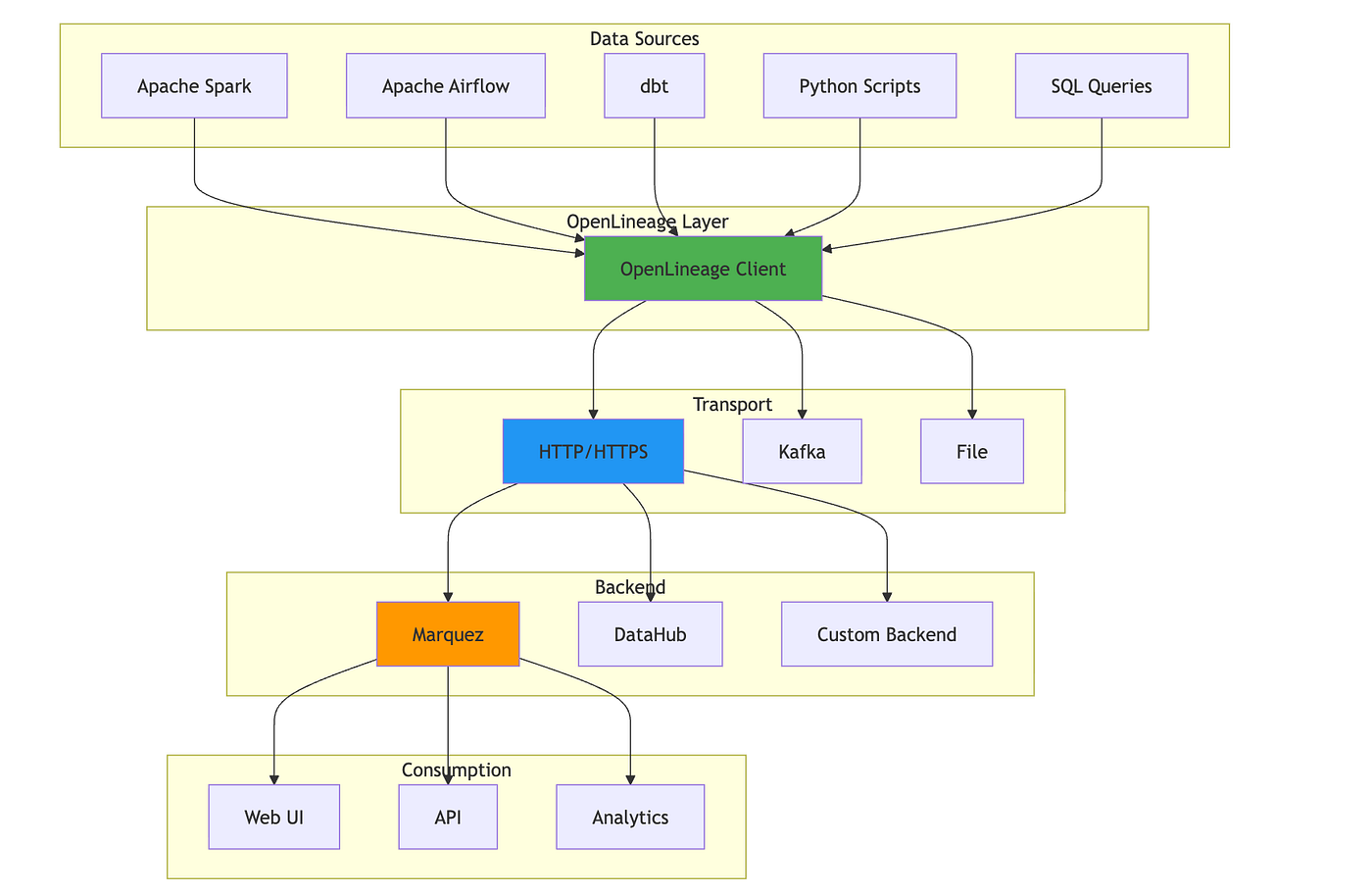
OpenLineage follows a simple but powerful architecture:
Core Components
- OpenLineage Specification
- Defines the event format (JSON schema)
- Specifies core event types: START, COMPLETE, FAIL, RUNNING
- Defines standard facets for common metadata
- OpenLineage Clients
- Libraries for different languages (Python, Java, etc.)
- Integration with popular frameworks (Spark, Airflow, dbt)
- Handle event creation and transmission
- Transport Layer
- HTTP/HTTPS (most common)
- Apache Kafka (for high-volume scenarios)
- File-based (for testing or batch processing)
- Backend Systems
- Store and process lineage events
- Examples: Marquez, DataHub, Egeria
- Provide APIs and UIs for lineage exploration
OpenLineage Event Structure
An OpenLineage event is a JSON document with this structure:
{
  "eventType": "COMPLETE",
  "eventTime": "2026-05-30T12:00:00.000Z",
  "run": {
    "runId": "550e8400-e29b-41d4-a716-446655440000"
  },
  "job": {
    "namespace": "my-data-platform",
    "name": "customer-etl",
    "facets": {
      "documentation": {
        "description": "Daily customer data processing"
      }
    }
  },
  "inputs": [
    {
      "namespace": "my-data-platform",
      "name": "raw_customers",
      "facets": {
        "schema": {
          "fields": [
            {"name": "customer_id", "type": "INTEGER"},
            {"name": "name", "type": "VARCHAR"},
            {"name": "email", "type": "VARCHAR"}
          ]
        }
      }
    }
  ],
  "outputs": [
    {
      "namespace": "my-data-platform",
      "name": "customers_clean",
      "facets": {
        "schema": {
          "fields": [
            {"name": "customer_id", "type": "INTEGER"},
            {"name": "name", "type": "VARCHAR"},
            {"name": "email", "type": "VARCHAR"},
            {"name": "status", "type": "VARCHAR"}
          ]
        },
        "dataQuality": {
          "rowCount": 10000,
          "bytes": 524288
        }
      }
    }
  ],
  "producer": "https://github.com/my-org/my-pipeline",
  "schemaURL": "https://openlineage.io/spec/1-0-5/OpenLineage.json"
}
Event Types
- START: Job execution begins
- RUNNING: Job is in progress (optional, for long-running jobs)
- COMPLETE: Job finished successfully
- FAIL: Job failed
- ABORT: Job was aborted
Facets: Extensible Metadata
Facets are the key to OpenLineage’s flexibility. They allow you to attach additional metadata to jobs, datasets, and runs:
Standard Facets:
schema: Column definitions and typesdataSource: Where data comes from (database, file, API)documentation: Descriptions and contextdataQuality: Metrics like row counts, null percentagescolumnLineage: Field-level lineage mappingsql: SQL queries executedsourceCode: Links to code repositories
Custom Facets: You can define your own facets for domain-specific needs:
{
  "customMetrics": {
    "processingTime": 45.2,
    "recordsProcessed": 10000,
    "errorRate": 0.001
  }
}
Installing OpenLineage with Docker/Podman
Let’s set up a complete OpenLineage environment using Marquez as the backend.
Prerequisites
- Docker or Podman installed
- curl for testing
- Python 3.7+ (for examples)
Step 1: Create Docker Compose File
Create a docker-compose.yml file:
services:
  # PostgreSQL database for Marquez
  db:
    image: postgres:15
    container_name: marquez-db
    ports:
      - "5432:5432"
    environment:
      - POSTGRES_USER=marquez
      - POSTGRES_PASSWORD=marquez
      - POSTGRES_DB=marquez
    volumes:
      - db-data:/var/lib/postgresql/data
    healthcheck:
      test: ["CMD", "pg_isready", "-U", "marquez"]
      interval: 10s
      timeout: 5s
      retries: 5
# Marquez API server (OpenLineage backend)
  api:
    image: marquezproject/marquez:latest
    container_name: marquez-api
    ports:
      - "5050:5000"  # API port
      - "5001:5001"  # Admin port
    environment:
      - MARQUEZ_PORT=5000
      - MARQUEZ_ADMIN_PORT=5001
      - POSTGRES_HOST=db
      - POSTGRES_PORT=5432
      - POSTGRES_DB=marquez
      - POSTGRES_USER=marquez
      - POSTGRES_PASSWORD=marquez
    depends_on:
      db:
        condition: service_healthy
    healthcheck:
      test: ["CMD", "curl", "-f", "http://localhost:5001/healthcheck"]
      interval: 10s
      timeout: 5s
      retries: 5
  # Marquez Web UI
  web:
    image: marquezproject/marquez-web:latest
    container_name: marquez-web
    ports:
      - "3000:3000"
    environment:
      - MARQUEZ_HOST=api
      - MARQUEZ_PORT=5000
    depends_on:
      api:
        condition: service_healthy
volumes:
  db-data:
Step 2: Start Services
Using Docker:
docker-compose up -dUsing Podman:
podman-compose up -d
# or
podman play kube docker-compose.yml
Step 3: Verify Installation
Check that all services are running:
# Docker
docker ps
# Podman
podman ps
You should see three containers:
marquez-db(PostgreSQL)marquez-api(OpenLineage backend)marquez-web(Web UI)
Test the API:
curl http://localhost:5050/api/v1/namespacesAccess the Web UI:
http://localhost:3000Step 4: Send a Test Event
curl -X POST http://localhost:5050/api/v1/lineage \
  -H 'Content-Type: application/json' \
  -d '{
    "eventType": "COMPLETE",
    "eventTime": "2026-05-30T12:00:00.000Z",
    "run": {
      "runId": "550e8400-e29b-41d4-a716-446655440000"
    },
    "job": {
      "namespace": "test-namespace",
      "name": "test-job"
    },
    "inputs": [{
      "namespace": "test-namespace",
      "name": "input-dataset"
    }],
    "outputs": [{
      "namespace": "test-namespace",
      "name": "output-dataset",
      "facets": {
        "schema": {
          "_producer": "test",
          "_schemaURL": "https://openlineage.io/spec/facets/1-0-0/SchemaDatasetFacet.json",
          "fields": [
            {"name": "id", "type": "INTEGER"},
            {"name": "value", "type": "VARCHAR"}
          ]
        }
      }
    }],
    "producer": "test-producer",
    "schemaURL": "https://openlineage.io/spec/1-0-5/OpenLineage.json"
  }'
View the lineage in the UI at http://localhost:3000 (search for “test-job”).

Python Example: Tracking Lineage
Here’s a simple Python example showing how to track lineage in your data pipelines.
Install Dependencies
pip install requestsSimple Example
import requests
import uuid
from datetime import datetime

# Configuration
MARQUEZ_URL = 'http://localhost:5050'
NAMESPACE = 'python-example'
JOB_NAME = 'data-processor'
def send_lineage_event(event_type, run_id, inputs=None, outputs=None):
    """Send an OpenLineage event to Marquez"""
    event = {
        "eventType": event_type,
        "eventTime": datetime.utcnow().isoformat() + "Z",
        "run": {"runId": run_id},
        "job": {
            "namespace": NAMESPACE,
            "name": JOB_NAME
        },
        "inputs": inputs or [],
        "outputs": outputs or [],
        "producer": "https://github.com/my-org/my-pipeline",
        "schemaURL": "https://openlineage.io/spec/1-0-5/OpenLineage.json"
    }

    response = requests.post(
        f"{MARQUEZ_URL}/api/v1/lineage",
        json=event,
        headers={"Content-Type": "application/json"}
    )
    response.raise_for_status()
# Generate unique run ID
run_id = str(uuid.uuid4())
# Define datasets
input_dataset = {
    "namespace": NAMESPACE,
    "name": "customers.csv"
}
output_dataset = {
    "namespace": NAMESPACE,
    "name": "customers_filtered.csv",
    "facets": {
        "schema": {
            "_producer": "my-pipeline",
            "_schemaURL": "https://openlineage.io/spec/facets/1-0-0/SchemaDatasetFacet.json",
            "fields": [
                {"name": "customer_id", "type": "INTEGER"},
                {"name": "name", "type": "VARCHAR"},
                {"name": "status", "type": "VARCHAR"}
            ]
        }
    }
}
# Send START event
print(f"Starting job run: {run_id}")
send_lineage_event("START", run_id, inputs=[input_dataset])
try:
    # Your data processing here
    print("Processing data...")

    # Send COMPLETE event
    send_lineage_event("COMPLETE", run_id,
                      inputs=[input_dataset],
                      outputs=[output_dataset])
    print("✓ Job completed successfully")

except Exception as e:
    # Send FAIL event on error
    send_lineage_event("FAIL", run_id, inputs=[input_dataset])
    print(f"✗ Job failed: {e}")
    raise
print(f"\nView lineage at: http://localhost:3000")
print(f"Search for: {JOB_NAME}")
This simple example demonstrates the core concepts:
- Generate a unique run ID
- Send START event before processing
- Send COMPLETE event after success
- Send FAIL event on errors
- Include schema information in outputs
Integration with Popular Tools
OpenLineage has native integrations with many popular data tools:
Apache Spark
from pyspark.sql import SparkSession
spark = SparkSession.builder \
    .appName("MyApp") \
    .config("spark.openlineage.transport.type", "http") \
    .config("spark.openlineage.transport.url", "http://localhost:5050") \
    .config("spark.openlineage.namespace", "spark-jobs") \
    .getOrCreate()
# Your Spark code - lineage is tracked automatically!
df = spark.read.csv("input.csv")
df.write.parquet("output.parquet")
Apache Airflow
from airflow import DAG
from airflow.providers.openlineage.extractors import OperatorLineage
# Airflow automatically sends OpenLineage events
# Just configure the connection in airflow.cfg
dbt
# profiles.yml
my_project:
  target: dev
  outputs:
    dev:
      type: postgres
      # ... connection details ...
      openlineage:
        namespace: dbt-project
        transport:
          type: http
          url: http://localhost:5050
More example can be found here:
Best Practices
- Use Meaningful Namespaces: Group related jobs and datasets logically
- Include Schema Information: Always track column-level metadata
- Add Descriptions: Use documentation facets to explain what jobs do
- Track Failures: FAIL events are crucial for debugging
- Use Unique Run IDs: UUID4 is recommended
- Add Custom Facets: Include domain-specific metadata
- Monitor Lineage Quality: Regularly check that events are being captured
Conclusion
OpenLineage is transforming how we track data lineage by providing:
- Standardization across tools and platforms
- Automation of lineage collection
- Flexibility through extensible facets
- Community support and active development
Whether you’re building a new data platform or adding lineage to existing pipelines, OpenLineage provides the foundation you need.
메타데이터
- post_id
- 77e67a5f0488
- slug
- openlineage-the-open-standard-for-data-lineage-77e67a5f0488
- url
- https://medium.com/@Shamimw/openlineage-the-open-standard-for-data-lineage-77e67a5f0488
- canonical_url
- https://medium.com/@Shamimw/openlineage-the-open-standard-for-data-lineage-77e67a5f0488
- author_url
- https://medium.com/@Shamimw
- status
- ok
- fetched_at
- 2026-07-27 13:52:01