Going deeper. How my AI workflow is built under the hood
Following previous posts where I mentioned that I’ve created my perfect AI workflow for my daily work, particularly for development, but it…
Going deeper. How my AI workflow is built under the hood
Following previous posts where I mentioned that I’ve created my perfect AI workflow for my daily work, particularly for development, but it is also useful for any other desktop tasks. If you are interested, you can check them:
- Change after Copilot pricing change
- How Chinese models perform against the hegemony of Claude, GPT, and Gemini
How do you actually use AI in software development without spending a fortune, losing control of the codebase, or constantly fighting the tools?
There is a lot of noise around AI development right now. Every week, there is a new framework, a new “AI engineer”, a new autonomous coding agent, or another viral demo showing an AI building an app in 30 seconds.
Most of those demos are not useful in real projects.
What I wanted was something much more practical:
- A workflow that works with real codebases
- Good code quality
- Multiple specialized agents
- Low operational cost
- Control over models
- Good developer experience
- No vendor lock-in
- Something that could scale over time
After testing many combinations, I ended up building a setup using:
- OpenCode
- Gentle AI
- OpenRouter
- DeepSeek
- Qwen
- GPT
- Claude (only for selective tasks)
- And, probably the most important thing here, the human in the loop
And honestly, this is the first setup that felt production-ready for daily development work.
This article explains everything step by step for developers who are new to AI-assisted development and want to build a serious workflow instead of relying on a single chatbot window.
Understanding the Problem with Most AI Coding Setups
Most developers start with tools like GitHub Copilot or ChatGPT.
Those tools are useful, but eventually you run into limitations:
- The AI loses context
- Large repositories become difficult to manage
- Architectural consistency suffers
- Costs increase quickly
- The same model is used for every task
- There is no orchestration
- No memory between workflows
- No specialization between tasks
The important realization is that software development is not a single task.
Writing code, reviewing architecture, generating tests, exploring repositories, documenting systems, and validating implementations are very different activities.
Using the same model for all of them is inefficient. This is where multi-agent workflows become interesting.
The Core Idea Behind Multi-Agent Development
Instead of having one giant AI assistant doing everything, you split responsibilities into specialized agents.
For example:
- One agent explores the repository
- Another proposes solutions
- Another writes code
- Another validates tests
- Another document's changes
This is similar to how engineering teams work in real life.
Different responsibilities benefit from different types of reasoning and different model strengths.
Some models are extremely good at architectural reasoning but expensive. Others are excellent at generating large amounts of code at a very low cost. Some are fast and efficient for validation or testing.
The goal is to combine them intelligently.
Why I Chose OpenCode
I tested several orchestration approaches before settling on OpenCode. The reason I liked it is simple: It behaves much more like a real engineering tool than a chatbot.
OpenCode gives you:
- Terminal-based workflows
- Model routing
- Provider abstraction
- Tool support
- Agent orchestration
- Repository-aware workflows
- Structured execution flows
Most importantly, it integrates very naturally with external providers through APIs. That means you are not tied to a single AI vendor.
Why OpenRouter Matters
One of the biggest mistakes people make when starting with AI workflows is coupling everything to one provider.
For example:
- only OpenAI
- only Anthropic
- only Gemini
That quickly becomes limiting. OpenRouter solves this problem by acting as a unified gateway to multiple AI providers.
Through a single API key, you can access:
- DeepSeek
- Qwen
- Gemini
- Claude
- GPT models
- Kimi
- Grok
- GLM
- and many others
This gives you enormous flexibility.
You can test models, compare costs, switch providers, and route specific tasks to the most efficient model.
For serious AI workflows, this flexibility becomes extremely valuable.
Why Gentle AI Changed the Workflow Completely
OpenCode already provides orchestration capabilities, but Gentle AI adds something extremely important:
Structured Development Design (SDD) workflows.
Instead of random prompts, you work through defined phases.
The workflow I use looks like this:
- sdd-init
- sdd-explore
- sdd-propose
- sdd-spec
- sdd-design
- sdd-tasks
- sdd-apply
- sdd-verify
- sdd-archive
At first this looked overly complex to me.
After using it for real development work, it started making much more sense.
The key advantage is that every phase has a specific responsibility.
That dramatically improves:
- consistency
- context quality
- output reliability
- token efficiency
Understanding Each SDD Phase
sdd-init
This phase initializes the task. The agent tries to understand:
- the goal
- constraints
- requirements
- project context
This is essentially the planning phase.
sdd-explore
The AI explores the repository.
It searches:
- existing patterns
- dependencies
- architecture
- services
- naming conventions
This phase is extremely important because bad exploration usually leads to bad implementations.
sdd-propose
The system proposes an implementation strategy.
This is where architecture decisions happen:
- service boundaries
- integration approaches
- patterns
- tradeoffs
sdd-spec
The proposal becomes a structured specification.
This can include:
- interfaces
- DTOs
- contracts
- APIs
- workflows
- requirements
sdd-design
The detailed technical design is refined.
This is usually where:
- clean architecture
- modularity
- extensibility
- separation of concerns
become important.
sdd-tasks
The work gets split into smaller actionable tasks.
This helps the implementation agent stay focused and reduces hallucinations.
sdd-apply
This is where actual code gets written.
Most of the token usage usually happens here. The key is that here, the model does not need to do any analysis, just implement what was analyzed, proposed, and designed before, step by step, taking one task at a time (actually, can make multiple tasks at a time, but this is something to explore in another article).
sdd-verify
Tests, validation, and quality checks happen here.
This phase is extremely important because AI-generated code without verification becomes dangerous very quickly. Here, it is mandatory that you also review the code. What did the AI do? How it did it? You must understand the code; otherwise, you will trigger the uncertainty of what it has generated. You must have control over what it has generated.
sdd-archive
The workflow gets summarized and archived.
This improves memory reuse and future context retrieval.
Choosing the Right Models for Each Phase
This was probably the most important discovery during my experiments. The best workflow is usually not based on the “best model”, it is based on the best model distribution. Different models are better at different tasks.
A lot of developers route everything to Claude or GPT-5 because they are considered “top-tier” models.
This works technically. But it becomes extremely expensive very quickly. For medium-sized projects, the quality improvement often does not justify the cost increase.
The Orchestrator Agent
The orchestrator agent is the central coordination layer of the workflow.
Instead of directly generating code, its responsibility is to understand the current development objective, determine which SDD phase should execute next, select the most appropriate model for the task, manage context distribution, and keep the entire workflow consistent from beginning to end.
This agent acts as the decision-making layer between the developer, the repository, the specialized SDD agents, and the underlying LLM providers.
In practice, the orchestrator is responsible for:
- Delegating tasks to specialized agents
- Routing requests to the most cost-effective model
- Maintaining workflow state
- Reusing memory and previous context
- Reducing unnecessary token consumption
- Preventing duplicated exploration and analysis
- Ensuring architectural consistency across phases
- Coordinating retries and validations when outputs fail
Without orchestration, AI workflows tend to become chaotic very quickly.
The same repository gets re-explored multiple times, context windows grow uncontrollably, models receive irrelevant information, and costs increase significantly.
The orchestrator solves this by treating the workflow as a structured engineering pipeline instead of a sequence of disconnected prompts.
One of the most important ideas behind this architecture is that not every task deserves the same model.
For example:
- repository exploration may use Qwen
- implementation may use DeepSeek
- architecture analysis may use Gemini
- difficult reviews may escalate to Claude
The orchestrator makes these routing decisions automatically.
This approach dramatically improves:
- cost efficiency
- response speed
- workflow reliability
- scalability for larger repositories
In many ways, the orchestrator becomes more important than the individual models themselves.
The quality of the workflow depends less on using the “smartest” model everywhere and more on coordinating the right model, at the right phase, with the right context.
The Models I Ended Up Using
After a couple of months and extensive testing, I realized that most of the coding tasks (where you burn the majority of the tokens) can be done not just with Opus 4.7 or GPT-5.5. Once you understand that the responsibility delegation, the context management, the hallucination control, and the orchestration are properly addressed, then you can select smaller/cheaper models to do practically the same as those with 32 billion parameters (please do not be so literal, I know it is not the same, but I guess that if you read this article, you understand my point).
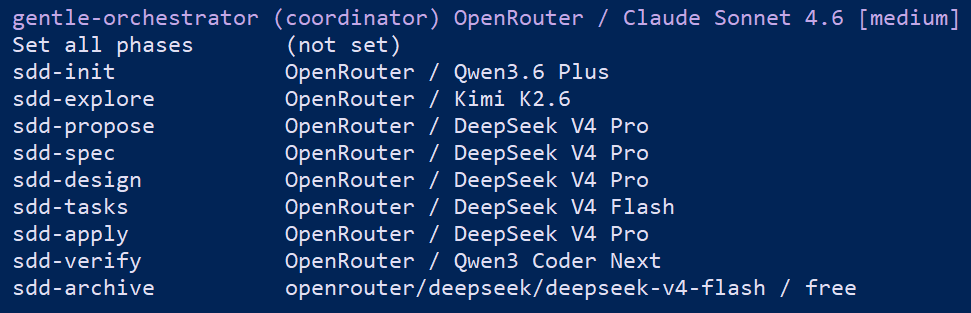
I’ve tested this configuration extensively on medium-sized projects, and I can assure you it works wonderfully. Perhaps for large or very large projects, the configuration shown in the image might need some modification, for example, in the exploration phase, where a Gemini 3.1, a Claude Sonnet 4.6, or a GPT 5.4 could be used.
Note that I haven’t used any super high-resource models here. I chose Sonnet 4.6 for orchestration because of the context window and because it requires significant decision-making capabilities that I don’t want to delegate to a less powerful model. I believe this one should be powerful (spoiler alert: I think using an Opus 4.7 for a medium-sized project is almost always a mistake. It’s very difficult to justify using a bazooka to kill an ant).
Cost Expectations
One of the most common misconceptions about AI development is that advanced workflows are automatically expensive.
That depends entirely on:
- model selection
- context management
- orchestration quality
- memory reuse
- token optimization
In my case, using OpenRouter with intelligent routing produced much better economics than relying exclusively on premium coding assistants.
For medium-heavy daily development usage, realistic costs are often somewhere between:
- $40/month
- and $100/month
depending on:
- repository size
- workflow complexity
- verification intensity
- context usage
The important detail is that the workflow becomes significantly more capable than traditional autocomplete-based tools.
What Actually Matters More Than the Model
This was another important realization. The model itself is only part of the system.
The real improvements came from:
- better orchestration
- specialized agents
- cleaner context
- smaller focused tasks
- memory reuse
- structured workflows
Most failed AI workflows are not failing because the models are bad.
They fail because:
- too much context is sent
- prompts are poorly structured
- responsibilities are mixed
- agents are not specialized
- workflows become chaotic
The architecture around the models matters more than most people expect.
Final Thoughts
I do not think AI is replacing software engineers anytime soon.
But I do think developers who learn how to orchestrate AI systems effectively will work dramatically faster than those who ignore these tools completely.
The important thing is approaching AI development realistically.
Not every problem needs:
- autonomous agents
- 20-model pipelines
- complex orchestration graphs
For most developers, the goal should be:
- reducing repetitive work
- improving implementation speed
- increasing consistency
- automating validation
- keeping architectural quality under control
The combination of OpenCode, Gentle AI, OpenRouter, and specialized model routing was the first setup that genuinely felt practical for real software engineering work instead of just AI experimentation.
And I think workflows like this are going to become increasingly common over the next few years.
메타데이터
- post_id
- 785ee4d27f6f
- slug
- going-deeper-how-my-ai-workflow-is-built-under-the-hood-785ee4d27f6f
- url
- https://medium.com/@guidorusso95/going-deeper-how-my-ai-workflow-is-built-under-the-hood-785ee4d27f6f
- canonical_url
- https://medium.com/@guidorusso95/going-deeper-how-my-ai-workflow-is-built-under-the-hood-785ee4d27f6f
- author_url
- https://medium.com/@guidorusso95
- status
- ok
- fetched_at
- 2026-06-09 15:37:30





