nftables - High-performance NAT & Filtering
Nftables is the modern packet filtering and classification framework in the Linux kernel.
nftables - High-performance NAT & Filtering
Nftables is the modern packet filtering and classification framework in the Linux kernel.
**nftables** is a netfilter project that aims to replace the existing {ip,ip6,arp,eb}tables framework. It provides a new packet filtering framework, a new user-space utility (nft), and a compatibility layer for {ip,ip6}tables. It uses the existing hooks, connection tracking system, user-space queueing component, and logging subsystem of Netfilter.

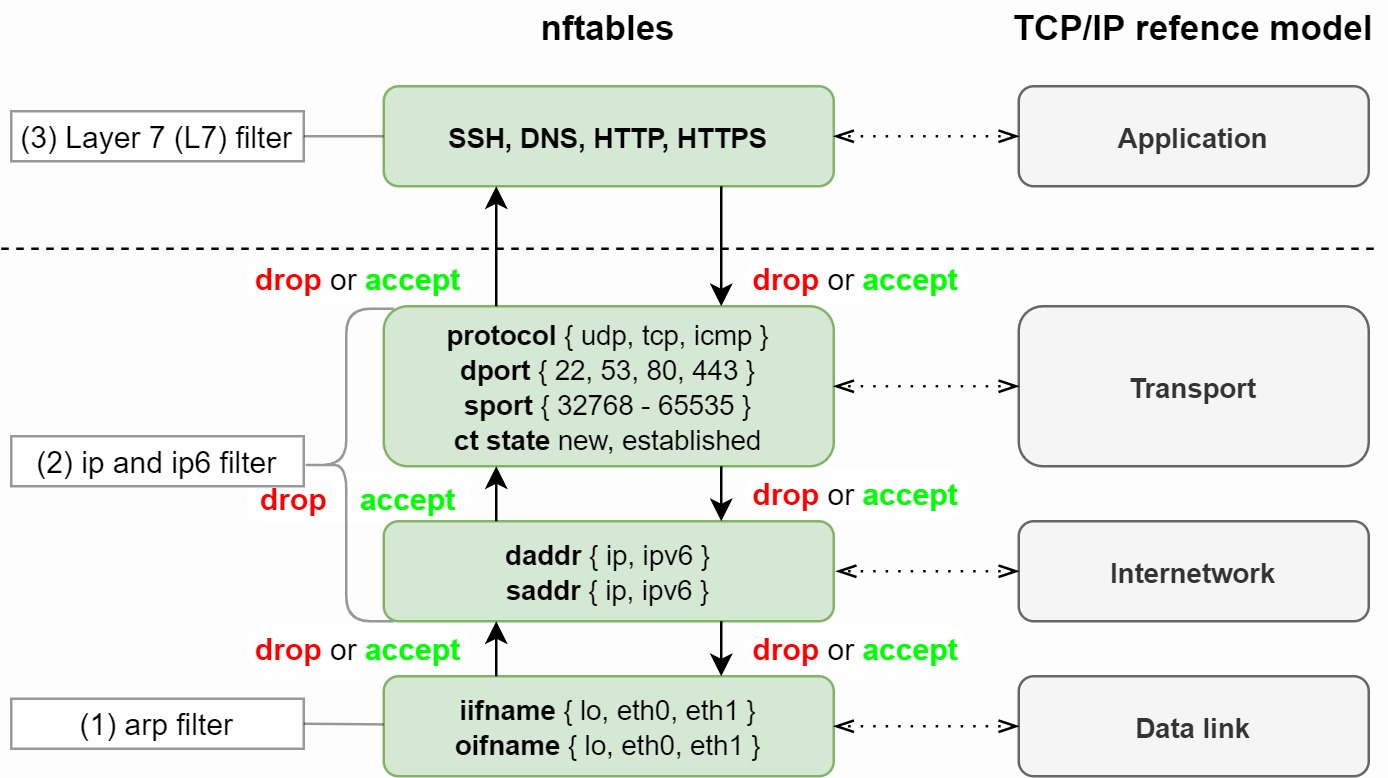
https://cryptsus.com/blog/nftables-tcpip-model.jpg
It consists of three main components: a kernel implementation, the libnl netlink communication, and the nftables user-space front-end. The kernel provides a netlink configuration interface and runtime rule-set evaluation; libnl contains the low-level functions for communicating with the kernel; and the nftables front-end is what the user interacts with via nft.
Install the utilities:
# Installing Process
sudo apt update
sudo apt install -y nftables

# Enable the nfta
sudo systemctl enable nftables
sudo systemctl start nftables

# Check the nft version
nft --version

# Check the rules
nft list ruleset
Here, the default ruleset
table inet filter {
    chain input {
        type filter hook input priority filter;
        policy accept;
    }

    chain forward {
        type filter hook forward priority filter;
        policy accept;
    }

    chain output {
        type filter hook output priority filter;
        policy accept;
    }
}
This means:
input→ incoming trafficforward→ routed trafficoutput→ outgoing trafficpolicy accept→ allow everything
What is nftables?
nftables is the modern Linux packet filtering and firewall framework. It replaces older systems like:
iptablesip6tablesarptablesebtables
It works together with the Linux kernel’s netfilter subsystem.
Key Features of nftables (why it’s important)
- Single unified tool (
nft) instead of multiple binaries - Atomic rule updates (no half-applied firewall rules)
- Better performance with sets, maps, and concatenations
- Cleaner syntax compared to iptables
- Easier automation (JSON output support)
Install nftables on Ubuntu
sudo apt update
sudo apt install nftables -y
Enable and start the service:
sudo systemctl enable nftables
sudo systemctl start nftables
Check status:
sudo systemctl status nftablesnft Command and Example’s
Enter nft command line
nft -i
nft> list ruleset
Create a nft script
flush ruleset

table ip filter {
    chain input {
      type filter hook_input priority filter; policy accept; tcp dport 22 drop
      tcp dport 22 accept
    }
}
Apply the nft script
nft -f input.nftnftables Firewall Configuration
Edit the main config file:
sudo nano /etc/nftables.confExample secure firewall configuration:
#!/usr/sbin/nft -f

flush ruleset

table inet filter {

    chain input {
        type filter hook input priority 0;
        policy drop;

        # Allow localhost
        iif lo accept

        # Allow established connections
        ct state established,related accept

        # Allow ICMP (ping)
        ip protocol icmp accept
        ip6 nexthdr ipv6-icmp accept

        # Allow SSH
        tcp dport 22 accept

        # Allow HTTP/HTTPS
        tcp dport {80, 443} accept
    }

    chain forward {
        type filter hook forward priority 0;
        policy drop;
    }

    chain output {
        type filter hook output priority 0;
        policy accept;
    }
}
Apply nftables Rules
Load the configuration:
sudo nft -f /etc/nftables.confVerify rules:
sudo nft list rulesetSave Rules Permanently
Ubuntu automatically loads:
/etc/nftables.confDuring boot, if the nftables service is enabled.
Open Additional Ports
Example for PostgreSQL:
tcp dport 5432 acceptExample for Kubernetes API:
tcp dport 6443 acceptExample for NodePort range:
tcp dport 30000-32767 acceptUseful Commands
List all rules:
sudo nft list rulesetFlush all rules:
sudo nft flush rulesetRestart nftables:
sudo systemctl restart nftablesStop nftables:
sudo systemctl stop nftablesExample: Kubernetes Server nftables
#!/usr/sbin/nft -fflush rulesettable inet filter { chain input {
type filter hook input priority 0;
policy drop; iif lo accept
ct state established,related accept # SSH
tcp dport 22 accept # Kubernetes
tcp dport {6443,2379-2380,10250,10257,10259} accept # NodePort
tcp dport 30000-32767 accept # HTTP/HTTPS
tcp dport {80,443} accept # ICMP
ip protocol icmp accept
} chain forward {
type filter hook forward priority 0;
policy accept;
} chain output {
type filter hook output priority 0;
policy accept;
}
}Then apply:
sudo nft -f /etc/nftables.confCheck Open Listening Ports
sudo ss -tulpnBlock traffic by using nftables
You can block traffic in nftables using rules based on:
- IP address
- Port
- Protocol
- Interface
- Country/network range
- Rate limits
- Specific connection states
Block an IP Address
Block a single IP:
ip saddr 192.168.1.100 dropExample inside input chain:
    chain input {
        type filter hook input priority 0;
        policy drop;
ip saddr 192.168.1.100 drop
ct state established,related accept
iif lo accept
tcp dport 22 accept
}Block Multiple IPs
ip saddr {192.168.1.100, 10.0.0.5, 8.8.8.8} dropBlock a Subnet
Block entire CIDR range:
ip saddr 192.168.1.0/24 dropBlock a Port
Block inbound traffic to port 8080:
tcp dport 8080 dropBlock UDP DNS:
udp dport 53 dropBlock Outgoing Traffic
Inside output chain:
ip daddr 8.8.8.8 dropBlock outbound HTTPS:
tcp dport 443 dropBlock by Interface
Block traffic from the interface:
iifname "eth1" dropRate Limit / Anti-DDoS
Allow max 10 SSH connections/minute:
tcp dport 22 ct state new limit rate 10/minute acceptDrop excess:
tcp dport 22 dropBlock Ping (ICMP)
ip protocol icmp dropFor IPv6:
ip6 nexthdr ipv6-icmp dropTemporary Runtime Block
Without editing config:
sudo nft add rule inet filter input ip saddr 1.2.3.4 dropDelete later:
List handles:
sudo nft -a list rulesetDelete by handle:
sudo nft delete rule inet filter input handle 15Recommended Rule Order
nftables processes top → bottom.
Example:
chain input {
    type filter hook input priority 0;
    policy drop;

    # Block bad IPs first
    ip saddr 1.2.3.4 drop

    # Allow established traffic
    ct state established,related accept

    # Allow localhost
    iif lo accept

    # Allow SSH
    tcp dport 22 accept
}
Logging Before Blocking
Useful for debugging:
ip saddr 1.2.3.4 log prefix "BLOCKED-IP: " dropCheck logs:
sudo journalctl -fExample Full Blocklist Configuration
table inet filter {

    set blocked_ips {
        type ipv4_addr
        elements = {
            1.2.3.4,
            5.6.7.8
        }
    }

    chain input {
        type filter hook input priority 0;
        policy drop;

        ip saddr @blocked_ips drop

        ct state established,related accept
        iif lo accept

        tcp dport {22,80,443} accept
    }
}
This is cleaner for managing large blocklists. Apply by using this cmd
sudo nft -f /etc/nftables.confor
sudo systemctl restart nftablesReference
메타데이터
- post_id
- 78e1a42fde65
- slug
- nftables-high-performance-nat-filtering-78e1a42fde65
- url
- https://medium.com/@arn-ob/nftables-high-performance-nat-filtering-78e1a42fde65
- canonical_url
- https://medium.com/@arn-ob/nftables-high-performance-nat-filtering-78e1a42fde65
- author_url
- https://medium.com/@arn-ob
- status
- ok
- fetched_at
- 2026-06-12 10:20:10