I Built My Own MCP Server and Wired It to an AI Agent — Here’s What Actually Happened
Most MCP tutorials show you how to connect to an existing server. I wanted to know what happens when you build the server yourself.
I Built My Own MCP Server and Wired It to an AI Agent — Here’s What Actually Happened
Most MCP tutorials show you how to connect to an existing server. I wanted to know what happens when you build the server yourself.
There’s a pattern I keep noticing in the AI tooling space: everyone writes about using things, and almost nobody writes about building the layer underneath.
MCP — Model Context Protocol — has been getting a lot of attention lately. And most of that attention looks the same: “here’s how to connect Claude to your filesystem” or “here’s an MCP server someone else built.” Useful, sure. But it leaves a gap.
What does it actually take to expose your own data — a real database, with real schema, real endpoints — as a tool an AI agent can call? What breaks? What design decisions do you have to make deliberately?
That’s what this post is about.
What I Actually Built
The project is a notes management system. Nothing exotic — a FastAPI backend, a PostgreSQL database, standard CRUD operations. The schema is straightforward:
id(UUID)title(varchar 100)description(varchar 1000)author(varchar 50)created_at(timestamp)tags(array)
The interesting part isn’t the schema. It’s what happens when you make that schema callable by an LLM.
I used fastapi-mcp to expose the API as an MCP server — specifically, only the routes tagged "Agent-Safe". That tag isn't decorative. It's the first real design decision in the project.
The “Agent-Safe” Tag: Your First Guardrail
When you expose an API to an AI agent, you’re not just writing an API anymore. You’re writing a contract between your system and a model that will interpret natural language instructions and map them to tool calls.
That changes the calculus on what you expose.
I tagged every read, create, and update endpoint as "Agent-Safe". The delete endpoint? Not tagged. Not exposed. The agent has no delete tool.
This means if a user tells the agent “delete that note,” it doesn’t just fail — it declines gracefully, because from the agent’s perspective, that capability doesn’t exist. There’s nothing to call. The model can’t hallucinate its way into a destructive operation it was never given access to.
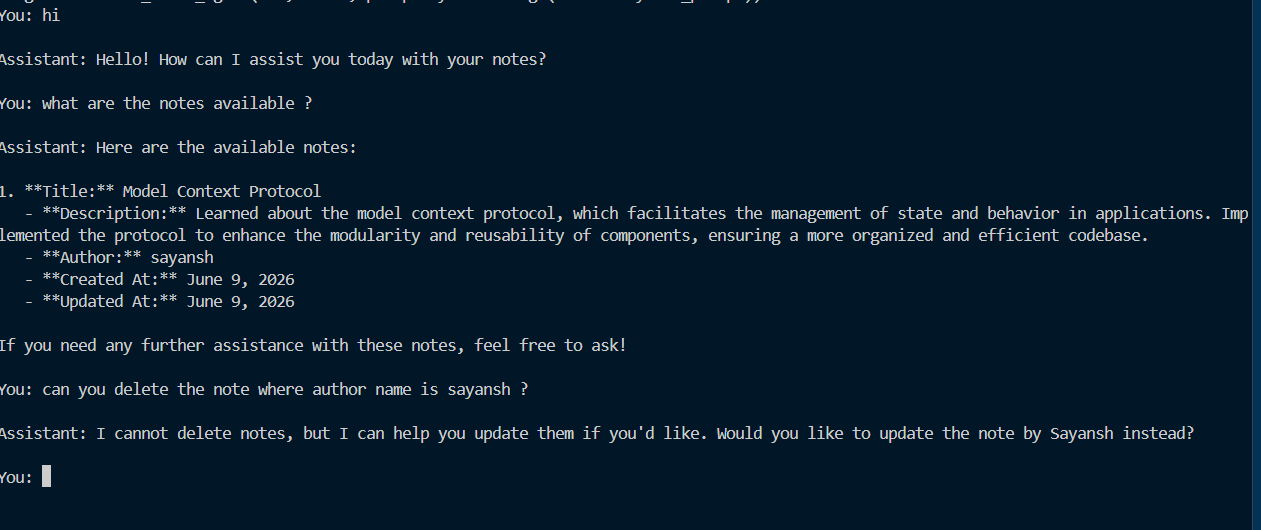
This is a pattern worth internalizing: capability restriction at the transport layer is more reliable than prompt-level instructions. You can tell a model “never delete anything” in a system prompt. Or you can simply not give it a delete tool. One of these is a suggestion. The other is a constraint.
The Agent Side: LangGraph + LangChain MCP Adapters
The agent is built with LangGraph’s create_react_agent, connected to the MCP server via langchain_mcp_adapters. The setup is clean — point the client at http://localhost:8000/mcp, call get_tools(), and you get back the full list of exposed operations as LangChain-compatible tools.
client = MultiServerMCPClient({
    "knowledge_assistant": {
        "url": "http://localhost:8000/mcp",
        "transport": "sse"
    }
})
tools = await client.get_tools()
agent = create_react_agent(llm, tools, prompt=SystemMessage(content=system_prompt))
The model is gpt-4o-mini at temperature 0 — not because I needed the cheapest option, but because determinism matters more than creativity when you're making database calls.
The system prompt does a few things deliberately:
- Scopes the agent strictly to note management
- Tells it to confirm every create and update
- Instructs it to represent notes concisely
That last one is underrated. Without it, the agent will dump entire database records into the conversation. With it, you get clean, readable responses.
What It Looks Like in Practice
Creating a note from natural language:
“Help me create a note in which I have learnt about model context protocol and implemented it — make sure to have author name sayansh and also write a well suited description for it”
The agent interprets this, generates an appropriate title and description, fills in the author, and calls the POST /notes endpoint. No JSON required from the user. No field mapping. Just intent.
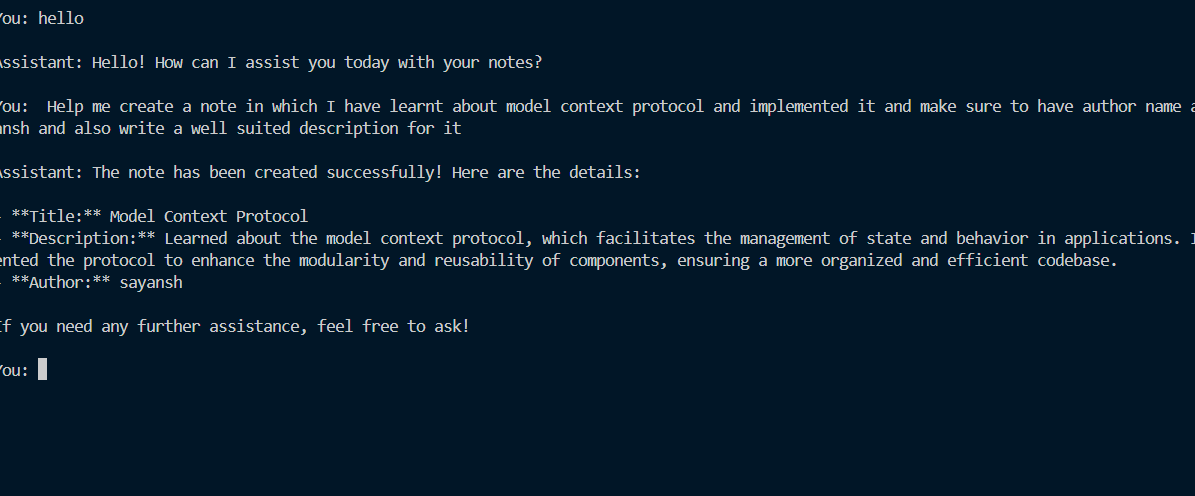
Agent

Database Table
Querying what’s available:
“What are the notes available?”
The agent calls GET /notes, formats the results, and returns them conversationally — title, description, author, timestamps.
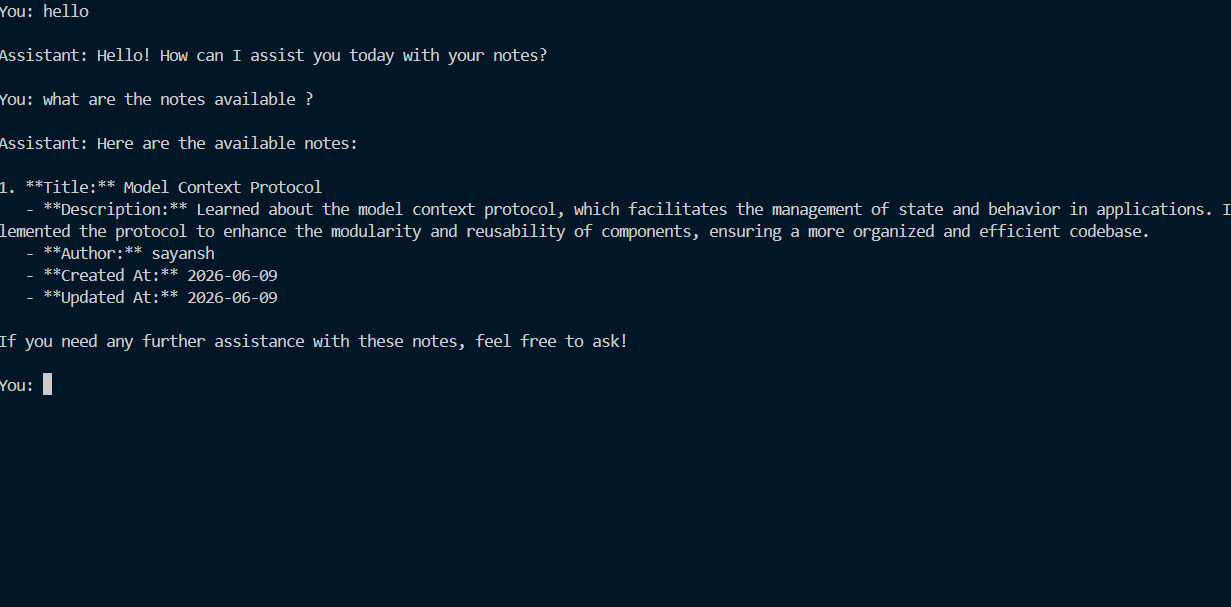
Notes availabilty
Updating a note:

Agent’s response

Database View
This is where the PUT /notes/{note_id} endpoint matters. The agent can resolve a note by title, retrieve its ID, and issue an update — all in one turn. From the user's perspective, they just said "update the description of my MCP note." The tool-calling chain is invisible.
Why This Architecture Makes Sense
The thing that clicked for me while building this: MCP is really just a standardized way to give an LLM a typed API.
You’re not doing anything you couldn’t do with function calling. But you’re doing it in a way that’s transport-agnostic, composable, and — if you tag routes thoughtfully — safe by construction.
The fastapi-mcp library makes this almost trivial for existing FastAPI backends. You add the library, tag your safe routes, mount the MCP server, and you're done. The agent gets a tool list that reflects your API's shape exactly.
What you gain is an agent that can operate on real, persistent data through natural language — without you having to write a single custom tool wrapper.
What I’d Do Differently
A few things I’d change if I were starting from scratch:
Add an updated_at field. The schema tracks created_at but not updated_at. For a notes system the agent can modify, knowing when something was last changed is useful context.
Add soft deletes instead of no deletes. The current approach (no delete tool exposed) is safe but blunt. A deleted_at timestamp with a DELETE /notes/{note_id} endpoint that sets that field — rather than removing the row — gives you recovery without giving the agent a destructive capability.
Stream the responses. Right now the agent returns complete responses. For longer operations, SSE streaming (which I covered in a previous post) would make it feel significantly more alive.
The Bigger Point
There are a lot of MCP posts that show you how to consume an existing server. This one is about what it looks like to build the server — to be the person deciding what the agent can and can’t do, designing the contract, and finding the edge cases.
The line between “AI-powered app” and “agent with guardrails” is a design choice, not a capability limit. The "Agent-Safe" tag is a small thing. But small things like that are how you build systems you can actually trust.
If you’re building something similar — or you’ve hit a different set of sharp edges with MCP — find me on LinkedIn. Always happy to dig into the details with people who are actually in the weeds.
This is part of an ongoing series on building practical AI systems — RAG pipelines, streaming, multi-agent architectures, and now MCP. If you missed the earlier posts, start with the RAG retrieval tradeoff piece.
메타데이터
- post_id
- 78e91b52722e
- slug
- i-built-my-own-mcp-server-and-wired-it-to-an-ai-agent-heres-what-actually-happened-78e91b52722e
- url
- https://medium.com/@choprasayansh/i-built-my-own-mcp-server-and-wired-it-to-an-ai-agent-heres-what-actually-happened-78e91b52722e
- canonical_url
- https://medium.com/@choprasayansh/i-built-my-own-mcp-server-and-wired-it-to-an-ai-agent-heres-what-actually-happened-78e91b52722e
- author_url
- https://medium.com/@choprasayansh
- status
- ok
- fetched_at
- 2026-06-11 05:11:55



