Top CRM software that integrates with QuickBooks Online in 2025
QuickBooks is accounting and bookkeeping software that enables businesses to track their invoices, expenses, orders, projects, payroll…
Top CRM software that integrates with QuickBooks Online in 2025
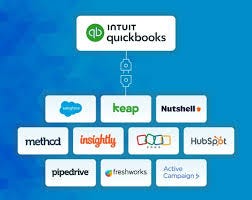
QuickBooks is accounting and bookkeeping software that enables businesses to track their invoices, expenses, orders, projects, payroll, time activity, and payments.
The software helps generate, manage, and share invoices with customers and receive payments.
The software helps manage and receive bills from vendors and pay them.
Why Integrate QuickBooks with a CRM?
A CRM that integrates with QuickBooks makes it easy for businesses to manage customer relationships and track finances.
Customer relationship management tools store all essential information related to prospects or leads and customers in one central database.
Connecting this database with your QuickBooks records can help you access invoices and other related financial information with ease.
Such integration conserves business time in any industry and provides enhanced visibility into the enterprise’s financial position.
1. SalesForce: A Premier CRM Solution
Overview
Salesforce is a premier cloud-based customer relationship management (CRM) platform widely recognized for its extensive capabilities in sales, service, marketing, and analytics.
It provides a comprehensive suite of tools that empower businesses to manage customer relationships effectively, streamline processes, and improve productivity.
Salesforce is designed for scalability, making it suitable for organizations of all sizes.

Features
- Contact & Lead Management: Centralizes customer data to facilitate tracking interactions and managing leads efficiently.
- Sales Automation: Automates repetitive tasks such as follow-ups and lead assignments, enhancing sales team productivity.
- Reporting & Analytics: Offers advanced reporting tools that provide insights into sales performance and customer behavior.
- Marketing Automation: Integrates marketing campaigns with sales processes to enable targeted outreach and engagement.
- AppExchange: A marketplace for third-party applications that can be integrated to extend Salesforce’s functionality.
Pros & Cons of Salesforce

Salesforce QuickBooks Integration:
Salesforce CRM software that integrates with QuickBooks
- Features: Salesforce integrates seamlessly with QuickBooks Online, allowing users to sync customer data and invoices. This integration enables the sales team to generate invoices directly from Salesforce without switching platforms.
- Limitations: Some users may find that advanced financial reporting requires additional tools beyond what Salesforce provides.
Pricing
- Salesforce offers multiple pricing tiers depending on the features required.
- A free trial is available for new users for 30 days.

2. Keap CRM: Empowering Small Businesses
Overview:
Keap (formerly Infusionsoft) is a CRM tailored for small businesses. It combines CRM functionality with powerful marketing automation tools.
It helps businesses manage leads, automate marketing tasks, and enhance customer engagement.
Keep focused on delivering a user-friendly experience while providing robust features designed for growth.

Key Features of Keap CRM
- Contact Management: Organizes customer information in one place for easy access and updates.
- Marketing Automation: Automates email campaigns, follow-ups, and lead nurturing processes to engage customers effectively.
- Sales Pipeline Management: Visualizes the sales process with customizable pipelines that help track leads through various stages.
- E-commerce Integration: Facilitates online sales by integrating with e-commerce platforms for seamless transaction management.
Pros & Cons by softwareadvice

Keap QuickBooks Online Integration:
How Does Keap Integrate with QuickBooks Online?
Keap CRM software that integrates with QuickBooks
- Features: Keep integrates with QuickBooks Online to sync customer data and invoices.Users can manage financial transactions directly from Keap without needing to switch applications.
- Limitations: Some users may find that while basic syncing is effective, more complex financial reporting needs may require additional solutions.
Pricing
- Keap offers tiered pricing plans based on the number of users and features required.
- A free trial is also available for potential customers of 14 days.

3. NutShell CRM: Simplifying Sales and Customer Relationships
Overview
Nutshell is a CRM platform that simplifies your sales and customer relationship processes.
It’s built primarily for small to mid-sized businesses, helping teams manage leads, track sales, and communicate more effectively with customers.
Unlike more complex CRMs, Nutshell focuses on delivering powerful features without overwhelming users with too much complexity.
It’s perfect for businesses that don’t need to spend weeks getting set up but still want access to advanced tools like email automation and detailed reporting.

Key Features of Nutshell CRM
- Contact Management: Keep all your customer information in one place. Every interaction, from emails to notes and call logs, can be tracked in an easy-to-navigate system.
- Sales Pipeline: Visualize your entire sales process with customizable pipelines, making it easier to track where leads are in the buying journey.
- Email Campaigns & Automation: With its drag-and-drop email builder, you can create visually appealing email campaigns and automate follow-ups to save time on repetitive tasks.
- Reporting & Analytics: Generate reports on sales performance, pipelines, and team activities, with the ability to forecast future sales and spot trends
- Team Collaboration: Team members can share notes, assign tasks, and collaborate on deals all in one place, keeping everyone aligned.
- Mobile App: Use the mobile app to track leads, view reports, and manage tasks while on the go ideal for salespeople who are often away from their desks.
Pros & Cons


NutShell QuickBooks Online Integration
Nutshell CRM software that integrates with QuickBooks
- Features: It syncs customer contact information directly from Nutshell to QuickBooks, and you can create and track invoices from CRM.This means your sales team can generate invoices without jumping between systems, streamlining workflows for both sales and accounting teams.
- Limitations: If you need more advanced financial management features beyond invoicing, you might find the integration a bit basic.It’s a solid solution for small businesses, but larger companies might outgrow its capabilities.
Pricing
- Free Trial: Try Nutshell free for 14 days

4. HubSpot: A Comprehensive Solution for Growing Businesses
Overview:
HubSpot is a household name in CRM solutions, known for its robust features and scalability.
Whether you’re a small business just starting or a larger enterprise looking for comprehensive tools, HubSpot delivers.
It’s especially popular for its free version, which offers many features at no cost, and it scales well as your business grows.
The platform covers everything from lead generation to nurturing, sales automation, and marketing campaigns, all under one roof.

Key Features of HubSpot
- Contact & Lead Management: Manage an unlimited number of contacts and companies and keep track of every interaction across multiple channels whether it’s an email, call, or meeting.
- Sales Automation: Automatically assign leads to sales reps, set follow-up reminders, and even use predictive lead scoring to prioritize contacts that are most likely to convert.
- Email Marketing: HubSpot’s email marketing tools allow you to create beautiful campaigns, segment your audience, and track engagement to fine-tune your strategy.
- Reporting Dashboards: With fully customizable dashboards and reports, you can get a clear picture of your sales performance, pipeline health, and team productivity.
- Live Chat & Help Desk: Engage with website visitors through live chat and manage customer inquiries through its help desk feature, keeping everything organized in one place.
- Integrations: HubSpot integrates with a wide array of tools, including QuickBooks, making it easy to sync customer and financial data.
Read the full Blog: https://satvasolutions.com/blog/crm-softwares-that-integrates-with-quickbooks-online
Originally published at https://satvasolutions.com on December 20, 2024.
메타데이터
- post_id
- 7900cdfe4b35
- slug
- top-crm-software-that-integrates-with-quickbooks-online-in-2025-7900cdfe4b35
- url
- https://medium.com/@chintan_satva/top-crm-software-that-integrates-with-quickbooks-online-in-2025-7900cdfe4b35
- canonical_url
- https://medium.com/@chintan_satva/top-crm-software-that-integrates-with-quickbooks-online-in-2025-7900cdfe4b35
- author_url
- https://medium.com/@chintan_satva
- status
- ok
- fetched_at
- 2026-07-27 20:16:54