Part 4: Beyond Passwords — The Passkey Revolution
A Staff-level architecture guide to implementing phishing-resistant authentication using FIDO2, WebAuthn, and the Credential Manager API.
Part 4: Beyond Passwords — The Passkey Revolution
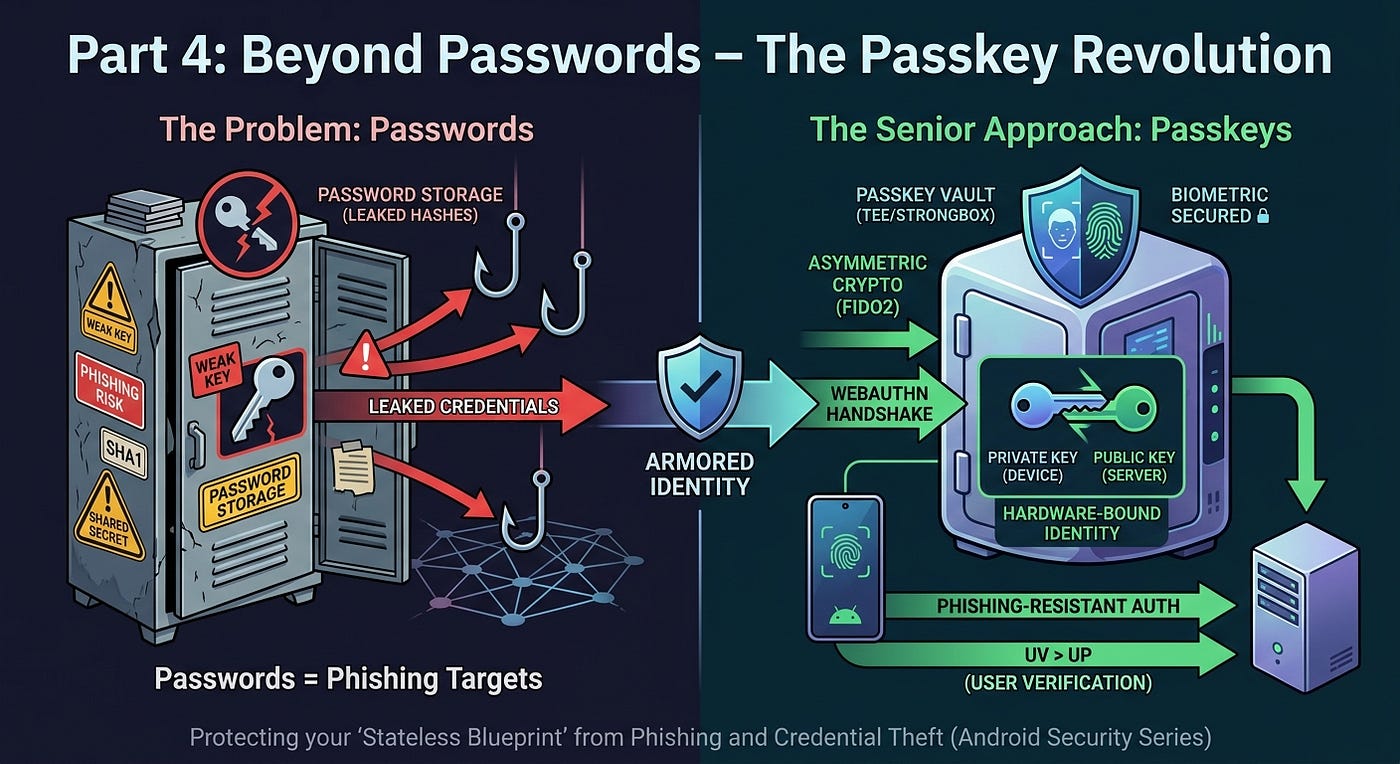
Beyond Passwords — The Passkey Revolution
Not a Medium Member? “Read For Free”
Previous Part: Part 3: The Interceptor Pattern — Mastering Transport & Concurrency
In Part 1, we built the Stateless Blueprint. In Part 2, we secured tokens in the Hardware Vault. In Part 3, we mastered the Transport Layer. But even a bulletproof architecture is vulnerable if the user’s “front door” is left ajar by a weak password.
Today, we eliminate the weakest link in the security chain: The Password.
⚡ TL;DR
- Passwords are “shared secrets” — inherently vulnerable to phishing and breaches.
- Passkeys use asymmetric cryptography (FIDO2/WebAuthn) to provide phishing-resistant authentication.
- Credential Manager API is the unified Android entry point for Passkeys (WebAuthn), Federated Sign-in, and legacy passwords.
- The Shift: Authentication is moving from “what users know” to “what devices prove,” emerging as the dominant long-term path for high-scale applications.
🛑 The Problem: Passwords are a Liability, Not an Asset
Senior Engineers view passwords as “toxic waste.” If you store them, you must protect them; if the user knows them, they can be socially engineered.
🧠 Mental Model: Password vs. Passkey
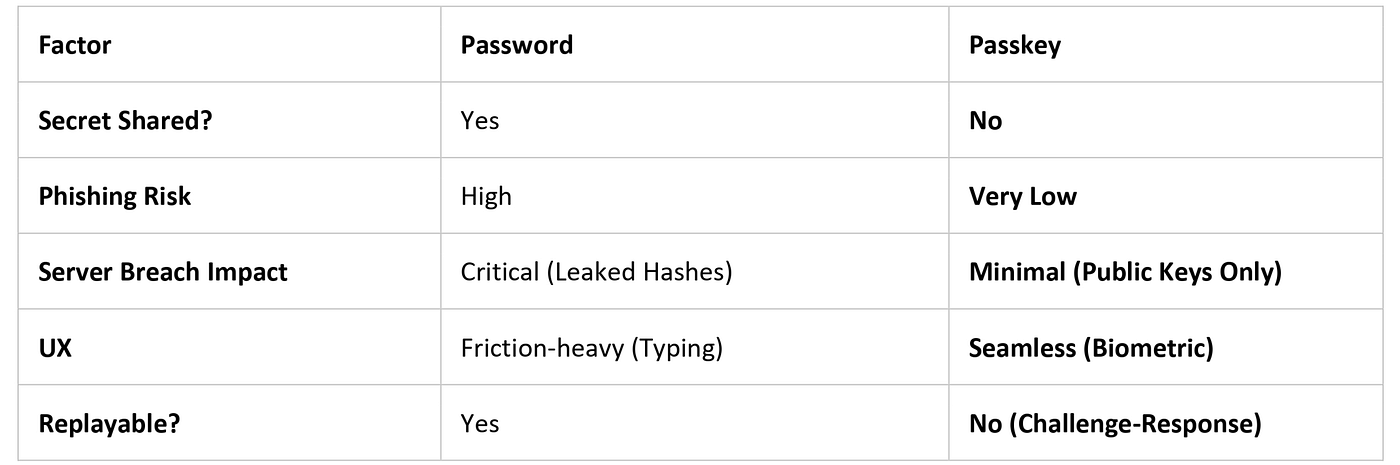
Mental Model: Password vs. Passkey
🏛️ FIDO2 and the Credential Manager
Implementing a passwordless authentication architecture via the Credential Manager API changes the identity model to Asymmetric Cryptography.
- Hardware Isolation: Keys are stored in StrongBox (if available) or the TEE (common fallback).
- Anti-Extraction: Even on rooted devices, extracting private keys from hardware-backed keystores is designed to be infeasible. While advanced runtime abuse is possible, the key material itself remains shielded.
- UV vs. UP: Passkeys enforce User Verification (UV) via biometrics (fingerprint/face), ensuring the actual owner is present, not just a simple “User Presence” (UP) tap.
🛠️ Implementation: The Passkey Lifecycle
At a Senior level, we must distinguish between the one-time setup and the recurring login.
🔷 Phase 0: Registration (One-Time Setup)
- Challenge: Server sends a unique, cryptographically random challenge.
- Key Creation: The Android device generates a new public/private key pair.
- Storage: The private key stays in the TEE; the public key is sent to the server and linked to the user’s account.
// Registration: Creating a new Passkey
val createRequest = CreatePublicKeyCredentialRequest(
    requestJson = "{\"challenge\":\"$serverChallenge\", \"rp\":{\"name\":\"SecureApp\", \"id\":\"secureapp.com\"}, ...}"
)

lifecycleScope.launch {
    try {
        val result = credentialManager.createCredential(context, createRequest)
        completeRegistrationOnBackend(result)
    } catch (e: CreateCredentialException) {
        handleRegistrationFailure(e)
    }
}
🔷 Phase 1: Authentication (Recurring Login)
- Challenge: Server sends a new, short-lived challenge.
- Signing: The device signs the challenge after biometric verification.
- Server Validation (Critical Steps): * Origin Check: Validate that the origin exactly matches your domain (e.g.,
[https://secureapp.com).](https://secureapp.com).)
- RP ID Hash Check: Ensure the
authenticatorDatacontains a hash that matches yourrp.id. This makes it cryptographically infeasible for a spoofed site to request a valid signature. - Signature Check: Validated against the stored Public Key.
⚠️ Failure Handling: Production Reality
A conceptual guide assumes success; a Staff-level guide plans for the “Edge”:
- Minimized Choice: A well-designed flow minimizes user choice — automatically prompting passkeys first reduces decision fatigue and increases adoption.
- User Cancellation: Your UI must handle the cancellation gracefully, allowing the user to retry or select an alternative method.
- Platform Sync: On Android, passkeys may be synced via Google Password Manager, enabling seamless restore across devices signed into the same Google account.
🔍 Deep Dive: Replay Prevention and Ecosystems
- Challenge Expiry: Challenges must be single-use and short-lived. If a challenge is intercepted, it is useless by the time an attacker attempts to replay it.
- Cross-Platform Reality: Passkeys are inherently cross-platform via the WebAuthn standard, but ecosystem differences (Android vs. iOS) introduce UX variations you must account for.
🏁 Key Takeaways
- Phishing Resistance: Industry reports often cite up to ~90% reduction in successful phishing attacks when moving to Passkeys.
- Unified API: Credential Manager abstracts Federated, Passkey, and Password providers into one sheet.
- Strategic Shift: Passwords are not evolving — attackers are. Shifting to hardware-proven identity is the only viable path for high-scale apps.
🙋♂️ Frequently Asked Questions (FAQs)
What if the user loses their phone?
Passkeys are typically restored via platform sync if enabled, ensuring an end-to-end encrypted backup is available on the new device.
Can an attacker copy a Passkey?
No. Because the private key is in the TEE/Secure Element, it is non-exportable. An attacker cannot “copy-paste” the key file even with root access.
Is it hard for the user?
It is objectively faster. A 0.5-second biometric scan replaces the cognitive load of remembering and typing a complex password.
💬 Join the Discussion
- How are you planning to handle the transition for users who log in across Android, iOS, and Web?
- Does your organization prioritize the infrastructure required for WebAuthn?
- Is “Legacy Debt” the biggest hurdle to a passwordless future in your org?
Next Up: Part 5: Environment Trust — Play Integrity & Attestation
📘 Master Your Next Technical Interview
Since Java is the foundation of Android development, mastering DSA is essential. I highly recommend “Mastering Data Structures & Algorithms in Java”. It’s a focused roadmap covering 100+ coding challenges to help you ace your technical rounds.
- E-book (Best Value! 🚀): **$1.99 on Google Play**
- Kindle Edition: **$3.49 on Amazon**
- Also available in Paperback & Hardcover.
메타데이터
- post_id
- 793ea2f291fe
- slug
- part-4-beyond-passwords-the-passkey-revolution-793ea2f291fe
- url
- https://blog.stackademic.com/part-4-beyond-passwords-the-passkey-revolution-793ea2f291fe
- canonical_url
- https://blog.stackademic.com/part-4-beyond-passwords-the-passkey-revolution-793ea2f291fe
- author_url
- https://medium.com/@sivavishnu0705
- status
- ok
- fetched_at
- 2026-06-23 17:05:31