The Complete Beginner’s Guide to Suno AI: From Zero to Your First Hit Song in 24 Hours
No music background. No audio software. Just Suno, a structured approach, and 24 hours. Here’s the exact path from “I’ve never made a song”…
The Complete Beginner’s Guide to Suno AI: From Zero to Your First Hit Song in 24 Hours
No music background. No audio software. Just Suno, a structured approach, and 24 hours. Here’s the exact path from “I’ve never made a song” to a track you’d actually share plus the free workflow system to keep it going.
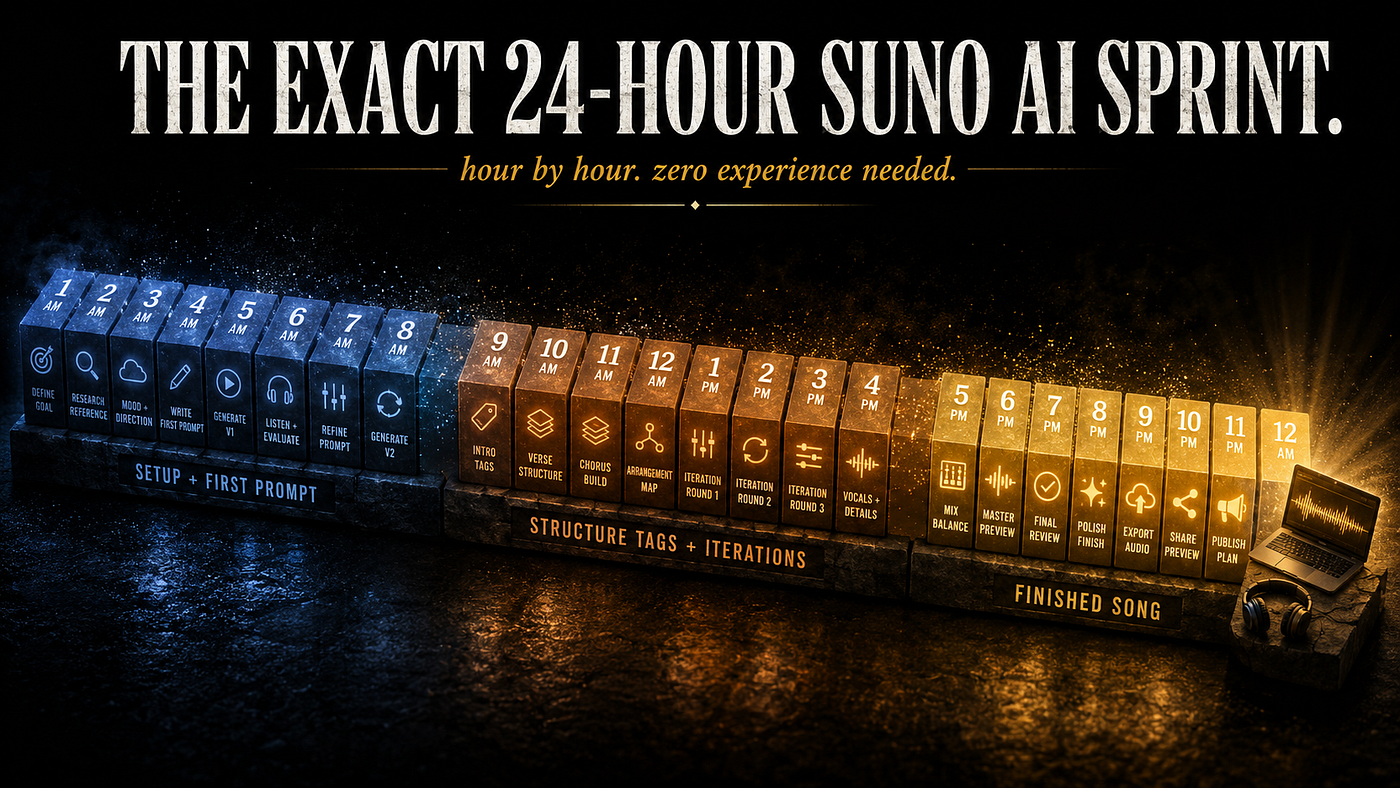
24 hours from now, even with the latest 2026 Suno updates, you can have a finished song. Not a robotic AI demo. Not a 30-second loop. An actual track with verses, a chorus, and production that sounds intentional.
That’s not a marketing claim. It’s the timeline I followed when I made my first Suno AI song that didn’t sound like a glitched ringtone and it’s the exact path I’d hand to anyone starting from zero today.
This guide walks you through that 24-hour sprint hour by hour. No music theory required. No expensive subscriptions. Just the moves that turn a blank Suno screen into a finished song you’d actually share.
What Suno AI Actually Is (And What It Isn’t)
Before the steps, the foundation. Suno AI generates full songs vocals, instrumentation, lyrics, production from text prompts. You describe what you want. It builds it. Two minutes per generation.
What it does well: catchy melodies, genre-accurate production, surprisingly emotional vocals, full-song structure.
What it doesn’t do: read your mind, recreate copyrighted artists, replace a real producer for studio releases without editing. The free plan is enough to learn on. Paid plans unlock commercial rights and faster generation.
For the official sign-up, head to suno.com. Free account first. Don’t pay until you’ve burned through the trial credits.
Suno has evolved fast the current version produces tracks up to 8 minutes long with cleaner vocals and better instrumental separation than previous generations. The fundamentals below work across any version you’ll encounter.
The Beginner’s Mindset Shift That Changes Everything
Most beginners treat Suno like a slot machine. Type “sad pop song,” hit Create, hope for the best. The output is mediocre. They quit.
The shift: Suno is a language model that happens to make music. It rewards musical vocabulary, not emotional adjectives. “Sad song” tells it almost nothing. “Acoustic folk ballad, 75 BPM, fingerpicked guitar, breathy female vocal, melancholic” tells it everything.
You don’t need to know music theory. You just need to talk to it in specific terms: genre, tempo, instruments, vocal character, mood. That’s the whole secret. Every advanced technique you’ll read about later is a variation of this one idea.
The 24-Hour Sprint: Hour-by-Hour
Here’s the breakdown. Total active time: about 6 hours spread across one day. The rest is generation time, listening, and small breaks.
Hours 1–4: Setup and First Generation
Hour 1: Sign up at suno.com. Free account. Spend 30 minutes scrolling Suno’s “Explore” page to hear what other people are making. This is your taste-calibration time you’ll know what’s possible.
Hour 2: Pick ONE genre to focus on for your first song. Resist the urge to chase multiple. Beginners who try lofi, jazz, country, and trap in their first day end up with five mediocre songs. Pick one. Master one. Then expand.
Hour 3: Switch to Custom Mode (not Simple Mode). Custom Mode lets you write your own lyrics and prompt independently. This is non-negotiable Simple Mode trains bad habits.
Hour 4: Write your first detailed prompt. Use this skeleton:
[Genre] [Subgenre], [BPM] BPM, [Lead instrument], [Rhythm section], [Vocal description], [Mood verb], [Mix character]
Example: Indie folk, 82 BPM, fingerpicked acoustic guitar, brushed snare, breathy female vocal, aching, warm tape saturation
Hit Generate. You’ll get two variations. Listen to both. Don’t accept the first one generate 2–3 more rounds.
Hours 5–8: Structure Tags and Lyrics
This is where 90% of beginners stop and shouldn’t. Generic generations sound generic because Suno is guessing your song structure. Take the wheel.
In your lyrics box, use section tags:
[Intro]
[Verse 1]
Your first verse lyrics here...

[Chorus]
Your chorus here...

[Verse 2]
Second verse...

[Bridge]
[Outro]
Suno respects these tags more than most people realize. Adding them transforms outputs from “audio blob” to “real song.”
For lyrics: write them yourself or use ChatGPT to draft a starting point. Either way, edit them so they’re conversational and singable. Avoid complex rhymes Suno mispronounces them.
I broke down 10 foundational tips like this in 10 Things You Need To Know About Suno AI. Read it after this it’s the perfect day-2 follow-up.
Hours 9–16: The Extend and Refine Loop
Most beginners think Suno gives you a finished song in one shot. It doesn’t. Pro outputs come from iteration.
Here’s the workflow:
- Generate 4–5 variations of your prompt
- Pick the one with the best character (the strongest 20 seconds — not the most polished overall)
- Use Extend to grow that 20 seconds into a full song
- Use Replace Section to fix weak parts
- Repeat until you have something you actually like
This is the single biggest unlock from beginner to intermediate. The first version is a draft. The fifth iteration is the song.
Hours 17–20: Download, Listen, Polish
By hour 17, you should have a finished track. Download both the audio and the stems (if you’re on paid plan). Listen on different devices: laptop speakers, phone, headphones, car if possible. Issues you didn’t hear in the studio become obvious in the car.
If something feels off, do ONE more Replace Section pass. Don’t perfectionize beginners can spend 40 hours on hour-20 polish and learn nothing.
Hours 21–24: Share It
This is the step most beginners skip. They finish a song, get scared to share it, and the project dies.
Share with one person friend, partner, group chat. Get one honest reaction. That reaction tells you more about your song than 10 more hours of editing.
You now have a finished song. Made in one day. With zero musical training. That’s the entire point.
🎁 Want the system I built to make this repeatable week after week without burning out or running out of ideas? Grab my free Suno AI Music Content System (Notion template): Get the Free System →. 5 databases, a weekly workflow, and the “1 track = 7 pieces of content” rule that turns one song into a week of posts.
After Day 1: The System That Keeps It Running
Making one song is the proof of concept. Making one a week consistently is where the actual progress happens.
That’s why I built a Notion system specifically for Suno AI workflows. The structure is simple:
- Monday : Weekly review + plan the week’s releases
- Tuesday–Wednesday : Generate 3–5 tracks in Suno, log every prompt
- Thursday : Create short-form content from the best track
- Friday : Publish releases + update stream numbers
- Sunday : Add new prompt ideas to the vault for next week
Total active time: about 4 hours per week. That’s the cadence that compounds into a real catalog.
The 1 Track = 7 Content Rule
This is the leverage move nobody teaches beginners. Every finished song should become 7 pieces of content across platforms:
- Full release → Spotify / SoundCloud
- 30-second hook clip → TikTok
- Prompt reveal → Instagram Reel
- Waveform visualizer → YouTube Shorts
- Behind-the-scenes thread → Twitter/X
- Before/after comparison → TikTok
- Playlist placement → Spotify / YouTube
One song. Seven posts. A full week of content from a single Suno session.
If you skip this, you’re leaving 80% of the leverage on the table. Beginners who post one song and disappear get 50 streams. Beginners who run the 7-content rule get 5,000.
Common Beginner Mistakes (And How to Skip Them)
Quick hit list these wreck most first weeks:
- Vague prompts. “Sad pop song” gets generic. Always specify genre + BPM + instruments + vocal type.
- Skipping structure tags. Without
[Verse],[Chorus], etc., Suno guesses your song structure. - Accepting first outputs. Generate 4–5 variations minimum. The first take is never the best.
- Trying to make Drake songs on day 1. Pick a low-competition niche (lofi, meditation, indie folk) these are easier to sound good in.
- Not logging your prompts. When something works, save it. When something fails, save that too. The library compounds fast.
For combining Suno with ChatGPT to generate prompts faster, my Suno AI + ChatGPT workflow guide is the natural follow-up read.
What to Do Next (Beyond Day 1)
Once you have your first song:
- Repeat the 24-hour sprint with a different genre. Variety builds your prompt instincts.
- Read about advanced features : Extend mastery, Exclude field, Custom Mode tricks. I covered the ones pros use in 5 Suno AI Features Pro Musicians Use.
- Build your prompt vault : every prompt that produces something good goes into a library you can reuse forever.
- Choose a monetization path : Spotify uploads, Fiverr gigs, YouTube channel, sync licensing. All viable with consistent output.
- Explore newer Suno features like Persona (locking vocal character across multiple tracks) and Stem Separation (downloading individual instruments) once you’ve mastered the basics above.
The goal of day 1 isn’t perfection. It’s proving to yourself that you can finish a song. Everything after that compounds.
The Last Word
You don’t need to be a musician to make music. You need a structured approach and the patience to iterate.
24 hours. One genre. Custom Mode. Structure tags. The Extend loop. The 7-content rule. That’s the whole beginner path.
The hardest part isn’t the music. It’s starting. Open Suno today. Generate something. Anything. The first song is always rough and it’s the only one you have to make on willpower. Every song after gets easier.
👉 If you want everything in this guide expanded into a step-by-step playbook every prompt formula, every Suno feature explained with examples I packaged it as my full beginner playbook: Suno AI: Beginner to First Song →. The version of this article I wish someone had handed me on day one.
Useful? Drop a clap and follow. I write weekly on Suno AI, AI music workflows, and the systems that help creators ship more songs. **Newsletter here.**
메타데이터
- post_id
- 7984806f6276
- slug
- suno-ai-beginners-guide-first-song-24-hours-7984806f6276
- url
- https://medium.com/@james-palm/suno-ai-beginners-guide-first-song-24-hours-7984806f6276
- canonical_url
- https://medium.com/@james-palm/suno-ai-beginners-guide-first-song-24-hours-7984806f6276
- author_url
- https://medium.com/@james-palm
- status
- ok
- fetched_at
- 2026-06-09 15:37:30






