TShark Challenge I — Write-Up
Room: TryHackMe — TShark Challenge I
TShark Challenge I — Write-Up
Room: *TryHackMe — TShark Challenge I*
Scenario:
An alert has been triggered: “The threat research team discovered a suspicious domain that could be a potential threat to the organisation.”
The case was assigned to you. Inspect the provided teamwork.pcap located in ~/Desktop/exercise-files and create artefacts for detection tooling.
Your tools: TShark, VirusTotal(opens in new tab).
Q-1: What is the full URL of the malicious/suspicious domain address?
A: Let’s start with the basics. We load the PCAP and filter for HTTP traffic using: tshark -r teamwork.pcap -Y "http"
Scrolling through the output, one packet stands out immediately, the packet 747. It’s a GET request to Google with a suspicious URL embedded in the search query parameter.
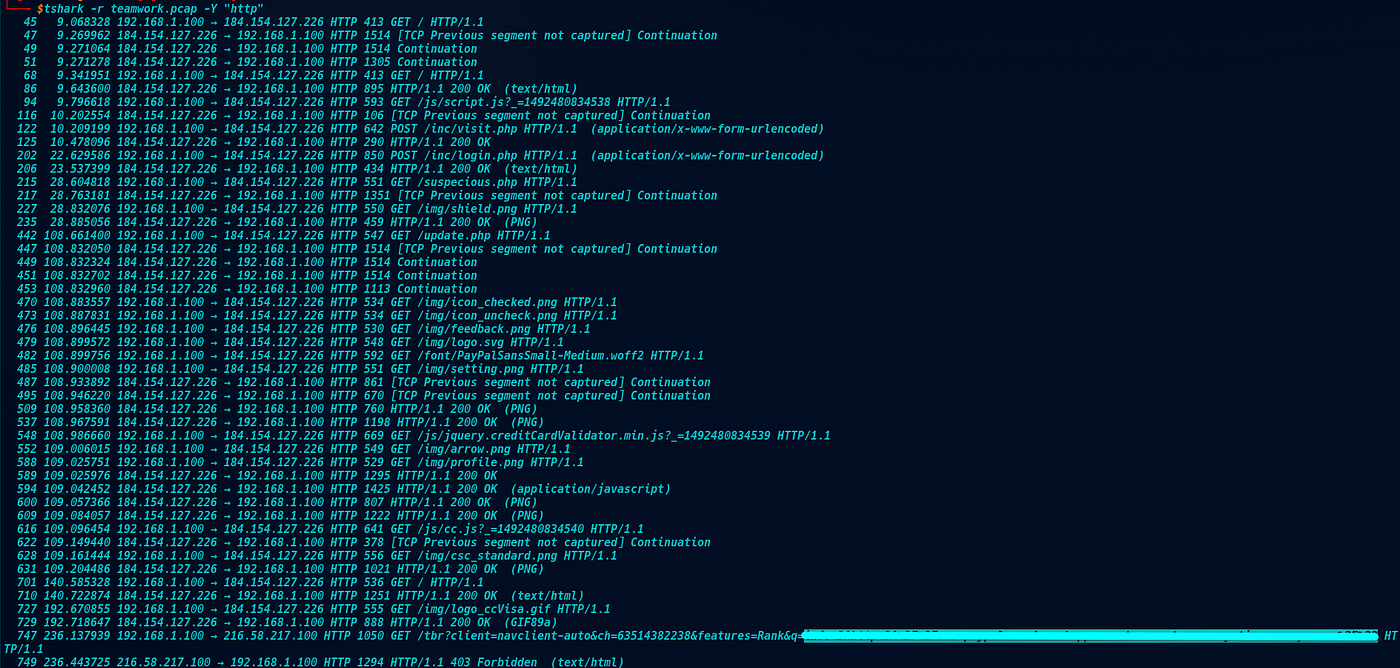
The URL is percent-encoded, so we paste it into Burp Suite’s Decoder and URL-decode it.

This is a classic combo-squatting technique — the domain string starts with “paypal.com” but it’s not a subdomain of PayPal. A quick glance could fool anyone.
Don’t forget to defang the URL before submitting.
Q-2: When was the URL first submitted to VirusTotal?
A: We take our defanged URL over to VirusTotal and check the Details tab. 2/92 vendors flagged it as malicious, and the History section gives us exactly what we need.

Q-3: Which known service was the domain trying to impersonate?
A: This one doesn’t need a tool. The domain name says it all. Look closely and you will see the answer.

Q-4: What is the IP address of the malicious domain?
A: Back to tshark. We filter for all requests going to our suspicious domain:
tshark -r teamwork.pcap -t ad -Y ‘http.request.full_uri contains “timeseaways”’

Two destination IPs show up. Packet 747 goes to 216[.]58[.]217[.]100 — that's Google. The victim searched for the URL before visiting it. But we need to confirm which IP actually hosts the phishing site, so let's dig deeper by following TCP stream 45: tshark -r teamwork.pcap -t ad -z follow,tcp,ascii,45 -q and here is the answer.

Q-5: What is the email address that was used?
A: Now for the most interesting part. We filter for POST requests sent to the malicious server: tshark -r teamwork.pcap -t ad -Y ‘ip.dst == 184.154.127.226 and http.request.method == “POST”’

Two results come back — a POST to /inc/visit.php and a POST to /inc/login.php. The login endpoint is what we want. Inspecting the packet detail reveals the form data submitted by the victim, including the user field. We require the user field.

Written by *Tamerlan Shabanov | SOC Analyst | [GitHub](https://github.com/VelvetB1te/)*
메타데이터
- post_id
- 79a674c2ce5c
- slug
- tshark-challenge-i-write-up-79a674c2ce5c
- url
- https://medium.com/@tamerlan-shabanov/tshark-challenge-i-write-up-79a674c2ce5c
- canonical_url
- https://medium.com/@tamerlan-shabanov/tshark-challenge-i-write-up-79a674c2ce5c
- author_url
- https://medium.com/@tamerlan-shabanov
- status
- ok
- fetched_at
- 2026-07-15 02:50:08