Best Wireless Router for Home Streaming
Enjoy buffer-free 4K streaming, faster speeds, and reliable whole-home Wi-Fi with a wireless router built for seamless entertainment.
Best Wireless Router for Home Streaming
Enjoy buffer-free 4K streaming, faster speeds, and reliable whole-home Wi-Fi with a wireless router built for seamless entertainment.
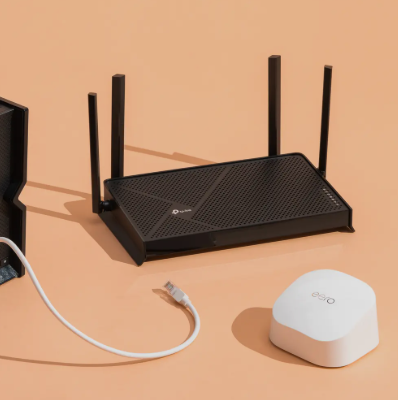
If there’s one piece of tech in my house that never gets a break, it’s my Wi-Fi router. It’s working overtime, powering Zoom calls, streaming 4K movies, handling online gaming, backing up files, and quietly connecting dozens of smart devices I forget even exist. And if your internet ever feels “fine but frustrating,” chances are your router is the bottleneck.
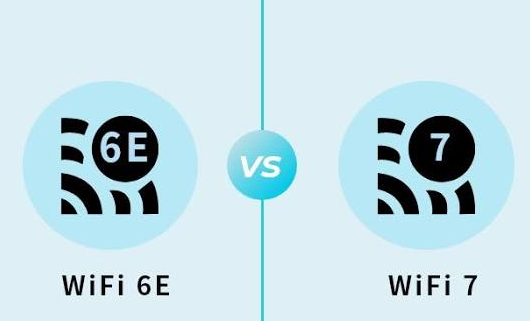
I’ve spent a lot of time researching, testing, and living with modern routers, and I’ve learned one thing the hard way: a good router doesn’t just make Wi-Fi faster, it makes life calmer. In 2026, with Wi-Fi 6E and Wi-Fi 7 becoming mainstream, choosing the right router matters more than ever.
This guide breaks down the best Wi-Fi routers for 2026, explains who each one is really for, and walks you through what features actually matter, without drowning you in specs you’ll never use.
My Top Picks at a Glance (Based on Real Use)
Instead of overwhelming you with dozens of options, I focused on routers that hit the sweet spot for most real homes, performance, reliability, future-proofing, and value.
I’ve included three standout routers that cover the needs of most people in 2026.
TP-Link Archer AXE75 (Wi-Fi 6E)

If you want one router that does almost everything right without destroying your budget, the TP-Link Archer AXE75 is hard to beat. This is the router I often recommend first because it simply works, and keeps working even when the network gets busy.
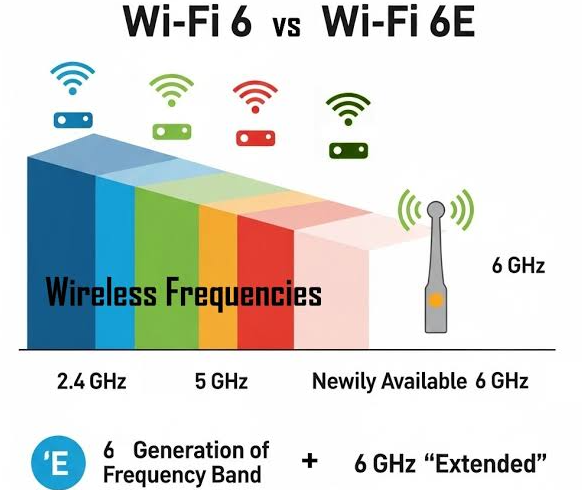
What makes it special is Wi-Fi 6E support, which opens up the 6GHz band. In my experience, that extra band feels like adding a new empty highway just for your fastest devices. Less congestion, lower latency, and smoother performance for laptops, phones, and gaming consoles that support it.
Setup is refreshingly easy. I had it running in minutes, and the interface doesn’t feel like it was designed by an engineer who hates humans. Speeds are consistently strong, coverage is reliable for apartments and medium-sized homes, and it’s mesh-ready if you ever need to expand later.
Where it falls short: It doesn’t have multi-gig LAN ports, and some advanced security features require a subscription. File transfers are fine, but not class-leading.
Who this router is best for:
- Most homes and apartments
- Remote work + streaming households
- Users who want Wi-Fi 6E without paying premium prices
Synology WRX560

The Synology WRX560 feels like it was designed for people who want power and control without complexity. If you’ve ever used Synology NAS products, you already know their reputation for rock-solid software, and that same philosophy shows up here.
What impressed me most was how stable and consistent this router feels. Even with multiple devices pulling bandwidth at once, it stays smooth. Built-in parental controls and network security tools come included, which is refreshing in a world full of paid add-ons.
It also supports multi-gig WAN and LAN, making it a great choice if you already pay for fast internet and actually want to use it. Coverage is excellent, and it’s mesh-capable if your home grows or your needs change.
Where it falls short: The design is a bit top-heavy, and file transfer performance is decent rather than exceptional.
Who this router is best for:
- Families who want strong parental controls
- Power users who value stability
- Homes with high-speed internet plans
Best Wi-Fi 7 Router (No Compromises)
ASUS RT-BE96U

If you want to go all-in on the future, the ASUS RT-BE96U is a monster in performance and physical size. This is a true Wi-Fi 7 router, and it shows.
Wi-Fi 7 brings wider channels, lower latency, and insane theoretical speeds. While real-world results never hit marketing numbers, this router still delivers some of the fastest wireless performance I’ve seen. The 6GHz band, 320MHz channels, and 10GbE ports make it a beast for gaming, content creation, and heavy multitasking.
It’s packed with features: advanced QoS, strong parental controls, built-in security tools, and deep customization for people who love tweaking their network.
Where it falls short: It’s expensive, large, and honestly overkill for many households.
Who this router is best for:
- Enthusiasts and early adopters
- Gamers and creators
- Homes preparing for multi-gig internet
How to Choose the Right Wi-Fi Router in 2026
Before buying anything, I always ask myself three questions:
1. How Big Is My Space?
Apartments and small homes usually do fine with a single powerful router. Larger homes or multi-story layouts often benefit from mesh-ready routers or full mesh systems.
2. How Many Devices Are Connected?
If you’ve got smart TVs, phones, laptops, consoles, cameras, and smart home gadgets, you’ll want a router that handles high device density without slowing down.
3. Do I Want Future-Proofing?
Wi-Fi 6 is still great, but Wi-Fi 6E and Wi-Fi 7 are where things are heading. If you don’t upgrade routers often, spending a little more now can save frustration later.
Understanding Wi-Fi Generations (Without the Headache)
- Wi-Fi 6 (802.11ax): Still excellent for most homes
- Wi-Fi 6E: Adds the 6GHz band for cleaner, faster connections
- Wi-Fi 7: Faster speeds, lower latency, better for multi-gig networks
In real life, Wi-Fi 6E already feels like a noticeable upgrade. Wi-Fi 7 shines most in high-end setups.
Router Features That Actually Matter
From my experience, these features make the biggest difference:
- Tri-band support: Helps manage traffic more efficiently
- QoS (Quality of Service): Keeps video calls and gaming smooth
- Parental controls: Useful even if you’re not a parent
- Security updates: Often overlooked, but critical
- Mesh compatibility: Future expansion without replacing everything
Should You Use a Mesh System Instead?
If your home has Wi-Fi dead zones, a mesh system can be life-changing. Unlike extenders, mesh nodes share one network name and provide seamless roaming. That said, mesh systems are usually more expensive and offer fewer advanced settings.
For many people, a mesh-ready router first is a smarter move. Add nodes only if you need them.
Final Thoughts:
The best compliment I can give a router is this: I stop thinking about it. No dropped calls. No buffering. No constant reboots.
For most people in 2026, the TP-Link Archer AXE75 hits that perfect balance. If you want more control and stability, the Synology WRX560 is fantastic. And if you want cutting-edge performance with no compromises, the ASUS RT-BE96U is a beast.
Amazon Affiliate Disclosure :This article contains affiliate links. If you purchase through these links, I may earn a small commission at no extra cost to you. I only recommend products I’ve genuinely researched and would consider using myself.
Frequently Asked Questions
Is Wi-Fi 7 worth buying in 2026?
If you’re a power user, gamer, or planning for multi-gig internet, yes. For most households, Wi-Fi 6E still offers excellent performance.
How long should a Wi-Fi router last?
A good router typically lasts 4–6 years, especially if it supports newer standards like Wi-Fi 6E or Wi-Fi 7.
Do I need a mesh system for a small home?
Usually no. A strong single router is often faster and cheaper for apartments and small houses.
Does a better router increase internet speed?
It won’t increase your ISP’s speed, but it dramatically improves how efficiently that speed is delivered to your devices.
메타데이터
- post_id
- 79b32dd0ef86
- slug
- best-wireless-router-for-home-streaming-79b32dd0ef86
- url
- https://medium.com/@mukhaledumer/best-wireless-router-for-home-streaming-79b32dd0ef86
- canonical_url
- https://medium.com/@mukhaledumer/best-wireless-router-for-home-streaming-79b32dd0ef86
- author_url
- https://medium.com/@mukhaledumer
- status
- ok
- fetched_at
- 2026-07-27 01:50:49