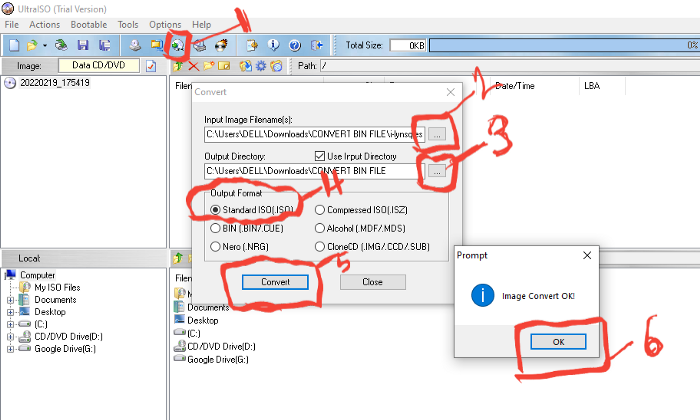
The following steps will guide you to converting a bin file and extract all relevant document.
Applications needed include
The following steps will guide you to converting a bin file and extract all relevant document.
Applications needed include
Ultra ISO
WinRAR
Step 1. Download and install WinRAR
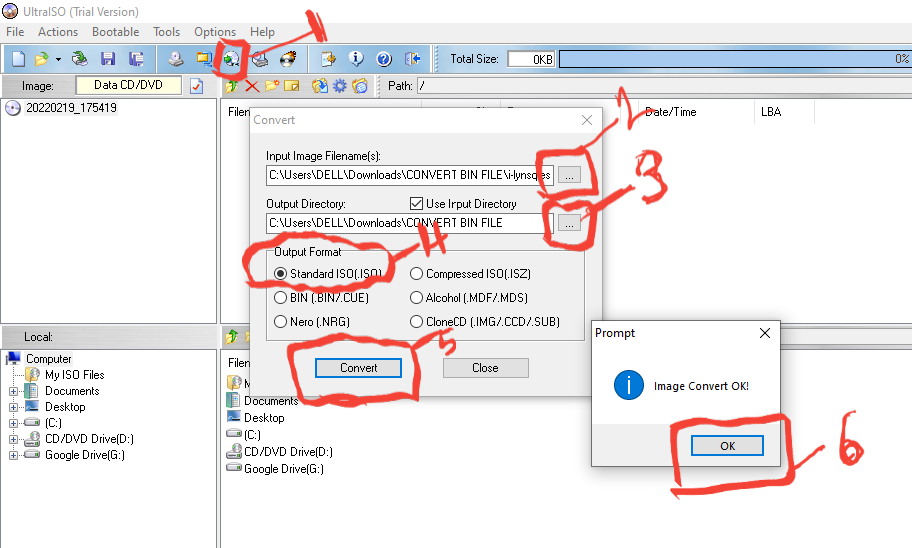
Step 2. Download and Install Ultra-ISO and run
- click on convert
- from the dialog screen, select the .bin file to be converted
- selected destination folder
- select 'Standard ISO (.iso)
- click on convert.
- wait for the file to convert
- click 'OK' on the next screen & close the convert dialog screen.
Step 3. Open the destination folder on file explorer
- Right click on the ISO.
- Extract file.
Step 4. there you have it.
mission completed.
메타데이터
- post_id
- 7adbebe633d4
- slug
- the-following-steps-will-guide-you-to-converting-a-bin-file-and-extract-all-relevant-document-7adbebe633d4
- url
- https://medium.com/@ukchike/the-following-steps-will-guide-you-to-converting-a-bin-file-and-extract-all-relevant-document-7adbebe633d4
- canonical_url
- https://medium.com/@ukchike/the-following-steps-will-guide-you-to-converting-a-bin-file-and-extract-all-relevant-document-7adbebe633d4
- author_url
- https://medium.com/@ukchike
- status
- ok
- fetched_at
- 2026-06-16 19:09:56