OpenDataLoader: A PDF Parser That Converts Any PDF into Layout-Preserving DOCX, TXT, and JSON
How I used OpenDataLoader PDF to build a structured, LLM-ready document pipeline — no GPU, no cloud, no headaches
OpenDataLoader: A PDF Parser That Converts Any PDF into Layout-Preserving DOCX, TXT, and JSON
How I used OpenDataLoader PDF to build a structured, LLM-ready document pipeline — no GPU, no cloud, no headaches
👨🏾💻 GitHub ⭐️ | 👔 LinkedIn | 📝 Medium | ☕️ Ko-fi | 🌐 InventaAI Blog
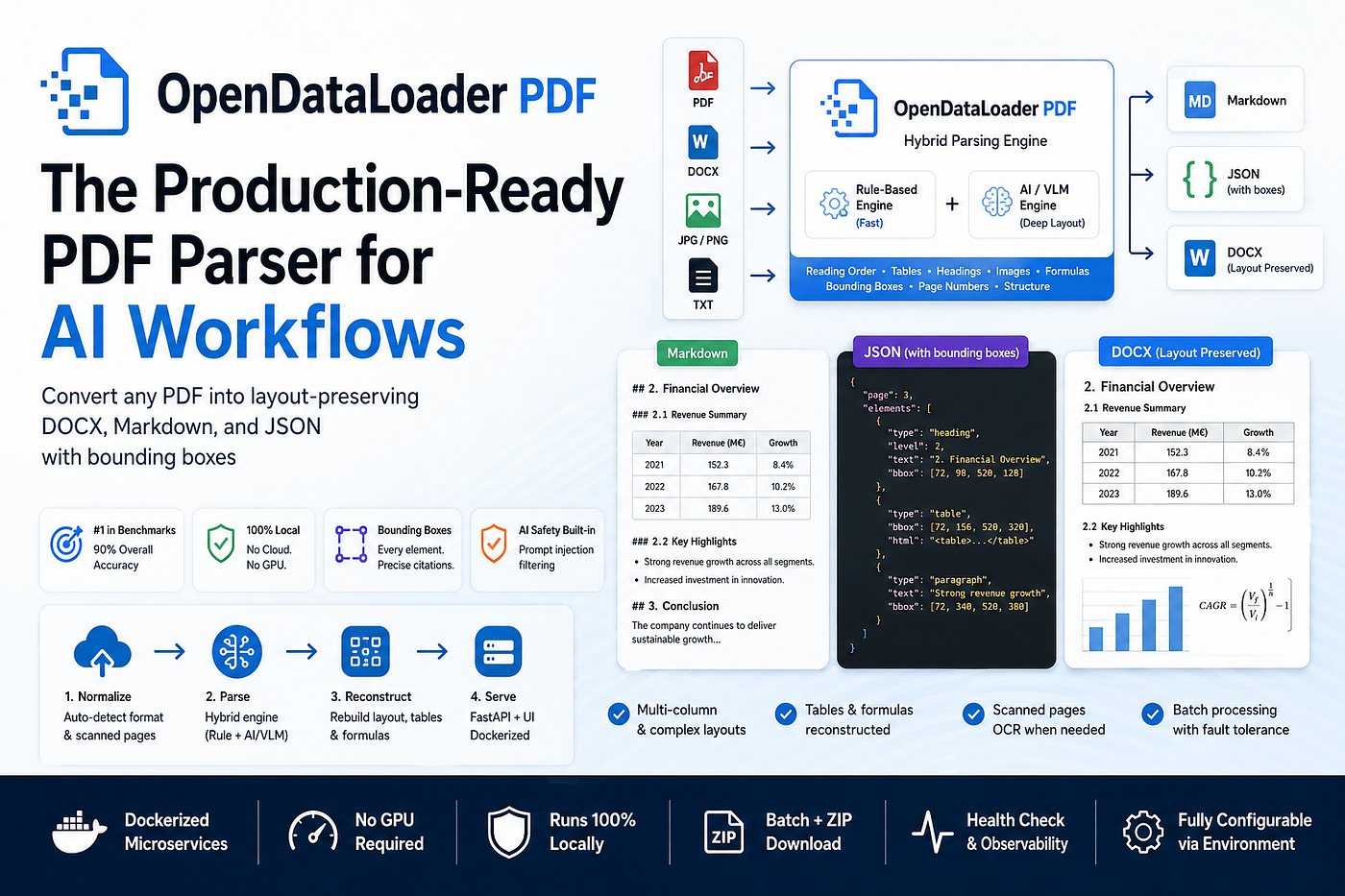
Photo by Author
Introduction
If you’ve ever tried to feed a PDF into an LLM or RAG pipeline, you know the pain. Tables come out mangled. Multi-column layouts collapse into a stream of nonsense. Scanned pages are invisible. And after all that, you still can’t tell your users where in the document the answer came from.
I’ve been building document intelligence pipelines for German insurance and legal documents at my day job, and the PDF parsing problem kept coming up. I tried PyMuPDF, PyPDF2, and pdfminer, and they all had the same structural blindness. Then I came across OpenDataLoader PDF, and it genuinely changed how I approach document parsing. I built Docker for production-level, single-document, and batch processing. The output has markdown as txt, json, and the original layout copied as a docx file.
This post walks through what OpenDataLoader PDF is, what makes it stand out, how I built a parsing pipeline with it, and why it’s now my go-to for any AI document workflow.
What Is OpenDataLoader PDF?
OpenDataLoader PDF is an open-source PDF parser that converts PDFs into LLM-ready Markdown and JSON, ranked #1 in benchmarks with a 0.90 overall score, supports bounding boxes for citations, and runs 100% locally under the Apache-2.0 license — meaning no cloud APIs, no data leaving your machine. OpenDataLoader PDF
What sets it apart is a hybrid extraction approach: it uses AI-based parsing for layout understanding combined with direct extraction for precise text. Pure AI approaches are slow and expensive; pure rule-based approaches are brittle. A hybrid combines the strengths of both.
The result is something I hadn’t seen before in open-source tooling: a parser that actually respects document structure.
Before we start! 🦸🏻♀️
If you like this topic and you want to support me:
- Clap my article 50 times; that will help me out.👏
- **Follow** me on Medium and subscribe to get my latest article for Free🫶
Opendataloader Features
Here are the capabilities that matter most for real-world AI pipelines:
- Accurate Reading Order (XY-Cut++ Algorithm): The XY-Cut++ algorithm handles multi-column layouts correctly, so text flows in the order humans actually read it, not the random interleaving you get from naive PDF parsers.
- Structured Output Formats: OpenDataLoader outputs structured Markdown with headings, tables, and lists preserved and ideal for semantic chunking. Each element in JSON output includes type, heading level, and page number, so you can split by section or page boundary.
- Bounding Boxes for Every Element: Every extracted element includes bounding box coordinates and precise X/Y positions on the page. This means that when an AI chatbot gives an answer based on a PDF, it can point to the exact location on the exact page where it found that information.
- Built-in AI Safety (Prompt Injection Filtering): There is built-in prompt injection filtering that catches hidden text, off-page content, and invisible layers, a critical feature if you’re processing documents from untrusted sources.
- No GPU Required: The parser runs 100% locally without a GPU, making it practical for any development environment.
- Benchmark-Leading Accuracy: Tested against 200 real-world PDFs, including scientific papers, financial reports, and multi-column documents, OpenDataLoader beat every open-source alternative: 90% overall accuracy, 94% reading order, 93% tables, 83% headings.
- Multiple Output Formats: Text, Markdown, JSON with bounding boxes, and HTML, whatever your downstream pipeline needs.
- LangChain Integration: There is a dedicated LangChain document loader that parses PDFs into structured Document objects for RAG pipelines, with per-page splitting and full page number metadata.
What features did I add?
- Layout Preserved docx: Every element in the output DOCX sits at the same position as in the original PDF. Paragraphs, headings, images, tables, and formulas are all anchored to their original bounding box. Open the file in Microsoft Word, and it looks like the original document; nothing shifts, nothing collapses, nothing disappears.
- Accurate Table and Formula Reconstruction: Tables are re-derived from raw PDF word positions, not guessed from text flow. This fixes the common case where words land in the wrong cells or multi-column headers flatten into noise. Formulas are embedded at their correct position so the output carries the same mathematical content as the original.
- Single and Batch Processing Mode: Single mode lets you upload one document, preview all three outputs in the browser, and download each file individually. Batch mode processes many files in parallel, gives you per-file download buttons for each result, and packages everything into one ZIP with a single click. One failed file never blocks the rest.
- Clean and Functional UI Design: The interface has two clearly labeled modes in the top navigation bar. Single mode shows a split-pane view with your input preview on the left and parsed outputs on the right, switchable between Markdown, JSON, and DOCX tabs. Batch mode provides each file with its own result row, including status, elapsed time, and download buttons. Errors appear in line in red. The design works for both technical and non-technical users with no training required.
- Production-Level Project: The entire stack runs as two Dockerized microservices and starts with one command. No manual setup, no environment conflicts. A named Docker volume persists all outputs across restarts. The
/healthendpoint exposes backend status, warmup state, and memory availability in real time. Every runtime parameter is configurable via environment variables; no code changes needed.
How It Works
The pipeline is built as two Dockerized services: an OCR service (FastAPI, port 8001) that owns the entire parsing and reconstruction logic, and a thin UI service (port 8000) that proxies requests and renders the web frontend. Everything kicks off with a single command:
git clone https://github.com/mdmonsurali/Opendataloader-PDF-Parser.git
cd Opendataloader-PDF-Parser
docker compose up --build -d
Then open http://localhost:8000 for single-document mode or http://localhost:8000/batch for batch mode.
Stage 1: Normalize (Any Format In)
The entry point is opendataloader.py, which houses the DocumentPipeline class. Before any parsing happens, every input format is normalized to a common representation:
- Images (JPG/JPEG/PNG) → wrapped into a single-page 300 DPI PDF
- DOCX → converted to PDF via headless LibreOffice
- TXT → bypasses parsing entirely, wrapped in a minimal JSON
- PDF → passed through as-is
Scanned vs. digital pages are auto-detected per page via pdf_is_scanned(). This is important: OCR fires only on pages that actually need it. A 50-page report where only 3 pages are scanned runs fast; the 47 digital pages never touch the OCR backend.

Single document UI
Stage 2: Parse (opendataloader-pdf in Hybrid Mode)
The normalized PDF goes through opendataloader-pdf in hybrid mode:
- Digital pages → processed locally at ~0.02 s/page with the rule-based engine
- Complex/scanned pages → routed to a bundled
doclingbackend (warmed up in the background at container startup) that loads two VLM models (docling-layout-heron+CodeFormulaV2in bfloat16)
The output is a structured JSON tree, every element (paragraph, heading, table, image, formula) tagged with its type and exact bounding box coordinates on the page.
The health endpoint tells you when the backend is fully ready:
curl http://localhost:8001/health
# → "warmup_done": true means VLM models are loaded and the first request won't block
Stage 3: Reconstruct (doc_reconstruction.py)
This is the piece most parsers skip entirely. Rather than dumping the JSON straight to a DOCX, doc_reconstruction.py goes back to the raw PDF word positions to re-derive table cells, fixing the common case where the parser assigned words to the wrong column.
It then emits a Node.js script that drives the docx npm package (v9.6.1) to build the final .docx with every element anchored at its exact PDF bounding box using floating Word tables. The result looks like the original document in Word, not a wall of text.
Stage 4: Serve (FastAPI + UI)
Three outputs are produced per file, all prefixed ocr_ to avoid confusion with the source:

Figure: output file name
OutputFormatUse caseocr_<stem>.mdMarkdownLLM context, RAG chunking, search indexesocr_<stem>.jsonStructured JSON + bounding boxes, downstream automation, element-level extractionocr_<stem>.docxReconstructed Word docHuman review, editable output
The FastAPI layer exposes:
# Single file
curl -X POST http://localhost:8001/ocr -F "file=@contract.pdf"

# Batch
curl -X POST http://localhost:8001/ocr/batch \
  -F "files=@a.pdf" -F "files=@b.docx" -F "files=@c.png"
# Download as ZIP
curl -X POST http://localhost:8001/ocr/batch-zip \
  -d '{"stems":["a","b","c"]}' -o results.zip
Batch jobs fan out across max(cpu_count() - 1) worker threads by default (tunable via BATCH_MAX_WORKERS). LibreOffice DOCX conversions are serialized threading.Lock to prevent race conditions on the user-profile lock — all other formats run fully in parallel.

Batch or Multi document
Output Preview
Every output is previewable in the browser before download. The DOCX preview is rendered directly from the sibling .json via PyMuPDF — every text element, heading, image, and table cell painted onto a blank page at its bounding box. This is intentional: the reconstructed DOCX uses hundreds of floating tables for absolute positioning, which LibreOffice cannot render quickly enough for a live preview.
For more details, check the video:
[embed]
This Is a Production-Level Project
This is not a Jupyter notebook experiment or a weekend script. Every architectural decision in Opendataloader-PDF-Parser was made with production reliability in mind.
- Dockerized microservices architecture. The pipeline runs as two fully isolated services, an OCR service and a UI service, orchestrated via Docker Compose. There are no manual setup steps, no environment conflicts, no “works on my machine” surprises. One command brings the entire stack up; one command tears it down cleanly.
- Fault-tolerant batch processing. The batch endpoint fans work out across a
ThreadPoolExecutorwithmax(cpu_count() - 1)workers. Critically, it is continue-on-error by design. One failed file does not abort the rest of the batch. Every file gets its own result row with status, error message (if any), and elapsed time. This is the behavior you need when processing hundreds of documents overnight, not just five in a demo. - Auto-detected OCR routing. Scanned and digital pages are detected per page, not per document. OCR only fires where it is actually needed. A 100-page PDF with 5 scanned pages does not pay the VLM cost for the other 95. This matters at scale, both for throughput and for cost.
- Health and observability built in. The
/healthendpoint exposes container memory, hybrid backend status, warmup state, and worker availability. You can monitor the stack from day one without adding external tooling. Thewarmup_doneflag tells you exactly when the VLM models are loaded and the backend is ready to serve traffic. No guessing, no cold-start surprises on the first real request. - Collision-safe output management. Duplicate filenames in a batch are auto-suffixed
_2,_3, and so on. They never clobber each other's output. All produced files are prefixedocr_to be unambiguous from the source document. Outputs persist to a named Docker volume so they survive container restarts. - LibreOffice concurrency handled correctly. LibreOffice uses a single user-profile lock per UID. Naive parallelism causes race conditions and silent failures. The pipeline serializes DOCX conversions via an isolated
-env:UserInstallationprofile, while keeping PDF, image, and text inputs fully parallel. This is the kind of edge case that bites you in production and never shows up in a tutorial. - Configurable for your environment. Every meaningful runtime parameter, including OCR languages, worker count, memory threshold, hybrid backend URL, and output path, is exposed as an environment variable in
docker-compose.yml. No code changes needed to tune the stack for a different host, language set, or memory budget. - Preview without the bottleneck. The DOCX preview is rendered from the structured JSON via PyMuPDF rather than through LibreOffice. This is a deliberate production trade-off. The reconstructed DOCX uses hundreds of floating tables for absolute positioning, which LibreOffice cannot lay out in any reasonable time. Rendering from JSON keeps the preview instant and the user experience responsive.
- The tech stack reflects real engineering choices: Python 3.11, FastAPI, opendataloader-pdf with hybrid mode, docling, PyMuPDF, EasyOCR, Node.js 20 + docx@9.6.1, LibreOffice, OpenJDK 21. Every component was chosen because it solved a specific problem in the pipeline, not because it was the trendiest option.
Buy the Project:
https://ko-fi.com/s/dd7f1145fa
Conclusion
PDF parsing is a problem that looks simple until you try to do it seriously. Flat text extraction is easy. Preserving tables, reading order, bounding boxes, scanned pages, multi-column layouts, formulas, and images, all at once, across mixed input formats, at batch scale, in a way that a non-technical reviewer can actually open and verify, that is a different problem entirely.
Opendataloader-PDF-Parser solves that problem end-to-end. Every document, whether it is a scanned German insurance form, a multi-column research paper, a DOCX contract, or a photo of a handwritten receipt, comes out as three aligned artifacts: clean Markdown for LLMs and search, structured JSON with bounding boxes for downstream automation, and a layout-faithful DOCX that a human reviewer can open in Word and check against the original.
The pipeline is production-ready today. It runs fully locally, requires no cloud APIs, handles failures gracefully at batch scale, and exposes the observability hooks you need to operate it with confidence.
If you are building a RAG pipeline, a document intelligence system, or any workflow that ingests real-world documents, this is the parsing layer you have been missing.
Enjoyed this article? Check out more of my work:
- Building a Custom Documents Agent with Elasticsearch, Ollama, LLaMA 3.1, and LangChain: Explore how to set up a personalized document retrieval agent using LLaMA 3.1 and Ollama for seamless information retrieval. Read the full tutorial here.
- Build Your Own AI Assistant: Learn how to create an AI chatbot from scratch using GPT4All and Langchain, with a detailed comparison of response times between Mixtral and Llama3. Discover the step-by-step guide.
- MonkeyOCR: Run This Smart Document Parser Locally with Ease — Discover how to set up and run MonkeyOCR for efficient document parsing on your local machine, with step-by-step instructions for optimal results. Read the full tutorial here.
- Dolphin OCR: Convert PDFs & Images into Structured Markdown, JSON & DOCX with Original Tables, Formulas & Figures. Read the full tutorial here.
- Docling: IBM’s AI-Ready Document Conversion Library with Markdown, JSON, and Enhanced RAG — Learn how Docling converts documents into AI-friendly formats like Markdown and JSON, enabling improved RAG pipelines. Read the full tutorial here.
- mPLUG-DocOwl2: An OCR-Free Multi-page Document Understanding: Explore how mPLUG-DocOwl2 enables multi-page document understanding without the need for OCR. Learn about its innovative approach to processing complex document layouts. Read the full tutorial here.
메타데이터
- post_id
- 7b3e3600c09f
- slug
- opendataloader-a-pdf-parser-that-converts-any-pdf-into-layout-preserving-docx-txt-and-json-7b3e3600c09f
- url
- https://levelup.gitconnected.com/opendataloader-a-pdf-parser-that-converts-any-pdf-into-layout-preserving-docx-txt-and-json-7b3e3600c09f
- canonical_url
- https://levelup.gitconnected.com/opendataloader-a-pdf-parser-that-converts-any-pdf-into-layout-preserving-docx-txt-and-json-7b3e3600c09f
- author_url
- https://medium.com/@monsuralirana
- status
- ok
- fetched_at
- 2026-06-09 15:37:30