Cursor-Based Pagination Without COUNT: The Fetch n+1 Pattern
A tiny trick that eliminates a COUNT query and makes cursor-based pagination feel effortless.
Cursor-Based Pagination Without COUNT: The Fetch n+1 Pattern
A tiny trick that eliminates a COUNT query and makes cursor-based pagination feel effortless.
The Problem
You’re building a paginated API. The client requests page 2 with a page size of 20. You run the query, return 20 rows — but now the client needs to know: is there a page 3?
The naive solution is to run a second query:
SELECT COUNT(*) FROM products;Then compare: if (offset + pageSize < totalCount) → hasNextPage = true.
This works, but it has real costs:
- Two round-trips to the database on every paginated request.
COUNT(*)on large tables is expensive — especially with filters applied.- The total count becomes stale the moment it’s returned (rows can be inserted or deleted).
- In cursor-based pagination, a total count is often meaningless anyway.
There’s a better way.
The Trick: Fetch One Extra Row
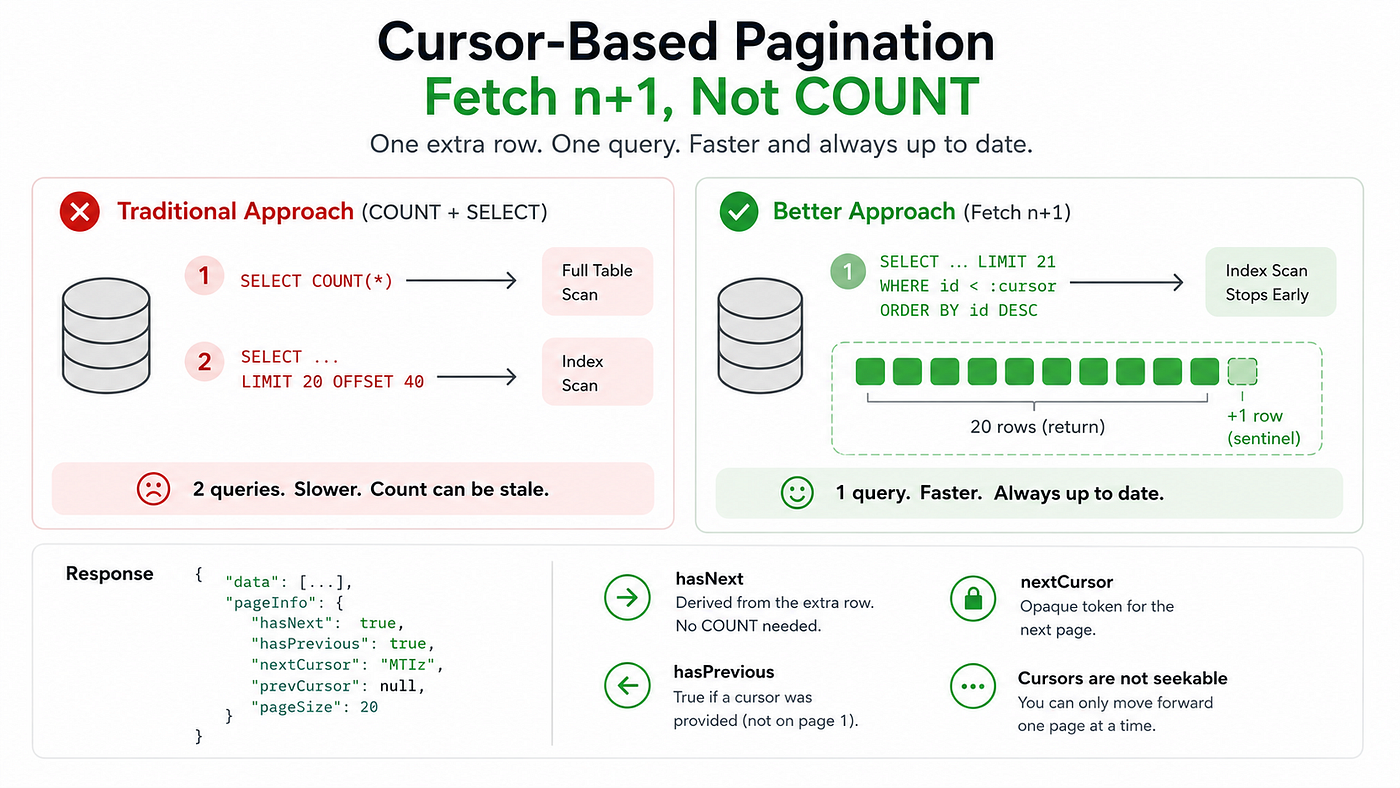
Instead of asking “how many rows exist?”, ask a simpler question: “does even one more row exist after this page?”
Request pageSize + 1 rows. If you get back more than pageSize, a next page exists. Trim the extra row before returning.
$items = $query->limit($pageSize + 1)->get();

$hasNext = $items->count() > $pageSize;
if ($hasNext) {
    $items = $items->slice(0, $pageSize); // drop the sentinel row
}
That’s it. One query. No COUNT. No second round trip.
Why It Works
The database only needs to find pageSize + 1 rows and stop. There is no full table scan, no aggregation. The query plan is identical to a normal paginated query — just one row wider.
ApproachQueriesCostCOUNT + SELECT2Full scan + index scanFetch n+11Index scan only
The “extra” row is a sentinel — its only job is to answer the boolean question. You never return it to the client.
Implementing It With Cursor-Based Pagination
Offset pagination (LIMIT 20 OFFSET 40) has a well-known problem: it gets slower as the offset grows, because the database must skip rows it will never return. It also produces inconsistent results if rows are inserted or deleted between pages.
Cursor-based pagination solves both problems. Instead of an offset, you track the position of the last-seen row using a cursor — typically the primary key, encoded as an opaque token.
private function executePaginatedQuery(
    Builder $query,
    int $pageSize,
    ?string $cursor,
    string $cursorColumn = 'id'
): array {
    // Apply the cursor: fetch only rows after the last-seen position
    if ($cursor) {
        $query->where($cursorColumn, '<', (int) base64_decode($cursor));
    }

    $query->orderBy($cursorColumn, 'desc');

    // Fetch one extra row to detect the next page
    $items = $query->limit($pageSize + 1)->get();
    $hasNext = $items->count() > $pageSize;
    if ($hasNext) {
        $items = $items->slice(0, $pageSize);
    }
    return compact('items', 'hasNext');
}
The cursor for the next request is simply the ID of the last row in the current page, base64-encoded:
'nextCursor' => $hasNext
    ? base64_encode((string) $items->last()->id)
    : null,
The client passes this token back as a query parameter. The server decodes it, applies the WHERE id < ? clause, and the cycle continues — with no offset drift and no COUNT queries, ever.
The Full Page Info Response
A clean API response wraps the data with enough metadata for the client to navigate:
{
  "data": [...],
  "pageInfo": {
    "hasNext": true,
    "hasPrevious": true,
    "nextCursor": "MTIz",
    "prevCursor": null,
    "pageSize": 20
  }
}hasNext— derived from the n+1 trick; no COUNT needed.hasPrevious— true if a cursor was provided on the current request (meaning we're not on page 1).nextCursor— opaque token; clients treat it as a black box.prevCursor— backward pagination requires storing the first-seen ID; omitted here for simplicity.
Tradeoffs to Know
What you gain:
- Half the database queries on every paginated request.
- Stable, consistent pages even under concurrent writes.
- Simple query plans — the database uses an index seek and stops early.
What you give up:
- No total count. You can’t tell the client “page 4 of 17”. If your UI needs a total, you’ll need to cache it separately or accept an approximate count.
- Forward-only by default. Backward pagination requires encoding both ends of the page, not just the tail.
- Cursors are not seekable. You can’t jump to page 7 directly — you must walk the cursor chain.
For most infinite-scroll UIs, feed-style lists, and API consumers, none of these are real constraints. The tradeoffs are almost always worth it.
Summary
The fetch n+1 trick is one of those small ideas with outsized impact:
- Replace two queries with one.
- No
COUNT(*). No stale totals. - Works perfectly alongside cursor-based pagination.
- Costs exactly one extra row of memory per request.
Next time you reach for SELECT COUNT(*) to check for a next page, remember: just ask for one more row and let the database stop early. Simple, fast, and correct.
메타데이터
- post_id
- 7baa82bc8ac6
- slug
- cursor-based-pagination-without-count-the-fetch-n-1-pattern-7baa82bc8ac6
- url
- https://medium.com/@abhihyder/cursor-based-pagination-without-count-the-fetch-n-1-pattern-7baa82bc8ac6
- canonical_url
- https://medium.com/@abhihyder/cursor-based-pagination-without-count-the-fetch-n-1-pattern-7baa82bc8ac6
- author_url
- https://medium.com/@abhihyder
- status
- ok
- fetched_at
- 2026-06-09 15:37:30


