Google Search Console Now Has a Dedicated AI Performance Report
For the first time, website owners can track AI-driven visibility and clicks directly inside Search Console.
Google Search Console Now Has a Dedicated AI Performance Report
For the first time, website owners can track AI-driven visibility and clicks directly inside Search Console.
Photo by Justin Morgan on Unsplash
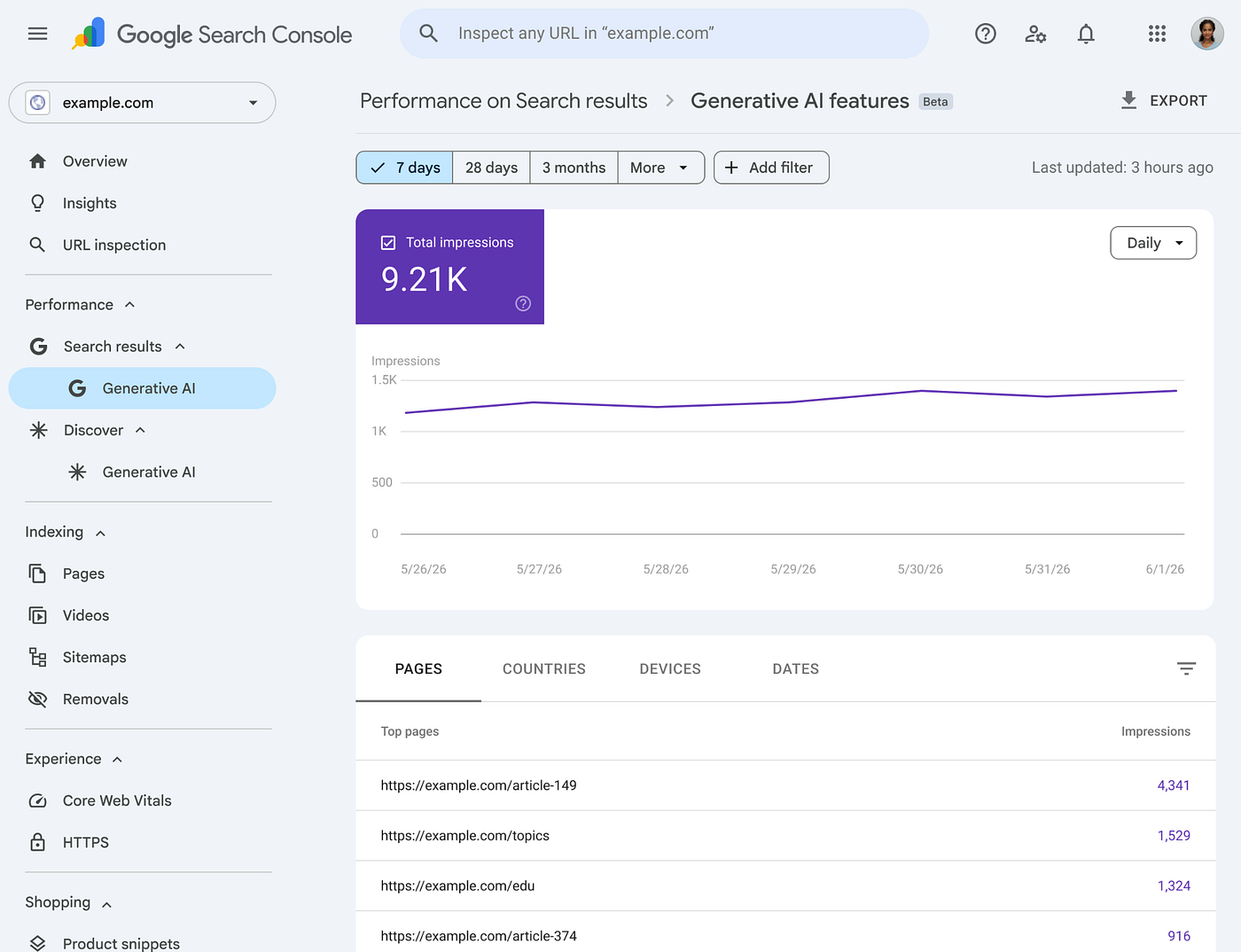
Google announced new Search Generative AI performance reports in Search Console, including dedicated reports for both Search and Discover, designed to help you understand your site’s visibility within generative AI features. The new reports cover AI Overviews and AI Mode on Search, as well as generative AI features in Discover.
Main Highlights
- Google is testing a new toggle that lets website owners decide whether their content can appear in AI Overviews and AI Mode.
- It is also adding dedicated Search Console reports that show performance data from AI-powered search features.
- Both features are currently being tested with a small group of website owners in the UK before a wider rollout.
What’s Missing, and Why It Matters
The reporting includes impressions, pages, countries, devices and dates but does not include click data. No query-level data either. You won’t be able to see which searches are triggering your content inside AI Overviews or AI Mode.
This creates a real problem for anyone trying to understand whether AI visibility is worth anything commercially. You can see that your pages are being surfaced inside AI features. You cannot see whether anyone is clicking through to your site from those surfaces, or what they were searching for when your content appeared.
Because click data is absent from the new reports, site owners will not be able to assess whether AI Search impressions are driving meaningful referral traffic. Planning around AI visibility will therefore rely on impression trends and page-level data alone until Google introduces additional metrics.
Neither Google nor Bing’s AI reports include click data, and we shouldn’t expect them to anytime soon.
AI Overviews are built to answer queries on the page. The less users click away, the better the product works from Google’s perspective. Revealing how few clicks those AI impressions generate would expose a tension that Google has no incentive to make visible.
The AI Visibility Toggle
Google stated that sites that opt out will not receive traffic or impressions from their generative AI features, and that this control will not be used as a ranking signal for search results outside of those generative AI Search features.
You can stay in the blue links while stepping out of AI Overviews and AI Mode entirely. The tradeoff is that you lose whatever referral traffic those AI features were generating, which, without click data, you can’t quantify.
Why is this happening in the UK first? The decision to begin testing in the UK is directly connected to regulatory pressure from British competition authorities.
**The UK’s Competition and Markets Authority stated **on June 3, 2026 that requirements imposed on Google under the digital markets competition regime gave publishers more control and stronger bargaining power over the use of their content. The CMA called this a world first — publishers now have effective tools to prevent their content from being used to power AI features in search.
Google must also ensure that publisher content is properly attributed with clear links in AI-generated search results, and must allow publishers to opt out of having their content used for fine-tuning of AI models.
News websites and other publishers have seen click-through rates drop sharply as a result of users relying on AI-generated overviews.
The opt-out toggle exists because publishers need leverage in content licensing negotiations with Google. If you can show Google the traffic impact of removing your content from AI features, that becomes a data point in a commercial conversation.
How Does This Compare to Bing Webmaster Tools?
Microsoft launched AI Performance in Bing Webmaster Tools in beta on February 10, 2026. The feature lets site owners see where and how often their content is cited in AI-generated answers across Microsoft Copilot, Bing’s AI summaries, and select partner integrations.
Bing Webmaster Tools shows which URLs are cited, which queries trigger those citations, and how citation activity changes over time
Meanwhile, Microsoft moved faster on AI search reporting. Bing Webmaster Tools launched an AI Performance dashboard in February and added grounding query-to-page mapping in March.
Bing, a distant second in market share, has offered query-level citation data globally for months, while Google is testing impression-only data in one country. The scale difference between the two platforms makes this even more pointed: Google processes billions more queries, but is sharing far less information about what happens inside its AI features.
How to Use Your AI Impressions Data in Search Console Right Now
If you have access to the report, here is how to work with it in a way that produces actionable conclusions.
Step 1: Find the report
The new view sits inside Search Console under Performance, with a dedicated Generative AI tab separate from your standard Search results data. If you don’t see it yet, the rollout hasn’t reached your property, check back weekly.
Step 2: Sort pages by impressions, high to low
This is your starting list. Export it. You now have a ranked view of which URLs Google’s AI features are pulling from most often. This list is different from your top organic pages and that difference is the whole point.
Step 3 :Cross-reference against your standard Performance report
Open your regular Search results report and pull the same pages by clicks over the same date range. Now you have two columns: AI impressions and organic clicks. The comparison tells you three things:
- Pages with high AI impressions and strong organic clicks are your safest assets. AI is surfacing them and users are still clicking through. These pages have enough depth that readers want more than the summary.
- Pages with high AI impressions but low or declining organic clicks are your substitution risk. Google is using your content to answer queries on-page and the traffic isn’t coming through. These are the pages to audit first.
- Pages with low AI impressions but strong organic clicks are your most defensible content. These are pages covering topics where AI isn’t confident enough to generate an answer, or where the query intent is transactional or navigational. Protect these pages. They represent the clearest path to traffic in a search environment where AI is absorbing more informational queries.
Step 4: Segment by device
The report lets you filter by device, so you can understand where your generative AI impressions are originating. If your AI impressions are heavily skewed toward mobile, that tells you users are encountering your content in AI Overviews while searching on the go — typically higher-intent, faster-moving sessions where they’re less likely to click through. Desktop AI impressions skew toward longer research sessions where depth-of-content matters more.
Step 5: Track impression trends over time
The report supports hourly, daily, weekly, and monthly granularity, so you can monitor performance over time. A page dropping in AI impressions after a content update is a signal that the update made the page less useful to Google’s generative systems, even if conventional rankings held steady. A page gaining AI impressions without a content change means Google’s AI is increasingly confident it can use your content to answer queries, which is worth investigating to understand why.
A Few Conclusive Words
The absence of click data in Google’s report isn’t going to change until there’s enough regulatory or commercial pressure to force that disclosure. Until then, the gap between what’s visible in this report and what’s actually happening to your traffic is where the most important measurement work is happening.
That’s the honest state of things on June 3, 2026.
메타데이터
- post_id
- 7bb8b637d544
- slug
- google-search-console-now-has-a-dedicated-ai-performance-report-7bb8b637d544
- url
- https://medium.com/@sohaibsaeed/google-search-console-now-has-a-dedicated-ai-performance-report-7bb8b637d544
- canonical_url
- https://medium.com/@sohaibsaeed/google-search-console-now-has-a-dedicated-ai-performance-report-7bb8b637d544
- author_url
- https://medium.com/@sohaibsaeed
- status
- ok
- fetched_at
- 2026-06-09 15:37:30





