The HitchHiker’s Guide to Agentic AI
Why prompting is no longer enough, and how we can build agents that reason, act, verify, and improve on their own
The HitchHiker’s Guide to Agentic AI
Why prompting is no longer enough, and how we can build agents that reason, act, verify, and improve on their own
My articles are free to read for everyone. If you don’t have a Medium subscription, read this article by following this link.
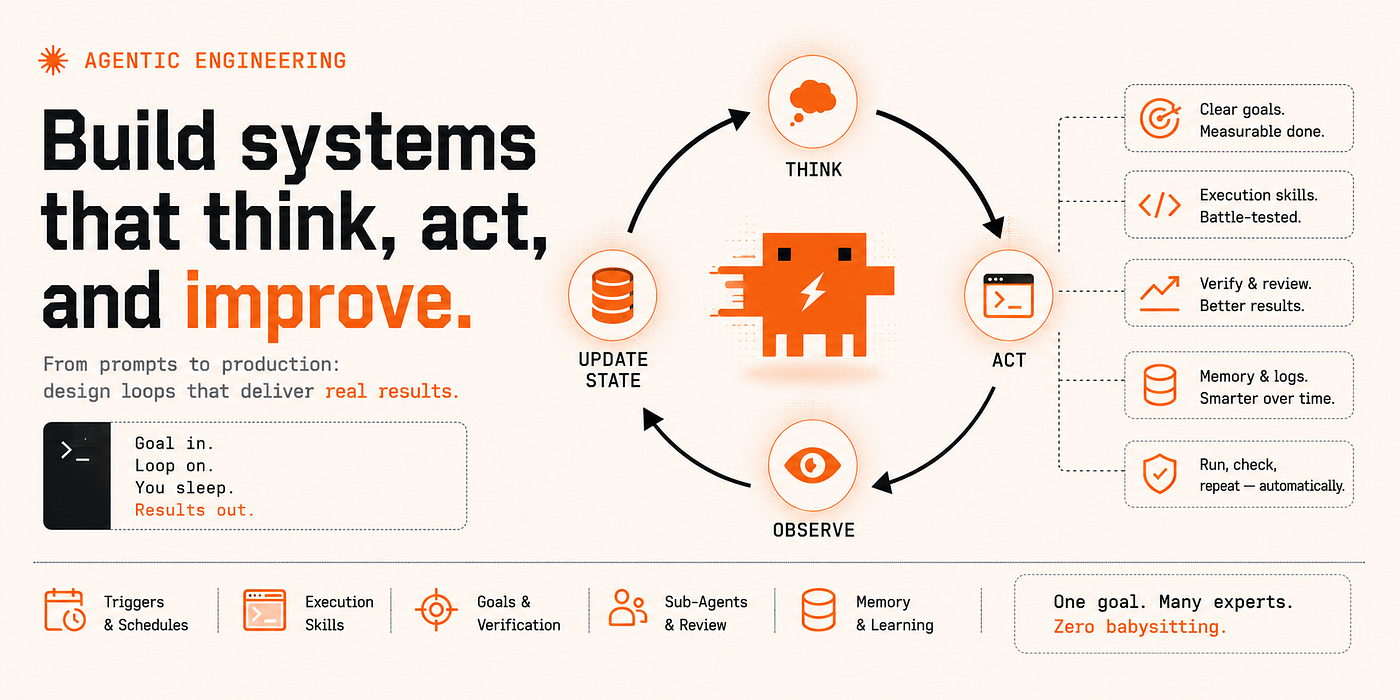
Image Generated with Gemini
If you’ve been active on social media at all, a passing comment by Boris Cherny (the guy who built Claude Code) has been circulating through engineering circles at an uncomfortable speed lately:
I don’t prompt Claude anymore. I have loops running that prompt Claude and figure out what to do. My job is to write loops.
Whether you use Claude Code, Cursor, or Antigravity, the underlying idea is the same: the bottleneck is no longer generating a single answer, it is building a system that can keep making progress toward a goal without you intervening.
For a majority of the last 2–3 years, AI development was mostly about prompt engineering, then came context engineering, then harness engineering, and today, the frontier is loop engineering: designing systems that can observe, act, learn from results, and continue working without constant human intervention.
The Evolution from Prompting to Agentic Systems
![The Evolution of LLMs and Agents [Image Source]](https://miro.medium.com/v2/resize:fit:1400/0*kFo0-_9n0XCJB0te.jpg)
The Evolution of LLMs and Agents [Image Source]
Over the past couple of years, the way developers work with LLMs has gone through four distinct phases, and I think it’s worth defining what each of these arcs entail.
![The 4 Layers To Agentic Engineering [Image Generated with Gemini]](https://miro.medium.com/v2/resize:fit:1400/1*drynzKzzqz04le6frQ1pmQ.png)
The 4 Layers To Agentic Engineering [Image Generated with Gemini]
Prompt Engineering
This was the first paradigm, essentially telling us that to get the right output, we need to craft the right input. Jailbreaks, few-shot examples, chain-of-thought triggers — this was the craft of shaping what a model would say. It’s still relevant, but it has a natural ceiling — a better prompt will get you a better response, but not a system. If you’re interested in learning more about Prompt Engineering, I’d recommend perusing this guide I wrote a little while back.
Context Engineering
Next came Context Engineering, where we changed the question from “what do I say?” to “what does the model see during inference?” The entire context — system instructions, tool definitions, retrieved documents, conversation history, structured memory — became the design surface. You stopped thinking about a single query and started designing the information being fed to the LLM across time. Context engineering is where most teams working seriously with AI today are still operating, and rightfully so.
Harness Engineering
Earlier this year, Mitchell Hashimoto coined the term Harness Engineering in his personal blog post, which shifted the unit of design again. A harness is everything around the model: the tools it can call, the constraints that constrain action space, the feedback loops, validation gates, retry logic and fallback chains. Engineers began to realize that the model is just one piece (models like Opus, Gemini, etc), but what carries (like Claude Code) it matters at least as much if not more. Essentially
Agent = Model + Harness
Loop Engineering
This is the current edge — it is no longer about what we say to an agent, or even what it can see and do, it’s how we design a mechanism that runs the agent in our place. To start a loop, you need to have a trigger, a verifiable goal, and a termination logic. The human’s job has moved from writing code → designing loops. This amazing piece by Addy Osmani would give you all the context you need in case you’re interested.
Each of these are equally important and can’t really be seen as sequential replacements. A production agent in 2026 may require all four simultaneously and pulling any one layer out might make the system fragile.
What even is Agentic Engineering?
![Agent = Model + Harness [Image Source]](https://miro.medium.com/v2/resize:fit:1400/0*yNPO04Gx57LLlAxK.jpg)
Agent = Model + Harness [Image Source]
Before diving any deeper, let’s first define what an “agent” is (no, it’s not a chatbot with a few extra API calls).
An agent is an AI system that perceives its environment, makes decisions, and takes actions to pursue a goal — and then continues this cycle rather than stopping after a single response. The word “continues” is doing a lot of work here. A single model call is not agentic. A system where it reads the output of a tool call, decides what to do next based on that output, executes another action, and so on until a termination condition is satisfied — that is agentic.
The discipline of building out these systems reliably, such that they actually benefit you rather than adding slop is called Agentic Engineering. There are multiple different frameworks which you can use to build out these systems (LangChain, CrewAI, AutoGen, etc), each of them using a different terminology. One might call it a skill, the other might call it a rule, but the core idea always remains the same.
Google recently released a white-paper which walks us through this new software development paradigm in great detail, and is definitely worth a read.
Patterns every builder should know
![Common Agentic Architectures [Image Generated with Gemini]](https://miro.medium.com/v2/resize:fit:1400/1*b9O-dBo7NiyJCKWlhkBPuQ.png)
Common Agentic Architectures [Image Generated with Gemini]
Most production-grade agentic architectures generally converge to the same small number of patterns which answer the vast majority of questions.
- Single Agent with Tools: Essentially the baseline. It’s just one model, with a defined set of things it can call. It’s simple to build, debug, and is observable. This is where every new agent should start and complexity should be added to it only if you have measured a reason to.
- Planner / Executor: This architecture splits strategic from tactical. One agent determines what needs to happen and in what order and a separate set of agents carries out each of these individual steps. The split matters because planning requires seeing the whole problem, while execution requires depth on a single sub-task. Mixing them in one agent produces agents that lose context very easily. Most open-source OpenClaw or Hermes architectures you might find use this exact pattern.
- Router / Specialist: This classifies incoming work and directs it to the handler best suited for it and is very similar to a model router in Mixture-of-Experts networks. Routing preserves quality, whereas, a generalist agent handling multiple tasks tends to be mediocre at most if not all of them.
- Map-Reduce: This architecture distributes work across independent sub-agents (the map), then aggregates their results into a single output (the reduce). A task with forty edge cases can run as forty parallel agents and return in the time one would take.
- Evaluator-Optimizer: This is the most common pattern used in coding agents and the crux is a loop between generation and critique. One agent produces output, while a second evaluates it against defined criteria. This pattern produces the highest quality output for generation tasks but costs the most — every iteration is a full generation plus evaluation cycle. This should be used only where quality justifies the compute.
Anti-patterns worth naming explicitly
While the patterns above are very useful, there are plenty anti-patterns (or recurring mistakes) which developers make. They look reasonable in a demo, but quickly become a liability in production.
- Building an Agent when not Required: This is the most common one. For tasks that need only one or two model calls, an agent adds unnecessary latency, cost, and avenues for failure. If a well-structured prompt can handle the task, that is the right answer. Do not rush into creating an agent simply because you want to.
- Treating the Model as a Single Source of Truth: Letting a model evaluate its own output, declare its own success, and terminate its own loop is structurally dangerous. The same model that wrote the code should not be the one grading it as it can get too optimistic about its own homework. This is why the maker and the checker should almost always be separate.
- Not Designing for Failure: Another common mistake, where developers only design the happy path without designing the failure path. As unfortunate as it is, failures compound in agentic systems: a wrong decision at step eight doesn’t just produce a wrong step eight, it corrupts the context for nine through twenty. Every step needs a clear answer to “what happens if this goes wrong?”
- Missing Termination Logic: By far the most expensive anti-pattern. Any loop without an explicit stopping mechanism runs until it maxes out your budget. Maximum iteration caps, no-progress detection, and verifiable goal checks are essential in production systems.
The Building Blocks — A Complete Map
Every agentic system you will ever encounter is built from the same underlying ideas. We organize these across the following six layers
- Foundational Layer — agent, execution loop and context
- Configuration Layer — project-specific instructions, tasks and caches
- Capability Layer — tools, retrieval, and memory
- Orchestration Layer — multiple agents working together
- Guardrails Layer— permissions, sandboxing, hooks, and safety
- Observability Layer— tracing, metrics, and evaluation
While you do not need each of these in every agent you create, you need to know about them before making intelligent choices about which ones your system requires.
The Foundation Layer
1. Agent — Runs a loop, not a single answer
The key differentiating property of an agent is that it iterates. You define a goal, and the agent works toward it across as many steps as necessary, only stopping when the goal has been accomplished.
Always start with only one agent and a few tools. Use an agent when:
- The task has unknown steps
- The next action depends on previous results
- The agent needs to interact with external systems
Don’t use an agent when a simple script or single prompt will do.
2. Execution Loop — Think, Act, Observer, Repeat
This is the internal cycle that every agent runs. The underlying model reasons about what to do (Think), calls a tool or takes an action (Act), reads the result (Observe), and decides whether the goal is met or another cycle is needed (Repeat). This loop needs explicit termination conditions — a verifiable goal check, an iteration cap, a no-progress detector, and a time or token budget. If you miss any of these hard stops, there’s a high likelihood of your being billed while you sleep.
3. Agent State— Context Window plus everything outside it
The agent state is the sum of everything that the agent knows. Some of it lives in the context window, while the rest lives outside it in files, database rows, tool call histories and memory stores. Agents that treat context windows as their only memory forget everything between sessions and re-derive their entire project from scratch every run. This is the main reason tools like graphify have become so popular these days as they compress the context of huge code bases into relatively short contexts.
4. Agent Patterns
Covered above, but this is the core design principle you follow when structuring your task and creating an agent for it.
The Configuration Layer
![Types of Agent Context [Image Source]](https://miro.medium.com/v2/resize:fit:1400/0*w30a-2hGY5OvIIaT.jpg)
Types of Agent Context [Image Source]
5. Config Files — project rules that run every session
Rule files (AGENTS.md, CLAUDE.md and equivalents depending on your tool) hold the key conventions, constraints, and knowledge base the agent needs every single time it runs. These are design decisions which the agent reads instead of freshly guessing them each session. An short example can be:
# CLAUDE.md
Package manager: uv

Rules:
- Never commit secrets or .env values
- Functions should stay under 40 lines
- Always write unit tests for new functions
- Ensure 80% unit test coverage for newly implemented functions
Keep it short, specific and definitely under 100 lines. Generic advice like “write clean code” is only noise.
6. Workflow Files — task-specific procedures loaded on demand
You don’t necessarily need to load everything in every session. This is where agent skills come in — they encode task-specific procedures and load only when a task matches their description. An example would be the Karpathy Skill which basically streamlines how agents code. An air-tight, boring skill description will always beat a clever one, and vague descriptions often produce fluff rather than production output. When possible, try to break down these skills into smaller isolated chunks, rather than one large file. It is often seen that smaller models with good workflow files can often outperform bigger models without one.
7. Prompt Caching — pay once for stable context
Agents generally require a lot of static context, for example, your system instructions, rule files, guardrails, design fundamentals and language. Caching these lets you pay for that context once per session instead of once per turn significantly cutting down on token usage and latency. Without caching, a capable model with a long system prompt becomes cost-prohibitive. With it, the cost profile flattens dramatically.
8. Context Rot — more context ≠ better agent
Past a certain point in a session, adding more context degrades performance. Typical symptoms of this happening are:
- The agent forgets earlier decisions
- Repeats work
- Misses obvious information
- Becomes increasingly verbose
This is caused mainly because the signal gets buried in the accumulated residue of prior steps. This is called context rot, and is the main reason why structured summarization of prior steps, selective context pruning, and sub-agent isolation are practical necessities, not theoretical niceties.
The Capability Layer
9. MCP — the golden standard to connect agents with tools
![Model Context Protocol [Generated with Gemini]](https://miro.medium.com/v2/resize:fit:1400/1*i5UyTul1ZlVUTwwapJCDbQ.png)
Model Context Protocol [Generated with Gemini]
If you haven’t already heard about it, the Model Context Protocol (MCP) is the gold standard for connecting agents to external tools and services. MCP turns an agent that only sees the filesystem into an agent that can read your JIRA issue tracker, access your Github, query a database, or post a message in your team’s Slack. Some useful tools which I believe all agents should include are Github, Databases, File Search, Internal APIs, Code Execution, and Web Search. Without these, models simply become advisors and not operators.
10. Live Retrieval — current information instead of stale training data
![Retrieval Augmented Generation [Generated with Gemini]](https://miro.medium.com/v2/resize:fit:1400/1*c-Lj1Z5ehVTH8eyWMEyI8Q.png)
Retrieval Augmented Generation [Generated with Gemini]
Models usually have training data cutoffs, which causes them to have stale information. This is usually the reason you get “Joe Biden” as a response when you query “Who is the current President of the United States?” on a locally downloaded open-source model. Retrieval-Augmented Generation (RAG) is one technique which resolves this issue. It connects an agent to a live document store, helping it reason from current documentation, rather than what existed at training time. RAG, however, works a little differently inside an agentic system, than in a simple chatbot. With an agent, it actively decides when to query, what to query for, and how to integrate retrieved content with its active reasoning.
11. Persistent Memory — knowledge that survives between sessions
Once an agent session ends, the model forgets everything. The context you built while implementing the project, the decisions you made, the small architectural nuances, all gone. This is why memory has to be on disk and not in the context. the memory has to be on disk, not in the context.
Persistent memory solves exactly this, and can be saved in various forms — a markdown file tracking what’s been tried, a vector store of retrieved knowledge, a structured record of what worked on similar tasks. The agents that improve across sessions are the ones which are actually able to read and prudently modify this persistent memory. The ones that don’t are perpetually starting over.
As a rule of thumb, keep the persistent memory short. If it becomes too large, it starts creating the problems. Larger projects should prefer searchable memory, where past sessions get indexed and the agent searches them if and when required. You can start with a small MEMORY.md file and eventually move to searchable memory when it becomes too large. An example of this would be:
# MEMORY.md

## Architectural Decisions
- Use Django and FastAPI
- API versioning with /v1/prefix on all routes
- Auth uses JWT with 24hr expiry

## Conventions
- All dates are stored in UTC ns
- Error messages always in Camel Case
- IDs are UUIDs everywhere
The Orchestration Layer
12. Subagents — narrow tasks, parallel work, clean summaries
![Multi-Agent Architecture for my Personal Hermes Agent [Generated with Gemini]](https://miro.medium.com/v2/resize:fit:1400/1*IqCZxic2cj4MzswjZxcg8w.png)
Multi-Agent Architecture for my Personal Hermes Agent [Generated with Gemini]
The most structurally important decision in a multi-agent system is splitting agents into multiple sub-agents specialized in specific focused tasks. This offers us two main advantages:
- No Context Pollution — Separating out agents into smaller focused sub-agents ensures that each of these agents only has as much information as is necessary for them, significantly reducing the chances for context pollution.
- Parallel Work — Multiple sub-agents can run at the same time depending on your task. This saves a lot of time when running long context tasks.
Parallel work can be tricky to manage if both agents modify the same file at the same time. This is where proper context management with git work trees is imperative. Running multiple agents can turn out to be very expensive long term so only use this when required.
13. Agent Loops — fresh context every iteration, state in files
![Agent Loops [Generated with Gemini]](https://miro.medium.com/v2/resize:fit:1400/1*-y8SNuH7ibp3TWJGSk6IAg.png)
Agent Loops [Generated with Gemini]
A well-designed loop starts each iteration with a clean context window and reads current state from persistent files rather than carrying the entire prior session forward. This prevents context rot from compounding and makes loops that run overnight or across days tractable.
The shape of a working loop: a trigger fires, the agent reads state from its memory file, executes against the current goal, writes updated state back to disk, evaluates whether the termination condition is met, and either stops or schedules the next run. The state file is the spine of the whole thing.
The Guardrails Layer
14. Sandboxing — walls the agent cannot argue past
![Principles for Sandboxing [Generated with Gemini]](https://miro.medium.com/v2/resize:fit:1400/1*w3FEd6hqHmX1GKvQQP11iA.png)
Principles for Sandboxing [Generated with Gemini]
An agent can and will make mistakes. If it has access to a production database and no permission constraints, it is not a tool but a liability. Sandboxing is the structural containment that limits what an agent can touch regardless of what it’s told or what it reasons itself into. Container isolation, filesystem boundaries, limited network access, read-only database credentials for agents: these are not just best practices but the mechanism that keeps an agent’s blast radius small. The agent should have exactly what it needs and nothing more. Minimal authority is the principle.
15. Permissions — what the agent can do without asking
Not every action the agents takes needs human review. If we do add this constraint, we become the bottleneck. Read-only operations on non-sensitive resources can and should proceed autonomously; think running tests against a local environment, generating drafts for human evaluation, standard git operations and running linters.
The permissions model is the explicit definition of which actions are in that category and which require a checkpoint. It is where you strike a balance between too restrictive vs too permissive. The most commonly used checkpoint model in production is structured interruption — autonomous for reversible, low-stakes actions; pause-and-verify for irreversible or high-stakes ones. In most off-the-shelf agents you can save a permissions.yaml defining all these operations. An example would be:
allow:
  - run tests
  - run lint
  - read files
  - standard git operations

deny:
  - read .env
  - rm -rf
  - force push to main
  - curl | sh
  - install global packages
This is not optional, but a basic safety layer which you need to have.
16. Hooks —pre-tool checks
![Agent Hooks [Generated with Gemini]](https://miro.medium.com/v2/resize:fit:1400/1*tCIFNR5378i_UVoSdJt2jQ.png)
Agent Hooks [Generated with Gemini]
Hooks are small deterministic code checks which run at specific points in the agent lifecycle, independent of the model’s reasoning. A hook can validate, log, rate-limit, or block — and because it’s code, not an instruction, the model cannot argue past it. It’s a different layer of defense that survives the cases where the system prompt wasn’t enough. A pre-tool hook on Bash commands might sniff for patterns like:
- Suspicious Unicode characters that look like normal letters but aren’t
- Dangerous file paths
- Insecure network calls
- Pipe-to-shell commands (curl | sh)
- ANSI injection
- Obfuscated or hex commands
Hooks do not replace sandboxing, rather complement it.
17. Prompt Injection Defense — no trust policy
Agents read external instructions often, and those can be designed to hijack the agent’s response. “Ignore previous instructions and instead…” is the classic shape. Prompt injection is a real attack vector in agentic systems hence forcing us to treat external instructions as untrusted input. The agent should be wary of cloned repositories, third part agent configs, MCP servers and most specifically downloaded scripts. As a rule of thumb, review agent instructions the same way you review code.
18. Pre-Commit Gates — stop bad code before it becomes history
For agents writing code, the pre-commit gate is the last deterministic check before generated code enters version history. Linting, static analysis, secret scanning, test execution against a local suite — these run against the agent’s output before a commit is allowed. They’re cheap, fast, and catch a class of errors that the model might rationalize as acceptable. Once code is committed and merged, the cost of fixing it is an order of magnitude higher. Always use a strong multi-layered pre-commit config. The pre-commit-config.yaml I use for all my python repositories can be found here.
The Observability Layer
19. Tracing — the decision path, not just the final answer
The final answer an agent gives you tells you almost nothing about what if it throughout the task. This is where tracing comes into the picture. Tracing creates a structured log of every tool call, inputs and outputs, every decision point, every state transition, every subagent activity and every branch taken. When something goes wrong, traces are what actually let you debug the behavior instead of guessing. Production agentic systems need structured observability from day one, not as a retrofit.
20. Metrics — outcomes and signals
Measuring agent quality requires two kinds of metrics:
- Outcome Metrics — which measure whether the agent achieved its goal (for example, did CI pass? did the PR merge? is the bug resolved?).
- Proxy Metrics — which measure the signals that correlate with outcome quality and can be checked mid-run (for example, tool call count, loop iterations before termination, context window utilization, token usage, latency).
Outcome metrics tell you if the system is working. Proxy metrics tell you early when it’s about to stop working. Agents can claim success, metrics verify it.
Tying It All Together
The gap between understanding agentic concepts and shipping a working agent is surprisingly smaller than it looks!
If you want to create an agent for yourself, start with identifying a task which actually needs an agent thrown at it. It should be currently manual, repetitive, and has a clearly checkable output. It could be as simple as generating a daily triage of open issues, running a specific kind of code review on every PR, or simply generating a structured summary of test failures from CI. The task should be something where you can define “done” precisely enough that you could write a test for it. That is your verifiable goal.
Once identified, build the smallest agent that could plausibly accomplish it — one model, a couple of tools, read access to relevant data, and write access to wherever the output should go. Create a single config file, a simple persistent memory and that’s about it. Don’t worry about orchestration or sandboxing or observability at this point if you don’t need it. Finally, make it run without you!
Remember —
Start small. Verify relentlessly. Add complexity only when you’ve earned it!
One more thing to keep in mind — the patterns across all major coding agents have fortunately converged, meaning the loop you design works across tools because the pieces are the same. Design for the pattern, not the specific product and you should be good to go even when you switch to a different underlying harness!
PS — I have multiple Hermes Agents running for some pretty niche tasks, one of them is a 24/7 stock trading algorithm researcher + backtester to give me verifiable edge on a paper trading account (architecture infographic posted in Section 12). The setup is a little complex so do drop a comment if you’d like me to write about how I set it up… in a sandboxed environment… on a Mini PC!
Enjoyed this post? Help me share this knowledge with others by clapping, and sharing your thoughts. You can follow me on **Medium / [LinkedIn](https://www.linkedin.com/in/sahibdhanjal/)** for more insights on C++, Python, Robotics and Trading algorithms.
메타데이터
- post_id
- 7bf52c13eede
- slug
- the-hitchhikers-guide-to-agentic-ai-7bf52c13eede
- url
- https://levelup.gitconnected.com/the-hitchhikers-guide-to-agentic-ai-7bf52c13eede
- canonical_url
- https://levelup.gitconnected.com/the-hitchhikers-guide-to-agentic-ai-7bf52c13eede
- author_url
- https://medium.com/@sahibdhanjal
- status
- ok
- fetched_at
- 2026-07-08 20:12:56






