Web for Discovery, Native for Playback
How a scoped handoff between WKWebView and AVPlayer unlocks background playback, AirPlay, and Picture in Picture—without turning a reader…
Web for Discovery, Native for Playback
How a scoped handoff between WKWebView and AVPlayer unlocks background playback, AirPlay, and Picture in Picture—without turning a reader app into a downloader or confusing technical access with permission.

You don’t set boundaries to keep people out. You set them to keep yourself intact. — Adelyn Birch
Good media architecture depends on the same principle. A boundary is not a refusal to cooperate. It is a way to let each part of the system do its job without absorbing responsibilities it cannot safely own.
That became clear while I was adding video playback to TheOneConvert.
The first build looked finished. A website opened inside the app. The user pressed Play. The video started.
Then the app moved to the background, and playback stopped.
There was no obvious UI bug. The page still worked in the foreground. The app had an audio session and the expected background capability. Yet the media session disappeared as soon as iOS suspended the web process.
The problem was not a missing checkbox. It was an ownership problem.
A WKWebView can preserve a provider’s page, account session, cookies, controls, and navigation. But displaying media inside WebKit is not the same as owning its playback lifecycle. For background playback, AirPlay, Picture in Picture, and sleep behavior, the operating system needs a native media session it can manage directly.
The solution was not to replace the website with a custom player.
It was to divide responsibility deliberately:
- WebKit owns discovery, sign-in, navigation, and provider context.
**AVPlayertemporarily owns eligible HLS or MP4 playback.**- A policy layer owns handoff, fallback, scope, and cleanup.
Key takeaway: The browser and the native player are not competing implementations. They are cooperating parts of one playback session.
The Checkbox That Wasn’t a Solution
TheOneConvert is a shared SwiftUI app for iPhone, iPad, and Mac. Its original purpose was to turn article URLs into a clean reading experience, so WKWebView was already a natural part of the architecture.
For the Watch workspace, preserving the website mattered even more. A video page may depend on:
- Existing cookies and account state
- Provider-specific navigation
- A JavaScript media player
- Captions and quality controls
- Signed, short-lived media URLs
- Media Source Extensions, where the visible source is a
blob:URL - DRM or another access-control system
Replacing all of that with a custom browser or extractor would have been brittle. It also would have moved the product in the wrong direction.
My first implementation therefore kept playback inside WKWebView and added the usual native support around it: inline playback, Picture in Picture, AirPlay permission, an audio session, and the iOS audio background mode.
Playback still stopped when the app moved to the background.
The reason becomes obvious once the architecture is drawn correctly:

The app owned the entitlement. It did not own the player.
Apple describes AVPlayer as the native object for playing local and remote media, including HLS, and gives it explicit policies for external playback and audiovisual background behavior. That makes it the appropriate owner for the portion of the session that needs deep operating-system integration. (AVPlayer documentation)
“Native or Web?” Is the Wrong Question
The useful question is not which technology should win.
It is which layer should own each responsibility.

This leads to a cleaner product model:

The web view remains the user’s workspace. The native player is an optional playback engine — not a replacement website.
That distinction produces an important fallback rule: when a source is not suitable for native playback, the website keeps playing it. The app does not treat incompatibility as an obstacle to defeat.
The Handoff Is a Transaction, Not a Toggle
A safe handoff has a beginning, a commit point, and a rollback path.
The full flow looks like this:

Two details make this more reliable than a simple “find URL, start player” implementation.
1. Do not pause WebKit before native playback is ready
Finding a possible URL does not prove that AVPlayer can use it. The resource may require cookies, custom headers, a valid token, or a DRM context that exists only inside the page.
The app first creates an AVPlayerItem, observes its status, and completes the handoff only after the item becomes ready to play.
Until then, WebKit remains the trusted playback owner.
2. Preserve the user’s current position
A handoff that restarts the video is technically functional and experientially broken.
The native player seeks to the page’s current playback time before it begins:
let item = AVPlayerItem(url: source.url)
let player = AVPlayer(playerItem: item)
player.allowsExternalPlayback = true
player.audiovisualBackgroundPlaybackPolicy = .continuesIfPossible
player.preventsDisplaySleepDuringVideoPlayback = true
player.seek(to: CMTime(seconds: source.currentTime,
                       preferredTimescale: 600))
player.play()
The implementation also observes player status and time-control state. A player object merely existing is not the same as media actively playing, and background resources should follow the latter.
Apple’s .continuesIfPossible policy is intentionally conditional: it asks the system to continue audiovisual playback when possible. It does not promise that every asset or runtime state will succeed. (Background playback policy)
Resolve Eligibility, Not Ownership
Modern video pages do not always expose a useful URL through <video src>.
During development with a page such as KUBB, the active media element could report a blob: URL. That is normal for a JavaScript player using Media Source Extensions. The browser may fetch an HLS manifest and assemble playback through a blob-backed pipeline.
The resolver therefore checks only two narrow sources of runtime information:
- The active
<video>or<audio>element - Recent media resource entries the page has already loaded
It accepts only:
http:orhttps:URLs- HLS manifests such as
.m3u8 - Direct MP4 resources
It rejects:
blob:URLs- Local file URLs
- Missing or invalid hosts
- Anything that is not an eligible direct media resource
The validation is deliberately boring:
guard
    let url = URL(string: candidate),
    let scheme = url.scheme?.lowercased(),
    scheme == "http" || scheme == "https",
    url.host != nil
else {
    return nil
}
That narrowness is the point.
The resolver’s job is eligibility, not acquisition.
The source URL lives only long enough to create the native playback session. The app does not write it to the media library, logs, analytics, or persistent storage. It does not proxy the stream through a server or expose a download action.
This is especially important for signed URLs. A signed URL is usually a temporary capability issued within a specific provider session. Persisting or sharing it would be both a security mistake and a product-design mistake.
AirPlay, PiP, and Background Playback Are One Session
AirPlay is not a separate video implementation. Neither is Picture in Picture.
They are operating-system capabilities attached to the same native playback session.
The native player permits external playback:
player.allowsExternalPlayback = trueThe UI presents the system AVRoutePickerView; on iOS, the picker prioritizes video-capable devices. Apple recommends the route picker as the standard interface for nearby AirPlay receivers, and AVPlayer is the normal playback path for AirPlay video. (Supporting AirPlay in your app, AVRoutePickerView)
At playback time, the app activates an audio session using the playback category, movie playback mode, and the long-form video route-sharing policy. The iOS target declares the Audio, AirPlay, and Picture in Picture background mode, which maps to UIBackgroundModes with the audio value. (Configuring background execution modes)
Together, these pieces describe one coherent session:
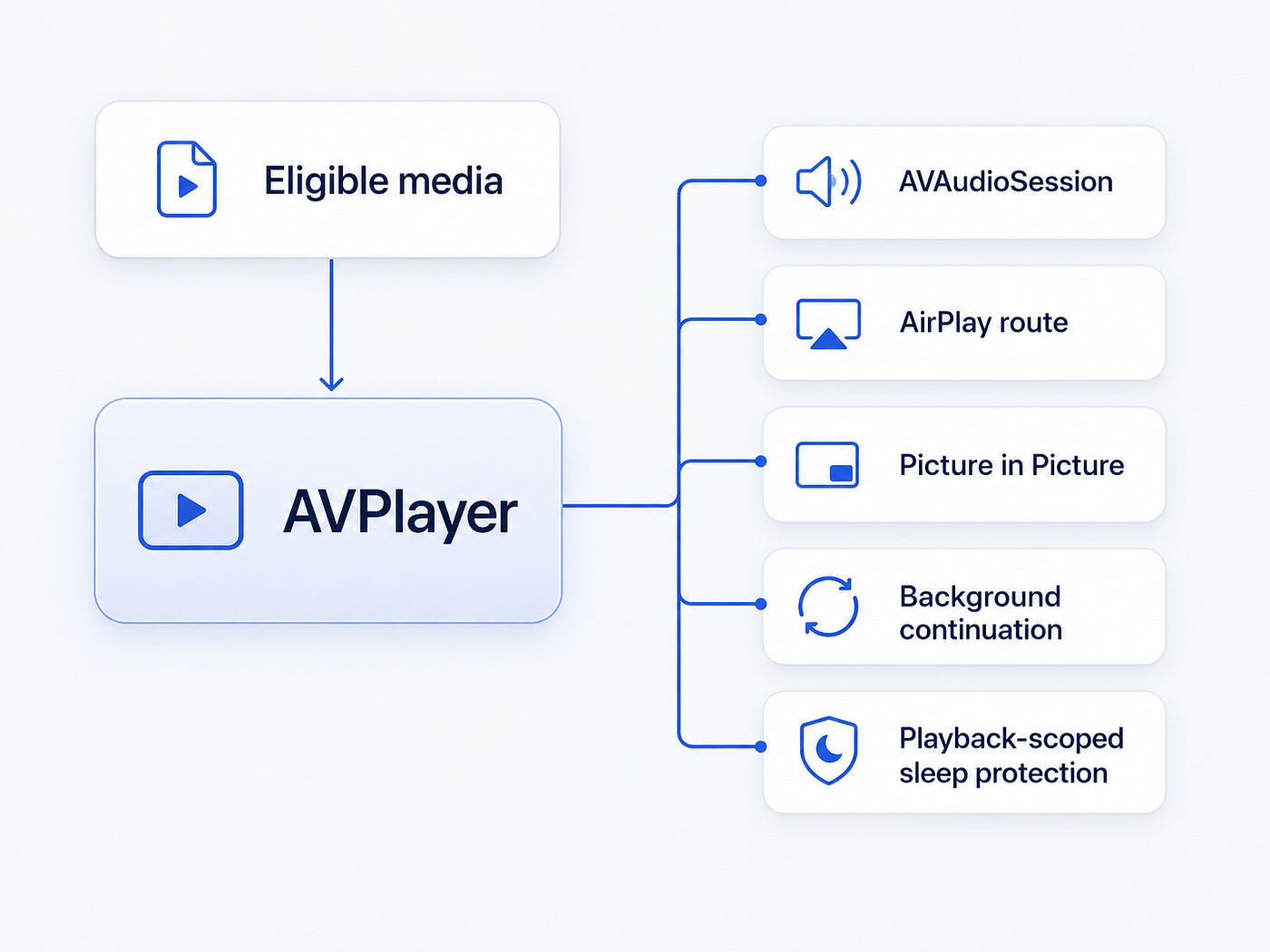
The app activates the audio session only when playback begins. Apple specifically recommends avoiding unnecessary activation because taking over the audio session too early can interrupt audio from other apps. (AVAudioSession documentation)
Background Playback Is a Lifecycle
Adding audio to UIBackgroundModes is necessary on iOS. It is not sufficient.
The operating system also needs a legitimate playback owner and an active media session. That means every supporting resource must follow observed player state.

On iOS, the idle timer is disabled only while playback is active.
On macOS, the equivalent is a scoped ProcessInfo activity that prevents idle system and display sleep. The activity token ends as soon as playback stops.
AVPlayer.preventsDisplaySleepDuringVideoPlayback participates in the same design. Apple exposes it specifically for preventing display sleep during video playback; it should not become a permanent “keep my app awake” switch. (Display-sleep behavior)
This scope is not merely tidy engineering. It protects the user from a media feature that silently keeps the device awake long after playback has ended.
Content Rights Belong Inside the Architecture
Media technology makes it easy to confuse two facts:
- A resource is technically visible to software during playback.
- A person has permission to copy, redistribute, or bypass controls around it.
The first does not prove the second.
The U.S. Copyright Office notes that movies and other audiovisual works are copyrightable and that copyright owners hold exclusive rights, subject to licenses, public-domain status, and legal exceptions. Product code cannot determine all of those rights for a user. (What Is Copyright?)
This is not legal advice, but it leads to clear engineering constraints:
- Use content you own, are authorized or licensed to play, that is in the public domain, or that you are otherwise legally permitted to use.
- Respect provider terms, account restrictions, and playback controls.
- Do not bypass DRM, encryption, paywalls, geographic controls, or other access-control systems.
- Do not collect decryption keys or reproduce a protected media pipeline.
- Do not persist, publish, or share signed stream URLs.
- Do not add downloading merely because a stream can be played.
- Treat unsupported, cookie-bound, or protected sources as a reason to remain in the website player — not as a challenge to work around.
TheOneConvert follows those rules structurally. It preserves the provider’s page and session, creates a temporary native handoff only for compatible direct media, and falls back whenever native playback is inappropriate.
AirPlay does not change that boundary. Sending authorized playback to a television changes the output route. It does not grant new rights to the content.
A Graceful “No” Is Part of the Feature
A direct media URL may still fail in AVPlayer.
It may require cookies, request headers, a short-lived token, or a DRM context that belongs to the web player. A source may also expire after discovery.
When that happens, TheOneConvert:
- Stops the native attempt
- Releases audio and sleep assertions
- Returns control to the website player
- Shows a generic explanation instead of exposing the media URL
The interface also provides an explicit Website Player action.
Native playback is an enhancement, not a lock-in. Failure is a supported state, and fallback is part of the primary design — not cleanup added after the happy path.
What Automated Checks Can Prove
The implementation is backed by:
- Successful iOS Simulator and macOS builds
- 41 passing unit tests
- Five passing macOS UI tests
- A focused Watch-workspace UI test
- Tests for HLS acceptance, playback-position transfer, invalid URL rejection, and
blob:rejection - A built iOS configuration containing the audio background mode and long-form video route-sharing policy
These checks validate the resolver, app configuration, shared-target integration, and fallback behavior.
They do not prove that media survives a phone lock, routes correctly to a television, or remains synchronized through a real AirPlay session.
Those behaviors require hardware.
The Real-Device Test Matrix
Before treating the feature as release-ready, I run this sequence:
- Start an eligible HLS video on an iPhone.
- Confirm that native handoff preserves the current position.
- Lock the phone and verify that playback continues.
- Return to the app and verify that controls remain synchronized.
- Route playback to an Apple TV with the system AirPlay picker.
- Background and foreground the app while AirPlay remains active.
- Pause playback and confirm that sleep protection and the audio session are released.
- Repeat with an unsupported or protected source and confirm that it remains in the website player.
- Repeat the lifecycle on iPad and Mac.
This is the gap between the project builds and the media experience works in the room.
A Practical Implementation Sequence
For a similar SwiftUI feature, I would build in this order:
- Preserve the website as the owner of navigation, authentication, and provider behavior.
- Define an intentionally narrow native-source policy.
- Accept only HTTP(S) media that AVFoundation is designed to play, such as HLS or MP4.
- Wait for
AVPlayerItemreadiness before pausing the website. - Transfer the current playback time.
- Enable external playback and present the system route picker.
- Configure the audio session for playback and long-form video.
- Add the iOS Audio, AirPlay, and Picture in Picture background mode.
- Tie audio-session and sleep assertions to observed playback state.
- Release every resource on pause, failure, navigation, and exit.
- Keep a first-class website fallback.
- Store no stream URLs and build no DRM workaround.
- Test on a physical device and a real AirPlay receiver.
The resulting stack is intentionally small:

The Larger Lesson
The most useful result was not a clever extractor. It was a boundary.
Web technology is excellent at preserving a provider’s application, identity, and content context. Native media frameworks are excellent at integrating playback with the operating system. A controlled handoff lets both remain true without pretending that every website video is a native asset — or that being able to observe a stream creates permission to own it.
The implementation is intentionally modest:
- Discover on the web.
- Play natively when the source is eligible.
- Route through AirPlay when the user chooses.
- Continue in the background when the system and media allow it.
- Prevent sleep only while playback is real.
- Fall back without bypassing protection.
- Respect ownership at every layer.
The architecture became more reliable when it stopped trying to own the entire experience. That restraint is not a limitation of the design.
It is the reason the design holds together.
Before You Go
AI only gets real when you stop talking about it and start building with it. Used well, it unlocks what wasn’t possible before — and as it evolves, it keeps opening new paths and redefining how we do the old ones. That’s what I share here — what works, what breaks, and what’s worth understanding more deeply. **Follow along and subscribe** if you want to stay close to the edge.
메타데이터
- post_id
- 7c0ea304a319
- slug
- web-for-discovery-native-for-playback-7c0ea304a319
- url
- https://medium.com/@dorangao/web-for-discovery-native-for-playback-7c0ea304a319
- canonical_url
- https://medium.com/@dorangao/web-for-discovery-native-for-playback-7c0ea304a319
- author_url
- https://medium.com/@dorangao
- status
- ok
- fetched_at
- 2026-08-12 10:11:50