Conditional and Iterative workflows in LangGraph
In this Blog we will cover about the two major workflows that are used in LangGraph which are the core reason why AI engineers choose to…
Conditional and Iterative workflows in LangGraph
In this Blog we will cover about the two major workflows that are used in LangGraph which are the core reason why AI engineers choose to use it
Conditional Workflows
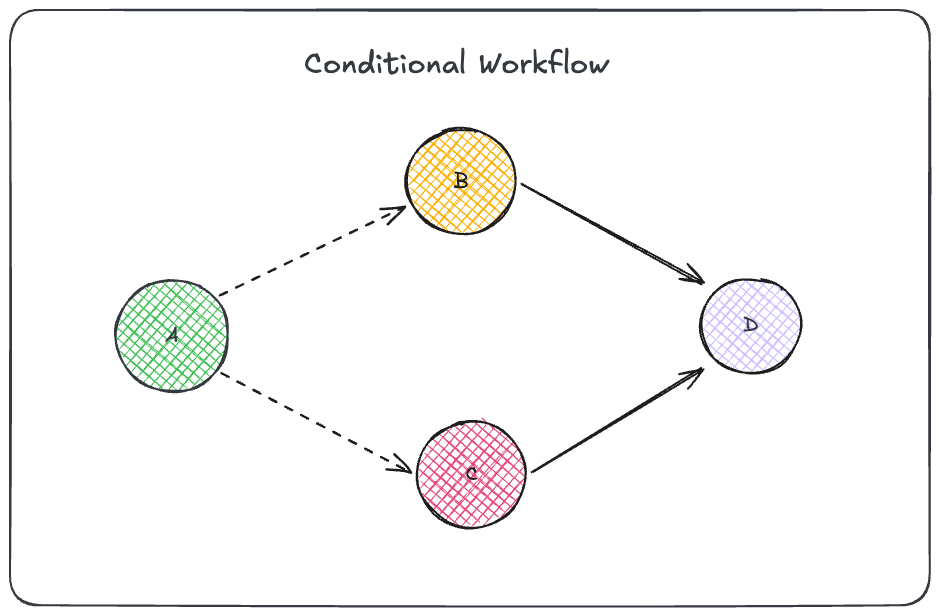
Conditional workflows are similar to the parallel workflow but instead you dont go to both the branches , you go to one of the branches based on a condition
example 1
look at the example 1 , from A the flow will either go to B or C , making the workflow as either A — B — D or A — C — D , the control from A node goes to B or C based on a certain condition , the branches can be more than two it doesnt matter
There are two important elements that makes a workflow conditional
- conditional node
- conditional edge
we will use two examples to understand Conditional workflows !
- Student Pass Fail (without LLM)
- Product Review (using LLMs)
Student Pass / Fail
In this workflow we decide if a student passes or fails based on their marks
State Definition

given below is how the workflow looks like , there is a calculate_percentage node that calculated the percentage , this calculate percentage node doesnt directly point to 3 different nodes , it has a conditional node which tells it to which nodes it has to go


the calculate_percentage node then connects to the conditional node
Conditional node :
A conditional node is different from a regular node , it is not attached to the main StateGraph , its only purpose it to return the certain values based on a certain condition


the check_result node function is the conditional node which returns the function names of the other nodes , below is how we instantiate all the nodes , note that check_results is not added as a node

Conditional edges
In the code below conditional edges is created , the check_result node is connected as a conditional edge from the calculate_percentage node , thus when check_result function runs it returns one of the values fail_student , pass_student and distinction_student which gets executed

think of it such as that a conditional edge just get converts to an normal edge with the value from the check_result

the other nodes are defined as follows

Product Review
To check out the entire code Click here
In this example we will be looking a review workflow , which provides responses to reviews provided by the customer and categories it into negative and positive reviews with some other extra qualities , the workflow looks like the following

The state of the workflow is :

the control from the find_sentiment node goes to the conditional node where it has two options them being run_diagnosis and positive_response

sentiment analyser is the conditional node , it returns run_diagnosis function or the positive_response based on the state data from the find_sentiment node

the nodes are defined in the following manner :

the edges are defined in the following manner with sentiment_analyser in the conditional edge

example output :
workflow.invoke({
    "review" : "the screen keeps on stucking when i go to my  settings panel and The password that it sends is very long to my email I want ewasier passwords to remember and make an option that I can set my own passwords I dont like it restricting on me"
})

{
    'review': 'the screen keeps on stucking when i go to my  settings panel and The password that it sends is very long to my email I want ewasier passwords to remember and make an option that I can set my own passwords I dont like it restricting on me',
    'positive': False,
    'tone': 'negative',
    'issue_type': 'UI bug: settings panel freeze; password policy request (simplify/customize passwords)',
    'urgency': 'high',
    'review_response': 'Sorry for the frustration. The settings panel freeze is a high-priority UI bug we’re investigating. About passwords, user-defined policies aren’t supported today; we’re exploring simplifications for the future. In the meantime, update the app, clear cache, or use a password manager. Please share device, app version, and steps to reproduce.'
}
Iterative Workflows
Iterative workflows are also known as looping workflows , they are a modification of Conditional workflows

the only modification is that one of the conditional edges leads to a node which points to the parent node itself
let us understand Iterative workflows using an example which is a social media post generator

we will have a conditional node after the post_evaluator , the conditional node is like an if statement that we use specifically to redirect at an node , here if the post_evaluator returns approved we end and if it rejects we go to the optimizer node , this is a little different from the above examples where we just returned the name of the nodes to be pre conditionally redirected to

the state of the workflow is :

there are three nodes in this workflow , they are defined below

below is the conditional node that we used , this node is connected by the post_evaluator node and is triggered after the evaluator accepts or rejects the post and return the state


notice how in the previous example we just returned the name of the node and the conditional workflow worked , look at the example above and notice that we have an extra field that says if the conditional node returns approved then go to END or if rejects it points to the name of another node

I didnt provide the code of each and every node cause the code was pretty lengthy … If you are intrested u can check out the code over here
just a small observation I thought to share while I was testing this workflow , for all my queries the iteration never incremented which meant the post was never rejected , but by using a better prompt I got an Iteration of 1

the models nowadays are kindaah too good that I had to make gpt write a bigger prompt just to get rejected once , thus your prompt really really matter … the more personalized and detailed prompt u give the better the model performs
I hope you learned about Iterative and Conditional workflows , thanks alot of reading 💛
메타데이터
- post_id
- 7c9ba474cd49
- slug
- conditionals-and-iterative-workflows-in-langgraph-7c9ba474cd49
- url
- https://medium.com/@hsamiuddin405/conditionals-and-iterative-workflows-in-langgraph-7c9ba474cd49
- canonical_url
- https://medium.com/@hsamiuddin405/conditionals-and-iterative-workflows-in-langgraph-7c9ba474cd49
- author_url
- https://medium.com/@hsamiuddin405
- status
- ok
- fetched_at
- 2026-06-09 15:37:30



