What NotebookLM’s New Big Update Means for Researchers
NotebookLM always had a ceiling. A smart one, but a ceiling.
What NotebookLM’s New Big Update Means for Researchers
NotebookLM always had a ceiling. A smart one, but a ceiling.
NotebookLM always had a ceiling. A smart one, but a ceiling.
You could upload papers, ask questions, get oriented fast. That was genuinely useful. But the tool stopped there, and it couldn’t find sources for you, couldn’t run analysis, couldn’t produce anything beyond text. It was a good reading companion, not a full research environment. And if you wanted to do anything with what you’d read, you had to go somewhere else to do it.
Google just changed that. Last week they shipped an update that expanded what NotebookLM actually is. And it’s not a mere minor feature drop. It’s actually a structural shift in what the tool can do inside a single session.
Whether that expansion matters for your workflow is a different question, and the answer depends on what the tool still can’t do. Which it still can’t do plenty of. But first, here’s what actually changed.
What Actually Changed
The biggest change is code execution. NotebookLM now has a built-in cloud computer, which means you can write and run code inside the notebook itself.
Here’s why that matters. Before this update, any kind of analysis had to happen somewhere else. You’d extract what you needed from your papers inside NotebookLM, then open Python or a spreadsheet somewhere else to actually process the numbers, then come back. That constant switching between tools is one of the quietly exhausting parts of doing research. It doesn’t feel dramatic. It just kills your focus a little bit every time.
Now that loop stays in one place. That’s a real workflow improvement.
The second change is source discovery. NotebookLM used to require you to bring every source to it manually. You had to already know what you were looking for before the tool could help you. Now you can start with a rough research question and it will find relevant web sources for you. It’s not a replacement for a proper database search, but for the messy early stage of a project when you’re still figuring out what the conversation in a field even looks like, it’s useful.
Third, the output formats expanded. Charts, spreadsheets, slide decks, all generatable directly from your sources without leaving the workspace. Previously the outputs were mostly text. Summaries, answers, maybe a study guide. Now there’s structured output you can actually use downstream.
The whole system now runs on Gemini 3.5, which is a step up in reasoning quality from what NotebookLM was running before.
But one thing worth saying before we go further. Most of these features are gated behind Google AI Ultra, which costs $99.99 a month. Free users and standard plan users are not included in the rollout yet. That price point matters a lot to how you think about everything I’m about to say.
So, What This Means And How Can it Be Useful If You Do Research
The update helps most with the parts of research that tend to feel the most stuck.
That early stage of a literature review is always uncomfortable. You have a research question but you don’t have a reading list. You’re searching databases, following citation trails, trying to piece together what a field has actually said before you can say anything yourself. It’s a phase where you spend a lot of time feeling like you don’t know enough to do the work yet. NotebookLM can now help you build that initial source pool from a question rather than requiring you to already have it figured out. That’s a small shift but a real one.
The distance between reading and doing something with what you’ve read also got shorter. Before, you’d extract insights inside NotebookLM and then have to go somewhere else to run any analysis, build any comparison, or produce any real output. Now more of that process lives in one workspace. For anyone who loses the thread every time they have to switch tools, and I do, that compression matters.
The reasoning quality went up too. I’ve spent a good amount of time comparing NotebookLM to other AI tools for knowledge work, and the gap between NotebookLM and the stronger alternatives has narrowed with this update. Questions that used to produce careful, noncommittal answers are getting more precise responses now.
What hasn’t changed is the part that matters most. The work of reading deeply, developing an original argument, figuring out what your contribution actually is, that’s still yours. A better tool doesn’t do your thinking. It just means less of your energy goes to things that aren’t thinking.
What It Still Can’t Do

This is the section the announcement didn’t lead with.
NotebookLM is still a chat interface. You ask, it answers, linearly. For researchers working across a large body of literature, that linearity is a real limitation. You often need to see how ideas connect across papers, how a methodology debate in one study maps onto a theoretical framework in another, where the clusters and gaps in a field actually sit. NotebookLM gives you precise answers to specific questions. It doesn’t show you the shape of a knowledge base. Those are two different things, and the second one is often more valuable.
It also doesn’t connect to the tools you’re already using. If you’ve spent years building a Zotero library or an Obsidian vault full of literature notes, NotebookLM has no idea any of that exists. You have to manually import sources into its world every single time. For a single contained project, that’s manageable. For a researcher with years of organized knowledge living elsewhere, that friction compounds quickly. You end up maintaining two separate systems rather than working from one.
Privacy deserves more attention than it’s getting in the update coverage. When you upload unpublished data, embargoed papers, or sensitive fieldwork to NotebookLM, that material goes onto Google’s servers. For some researchers that’s a non-issue. For others working with anything confidential or pre-publication, it’s a dealbreaker. I’ve written before about privacy-focused alternatives for researchers who need to think carefully about where their work lives.
And then there’s the price. $99.99 a month. I want to sit with that number for a moment because most of the researchers I know are grad students, postdocs, or independent scholars. They are not expensing software subscriptions. That price point locks the most capable version of the tool away from exactly the people who would get the most out of it. An update that genuinely helps researchers is less useful if most researchers can’t access it.
A Better Alternative
Constella approaches the research problem at a different level. Instead of a chat interface where you bring sources and ask questions linearly, Constella builds a visual graph canvas where your sources become interconnected nodes. You can see how papers and ideas connect to each other, where gaps exist between clusters of literature, and what your knowledge base actually looks like as a structure rather than a stack. That spatial view is something NotebookLM still doesn’t offer, and for research work it’s the difference between understanding a field and just searching it.
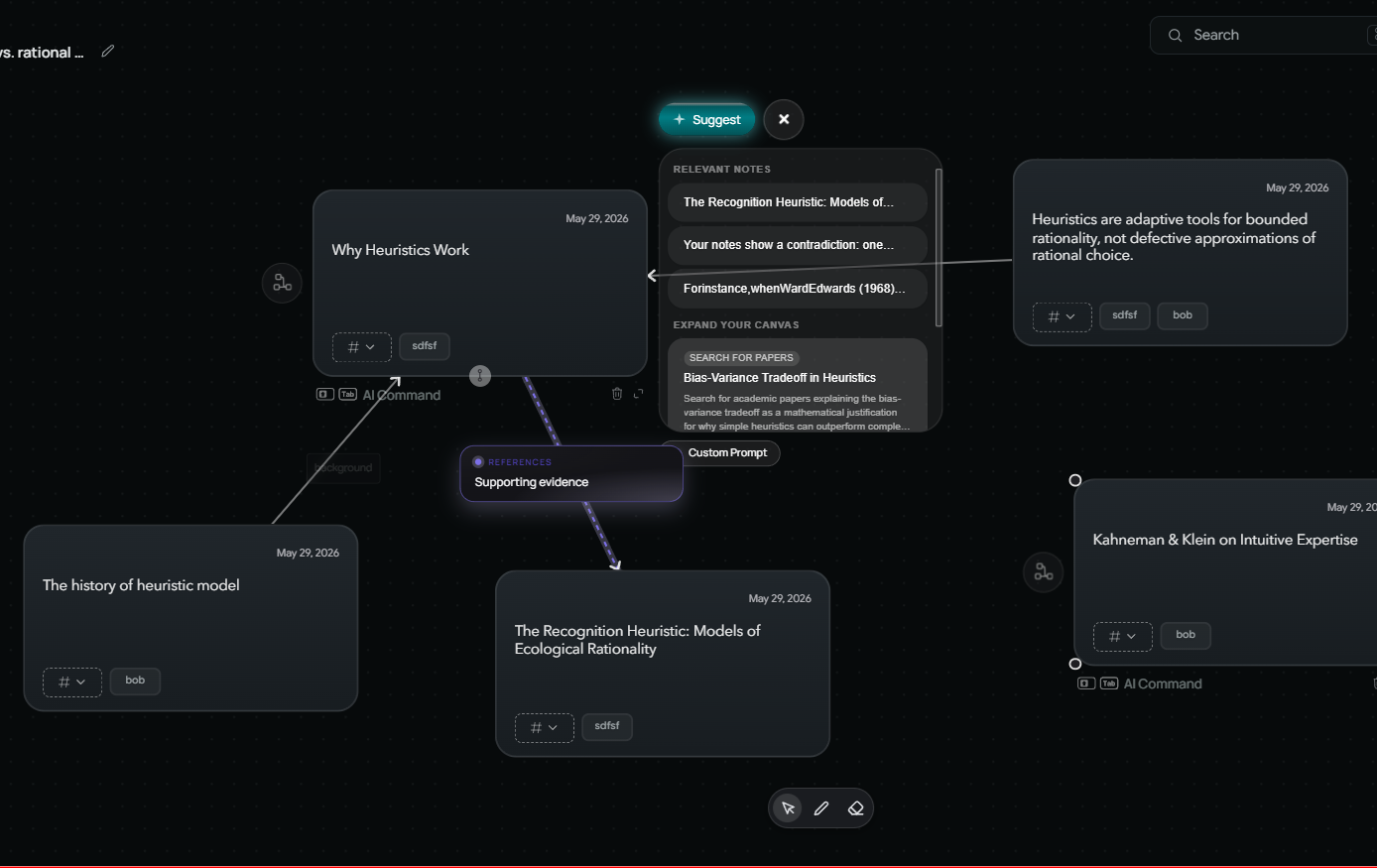
It also integrates with the tools you’re already using. Zotero, Obsidian, Readwise, Notion. It works with the knowledge you’ve already built over years rather than asking you to rebuild it inside a new system. It’s fully private and local, which matters if your research involves anything you wouldn’t put on a corporate server. And it’s free, which given what NotebookLM now charges for its best features, is not a minor detail.
This is sponsored by Constella. Only try it if you find it useful. It’s 100% private, local, and free.
NotebookLM got meaningfully better in June 2026. If you have institutional access or can justify the Ultra subscription, the update is worth exploring. But if you need your tools to connect to where your knowledge already lives, and you can’t or won’t spend a hundred dollars a month on a single research app, Constella is worth a serious look.
메타데이터
- post_id
- 7cab1c0b5ca3
- slug
- what-notebooklms-new-big-update-means-for-researchers-7cab1c0b5ca3
- url
- https://medium.com/better-workflow/what-notebooklms-new-big-update-means-for-researchers-7cab1c0b5ca3
- canonical_url
- https://medium.com/better-workflow/what-notebooklms-new-big-update-means-for-researchers-7cab1c0b5ca3
- author_url
- https://medium.com/@theo-james
- status
- ok
- fetched_at
- 2026-06-20 20:29:01