GGUF Quantization Explained: From the Bottom Up
A practical guide to understand GGUF Quantization
GGUF Quantization Explained: From the Bottom Up
A practical guide to understand GGUF Quantization
Part 1: The Core Problem
Why Your Laptop Can’t Run Llama-3.1–405B
Let’s do some math:
Llama-3.1-405B has 405 billion parameters
Each parameter stored as Float32 = 4 bytes

405,000,000,000 × 4 bytes = 1,620,000,000,000 bytes
≈ 1.62 TB of storage needed!
Even a smaller 7B model needs:
7,000,000,000 × 4 bytes = 28 GB (Float32)
7,000,000,000 × 2 bytes = 14 GB (Float16)
That’s why you need an RTX 4090 with 24GB VRAM just to load a 7B model at full precision.
Part 2: The Core Idea — Quantization
What is Quantization?
Quantization means storing numbers using fewer bits while still being able to reconstruct them accurately enough for the model to work well.
The key insight: We don’t store the raw number. We store a compressed representation that includes:
- A quantized integer value (fewer bits)
- Metadata to convert it back (scale, zero_point)
Why Can’t We Just Round?
int8(0.123456) = 0 // All information lost!The problem: Integers in the range [-128, 127] don’t match the tiny decimal values neural networks use.
Part 3: The Solution — Scaling and Grouping
Step-by-Step: How Q4_K_M Actually Works
Let’s walk through quantizing a small group of 4 weights:
Original floats: [0.11, 0.09, 0.12, 0.10]Step 1: Find the Range
We find the minimum and maximum values in our group:
min = 0.09max = 0.12range = max - min = 0.03
Step 2: Calculate Scale and Zero Point
We map this range to fit within our quantized integer space (for Q4, that’s 0–15):
scale = range / 15 = 0.03 / 15 = 0.002
zero_point = min = 0.09
Step 3: Quantize Each Value
To convert each float to a 4-bit integer:
quantized_value = round((original - zero_point) / scale)Let’s calculate:
0.11 → round((0.11 - 0.09) / 0.002) = round(10) = 10
0.09 → round((0.09 - 0.09) / 0.002) = round(0) = 0
0.12 → round((0.12 - 0.09) / 0.002) = round(15) = 15
0.10 → round((0.10 - 0.09) / 0.002) = round(5) = 5
So our quantized values are: [10, 0, 15, 5] (stored as 4-bit integers)
Step 4: Store Everything
In the GGUF file, we store:
- The quantized integers:
10, 0, 15, 5(4 bits each = 2 bytes total) - Metadata for this group:
- scale = 0.002
- zero_point = 0.09
Step 5: During Inference — Dequantize
When the model runs, it reconstructs the values:
reconstructed = scale × quantized + zero_point

10 → 0.002 × 10 + 0.09 = 0.11 ✓
0 → 0.002 × 0 + 0.09 = 0.09 ✓
15 → 0.002 × 15 + 0.09 = 0.12 ✓
5 → 0.002 × 5 + 0.09 = 0.10 ✓
We get back our original values (with tiny rounding differences).
Part 4: The Suffix Meanings
Breaking Down Q4_K_M
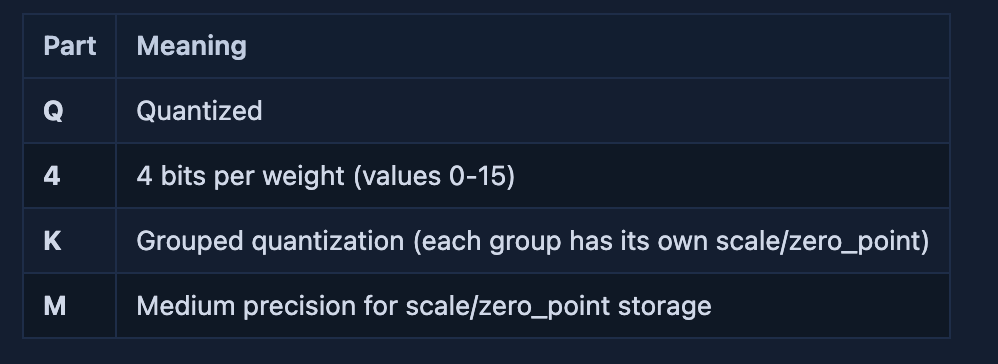
Other Common Formats
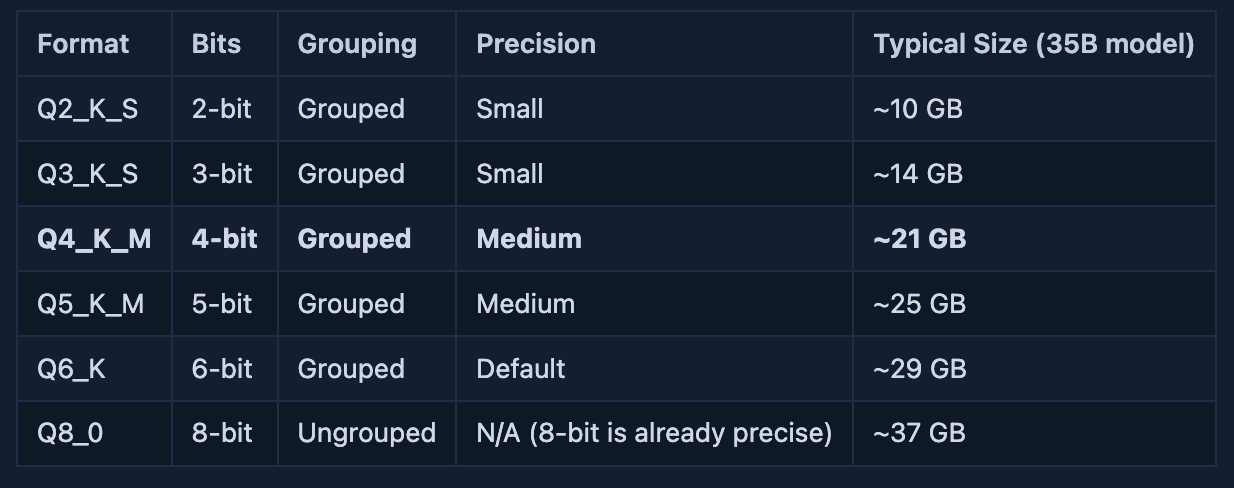
What’s the Difference?
_K vs _0
**_K** = Grouped quantization - each group of weights has its own scale/zero_point. This gives better accuracy.**_0** = Ungrouped quantization - one global scale/zero_point for the entire tensor. Faster but less accurate.
_M, No Suffix, _S, _L
These indicate precision level for scale/zero point storage:
- No suffix (e.g.,
Q6_K) = Default precision **_M** (Medium) = Medium precision for group parameters - best quality for most use cases**_S** (Small) = Small precision, fastest but lowest quality**_L** (Large) = Large precision, slowest but maximum accuracy
Part 5: How GGUF Model Inference Works
The Memory Architecture
When you run a quantized model, memory is used for two main things:
- Model weights — stored in VRAM (this is what GGUF reduces)
- KV cache — short-term memory for the context window
VRAM Usage = Weights + KV Cache
           = 21 GB (Q4_K_M) + ~0.6 GB (for 35B model)
           = ~21.6 GB total
The Inference Flow
1. Load quantized weights into VRAM (~21 GB for Q4_K_M)
2. During forward pass:
   a) Load one tensor block from VRAM
   b) Dequantize to FP16 in GPU registers (temporary, not stored)
   c) Compute attention/MLP layers
   d) Store keys/values in KV cache as FP16 (~8-10 GB total)
3. Repeat for next layer
The dequantization happens on-the-fly — the full-precision values exist only briefly in GPU registers during computation, not in VRAM.
Part 6: Why GGUF Saves VRAM and Preserves Quality
VRAM Breakdown for Inference
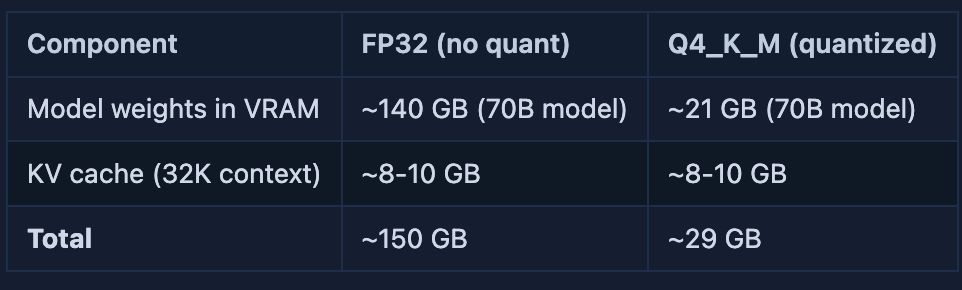
Real Numbers from Benchmarking,From the llama.cpp VRAM requirements:
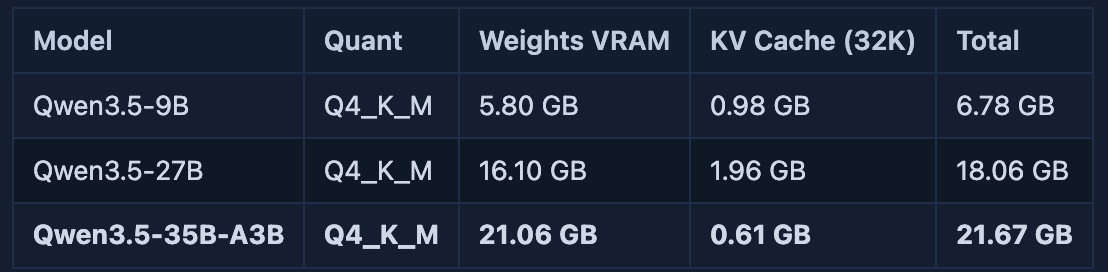
Notice how the KV cache is only ~3% of total VRAM for these models — it’s dominated by weight storage.
Why Quality is Preserved?
The key insight: quantization error is distributed across billions of parameters. When you quantize a single weight from 0.123456 to 0.12, the error is tiny (0.003456). But when you have 35 billion weights, that’s still only ~0.00001% total error.
More importantly:
- Neural networks are robust to small weight perturbations
- The quantization process is optimized during training/post-training
- Group-wise scaling (K-quants) adapts to local weight variations
Part 7: How to Choose GGUF Files
When to Choose What
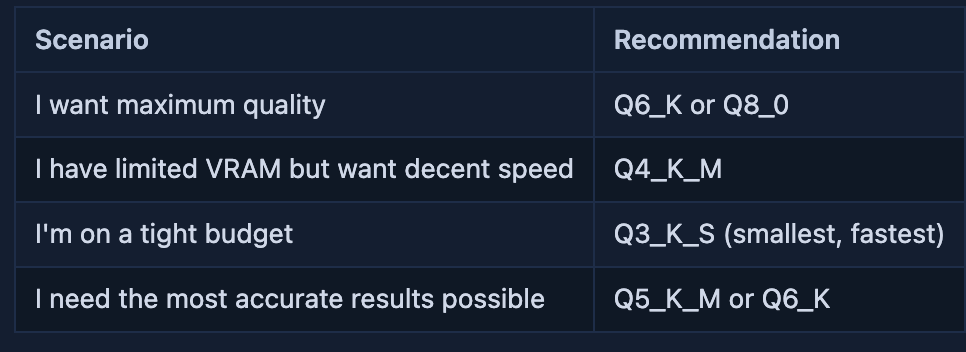
Practical Tips
- Start with Q4_K_M — it’s the sweet spot for most users
- Check your GPU VRAM — use
nvidia-smion Linux/Windows orsystem_profiler SPDataTypeon macOS - Test before committing — try different quant versions to see what works best on your hardware
Part 8: The Bottom Line
What GGUF Actually Does
- Groups weights into small blocks (typically 64 elements)
- For each group, finds min/max and calculates scale/zero_point
- Converts floats to quantized integers (e.g., 4-bit values 0–15)
- Stores integers + metadata in a portable file format
The Magic
During inference:
- Load quantized weights into VRAM (~21 GB for Q4_K_M on a 35B model)
- When a tensor block is needed, load its scale/zero_point
- Dequantize the block in GPU registers (temporary, not stored)
- Do matrix multiplication
- Discard the dequantized values before loading next block
The full-precision values exist only briefly in CPU/GPU registers during computation — not in VRAM.
Conclusion
GGUF quantization is the breakthrough that made local LLMs practical. By understanding how it works — from the basic math of scale/zero_point to the actual VRAM savings — you can make informed choices about which model version to download and run.
The next time you see Q4_K_M in a Hugging Face repo, you'll know exactly what those letters mean—and why they let your laptop run models that were once exclusive to enterprise data centers.
메타데이터
- post_id
- 7cdf191872f9
- slug
- gguf-quantization-explained-from-the-bottom-up-7cdf191872f9
- url
- https://medium.com/@xhinker/gguf-quantization-explained-from-the-bottom-up-7cdf191872f9
- canonical_url
- https://medium.com/@xhinker/gguf-quantization-explained-from-the-bottom-up-7cdf191872f9
- author_url
- https://medium.com/@xhinker
- status
- ok
- fetched_at
- 2026-06-17 08:20:12