HackLab: Cross-Compile C source code for ARM architecture on x86 system.
Well in my last blogpost I showed how to Debug Arm binaries on x86 system as a CTF player or as a Reverse Engineer. We worked with compiled…
HackLab: Cross-Compile C source code for ARM architecture on x86 system.
Well in my last blogpost I showed how to Debug Arm binaries on x86 system as a CTF player or as a Reverse Engineer. We worked with compiled Binary.
So, you’ve got the source but need an ARM binary. Maybe you’ve exhausted x86 exploit dev and you’re hungry for a challenge that’s a bit more… exotic. You want to see if your favorite techniques still hold up on ARM. You’re in the right place. I’m going to walk you through a streamlined method for cross-compiling ARM binaries without ever leaving your x86 workstation.
1. Requirements.
You have to install following packages before starting:
- Docker
- Docker containerd Image store.
2. Enable Containerd Image Store
According to Official Docker Documentation:
The image store is the component responsible for pushing, pulling, and storing images on the filesystem.
The classic Docker image store is limited in the types of images that it supports. For example, it doesn’t support image indices, containing manifest lists. When you create multi-platform images, for example, the image index resolves all the platform-specific variants of the image. An image index is also required when building images with attestations.
So here’s shorter version of above sentence:
You have to enable containerd image store in order to cross compile you C source :D.
To enable containerd image store just add following json into you /etc/docker/daemon.json.
{
  "features": {
    "containerd-snapshotter": true
  }
}
Restart docker daemon and you are ready to go.
3. Compile for ARM processors with Dockerfile.
So last step.
3.1 Install Qemu and register binfmt_misc.
You don’t need to install Qemu binaries, just run following command.
sudo docker run --privileged --rm tonistiigi/binfmt --install allAccording to docs:
This installs the QEMU binaries and registers them with
[binfmt_misc](https://en.wikipedia.org/wiki/Binfmt_misc), enabling QEMU to execute non-native file formats for emulation.
https://en.wikipedia.org/wiki/Binfmt_misc
So shorter version of that sentence:
This installs Qemu and you don’t need to do anything. Just run that command and move on. :D
3.2 Create a Dockerfile.
FROM --platform=linux/arm64 ubuntu:latest AS builder

RUN apt-get update && apt-get install -y build-essential

WORKDIR /src
COPY . .

RUN gcc -o vuln-64 source.c \
    -fno-stack-protector \
    -z noexecstack \
    -pie -fPIE \
    -Wl,-z,relro \
    -U_FORTIFY_SOURCE

FROM scratch
COPY --from=builder /src/vuln-64 /vuln-64
So you should change something in that Dockerfile:
- platform=linux/arm64** **— Specify which platform you want to build.
- source.c — Your source code’s filename.
- ubuntu:latest — Specify which docker image you want to build. You need to change it to more smaller image to make build faster, its only a placeholder.
Look, I get it. I skip the long explanations too. :D We’re all just here for the code. Feel free to just toss this Dockerfile into your favorite AI, tell it to explain the parts you care about, and tweak the values for your specific target. I won’t tell if you don’t.
3.3 Build and get that binary.
sudo docker buildx build --platform linux/arm64 -o type=local,dest=. .This command won’t create a new docker image (**-o type=local), instead it will copy files from last stage to current folder(`dest=. .`**).
After successfully build, you will have binary with name vuln-64 in your current folder and if you check it with file command.
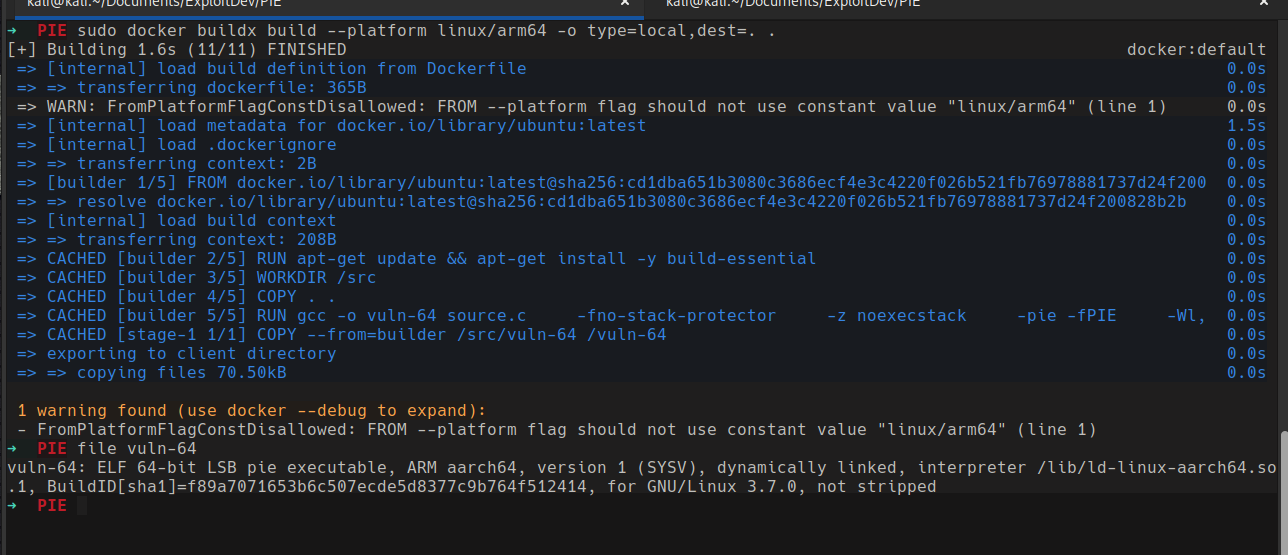
As you can see we are on x86_64 bit kali linux and we built our source code as ARM binary. Now you can start debugging your Binary.
If you dont Now how to Debug your ARM binary on x86 system. You can check my other blogpost for this.
https://medium.com/@cccybercrow/arm-debugging-bridging-the-gap-between-ghidra-and-qemu-0359c47140f5
메타데이터
- post_id
- 7d39c065be1a
- slug
- hacklab-cross-compile-c-source-code-for-arm-architecture-on-x86-system-7d39c065be1a
- url
- https://medium.com/@cccybercrow/hacklab-cross-compile-c-source-code-for-arm-architecture-on-x86-system-7d39c065be1a
- canonical_url
- https://medium.com/@cccybercrow/hacklab-cross-compile-c-source-code-for-arm-architecture-on-x86-system-7d39c065be1a
- author_url
- https://medium.com/@cccybercrow
- status
- ok
- fetched_at
- 2026-06-22 12:55:45




