End-to-End CI/CD Pipeline using Jenkins and Ansible
Project Repository: https://github.com/sudiptaMukherjee2001/ansible-learning/tree/main/activity_2
End-to-End CI/CD Pipeline using Jenkins and Ansible
Project Repository: https://github.com/sudiptaMukherjee2001/ansible-learning/tree/main/activity_2
Introduction
When I first started learning DevOps, one thing always confused me — how CI/CD actually works in real-world scenarios. On paper, everything looked simple, but in practice, I couldn’t clearly understand how different tools connect and work together as one system.
I was familiar with individual tools. I knew Jenkins is used for automation, Ansible helps with configuration management, and AWS EC2 is used for hosting applications. But the missing piece for me was understanding how these tools integrate into a proper pipeline. How does code move from development to deployment automatically? What exactly happens behind the scenes?
To clear this confusion, I decided to build a complete end-to-end CI/CD pipeline as my project. The idea was simple — pull code from GitHub, trigger a Jenkins pipeline, and use Ansible to deploy the application onto EC2 instances.
Honestly, in the beginning, I had zero knowledge of Ansible. Even basic concepts like inventory files and playbooks felt confusing. But I took it step by step, experimenting, making mistakes, and fixing them along the way.
In this article, I’ll walk through the exact process I followed, in a simple and practical way, so that anyone starting out can relate and learn from it.
Architecture Overview
🏗️ Components Used:
- Jenkins (Local System) → CI/CD Orchestration
- Ansible (Installed Locally) → Configuration Management
- AWS EC2 (2 Instances) → Application Servers
- GitHub → Source Code Repository
- SSH Keys (.pem) → Secure Authentication
🔁 Flow of the System:
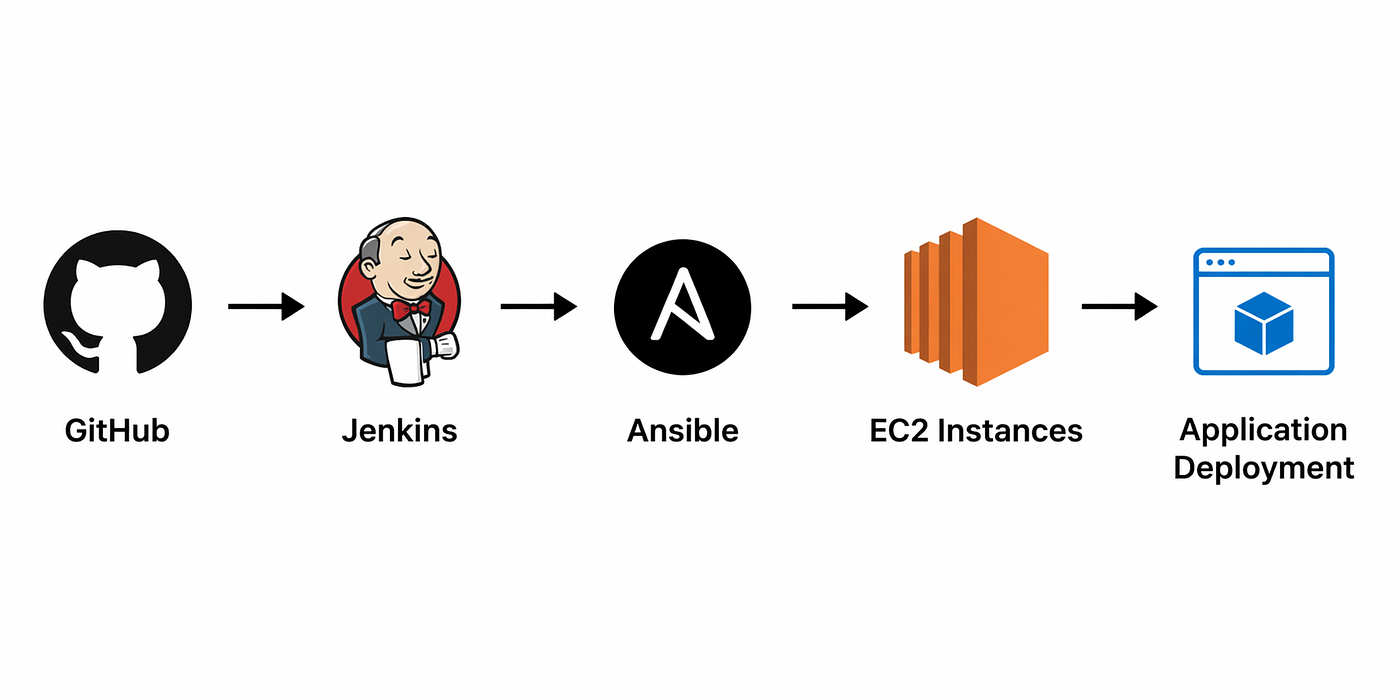
GitHub → Jenkins → Ansible → EC2 Instances → Application Deployment
Step-by-Step Implementation
Step 1: Setup EC2 Instances
- Create 2 Ubuntu EC2 instances
- Open port:
22(SSH)80(HTTP)

Step 2: SSH Access from Local Machine
ssh -i key.pem ubuntu@EC2_IP👉 This confirms:
Your machine can access EC2
Step 3: Setup Ansible
Install Ansible locally:
sudo apt install ansibleCheck:
ansible --versionStep 4: Create Inventory File
manage-node-1 ansible_host=18.x.x.x
manage-node-2 ansible_host=54.x.x.x
👉 This defines Where Ansible should deploy.
Step 5: Create Ansible Playbook
Example (deploy.yml):
- name: Deploy app to EC2
  hosts: all
  become: yes
  tasks:
    - name: Install nginx
      apt:
        name: nginx
        state: present
- name: Copy HTML file
copy:
src: index.html
dest: /var/www/html/index.html - name: Start nginx
service:
name: nginx
state: startedStep 6: Test Ansible Manually
ansible-playbook -i inventory deploy.yml👉 This ensures everything works before automation.
Step 7: Setup Jenkins Pipeline
You already configured:
- Jenkins installed locally
- GitHub connected
- Credentials added (SSH key)
Step 8: Add SSH Key in Jenkins
- Type → SSH Username with private key
- Username →
ubuntu - Private key →
.pem content

Step 9: Handle SSH Trust (Important Fix)
In pipeline:
mkdir -p ~/.sshssh-keygen -R 18.x.x.x || true
ssh-keygen -R 54.x.x.x || truessh-keyscan -H 18.x.x.x >> ~/.ssh/known_hosts
ssh-keyscan -H 54.x.x.x >> ~/.ssh/known_hosts🧠 Why this is needed?
- Avoids Host key verification failed
- Keeps pipeline fully automated
- Ensures secure connection
Step 10: Jenkins Pipeline Setup and Execution
pipeline {
    agent any
    stages {
        stage("Run Ansible Playbook") {
            steps {
                withCredentials([
                    sshUserPrivateKey(
                        credentialsId: 'your-id',
                        keyFileVariable: 'private_key'
                    )
                ]) {
                    sh '''
                    mkdir -p ~/.ssh
ssh-keygen -R 18.x.x.x || true
ssh-keygen -R 54.x.x.x || true ssh-keyscan -H 18.x.x.x >> ~/.ssh/known_hosts
ssh-keyscan -H 54.x.x.x >> ~/.ssh/known_hosts
''' dir('activity_2') {
sh '''
ansible-playbook -i inventory deploy.yml --private-key $private_key -u ubuntu
'''
}
}
}
}
}
}Step 11: Making the Pipeline Fully Automated using GitHub Webhooks
At this point, my pipeline was working perfectly, but there was still one problem. Every time I pushed code, I had to manually trigger the Jenkins job. To solve this, I integrated GitHub Webhooks so that Jenkins automatically triggers the pipeline whenever new code is pushed.
Setting up ngrok
Since my Jenkins was running locally, I used ngrok to expose it to the internet: ngrok http 8080
This gave me a public URL, which I used in GitHub webhook configuration.

Configuring GitHub Webhook
Go to GitHub repository:
- Go to Settings → Webhooks
- Add a new webhook

Configuring Jenkins Enable “GitHub hook trigger for GITScm polling”
Final Result Now, whenever I push code to GitHub:
- GitHub sends webhook
- Jenkins pipeline triggers automatically
- Ansible deploys changes to EC2
Conclusion
Working on this project genuinely changed how I understand CI/CD.
At the end of this setup, the entire flow became fully automated — whenever I push code to GitHub, a webhook is triggered, Jenkins automatically starts the pipeline, and Ansible deploys the changes to my EC2 instances. Seeing this complete flow working in real-time made everything much clearer.
Earlier, everything felt very theoretical and confusing. I had many doubts around SSH authentication, how Ansible inventory works, managing Jenkins credentials, and even host key verification. But once I started building everything step by step, things slowly began to click.
The biggest learning for me was this — automation is not just about running a few commands. It’s about making different systems work together in a reliable and secure way. That shift in thinking made a huge difference.
Now, I feel much more confident working with Jenkins pipelines, Ansible automation, and handling cloud infrastructure.
If you’re starting your DevOps journey, one thing I would say is — don’t just rely on tutorials. Try to build something end-to-end on your own. Once you connect all the tools and see the full flow working, that’s when DevOps actually starts making real sense.
메타데이터
- post_id
- 7d5b0e67f0f4
- slug
- end-to-end-ci-cd-pipeline-using-jenkins-and-ansible-7d5b0e67f0f4
- url
- https://medium.com/@sudiptamukherjee112/end-to-end-ci-cd-pipeline-using-jenkins-and-ansible-7d5b0e67f0f4
- canonical_url
- https://medium.com/@sudiptamukherjee112/end-to-end-ci-cd-pipeline-using-jenkins-and-ansible-7d5b0e67f0f4
- author_url
- https://medium.com/@sudiptamukherjee112
- status
- ok
- fetched_at
- 2026-06-26 21:52:29

