Temporal Replay Bugs Hide in Plain Sight
The 7 nondeterminism sources that quietly break Temporal workflows when replay turns old history into today’s code.
Temporal Replay Bugs Hide in Plain Sight
The 7 nondeterminism sources that quietly break Temporal workflows when replay turns old history into today’s code.
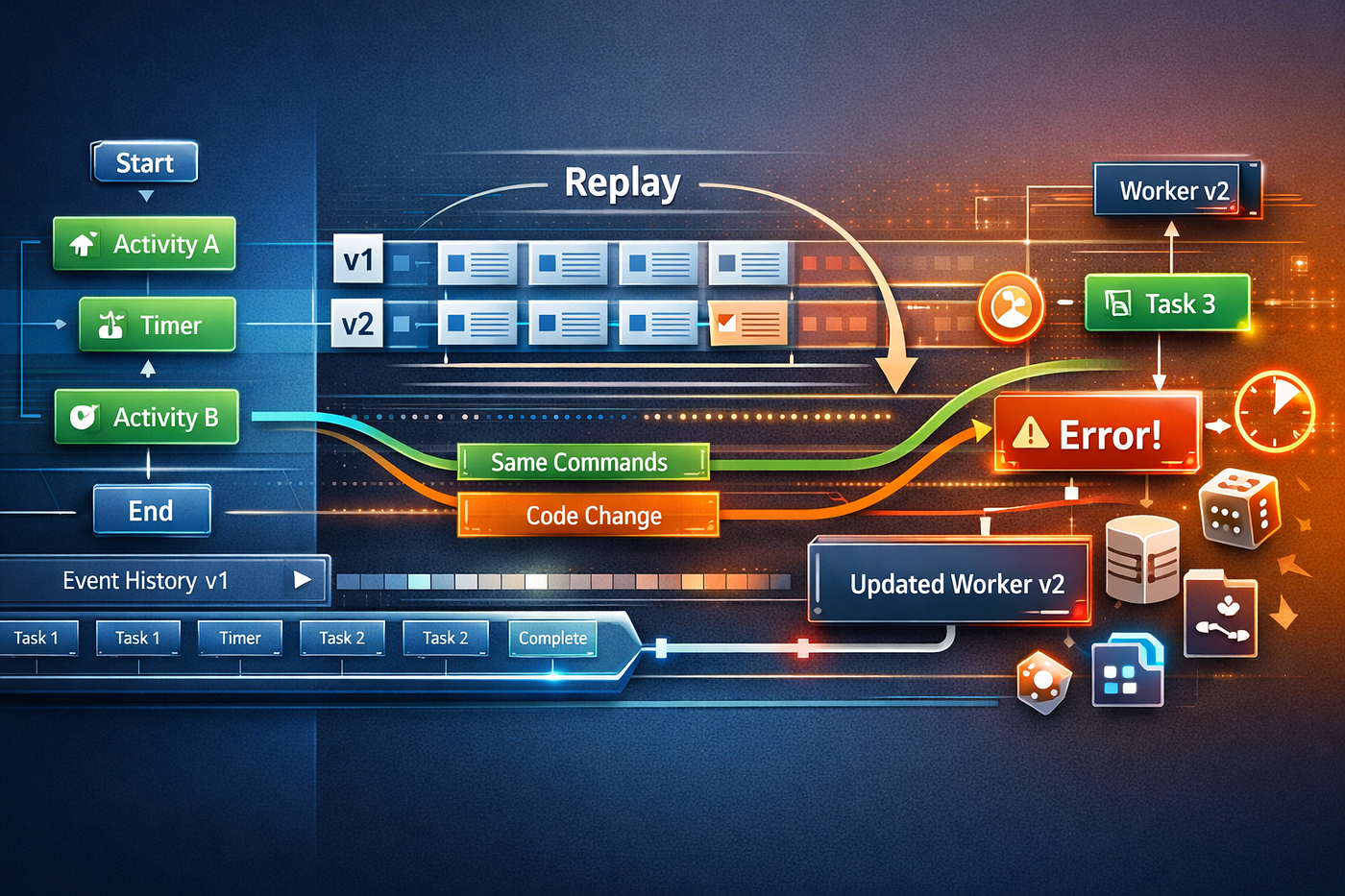
Learn 7 hidden Temporal replay bug sources that cause nondeterminism, broken workflow history, and painful production failures.
Temporal bugs are strange.
They do not always show up when the code first runs. Sometimes the workflow starts fine, sleeps fine, waits fine, and then explodes later when a worker replays history against code that now behaves just a little differently. That is the part many teams miss. The bug was already there. Replay just made it visible.
If you have worked with Temporal long enough, you know the official rule: workflow code must be deterministic so the same history produces the same commands in the same sequence. Temporal persists workflow event history and re-executes workflow code from the beginning during recovery, so any mismatch between generated commands and recorded history can raise a nondeterminism error.
Let’s be real, that rule sounds simple until a production workflow has been running for three months and your “tiny refactor” suddenly turns into an incident.
Why replay bugs feel unfair
A normal application bug often fails in the moment. A Temporal replay bug can sit quietly in code until history is replayed under just the wrong condition.
That is because Temporal workflows are not regular request handlers. The code is re-run to reconstruct state, and that means every workflow decision that affects commands has to remain stable across replays. Temporal explicitly recommends versioning for workflow code changes because running executions may live for months or years, and updated code can otherwise diverge from recorded history.
Here is the mental model that helps:
Workflow Start
    |
    v
[Workflow code runs] ---> emits Commands ---> stored as Event History
    |
worker crash / deploy / resume / replay
    |
    v
[Same workflow code re-runs from start]
    |
must emit same command sequence from same history
If replay reaches a line of code that now chooses a different branch, different timer pattern, different child workflow path, or different activity order, determinism breaks.
And yes, sometimes it breaks because of a clock call you forgot was there.
H2: The 7 nondeterminism sources most teams miss
H3: 1) Tiny workflow code reordering that “should be harmless”
This is the classic Temporal trap.
You had a workflow that started a timer and then called an activity. Later you cleaned it up and called the activity first, then the timer. From a business logic perspective, the change may look equivalent. From Temporal’s perspective, it is not equivalent at all. The command order changed.
Temporal’s workflow determinism docs use exactly this kind of example: reordering timer and activity commands can make replay fail because the recorded history no longer matches the new code path.
That is why replay bugs feel so pedantic. Temporal is not checking whether your intention stayed the same. It is checking whether command generation stayed the same.
What to do instead: treat any change that alters workflow API call order as versioned behavior, not a cosmetic refactor.
H3: 2) Using normal time and randomness APIs inside workflow logic
You would think this mistake would be rare by now. It is not.
Temporal’s TypeScript SDK says it replaces functions like Math.random(), Date, and setTimeout() with deterministic versions inside workflow runtime, and removes features like WeakRef and FinalizationRegistry because garbage collection behavior is nondeterministic. The plugin guidance is even more direct: do not call system time APIs, generate random values, or do direct network and file I/O in workflow-context code.
But teams still trip over this in two ways.
First, they assume every library they import respects Temporal’s deterministic runtime model. Second, they move helper code into the workflow and forget that the helper reads the current time, generates a UUID, or consults a random source.
You might be wondering, “But the TypeScript SDK patches some of this, so am I safe?” Safer, yes. Universally safe, no. Deterministic wrappers help, but workflow-friendly code still has to avoid hidden nondeterministic behavior.
H3: 3) Direct I/O sneaking in through a helper or library
This one is nastier because the workflow code may look innocent.
Maybe a helper function reads a local file for configuration. Maybe a third-party package fetches metadata lazily. Maybe a logger or feature flag utility makes a network call when initialized. None of that belongs in workflow-context code. Temporal’s guidance is explicit that direct network and file I/O should be moved to Activities or Nexus Operations, because workflow code must remain deterministic.
The annoying part is that the workflow may appear to work fine in development. Replay is where it turns ugly. The helper returns a different result, or fails differently, or changes control flow in a way history never recorded.
Rule of thumb: if code consults the outside world, it probably belongs in an Activity, not in workflow logic.
H3: 4) Side effects that were never recorded as side effects
Temporal supports side-effect APIs specifically so you can capture nondeterministic results, like generated UUIDs or random numbers, into event history and replay them consistently later. The docs are clear that Side Effects exist to execute nondeterministic code while preserving replay determinism.
Yet teams still write code like this:
// bad workflow idea
const runId = crypto.randomUUID();
if (runId.startsWith('a')) {
  await sleep('5s');
}
That looks tiny. It is also replay poison unless the value is recorded through the SDK’s deterministic mechanism or moved into an Activity.
The deeper lesson is not just “use side effects.” It is “know which values become part of control flow.” A nondeterministic value that never affects workflow commands is less dangerous. One that changes branching, timers, child workflow starts, or activity calls is exactly how replay bugs are born.
H3: 5) Assuming value changes are as dangerous as command changes
This is the subtle one that confuses even experienced engineers.
Temporal’s docs note that some changes are safe and some are not. For example, the runtime sanity check is not exhaustive, and each SDK handles these checks differently. The docs specifically warn that changes like activity input arguments or timer duration may not be fully checked by runtime nondeterminism detection, and recommend replay testing when making revisions. They also note some timer changes have special cases, such as changing to or from zero duration in several SDKs being nondeterministic.
That means two things at once.
First, not every code edit is equally dangerous. Second, you cannot rely on runtime checks to save you from every bad edit.
Let’s be honest: this is where teams get overconfident. They hear that certain argument changes are “safe enough,” then make broader edits around the call site and accidentally alter control flow anyway.
What to do instead: replay-test every meaningful workflow change, even when the diff looks operational rather than structural.
H3: 6) Forgetting versioning during workflow evolution
This is less a single bug and more a factory for bugs.
Temporal’s versioning guidance exists because long-running workflows can outlive multiple deployments. The docs describe two primary approaches: Worker Versioning and patching APIs such as GetVersion, allowing new executions to use new code while in-progress executions continue safely on older behavior. They also note that older experimental worker-versioning support is being removed from server builds in March 2026, which is a useful reminder that versioning guidance itself evolves and teams should stay on current docs.
Here is the replay bug pattern I see constantly:
v1 workflow history recorded
        |
deploy v2 without patching
        |
old execution resumes on new worker
        |
replay reaches changed branch
        |
nondeterminism error
That is not bad luck. That is missing version discipline.
You do not need versioning because Temporal is fragile. You need versioning because your workflows are durable.
H3: 7) Hidden nondeterminism in “harmless” runtime behavior
This category is where the weird bugs live.
The TypeScript SDK documentation points out that WeakRef and FinalizationRegistry are removed because V8 garbage collection timing is not deterministic. That is a useful clue about a broader principle: runtime behaviors you normally ignore can matter inside a replayed workflow context.
Examples include:
- branching based on object iteration order from code you did not audit carefully
- relying on runtime cleanup callbacks
- importing libraries that use timers or ambient state internally
- letting observation code produce side effects differently during replay
Temporal’s plugin guide even calls out observability concerns, warning you to avoid duplicating observation side effects when workflows replay.
This is why replay bugs feel slippery. The workflow business logic may be fine. The surrounding runtime assumptions are what moved under your feet.
H2: A safer way to think about workflow code
A Temporal workflow is not just business logic. It is a command-producing specification that must survive time.
That mindset changes how you code.
You stop asking, “Does this function work?” and start asking, “Will this function produce the same workflow commands from the same history six months from now?” Those are not the same question.
A helpful architecture split looks like this:
Workflow code
  - deterministic branching
  - timers
  - activity orchestration
  - version gates

Activities
  - network I/O
  - file I/O
  - random IDs
  - current wall clock reads
  - external service lookups
That separation is not style. It is survival.
H2: A practical replay checklist
Before shipping a Temporal workflow change, check:
H3: Did command order change?
H3: Did any new helper read time, randomness, files, or the network?
H3: Did a library import drag in hidden side effects?
H3: Did timer behavior change in a way replay could notice?
H3: Did you add versioning or patching where old executions still exist?
H3: Did you run replay tests against real histories?
That last one matters more than teams admit. Temporal’s docs explicitly recommend replay testing because runtime checks are not a complete determinism proof.
Conclusion
Temporal replay bugs are rarely dramatic in source control.
They start life as helper functions, tidy refactors, dependency upgrades, tiny branch edits, or innocent utility calls. Then replay forces the code to confront its own history, and suddenly the system tells you the uncomfortable truth: your workflow was never as deterministic as you thought.
That is not a Temporal quirk. That is the price of durability.
So the next time a workflow fails only after resume, redeploy, or recovery, do not just stare at the stack trace. Ask the more useful question:
What piece of workflow behavior stopped matching its own recorded past?
That is usually where the real bug is hiding.
If you have been burned by a replay-only failure, leave a comment with the strangest nondeterminism source you found, and follow for more deep dives into Temporal, durable execution, and the reliability bugs that wait until the second run to reveal themselves.
메타데이터
- post_id
- 7e436f4b3ea4
- slug
- temporal-replay-bugs-hide-in-plain-sight-7e436f4b3ea4
- url
- https://medium.com/@Nexumo_/temporal-replay-bugs-hide-in-plain-sight-7e436f4b3ea4
- canonical_url
- https://medium.com/@Nexumo_/temporal-replay-bugs-hide-in-plain-sight-7e436f4b3ea4
- author_url
- https://medium.com/@Nexumo_
- status
- ok
- fetched_at
- 2026-06-12 07:40:50