Navigation & Route
Compose : Navigation & Route with BottomNavigati and NavigationDrawer
Navigation & Route
Compose : Navigation & Route with BottomNavigati and NavigationDrawer
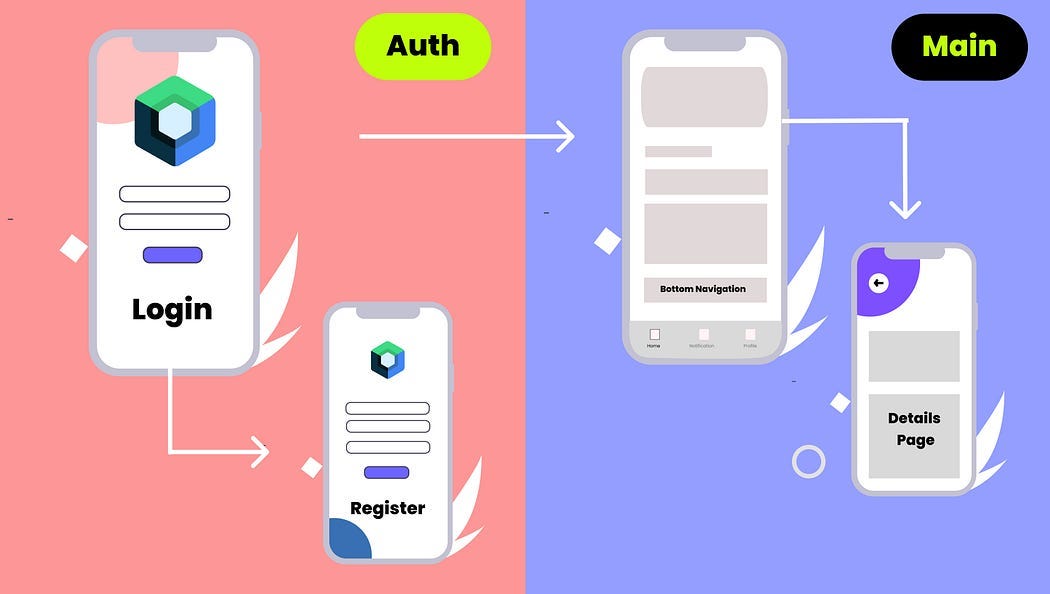
Source: https://blog.kotlin-academy.com/
- What is Nav-Host
- What is Nav-Graphs
- What is Nav-Controller
- What is Nested Nav-Graphs
- What is composable in Navigation
- What is Route
- What is NavigationItems
- How to pass Arguments / data in between Navigation
- How to Navigate to Others Compose Screen
- How to Manage Back Stack / backStackEntry in Navigation
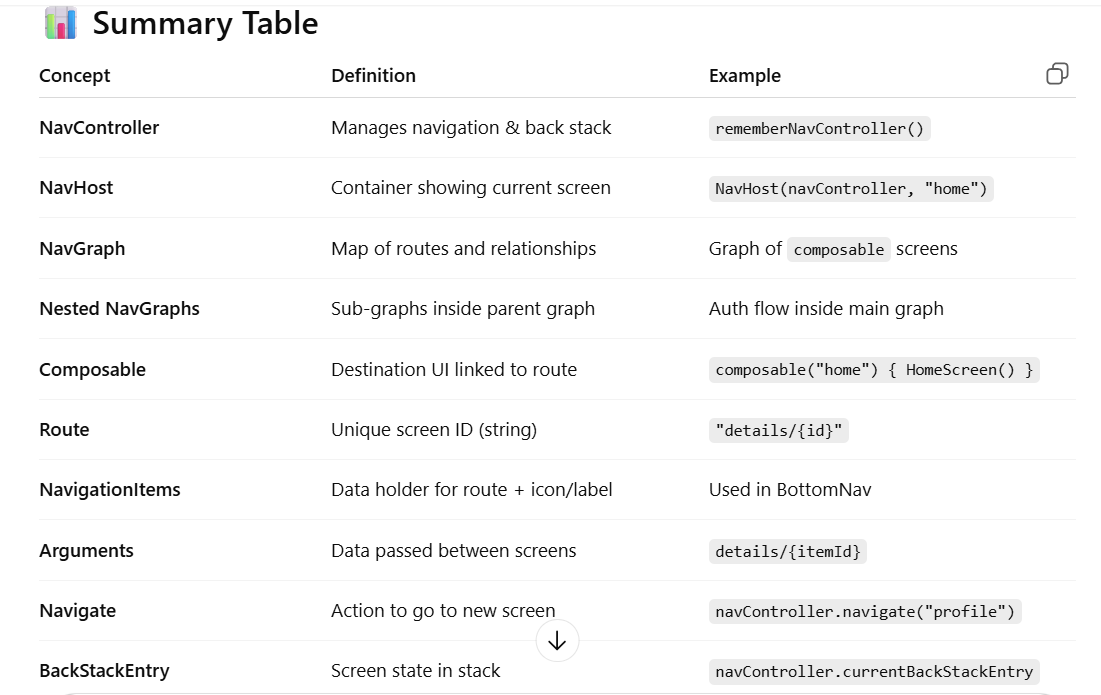
NavHost
Definition: This is a unique composable that you can include in your layout. It shows various destinations from your Navigation Graph. The NavHost links the NavController with a navigation graph that specifies the composable destinations that you should be able to navigate between. As you navigate between composables, the content of the NavHost is automatically recomposed. Each composable destination in your navigation graph is associated with a route.
NavHost is a composable designed to hold our layouts. It holds layouts in stack. As we navigate through composable, the content within the NavHost changes. Each screen in the navigation has its route:
A route is a string that defines the path to your composable. You can think of it as a key that corresponds to a specific destination.
Each destination has a unique route.
- The
NavHostis the container that displays the current destination based on theNavController.- It works like a “stage” where Composables are shown depending on navigation state.
/*
    navController - the navController for this host
    startDestination - the route for the start destination
    modifier - The modifier to be applied to the layout.
    route - the route for the graph
    builder - the builder used to construct the graph
*/
@Composable
public fun NavHost(
    navController: NavHostController,
    startDestination: String,
    modifier: Modifier = Modifier,
    route: String? = null,
    builder: NavGraphBuilder.() -> Unit
) {
    NavHost(
        navController,
        remember(route, startDestination, builder) {
            navController.createGraph(startDestination, route, builder)
        },
        modifier
    )
}

//Example
val navController = rememberNavController()

NavHost(
    navController = navController,
    startDestination = "home",
    modifier = Modifier.padding(innerPadding)
) {
    composable("home") { HomeScreen(navController) }
    composable("details") { DetailsScreen(navController) }
}
NavController
Definition: NavController manages the stack & back stack of composables, representing the screens in our app and their respective states.
Each [NavController](https://developer.android.com/reference/androidx/navigation/NavController) must be associated with a single [NavHost](https://developer.android.com/reference/kotlin/androidx/navigation/compose/package-summary#NavHost(androidx.navigation.NavHostController,kotlin.String,androidx.compose.ui.Modifier,kotlin.String,kotlin.Function1)) composable. The NavHost links the NavController with a navigation graph that specifies the composable destinations that you should be able to navigate between.
- The
NavControlleris the central API for navigation and back stack management in Jetpack Compose. - It’s responsible for:
. Keeping track of the current screen (destination).
. Managing the back stack (history of screens).
. Executing navigation actions (e.g.,
navigate(),popBackStack()).
val navController = rememberNavController()

navController.navigate("details")
NavGraph
Definition:
- A graph of all possible destinations (routes) in your app and how they connect.
- This is a resource that collects all navigation-related data in one place. This includes all of the locations in your app, referred to as destinations, as well as the possible paths a user could take through your app. It’s like a big book that has all the places you can go in an app and how you can move between them. Think of it as a map and a guide combined.
- It defines: . startDestination (entry screen). . destinations (composables). . relationships (navigation actions).
NavHost(navController, startDestination = "home") {
    composable("home") { HomeScreen(navController) }
    composable("profile") { ProfileScreen(navController) }
}
Nested NavGraphs
Definition:
- A NavGraph inside another NavGraph, used to organize and modularize navigation.
- Useful for flows like authentication, onboarding, or feature modules
NavHost(navController, startDestination = "auth") {
    navigation(startDestination = "login", route = "auth") {
        composable("login") { LoginScreen(navController) }
        composable("signup") { SignupScreen(navController) }
    }
    composable("home") { HomeScreen(navController) }
}
Composable in Navigation
Definition:
- Each destination in the navigation graph is represented by a
composable {}block. - A
composableis linked to a route and displays a UI screen.
composable("login") { LoginScreen(navController) }Route
Definition:
- A unique string identifier for a destination.
- Think of it like a screen ID or URL.
- Can be plain (
"home") or parameterized ("details/{id}").
object Routes {
    const val HOME = "home"
    const val DETAILS = "details/{itemId}"
}
NavigationItems
Definition:
- A data structure (often sealed class or object) used to organize routes + metadata (label, icon).
- Commonly used for BottomNavigation or DrawerNavigation.
sealed class NavigationItem(val route: String, val label: String, val icon: Int) {
    object Home : NavigationItem("home", "Home", R.drawable.ic_home)
    object Profile : NavigationItem("profile", "Profile", R.drawable.ic_profile)
}
Navigating to Other Screens
Definition:
- The process of moving from one destination to another using the
NavController.
navController.navigate("profile")

navController.navigate("home") {
    launchSingleTop = true   // Avoid duplicates
    restoreState = true      // Restore previous state if exists
}
Back Stack & BackStackEntry
Definition:
- The back stack is a history of screens (like a browser’s history).
- A
BackStackEntryis one record in the back stack that holds: . Route name. . Arguments. . Saved state.
// Get current screen
val currentBackStackEntry = navController.currentBackStackEntryAsState()
val currentRoute = currentBackStackEntry.value?.destination?.route

//Managing Back Stack:
navController.popBackStack()  // Go back one screen

navController.navigate("home") {
    popUpTo("login") { inclusive = true }  // Clear everything up to login
}
Passing Arguments / Data in Compose Navigation
Route Parameters (Simple, URL-style)
Arguments are part of the route string, just like query params in a URL.
navController.navigate("details/101")

NavHost(navController, startDestination = "home") {
    composable("home") { HomeScreen(navController) }
    composable("details/{itemId}") { backStackEntry ->
        val itemId = backStackEntry.arguments?.getString("itemId")
        DetailsScreen(itemId)
    }
}
Typed Arguments with navArgument
Compose Navigation supports strong typing by declaring arguments explicitly.
navController.navigate("details/42")

NavHost(navController, startDestination = "home") {
    composable(
        route = "details/{itemId}",
        arguments = listOf(
            navArgument("itemId") { type = NavType.IntType }
        )
    ) { backStackEntry ->
        val id = backStackEntry.arguments?.getInt("itemId")
        DetailsScreen(id)
    }
}
Query Parameters (Optional Arguments)
Arguments are passed like query params in a route.
composable(
    route = "profile?userId={userId}&isPremium={isPremium}",
    arguments = listOf(
        navArgument("userId") { type = NavType.StringType; defaultValue = "guest" },
        navArgument("isPremium") { type = NavType.BoolType; defaultValue = false }
    )
) { entry ->
    val userId = entry.arguments?.getString("userId")
    val isPremium = entry.arguments?.getBoolean("isPremium")
    ProfileScreen(userId, isPremium)
}
Supported Types:
NavType.StringTypeNavType.IntTypeNavType.BoolTypeNavType.FloatTypeNavType.LongTypeNavType.EnumType(MyEnum::class.java)- Object Class / JSON
Complete Example
📂 Project Structure
Awesome 🚀 Let’s put everything together into one consistent project example that you can directly use to:
- Build a simple Compose Navigation app
- Run Unit tests (for NavGraph logic)
- Run UI tests (for user flows)
- Run Screenshot tests (using Paparazzi)
Now I’ll give you a minimal but 100% runnable project with:
- ✅ Clean-ish architecture (simple structure)
- ✅ MVI
- ✅ Hilt
- ✅ Compose
- ✅ Unit test
- ✅ UI test
- ✅ Detekt
- ✅ Lint
- ✅ GitHub CI
- ✅ All required config
app/src/main/java/com/example/app/
 ├── MyApp.kt
 ├── MainActivity.kt
 ├── di/AppModule.kt
 ├── navigation/
 │     ├── NavGraph.kt
 │     └── Routes.kt
 ├── presentation/
 │     ├── home/
 │     │    └── HomeScreen.kt
 │     ├── profile/
 │     │    ├── ProfileScreen.kt
 │     │    ├── ProfileViewModel.kt
 │     │    └── ProfileState.kt
 │     └── settings/
 │          └── SettingsScreen.kt
 ├── domain/
 │     ├── User.kt
 │     ├── UserRepository.kt
 │     └── GetUserUseCase.kt
 └── data/
       ├── UserApi.kt
       ├── UserRepositoryImpl.kt
       └── UserDto.kt

app/
 ├── src/main/java/com/example/app/
 │   ├── MyApp.kt
 │   ├── MainActivity.kt
 │   ├── di/AppModule.kt
 │   ├── data/
 │   │     ├── UserApi.kt
 │   │     ├── UserRepositoryImpl.kt
 │   │     └── UserDto.kt
 │   ├── domain/
 │   │     ├── User.kt
 │   │     ├── UserRepository.kt
 │   │     └── GetUserUseCase.kt
 ├── navigation/
 │     ├── NavGraph.kt
 │     └── Routes.kt
 ├── presentation/
 │     ├── home/
 │     │    └── HomeScreen.kt
 │     ├── profile/
 │     │    ├── ProfileScreen.kt
 │     │    ├── ProfileViewModel.kt
 │     │    └── ProfileState.kt
 │     └── settings/
 │          └── SettingsScreen.kt
 │         ├── UserIntent.kt
 │         ├── UserState.kt
 │         ├── UserViewModel.kt
 │         └── UserScreen.kt
 │
 ├── src/test/java/com/example/app/
 │   ├── MainDispatcherRule.kt
 │   └── UserViewModelTest.kt
 │
 ├── src/androidTest/java/com/example/app/
 │   └── UserScreenTest.kt
 │
.github/workflows/android-ci.yml
config/detekt/detekt.yml
app/ ├── src/main/java/com/example/app/ │ ├── MyApp.kt │ ├── MainActivity.kt │ ├── di/AppModule.kt │ ├── data/ │ │ ├── UserApi.kt │ │ ├── UserRepositoryImpl.kt │ │ └── UserDto.kt │ ├── domain/ │ │ ├── User.kt │ │ ├── UserRepository.kt │ │ └── GetUserUseCase.kt │ └── presentation/ │ ├── UserIntent.kt │ ├── UserState.kt │ ├── UserViewModel.kt │ └── UserScreen.kt │ ├── src/test/java/com/example/app/ │ ├── MainDispatcherRule.kt │ └── UserViewModelTest.kt │ ├── src/androidTest/java/com/example/app/ │ └── UserScreenTest.kt │ .github/workflows/android-ci.yml config/detekt/detekt.yml
✅ 1️⃣ PROJECT build.gradle (root)
buildscript {
    dependencies {
        classpath("com.google.dagger:hilt-android-gradle-plugin:2.50")
    }
}

plugins {
    id("io.gitlab.arturbosch.detekt") version "1.23.5"
}
✅ 2️⃣ app/build.gradle
plugins {
    id("com.android.application")
    id("org.jetbrains.kotlin.android")
    id("kotlin-kapt")
    id("dagger.hilt.android.plugin")
}

android {
    namespace = "com.example.app"
    compileSdk = 34

    defaultConfig {
        applicationId = "com.example.app"
        minSdk = 24
        targetSdk = 34
        testInstrumentationRunner =
            "androidx.test.runner.AndroidJUnitRunner"
    }

    buildFeatures { compose = true }

    composeOptions {
        kotlinCompilerExtensionVersion = "1.5.8"
    }

    lint {
        abortOnError = true
    }
}

dependencies {

    // Compose
    implementation("androidx.activity:activity-compose:1.8.2")
    implementation("androidx.compose.ui:ui:1.6.1")
    implementation("androidx.compose.material3:material3:1.2.1")
    implementation("androidx.lifecycle:lifecycle-runtime-compose:2.7.0")

    // Hilt
    implementation("com.google.dagger:hilt-android:2.50")
    kapt("com.google.dagger:hilt-compiler:2.50")
    implementation("androidx.hilt:hilt-navigation-compose:1.2.0")

    // Coroutines
    implementation("org.jetbrains.kotlinx:kotlinx-coroutines-android:1.7.3")

    // Unit test
    testImplementation("junit:junit:4.13.2")
    testImplementation("io.mockk:mockk:1.13.10")
    testImplementation("org.jetbrains.kotlinx:kotlinx-coroutines-test:1.7.3")
    testImplementation("app.cash.turbine:turbine:1.0.0")

    // UI test
    androidTestImplementation("androidx.compose.ui:ui-test-junit4:1.6.1")
    debugImplementation("androidx.compose.ui:ui-test-manifest:1.6.1")
}
✅ 3️⃣ DOMAIN
User.kt
data class User(val id: String, val name: String)UserRepository.kt
interface UserRepository {
    suspend fun getUser(): User
}
GetUserUseCase.kt
class GetUserUseCase(
    private val repository: UserRepository
) {
    suspend operator fun invoke() = repository.getUser()
}
✅ 4️⃣ DATA
UserDto.kt
data class UserDto(val id: String, val name: String)UserApi.kt
interface UserApi {
    suspend fun getUser(): UserDto
}

class FakeUserApi : UserApi {
    override suspend fun getUser() =
        UserDto("1", "John")
}
UserRepositoryImpl.kt
class UserRepositoryImpl(
    private val api: UserApi
) : UserRepository {
    override suspend fun getUser() =
        api.getUser().let { User(it.id, it.name) }
}
✅ 5️⃣ HILT MODULE
AppModule.kt
@Module
@InstallIn(SingletonComponent::class)
object AppModule {

    @Provides
    fun provideApi(): UserApi = FakeUserApi()

    @Provides
    fun provideRepository(
        api: UserApi
    ): UserRepository = UserRepositoryImpl(api)

    @Provides
    fun provideUseCase(
        repo: UserRepository
    ) = GetUserUseCase(repo)
}
✅ 6️⃣ MVI
UserIntent.kt
sealed interface UserIntent {
    data object Load : UserIntent
}
UserState.kt
data class UserState(
    val loading: Boolean = false,
    val user: User? = null,
    val error: String? = null
)
UserViewModel.kt
@HiltViewModel
class UserViewModel @Inject constructor(
    private val getUser: GetUserUseCase
) : ViewModel() {

    private val _state = MutableStateFlow(UserState())
    val state: StateFlow<UserState> = _state

    fun process(intent: UserIntent) {
        if (intent is UserIntent.Load) {
            viewModelScope.launch {
                _state.value = UserState(loading = true)
                runCatching { getUser() }
                    .onSuccess {
                        _state.value = UserState(user = it)
                    }
                    .onFailure {
                        _state.value = UserState(error = it.message)
                    }
            }
        }
    }
}
✅ 7️⃣ UI
Navigation
Routes.kt
object Routes {
    const val HOME = "home"
    const val PROFILE = "profile"
    const val SETTINGS = "settings"
}
NavGraph.kt
@Composable
fun AppNavGraph(
    navController: NavHostController = rememberNavController()
) {
    NavHost(navController, startDestination = Routes.HOME) {

        composable(Routes.HOME) {
            HomeScreen(
                onNavigateProfile = { navController.navigate(Routes.PROFILE) },
                onNavigateSettings = { navController.navigate(Routes.SETTINGS) }
            )
        }

        composable(Routes.PROFILE) {
            ProfileScreen(onBack = { navController.popBackStack() })
        }

        composable(Routes.SETTINGS) {
            SettingsScreen(onBack = { navController.popBackStack() })
        }
    }
}
MainActivity
@AndroidEntryPoint
class MainActivity : ComponentActivity() {
    override fun onCreate(savedInstanceState: Bundle?) {
        super.onCreate(savedInstanceState)
        setContent {
            MaterialTheme {
                AppNavGraph()
            }
        }
    }
}
HomeScreen.kt
@Composable
fun HomeScreen(
    onNavigateProfile: () -> Unit,
    onNavigateSettings: () -> Unit
) {
    Column(
        Modifier.fillMaxSize(),
        verticalArrangement = Arrangement.Center,
        horizontalAlignment = Alignment.CenterHorizontally
    ) {
        Button(onClick = onNavigateProfile) { Text("Go to Profile") }
        Spacer(Modifier.height(16.dp))
        Button(onClick = onNavigateSettings) { Text("Go to Settings") }
    }
}
ProfileScreen.kt
@Composable
fun ProfileScreen(
    onBack: () -> Unit,
    viewModel: ProfileViewModel = hiltViewModel()
) {
    val state by viewModel.state.collectAsState()

    LaunchedEffect(Unit) {
        viewModel.loadUser()
    }

    Column(
        Modifier.fillMaxSize(),
        verticalArrangement = Arrangement.Center,
        horizontalAlignment = Alignment.CenterHorizontally
    ) {
        when {
            state.loading -> CircularProgressIndicator()
            state.user != null -> Text("Profile: ${state.user.name}")
            state.error != null -> Text("Error")
        }

        Spacer(Modifier.height(16.dp))
        Button(onClick = onBack) { Text("Back") }
    }
}
SettingsScreen
@Composable
fun SettingsScreen(onBack: () -> Unit) {
    Column(
        Modifier.fillMaxSize(),
        verticalArrangement = Arrangement.Center,
        horizontalAlignment = Alignment.CenterHorizontally
    ) {
        Text("Settings Screen")
        Spacer(Modifier.height(16.dp))
        Button(onClick = onBack) { Text("Back") }
    }
}
UserScreen.kt
@Composable
fun UserScreen(
    viewModel: UserViewModel = hiltViewModel()
) {
    val state by viewModel.state.collectAsState()

    LaunchedEffect(Unit) {
        viewModel.process(UserIntent.Load)
    }

    when {
        state.loading -> CircularProgressIndicator()
        state.user != null -> Text(state.user.name)
        state.error != null -> Text("Error")
    }
}
✅ 8️⃣ APP ENTRY
MyApp.kt
@HiltAndroidApp
class MyApp : Application()
MainActivity.kt
@AndroidEntryPoint
class MainActivity : ComponentActivity() {
    override fun onCreate(savedInstanceState: Bundle?) {
        super.onCreate(savedInstanceState)
        setContent {
            MaterialTheme { UserScreen() }
        }
    }
}
✅ 9️⃣ UNIT TEST
MainDispatcherRule.kt
@OptIn(ExperimentalCoroutinesApi::class)
class MainDispatcherRule(
    private val dispatcher: TestDispatcher =
        StandardTestDispatcher()
) : TestWatcher() {

    override fun starting(description: Description) {
        Dispatchers.setMain(dispatcher)
    }

    override fun finished(description: Description) {
        Dispatchers.resetMain()
    }
}
UserViewModelTest.kt
@OptIn(ExperimentalCoroutinesApi::class)
class UserViewModelTest {

    @get:Rule val rule = MainDispatcherRule()

    @Test
    fun load_success() = runTest {
        val repo = mockk<UserRepository>()
        coEvery { repo.getUser() } returns User("1","Test")

        val vm = UserViewModel(GetUserUseCase(repo))
        vm.process(UserIntent.Load)

        vm.state.test {
            assertTrue(awaitItem().loading)
            assertEquals("Test", awaitItem().user?.name)
        }
    }
}
✅ 🔟 UI TEST
UserScreenTest.kt
@get:Rule
val composeRule = createAndroidComposeRule<MainActivity>()

@Test
fun user_displayed() {
    composeRule.onNodeWithText("John")
        .assertIsDisplayed()
}
✅ 1️⃣1️⃣ DETEKT CONFIG
config/detekt/detekt.yml
style:
 MagicNumber:
 active: false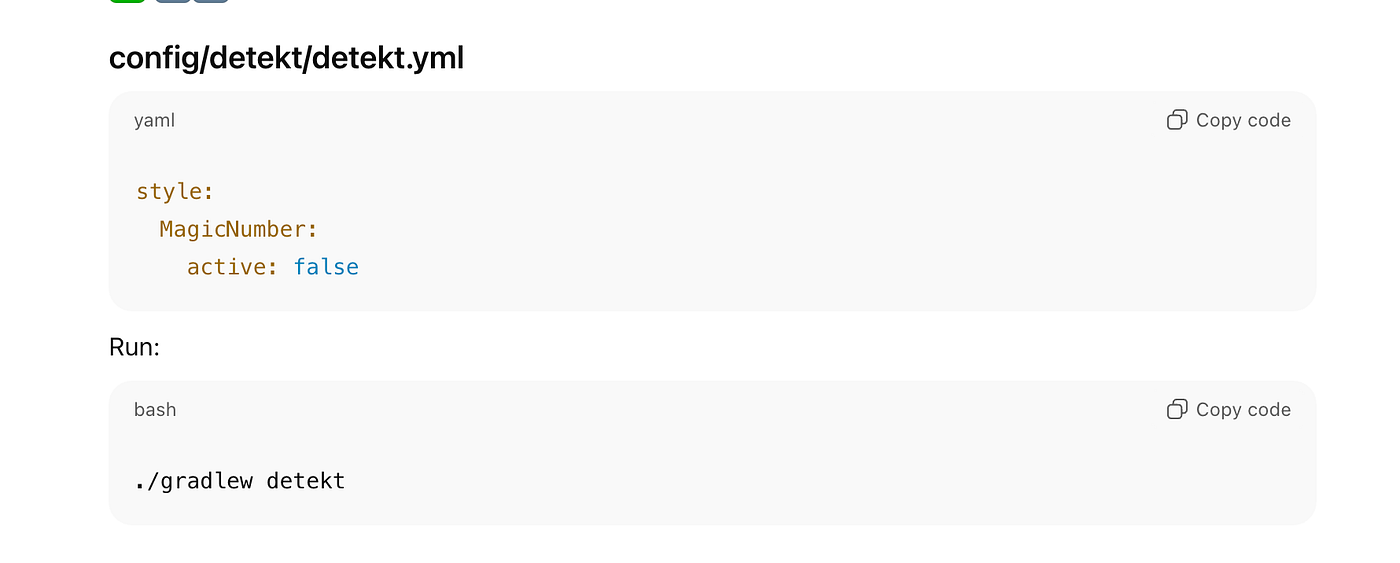
✅ 1️⃣2️⃣ CI PIPELINE
.github/workflows/android-ci.yml
name: Android CI

on:
  push:
  pull_request:

jobs:
  build:
    runs-on: ubuntu-latest

    steps:
      - uses: actions/checkout@v4

      - uses: actions/setup-java@v4
        with:
          distribution: 'temurin'
          java-version: '17'

      - run: chmod +x gradlew

      - run: ./gradlew detekt
      - run: ./gradlew lint
      - run: ./gradlew testDebugUnitTest
      - run: ./gradlew assembleDebug
HOW TO RUN
./gradlew clean build
./gradlew detekt
./gradlew lint
./gradlew testDebugUnitTest
./gradlew connectedDebugAndroidTest
메타데이터
- post_id
- 7ebd0dfdf1eb
- slug
- navigation-route-7ebd0dfdf1eb
- url
- https://medium.com/@mappsdeveloper1991/navigation-route-7ebd0dfdf1eb
- canonical_url
- https://medium.com/@mappsdeveloper1991/navigation-route-7ebd0dfdf1eb
- author_url
- https://medium.com/@mappsdeveloper1991
- status
- ok
- fetched_at
- 2026-07-13 06:23:13