Deploying Multi-Cloud Infrastructure with Terraform Modules
One of the first things you run into when building real infrastructure with Terraform is that resources do not all live in the same place…
Deploying Multi-Cloud Infrastructure with Terraform Modules
One of the first things you run into when building real infrastructure with Terraform is that resources do not all live in the same place. You might have a primary database in one region and a replica in another. Your staging environment might be in a completely different AWS account from production. And sometimes your infrastructure spans more than one cloud platform entirely.
Day 15 of my 30-day Terraform challenge covered exactly this — how to build modules that work across multiple providers, how to deploy Docker containers using Terraform, and how to provision a full EKS cluster with a Kubernetes workload running on top of it. This post walks through all of it.
The problem with providers inside modules
Before getting into the solution, it helps to understand the problem. When you write a Terraform module, you might be tempted to define provider blocks inside it specify the region, the account, everything. That seems clean.
The problem is that it locks the module to a specific region or account. Anyone who wants to use the module in a different environment has to go inside the module and change things, which defeats the purpose of having a reusable module.
The correct pattern is for modules to accept providers from whoever is calling them. The caller decides where things deploy. The module just defines what gets deployed.
configuration_aliases — telling a module which providers to expect
When a module needs to work with multiple providers, it declares which ones it expects using configuration_aliases inside its required_providers block:
# modules/multi-region-app/main.tf
terraform {
  required_providers {
    aws = {
      source                = "hashicorp/aws"
      version               = "~> 5.0"
      configuration_aliases = [aws.primary, aws.replica]
    }
  }
}
This tells Terraform that the module expects two AWS provider configurations; one aliased as aws.primary and one aliased as aws.replica. The module does not define what region those providers point to. That is the caller's responsibility.
Inside the module, resources reference the providers by those aliases:
resource "aws_s3_bucket" "primary" {
  provider = aws.primary
  bucket   = "${var.app_name}-primary"
}
resource "aws_s3_bucket" "replica" {
provider = aws.replica
bucket = "${var.app_name}-replica"
}Wiring providers into a module from the caller
The root configuration the one that calls the module defines the actual provider configurations and passes them in using a providers map:
# live/main.tf
provider "aws" {
  alias  = "primary"
  region = "eu-central-1"
}
provider "aws" {
alias = "replica"
region = "eu-west-1"
}module "multi_region_app" {
source = "./modules/multi-region-app"
app_name = "lydiah" providers = {
aws.primary = aws.primary
aws.replica = aws.replica
}
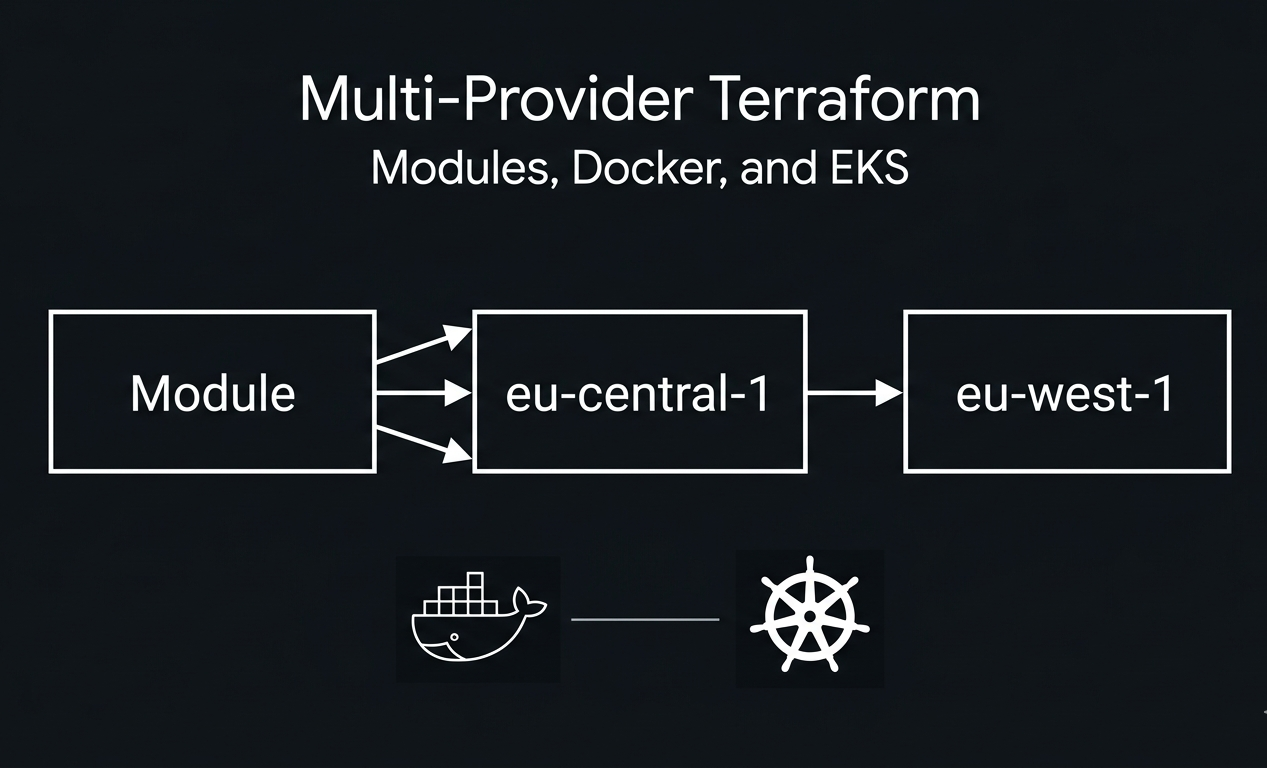
}The providers map is what wires everything together. On the left side of each entry is the alias the module expects. On the right side is the provider from the root configuration that should be used for it. Running terraform apply on this deployed two S3 buckets — one in eu-central-1 and one in eu-west-1 — using a single module call.
The Docker provider — a different kind of provider
Not every Terraform provider talks to a cloud platform. The Docker provider, maintained by kreuzwerker, manages local Docker containers. It is a useful way to test containerised application configurations before deploying them to a cloud environment.
To use it, add it to your required_providers block:
terraform {
  required_providers {
    docker = {
      source  = "kreuzwerker/docker"
      version = "~> 3.0"
    }
  }
}
provider "docker" {}The provider "docker" {} block has no arguments — it connects to the Docker daemon running on your local machine. Make sure Docker Desktop is running before you run terraform init.
Then define the image and container:
resource "docker_image" "nginx" {
  name         = "nginx:latest"
  keep_locally = false
}
resource "docker_container" "nginx" {
image = docker_image.nginx.image_id
name = "terraform-nginx" ports {
internal = 80
external = 8080
}
}docker_image pulls the nginx image from Docker Hub. docker_container runs a container from that image and maps port 80 inside the container to port 8080 on your machine.
After running terraform apply, open your browser and go to http://localhost:8080 you should see the nginx welcome page. Running terraform destroy stops and removes the container.

Deploying EKS with Terraform
EKS is Amazon’s managed Kubernetes service. Setting it up manually involves a lot of moving parts VPC, subnets, IAM roles, security groups, node groups. The official terraform-aws-modules/eks module handles all of that.
Before writing the configuration, understand what you are provisioning: a VPC with public and private subnets, a NAT gateway so nodes in private subnets can reach the internet, an EKS control plane, and a managed node group with EC2 instances running as worker nodes.
This takes 15–20 minutes to provision and incurs AWS charges destroy it as soon as you have confirmed it works.
The VPC module goes first, since EKS needs a VPC to deploy into:
module "vpc" {
  source  = "terraform-aws-modules/vpc/aws"
  version = "~> 5.0"
name = "eks-vpc-day15"
cidr = "10.0.0.0/16" azs = ["eu-central-1a", "eu-central-1b"]
private_subnets = ["10.0.1.0/24", "10.0.2.0/24"]
public_subnets = ["10.0.101.0/24", "10.0.102.0/24"] enable_nat_gateway = true
single_nat_gateway = true
enable_dns_hostnames = true
}Then the EKS cluster, referencing the VPC outputs:
module "eks" {
  source  = "terraform-aws-modules/eks/aws"
  version = "~> 20.0"
cluster_name = "terraform-challenge-cluster"
cluster_version = "1.32" vpc_id = module.vpc.vpc_id
subnet_ids = module.vpc.private_subnets cluster_endpoint_public_access = true eks_managed_node_groups = {
default = {
min_size = 1
max_size = 3
desired_size = 2
instance_types = ["t3.small"]
}
}
}One thing worth noting: cluster_version must be a currently supported Kubernetes version. During this project, 1.29 was no longer supported for new node groups in eu-central-1 — the apply failed with an unsupported AMI error. Switching to 1.32 fixed it.
Deploying a workload onto EKS with the Kubernetes provider
Once the cluster exists, the Kubernetes provider can connect to it and deploy workloads. The provider configuration references the EKS module outputs directly:
provider "kubernetes" {
  host                   = module.eks.cluster_endpoint
  cluster_ca_certificate = base64decode(module.eks.cluster_certificate_authority_data)
exec {
api_version = "client.authentication.k8s.io/v1beta1"
command = "aws"
args = ["eks", "get-token", "--cluster-name", module.eks.cluster_name]
}
}The exec block tells the Kubernetes provider to call aws eks get-token to get a short-lived authentication token each time it needs to talk to the cluster. This avoids storing static credentials anywhere.

Then deploy nginx onto the cluster:
resource "kubernetes_deployment" "nginx" {
  metadata {
    name = "nginx-deployment"
    labels = {
      app = "nginx"
    }
  }
spec {
replicas = 2 selector {
match_labels = {
app = "nginx"
}
} template {
metadata {
labels = {
app = "nginx"
}
} spec {
container {
image = "nginx:latest"
name = "nginx" port {
container_port = 80
}
}
}
}
} depends_on = [module.eks]
}After apply, confirm the deployment is running:
aws eks update-kubeconfig --name terraform-challenge-cluster --region eu-central-1
kubectl get deployments -n default
You should see:
NAME               READY   UP-TO-DATE   AVAILABLE   AGE
nginx-deployment   2/2     2            2           6m10s
2/2 means both replicas are running. That is a Kubernetes workload deployed entirely through Terraform — no manual cluster configuration needed.

One issue that came up: the Kubernetes provider returned an Unauthorized error on the first apply attempt even after the cluster was ready. The fix was to create an EKS access entry granting the IAM user cluster admin permissions, then wait for the permissions to propagate before applying again.
Conclusion
Provider aliases and the configuration_aliases declaration are what make truly reusable Terraform modules possible. A module that accepts providers from its caller can deploy to any region or account without any changes to the module itself — the caller controls the target.
The Docker provider shows that this same model extends beyond cloud platforms. And the EKS deployment shows what it looks like when multiple providers — AWS for the infrastructure, Kubernetes for the workloads — work together in a single Terraform configuration.
The full code for this project is on my GitHub: github.com/LydiahLaw/terraform-30-day-challenge
메타데이터
- post_id
- 7ef406e48efa
- slug
- deploying-multi-cloud-infrastructure-with-terraform-modules-7ef406e48efa
- url
- https://medium.com/@LydLaw/deploying-multi-cloud-infrastructure-with-terraform-modules-7ef406e48efa
- canonical_url
- https://medium.com/@LydLaw/deploying-multi-cloud-infrastructure-with-terraform-modules-7ef406e48efa
- author_url
- https://medium.com/@LydLaw
- status
- ok
- fetched_at
- 2026-06-10 12:26:30