How I’d Go About Starting in AWS Cloud Security as an Ex-Network Engineer
When I first started transitioning to AWS cloud security, I worried my decades of network experience would be obsolete. All my knowledge of…
How I’d Go About Starting in AWS Cloud Security as an Ex-Network Engineer
When I first started transitioning to AWS cloud security, I worried my decades of network experience would be obsolete. All my knowledge of Cisco IOS, BGP routing, and physical firewalls felt like it belonged to a different era. This guide covers how I would approach starting in AWS cloud security as an ex-network engineer, demonstrating that your core skills are more valuable than ever.
However, I quickly realized that the fundamentals are critical, just virtualized. Understanding subnetting, routing tables, and how packets traverse a network, similar to the OSI model’s teachings, directly applies. The cloud abstracts the hardware, not the logic. In fact, that foundational knowledge gives network engineers a significant advantage in mastering AWS cloud security.
I have found that my ability to troubleshoot connectivity by meticulously tracing a packet’s path from source to destination directly translates to diagnosing why an EC2 instance cannot reach an RDS database. The culprit is often a misconfigured Network ACL or a faulty route in a table. It is the same diagnostic process, simply with a different set of tools. This deep understanding of network flow is the bedrock of effective AWS VPC security.
My core skills were not outdated; they were the key to mastering the virtual private cloud. The medium changed, but the principles of networking are universal, providing a solid foundation for building secure and resilient cloud architectures.
Note: The AWS VPC is logically isolated, but it is still just a software-defined network. Thinking of it in terms of physical network analogies (routers, switches, firewalls) will dramatically accelerate your learning curve.
This deep understanding of network flow is essential. To show how these virtual components fit together, here is a foundational VPC layout.
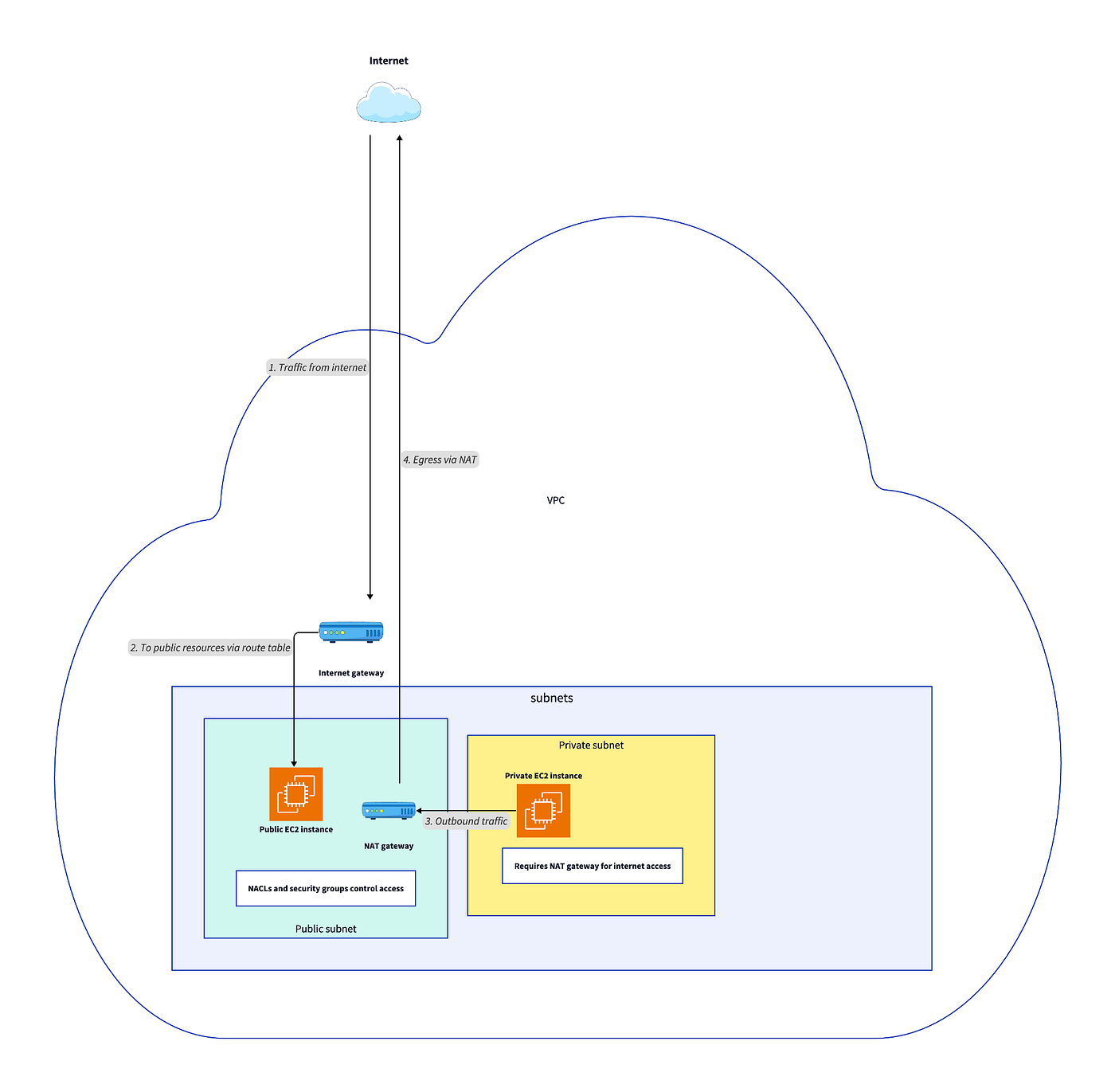
Understanding the architecture visually is one thing, but applying security controls is where the real work begins, starting with the cloud’s answer to firewalls.
Mapping firewall logic to AWS: Security groups and NACLs
Back in my on-premises days, I spent endless hours wrestling with physical firewall rules. Now, in AWS, I have found that understanding AWS Security Groups and Network ACLs (NACLs) is the key to translating that logic to the cloud. Learning how to map traditional firewall rules to AWS Security Groups is a crucial first step. I quickly learned that they serve different purposes and operate at different layers, a distinction that determines your network security posture’s effectiveness.
I observed that Security Groups are stateful and applied at the instance level (specifically, the Elastic Network Interface). This reminded me of the host-based firewalls I used to manage on individual servers. If you allow inbound traffic, the return traffic is automatically allowed, regardless of outbound rules.
NACLs, in contrast, are stateless and operate at the subnet level, reminding me more of the perimeter firewalls I would configure for an entire network segment. For NACLs, you must explicitly define rules for both inbound and outbound traffic. For example, when I needed to allow inbound HTTPS access to my web servers, I simply created a Security Group rule for TCP port 443 and attached it to my EC2 instances. The logic was identical to my old job, just abstracted and far more scalable.
Watch out: A common mistake is relying solely on Security Groups. A misconfigured NACL can block traffic before it ever reaches your instance, making your Security Group rules completely ineffective. Always check both layers when troubleshooting.
To clarify their distinct roles and help with understanding AWS security groups and network ACLs, this table breaks down their key differences.

While these tools are perfect for controlling traffic flow, they do not provide deep-packet inspection. For that, I had to look for a different solution.
Evolving DPI skills with AWS Network Firewall
Managing on-premises next-generation firewalls (NGFWs) was always a headache. It meant constant patching, hardware scaling, and meticulously configuring deep-packet-inspection rules. When I first encountered AWS Network Firewall, I found it to be a powerful advancement: a fully managed service that provides advanced intrusion detection and prevention (IDS/IPS) for VPC traffic without me needing to touch a single server. Proper AWS Network Firewall configuration felt like moving from a manual transmission to an automatic; the mechanics are similar, but the operational overhead is drastically reduced.
I remember spending a weekend configuring an appliance to block emerging SQL injection signatures. Now, I simply deploy AWS Network Firewall with managed threat intelligence rule groups, and it automatically inspects malicious traffic. This deep-packet inspection capability with AWS Network Firewall is a significant advancement, dropping threats before they reach my web-application fleet.
It scales automatically, so I no longer worry about the firewall becoming a bottleneck. This shift freed me to focus on higher-value security tasks. It is a powerful tool for enforcing security at the VPC boundary, giving me centralized control over traffic inspection for my entire network.
Practical tip: Place AWS Network Firewall in a centralized “inspection” VPC and route traffic from your other VPCs through it. This hub-and-spoke model simplifies management and reduces costs.
Here is a diagram showing how this fits into a VPC to inspect traffic.

This kind of proactive filtering is a significant improvement, but it still relies on predefined rules. True cloud-native security also requires intelligent detection of unknown threats.
Intelligent threat detection with Amazon GuardDuty
In my sysadmin career, I relied on manual log reviews and static systems to catch threats. However, cloud security demands more than just packet filtering. I have come to appreciate Amazon GuardDuty as a powerful tool, acting as an intelligent threat detection service that complements my traditional controls perfectly. Instead of replacing firewalls, using Amazon GuardDuty for intelligent threat detection adds a crucial layer of intelligence. It analyzes massive volumes of AWS logs, such as VPC Flow Logs and CloudTrail events, using machine learning to identify anomalous behavior I would never spot manually.
For example, while my Security Group might permit RDP traffic from a specific IP, that rule is blind to behavior. GuardDuty provides the crucial context. It gives me the intelligence to generate a finding if it detects a brute-force attack against an EC2 instance on that RDP port from that allowed IP. Among the various AWS security monitoring tools, it excels at this kind of behavioral analysis.
This provides a level of proactive threat awareness I did not have before. By understanding what is normal for my account, GuardDuty can flag deviations that indicate a potential compromise, elevating my security posture beyond the basic requirements of the AWS Shared Responsibility Model. Mastering services like GuardDuty is key for advanced cloud security, a topic thoroughly explored in courses such as Master AWS Certified Cloud Practitioner CLF-C02 Exam.
Note: GuardDuty is a detection service, not a prevention service. It alerts you to threats. You need to pair it with automation, like AWS Lambda functions, to respond to its findings automatically.
Getting started is incredibly simple, requiring just a single command.
aws guardduty create-detector - enable - finding-publishing-frequency
SIX_HOURS
Enabling these services is a great first step, but the real power comes from managing them at scale with code.
Automating security at scale with Infrastructure as Code (IaC)
The biggest shift for me has been embracing Infrastructure as Code (IaC) for security. I used to painstakingly click through vendor consoles or write brittle scripts, which always led to configuration drift and painful audits. Now, I define all network security policies, including Security Groups, NACLs, and Network Firewall rules, using declarative tools like Terraform or AWS CloudFormation.
This approach means my configurations are version-controlled, auditable, and deployable consistently. It is one of the most critical AWS security best practices for former network engineers because it enforces consistency and helps meet AWS security compliance standards during audits.
Instead of manually updating hundreds of Security Group rules after a vulnerability is found, I modify a single Terraform module. A CI/CD pipeline then programmatically applies the changes everywhere, preventing significant operational burden and reducing human error. This programmatic approach makes security a repeatable, testable, and automated part of the development life cycle.
Practical tip: Use a tool like tfsec or checkov in your CI/CD pipeline to scan your IaC templates for security misconfigurations before they are ever deployed to your AWS account.
This automated pipeline is the cornerstone of modern cloud security management.
Your step-by-step guide to a successful transition
For those just starting, here is a clear path to follow. This step-by-step guide to AWS cloud security for network engineers outlines the progression from foundational knowledge to advanced automation:
- Master the fundamentals: Solidify your understanding of core AWS services like VPC, Subnets, Route Tables, and Internet Gateways. Think of them as the virtualized versions of the physical hardware you already know.
- Translate your firewall skills: Dive deep into AWS Security Groups and NACLs. Practice creating rules that mirror the access control lists you have built for years. This is the most direct translation of your existing expertise.
- Embrace managed security services: Learn how services like AWS Network Firewall and Amazon GuardDuty can replace the operational burden of managing physical appliances and manual log analysis. Focus on configuration and response, not maintenance.
- Learn to code your infrastructure: The single most important new skill is Infrastructure as Code. Start with Terraform or AWS CloudFormation to define and deploy your security configurations. This is non-negotiable for scalable cloud security.
- Pursue relevant certifications: To validate your new skills, consider pursuing AWS cloud security certifications. The AWS Certified Security — Specialty is a valuable credential that validates your expertise to employers and deepens your knowledge.
By following these AWS security best practices, you can build a resilient and easily recoverable system that leverages the cloud’s full potential, facilitating a successful career transition into a highly sought-after technology field.
메타데이터
- post_id
- 7f4802ff68e9
- slug
- how-id-go-about-starting-in-aws-cloud-security-as-an-ex-network-engineer-7f4802ff68e9
- url
- https://medium.com/@repobaby/how-id-go-about-starting-in-aws-cloud-security-as-an-ex-network-engineer-7f4802ff68e9
- canonical_url
- https://medium.com/@repobaby/how-id-go-about-starting-in-aws-cloud-security-as-an-ex-network-engineer-7f4802ff68e9
- author_url
- https://medium.com/@repobaby
- status
- ok
- fetched_at
- 2026-07-27 15:20:32