How to Enable CredCheck on PostgreSQL Active-Standby Setup
A practical guide for installing and enabling CredCheck safely in a PostgreSQL 17 streaming replication environment
How to Enable CredCheck on PostgreSQL Active-Standby Setup
A practical guide for installing and enabling CredCheck safely in a PostgreSQL 17 streaming replication environment
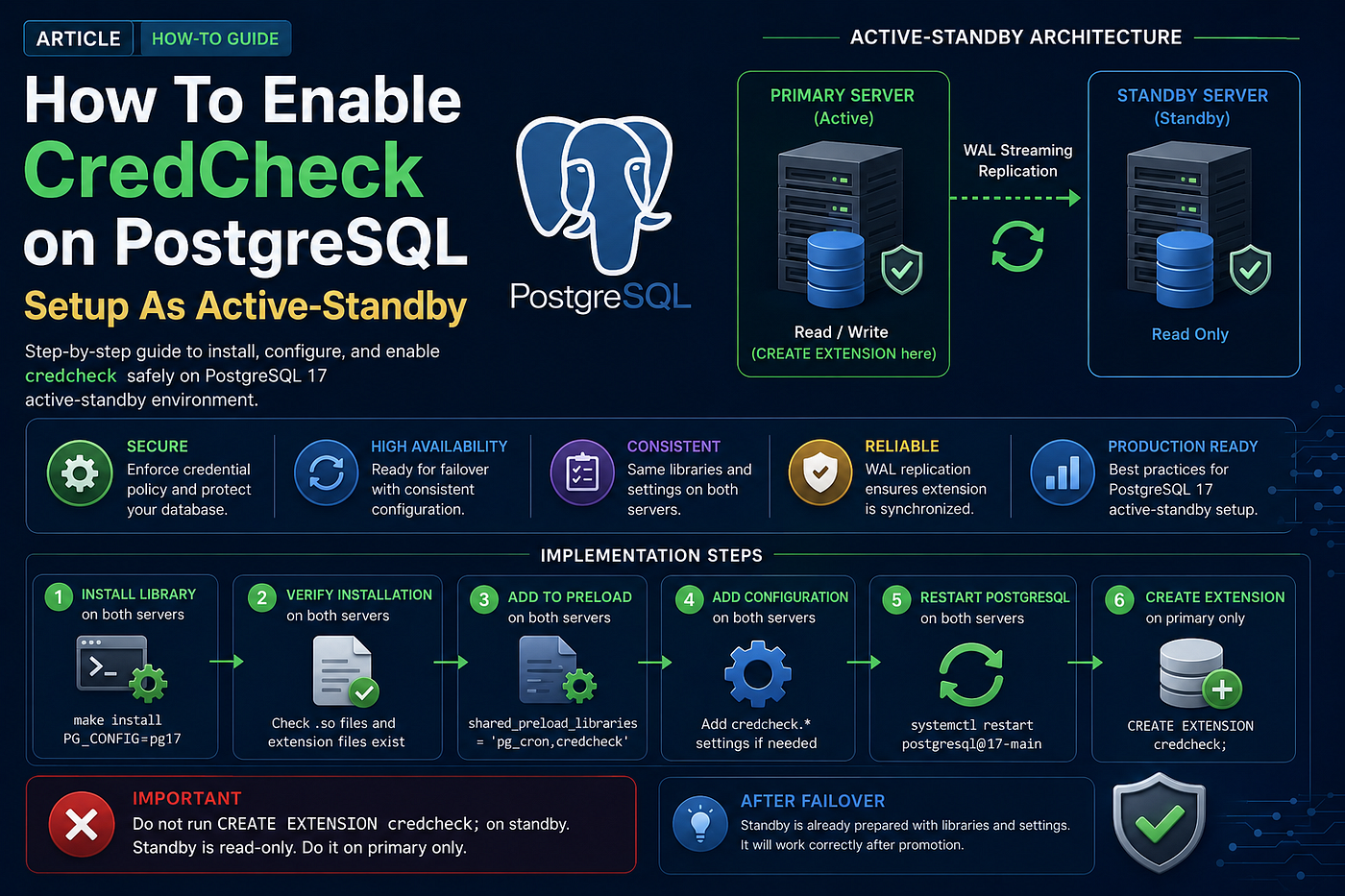
When running PostgreSQL in an active-standby architecture, every change must be handled carefully. Some actions should be done on both servers, while others must only be done on the primary server.
One example is enabling the credcheck extension.
credcheck is useful for enforcing credential and password-related rules in PostgreSQL. However, because PostgreSQL standby servers are normally read-only, the installation and extension creation process must be done correctly.
This guide explains how to enable credcheck in a PostgreSQL 17 active-standby setup.
Architecture Overview
In this setup, we have:
Primary PostgreSQL Server
    ↓ WAL Streaming Replication
Standby PostgreSQL Server
The primary server accepts writes.
The standby server receives changes from the primary through WAL replication and remains read-only until failover or promotion.
Because of this, the credcheck library must be installed on both servers, but the extension must be created only on the primary server.
Step 1: Install CredCheck Library on Both Servers
First, install the credcheck library on both the primary and standby servers.
Run the following commands on both servers:
cd /App2/credcheckmake cleanmake PG_CONFIG=/usr/lib/postgresql/17/bin/pg_configsudo make install PG_CONFIG=/usr/lib/postgresql/17/bin/pg_configThe PG_CONFIG path is important because it ensures the extension is compiled and installed for the correct PostgreSQL version.
In this example, we are using PostgreSQL 17:
/usr/lib/postgresql/17/bin/pg_configStep 2: Verify the Installation on Both Servers
After installation, verify that the credcheck files exist on both servers.
Run:
ls $(pg_config --pkglibdir) | grep credcheckThen check the extension files:
ls $(pg_config --sharedir)/extension | grep credcheckYou should see files related to credcheck.
This confirms that the shared library and extension definition files were installed correctly.
Step 3: Add CredCheck to shared_preload_libraries
Next, update the PostgreSQL configuration on both the primary and standby servers.
Open postgresql.conf and add credcheck to shared_preload_libraries.
Example:
shared_preload_libraries = 'pg_cron,credcheck'If you already have another library such as pg_cron, keep it and add credcheck separated by a comma.
Do this on both servers.
This is required because credcheck must be loaded when PostgreSQL starts.
Step 4: Add CredCheck Configuration on Both Servers
If you use custom credcheck settings in the configuration file, make sure the same settings exist on both servers.
Example:
credcheck.whitelist_auth_failure = 'app_sms,app_gateway'This ensures the standby server is already prepared if it is promoted during failover.
Keeping the configuration consistent between primary and standby is important for predictable behavior.
Step 5: Restart PostgreSQL on Both Servers
After updating postgresql.conf, restart both PostgreSQL clusters.
Run on both servers:
sudo systemctl restart postgresql@17-mainThen confirm PostgreSQL is running:
sudo systemctl status postgresql@17-mainYou can also check the PostgreSQL logs if the service fails to start.
Step 6: Create the Extension Only on the Primary Server
Now connect to the primary server only and create the extension.
Run this command on the primary server:
sudo -u postgres psql -d postgres -c "CREATE EXTENSION IF NOT EXISTS credcheck;"This creates the extension in the postgres database.
Because the environment uses streaming replication, this DDL change will be written to WAL and replicated to the standby server automatically.
Important: Do Not Create the Extension on the Standby Server
Do not run this command on the standby server:
CREATE EXTENSION credcheck;The standby server is read-only.
If you try to create the extension directly on the standby, PostgreSQL will reject the command because DDL operations are not allowed on a physical standby server.
The correct process is:
Install library files on both servers
Configure shared_preload_libraries on both servers
Restart both PostgreSQL services
Create the extension only on the primary
Let WAL replication apply the change to standby
Why the Library Must Exist on Both Servers
Even though CREATE EXTENSION is executed only on the primary, the actual extension files must already exist on the standby.
This is because the standby will replay the WAL record that creates the extension.
If the standby does not have the required credcheck files installed, replication may fail or PostgreSQL may raise an error when trying to access the extension.
That is why installation is required on both servers.
Step 7: Confirm the Extension
On the primary server, check:
sudo -u postgres psql -d postgres -c "\dx credcheck"You should see credcheck listed.
On the standby server, you can also check using a read-only query:
sudo -u postgres psql -d postgres -c "\dx credcheck"If replication is working correctly, the extension should appear on the standby after the WAL changes have been replayed.
Step 8: Behavior After Failover
After failover, the standby server may be promoted to become the new primary.
Because we already prepared the standby with:
shared_preload_libraries = 'pg_cron,credcheck'and because the credcheck library files were already installed, the extension should continue working after promotion.
This is the main reason we install and configure credcheck on both servers before failover happens.
A failover event is not the right time to discover that an extension library is missing.
Recommended Checklist
Before considering the setup complete, verify the following:
CredCheck source exists on both servers
CredCheck library is installed on both servers
Extension files exist under PostgreSQL shared extension directory
shared_preload_libraries includes credcheck on both servers
credcheck.* settings are consistent on both servers
PostgreSQL was restarted successfully on both servers
CREATE EXTENSION was executed only on the primary
Standby received the extension through WAL replication
Failover server is ready for promotion
Common Mistakes to Avoid
Installing only on the primary
This is risky because the standby may fail when replaying extension-related changes or after promotion.
Running CREATE EXTENSION on the standby
A standby server is read-only. Extension creation must happen on the primary only.
Forgetting shared_preload_libraries
If credcheck requires preload and it is not added, PostgreSQL may not load the extension correctly.
Using the wrong pg_config
If multiple PostgreSQL versions are installed, using the wrong pg_config can install the extension into the wrong PostgreSQL directory.
Always confirm:
/usr/lib/postgresql/17/bin/pg_configfor PostgreSQL 17.
Final Thoughts
Enabling credcheck in a PostgreSQL active-standby setup is not difficult, but the order of operations matters.
The safest approach is:
Install on both servers
Configure on both servers
Restart both servers
Create extension only on the primary
Let replication handle the standby
This keeps the standby clean, consistent, and ready for failover.
In production environments, this kind of preparation is important. Extensions, preload libraries, and configuration files must be aligned across primary and standby servers to avoid problems during replication or failover.
메타데이터
- post_id
- 7f6aaffd76ca
- slug
- how-to-enable-credcheck-on-postgresql-active-standby-setup-7f6aaffd76ca
- url
- https://medium.com/@vitchum/how-to-enable-credcheck-on-postgresql-active-standby-setup-7f6aaffd76ca
- canonical_url
- https://medium.com/@vitchum/how-to-enable-credcheck-on-postgresql-active-standby-setup-7f6aaffd76ca
- author_url
- https://medium.com/@vitchum
- status
- ok
- fetched_at
- 2026-06-16 19:09:56