PNY RTX 5060 8 GB Single Fan Beginner Guide
The PNY GeForce RTX 5060 8 GB Single Fan is a small, budget-friendly graphics card that fits easily into compact computer builds. If you’re…
PNY RTX 5060 8 GB Single Fan Beginner Guide
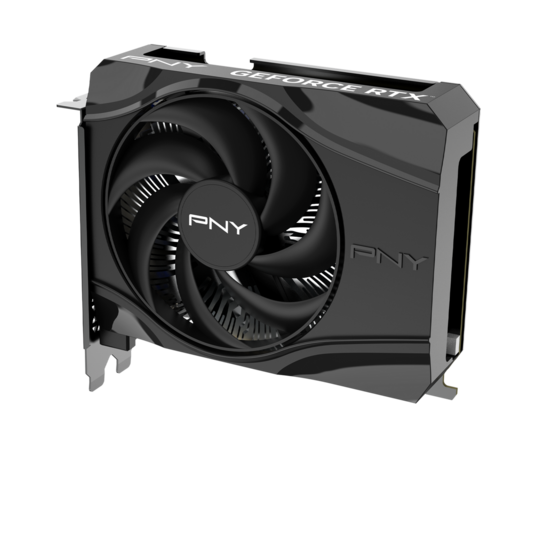
The PNY GeForce RTX 5060 8 GB Single Fan is a small, budget-friendly graphics card that fits easily into compact computer builds. If you’re not deep into tech or just want a clear explanation of what this card actually does without it being overcomplicated, this guide is for you. We’ll go through the specs one by one and explain what they mean in simple terms. You won’t need to know every technical keyword to follow along. I made this to help anyone learn without feeling overwhelmed, while still being thorough. Price and availability tend to change often with graphics cards, so we won’t be focusing on that here, but the MSRP for this model is $299 for reference. This card also shows up in a lot of prebuilt PCs, which is one of the more common ways people end up with this card.
Hardware Specs and Architecture
This card is based on NVIDIA’s new Blackwell GPU design, which brings updated features and better performance for modern games and apps. The PNY version keeps things compact and easy to power while still giving you everything that matters for a smooth experience. Let’s go through what’s on the card and how each piece fits together.
Blackwell Architecture Basics
Blackwell is the next step after NVIDIA’s previous Ada design. One of the main upgrades is a new version of their AI-focused Tensor Cores, now in their fifth generation. These are small parts inside the GPU that handle tasks related to machine learning, including features like DLSS, which helps your games run faster by using AI to fill in extra frames. This version includes special support for lower-precision math (called FP4), which is better suited for those AI features and helps speed them up.
Ray tracing, which adds more realistic lighting and reflections in supported games, also gets a boost. The dedicated cores that handle this effect are now in their fourth generation. They’re better at processing large, complex 3D scenes, particularly when the geometry has lots of detail. This means newer games that use ray tracing will look smoother and run more efficiently than they did on older cards.
Core Counts and Clocks
The RTX 5060 comes with 3,840 CUDA cores. These are the parts of the chip that handle most of the general processing, especially when running games or creative apps. CUDA cores work together in large groups, taking small pieces of a task and running them all at once. The number gives a sense of how much raw computing power the card has.
As for speed, the card runs at a base clock of 2,280 megahertz and can boost up to 2,497 megahertz when needed. Boost clocks are the faster speeds your card can reach when it’s not running too hot and still has room in its power budget. This boost happens automatically, depending on the current workload and temperature.
Memory and Bandwidth
This card uses 8 gigabytes of GDDR7 memory. That’s the latest generation of graphics memory, and it runs faster than the GDDR6 found in most earlier cards. That speed helps the GPU move textures, geometry data, and visual effects quickly in and out of memory while it’s processing frames. When memory moves faster, the card has an easier time keeping up with everything it needs to show on screen. This memory is called VRAM, which stands for video RAM. It’s where the graphics card stores things like game assets, background textures, lighting details, and other visual data while it’s working. The more VRAM a card has, the more it can keep ready to go without needing to pull from slower system memory. That makes a difference when scenes get more complex or when settings are turned up.
The RTX 5060 connects to its memory over a 128-bit path. Think of that as the width of the lane the data travels through. A wider lane and faster memory together give the card a total memory bandwidth of 448 gigabytes per second. That’s the amount of data it can move every second, and it helps reduce wait times when large amounts of visual content need to be processed all at once.
While 8 GB is still enough for a lot of common tasks, it’s starting to fall behind in terms of what’s becoming standard. Many newer mid-range cards are coming with 12 or even 16 GB, and more games and software are beginning to take advantage of that extra room. The RTX 5060 doesn’t offer other memory options, so if you’re planning to stretch this card over several years or work with high-memory tasks later on, that’s something to keep in mind. But for now, the 8 GB here is fast and can handle basic workloads as long as memory use stays within that limit.
Power and Cooling Design
This card uses up to 145 watts when it’s under full load, which puts it in a comfortable range for a mid-range GPU. That amount of power draw means most modern power supplies can handle it without any trouble. It connects with a single 8-pin power cable, which is one of the most common plugs found in gaming power supplies, so there’s usually no need to change anything to get it running.

You can see the 8‑pin power connector.
Cooling is handled by one fan mounted directly on the card. It pushes air across the heatsink, which spreads heat out across a metal surface, helping it cool down before the air exits the card. The fan speed adjusts based on temperature, and it’s designed to stay relatively quiet during normal use.

This image shows the internals, including the heatsink.
Because there’s only one fan, heat doesn’t move away from the card as quickly as it would on models with two or three fans. That’s something to be aware of during long or demanding sessions where temperatures stay high for extended periods. It’s not a deal-breaker, but it can affect how hot the card runs and how hard the fan has to work to manage it. The upside is that the smaller cooling system helps keep the card compact, which is a better fit for tighter cases or more space-conscious builds.
Software and Warranty
PNY includes its VelocityX software with the card, which gives you a simple way to adjust fan speeds, monitor temperatures, and fine-tune performance. It’s helpful if you want to control how the card behaves without needing to install third-party tools. On top of that, this model comes with a 3-year limited warranty through PNY, which gives you a bit of extra peace of mind if you’re planning to keep the card in your system for a while, just remember to register.
Building and Everyday Use
The PNY RTX 5060 8 GB Single Fan is built to handle common tasks that most PC users care about, whether that’s gaming, light content creation, or simply building a system that runs quietly and fits in a tighter space. It leans toward users who want something modern but don’t need high-end performance or large-scale workloads. Everything on the card is geared toward staying compact, efficient, and reasonably fast for its class and budget.
Game Performance Expectations
This card is mainly built for 1080p gaming and does a decent job at that resolution. Most games run smoothly with high or very high graphics settings, and the frame rates stay steady in most cases. Lighter games like League of Legends or Valorant can go far beyond 300 frames per second. Heavier ones like Grand Theft Auto V or Call of Duty: Warzone land closer to 100 to 120 frames per second depending on what’s happening on screen.
That’s with DLSS 4 turned on, which helps boost performance by generating extra frames between the ones the GPU normally draws. The feature is built around AI, and it lets you play at higher frame rates without putting as much pressure on the hardware. The single-fan version of this card, which this article focuses on, can sometimes run hot during long sessions. When that happens, the clock speed may lower a bit to cool things down. Lowering one or two settings can help keep the frame rate from dropping during those heavier moments.

FPS results at 1080p using the RTX 5060 paired with a Ryzen 7 7800X3D on howmanyfps.com
At 1440p, the card still handles a good range of games. The frame rates are lower than at 1080p, but many games are still playable at high settings. Valorant and League of Legends still run very fast, while more demanding games like Fortnite and Warzone drop closer to the 100 FPS range. If the game uses large textures or advanced effects, that can fill up the card’s 8 GB of video memory. When the memory gets close to full, you may notice some brief stuttering or short pauses, particularly in newer titles or large maps. That doesn’t happen as much at 1080p, where the memory use is lower and the card has more room to work with.

FPS results at 1440p using the RTX 5060 paired with a Ryzen 7 7800X3D on howmanyfps.com
This card isn’t built for 4K or very high frame rates in demanding games, but it performs decently for players who want a steady experience at 1080p. You can expect a smooth 60 frames per second in many titles, with some going higher depending on the game and settings. With Reflex 2 helping cut down input delay, games that rely on quick reactions still feel responsive and sharp.

FPS results at 3840x2160 using the RTX 5060 paired with a Ryzen 7 7800X3D on howmanyfps.com
All benchmark numbers in this article come from howmanyfps.com which is a great resource, based on tests with the RTX 5060 and Ryzen 7 7800X3D.
Content Creation with NVIDIA Studio
The RTX 5060 works with the NVIDIA Studio platform, which brings added support for creative software. That includes tools for editing photos, cutting videos, doing basic 3D modeling, and working with AI-based filters. The fifth-generation Tensor Cores improve the speed of effects that rely on AI, like background removal or voice filters in real-time video. The newer ray tracing cores also help speed up lighting previews in apps that support it.
For users doing casual to moderate creative work, the card holds up well. The GDDR7 memory is quick enough to handle high-resolution video timelines and preview changes without long delays. It’s a budget-friendly option that makes newer tools more accessible without jumping to a higher-end card. But for large 3D scenes or long 4K video projects, the 8 GB of VRAM can feel a bit tight, and the single-fan design may run hotter under heavy load. That can lead to thermal throttling, which means the card may slow itself down to keep temperatures under control during longer sessions. It’s better suited to shorter workloads, hobby projects, and creators who are building content for social platforms or basic streaming.
The card also supports NVIDIA Broadcast, which gives you extra tools like noise removal, virtual backgrounds, and camera framing. These can be helpful if you’re doing live streams or recording content from home without needing extra gear.
System Power and Slot Requirements
Power requirements for the RTX 5060 are fairly modest, which makes installation less stressful for people building or upgrading a system. It draws up to 145 watts and runs off a single 8-pin power cable, which is standard on most gaming power supplies. That keeps things simple and avoids needing extra adapters or special plugs.
The card fits into a regular PCIe slot and uses the PCIe 5.0 standard, though it’s still fully compatible with older PCIe 4.0 or 3.0 slots. It connects over 8 lanes instead of the full 16, but that doesn’t affect performance much with this kind of GPU. The smaller lane count helps save space on compact motherboards and leaves room for other expansion cards.
You don’t need a high-wattage supply to run this card, and most systems with at least a 550-watt power supply should be fine. That gives it flexibility for prebuilt systems or upgrades where you don’t want to replace too many parts at once.
Compact Build Potential and Display Output
This version of the RTX 5060 is very compact compared to many other modern graphics cards. It measures about 146 millimeters in length, which means it can slide into small cases that bigger cards wouldn’t fit into. The single-fan design helps keep the size down and makes it easier to work around other components inside the case. It only takes up two slots, which means it covers the space of two expansion slots on the back of your case, and avoids blocking nearby connectors or drive bays. That makes it a good choice for tighter builds like mini towers or small-form-factor PCs, specifically in setups where airflow is a concern. Even with its smaller footprint, the card stays sturdy and doesn’t require extra support brackets or mounting accessories.

This shows the two-slot design, with three DisplayPorts and a single HDMI port on the right.
It comes with three DisplayPort connections and one HDMI port, which gives you plenty of options if you’re running multiple monitors or connecting to a capture setup.
If you’re building in a case with limited room or upgrading an older system that wasn’t designed for massive graphics cards, this one is easier to work with and less likely to cause space-related issues during installation.
Comparing with AMD RX 9060 XT
The closest competitor to the RTX 5060 is the AMD RX 9060 XT. The 5060 has an MSRP of $299, while the RX 9060 XT 16 GB comes in at $349. Both target the same kind of use, which includes 1080p gaming, support for modern features, and enough performance to handle some creative workloads without going overboard.
What Sets Them Apart
At 1080p, both cards deliver good results, and the difference in game performance depends a lot on how the game is built. The RTX 5060 uses DLSS 4, which helps boost frame rates by using AI to generate extra frames. AMD cards use FSR, a similar tool for upscaling, though it works differently. In many cases, performance will feel about the same unless you’re looking closely at numbers.

FPS results at 1080p using the RTX 5060 compared to the RX 9060XT 16 GB on howmanyfps.com
The RX 9060 XT 16 GB pulls ahead more clearly at 4K. It has a wider memory bus and more VRAM, which helps in games that stream large textures or manage heavy effects. In titles like Fortnite, Valorant, and Call of Duty: Warzone, the RX 9060 XT consistently shows higher frame rates at 3840x2160. That gives it some breathing room in longer play sessions or when you’re working with larger game environments.

FPS results at 3840x2160 using the RTX 5060 compared to the RX 9060XT 16 GB on howmanyfps.com
Cooling and Memory Choices
Many RX 9060 XT models come with dual- or triple-fan coolers and larger heatsinks, which help keep temperatures lower and noise down during long sessions. It currently doesn’t come in a single-fan version. The RTX 5060 Single Fan model is smaller and easier to fit into compact cases, but that one fan has to work harder when the card is under heavy load. For lighter use, it’s fine, but in longer gaming sessions or creative work, it may run warmer or throttle performance slightly to stay cool.
The RTX 5060 is more compact and more power-efficient, while the RX 9060 XT leans toward higher performance and longer-term memory flexibility. Both have strengths depending on what you’re building for.
Conclusion
The PNY RTX 5060 8 GB Single Fan brings together updated architecture, faster memory, and practical design choices in a compact card that fits where larger models won’t. It runs cool enough under basic use, handles modern games well at 1080p, and supports creative tools with features that speed up AI and video workflows. With one fan and 8 GB of VRAM, it’s built more for everyday needs than for pushing limits, but the hardware holds up well for its size and price.
If you want to see how this version stacks up against the rest of the lineup, I’ve got a full comparison of all four PNY RTX 5060 8 GB models: All PNY RTX 5060 8GB Models Compared for Beginners
- *PNY RTX 5060 Single Fan Product Page*
- *PNY VelocityX Software*
- *NVIDIA Blackwell Architecture Overview*
- *NVIDIA DLSS 4 Developer Guide*
- *NVIDIA Studio Support and Setup*
- *PNY Product Registration*
- *HowManyFPS.com*
You can reach me at alexander.obregon47@gmail.com for sponsorships, collaboration requests, or other professional opportunities.
메타데이터
- post_id
- 7f8bc2bbec35
- slug
- pny-rtx-5060-8-gb-single-fan-beginner-guide-7f8bc2bbec35
- url
- https://medium.com/@AlexanderObregon/pny-rtx-5060-8-gb-single-fan-beginner-guide-7f8bc2bbec35
- canonical_url
- https://medium.com/@AlexanderObregon/pny-rtx-5060-8-gb-single-fan-beginner-guide-7f8bc2bbec35
- author_url
- https://medium.com/@AlexanderObregon
- status
- ok
- fetched_at
- 2026-06-25 07:00:49