How I Discovered Canva and Why I Can’t Live Without It
Photo by Kevin Bhagat on Unsplash
How I Discovered Canva and Why I Can’t Live Without It

Photo by Kevin Bhagat on Unsplash
In 2023, I started exploring ways to make money online, and one of my first attempts was publishing planners and coloring books on Amazon KDP. I loved the idea of creating digital products, but I had one big problem: I had zero design skills. Photoshop seemed too complicated, and other programs felt overwhelming.
While searching for a more beginner-friendly alternative, I discovered Canva. At first, it seemed like just another tool for making Instagram posts, but I quickly realized it could do much more. With its ready-made templates and easy-to-use tools, I was able to design my first book covers and interior pages for planners without spending hours learning complicated software.
Since then, Canva has become an essential part of my online work. After KDP, I ventured into CPA marketing on Pinterest, using Canva to create eye-catching pins. Now, I rely on it daily for my digital product business, and if Canva disappeared tomorrow, it would be a disaster for me.
Photo by Dima Solomin on Unsplash
What Is Canva and Why Is It So Popular?
Canva is an online design platform that allows anyone to create professional-looking graphics, even with no prior experience. It’s used by freelancers, entrepreneurs, and even big companies to quickly produce high-quality visual content.
What makes Canva special is that you don’t need any technical skills. Everything works with drag & drop, and the vast template library helps you create a polished design in minutes.
If you need to create any type of visual content, Canva has you covered. Here are some of its most popular uses:
• Social media posts – Instagram, Pinterest, TikTok, Facebook
• Ebook covers, book covers, and planners
• Digital guides and PDFs
• Marketing materials and presentations
• Flyers, posters, and business cards
• Logos and branding assets
• Simple videos and animations
• Mockups for digital products
Another major advantage is that everything is online, so you don’t need to install anything. You can start a design on your laptop and continue working on it from your phone without any hassle.
How I’ve Used Canva in Different Stages of My Online Business
- Canva for Amazon KDP – My First Steps in Design
When I started publishing books on Amazon KDP, I needed two key things:
• Attractive covers – Since KDP is a competitive marketplace, I had to design something that would stand out.
• Interior pages for books – Lined pages for planners, illustrations for coloring books, etc.
Instead of hiring a designer, I used Canva to do everything myself. I started with free templates and customized them to fit my needs. The result? My first books were listed on Amazon without any extra design costs.
- Canva for CPA Marketing on Pinterest
After my KDP experience, I ventured into CPA marketing on Pinterest, where pin design was crucial.
With Canva, I could quickly create optimized Pinterest pins, experimenting with different color combinations, fonts, and images. I tested multiple styles and found out which pins generated the most clicks.
- Canva for My Digital Product Business
Now, Canva is essential for me in creating and promoting digital products. I use it to:
• Design PDF guides – Professionally formatted and ready to sell.
• Create mockups for my products – To make them look more appealing.
• Make social media content – To promote my products on Instagram and TikTok.
Without Canva, I would probably have to hire a designer for all these tasks.
Canva Free vs. Canva Pro – Is It Worth Paying For?
I started with the free version, which was enough in the beginning. However, as my business grew, I decided to upgrade to Canva Pro.
Main Differences:
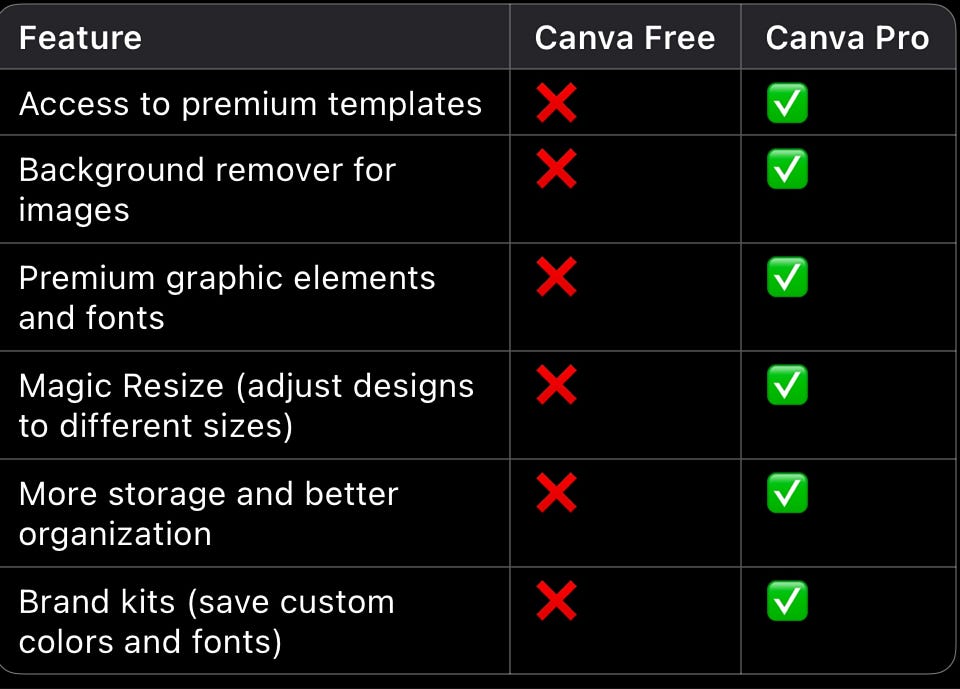
If you’re just starting, the free version is great. But if you want to monetize your work, Canva Pro gives you a lot more flexibility and advanced tools.
Tips to Use Canva More Efficiently
-
Use templates, but customize them – Don’t just use a template as is. Change the colors, fonts, and layout to match your style.
-
Organize your designs into folders – If you create a lot of projects, it helps to keep them well-organized.
-
Take advantage of the “Magic Resize” tool – It allows you to instantly convert a design into different sizes.
-
Experiment with fonts and colors – Canva provides many professional-looking combinations to improve your designs.
-
Use mockups for digital products – They make your products look more polished and help attract more buyers.
Canva is one of the most valuable tools for anyone working online. You don’t need design experience, and you can quickly create content for social media, ebooks, digital products, and more.
If you’re looking to start an online business but don’t have graphic design skills, Canva is your best friend. I started with zero experience, and now I use it daily without stress.
Have you used Canva? If so, what have you created with it? Let me know in the comments!
메타데이터
- post_id
- 7fb7cfec68b4
- slug
- how-i-discovered-canva-and-why-i-cant-live-without-it-7fb7cfec68b4
- url
- https://medium.com/@radulescudumitru1/how-i-discovered-canva-and-why-i-cant-live-without-it-7fb7cfec68b4
- canonical_url
- https://medium.com/@radulescudumitru1/how-i-discovered-canva-and-why-i-cant-live-without-it-7fb7cfec68b4
- author_url
- https://medium.com/@radulescudumitru1
- status
- ok
- fetched_at
- 2026-06-09 15:37:30




