Tiled Matrix Multiplication in CUDA
This post is for beginners. If you already know more advanced GPU techniques, you can skip it. But if you are new to GPU programming, start…
Tiled Matrix Multiplication in CUDA
This post is for beginners. If you already know more advanced GPU techniques, you can skip it. But if you are new to GPU programming, start here, tiling is the one idea everything else is built on.
Why does tiling matter so much? Because almost all the heavy work in modern deep learning is really just matrix multiplication. Attention is matrix multiplication. The layers inside a Mixture-of-Experts (MoE) model are matrix multiplication. Even fast attention kernels like FlashAttention are, at their core, the same matrix-multiply work arranged cleverly. If you ever want to read those advanced kernels and truly understand why they are fast, you first need to understand tiling. It is the foundation. So we will learn it slowly and clearly.
Now, if you come from CPU programming C or Python, your first instinct for this is probably nested loops a loop over rows, a loop over columns, and an inner loop to add things up. That works, and on a CPU it is often the best you can do, because a CPU has only a handful of cores to spread the work over. A GPU is different. It has thousands of cores, so the number of cores is no longer the thing holding you back. The question becomes, how do we use all of them well?
That is where this article goes. The first time you write matrix multiplication on a GPU, it works but it is slow. Very slow, for a chip with thousands of cores. The fix is not a faster GPU or more threads. The fix is tiling, a trick that works with the way GPU memory moves data, instead of against it.
If you have never written CUDA, you can follow every step. We will cover what matrix multiplication is, how a matrix sits in memory, how the GPU splits up the work, and then the simple (naive) kernel and the tiled one.
1. What matrix multiplication actually does
If you multiply two matrices A and B to get C, each single element of C is a dot product: take one row from A, one column from B, multiply them element by element, and add it all up.
C[i][j] = Σ ( A[i][k] × B[k][j] ) for k = 0 .. width-1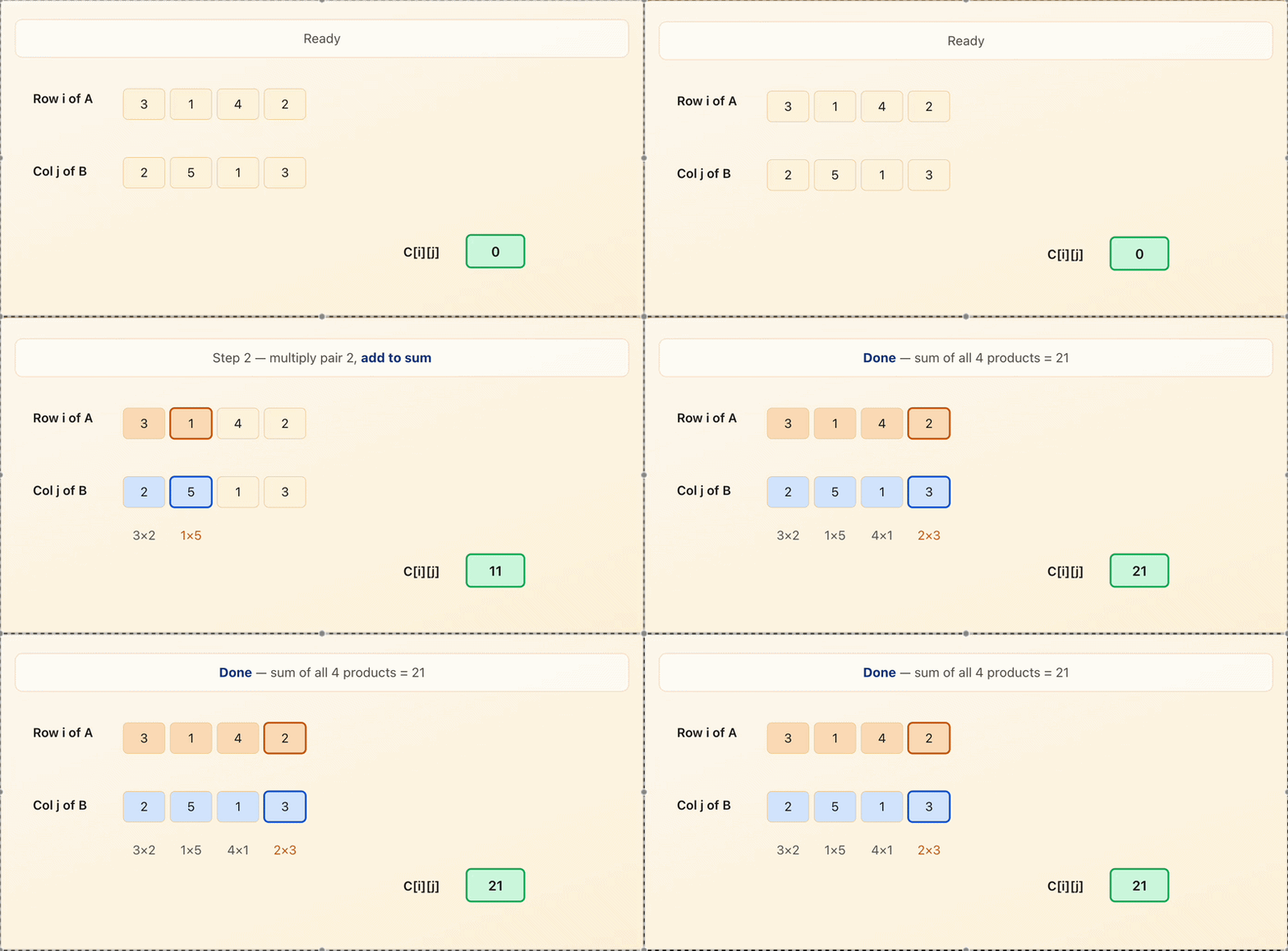
One output cell consumes an entire row of A and an entire column of B.
Two things to remember. First, every cell of C is independent. C[0][0] does not need C[0][1]. That is why GPUs are great at this: many workers can compute many cells at the same time. Second, cells next to each other use a lot of the same data. Every cell in row i needs the same row i of A. Keep that in mind — it is the whole reason tiling exists.
2. How a matrix lives in memory: flat indexing
We draw a matrix as a grid. But computer memory is not a grid. It is one long line of slots, numbered from 0. So the rows are stored one after another, end to end. To find a cell, you turn its (row, col) position into one number, with one formula:
index = row × width + col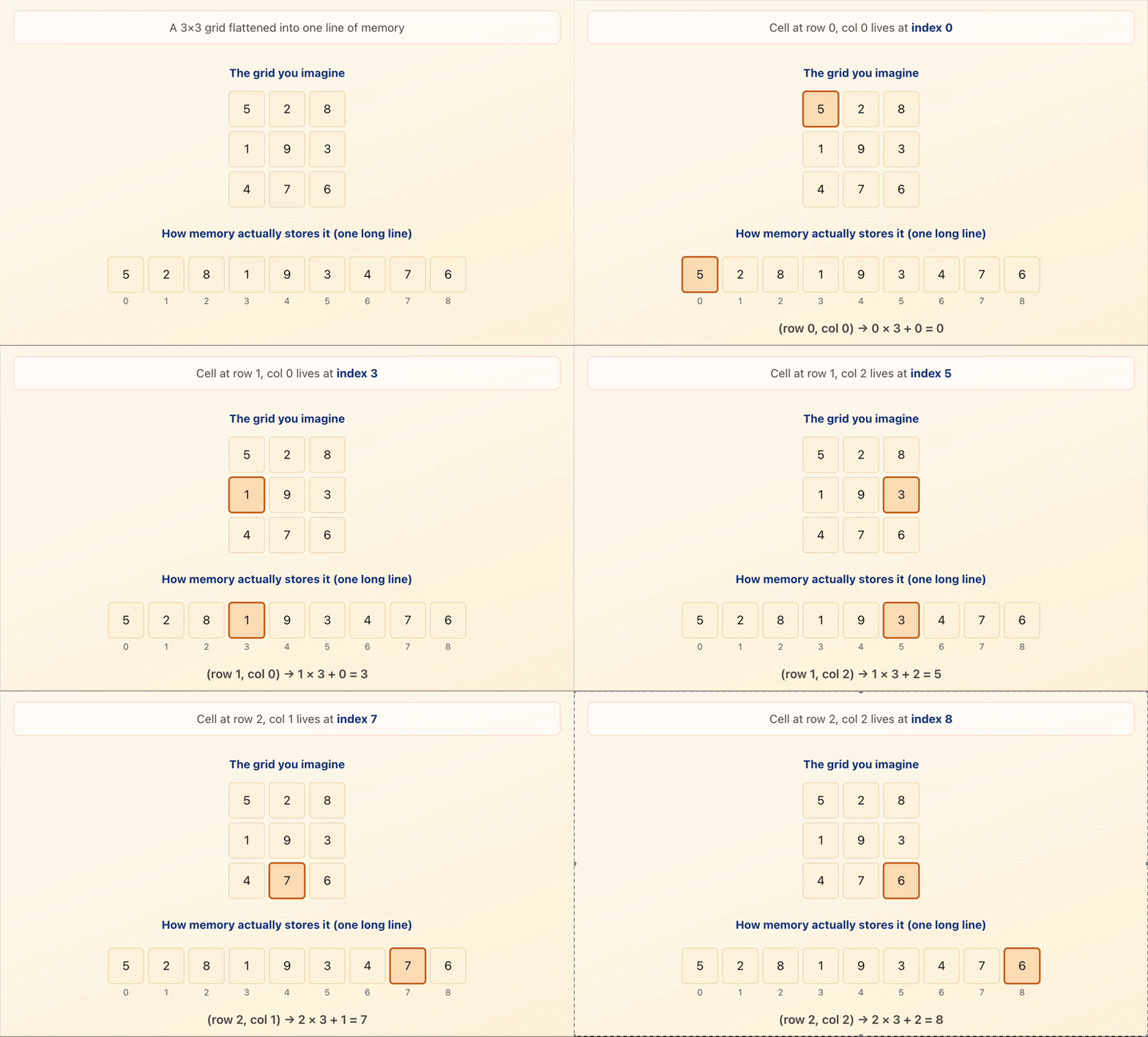
Think of an apartment building where all the doors are numbered in one long line. Each floor has width doors. To reach floor i, door j, you pass i × width doors on the floors below you, then walk j doors down your own hallway. That is all row × width + col means. The first part jumps to your floor. The second part walks to your door.
This is called row-major order, and it is not special to CUDA. Memory is always one line, so languages that store 2D arrays in one contiguous block flatten them this way. NumPy (by default) and C both compute i * width + j behind the scenes. CUDA just makes you write it yourself. (Fortran and MATLAB use the opposite order, column-major, where the formula flips to j * height + i — but everything in this article is row-major.)
This one formula shows up everywhere in the kernel. When you see A[row * width + k], it's just flat indexing into A at (row, k).
3. The CUDA hierarchy: thread, block, grid
A GPU does not run one program that loops over every cell. It starts thousands of cores, running millions of small workers called threads, and they all run the same function at the same time. The threads are grouped in a simple structure. Learn these four words first the code will make sense after.
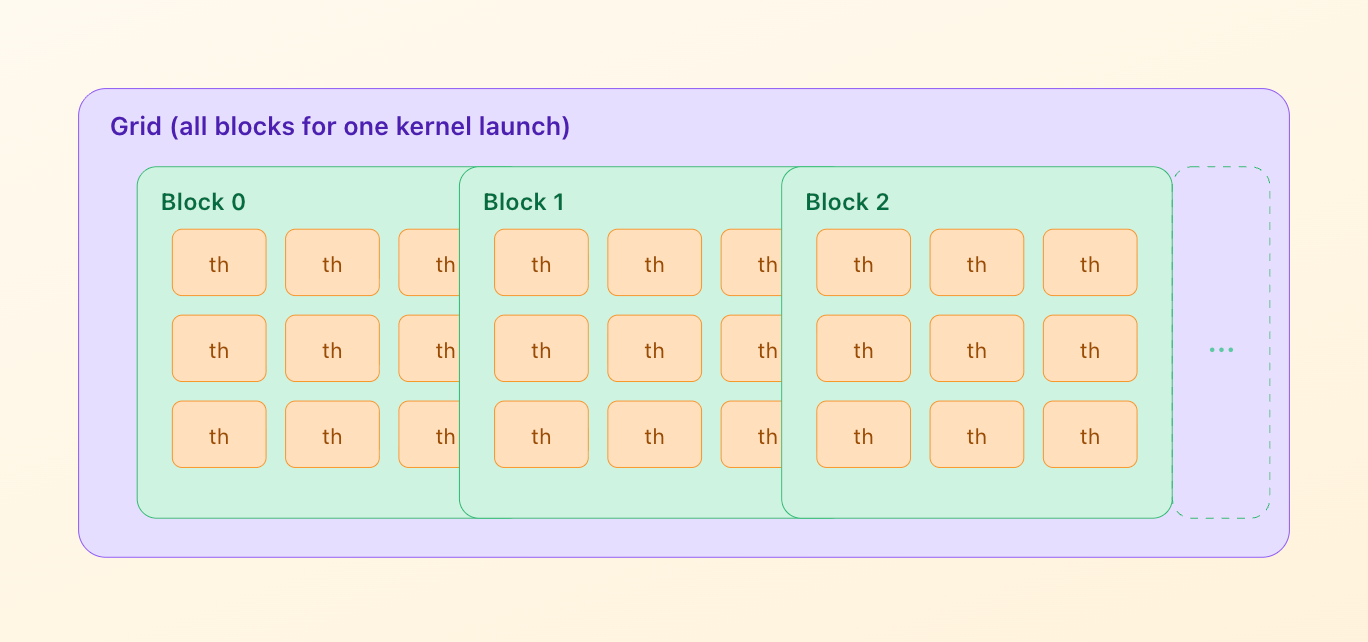
Threads sit inside blocks,blocks sit inside the grid. Each block maps to one tile of the output.
- Thread — the smallest worker. One thread runs the kernel once. Here, one thread computes one cell of C.
- Block — a group of threads. Key point: threads in the same block can share fast memory and wait for each other. Threads in different blocks cannot. Think of a block as a team at one table. In tiling, one block computes one tile of C.
- Grid — all the blocks together for one launch. If a block is a table, the grid is the whole room of tables.
- Kernel — the function (marked
__global__) that every thread runs. You write it once. The GPU runs thousands of copies.
What the launch line means
Everything starts with one line. It looks like a normal function call, plus strange triple angle brackets:
MatrixMulCUDA<<<gridSize, blockSize>>>(C, A, B, width);The <<< >>> part exists only in CUDA. It is called the execution configuration. It answers a different question than the parentheses:
- The angle brackets say how many workers, in what groups: launch
gridSizeblocks, each withblockSizethreads. - The parentheses pass the data: pointers to C, A, B, and the width. Same as any function call.
Read the line as: “run MatrixMulCUDA as gridSize blocks of blockSize threads, and give them C, A, B, width." After this line, all the threads start at once. There is no for loop over cells in your CPU code. The many threads are the loop.
4. How a thread finds its cell
Every thread runs the same kernel code. So the first job of each thread is to find out, which cell of C is mine? It uses three built-in values:
threadIdx— my seat inside my block (my place at the table).blockIdx— which block I am in (which table in the room).blockDim— the size of each block (how many seats per table).
Put them together and a thread finds its global position. It is the same “skip, then walk” idea as flat indexing:
int row = blockIdx.y * blockDim.y + threadIdx.y;
int col = blockIdx.x * blockDim.x + threadIdx.x;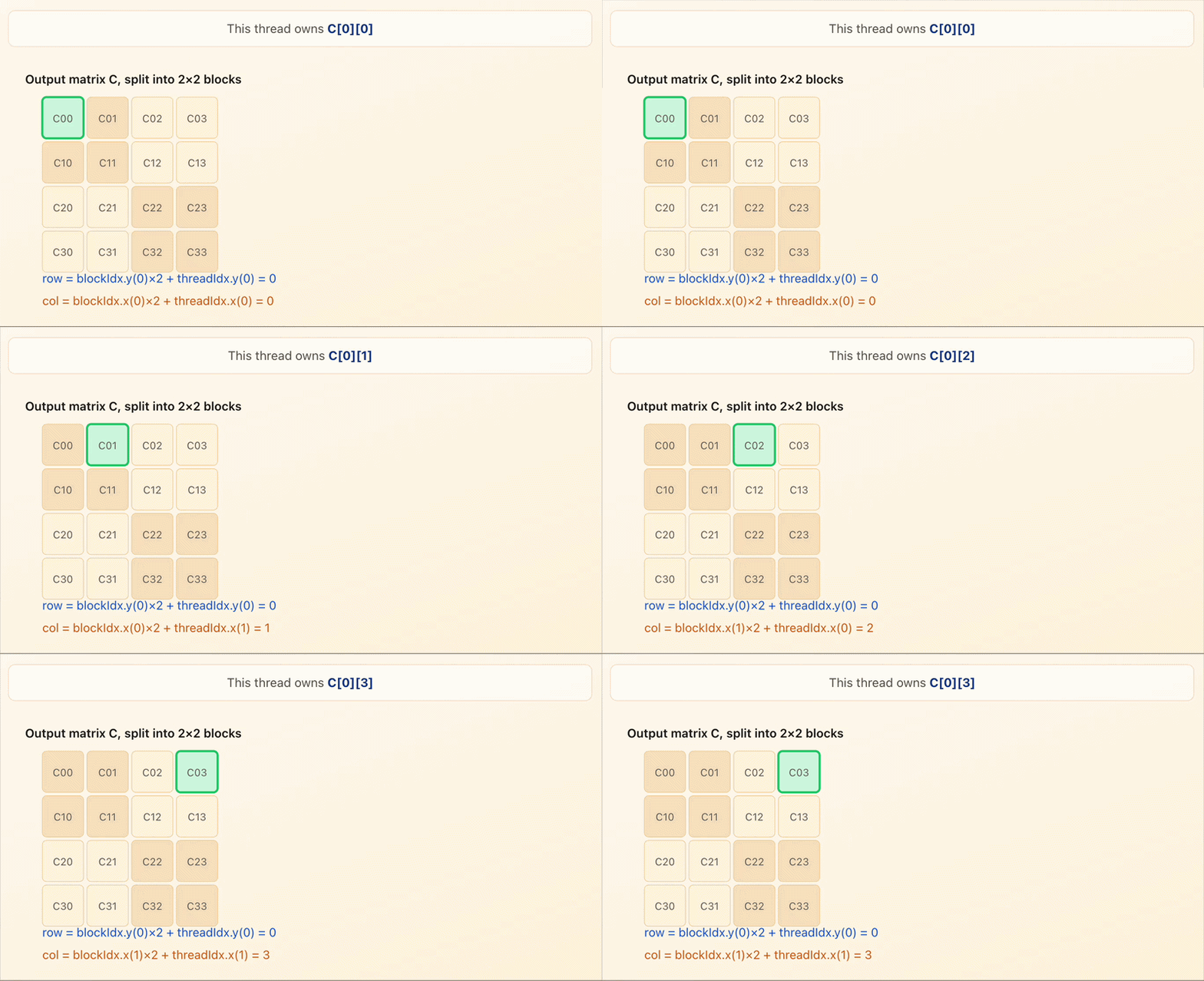
This is the most common beginner bug, so let’s be very clear. A row is a vertical question. So every part of row must measure something vertical (.y):
blockIdx.y— how many blocks are above me.blockDim.y— how many rows tall each block is (the size of one jump).threadIdx.y— my row inside my block.
Multiply the first two: that skips all the rows in the blocks above you. Add the third: that walks down to your own row. Every piece is vertical, so the answer is a real row.
Now imagine mixing axes, like blockIdx.x * blockDim.y. That multiplies a sideways position by a vertical height. The result means nothing — like finding your apartment by multiplying which column of the building you are in by how many floors it has. It only looks right when the grid and blocks are perfect squares, because then the x and y numbers happen to match. For most blocks, it gives the wrong row.
5. The naive kernel, and why it’s slow
Now we can read the simplest kernel. One thread per output cell. Each thread does its own dot product:
__global__ void matmulNaive(float* C, float* A, float* B, int width) {
    int row = blockIdx.y * blockDim.y + threadIdx.y;   // all .y → vertical
    int col = blockIdx.x * blockDim.x + threadIdx.x;   // all .x → horizontal

    float sum = 0.0f;
    for (int k = 0; k < width; ++k) {
        sum += A[row * width + k] * B[k * width + col];
    }
    C[row * width + col] = sum;
}
One counter, two directions
Look at A[row * width + k] and B[k * width + col]. The counter k sits in a different spot in each:
- In A,
rowstays fixed andkis the column. So A is read across a row. - In B,
colstays fixed andkis the row. So B is read down a column.
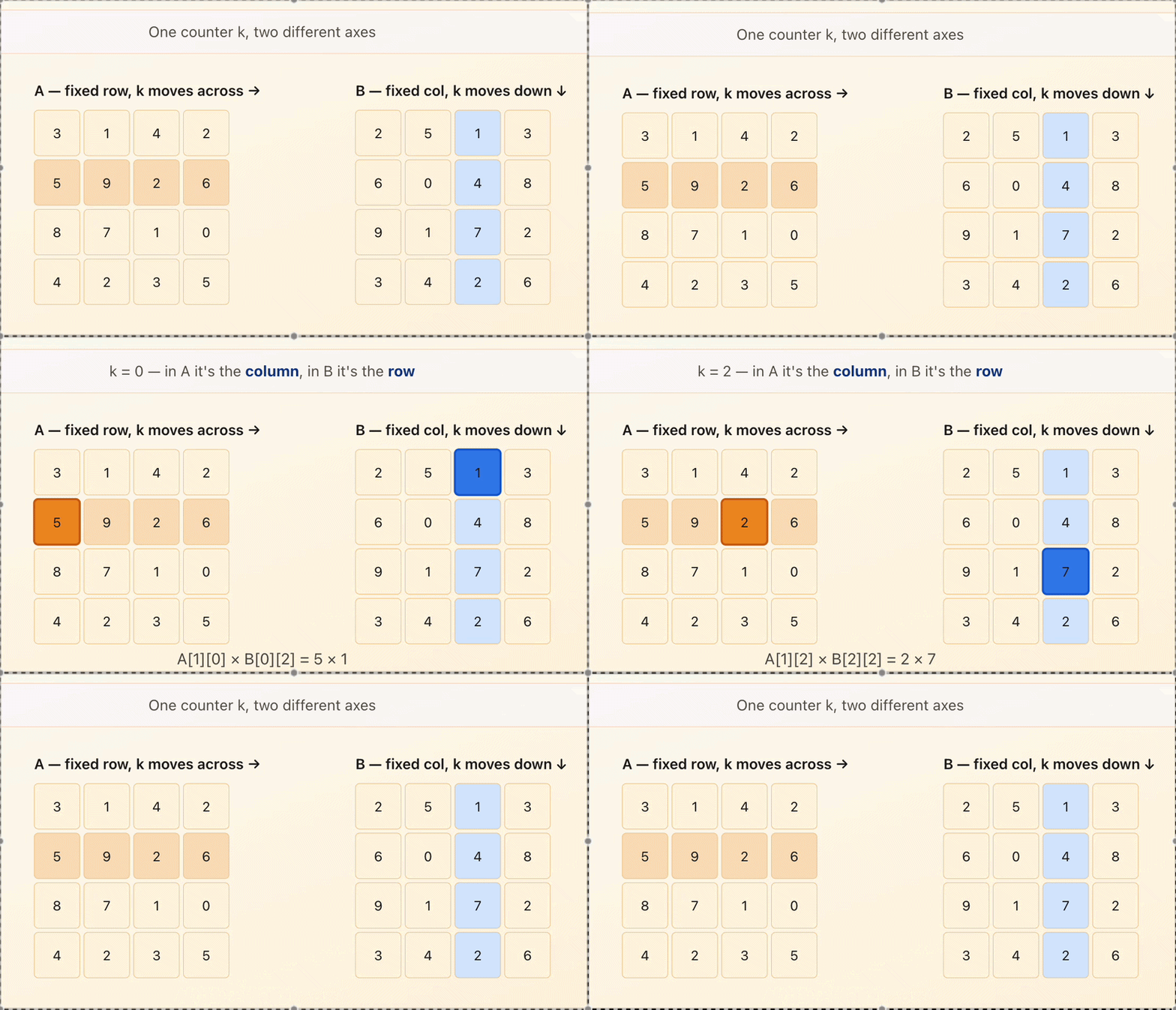
That is why B[k * width + col] is right and B[col * width + k] is wrong. The wrong one walks across a row of B. Row times row is not matrix multiplication. And B[row * width + col] is wrong too: it has no k, so it points at the same single cell on every loop step. A quick self-check: inside the k loop, look at each index and ask, "where is the k?" If k is missing, that read never moves — and it is almost surely a bug. row and col hold still. k moves.
Why this kernel wastes the GPU
The kernel gives the right answer. But it spends most of its time waiting for memory, not computing. Every thread reads its whole row of A and whole column of B from global memory the GPU’s big, slow main memory. Each read costs hundreds of clock cycles. And here is the waste the thread for C[1][2] and the thread for C[1][3] both read the same row 1 of A, separately, from that slow memory.
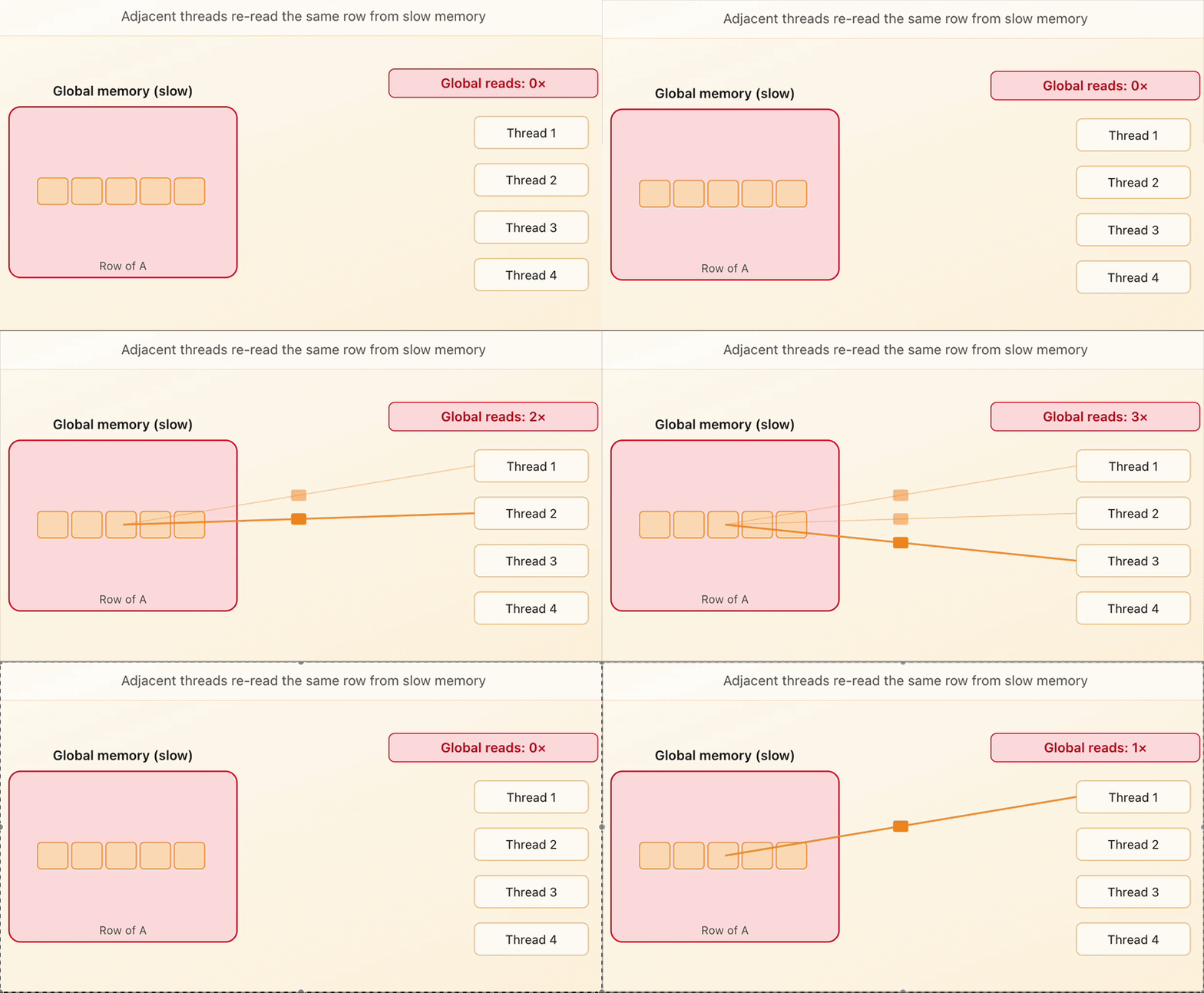
For a matrix of width N, each value of A gets read N times from global memory once for every output column. Same for B. That is a huge amount of repeated, slow traffic. The kernel is memory bound, faster math would not help, because the waiting is the problem.
6. The idea behind tiling
The GPU has a small, fast scratchpad next to each block, called shared memory. It is about 100× lower latency than global memory, but tiny . Whole matrices do not fit in it. They do not need to. Tiling works like this: load one small square tile of A and one tile of B into shared memory. Let the whole block compute with those fast copies. Then slide to the next tile and keep adding. Each value is loaded from slow memory once per block, then reused many times from fast memory. With a 16×16 tile, every loaded value is reused 16 times, so the number of requests to slow memory drops by about 16×. The math does not get cheaper the waiting does.
7. How tiled matmul works, line by line
Lets pick a tile width say 16×16 (we draw it as 2×2 here so it is easy to see). Each block computes one tile of C. The work happens in phases, load a tile, wait, compute a partial dot product, wait, slide to the next tile. First the big picture: watch the tiles march across the matrices.
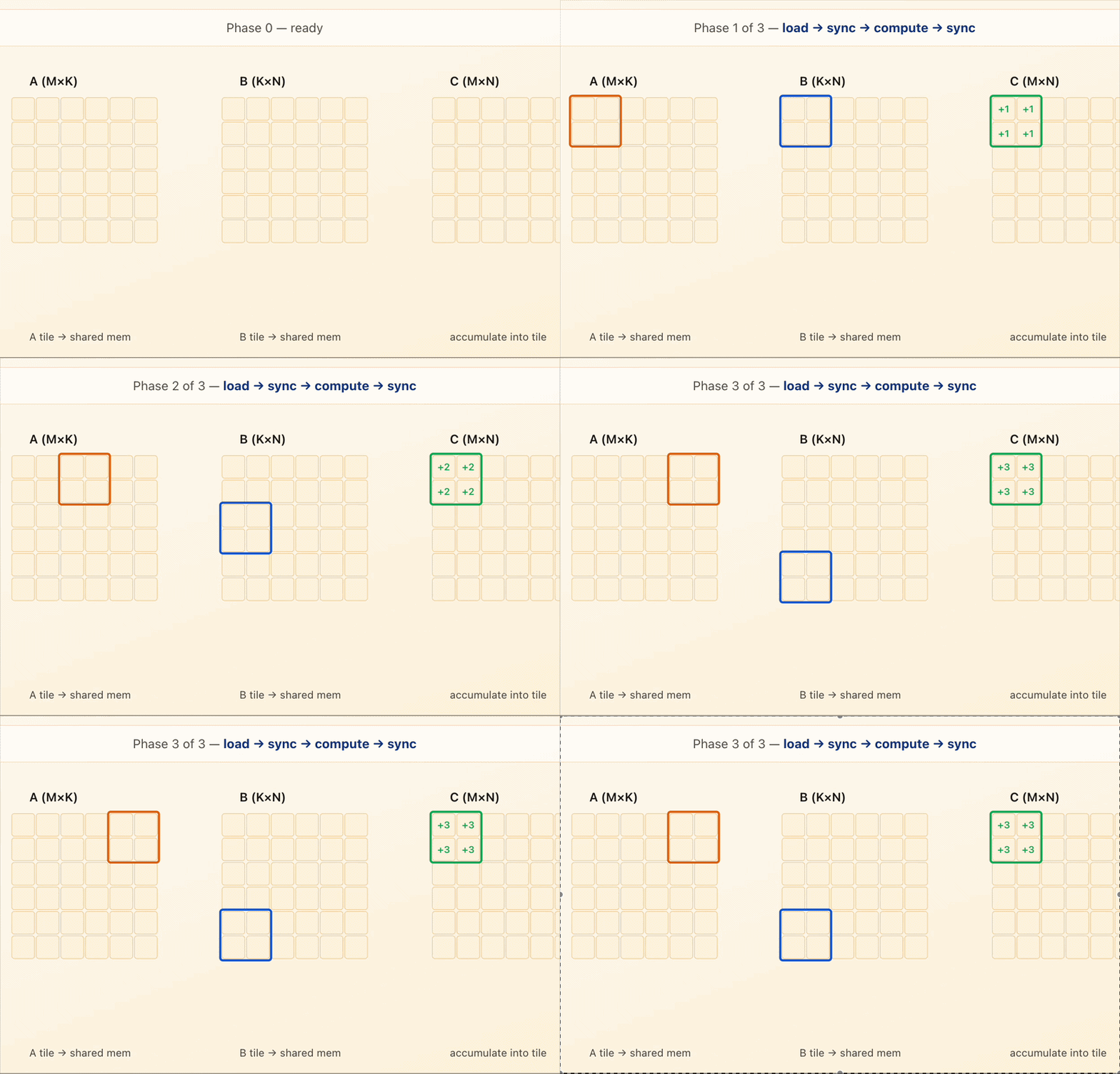
A’s tiles march right, B’s tiles march down; the same output tile accumulates across phases.
Zooming in: what actually happens inside one block
The march above hides the real action. Each phase is not just a “slide”. It is a copy from slow global memory into the block’s fast shared memory, then a tiny matrix multiply inside that fast memory. This animation zooms into one block. Watch the data land in the shared tiles, then watch the block multiply them and add the result to its running total.
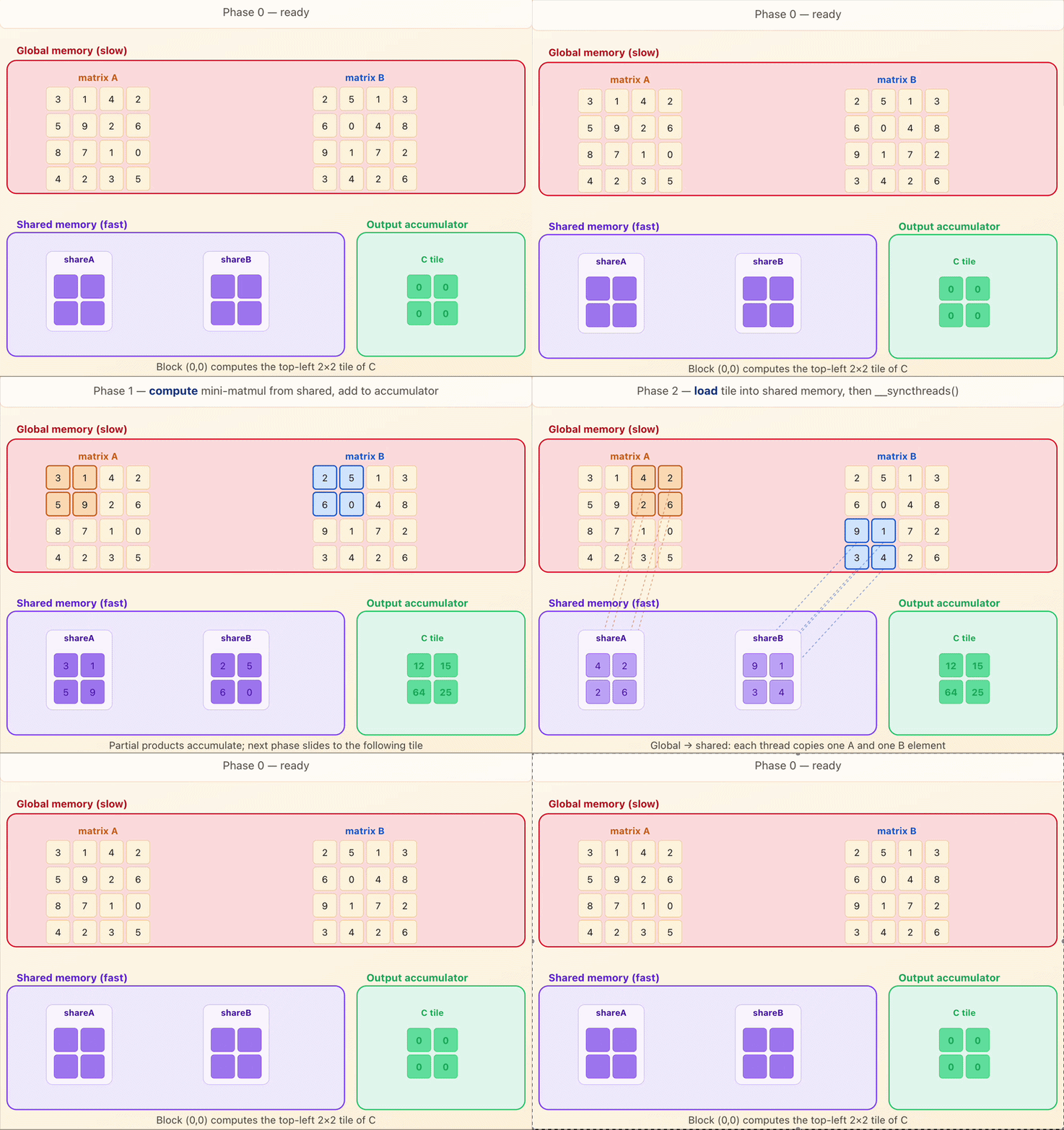
This is the heart of tiling. The slow trip to global memory happens once per tile. After that, every thread in the block reads those values from shared memory, which is about 100× faster. And remember: while this block works, every other block is doing the same thing on its own tile, at the same time.
Here’s the kernel. Each part of the code matches one of the four steps.
#define TILE_WIDTH 16

__global__ void matmulTiled(float* C, float* A, float* B, int width) {
    __shared__ float tileA[TILE_WIDTH][TILE_WIDTH];   // fast scratchpad
    __shared__ float tileB[TILE_WIDTH][TILE_WIDTH];

    int tx = threadIdx.x, ty = threadIdx.y;
    int row = blockIdx.y * TILE_WIDTH + ty;
    int col = blockIdx.x * TILE_WIDTH + tx;

    float sum = 0.0f;

    for (int phase = 0; phase < width / TILE_WIDTH; ++phase) {
        // 1. Load: my row fixed, column slides with phase (A walks right)
        tileA[ty][tx] = A[row * width + (phase * TILE_WIDTH + tx)];
        // my col fixed, row slides with phase (B walks down)
        tileB[ty][tx] = B[(phase * TILE_WIDTH + ty) * width + col];

        __syncthreads();   // 2. wait: whole tile loaded before anyone reads

        // 3. Partial dot product over the tile in fast shared memory
        for (int k = 0; k < TILE_WIDTH; ++k)
            sum += tileA[ty][k] * tileB[k][tx];

        __syncthreads();   // 4. wait: everyone done before tile is overwritten
    }

    C[row * width + col] = sum;
}
The two loops, and why phase joins k
Here is the one truly new thing tiling adds: two loops instead of one. The naive kernel had one k loop over the full width. Tiling wraps it in an outer phase loop. The phase picks which tile to load (the load lines move over by phase * TILE_WIDTH each time). The inner k loop then runs inside that tile, reading from fast shared memory. Phases pick the tile. k moves inside it.
Why there are two barriers
The two __syncthreads() calls are required. Each one prevents a different mistake.
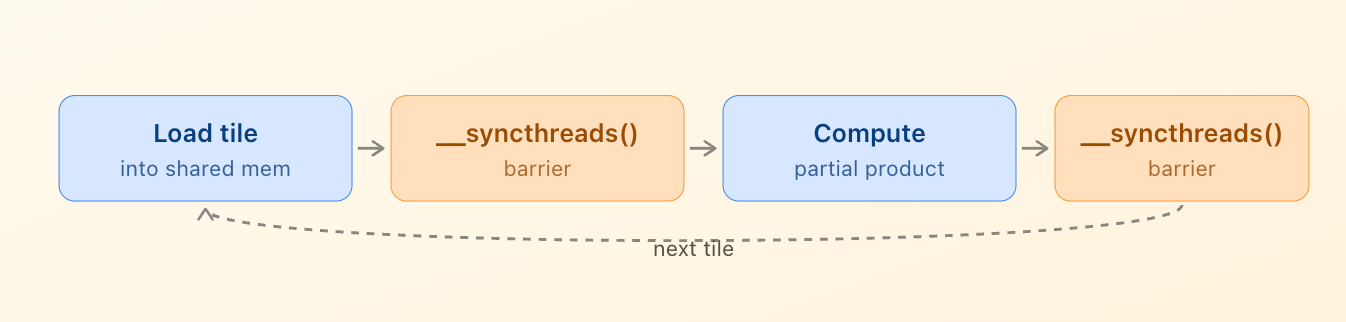
- After loading, before computing: if a fast thread starts reading the tile before a slow thread finishes writing its piece, it reads garbage. The first barrier makes everyone wait until the tile is fully loaded.
- After computing, before the next load: if a fast thread starts loading the next tile while a slow thread is still using the current one, it overwrites data that is still needed. The second barrier makes everyone finish before the tile is replaced.
Both barriers protect shared memory: never read it before it is written, and never overwrite it before everyone is done with it.
8. Takeaways, and where to go next
Tiling is not a CUDA trick. It is a memory idea that shows up everywhere CPU caches, deep learning kernels, databases. The core idea: move data to fast memory once, then reuse it many times.
The naive kernel and the tiled kernel give the exact same answer. The only difference is working with the way the hardware moves data and that difference is everything in high-performance computing. If you started this article new to CUDA, you now have the whole chain: a matrix stored as one line in memory, a grid of threads that each find their cell, a dot product that walks across a row and down a column, and a tiling trick that swaps repeated slow reads for fast reuse.
Shared-memory tiling is where every fast matmul starts, but a production kernel (like the ones inside cuBLAS) stacks several more ideas on top. Each one applies the same “reuse data in even faster storage” principle, just one level deeper in the hardware.
The best next step is to profile your own kernel and let the hardware tell you which rung to climb next. Pick a tool (NVIDIA’s Nsight Compute is the standard one), measure where your time actually goes, and optimize the bottleneck the profiler points at.
메타데이터
- post_id
- 7fd907dd6b3a
- slug
- tiled-matrix-multiplication-in-cuda-7fd907dd6b3a
- url
- https://medium.com/@mahareddyroja247/tiled-matrix-multiplication-in-cuda-7fd907dd6b3a
- canonical_url
- https://medium.com/@mahareddyroja247/tiled-matrix-multiplication-in-cuda-7fd907dd6b3a
- author_url
- https://medium.com/@mahareddyroja247
- status
- ok
- fetched_at
- 2026-06-14 11:28:49






