Rebuild Motus: A Mouse That Prevents Carpal Tunnel Syndrome 2.0
Designed and built by Simon Su, for DG8114 Human-Robot Interaction, Master of Digital Media, Toronto Metropolitan University.
Rebuild Motus: A Mouse That Prevents Carpal Tunnel Syndrome 2.0
Designed and built by Simon Su, for DG8114 Human-Robot Interaction, Master of Digital Media, Toronto Metropolitan University.
Seven weeks of turning an undergrad thesis into a networked, smart kinetic ergonomic prototype, and everything that worked/ broke along the way.
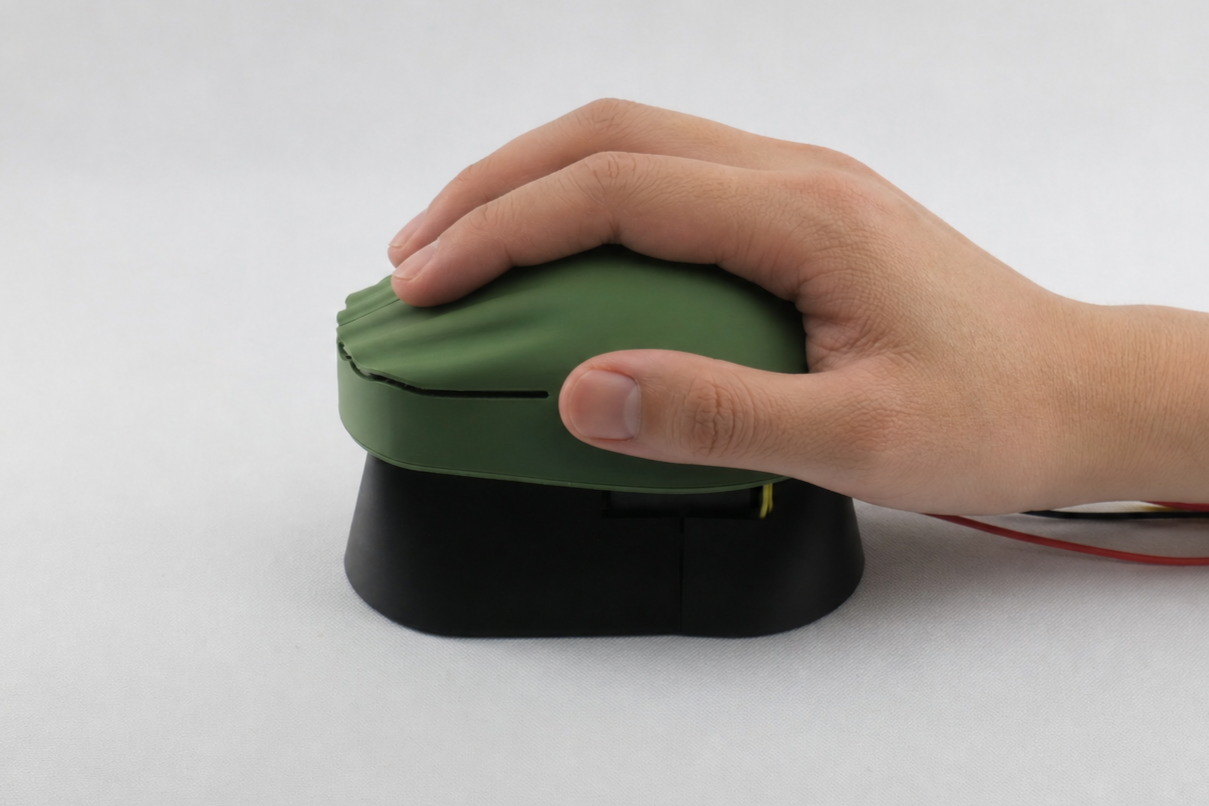
*This is a Real Prototype Photo, Enhanced by AI
The problem nobody treats until it’s too late.
Carpal tunnel syndrome and related repetitive strain injuries affect around five million Canadians. Globally, an estimated 70% of the workforce is potentially exposed. These are not exotic conditions, they are the predictable outcome of holding one hand in one position for eight hours a day, every day, for years.
What struck me when I first started researching this during undergrad was not the scale of the problem. It was the shape of the response to it.
Every product on the market is reactive. Wrist braces, compression gloves, massage guns, anti-inflammatory gels, ergonomic consultations booked after the pain starts. The entire category assumes injury has already happened and asks how to make it hurt less.
Very little exists that intervenes before the damage. And almost nothing addresses the actual mechanism of harm, which is not force or pressure but stillness. Repetitive strain injury is caused by sustained static posture. The hand doesn’t get hurt by moving. It gets hurt by not moving.
That reframing led to the question that has driven this project since my undergraduate thesis:
What if the peripheral itself refused to let your wrist hold still?
What is Motus 2.0?
Built on a undergrad research & design, Motus 2.0 is a computer mouse whose its entire surface moves.
The physical surface your palm rests on continuously and slowly pivots beneath your hand, driven by a smart servo, so that your wrist is never held at a single fixed angle for long enough to accumulate strain.
I call the underlying idea active ergonomics. Conventional ergonomics is passive, it finds the one optimal posture and builds a product that holds you in it. Active ergonomics assumes there is no single optimal posture, only optimal variation, and builds a product that keeps you moving through a healthy range.
The mouse operates in two modes, which I’ll return to in detail:
Continuous Mode — while your hand is on the device, the surface sweeps slowly and constantly through its range.
In-between Mode — the surface stays still while you work, but the moment you let go for more than two seconds it randomises to a new angle, so that every time you reach back for the mouse you adopt a slightly different posture.

2 Modes (GIF Speed Up)
It is operated under an dashboard, more details later on:

Main UI
The brief:
The Open Robot Project asked us to build a robot integrating at least four of six technology categories: Connectivity, APIs, Inputs, Outputs, AI Processing, and Custom Fabrication.
What I set out to build:
Motus already existed as a thesis concept. A moving surface, a motor, an idea. What it had never been was connected, instrumented, or polished. So rather than starting something new, I used the assignment to push the concept closer to the final viable prototype I set out to build.
My plan going in:
Feedback servos. Motors that report their own angle they encounter. This turns the output into an input, the thing that moves the surface also becomes the thing that senses the user pushing back against it.
Connectivity and a web dashboard. Stream live physical data off the device to a companion interface, and visualise a real-time “Posture Awareness Score.”
API integration. Sync with on-screen activity so the device could preemptively adjust before a high-stress work session.
Shopping list at the start:
Arduino Nano ESP32 · Spare mouse parts · Battery holder · Feedback servo · OSEPP ambient light sensor

Week 7— The bare-bones prototype
The first build had three components: a feedback servo, an ambient light sensor, and a push button. No enclosure, no network, no interface. The goal was to prove that the two interaction modes could work at all.
Hand detection without touch. I used an OSEPP ambient light sensor reading through a hole in the mouse body. Moving forward, I will probably use a capacitive sensor that doesn’t need to be fine-tuned to your environment. When your hand covers the device, it casts a shadow and the reading drops. It’s a cruder approach than capacitive sensing, but it needs no calibration to skin, works through a shell, and costs almost nothing.
Mode 1 — Continuous. When the light reading drops below the threshold, indicating a hand is present, the servo sweeps smoothly across its range at roughly one degree per second. Remove your hand and it stops instantly.
Mode 2 — In-between. The device waits for the hand to be fully clear for two continuous seconds. Once clear, it picks a random direction and shifts the surface by 45° over two seconds. Reach back for the mouse and it’s waiting at a different angle than you left it.

What went wrong
I fried a board. I attempted to power the Arduino Nano ESP32 from the same 6V battery pack driving the servo. The ESP32 didn’t survive it seems. I migrated to an Arduino Uno R4 WiFi, which tolerates 6V on VIN, and rebuilt the power architecture around a CYTRON 4×AA pack feeding the servo directly from the rails and the board through VIN.
The feedback signal was too hot. The servo’s position feedback comes back at up to 6V. Arduino analog pins want 5V maximum. I built a 50/50 voltage divider from two 10kΩ resistors to halve it, which let me read the arm’s true physical angle without damaging another board.
Button bounce. A four-leg tactile switch wired diagonally with INPUT_PULLUP, plus non-blocking debounce logic, gave a reliable manual toggle between modes.
*Arduino Code Supported by Gemini
/*
  Motus Project: Dual-Mode Architecture (Continuous & In-Between)
  Board: Arduino Uno R4 WiFi
*/

#include <Servo.h>

// --- PIN DEFINITIONS ---
const int feedbackPin = A0;
const int lightSensorPin = A1;
const int buttonPin = 2;       // New Mode Toggle Button
const int servoPWMPin = 9;

Servo motusServo;

// --- CALIBRATION ---
int minAnalogValue = 150;
int maxAnalogValue = 850;
const int lightThreshold = 50; // Hardcoded strict threshold [cite: 937]

// --- STATE & TRACKING ---
int currentPos = 0;
bool isContinuousMode = true;  // Default to Mode 1

// --- NON-BLOCKING TIMERS (Replacing delay) ---
unsigned long lastTelemetryTime = 0;
unsigned long lastContinuousMoveTime = 0;
unsigned long lastShiftMoveTime = 0;

// Button Debouncing
int buttonState = HIGH;
int lastButtonState = HIGH;
unsigned long lastDebounceTime = 0;
unsigned long debounceDelay = 50;

// Mode 1 Variables
bool movingUp = true;

// Mode 2 Variables
int targetPos = 0;
bool handOffTimerStarted = false;
unsigned long handOffStartTime = 0;
bool hasShifted = false; // Ensures it only shifts once per hand-off

void setup() {
  Serial.begin(115200);

  // Set up the button with internal pull-up resistor
  pinMode(buttonPin, INPUT_PULLUP);

  // Random seed for the up/down randomized movement
  randomSeed(analogRead(A5)); // Read an unconnected pin for true random noise

  motusServo.attach(servoPWMPin);
  motusServo.write(currentPos);

  delay(2000);
  Serial.println("System Initialized - Motus Dual-Mode Active.");
}

void printTelemetry(String modeName, String statusMessage, int currentLight) {
  int rawFeedback = analogRead(feedbackPin);
  int currentAngle = map(rawFeedback, minAnalogValue, maxAnalogValue, 0, 90);
  currentAngle = constrain(currentAngle, 0, 90);

  Serial.print("Mode: "); Serial.print(modeName);
  Serial.print(" | Status: "); Serial.print(statusMessage);
  Serial.print(" | Light: "); Serial.print(currentLight);
  Serial.print(" | Angle: "); Serial.print(currentAngle);
  Serial.println("°");
}

void loop() {
  unsigned long currentMillis = millis(); // The global clock

  // ---------------------------------------------------------
  // 1. BUTTON READING & DEBOUNCING
  // ---------------------------------------------------------
  int reading = digitalRead(buttonPin);
  if (reading != lastButtonState) {
    lastDebounceTime = currentMillis;
  }

  if ((currentMillis - lastDebounceTime) > debounceDelay) {
    if (reading != buttonState) {
      buttonState = reading;
      // If the button state went from HIGH (unpressed) to LOW (pressed)
      if (buttonState == LOW) {
        isContinuousMode = !isContinuousMode; // Toggle mode

        // Reset positioning logic when switching modes
        targetPos = currentPos;
        handOffTimerStarted = false;
        hasShifted = false;
      }
    }
  }
  lastButtonState = reading;

  // ---------------------------------------------------------
  // 2. SENSOR READING
  // ---------------------------------------------------------
  int currentLight = analogRead(lightSensorPin);
  bool isHandOn = (currentLight < lightThreshold);

  // ---------------------------------------------------------
  // 3. MODE LOGIC EXECUTION
  // ---------------------------------------------------------

  if (isContinuousMode) {
    // --- MODE 1: CONTINUOUS ---
    if (isHandOn) {
      // 1 degree per 1 second (1000ms) [cite: 935]
      if (currentMillis - lastContinuousMoveTime >= 1000) {
        lastContinuousMoveTime = currentMillis;

        if (movingUp) {
          currentPos++;
          if (currentPos >= 90) movingUp = false;
        } else {
          currentPos--;
          if (currentPos <= 0) movingUp = true;
        }
        motusServo.write(currentPos);
      }
    }

  } else {
    // --- MODE 2: IN-BETWEEN ---
    if (isHandOn) {
      // Reset Mode 2 variables while user is holding the mouse
      handOffTimerStarted = false;
      hasShifted = false;
    } else {
      // User took hand off
      if (!handOffTimerStarted) {
        handOffTimerStarted = true;
        handOffStartTime = currentMillis;
      }

      // If hand has been off for 2000ms and we haven't shifted yet
      if (handOffTimerStarted && !hasShifted && (currentMillis - handOffStartTime >= 2000)) {

        // 1. Randomize Direction (0 = Down, 1 = Up)
        int direction = random(0, 2) == 0 ? -1 : 1;

        // 2. Calculate Potential Target
        int potentialTarget = currentPos + (direction * 45);

        // 3. Boundary Safety (If it hits a wall, force it the other way)
        if (potentialTarget > 90) {
          targetPos = currentPos - 45;
        } else if (potentialTarget < 0) {
          targetPos = currentPos + 45;
        } else {
          targetPos = potentialTarget;
        }

        targetPos = constrain(targetPos, 0, 90);
        hasShifted = true; // Lock it so it only does this once
      }
    }

    // Execute the Mode 2 Shift Smoothly
    // 45 degrees in 2 seconds = roughly 1 degree every 44 milliseconds
    if (currentPos != targetPos) {
      if (currentMillis - lastShiftMoveTime >= 44) {
        lastShiftMoveTime = currentMillis;

        if (currentPos < targetPos) {
          currentPos++;
        } else {
          currentPos--;
        }
        motusServo.write(currentPos);
      }
    }
  }

  // ---------------------------------------------------------
  // 4. CONTINUOUS TELEMETRY
  // ---------------------------------------------------------
  // Print status every 500ms to avoid flooding the Serial Monitor
  if (currentMillis - lastTelemetryTime >= 500) {
    lastTelemetryTime = currentMillis;
    String modeString = isContinuousMode ? "1 (Continuous)" : "2 (In-Between)";

    if (isHandOn) {
      printTelemetry(modeString, "Active (Hand ON)", currentLight);
    } else {
      printTelemetry(modeString, "Standby (Hand OFF)", currentLight);
    }
  }
}
Week 8— Teaching it to feel
The upgrade that changed the project’s character was replacing the servo with a smart servo capable of reporting resistance.
The system takes a baseline reading of zero when the surface moves freely. When the user’s hand pushes back against the motion, the servo reports a rising integer value. Suddenly the device wasn’t only actuating — it was sensing the user through its own actuation.
This is the part I’d point to as the most genuinely interesting piece of engineering in the project. There is no dedicated pressure sensor anywhere in Motus. The resistance data is a by-product of the motor doing its job. The output became the input.
I also added a dedicated secondary control board driving the servo exclusively, and a hard slide switch as a physical power cutoff.
Logic changes: Mode 1 was inverted so that the motor rests while the sensor is uncovered and pivots when covered. Mode 2 was formalised into the two-second clearance behaviour described above.

/*
  Motus Project: Dual-Mode Architecture (Continuous & In-Between)
  Hardware: Arduino Uno R4 WiFi + Feetech STS3215 & FE-URT-2
*/

#include <SCServo.h>

// --- PIN DEFINITIONS & SMART SERVO SETUP ---
const int lightSensorPin = A1;
const int buttonPin = 2;

SMS_STS st;
const int servoID = 1; // Default ID for factory Feetech servos

// --- CALIBRATION ---
const int lightThreshold = 50;
// Center of STS3215 is step 2048. We map 0-90 degrees safely from center.
const int servoCenterStep = 2048;
const float stepsPerDegree = 11.377; // 4096 steps / 360 degrees

// --- STATE & TRACKING ---
int currentPos = 0; // Keeping logic in Degrees (0 to 90)
bool isContinuousMode = true;

// --- NON-BLOCKING TIMERS ---
unsigned long lastTelemetryTime = 0;
unsigned long lastContinuousMoveTime = 0;
unsigned long lastShiftMoveTime = 0;

// Button Debouncing
int buttonState = HIGH;
int lastButtonState = HIGH;
unsigned long lastDebounceTime = 0;
unsigned long debounceDelay = 50;

// Mode 1 Variables
bool movingUp = true;

// Mode 2 Variables
int targetPos = 0;
bool handOffTimerStarted = false;
unsigned long handOffStartTime = 0;
bool hasShifted = false;

// --- HELPER FUNCTION: DEGREES TO STEPS ---
int calculateSteps(int degrees) {
  return servoCenterStep + (degrees * stepsPerDegree);
}

void setup() {
  Serial.begin(115200);   // USB Serial Monitor
  Serial1.begin(1000000); // Hardware Serial1 (Pins 0 & 1) for FE-URT-2 (1 Mbps default)

  st.pSerial = &Serial1;  // Point the SCServo library to Serial1

  pinMode(buttonPin, INPUT_PULLUP);
  randomSeed(analogRead(A5));

  // Initialize Servo Position
  st.WritePosEx(servoID, calculateSteps(currentPos), 0, 0);

  delay(2000);
  Serial.println("System Initialized - Motus Dual-Mode Active (Smart Servo).");
}

void printTelemetry(String modeName, String statusMessage, int currentLight) {
  // Read exact data from the Smart Servo
  int currentStep = st.ReadPos(servoID);
  int currentResistance = st.ReadLoad(servoID); // Reads the physical load/current!

  // Convert returned steps back to degrees for human readability
  int actualAngle = (currentStep - servoCenterStep) / stepsPerDegree;

  Serial.print("Mode: "); Serial.print(modeName);
  Serial.print(" | Status: "); Serial.print(statusMessage);
  Serial.print(" | Light: "); Serial.print(currentLight);
  Serial.print(" | Target Angle: "); Serial.print(currentPos); Serial.print("°");
  Serial.print(" | Actual Angle: "); Serial.print(actualAngle); Serial.print("°");
  Serial.print(" | Resistance: "); Serial.println(currentResistance);
}

void loop() {
  unsigned long currentMillis = millis();

  // ---------------------------------------------------------
  // 1. BUTTON READING & DEBOUNCING
  // ---------------------------------------------------------
  int reading = digitalRead(buttonPin);
  if (reading != lastButtonState) {
    lastDebounceTime = currentMillis;
  }

  if ((currentMillis - lastDebounceTime) > debounceDelay) {
    if (reading != buttonState) {
      buttonState = reading;
      if (buttonState == LOW) {
        isContinuousMode = !isContinuousMode;

        targetPos = currentPos;
        handOffTimerStarted = false;
        hasShifted = false;
      }
    }
  }
  lastButtonState = reading;

  // ---------------------------------------------------------
  // 2. SENSOR READING
  // ---------------------------------------------------------
  int currentLight = analogRead(lightSensorPin);
  bool isHandOn = (currentLight < lightThreshold);

  // ---------------------------------------------------------
  // 3. MODE LOGIC EXECUTION
  // ---------------------------------------------------------

  if (isContinuousMode) {
    // --- MODE 1: CONTINUOUS ---
    if (isHandOn) {
      if (currentMillis - lastContinuousMoveTime >= 1000) {
        lastContinuousMoveTime = currentMillis;

        if (movingUp) {
          currentPos++;
          if (currentPos >= 90) movingUp = false;
        } else {
          currentPos--;
          if (currentPos <= 0) movingUp = true;
        }
        // Send command to smart servo
        st.WritePosEx(servoID, calculateSteps(currentPos), 0, 0);
      }
    }

  } else {
    // --- MODE 2: IN-BETWEEN ---
    if (isHandOn) {
      handOffTimerStarted = false;
      hasShifted = false;
    } else {
      if (!handOffTimerStarted) {
        handOffTimerStarted = true;
        handOffStartTime = currentMillis;
      }

      if (handOffTimerStarted && !hasShifted && (currentMillis - handOffStartTime >= 2000)) {
        int direction = random(0, 2) == 0 ? -1 : 1;
        int potentialTarget = currentPos + (direction * 45);

        if (potentialTarget > 90) {
          targetPos = currentPos - 45;
        } else if (potentialTarget < 0) {
          targetPos = currentPos + 45;
        } else {
          targetPos = potentialTarget;
        }

        targetPos = constrain(targetPos, 0, 90);
        hasShifted = true;
      }
    }

    if (currentPos != targetPos) {
      if (currentMillis - lastShiftMoveTime >= 44) {
        lastShiftMoveTime = currentMillis;

        if (currentPos < targetPos) {
          currentPos++;
        } else {
          currentPos--;
        }
        st.WritePosEx(servoID, calculateSteps(currentPos), 0, 0);
      }
    }
  }

  // ---------------------------------------------------------
  // 4. CONTINUOUS TELEMETRY (INCLUDING RESISTANCE)
  // ---------------------------------------------------------
  if (currentMillis - lastTelemetryTime >= 500) {
    lastTelemetryTime = currentMillis;
    String modeString = isContinuousMode ? "1 (Continuous)" : "2 (In-Between)";

    if (isHandOn) {
      printTelemetry(modeString, "Active (Hand ON)", currentLight);
    } else {
      printTelemetry(modeString, "Standby (Hand OFF)", currentLight);
    }
  }
}
Week 9— Getting it online
This is where connectivity requirement forced a decision I’d been deferring: the device needed to talk to something.
I implemented a full MQTT stack using WiFiS3 and PubSubClient, publishing telemetry to a cloud broker and subscribing to control commands coming back.
Alongside it, the first Node-RED dashboard: live gauges for angle and resistance, a mode toggle, and a speed slider.
The moment the dashboard first moved in response to my hand on the physical device was the moment the project stopped feeling like an assignment.

/*
  Motus Project: 5-Level Exponential Motion & MQTT
  Board: Arduino Uno R4 WiFi
  Hardware: Feetech STS3215 & FE-URT-1/2
*/

#include <SCServo.h>
#include <WiFiS3.h>
#include <PubSubClient.h>

// --- WIFI & MQTT CREDENTIALS ---
const char* ssid = "dejavusimon 2.4";
const char* password = "SSS82465";
const char* mqtt_server = "broker.hivemq.com";

WiFiClient espClient;
PubSubClient mqttClient(espClient);

// --- PIN DEFINITIONS & SMART SERVO SETUP ---
const int lightSensorPin = A1;
const int buttonPin = 2;

SMS_STS st;
const int servoID = 1;

// --- CALIBRATION ---
const int lightThreshold = 50;
const int servoCenterStep = 2048;
const float stepsPerDegree = 11.377; // 4096 steps / 360 degrees

// --- STATE & TRACKING ---
bool isContinuousMode = true;
int speedLevel = 1; // Default to Level 1 (Absolute Minimum)
int lastSpeedLevel = 1;

// Global Hardware Cache
int currentStep = servoCenterStep;
int currentResistance = 0;
int actualAngle = 0;
int targetAngle = 0;

// --- NON-BLOCKING TIMERS ---
unsigned long lastTelemetryTime = 0;
unsigned long lastServoReadTime = 0;
unsigned long lastMqttReconnectTime = 0;

// Button Debouncing
int buttonState = HIGH;
int lastButtonState = HIGH;
unsigned long lastDebounceTime = 0;
unsigned long debounceDelay = 50;

// Mode 1 Variables
bool movingUp = true;
bool wasHandOn = false;

// Mode 2 Variables
bool handOffTimerStarted = false;
unsigned long handOffStartTime = 0;
bool hasShifted = false;

// --- HELPER FUNCTION ---
int calculateSteps(int degrees) {
  return servoCenterStep + (degrees * stepsPerDegree);
}

// --- MQTT & WIFI FUNCTIONS ---
void setup_wifi() {
  Serial.print("Connecting to WiFi: ");
  Serial.println(ssid);
  WiFi.begin(ssid, password);

  int attempts = 0;
  while (WiFi.status() != WL_CONNECTED && attempts < 20) {
    delay(500);
    Serial.print(".");
    attempts++;
  }
  if (WiFi.status() == WL_CONNECTED) {
    Serial.println("\nWiFi Connected.");
  } else {
    Serial.println("\nWiFi Failed. Running in Offline Mode.");
  }
}

void mqttCallback(char* topic, byte* payload, unsigned int length) {
  String messageTemp;
  for (int i = 0; i < length; i++) {
    messageTemp += (char)payload[i];
  }

  if (String(topic) == "motus/control/mode") {
    if (messageTemp == "1" && !isContinuousMode) {
      isContinuousMode = true;
      wasHandOn = false;
      handOffTimerStarted = false;
      hasShifted = false;
    } else if (messageTemp == "0" && isContinuousMode) {
      isContinuousMode = false;
      wasHandOn = false;
      handOffTimerStarted = false;
      hasShifted = false;
    }
  }
  else if (String(topic) == "motus/control/speed") {
    // Reads integer 1, 2, 3, 4, or 5 from the dashboard slider
    speedLevel = messageTemp.toInt();
  }
}

void setup() {
  Serial.begin(115200);
  Serial1.begin(1000000);
  st.pSerial = &Serial1;

  pinMode(buttonPin, INPUT_PULLUP);
  randomSeed(analogRead(A5));

  setup_wifi();
  mqttClient.setServer(mqtt_server, 1883);
  mqttClient.setCallback(mqttCallback);

  // Initialize to starting point smoothly
  st.WritePosEx(servoID, calculateSteps(-178), 1000, 50);
  delay(2000);
  Serial.println("System Initialized - Motus 5-Level Exponential Motion Active.");
}

void publishTelemetry(String modeName, int currentLight, bool isHandOn) {
  int absResistance = abs(currentResistance);

  if (mqttClient.connected()) {
    mqttClient.publish("motus/telemetry/angle", String(actualAngle).c_str());
    mqttClient.publish("motus/telemetry/resistance", String(absResistance).c_str());
    mqttClient.publish("motus/telemetry/mode", modeName.c_str());
  }

  String handStatus = isHandOn ? "Hand On" : "Hand Off";

  Serial.print("Mode: "); Serial.print(modeName);
  Serial.print(" | Light: "); Serial.print(currentLight);
  Serial.print(" | "); Serial.print(handStatus);
  Serial.print(" | Actual: "); Serial.print(actualAngle); Serial.print("°");
  Serial.print(" | Resistance: "); Serial.println(absResistance);
}

void loop() {
  unsigned long currentMillis = millis();

  // --- 0. HARDWARE POLLING (Every 100ms) ---
  if (currentMillis - lastServoReadTime >= 100) {
    lastServoReadTime = currentMillis;

    int stepReading = st.ReadPos(servoID);
    if (stepReading != -1) {
      currentStep = stepReading;
      actualAngle = (currentStep - servoCenterStep) / stepsPerDegree;
    }

    int loadReading = st.ReadLoad(servoID);
    if (loadReading != -1) {
      currentResistance = loadReading;
    }
  }

  // --- MQTT RECONNECT ---
  if (!mqttClient.connected()) {
    if (currentMillis - lastMqttReconnectTime > 5000) {
      lastMqttReconnectTime = currentMillis;
      if (WiFi.status() == WL_CONNECTED) {
        String clientId = "MotusClient-" + String(random(0xffff), HEX);
        if (mqttClient.connect(clientId.c_str())) {
          mqttClient.subscribe("motus/control/mode");
          mqttClient.subscribe("motus/control/speed");
        }
      }
    }
  } else {
    mqttClient.loop();
  }

  // --- 1. BUTTON DEBOUNCING ---
  int reading = digitalRead(buttonPin);
  if (reading != lastButtonState) {
    lastDebounceTime = currentMillis;
  }

  if ((currentMillis - lastDebounceTime) > debounceDelay) {
    if (reading != buttonState) {
      buttonState = reading;
      if (buttonState == LOW) {
        isContinuousMode = !isContinuousMode;
        wasHandOn = false;
        handOffTimerStarted = false;
        hasShifted = false;
      }
    }
  }
  lastButtonState = reading;

  // --- 2. SENSOR READING ---
  int currentLight = analogRead(lightSensorPin);
  bool isHandOn = (currentLight < lightThreshold);

  // --- 3. MODE LOGIC EXECUTION ---
  if (isContinuousMode) {
    // --- MODE 1: NATIVE CONTINUOUS SWEEP ---
    if (isHandOn) {

      if (speedLevel != lastSpeedLevel) {
        lastSpeedLevel = speedLevel;
        wasHandOn = false; // Forces an immediate speed update
      }

      if (!wasHandOn) {
        // --- MATH: Map Dashboard Levels to Exponential Steps/Sec ---
        int nativeSpeed = 1;

        switch(speedLevel) {
          case 1: nativeSpeed = 1; break;     // ~0.088 deg/s (Absolute physical minimum)
          case 2: nativeSpeed = 11; break;    // ~1.0 deg/s
          case 3: nativeSpeed = 57; break;    // ~5.0 deg/s
          case 4: nativeSpeed = 227; break;   // ~20.0 deg/s
          case 5: nativeSpeed = 568; break;   // ~50.0 deg/s (Fast sweep)
          default: nativeSpeed = 11; break;   // Default fallback
        }

        targetAngle = movingUp ? -97 : -178;
        st.WritePosEx(servoID, calculateSteps(targetAngle), nativeSpeed, 50);
        wasHandOn = true;
      }

      // Reverse direction at boundaries
      if (movingUp && actualAngle >= -98) {
        movingUp = false;
        wasHandOn = false;
      } else if (!movingUp && actualAngle <= -177) {
        movingUp = true;
        wasHandOn = false;
      }

    } else {
      // Hand removed: Instant brake
      if (wasHandOn) {
        st.WritePosEx(servoID, currentStep, 0, 0);
        wasHandOn = false;
        targetAngle = actualAngle;
      }
    }

  } else {
    // --- MODE 2: IN-BETWEEN SHIFT ---
    if (isHandOn) {
      if (wasHandOn) {
        st.WritePosEx(servoID, currentStep, 0, 0);
        wasHandOn = false;
        targetAngle = actualAngle;
      }
      handOffTimerStarted = false;
      hasShifted = false;
    } else {
      wasHandOn = false;

      if (!handOffTimerStarted) {
        handOffTimerStarted = true;
        handOffStartTime = currentMillis;
      }

      if (handOffTimerStarted && !hasShifted && (currentMillis - handOffStartTime >= 2000)) {
        int direction = random(0, 2) == 0 ? -1 : 1;
        int potentialTarget = actualAngle + (direction * 45);

        if (potentialTarget > -97) {
          targetAngle = actualAngle - 45;
        } else if (potentialTarget < -178) {
          targetAngle = actualAngle + 45;
        } else {
          targetAngle = potentialTarget;
        }

        targetAngle = constrain(targetAngle, -178, -97);

        // Mode 2 uses a distinct, snappy 45-degree jump
        st.WritePosEx(servoID, calculateSteps(targetAngle), 256, 50);
        hasShifted = true;
      }
    }
  }

  // --- 4. CONTINUOUS TELEMETRY ---
  if (currentMillis - lastTelemetryTime >= 500) {
    lastTelemetryTime = currentMillis;
    String modeString = isContinuousMode ? "Continuous" : "In-Between";
    publishTelemetry(modeString, currentLight, isHandOn);
  }
}
Week 10— Giving it a body
Two things happened in parallel: rapid iterations for the industrial design, and the device became accessible.
Custom 3D-printed casings. The first physical shell went over the hardware. Critically, I validated that the ambient light sensor still detects a hand reliably through the printed shell: a real risk, since the whole hand-detection scheme depends on it.
Left and right-hand support. I made this a core requirement rather than a nice-to-have. Right-hand mode sweeps strictly to one side of centre; left-hand mode mirrors the boundaries entirely. A digital toggle in the dashboard switches profiles live.
I want to flag this as a deliberate ethical choice rather than a feature that I neglected to include during undergrad due to technical difficulties. Left-handed users are routinely treated as an edge case in peripheral design, and building the mirroring into the motion boundaries rather than bolting it on later cost me almost nothing at this stage. It would have cost a great deal later.
Dynamic sector gauge. I replaced the generic 180° arc with a precise centre-zero 40.5° sector matching the device’s actual physical range, and inverted the maths so the on-screen needle swings in the same direction as the real mouse. The earlier version had them opposed, which was quietly disorienting in a way that took a while to diagnose.


V1 & V2 Shell Industrial Design
Engineering in internals. I opted for mechanical connections (metal screws) for all components for easy and repeatable service.
3D printing with different PLA materials. A combination of generic PLA and PLA Tough+ was used for structural and nonstructural components.


Engineering the Internals


V3 Shell Industrial Design
Week 11 — Making it an actual mouse
Until this point, Motus was a moving surface. It was not a mouse.
I integrated optical mouse hardware inside the printed shell. Movement tracking, left click, right click, all working. The scroll wheel didn’t make it, purely due to technical limitations.
I printed a separate external housing for the logic components, wiring and batteries, extended the cable between the two, and added a USB tether to the laptop for stable logic power.
That tether is worth being honest about. It is not the product I designed. A finished Motus is wireless. But the servo draws enough current that battery-only operation made logic power unreliable during long sessions, and a demo that dies mid-presentation is worth less than a demo with a visible cable.
Ergonomic redesign. The shell was reworked with new colour, refined geometry, and improved contours.
Wrist Posture module. A new dashboard gauge correlating the servo’s resistance data with a posture reading: the beginning of the Posture Awareness Score I’d planned from the start.


V4 Shell Industrial Design

External Housing


Adding Real Mouse Components & Extending the Wires for Better Demo


V5 Shell Industrial Design & Final Physical Touches
Week 12— The interface becomes a product
The final stretch was almost entirely software, and it changed what Motus is more than any hardware change did.
Rebuilt the dashboard as an MQTT-native Node-RED template. The browser no longer speaks MQTT directly; Node-RED brokers everything. This removed a WebSocket port dependency and a local-file script-loading constraint that had made the previous build fragile.
Server-side session tracking. The system now reads local time, records genuine device-online time, accumulating only while telemetry is actually arriving, not merely while the broker connection is open. That distinction matters: broker uptime measures the network, telemetry freshness measures the device.
Weekly distribution chart. A seven-day view of accumulated activity, today highlighted. The actual tracked time are stored in my Google Drive, this data can be accessed and extract with the right credentials.
A landing page. The dashboard now opens on a device-selection screen presenting Motus 1.0 and 2.0 as objects you choose between, rather than dropping straight into telemetry. It reframes the dashboard as one device’s interface rather than the whole system, a small change that made the project feel like a product line instead of a prototype readout.

Final Node Red Nodes Built with Claude


Static UI Prototype Not AI (Left); V1 Dashboard Built with Claude (Right)*


Interating the UI with Claude


Building and Iterating the Landing Page with Claude Renderings of the Products Are Not AI*
Final? For now
Motus 2.0 is a functional computer mouse with a surface that moves under your hand, senses you pushing back against it, streams that data live over MQTT to a dashboard that visualizes your posture in real time, keeps a persistent record of use, and supports left and right-handed users equally.
It started as a thesis question about whether a peripheral could prevent injury rather than accommodate it. Seven weeks later it’s a device you can plug in and use.


Physical

Digital
What broke, and what it taught me
The fried ESP32. Read voltage tolerances before wiring.
Direction inversion. The dashboard needle initially swung opposite to the physical surface. It took longer to notice than it should have, because each half was individually correct.
The API integration that didn’t ship. I planned to sync Motus with on-screen activity so it could adjust before a high-stress session. It didn’t happen. Hardware integration and interface work consumed the time, and when I had to choose, I chose making the core interaction solid over adding a fourth technology category.
Where this is going
Right now Motus 2.0 streams resistance data, calculates a Posture Awareness Score, and displays it. That’s the entire loop. Everything needed to close that loop already exists in the system. If sustained resistance is high, the device knows the user is fighting the surface, which likely means they’ve locked into a rigid grip, exactly the state the product exists to interrupt. It could widen its sweep, shorten its interval, or shift more aggressively between sessions. If the score has been good for an hour, it could back off and leave the user alone.
That turns Motus from a device that reports on strain into one that responds to it.
The proactive layer I planned and didn’t build.
The original plan included syncing with on-screen activity so Motus could adjust its surface before a high-stress work session, rather than reacting during one. Opening a CAD file or a long editing timeline is a reliable predictor of two hours of static gripping. A device that knows that could preemptively widen its range instead of waiting for the strain to show up in the data.
The surfaces that are currently only visual.
Data History, Device Settings and Profile exist in the sidebar but lead nowhere. Score Streaks is a styled placeholder with no streak logic behind it. The floating add-widget button adds nothing. These are honest stubs, the interface is designed for a system larger than the one currently running underneath it, which is a reasonable way to prototype but shouldn’t be mistaken for completeness.
Designed and built by Simon Su, for DG8114 Human-Robot Interaction, Master of Digital Media, Toronto Metropolitan University.
메타데이터
- post_id
- 7fec7f1538a9
- slug
- rebuild-motus-a-mouse-that-prevents-carpal-tunnel-syndrome-2-0-7fec7f1538a9
- url
- https://medium.com/@dejavusimon/rebuild-motus-a-mouse-that-prevents-carpal-tunnel-syndrome-2-0-7fec7f1538a9
- canonical_url
- https://medium.com/@dejavusimon/rebuild-motus-a-mouse-that-prevents-carpal-tunnel-syndrome-2-0-7fec7f1538a9
- author_url
- https://medium.com/@dejavusimon
- status
- ok
- fetched_at
- 2026-08-01 04:07:27




