XQuery Update Facility Can Simplify XSpec Test Helper Functions
Bonus Sequel to “Ignoring Code Comments…” Series
XQuery Update Facility Can Simplify XSpec Test Helper Functions
Bonus Sequel to “Ignoring Code Comments…” Series
This topic is like a bonus sequel to Ignoring Code Comments During XSpec Testing for XQuery, which shows how to use <x:helper> and a custom XQuery helper function to remove XML comments from an actual result or expected result before XSpec compares the two.
In this topic, we implement the same helper function much more concisely and intuitively using XQuery Update Facility 1.0 instead of only the core XQuery language. XQuery Update Facility (XQUF) is a standard that extends the XQuery language by providing ways to insert, delete, and modify nodes.
Recap of Earlier XQuery Helper Function
In Ignoring Code Comments During XSpec Testing for XQuery, we created a helper function that removes comments starting with TEST NOTE: from an XML document, while preserving all other markup and content in the document. The helper function traversed the entire document, creating a new document as it went along. When creating the new document, the function carefully re-created almost everything—but left out the comments that were supposed to be removed. The function and its three subordinate functions had over 40 lines of code.
Does that seem like a lot of code just to remove certain comments and leave everything else as is?
What XQuery Update Facility Lets Us Do Instead
With XQuery Update Facility, the helper function can remove the nodes we want to remove in a simpler and more direct way. The function doesn’t have to code the node-by-node traversal of the XML document or the re-creation of nodes that need to be preserved. The function declaration can be a mere nine lines!
declare function frc:remove-comments(
$node as node()
) {
  copy $node-copy := $node
    modify delete node $node-copy//comment()
    [starts-with(normalize-space(.), $frc:prefix)]
    return
      $node-copy
};
The copy and modify keywords are part of what XQuery Update Facility calls a “transform expression”. The code above does the following:
- Receives one argument named
$node - Makes a copy of it named
$node-copy - Modifies the copy by deleting comments having a certain prefix
- Returns whatever is left after that modification.
The function argument
$nodeis unchanged, which might be important if it were coming from a database or other persistent storage. In this case, what we really care about is the function’s return value,$node-copy.
The XSpec element that invokes this helper function uses the return value when proceeding with testing operations.
XQUF Support in XQuery Processors
If you think the XQUF implementation of the helper function looks wonderfully simple compared to the original implementation, you might wonder if there is a “catch.” Be aware that it is possible for an XQuery processor to omit support for XQUF or support it only under certain conditions.
At least two XQuery processors can run your XSpec tests using XQUF helper functionality:
- The BaseX processor supports XQUF out of the box.
- The Saxon processor supports XQUF if you enable it explicitly and are licensed for Saxon-EE. If you invoke Saxon-EE from the command line, include
-update:onin your command. The unlicensed Saxon-HE product does not support XQUF.
How to Run XQUF-Dependent XSpec Test in BaseX
In the XSpec wiki, Run an XSpec test for XQuery with BaseX standalone provides instructions for running XSpec tests with BaseX.
My commands on Windows, after I navigate to the directory containing my XQuery and XSpec files (not the directory containing the XSpec implementation), look like the following.
set XSPEC_HOME_URI=file:///C:/.../xspec/
set BASEX_HOME=C:\...\BaseX112
set XMLCALABASH_JAR=C:\...\xmlcalabash-1.5.7-120\xmlcalabash-1.5.7-120.jar

java -jar "%XMLCALABASH_JAR%" -i source=./helper-remove-comments-xquf.xspec -p xspec-home=%XSPEC_HOME_URI% -p basex-jar="%BASEX_HOME%\BaseX.jar"  -o result=./helper-remove-comments-xquf-result.html %XSPEC_HOME_URI%src\harnesses\basex\basex-standalone-xquery-harness.xproc
I abbreviated dependency locations using ..., but you can see the data format. Fill in the paths that point to the dependency locations on your own system.
You might see the following output:
SLF4J: Failed to load class "org.slf4j.impl.StaticLoggerBinder".
SLF4J: Defaulting to no-operation (NOP) logger implementation
SLF4J: See http://www.slf4j.org/codes.html#StaticLoggerBinder for further details.
If the HTML report was generated, then the process worked and you can ignore that output.
How to Run XQUF-Dependent XSpec Test in Saxon
If you have Saxon-EE configured with its license, the only challenge in running an XSpec test that requires XQUF support is how to pass in the required -update:on option. You can pass it in as a so-called Saxon custom option. The mechanics depend on how you run XSpec.
Command-Line Script
Set the SAXON_CUSTOM_OPTIONS environment variable to -update:on, and run the xspec.bat (Windows) or xspec.sh (macOS or Linux) script as usual.
Oxygen XML Editor
Duplicate the Run XSpec Test transformation scenario and configure the resulting Edit Ant Scenario dialog as follows: on the Parameters tab, set saxon.custom.options to -update:on.
Use this new transformation scenario to run your test.
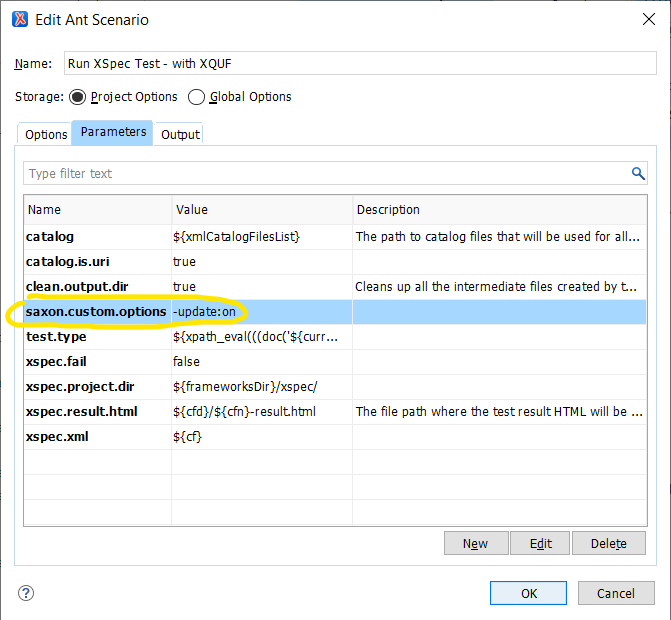
For more information about how to duplicate and modify transformation scenarios, see Duplicating a Transformation Scenario and Parameters Tab (Ant Transformations) in the Oxygen documentation.
Ant
Specify the Ant property, saxon.custom.options=-update:on, in the Ant command, build file, or property file.
On the command line, the syntax for specifying properties prepends -D to the property, resulting in the argument, -Dsaxon.custom.options=-update:on.
For more details about running XSpec tests using Ant, see Running with Ant.
If you have multiple options to specify, separate the adjacent options by a space.
Key Takeaways
- XQuery Update Facility is an extension of XQuery that can make it much easier to write XSpec helper functions that tweak XML content slightly. In XQUF, a transform expression copies an entire node tree and then modifies it using a combination of XQUF keywords and familiar XPath syntax. In this case, the code for deleting all comment nodes with a certain prefix was direct, short, and readable.
- Although the helper function code is simpler using XQUF, you need to make sure your XQuery processor can actually execute XQUF expressions. This topic discussed the license (for Saxon) and configuration (for Saxon or BaseX) needs.
- For a little more background about helper functions in XSpec, see Ignoring Code Comments During XSpec Testing.
Code is downloadable from https://github.com/galtm/xspectacles/ on GitHub, in the src/helper-comments-xquf folder.

메타데이터
- post_id
- 803a7b362002
- slug
- xquery-update-facility-can-simplify-xspec-test-helper-functions-803a7b362002
- url
- https://towardsdev.com/xquery-update-facility-can-simplify-xspec-test-helper-functions-803a7b362002
- canonical_url
- https://towardsdev.com/xquery-update-facility-can-simplify-xspec-test-helper-functions-803a7b362002
- author_url
- https://medium.com/@xspectacles
- status
- ok
- fetched_at
- 2026-07-22 08:55:38