OCI Cloud Guard — Real-Time Threat Detection and Automated Remediation for Enterprise Workloads
Introduction
OCI Cloud Guard — Real-Time Threat Detection and Automated Remediation for Enterprise Workloads
Introduction
If you have been following this series, here is where we are:
- Part 1 — Designed a secure 3-tier architecture with network isolation
- Part 2 — Automated IAM user onboarding with Python SDK
- Part 3 — Enforced cloud governance with Security Zones and Security Advisor
Every layer we have built so far prevents bad things from happening. But in the real world, things still go wrong — misconfigured resources slip through, unusual activity happens, someone makes a bucket public at 2 AM. You need a system that catches these things fast, tells you about them immediately, and ideally fixes them without waiting for a human.
That is exactly what OCI Cloud Guard does.
This blog walks through what Cloud Guard is, how it thinks, and how to set it up end to end — including auto-remediation and Slack/email alerts — with real CLI commands you can run today.
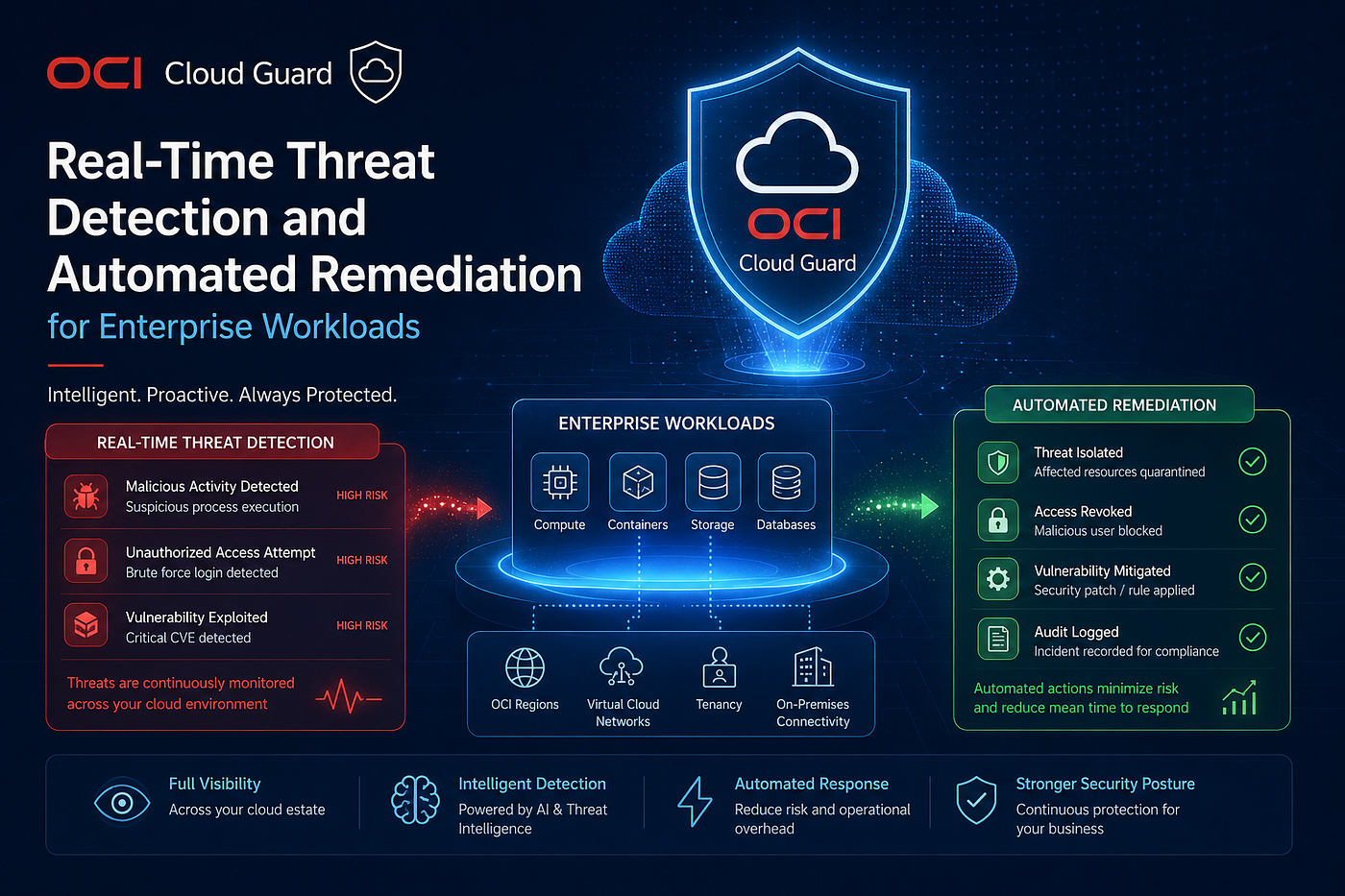
What Is OCI Cloud Guard?
Cloud Guard is a cloud security posture service in OCI giving you visibility into potential security issues in your cloud setup. Once enabled in your tenancy, Cloud Guard uses Detectors to identify common misconfigurations, activities and threats, and then helps with remediation through Responder Rules and Recipes. Terraform Registry
The key word is posture. Cloud Guard does not just monitor logs — it continuously evaluates the actual configuration state of your resources against security best practices, and flags anything that deviates. Think of it as a security engineer that never sleeps, scans your entire tenancy, and raises a ticket for every problem it finds.
Cloud Guard is a free OCI service and it is recommended it be enabled in all OCI tenancies. Terraform Registry
There is no reason not to use it.
The Cloud Guard Mental Model
Before touching the console, understand the four-component model that Cloud Guard operates on:
DETECTORS   →   PROBLEMS   →   RESPONDERS   →   RESOLUTION
(find it)       (log it)       (fix it)          (done)
ComponentWhat It DoesTargetThe compartment (and sub-compartments) Cloud Guard monitorsDetector RecipeA rulebook of what to look for — misconfigurations, suspicious activity, threatsProblemA violation Cloud Guard has detected and loggedResponder RecipeA rulebook of what actions to take when a problem is foundReporting RegionThe single region where all Cloud Guard data is aggregated — critical for notifications
The flow is always: a Detector finds something → a Problem is created → a Responder optionally acts on it → the Problem is resolved, dismissed, or marked for manual review.
Detector Recipes — What Cloud Guard Looks For
A detector is a Cloud Guard component that identifies potential security problems, based on resource configuration or activity. Each detector uses a detector recipe that defines what the detector should identify as a problem. Each detector recipe consists of a set of detector rules that provide a specific definition of a class of resources, with specific actions or configurations, that cause a detector to report a problem. Oracle Cloud Infrastructure
Cloud Guard ships with three broad categories of detectors:
1. Configuration Detectors — scan resource settings for misconfigurations. Examples:
- Object Storage bucket is public
- Boot volume is not encrypted
- VCN has a public subnet with no security list
- Database has a public endpoint
- IAM user has no MFA enabled
2. Activity Detectors — scan audit logs for suspicious behaviour. Examples:
- User logging in from an unusual geography (Impossible Travel)
- Excessive API calls in a short time (possible credential abuse)
- A user deleting large numbers of resources
- Root/admin account being used for routine operations
3. Threat Detectors — correlate Oracle threat intelligence with your tenancy. Examples:
- API calls from known malicious IP addresses
- Cryptomining activity signatures on compute instances
- Communication patterns consistent with command-and-control servers
Cloud Guard supports two types of detector recipes: Oracle-managed recipes are provided by Oracle and you can only modify a few settings in the recipe rules. User-managed recipes must be created, usually by cloning an Oracle-managed recipe. You can modify more settings in user-managed recipe rules. Oracle Cloud Infrastructure
Responder Recipes — What Cloud Guard Does About It
Cloud Guard provides integrated and automated remediation with detector recipes and responder recipes. There are two types of responders: a Notification responder that sends problem details to the OCI Events Service, and a Remediation responder that takes an action against a problem, either automatically or on confirmation from the user — all responder activity is logged as OCI Audit events. Terraform Registry
Common remediation actions Cloud Guard can take automatically:
- Make Bucket Private — flip a public Object Storage bucket back to private
- Disable User — suspend a compromised or suspicious IAM user
- Stop Instance — halt a compute instance showing cryptomining behaviour
- Terminate Instance — delete a rogue compute instance
- Remove Public IP — remove a public IP from a resource that should not have one
- Rotate API Key — invalidate and rotate compromised API keys
Important: Enabling responders gives Cloud Guard permissions to modify security settings in your environment to remediate, on your behalf, problems that the responders detect. Ensure that granting these permissions does not violate your organisation’s security policies. K21 Academy
For most enterprises, the right approach is: set critical remediations (like Make Bucket Private) to auto-execute, and destructive ones (like Terminate Instance) to ask me first.
Prerequisites
- You must have administrator permissions or an IAM policy granting Cloud Guard management access
- Decide your reporting region before enabling — you cannot change it without disabling and re-enabling Cloud Guard
- Have an OCI Vault available if Security Zones are also in use (from Part 3 of this series)
Required IAM policies:
Allow group SecurityAdmins to manage cloud-guard-family in tenancy
Allow service cloudguard to read all-resources in tenancy
Allow service cloudguard to use network-security-groups in tenancy
For auto-remediation (responders that modify resources):
Allow service cloudguard to manage all-resources in tenancyStep 1: Enable Cloud Guard
- Open the OCI Console → hamburger menu → Identity & Security → Cloud Guard
- Click Enable Cloud Guard
- Choose your Reporting Region
Critical: The Cloud Guard reporting region is NOT the same thing as the OCI home region. To see the reporting region, from the Cloud Guard options panel on the left, select Settings. All notification and event rules must be created in this region — not your home region. Write it down now. Oracle
- Under Compartments to Monitor, select your root compartment (recommended) or specific compartments
- Accept the Oracle-managed Configuration Detector Recipe and Activity Detector Recipe
- Accept the Oracle-managed Responder Recipe
- Click Enable
Cloud Guard will now begin its first scan. For a new security zone, it can take up to three hours before any violations are detected. The same applies to a freshly enabled Cloud Guard target. Oracle Cloud
Step 2: Clone and Configure a Custom Responder Recipe
To enable auto-remediation, you need a user-managed (cloned) responder recipe, because Oracle-managed recipes cannot be set to auto-execute.
Via Console:
- Navigate to Identity & Security → Cloud Guard → Recipes → Responder Recipes
- Find OCI Responder Recipe (Oracle Managed) → click Clone
- Name it
custom-responder-recipe - Open the cloned recipe
- Find the rule Make Bucket Private:
- Click Actions → Edit
- Set Rule Trigger to Execute Automatically
- Click Save
- Find the Cloud Event rule (this emits events to the Notifications service):
- Confirm it is Enabled and set to Execute Automatically
- If not, edit and enable it
Via CLI — list responder recipes:
oci cloud-guard responder-recipe list \
  --compartment-id <tenancy_ocid> \
  --all \
  --query 'data.items[*].{"name":"display-name","id":"id","managed":"is-read-only"}'
Step 3: Attach the Custom Recipe to Your Target
- Navigate to Identity & Security → Cloud Guard → Configuration → Targets
- Click on your target
- Under Resources → Responder Recipe
- If an Oracle-managed recipe is attached, click its Actions → Remove
- Click Add Recipe → select your
custom-responder-recipe - Click Save
Via CLI:
# First, get your target OCID
oci cloud-guard target list \
  --compartment-id <tenancy_ocid> \
  --all \
  --query 'data.items[*].{"name":"display-name","id":"id"}'
# Attach your custom responder recipe
oci cloud-guard target-responder-recipe create \
--target-id <target_ocid> \
--responder-recipe-id <custom_responder_recipe_ocid>Step 4: Set Up Email/Slack Notifications
This is where most engineers get tripped up. You must be in the Cloud Guard reporting region when creating the Events rule — not your home region, not any other region. The reporting region only. Oracle Cloud
Switch to your reporting region now using the region selector in the top-right of the OCI Console before continuing.
4a. Create a Notification Topic
- Navigate to Developer Services → Notifications → Topics
- Click Create Topic
- Name it
cloud-guard-alerts - Click Create
- Click on the topic → Create Subscription
- For Protocol, choose:
Email→ enter your email addressHTTPS (Custom URL)→ enter your Slack webhook URL
- Click Create
- If using email, confirm the subscription via the link sent to your inbox — unconfirmed subscriptions deliver nothing
4b. Create an Events Rule
- Navigate to Observability & Management → Events Service → Rules
- Click Create Rule
- Display Name:
cloud-guard-problem-alerts - Under Rule Conditions:
- Condition:
Event Type - Service Name:
Cloud Guard - Event Type: select all three:
Detected - ProblemRemediated - ProblemDismissed - Problem
Under Actions:
- Action Type:
Notifications - Compartment: select your compartment
- Topic: select
cloud-guard-alerts
Click Create Rule
Via CLI:
# Create notification topic
oci ons topic create \
  --compartment-id <compartment_ocid> \
  --name "cloud-guard-alerts"
# Create email subscription (replace with real email)
oci ons subscription create \
--compartment-id <compartment_ocid> \
--topic-id <topic_ocid> \
--protocol "EMAIL" \
--endpoint "your-team@company.com"# Create the Events rule
oci events rule create \
--compartment-id <compartment_ocid> \
--display-name "cloud-guard-problem-alerts" \
--is-enabled true \
--condition '{"eventType":["com.oraclecloud.cloudguard.problemdetected","com.oraclecloud.cloudguard.problemremediated","com.oraclecloud.cloudguard.problemdismissed"],"data":{}}' \
--actions '{"actions":[{"actionType":"ONS","topicId":"<topic_ocid>","isEnabled":true}]}'Step 5: List Open Problems with Python SDK
Once Cloud Guard is running, you can pull open problems programmatically — useful for dashboards, SIEM integrations, or Slack bots.
import oci
import os
from dotenv import load_dotenvload_dotenv()config = {
"user": os.getenv("OCI_USER_OCID"),
"key_file": os.getenv("OCI_KEY_FILE"),
"fingerprint": os.getenv("OCI_FINGERPRINT"),
"tenancy": os.getenv("OCI_TENANCY_OCID"),
"region": os.getenv("OCI_REPORTING_REGION"), # must be reporting region
}cloud_guard_client = oci.cloud_guard.CloudGuardClient(config)def list_open_problems(compartment_id: str):
"""Fetch all open Cloud Guard problems in a compartment."""
problems = cloud_guard_client.list_problems(
compartment_id=compartment_id,
lifecycle_state="OPEN",
compartment_id_in_subtree=True,
).data print(f"\n{'='*60}")
print(f"Open Cloud Guard Problems: {len(problems.items)}")
print(f"{'='*60}") for p in problems.items:
print(f"\n[{p.risk_level}] {p.detector_id}")
print(f" Resource : {p.resource_name} ({p.resource_type})")
print(f" Detected : {p.time_first_detected}")
print(f" Region : {p.region}") return problems.itemsif __name__ == "__main__":
COMPARTMENT_ID = os.getenv("OCI_COMPARTMENT_OCID")
list_open_problems(COMPARTMENT_ID)Sample output:
============================================================
Open Cloud Guard Problems: 3
============================================================
[CRITICAL] OCI_OBJECT_STORAGE_BUCKET_PUBLIC_ACCESS_ALLOWED
Resource : prod-data-bucket (BUCKET)
Detected : 2025-05-14 09:23:11
Region : ap-mumbai-1[MEDIUM] OCI_IAM_USER_WITHOUT_MFA
Resource : john.doe (USER)
Detected : 2025-05-13 16:45:02
Region : ap-mumbai-1Step 6: Test the Full Flow (Make a Bucket Public)
With everything set up, trigger a real detection end to end.
bash
# Create a test bucket and make it public
oci os bucket create \
  --compartment-id <compartment_ocid> \
  --name cloud-guard-test-bucket \
  --public-access-type ObjectRead
What happens next (in order):
- Cloud Guard detects the public bucket in its next scan (within ~10 minutes)
- A Problem is created with risk level Critical
- The
Make Bucket Privateresponder executes automatically (if configured) - The Cloud Event rule fires
- Your email or Slack receives an alert: “Detected — Problem: public bucket”
- A second alert follows: “Remediated — Problem: bucket made private”
Note: Cloud Guard is a posture management scanner, not a real-time event stream. If someone makes a bucket public at 2:00 PM, Cloud Guard may not detect and alert until 2:10 PM or later. For sub-minute detection of the creation event itself, combine Cloud Guard with OCI Events directly on the Object Storage service — but that is a separate setup. Oracle Cloud
Common Pitfalls to Avoid
1. Wrong region for Events/Notifications CREATE, UPDATE, and DELETE API calls are only allowed on the reporting region. If you create your Events rule in the wrong region, you will never receive notifications. Always confirm your reporting region in Cloud Guard → Configuration → Settings first. Oracle
2. Forgetting the IAM policy for auto-remediation The detection still works without the IAM policy. The auto-fix does not. If you enable “Make Bucket Private” auto-execute but forget the policy, Cloud Guard will detect the problem, try to fix it, fail silently, and show “Responder activity: Failed” in the problem details. Oracle Cloud
3. Not confirming email subscriptions OCI sends a confirmation email when you add an email subscription. If you do not click the confirmation link, the subscription stays in Pending state and no notifications are ever delivered.
4. Using Oracle-managed responder for auto-execute Oracle-managed responder recipes cannot be set to auto-execute. You must clone the recipe first, then enable auto-execution on the cloned version.
5. Dismissing problems without understanding them When you dismiss a problem, you are telling Cloud Guard to ignore this instance of the problem for that resource, and simply ignore it if it happens in the future. Dismissing is permanent suppression — only do it for confirmed false positives. Oracle Cloud
How This Series Fits Together
Looking back at all four blogs, here is the complete OCI security picture you have built:
LayerBlogWhat It ProvidesNetworkPart 1–3-Tier ArchitectureIsolated subnets, NSGs, no public exposureIdentityPart 2 — IAM AutomationConsistent, auditable user provisioningGovernancePart 3 — Security ZonesPrevents misconfigurations at resource creationDetectionPart 4 — Cloud GuardCatches violations in real time and auto-remediates
These are not independent tools. They form a defence-in-depth strategy where each layer catches what the layer above might miss. Security Zones stop bad configurations from being created. Cloud Guard catches anything that slips through and takes action on it. Together, they give you a security posture that is preventive, detective, and responsive.
Best Practices
- Always enable Cloud Guard at the root compartment level — it will automatically monitor all child compartments
- Set Critical risk remediations (public buckets, open ports) to auto-execute — the blast radius of auto-fixing these is minimal
- Set destructive actions (stop instance, disable user) to Ask me — confirm before acting
- Review the Cloud Guard dashboard weekly and measure your security score over time
- Cloud Guard maps problems related to misconfigured resources to Center for Internet Security (CIS) Benchmarks — use this for compliance reporting to auditors Oracle
- Integrate Cloud Guard events with your SIEM (Splunk, IBM QRadar) via OCI Functions for a unified security operations view
- Periodically review Oracle-managed detector recipe updates — Oracle continuously adds new rules, and your cloned recipe will receive them automatically
Conclusion
Cloud Guard completes the OCI security story. Design a secure architecture. Automate access provisioning. Enforce governance policies. Then let Cloud Guard watch everything that happens inside your tenancy, alert you when something goes wrong, and fix it before you even open your laptop in the morning.
Cloud Guard provides customers a cloud detect-and-respond framework that helps security organisations scale. It is not just a dashboard — it is an always-on security analyst with automated playbooks, CIS benchmark mapping, and direct integration into your notification channels. Oracle
Enable it today. It is free, it takes under 30 minutes to set up end to end, and it will catch things you would never have noticed manually.
This concludes the Oracle ACE Advocacy Series — OCI Security & Governance. The four blogs together form a complete blueprint for building, automating, governing, and monitoring a production-grade OCI tenancy.
References: OCI Cloud Guard Documentation | Configuring Notifications | Responder Recipes
메타데이터
- post_id
- 80a98e9b08f6
- slug
- oci-cloud-guard-real-time-threat-detection-and-automated-remediation-for-enterprise-workloads-80a98e9b08f6
- url
- https://medium.com/@tokishi/oci-cloud-guard-real-time-threat-detection-and-automated-remediation-for-enterprise-workloads-80a98e9b08f6
- canonical_url
- https://medium.com/@tokishi/oci-cloud-guard-real-time-threat-detection-and-automated-remediation-for-enterprise-workloads-80a98e9b08f6
- author_url
- https://medium.com/@tokishi
- status
- ok
- fetched_at
- 2026-06-24 11:06:28






