How to Add a Custom Skybox
A skybox defines the background and lighting mood of a Unity scene. To add a custom skybox, create a Material and change its Shader to…
How to Add a Custom Skybox
A skybox defines the background and lighting mood of a Unity scene. To add a custom skybox, create a Material and change its Shader to Skybox.
Steps:
- Right-click in Project → Create → Material
- Select the material → Shader → Skybox
- Choose one of the four skybox types below
- Assign it via Window → Rendering → Lighting → Skybox Material
Skybox Types in Unity
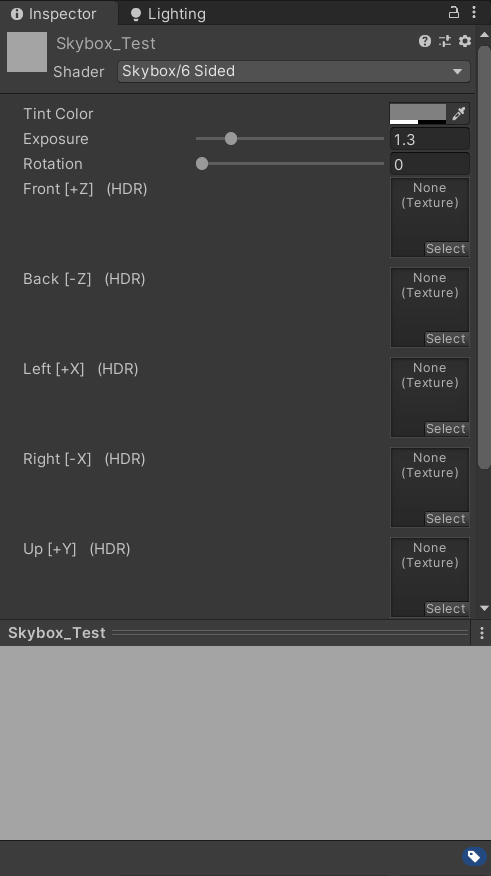
6 Sided Skybox
Uses six square images (Front, Back, Left, Right, Up, Down) that form a cube around the scene. Best for: Handcrafted or stylized environments
Cubemap Skybox
Uses a cubemap texture (six merged square faces). Common in HDR workflows and reflection probes. Best for: Realistic lighting and reflections

Panoramic Skybox
Uses a single 360° panoramic image (usually equirectangular 2:1). Best for: Real-world scenes, VR, fast setup

Procedural Skybox
Generated by Unity using parameters like sun size and atmosphere — no textures required. Best for: Prototyping and dynamic skies (most commonly used)

메타데이터
- post_id
- 80d03e36e103
- slug
- how-to-add-a-custom-skybox-80d03e36e103
- url
- https://medium.com/@250509/how-to-add-a-custom-skybox-80d03e36e103
- canonical_url
- https://medium.com/@250509/how-to-add-a-custom-skybox-80d03e36e103
- author_url
- https://medium.com/@250509
- status
- ok
- fetched_at
- 2026-07-14 05:34:20