How to Send Logs to Discord or Any Webhook in .NET Using NLog.Config
Use Case: I had a scenario where i need to send Application’s Error logs to the discord.
How to Send Logs to Discord or Any Webhook in .NET Using NLog.Config
Use Case: I had a scenario where i need to send Application’s Error logs to the discord.
Required Packages : Nlog.Web.AspNetCore
To get the webhook of the discord channel where you want to receive the logs go to the channel’s settings and then integration, after creating the webhook check for the specfic channel and copy the url
The webhook url would be https://discord.com/api/webhooks//{webhook.id}/{webhook.token}
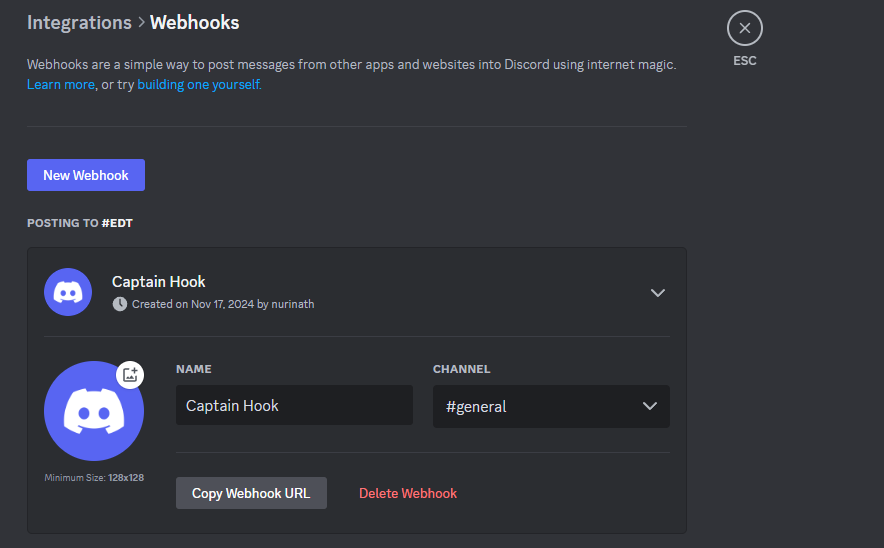
click on the “Copy Webhook URL” to copy the webhook url
after creating the logs lets head to the Discord Developer Portal to know about the discord’s webhook documentation

Discord Webhook Documentation

Execute Webhook
so there we can either use content or payload_json but we are gonna go with the payload_json so we dont have any characters limitations.
So now lets to the Nlog Configuration https://nlog-project.org/config/ here we can find all the configuration options we can use to send the Logs too ranging from the Databases to the Integration including Emails and Webhooks.

Webservice in the Last
after reading the Nlog Webservice docs we can clearly see we can add the webservices

Example to add the Webservices.
we modify this to
<target xsi:type=”WebService” name=”discord” url=”https://discord.com/api/webhooks//{webhook.id}/{webhook.token}" protocol=”JsonPost”> <parameter name=”username” layout=”Logger Bot” /> <parameter name=”payload_json” layout=”{ "content": "${longdate} | ${level:uppercase=true} | ${processid} | ${callsite} | ${message} | ${exception:format=tostring}" }”/> </target>
<logger name=”*” minlevel=”Error” writeTo=”discord” />
I use " to escape the special character in XML.
Apart from this you can also send logs to the email and other integrations
References
메타데이터
- post_id
- 80d1b73fcfd1
- slug
- how-to-send-logs-to-discord-or-any-webhook-in-net-using-nlog-config-80d1b73fcfd1
- url
- https://medium.com/@awaisafzal0/how-to-send-logs-to-discord-or-any-webhook-in-net-using-nlog-config-80d1b73fcfd1
- canonical_url
- https://medium.com/@awaisafzal0/how-to-send-logs-to-discord-or-any-webhook-in-net-using-nlog-config-80d1b73fcfd1
- author_url
- https://medium.com/@awaisafzal0
- status
- ok
- fetched_at
- 2026-06-27 07:40:21