The Windows Concept Journey — WebDav (Web Distributed Authoring and Versioning)
WebDAV is an HTTP based protocol that transforms a web server into a collaborative network drive. Hence, allowing users to manage and edit…
The Windows Concept Journey — WebDav (Web Distributed Authoring and Versioning)
WebDAV is an HTTP based protocol that transforms a web server into a collaborative network drive. Hence, allowing users to manage and edit remote files as if they were stored locally. Beyond basic file operations like moving\copying\deleting it supports metadata management and file locking to prevent version conflicts during simultaneous editing. While its core use is for web content, it is most widely recognized today through its specialized extensions, CalDAV and CardDAV, which power remote calendars and contacts synchronization across devices (https://developer.mozilla.org/en-US/docs/Glossary/WebDAV).
Overall, “Windows File Explorer” (https://medium.com/@boutnaru/the-windows-concept-journey-file-explorer-previously-windows-explorer-e48077b135a0) natively supports WebDAV. Thus, allowing users to map remote directories as network shares without additional software. These connections are typically initiated through either Windows UNC paths (https://medium.com/@boutnaru/the-windows-concept-journey-unc-universal-naming-convention-8b9a9959d211) or standard web URLs (https://cofense.com/blog/abusing-windows-file-explorer-and-webdav-for-malware-delivery).
Lastly, we can summarize that WebDAV is a suite of HTTP extensions designed for collaborative file management, allowing users to create and modify content directly on a web server (https://doc.oplist.org/guide/advanced/webdav). We can use WebDAV using an IIS (Internet Information Services) server. This is achieved by installing the WebDAV Publishing feature through the Windows Server Manager or Control Panel — as shown in the screenshot below (https://winsides.com/how-to-enable-webdav-publishing-iis-windows-11/). Once the feature is active, we must enable it within the IIS Manager, configure the authoring rules for your specific image directory and adjust security permissions to allow users to browse and select files. This configuration allows report authors to navigate the server’s image folders as easily as a local file system (https://www.ibm.com/docs/en/cognos-analytics/12.0.x?topic=services-configuring-webdav-iis).
See you in my next writeup ;-) You can follow me on twitter — @boutnaru (https://twitter.com/boutnaru). Also, you can read my other writeups on medium — https://medium.com/@boutnaru. You can find my free eBooks at https://TheLearningJourneyEbooks.com.
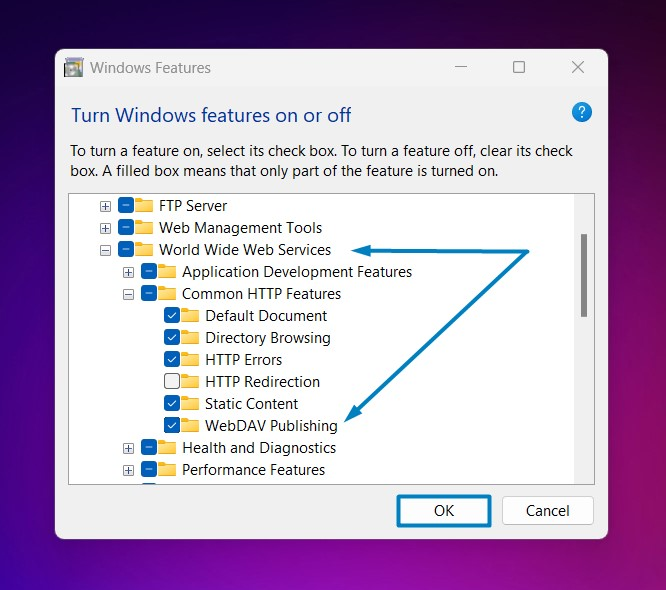
https://winsides.com/how-to-enable-webdav-publishing-iis-windows-11/
메타데이터
- post_id
- 8117291e40e2
- slug
- the-windows-concept-journey-webdav-web-distributed-authoring-and-versioning-8117291e40e2
- url
- https://medium.com/@boutnaru/the-windows-concept-journey-webdav-web-distributed-authoring-and-versioning-8117291e40e2
- canonical_url
- https://medium.com/@boutnaru/the-windows-concept-journey-webdav-web-distributed-authoring-and-versioning-8117291e40e2
- author_url
- https://medium.com/@boutnaru
- status
- ok
- fetched_at
- 2026-06-17 12:55:42




